


银狐是一款强大的远程控制软件,除了有远控常用的功能,还有很多特色功能。
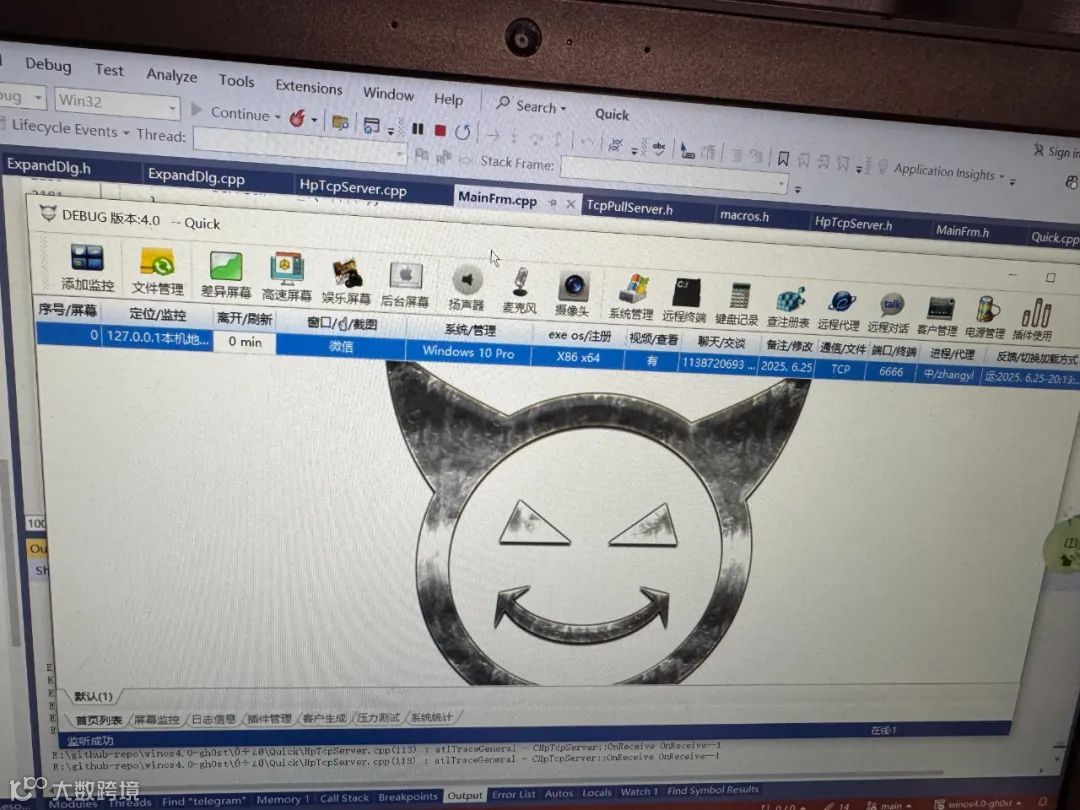
今天在研究银狐源代码的时候,当被控制端连上来后,点击控制端工具栏的【后台屏幕】图标。
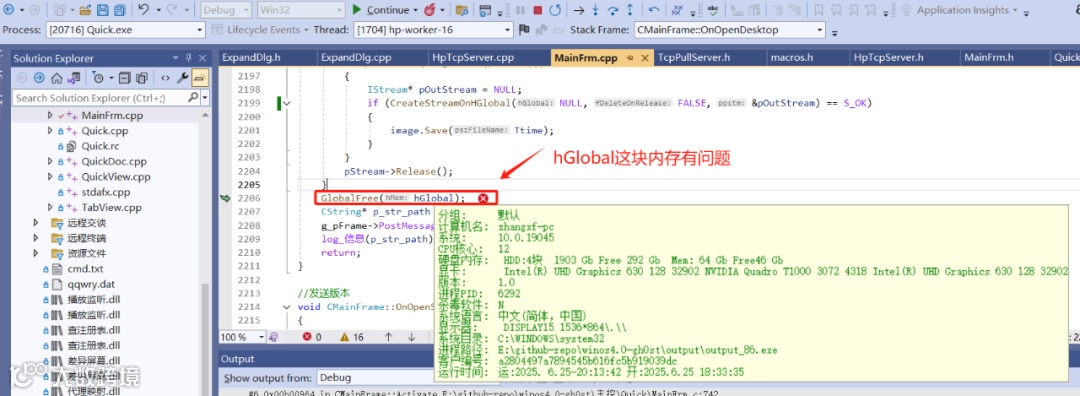
GlobalFree函数是一个Windows API,用于释放分配的堆内存,它与 Windows API GlobalAlloc函数成对使用,类似于 C 语言中的 free 和 malloc函数。
这行有内存问题,那么也就意味着hGlobal这个内存句柄有问题。
研究了一下这里的代码,没看出什么问题:
//显示截图窗口
void CMainFrame::OnOpenDesktop(ClientContext* pContext)
{
    //省略无关代码...

    UINT bufLen = pContext->m_DeCompressionBuffer.GetBufferLen() - 1;
    HGLOBAL hGlobal = GlobalAlloc(GMEM_MOVEABLE, bufLen);
    void* pData = GlobalLock(hGlobal);
    memcpy(pData, pContext->m_DeCompressionBuffer.GetBuffer(1), bufLen);
    GlobalUnlock(hGlobal);
    IStream* pStream = NULL;
    if (CreateStreamOnHGlobal(hGlobal, TRUE, &pStream) == S_OK)
    {
        CImage image;
        if (SUCCEEDED(image.Load(pStream)))
        {
            IStream* pOutStream = NULL;
            if (CreateStreamOnHGlobal(NULL, FALSE, &pOutStream) == S_OK)
            {
                image.Save(Ttime);
            }
        }
        pStream->Release();
    }
    GlobalFree(hGlobal);
    CString* p_str_path = new CString(Ttime);
    g_pFrame->PostMessage(WM_DESKTOPPOPUP, 0, (LPARAM)p_str_path);
    log_信息(p_str_path);
    return;
}
这样在以往的话,这种内存问题真的很难定位,最后就不了了之了。尤其是这里的几个Windows OLE函数,比如
CreateStreamOnHGlobal,我相信大多数人都不熟悉,更别说使用它了。
好在如今的 Visual Studio 已经集成了Google Address Sanitizer这款强大的内存排查工具,谁用都觉得好,妈妈再也不用担心我的内存 bug 了!
于是,果断在项目中启用 Google Address Sanitizer,打开项目的工程属性设置,在这个启用:
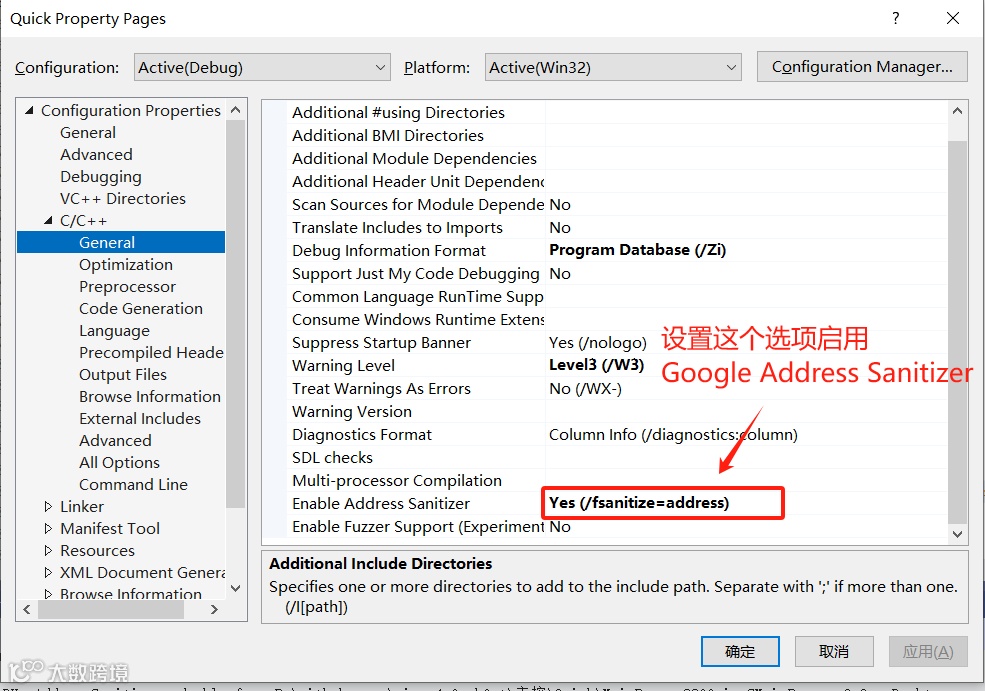
设置好之后,再次启动调试器,重复上面的操作打开后台桌面屏幕功能,再次崩溃。
这个时候在 Visual Studio 输出窗口就有如下信息:
==20716==ERROR: AddressSanitizer: attempting double-free on 0x1fb5a0f0 in thread T51:
==20716==WARNING: Failed to use and restart external symbolizer!
    #0 0x6a9ec6bd in GlobalFree+0x9d (d:\Program Files\Microsoft Visual Studio\2022\Enterprise\VC\Tools\MSVC\14.42.34433\bin\HostX86\x86\clang_rt.asan_dynamic-i386.dll+0x1003c6bd)
    #1 0x00b04491 in CMainFrame::OnOpenDesktop E:\github-repo\winos4.0-gh0st\主控\Quick\MainFrm.c:2206
    #2 0x00afc74a in CMainFrame::ProcessReceiveComplete E:\github-repo\winos4.0-gh0st\主控\Quick\MainFrm.c:1814
    #3 0x00afbaed in CMainFrame::NotifyProc E:\github-repo\winos4.0-gh0st\主控\Quick\MainFrm.c:1653
    #4 0x00acc540 in CHpTcpServer::OnReceive E:\github-repo\winos4.0-gh0st\主控\Quick\HpTcpServer.c:200
    #5 0x0162e2eb in CTcpServer::DoFireReceive E:\github-repo\winos4.0-gh0st\thirdparty\HP-Socket-dev\Windows\Src\TcpServer.h:153
    #6 0x0162db3b in CTcpPullServerT<CTcpServer>::DoFireReceive E:\github-repo\winos4.0-gh0st\thirdparty\HP-Socket-dev\Windows\Src\TcpPullServer.h:76
    #7 0x01633d7a in CTcpServer::FireReceive E:\github-repo\winos4.0-gh0st\thirdparty\HP-Socket-dev\Windows\Src\TcpServer.h:134
    #8 0x016870e6 in CTcpServer::TriggerFireReceive E:\github-repo\winos4.0-gh0st\thirdparty\HP-Socket-dev\Windows\Src\TcpServer.cpp:51
    #9 0x0168bd44 in CTcpServer::HandleReceive E:\github-repo\winos4.0-gh0st\thirdparty\HP-Socket-dev\Windows\Src\TcpServer.cpp:1133
    #10 0x0168b0fa in CTcpServer::HandleIo E:\github-repo\winos4.0-gh0st\thirdparty\HP-Socket-dev\Windows\Src\TcpServer.cpp:1015
    #11 0x0168acf9 in CTcpServer::WorkerThreadProc E:\github-repo\winos4.0-gh0st\thirdparty\HP-Socket-dev\Windows\Src\TcpServer.cpp:949
    #12 0x01d36437 in thread_start<unsigned int (__stdcall*)(void *),1> minkernel\crts\ucrt\src\appcrt\startup\thread.cpp:97
    #13 0x6a9fcd04 in _sanitizer_start_switch_fiber+0x12a4 (d:\Program Files\Microsoft Visual Studio\2022\Enterprise\VC\Tools\MSVC\14.42.34433\bin\HostX86\x86\clang_rt.asan_dynamic-i386.dll+0x1004cd04)
    #14 0x7654fcc8 in BaseThreadInitThunk+0x18 (C:\WINDOWS\System32\KERNEL32.DLL+0x6b81fcc8)
    #15 0x77d882ad in RtlGetAppContainerNamedObjectPath+0x11d (C:\WINDOWS\SYSTEM32\ntdll.dll+0x4b2e82ad)
    #16 0x77d8827d in RtlGetAppContainerNamedObjectPath+0xed (C:\WINDOWS\SYSTEM32\ntdll.dll+0x4b2e827d)

0x1fb5a0f0 is located 0 bytes inside of 16-byte region [0x1fb5a0f0,0x1fb5a100)
freed by thread T51 here:
    #0 0x6a9ec6bd in GlobalFree+0x9d (d:\Program Files\Microsoft Visual Studio\2022\Enterprise\VC\Tools\MSVC\14.42.34433\bin\HostX86\x86\clang_rt.asan_dynamic-i386.dll+0x1003c6bd)
    #1 0x76a03f68 in CoGetInterfaceAndReleaseStream+0x118 (C:\WINDOWS\System32\combase.dll+0x10083f68)
    #2 0x00b0444d in CMainFrame::OnOpenDesktop E:\github-repo\winos4.0-gh0st\主控\Quick\MainFrm.c:2204
    #3 0x00afc74a in CMainFrame::ProcessReceiveComplete E:\github-repo\winos4.0-gh0st\主控\Quick\MainFrm.c:1814
    #4 0x00afbaed in CMainFrame::NotifyProc E:\github-repo\winos4.0-gh0st\主控\Quick\MainFrm.c:1653
    #5 0x00acc540 in CHpTcpServer::OnReceive E:\github-repo\winos4.0-gh0st\主控\Quick\HpTcpServer.c:200
    #6 0x0162e2eb in CTcpServer::DoFireReceive E:\github-repo\winos4.0-gh0st\thirdparty\HP-Socket-dev\Windows\Src\TcpServer.h:153
    #7 0x0162db3b in CTcpPullServerT<CTcpServer>::DoFireReceive E:\github-repo\winos4.0-gh0st\thirdparty\HP-Socket-dev\Windows\Src\TcpPullServer.h:76
    #8 0x01633d7a in CTcpServer::FireReceive E:\github-repo\winos4.0-gh0st\thirdparty\HP-Socket-dev\Windows\Src\TcpServer.h:134
    #9 0x016870e6 in CTcpServer::TriggerFireReceive E:\github-repo\winos4.0-gh0st\thirdparty\HP-Socket-dev\Windows\Src\TcpServer.cpp:51
    #10 0x0168bd44 in CTcpServer::HandleReceive E:\github-repo\winos4.0-gh0st\thirdparty\HP-Socket-dev\Windows\Src\TcpServer.cpp:1133
    #11 0x0168b0fa in CTcpServer::HandleIo E:\github-repo\winos4.0-gh0st\thirdparty\HP-Socket-dev\Windows\Src\TcpServer.cpp:1015
    #12 0x0168acf9 in CTcpServer::WorkerThreadProc E:\github-repo\winos4.0-gh0st\thirdparty\HP-Socket-dev\Windows\Src\TcpServer.cpp:949
    #13 0x01d36437 in thread_start<unsigned int (__stdcall*)(void *),1> minkernel\crts\ucrt\src\appcrt\startup\thread.cpp:97
    #14 0x6a9fcd04 in _sanitizer_start_switch_fiber+0x12a4 (d:\Program Files\Microsoft Visual Studio\2022\Enterprise\VC\Tools\MSVC\14.42.34433\bin\HostX86\x86\clang_rt.asan_dynamic-i386.dll+0x1004cd04)
    #15 0x7654fcc8 in BaseThreadInitThunk+0x18 (C:\WINDOWS\System32\KERNEL32.DLL+0x6b81fcc8)
    #16 0x77d882ad in RtlGetAppContainerNamedObjectPath+0x11d (C:\WINDOWS\SYSTEM32\ntdll.dll+0x4b2e82ad)
    #17 0x77d8827d in RtlGetAppContainerNamedObjectPath+0xed (C:\WINDOWS\SYSTEM32\ntdll.dll+0x4b2e827d)

previously allocated by thread T51 here:
    #0 0x6a9ec484 in GlobalAlloc+0xc4 (d:\Program Files\Microsoft Visual Studio\2022\Enterprise\VC\Tools\MSVC\14.42.34433\bin\HostX86\x86\clang_rt.asan_dynamic-i386.dll+0x1003c484)
    #1 0x00b04155 in CMainFrame::OnOpenDesktop E:\github-repo\winos4.0-gh0st\主控\Quick\MainFrm.c:2188
    #2 0x00afc74a in CMainFrame::ProcessReceiveComplete E:\github-repo\winos4.0-gh0st\主控\Quick\MainFrm.c:1814
    #3 0x00afbaed in CMainFrame::NotifyProc E:\github-repo\winos4.0-gh0st\主控\Quick\MainFrm.c:1653
    #4 0x00acc540 in CHpTcpServer::OnReceive E:\github-repo\winos4.0-gh0st\主控\Quick\HpTcpServer.c:200
    #5 0x0162e2eb in CTcpServer::DoFireReceive E:\github-repo\winos4.0-gh0st\thirdparty\HP-Socket-dev\Windows\Src\TcpServer.h:153
    #6 0x0162db3b in CTcpPullServerT<CTcpServer>::DoFireReceive E:\github-repo\winos4.0-gh0st\thirdparty\HP-Socket-dev\Windows\Src\TcpPullServer.h:76
    #7 0x01633d7a in CTcpServer::FireReceive E:\github-repo\winos4.0-gh0st\thirdparty\HP-Socket-dev\Windows\Src\TcpServer.h:134
    #8 0x016870e6 in CTcpServer::TriggerFireReceive E:\github-repo\winos4.0-gh0st\thirdparty\HP-Socket-dev\Windows\Src\TcpServer.cpp:51
    #9 0x0168bd44 in CTcpServer::HandleReceive E:\github-repo\winos4.0-gh0st\thirdparty\HP-Socket-dev\Windows\Src\TcpServer.cpp:1133
    #10 0x0168b0fa in CTcpServer::HandleIo E:\github-repo\winos4.0-gh0st\thirdparty\HP-Socket-dev\Windows\Src\TcpServer.cpp:1015
    #11 0x0168acf9 in CTcpServer::WorkerThreadProc E:\github-repo\winos4.0-gh0st\thirdparty\HP-Socket-dev\Windows\Src\TcpServer.cpp:949
    #12 0x01d36437 in thread_start<unsigned int (__stdcall*)(void *),1> minkernel\crts\ucrt\src\appcrt\startup\thread.cpp:97
    #13 0x6a9fcd04 in _sanitizer_start_switch_fiber+0x12a4 (d:\Program Files\Microsoft Visual Studio\2022\Enterprise\VC\Tools\MSVC\14.42.34433\bin\HostX86\x86\clang_rt.asan_dynamic-i386.dll+0x1004cd04)
    #14 0x7654fcc8 in BaseThreadInitThunk+0x18 (C:\WINDOWS\System32\KERNEL32.DLL+0x6b81fcc8)
    #15 0x77d882ad in RtlGetAppContainerNamedObjectPath+0x11d (C:\WINDOWS\SYSTEM32\ntdll.dll+0x4b2e82ad)
    #16 0x77d8827d in RtlGetAppContainerNamedObjectPath+0xed (C:\WINDOWS\SYSTEM32\ntdll.dll+0x4b2e827d)

SUMMARY: AddressSanitizer: double-free E:\github-repo\winos4.0-gh0st\主控\Quick\MainFrm.c:2206 in CMainFrame::OnOpenDesktop
Address Sanitizer Error: Deallocation of freed memory
内存问题一目了然,首先崩溃的原因是内存被重复释放(上文输出中第一行:attempting double-free on 0x1f14d7b0)。
这块内存首次分配在:
previously allocated by thread T51 here:
    #0 0x6a9ec484 in GlobalAlloc+0xc4 (d:\Program Files\Microsoft Visual Studio\2022\Enterprise\VC\Tools\MSVC\14.42.34433\bin\HostX86\x86\clang_rt.asan_dynamic-i386.dll+0x1003c484)
    #1 0x00b04155 in CMainFrame::OnOpenDesktop E:\github-repo\winos4.0-gh0st\主控\Quick\MainFrm.c:2188
后来在这里被释放:
0x1fb5a0f0 is located 0 bytes inside of 16-byte region [0x1fb5a0f0,0x1fb5a100)
freed by thread T51 here:
    #0 0x6a9ec6bd in GlobalFree+0x9d (d:\Program Files\Microsoft Visual Studio\2022\Enterprise\VC\Tools\MSVC\14.42.34433\bin\HostX86\x86\clang_rt.asan_dynamic-i386.dll+0x1003c6bd)
    #1 0x76a03f68 in CoGetInterfaceAndReleaseStream+0x118 (C:\WINDOWS\System32\combase.dll+0x10083f68)
    #2 0x00b0444d in CMainFrame::OnOpenDesktop E:\github-repo\winos4.0-gh0st\主控\Quick\MainFrm.c:2204
这里的释放是只释放了从其首地址开始的16个字节,也就是说不是完全被释放。
后来又在这里被全部释放:
#0 0x6a9ec6bd in GlobalFree+0x9d (d:\Program Files\Microsoft Visual Studio\2022\Enterprise\VC\Tools\MSVC\14.42.34433\bin\HostX86\x86\clang_rt.asan_dynamic-i386.dll+0x1003c6bd)
    #1 0x00b04491 in CMainFrame::OnOpenDesktop E:\github-repo\winos4.0-gh0st\主控\Quick\MainFrm.c:2206
问题原因找到了,接下来看代码如何修复。
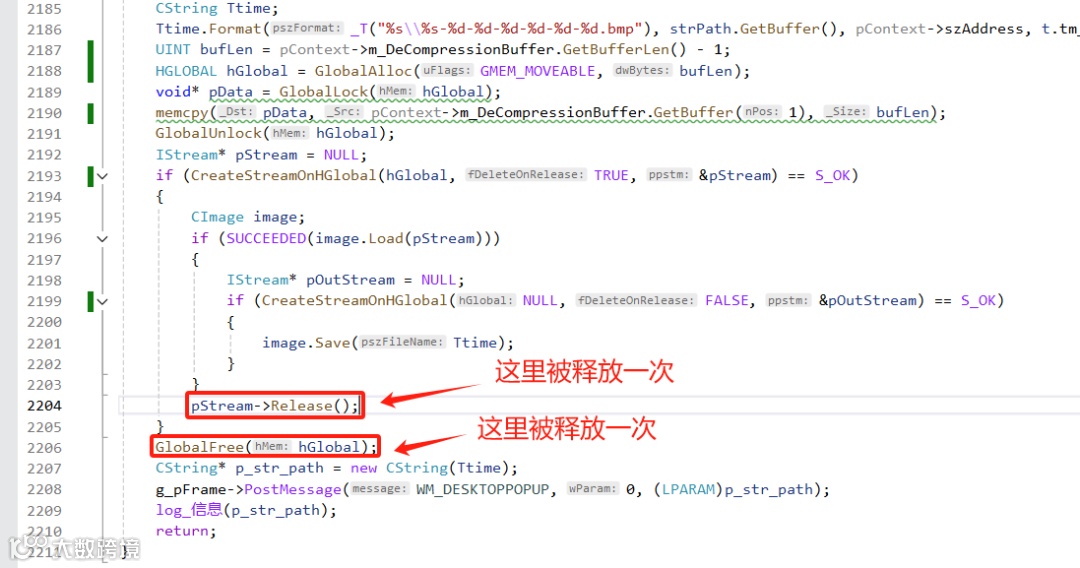
按我的理解,用GlobalAlloc函数分配的内存用GlobalFree释放没问题呀,而且这里也是成对调用的。
为啥pStream->Release()会释放这块内存?
查阅了一下 MSDN,发现GlobalAlloc函数分配内存时可以指定标志位,当标志位为GMEM_MOVEABLE时,分配的内存为可移动内存,CreateStreamOnHGlobal函数的第二个参数如果指定为 TRUE 时,在调用IStream::Release 时会自动释放CreateStreamOnHGlobal创建的 OLE 对象的内存。CreateStreamOnHGlobal函数签名如下:
HRESULT CreateStreamOnHGlobal(
  [in]  HGLOBAL  hGlobal,
  [in]  BOOL     fDeleteOnRelease,
  [out] LPSTREAM *ppstm
);
由于这个OLE对象只占用了GlobalAlloc分配的部分内存,所以就出现了上述现象。
因此只要将上述代码中两处调用CreateStreamOnHGlobal函数的地方改成 FALSE 就可以了,不要自动释放内存即可。
本文以银狐(winos)的内存问题排查演示了在Visual Studio中使用 Google Address Sanitizer工具的方法,这个工具非常强大,Windows 和 Linux C/C++开发都可以方便使用,强烈推荐一下。
源码获取
如果对银狐(winos)有兴趣,可以通过下面的方式获取全套源码:
关注后回复【winos】即可获取源码
特别申明
本套源码仅用于个人学习使用,不得用于其他用途,请遵守国家相关法律,使用该源码产生的问题与本号无关。