


新版本发布了
CHI & LONWIN
经历了很多之后,PCSWMM7.2版本终于发布了!
希望大家喜欢!
We’re dedicated to the global development of healthier communities and ecosystems by providing and advocating for best water management practices and software.
"What's new in PCSWMM 7.2?"
欢迎使用PCSWMM 7.2版!
新的PCSWMM版本支持最新的SWMM5引擎,OpenSWMM引擎和EPANET2引擎,并包含新工具和功能,对原有功能的改进以及一些错误修复等。
Welcome to PCSWMM version 7.2! The new PCSWMM version supports the latest US EPA SWMM5 engine, OpenSWMM engine and EPANET2 engine, and contains new tools and features, various improvements to existing features, some bug fixes and much more.
“新功能亮点 Some highlights”
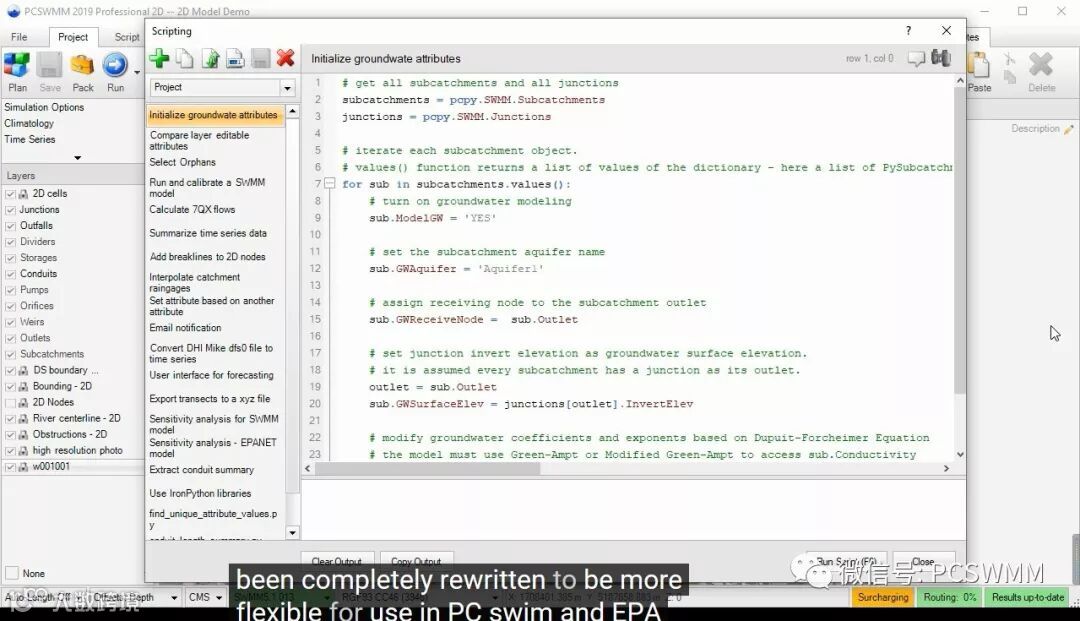
新的脚本工具将Python的强大功能添加到PCSWMM。 完全支持所有SWMM和EPANET输入文件参数的获取/设置,以及所有GIS图层/实体/属性,包括创建和重构图层,添加/编辑/删除实体及其形状,以及一些当前流行的GIS拓扑操作。PCSWMM还为所有时间序列数据提供获取/设置功能,以及一些专门的功能,例如执行SWMM / EPANET运行,发送文本消息(“运行完成”),生成报告等。
Python允许您访问与IronPython兼容的任何库,以及定义用于在PCSWMM中开发工具的输入/输出对话框。 现在只需要一些编程知识,您就不必等待我们实现节省时间的工具或为特定数据格式提供支持。
PCSWMM的全新脚本编辑器支持智能感知和自动完成,以及通过标签组织和分组脚本。
A rewrite of our scripting tool adds the power of Python to PCSWMM. Fully supports get/set for all SWMM and EPANET input file parameters, as well as all GIS layers/entities/attributes, including creating and restructuring layers, adding/editing/deleting entities and their shapes, and a number of popular GIS topological operations. PCSWMM also provides get/set capability for all time series data as well as some specialized functions such as executing SWMM/EPANET runs, sending text messages ("Your run is done"), generating reports and more.
Python allows you to access any library compatible with IronPython, as well as define input/output dialogs for developing tools in PCSWMM. Now with a little programming know-how, you don't have to wait for us to implement a time-saving tool or provide support for a particular data format.
PCSWMM's clean new scripting editor supports both intellisense and auto-completion, as well as organizing and grouping scripts via tags.
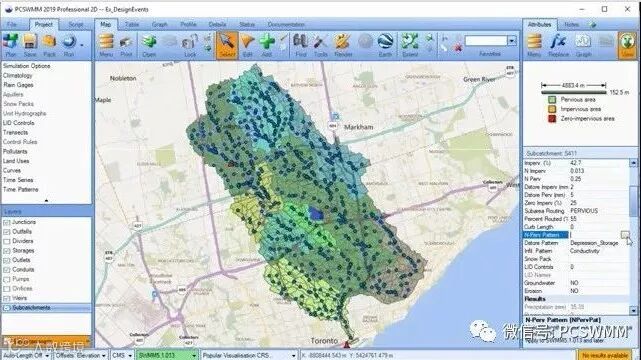
支持最新版的EPA SWMM5引擎(5.1.013)。 以及诸多改进,例如透过区域属性的月度调整,LID中的水质处理,LID井下控制的更多控制以及定期再生LID渗透能力的能力,新的可选Preissmann Slot动态波解决方案,支持堰流量曲线,加压存储单位等......
Added support for the latest official EPA SWMM5 engine (5.1.013). Includes many improvements such as monthly adjustment of pervious area attributes, water quality treatment in LIDs, more control for LID underdrains and the ability to periodically regenerate LID infiltration capacity, a new optional Preissmann Slot dynamic wave solution, support for weir discharge curves, pressurized storage units and more.
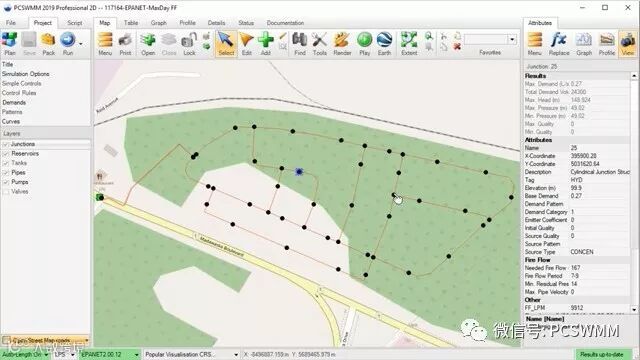
改进新的fire flow分析工具,EPANET运行后的结果属性生成(计算时间序列统计),用于查询,地图渲染或表格分析,在地图链接上显示泵和阀门图标,更好地支持编辑需求,以及优化 在“地图”面板中加载用于绘图和回放的时间序列。
Improvements include a new fire flow analysis tool, generation of results attributes after an EPANET run (computed time series statistics) for querying, map rendering or tabular analysis, display of pump and valve icons on map links, better support for editing demands, and optimized loading of time series for graphing and playback in the Map panel.
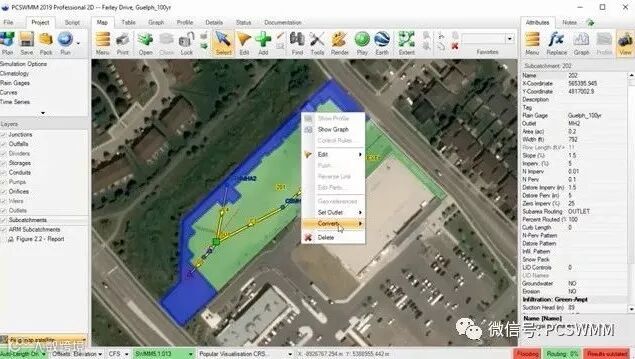
对PCSWMM替代径流方法的改进包括:增加Ventura Rational,LA County Rational和PRF Dimensionless UH方法,总计有9种替代计算径流的方法。 其他ARM改进包括支持从/向LandXML导入/导出ARM子汇集,支持所有6个SWMM流量单元,以及支持创建设计风暴场景。
Improvements to PCSWMM's alternative runoff methods include the addition of Ventura Rational, LA County Rational and PRF Dimensionless UH methods, bringing the total to 9 alternative methods for computing runoff. Other ARM improvements include support for importing/exporting ARM subcatchments from/to LandXML, support for all 6 SWMM flow units, and support for creating design storm scenarios.
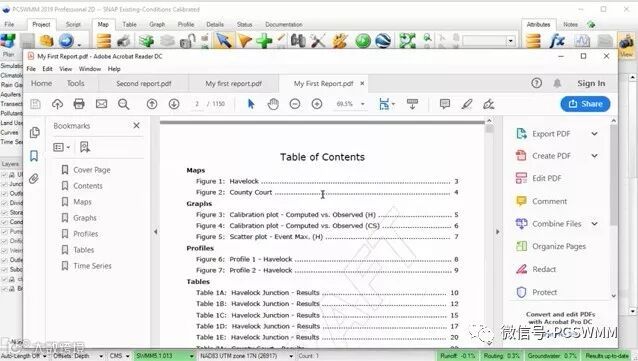
PCSWMM现在支持创建和管理多个自定义报告,将这些报告直接输出为PDF格式,并添加对汇总表和多个映射的支持(通过配对映射收藏夹和保存的扩展区)。 在SWMM运行后可以生成任意数量的报告,并支持通过Python脚本生成条件报告。 此外,报告可以自动通过电子邮件发送和/或报告元素通过FTP自动推送到Web服务器。
PCSWMM now supports creating and managing multiple custom reports, outputting these reports directly to PDF format, and adds support for summary tables and multiple maps (via pairing map favorites and saved extents). Any number of reports can be generated after a SWMM run, with support for conditional report generation via Python scripting. In addition, reports can be automatically emailed and/or report elements automatically pushed to web servers via FTP.
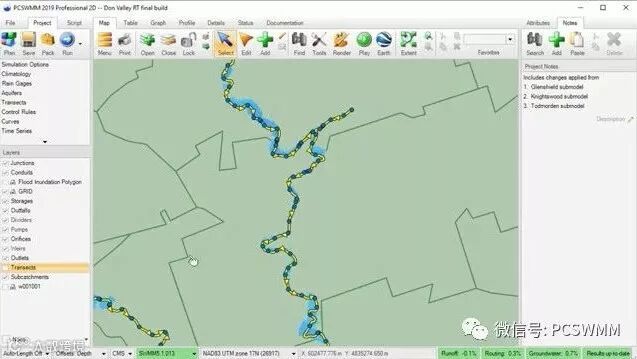
全新的Transect Creator工具可以更好地自动生成沿通道中心线的切割线,有选择地选择在横断面创建中使用哪条切割线的工具,以及从DEM更平滑地采样工作站/高程数据。 该工具既可用于生成一维洪水淹没多边形,也可用于新的一维洪水淹没网格输出,以及用于改进SWMM横断面对象的创建。
A complete re-write of the Transect Creator tool enables better automated generation of cut lines along channel centerlines, tools to selectively choose which cut lines to use in transect creation, and smoother sampling of station/elevations data from DEMs. This tool can be used for both generating 1D flood innundation polygon and new 1D flood innundation grid outputs, as well as for improved creation of SWMM transect objects.
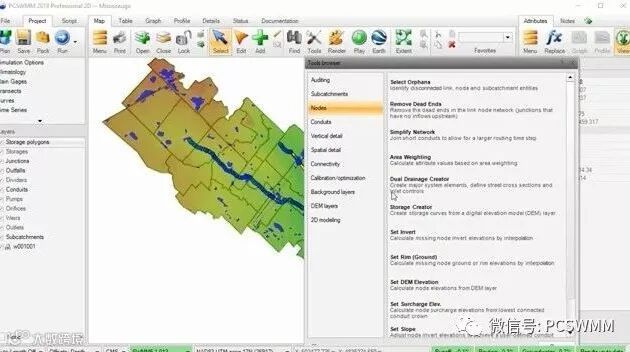
新的Storage Creator工具可以通过在DEM中根据用户指定的最小面积和深度标准查找凹坑来创建存储多边形。 可以使用这些存储多边形对DEM进行采样,创建深度区域存储曲线对象,并在SWMM模型中分配/创建存储单元。 提供选项用于指定存储曲线的默认地下区域(例如,用于集水区),或调整存储单元反转高程以匹配DEM。
The new Storage Creator tool can create storage polygons by finding pits in a DEM, based on user-specified criteria for minimum area and depth. These storage polygons can then be used to sample the DEM, create depth-area storage curve objects and assign/create storage units in a SWMM model. Options are provided for specifying a default below-ground area to the storage curve (e.g. for catchbasins), or adjusting storage unit invert elevations to match the DEM.
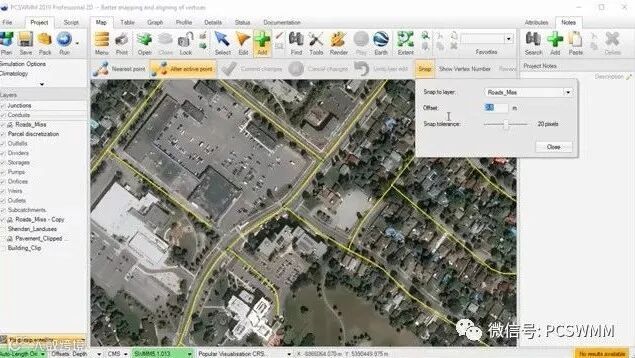
7.2版本包括在编辑实体形状(点,线或多边形)时指定对齐图层的选项。 顶点可以沿目标图层上的线/多边形捕捉到最近的位置,而且不仅仅是现有顶点。 可选的偏移将保持与目标层形状的距离。 此外,对齐网格选项可简化规则间隔几何形状的创建,对绘制原理图非常有用。
可以调整捕捉距离以支持各种像素密度。 不会在现有顶点的指定捕捉距离内创建顶点,这有助于避免意外点或顶点创建。
This version includes the option to specify a snap-to layer when editing entity shapes (points, lines or polygons). Vertices can snap to the nearest location along lines/polygons on the target layer, not just to existing vertices. An optional offset will maintain a distance from the target layer shapes. In addition, a snap-to grid option eases the creation of regularly spaced geometric shapes, useful for drawing schematics.
Snap distance can be adjusted to support a wide range of pixel densities. Vertices will not be created within the specified snap distance of an existing vertex which helps avoid accidental point or vertex creation.
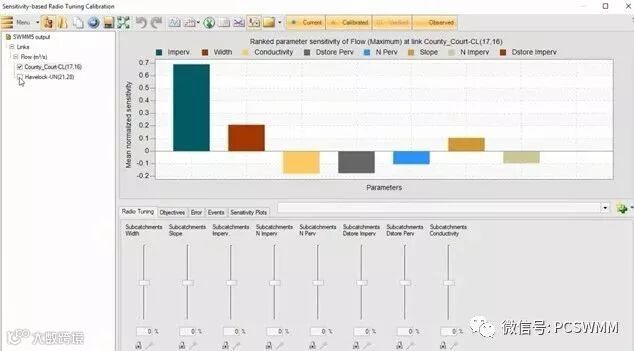
SRTC工具现在支持多敏感点分析,以更准确地预测非线性参数敏感性。其中包括用于敏感性分析的新工具:参数非线性敏感性梯度图和归一化的参数敏感性图。
The Sensitivity-based Radio Tuning and Calibration tool now supports more sensitivity points for more accurate prediction of non-linear parameter sensitivities. It also includes new tools for sensitivity analysis, including non-linear sensitivity gradient plots and ranked mean normalized parameter sensitivity plots.
"新功能详细列表 "
Detailed list of all the new features in PCSWMM 7.2
Add support for SWMM5.1.013
Improvements to EPANET modeling
New fire flow analysis tool
Add results statistics as EPANET layer attributes for querying/rendering
Display icons for pumps and valves on links in Map panel
Do not draw connectivity arrows for pipes in EPANET
Add Demands Editor to the Project panel
Add Demands table to the Table panel
Support importing Demands from another EPANET input file
Support Demands when pushing changes to scenarios
Load all time series from EPANET output file after run for quick access in Graph panel and for plan-view animations
Add all time series from output file to EPANET layers to display instantaneous values as attributes during playback
Redesigned scripting tool to support Python
Get/set SWMM5 and EPANET model inputs parameters
Get/set layer attributes
Get/set time series data
Create/delete layers, entities, time series and model objects
Topological (GIS) functions
Send email and text messages
Call other scripts
Edit hot start files
Create reports
Auto-completion and intellisense
Comment/uncomment multiple selected lines (Ctrl+Q)
Find/replace (Ctrl+F/Ctrl+H)
Console output (with copy button)
Tagging scripts to help organize your script library
Keyboard shortcuts: New Script (Ctrl+N), Save Script (Ctrl+S), Run Script (F6)
New script editor with support for
Support for more functions/properties
Improvements to reporting tool
Support creating/managing multiple custom reports
Support outputting reports direct to PDF files
Support uploading report files to FTP server
Support emailing reports
Support map favorites (and extents) in reporting multiple maps
Support summary tables
Support generating reports for Time Series (TSP) projects
Support shortcut keys: New Report (Ctrl+N), Save Report (Ctrl+S), Run report (F6)
Improvements to flood inundation analysis tool
Support creating peak flood inundation grid/raster layer (depth grid at DEM resolution)
Redesigned Transect Creator tool
New flow line methodology for aligning transect lines
Support for multiple vertices along transect lines
Improved support for using conduits layer as channel centerline layer
Automated smoothing option for channel centerline
Support for varying transect length based on contributing subcatchment area / channel length
Support for auto-shortening transect lengths to a specified depth
New advanced options dialog for creating transect lines
Add Transect filter to automatically or manually choose which transect lines to use in generating averaged station/elevation data for transect objects
Support arrow keys to navigate transect lines on transect layer
Improvements to SRTC tool
Support increased number of sensitivity points (2, 4, 8) for sensitivity analysis
Add Non-linear sensitivity gradients plot
Add Ranked mean normalized parameter sensitivity plot
Add Sensitivity Plot tab to manage above sensitivity graphs
Improvements to Alternative Runoff Methods (ARM)
Ventura Rational method
LA County Rational method
User-entered PRF Dimensionless UH method
Add support for all 6 SWMM flow units
Support importing/exporting to LandXML
Support importing flow length
Support ARM Subcatchments in creating design storm scenarios
Add three new alternative runoff methods
Delete ARM results when turning off ARM runoff
Add warning message
Check rainfall units from IDF curve
Correct Kerby TC calculation
Fix bugs in Modified Rational method
Improvement to control rules
Add CTRLRULES attribute to SWMM5/EPANET link layers to indicate whether the link is controlled by control rules (and quickly view those rules)
Support saving and reading the complete set of control rules to and from files
Add toolbar to Control Rules Editor with Refresh, Save and Open buttons
Improvements to IDF tools
Improve pasting to IDF table
Support including IDF files in packaged project
Support return periods of less than 1 year in IDF tool
Improve Symmetric design storm to support ab/abc table IDF curve
Add new Storage Creator tool
Support for creating storage polygons from a DEM
Support for creating storage curves and assigning them to storage units
New snap functionality for editing entity shapes
Wider pixel range for snap tolerance
Ability to specify a layer to snap vertices to
Ability to specify an offset from objects on the snap to layer
Improve 2D profiles
Use maximum HGL instead of 2D rim elevations when scaling Y axis
Don't display wide nodes for 2D nodes
For Map panel animations, store playback time with project and display it in the Attributes panel along with playback value
Add support for specifying subcatchment outlets graphically with Select in Map option
Calculate statistics when creating raingage time series in RAP project
Support import for Grib2 RAP project
Improve Map panel legend to better maintain user customizations
Add ability to assign LID object to multiple subcatchments at once and assign them all to occupy the full subcatchment area
Support Cumulative rainfall data type in design storm scenarios creator
New method for auto-selecting all profiles, based on longest flow path first
Add “Fill in empty areas” option to the Remove DEM Feature tool
Improve exporting large plan view animations (including 2D) to Google Earth
Support pasting polygons and polylines into points layer (prompts to convert)
Restore “Notify me of updates to this package” functionality
Export profile labels when exporting to a .dxf file
Expand the Create Grid Layer tool to support point, line and polygon grids
Support abbreviation prefix in Design storm scenarios, Events scenarios, Fire Flow scenarios and Source tracing scenarios
Improve support for copying and pasting in lookup tables
Add option in Import tool for toggling Depth/Rim and Width/Flow length calculations
Generate log file when pushing changes to scenarios
Add support for flow path option in Set DEM Slope tool
Add "Reassign outlets" checkbox to Splitting tool when splitting subcatchments
Add option for computing Auto length only once when editing a conduit or subcatchment shape
Long tails in duration plot caused by very small durations
Keep slope when graphically editing a conduits vertical position in the Profile panel (i.e. using midpoint handle)
Add support for pausing a SWMM5 run
Support larger labels in exporting profile to DXF file
Add delete button to checking minimum number of vertices in an edited shape dialog
Remove message box check when canceling the drawing of a new entity shape
Default to Objective tab in Graph panel when PCSWMM starts
Add report average results to Summary – Options table
Support WMTS web tiles layer
Check that the tag attribute is not being imported to if the Tag Imported Entities checkbox is used in import
Disable FIPS check
Check map extent after turning off web tiles
Fix bug in Pattern Creator tool that may cause a created weekend pattern object to be assigned the incorrect type
Fix bug that may cause the run incomplete flag to not be reset after a scenario run
Fix bug that may cause PCSWMM to crash after running a large 2D model with large number of subcatchments
Fix bug that may cause shared favorites to be lost after creating new projects
Fix bug that may prevent PCSWMM from successfully opening an EPANET .NET file
Fix bug that may cause data source flagging information to be lost
Fix bug in the Table panel that may cause rounding of very large integer values

希望大家喜欢我们的新版本!
CHI,龙网科技