


-
一 系统介绍 -
1.1 介绍 -
1.2 特点 -
1.3 系统架构图 -
二 实践 -
2.1 快速入门(演示英文,系统支持中文/英文) -
2.2 Grafana可视化集成 (可选) -
2.3 插件管理 -
三 原理 -
3.1 任务采集调度 -
3.2 高性能集群、云边协同 -
3.3 插件管理 -
四 总结
一 系统介绍
1.1 介绍
Apache HertzBeat (incubating) 是一个易用友好的开源实时监控告警系统,无需 Agent,高性能集群,兼容 Prometheus,提供强大的自定义监控和状态页构建能力。
1.2 特点
-
集 监控+告警+通知 为一体,支持对应用服务,应用程序,数据库,缓存,操作系统,大数据,中间件,Web服务器,云原生,网络,自定义等监控阈值告警通知一步到位。 -
易用友好,无需 Agent,全 WEB 页面操作,鼠标点一点就能监控告警,无需学习成本。 -
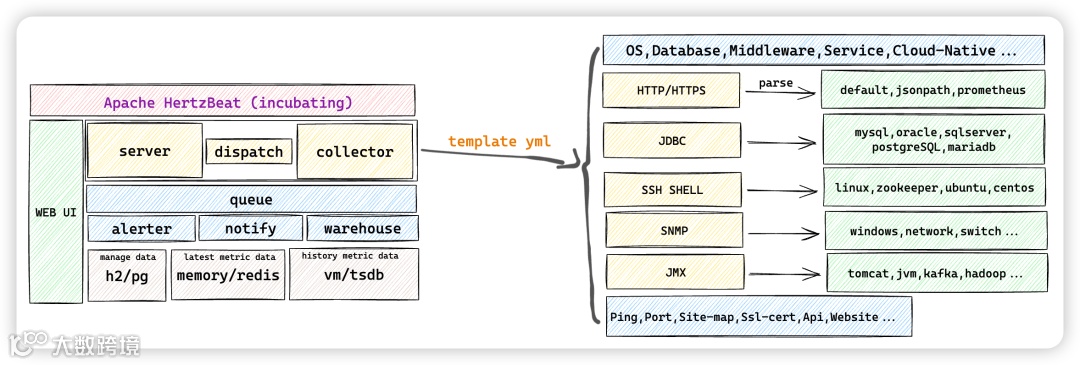
将 Http, Jmx, Ssh, Snmp, Jdbc, Prometheus 等协议规范可配置化,只需在浏览器配置监控模板 YML 就能使用这些协议去自定义采集想要的指标。您相信只需简单配置即可快速适配一款 K8s 或 Docker 等新的监控类型吗? -
兼容 Prometheus 的系统生态并且更多,只需页面操作就可以监控 Prometheus 所能监控的。 -
高性能,支持多采集器集群横向扩展,支持多隔离网络监控,云边协同。 -
自由的告警阈值规则,邮件 Discord Slack Telegram 钉钉 微信 飞书 短信 Webhook Server酱 等方式消息及时送达。 -
提供强大的状态页构建能力,轻松向用户传达您产品服务的实时状态。
1.3 系统架构图
二 实践
2.1 快速入门(演示英文,系统支持中文/英文)
在项目 pom.xml 中添加依赖
<dependency>
    <groupId>org.springframework.boot</groupId>
    <artifactId>spring-boot-starter-actuator</artifactId>
</dependency>
<dependency>
    <groupId>io.micrometer</groupId>
    <artifactId>micrometer-registry-prometheus</artifactId>
</dependency>
配置 application.yml 暴露端点:
management:
  endpoints:
    web:
      exposure:
        include: '*'
    enabled-by-default: true
  metrics:
    export:
      prometheus:
        enabled: true
注意:如果你的项目里还引入了认证相关的依赖,比如 springboot-security ,那么 SpringBoot Actuator 暴露出的接口可能会被拦截,此时需要你手动放开这些接口,以 springboot-security 为例,需要在 SecurityConfig 配置类中加入以下代码:
public class SecurityConfig extends WebSecurityConfigurerAdapter{
    @Override
    protected void configure(HttpSecurity httpSecurity) throws Exception{
        httpSecurity
                // 配置要放开的接口
                .antMatchers("/actuator/**").permitAll()
                .antMatchers("/metrics/**").permitAll()
                .antMatchers("/trace").permitAll()
                .antMatchers("/heapdump").permitAll()
                // ...
    }
}
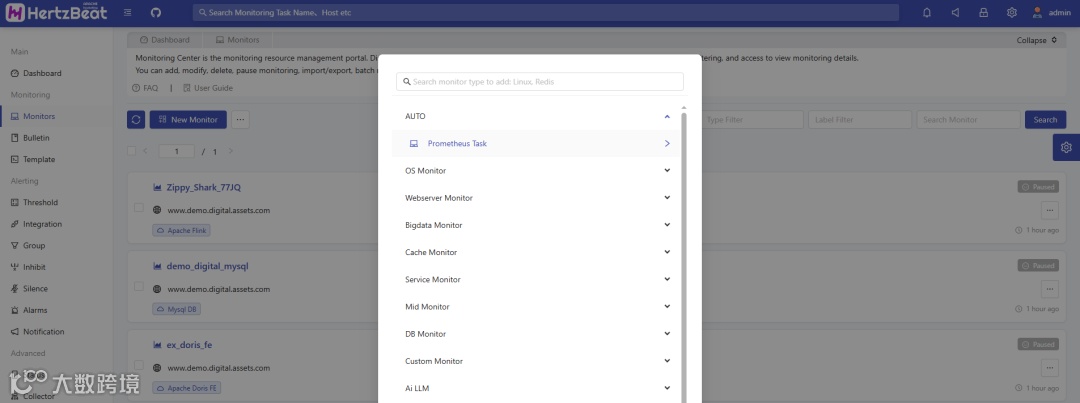
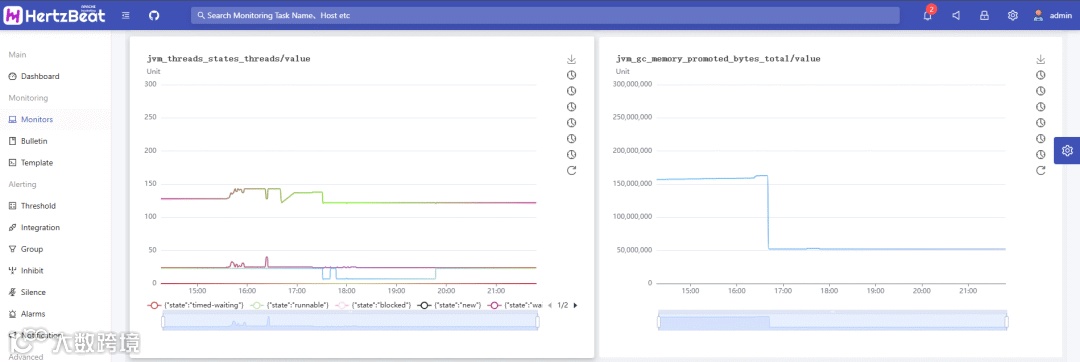
系统页面 -> 监控中心 -> 新增监控 -> AUTO -> Prometheus任务
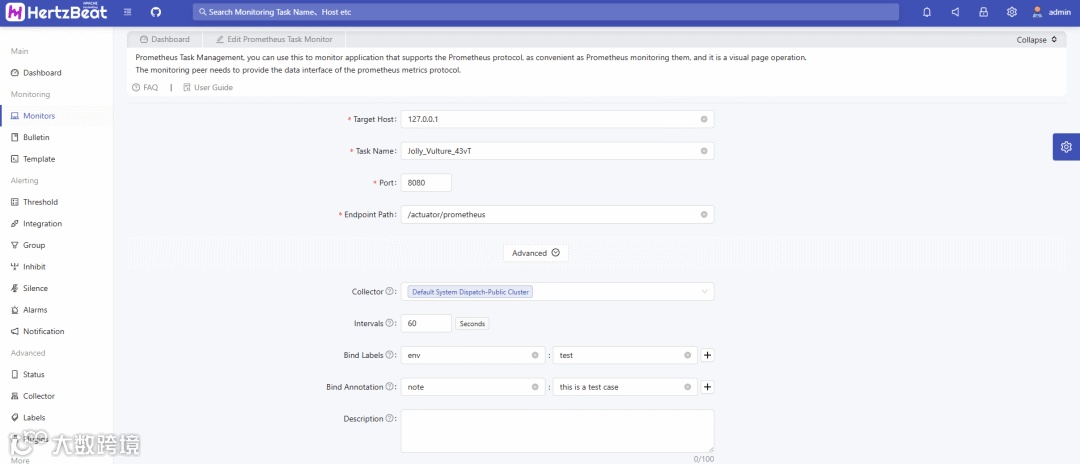
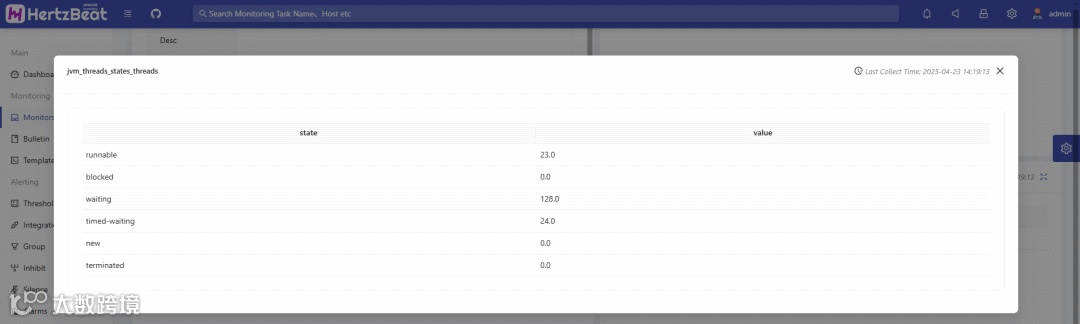
目标Host:SpringBoot 应用服务器地址(不带协议头,例如: https://, http:// ) 端口:应用服务端口(例如: 8080) 端点路径:/actuator/prometheus 可以使用标签分类来管理任务,如添加env=test等业务相关标签。
系统页面 -> 告警 -> 阈值规则 -> 新增 -> 新增阈值
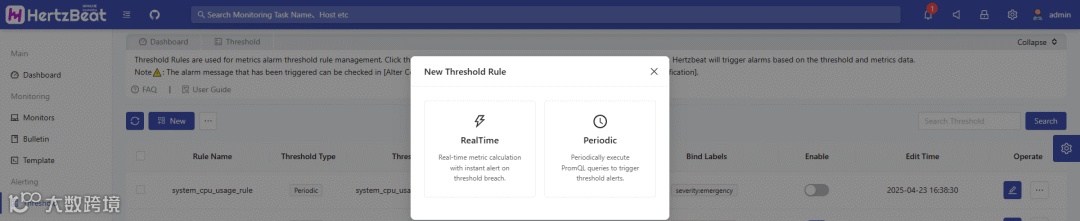
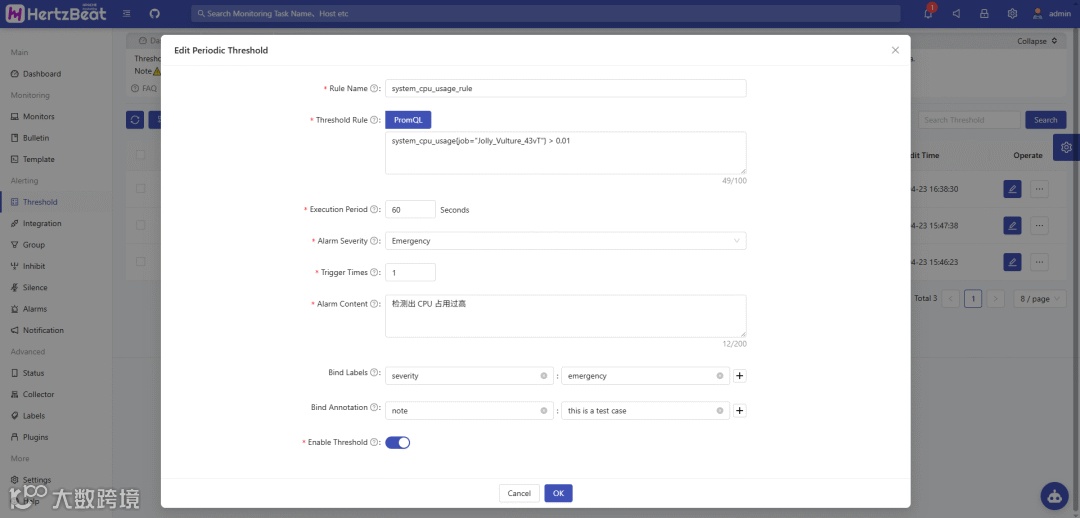
HertzBeat 提供了 实时计算 和 计划周期 两种类型的阈值规则设置,这里我们以 计划周期 阈值规则为例。
阈值名称:阈值规则名称
阈值规则:填写指标监测的规则(支持 PromQL)
执行周期:周期性执行阈值计算的时间间隔
告警级别:触发阈值的告警级别,从低到高依次为: 警告-warning,严重-critical,紧急-emergency
触发次数:设置触发阈值多少次之后才会发送告警
告警内容:填写监测告警的内容(支持填写变量)
比如监测 SpringBoot 应用程序的 CPU 占用,添加阈值规则:system_cpu_usage{job="Jolly_Vulture_43vT"} > 0.01
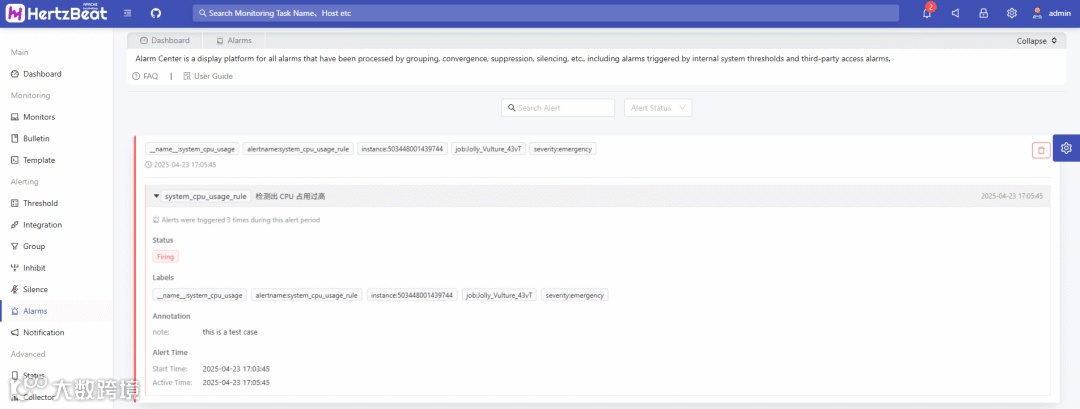
最后可以在 告警中心 看到已触发的告警。
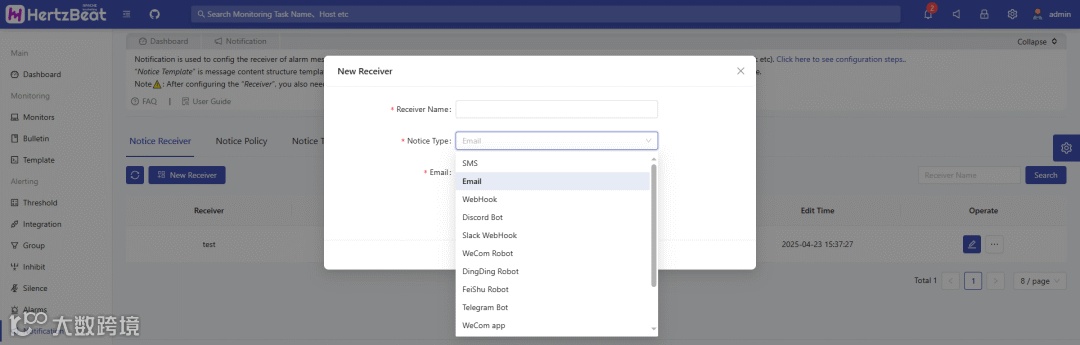
系统页面 -> 消息通知 -> 通知媒介 -> 新增接收对象
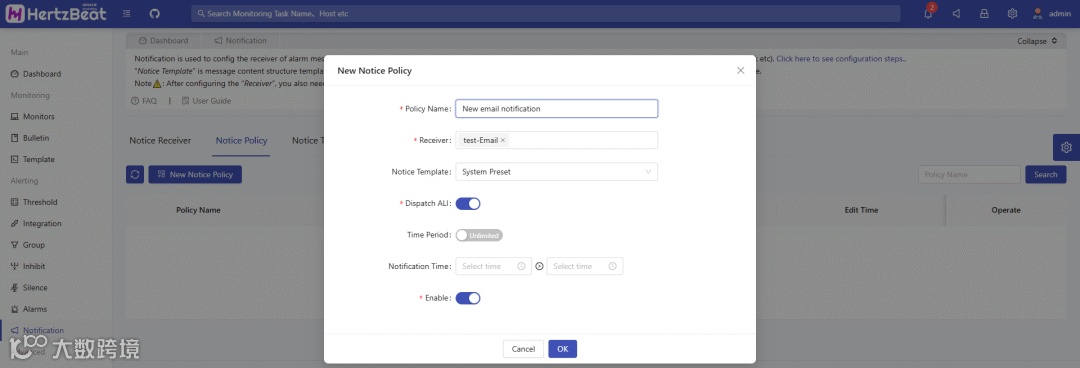
系统页面 -> 消息通知 -> 通知策略 -> 新增通知策略 -> 选择接收对象并启用通知
2.2 Grafana可视化集成 (可选)
需启用 Grafana 可嵌入功能,并开启匿名访问。
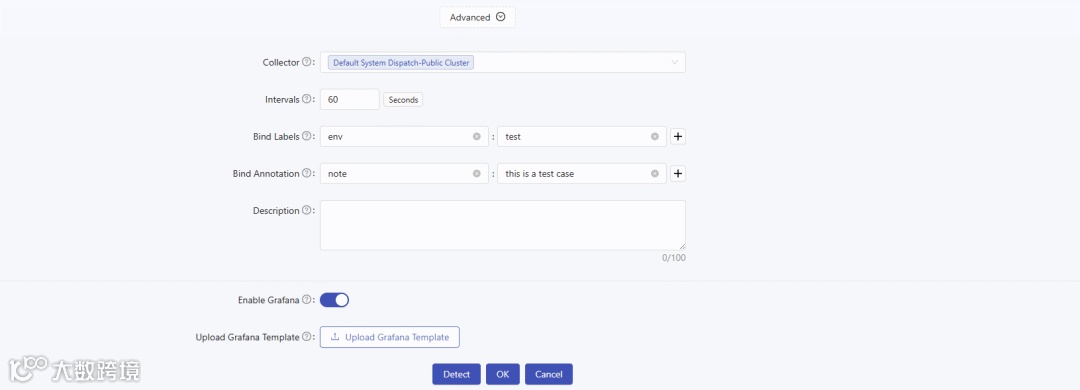
配置启用 Grafana 后,重启 HertzBeat 服务,在新增的 AUTO 监控中启用并上传 Grafana 模板。 比如:Grafana 数据源选择hertzbeat-victoria-metrics,然后在仪表盘点击:「Share」→「Export」→「Save to file」下载模板并上传至 HertzBeat 监控中。
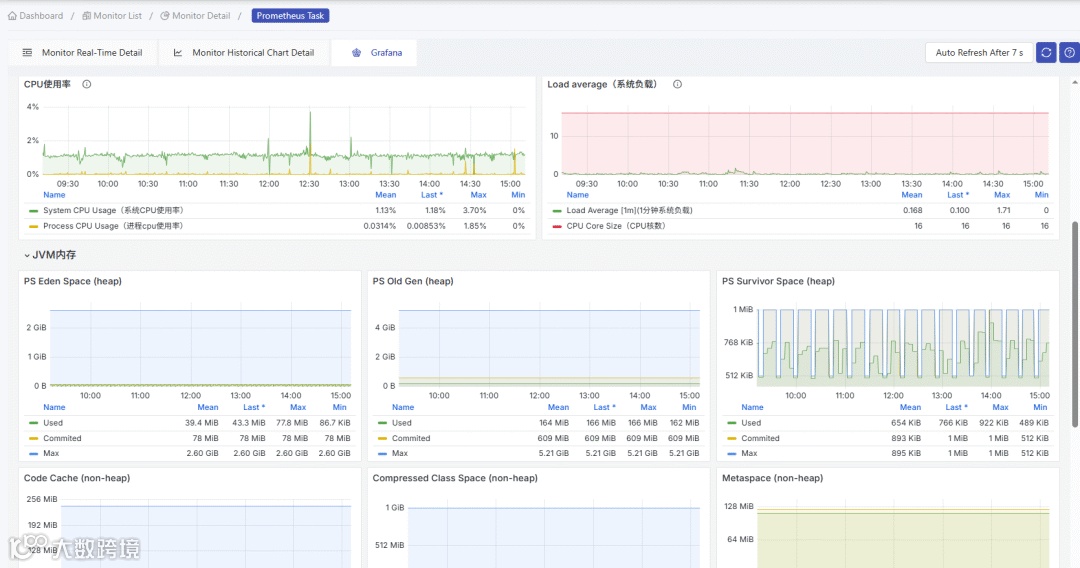
进入新增 AUTO 监控页面,点击 Grafana 图标按钮,即可查看 Grafana 图表。
2.3 插件管理
2.3.1 简介
-
HertzBeat 现有交互局限于告警后的通知功能,而插件功能可支持用户在其生命周期各阶段添加自定义操作,例如告警后执行 SQL、Shell 脚本,或采集监控数据后发送至其他系统。 -
用户按自定义插件流程开发并打包后,通过 “插件管理 - 上传插件” 功能上传并启用,即可在不重启 HertzBeat(热更新) 的情况下扩展自定义功能。
2.3.2 支持插件类型
-
Post-Alert插件
-
作用:在告警后执行自定义操作 -
实现接口:org.apache.hertzbeat.plugin.PostAlertPlugin
-
作用:在采集后执行自定义操作 -
实现接口:org.apache.hertzbeat.plugin.PostCollectPlugin
2.3.3 Demo
-
定位到plugin模块的 Plugin接口。 -
在org.apache.hertzbeat.plugin.impl目录下, 新建一个PostAlertPlugin 实现类,如DemoPlugin,在实现类中接收Alert 类作为参数,实现execute方法,逻辑由用户自定义. -
在 META-INF/services/org.apache.hertzbeat.plugin.PostAlertPlugin 文件中增加接口实现类的全限定名,每个实现类全限定名单独成行。 例如:org.apache.hertzbeat.plugin.impl.DemoPluginImpl -
打包 hertzbeat-plugin 模块。 -
通过 插件管理-上传插件 功能,上传以 -jar-with-lib.jar 结尾的插件包,启用插件即可在告警后执行自定义操作
2.3.4 自定义插件参数
-
插件功能支持自定义参数,并且在使用插件时可以通过插件管理 - 编辑参数 功能填写插件运行时需要的参数。 下面以定义一个包含两个参数的插件为例,详细介绍定义插件参数的流程:
-
在 define 目录下增加参数定义文件 ,注意参数定义文件必须是名称为 define 开头的 yml 文件,例如 define-demo.yml; 在 define-demo.yml 中定义参数,如下所示:
params:
 - field: host
   # name-param field display i18n name
   name:
     zh-CN: 目标 Host
     en-US: Target Host
   # type-param field type(most mapping the html input type)
   type: text
   # required-true or false
   required: true
# field-param field key
 - field: port
   # name-param field display i18n name
   name:
     zh-CN: 端口
     en-US: Port
   # type-param field type(most mapping the html input type)
   type: number
   # when type is number, range is required
   range: '[0,65535]'
 @Override
 public void execute(Alert alert, PluginContext pluginContext) {
     log.info("param host:{}",pluginContext.getString("host"));
     log.info("param port:{}",pluginContext.getInteger("port"));
 }
三 原理
3.1 任务采集调度
3.1.1 时间轮算法
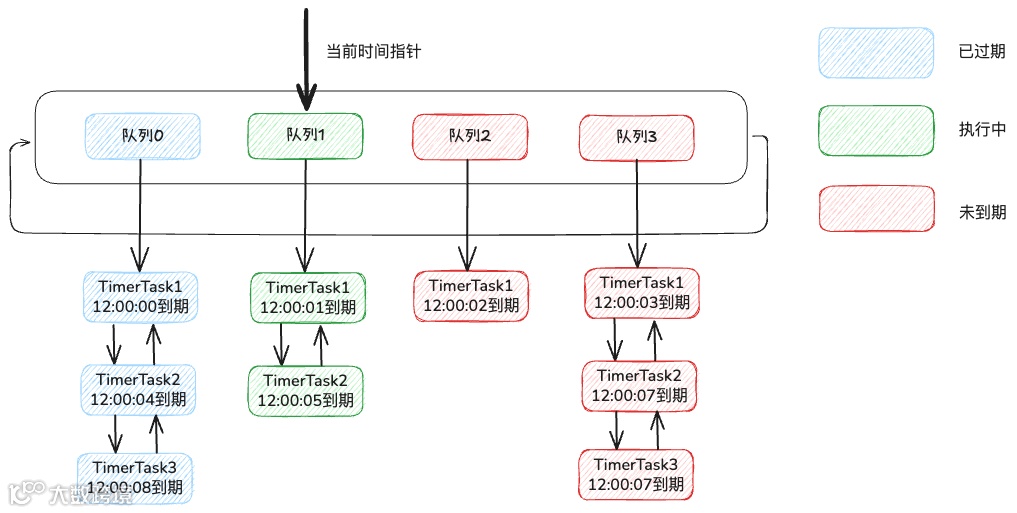
HertzBeat的监控任务调度内部使用的是时间轮算法。
-
时间轮定义: 时间轮是一个 存储定时任务的环形队列,底层采用数组实现,数组中的每个元素可以存放一个定时任务列表。TimerTaskList 是一个环形的双向链表,链表中的每一项表示的都是定时任务项
-
概念图
3.1.2 业务流程图
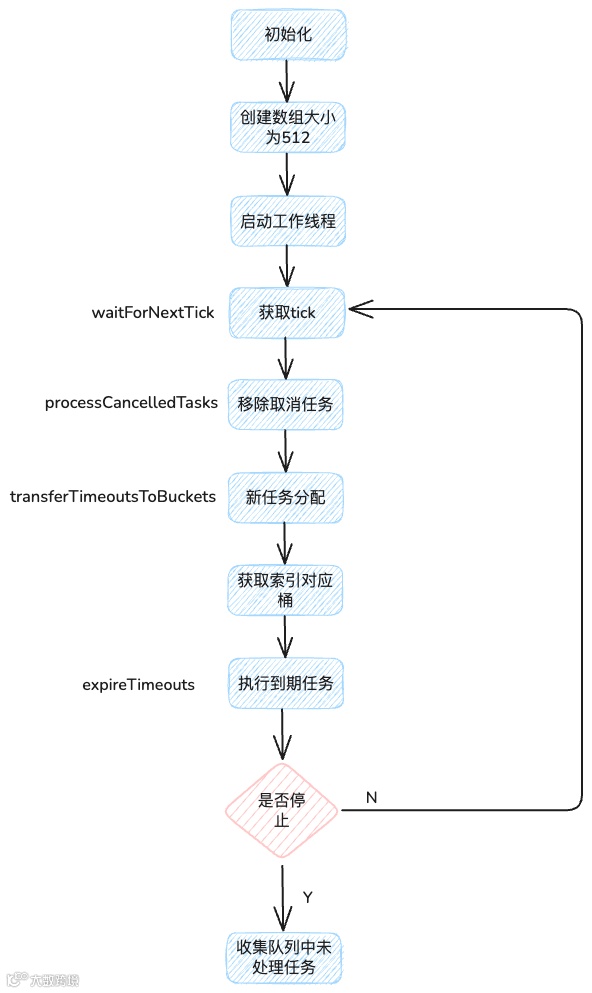
3.1.3 代码详解
-
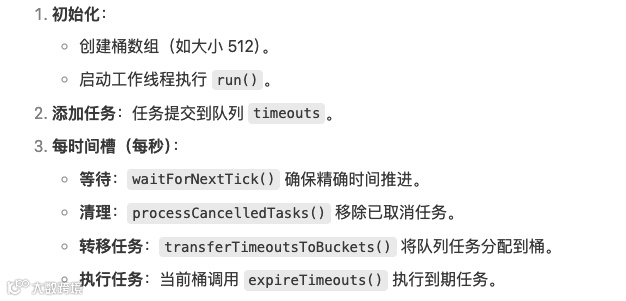
任务采集器
        //初始化桶大小为512 -1,用于取模
        int mask = 511;
        // 初始化起始时间
        startTime = System.nanoTime();
        do {
            // 获取下一个时间指针
            long deadline = waitForNextTick();
            if (deadline > 0) {
                // 计算当前桶索引(取模)
                int idx = (int) (tick & mask);
                // 清理已取消任务
                processCancelledTasks();
                // 获取当前桶
                HashedWheelBucket bucket = wheel[idx];
                // 将新任务添加到桶桶
                transferTimeoutsToBuckets();
                // 执行到期任务
                bucket.expireTimeouts(deadline);
                // 推进时间+1
                tick++;
            }
        } while (isRunning());
-
作用:确保每秒精确推进一个时间槽(tickDuration 默认为 1 秒)。 -
细节:通过休眠补偿时间差,避免忙等待。
private long waitForNextTick() {
    // 计算下一个tick的绝对时间点(单位:纳秒)
    // tickDuration:每个tick的时间长度(默认1秒=1e9纳秒)
    // tick:当前已执行的tick计数
    long deadline = tickDuration * (tick + 1);

    // 自旋等待直到达到下一个tick时间点
    for (; ; ) {
        // 计算当前已过去的时间(纳秒)
        final long currentTime = System.nanoTime() - startTime;

        // 计算需要休眠的时间(毫秒)
        // +999999:实现纳秒到毫秒的向上取整转换(避免精度丢失)
        long sleepTimeMs = (deadline - currentTime + 999999) / 1000000;

        // 检查是否已达到或超过deadline
        if (sleepTimeMs <= 0) {
            // 处理极端边界情况
            if (currentTime == Long.MIN_VALUE) {
                return -Long.MAX_VALUE;  // 异常返回值
            } else {
                return currentTime;  // 返回实际经过的时间
            }
        }

        // Windows平台特殊处理:调整休眠精度
        // 原因:Windows默认系统定时器精度约15ms,调整为10ms倍数可减少无效唤醒
        if (NetworkUtil.isWindowsPlatform()) {
            sleepTimeMs = sleepTimeMs / 10 * 10;  // 向下对齐到10ms
        }

        try {
            // 精确休眠直到下一个tick
            Thread.sleep(sleepTimeMs);
        } catch (InterruptedException ignored) {
            // 被中断时检查是否处于关闭状态
            if (WORKER_STATE_UPDATER.get(HashedWheelTimer.this) == WORKER_STATE_SHUTDOWN) {
                return Long.MIN_VALUE;  // 返回关闭标识
            }
            // 否则忽略中断继续等待
        }
    }
}
-
作用:删除桶中已取消任务节点 -
细节:timeout实现remove从双向链表中删除当前节点
    private void processCancelledTasks() {
            for (; ; ) {
                // 从取消任务队列获取取消任务
                HashedWheelTimeout timeout = cancelledTimeouts.poll();
                if (timeout == null) {
                    // all processed
                    break;
                }
                try {
                    // timeout实现的从双向链表中删除当前节点
                    timeout.remove();
                } catch (Throwable t) {
                    if (logger.isWarnEnabled()) {
                        logger.warn("An exception was thrown while process a cancellation task", t);
                    }
                }
            }
        }
deadline赋值逻辑:long deadline = System.nanoTime() + unit.toNanos(delay) - startTime;
短期任务(如 30 秒):remainingRounds = 0,直接放入对应桶。
长期任务(超出一轮范围,如 1000 秒): 假设桶总数 512,当前 tick=0:
-
calculated = 1000 / 1 = 1000 -
remainingRounds = (1000 - 0) / 512 = 1(需 1 轮) -
桶索引:1000 % 512 = 488(放入第 488 号桶)
private void transferTimeoutsToBuckets() {
    // 每次tick最多转移100,000个任务,防止添加任务的线程循环添加导致工作线程阻塞
    for (int i = 0; i < 100000; i++) {
        // 从任务队列取出任务
        HashedWheelTimeout timeout = timeouts.poll();
        // 队列为空时结束转移
        if (timeout == null) {
            break;
        }
        // 跳过已取消的任务
        if (timeout.state() == HashedWheelTimeout.ST_CANCELLED) {
            continue;
        }
        // 计算任务的理论触发时间槽(单位:tick)
        long calculated = timeout.deadline / tickDuration;
        // 计算任务需要经历的完整轮数
        timeout.remainingRounds = (calculated - tick) / wheel.length;
        // 确保任务不会分配到过去的时间槽:
        // 如果计算的时间槽小于当前tick,则使用当前tick
        final long ticks = Math.max(calculated, tick);
        // 计算桶索引(通过位运算替代取模,要求wheel.length是2的幂)
        int stopIndex = (int) (ticks & mask);
        // 将任务添加到对应桶中
        HashedWheelBucket bucket = wheel[stopIndex];
        bucket.addTimeout(timeout);
    }
}
-
执行条件: remainingRounds <= 0 且未取消的任务。 -
轮数更新:未到期的任务减少剩余轮数(每轮扫到桶时-1)。
void expireTimeouts(long deadline) {
            HashedWheelTimeout timeout = head;
            // 遍历桶中任务链表
            while (timeout != null) {
                HashedWheelTimeout next = timeout.next;
                // 剩余轮数为 0
                if (timeout.remainingRounds <= 0) {
                    // 从链表移除
                    remove(timeout);
                    if (timeout.deadline <= deadline) {
                        // 执行任务
                        timeout.expire();
                    }
                } elseif (timeout.isCancelled()) {
                    // 移除已取消任务
                    remove(timeout);
                } else {
                    // 减少剩余轮数
                    timeout.remainingRounds--;
                }
                // 指针next
                timeout = next;
            }
        }
3.2 高性能集群、云边协同
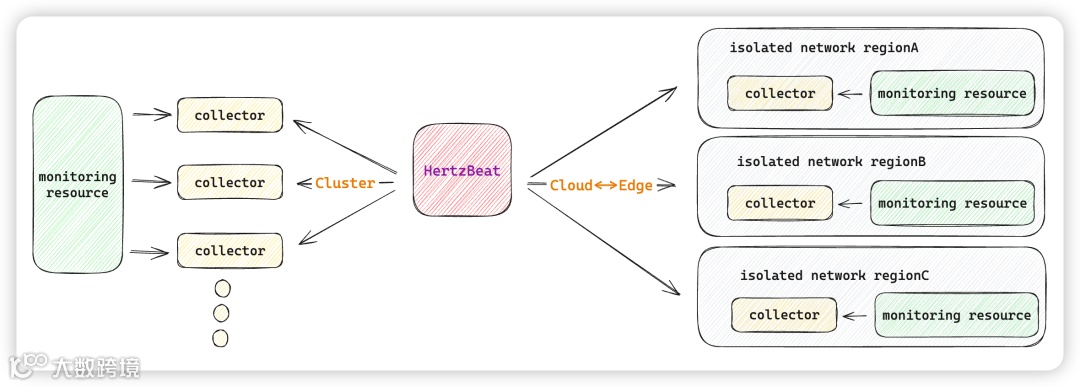
3.2.1 介绍
-
高性能集群:
-
HertzBeat 支持部署采集器集群,多采集器集群横向扩展,指数级提高可监控数量与采集性能。 -
监控任务在采集器集群中自调度,单采集器挂掉无感知故障迁移采集任务,新加入采集器节点自动调度分担采集压力。 -
单机模式与集群模式相互切换部署非常方便,无需额外组件部署。
-
HertzBeat 支持部署边缘采集器集群,与主 HertzBeat 服务云边协同提升采集能力。 -
多个隔离网络部署边缘采集器,采集器在隔离网络内部进行监控任务采集,采集数据上报,由主服务统一调度管理展示
3.2.2 架构图
3.2.3 自动调度
-
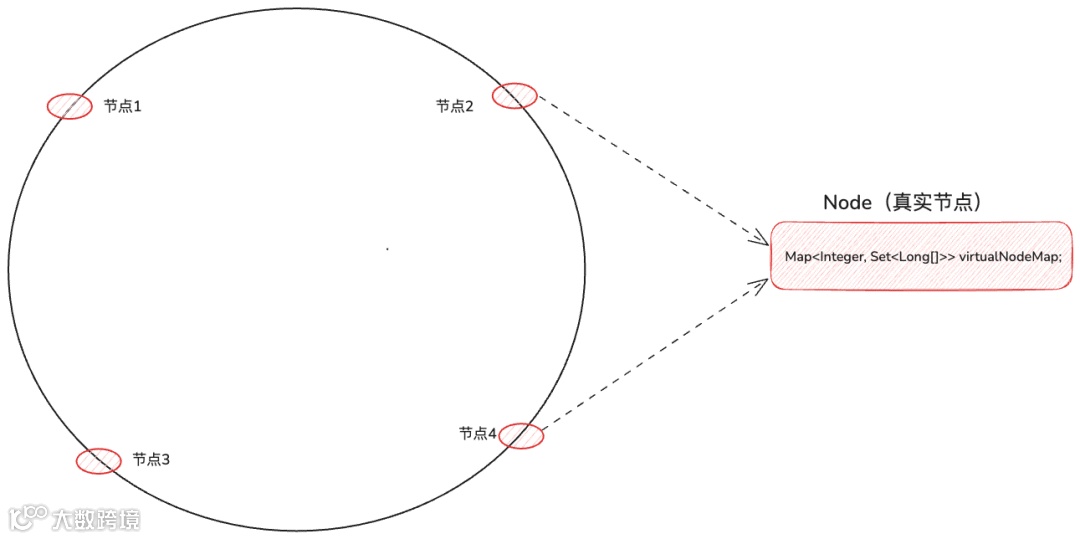
实现原理: 采用一致性哈希算法,构建虚拟节点环,未指定采集器的任务通过哈希值自动映射至最近虚拟节点 -
哈希环结构
-
key:虚拟节点hash值 -
value:任务id集合
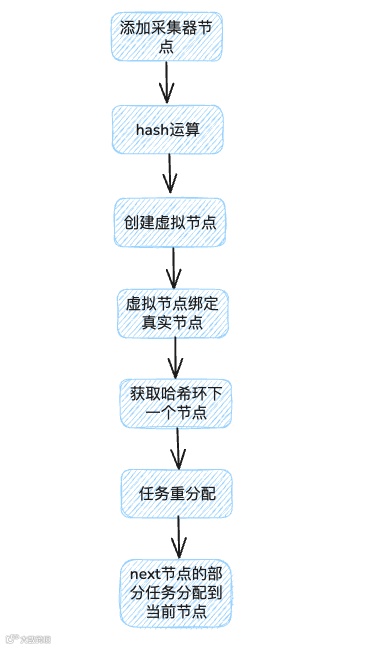
// 1. 添加物理节点
public void addNode(Node newNode) {
    if (!isPrivateMode(newNode)) {
        int vnodes = getVirtualNodeCount(newNode);
        for (int i = 0; i < vnodes; i++) {
            addVirtualNode(newNode, newNode.id + i);
        }
    }
    nodeMap.put(newNode.id, newNode);
    rebalanceJobs();
}

// 2. 添加虚拟节点(核心迁移逻辑)
public synchronized void addVirtualNode(Node node, String vnodeId) {
    int vHash = hash(vnodeId);
    hashRing.put(vHash, node);  // 加入哈希环

    // 初始化虚拟节点任务集
    node.initVirtualNode(vHash);

    // 获取顺时针后继节点
    Node nextNode = getNextNode(vHash);

    // 迁移任务:从后继节点获取任务集合
    Set<Long[]> jobs = nextNode.getJobsForMigration(vHash);

    if (!jobs.isEmpty()) {
        // 拆分任务:需要迁移的部分
        Set<Long[]> migrateJobs = extractJobsToMigrate(jobs, vHash);

        // 更新节点任务映射
        nextNode.updateJobs(jobs);          // 更新原节点
        node.addJobsToVirtualNode(vHash, migrateJobs); // 添加到新节点

        // 更新物理节点状态
        if (node != nextNode) {
            migrateJobStatus(nextNode, node, migrateJobs);
        }
    }
}

// 3. 管理虚拟节点任务
private void addVirtualNodeJobs(int vHash, Set<Long[]> jobs) {
    if (vNodeJobs == null) vNodeJobs = new ConcurrentHashMap<>();

    // 合并或创建任务集
    if (vNodeJobs.containsKey(vHash)) {
        vNodeJobs.get(vHash).addAll(jobs);
    } else {
        vNodeJobs.put(vHash, jobs);
    }
}
  public Node dispatchJob(Integer dispatchHash, Long jobId, boolean isFlushed) {
        if (dispatchHash == null || hashCircle == null || hashCircle.isEmpty()) {
            log.warn("There is no available collector registered. Cache the job {}.", jobId);
            dispatchJobCache.add(new DispatchJob(dispatchHash, jobId));
            return null;
        }
        // 获取哈希环中第一个大于等于dispatchHash的节点
        Map.Entry<Integer, Node> ceilEntry = hashCircle.ceilingOrFirstEntry(dispatchHash);
        int virtualKey = ceilEntry.getKey();
        Node curNode = ceilEntry.getValue();

        curNode.addJob(virtualKey, dispatchHash, jobId, isFlushed);
        return curNode;
    }
3.2.4 无感知故障迁移
-
实现原理:通过netty监控心跳每5秒一次,如果某采集器节点心跳失效,HertzBeat重新分配任务
-
代码详解:
-
感知到采集器下线后,会调用collectorGoOffline
public void collectorGoOffline(String identity) {
    // ... 更新数据库状态

    // 关键步骤:从一致性哈希环移除
    consistentHash.removeNode(identity);

    // 关键步骤:重新平衡任务分配
    reBalanceCollectorAssignJobs();
}
3.3 插件管理
3.3.1 实现原理:
通过SPI结合自定义类加载器实现插件热更新
3.3.2 代码详解
-
插件新增逻辑
  public void savePlugin(PluginUpload pluginUpload) {
        // 1. 保存JAR文件到plugin-lib目录
        String jarPath = new File(this.getClass().getProtectionDomain().getCodeSource().getLocation().getPath()).getAbsolutePath();
        Path extLibPath = Paths.get(new File(jarPath).getParent(), "plugin-lib");
        File extLibDir = extLibPath.toFile();
        String fileName = UUID.randomUUID().toString().replace("-", "") + "_" + fileName;
        File destFile = new File(extLibDir, fileName);

        // 2. 验证JAR文件内容
        PluginMetadata parsed = validateJarFile(destFile);

        // 3. 保存插件元数据到数据库
        metadataDao.save(pluginMetadata);
        itemDao.saveAll(pluginItems);

        // 4. 重新加载类加载器
        loadJarToClassLoader();

        // 5. 同步插件状态
        syncPluginStatus();
    }
-
插件更新
@PostConstruct
private void loadJarToClassLoader() {
    // 1. 关闭旧的类加载器
    for (URLClassLoader pluginClassLoader : pluginClassLoaders) {
        if (pluginClassLoader != null) {
            pluginClassLoader.close();
        }
    }

    // 2. 清理内存
    if (!pluginClassLoaders.isEmpty()) {
        pluginClassLoaders.clear();
        System.gc();
    }

    // 3. 重新加载所有启用的插件
    List<PluginMetadata> plugins = metadataDao.findPluginMetadataByEnableStatusTrue();
    for (PluginMetadata metadata : plugins) {
        List<URL> urls = loadLibInPlugin(metadata.getJarFilePath(), metadata.getId());
        urls.add(new File(metadata.getJarFilePath()).toURI().toURL());
        pluginClassLoaders.add(new URLClassLoader(urls.toArray(new URL[0]), Plugin.class.getClassLoader()));
    }
}
-
插件调用
@Override
public <T> void pluginExecute(Class<T> clazz, Consumer<T> execute) {
    for (URLClassLoader pluginClassLoader : pluginClassLoaders) {
        // 使用ServiceLoader发现插件实现
        ServiceLoader<T> load = ServiceLoader.load(clazz, pluginClassLoader);
        for (T t : load) {
            if (pluginIsEnable(t.getClass())) {
                execute.accept(t);
            }
        }
    }
}
四 总结
-
开箱即用:Docker 快速部署,端口映射即可使用;集成监控、告警、通知,覆盖多类对象。 -
极简易用:部署简单,配置量少,无需 Agent 即可直接监控;全 WEB 操作,零学习成本。 -
界面直观:菜单简洁,无深层嵌套,核心功能集中在一级菜单;用户配置在配置文件中完成,操作便捷。 -
安全可靠:数据密钥全链路加密。 -
高性能与自定义:支持多协议模板化配置,YML 自定义指标;集群横向扩展,适配多网络场景;灵活告警与多渠道通知,可快速适配新 K8s 监控类型。
关于作者
闫书铭,转转回收技术部 后端工程师,Apache HertzBeat Committer
想了解更多转转公司的业务实践,欢迎点击关注下方公众号: