

计算机视觉是教计算机看东西。例如,它可能建立一个模型来判断照片是猫还是狗(二元分类);或是判断照片是猫、狗还是鸡(多类分类);识别汽车出现在视频帧中的位置(对象检测);找出图像中不同对象的分离位置(全景分割)。
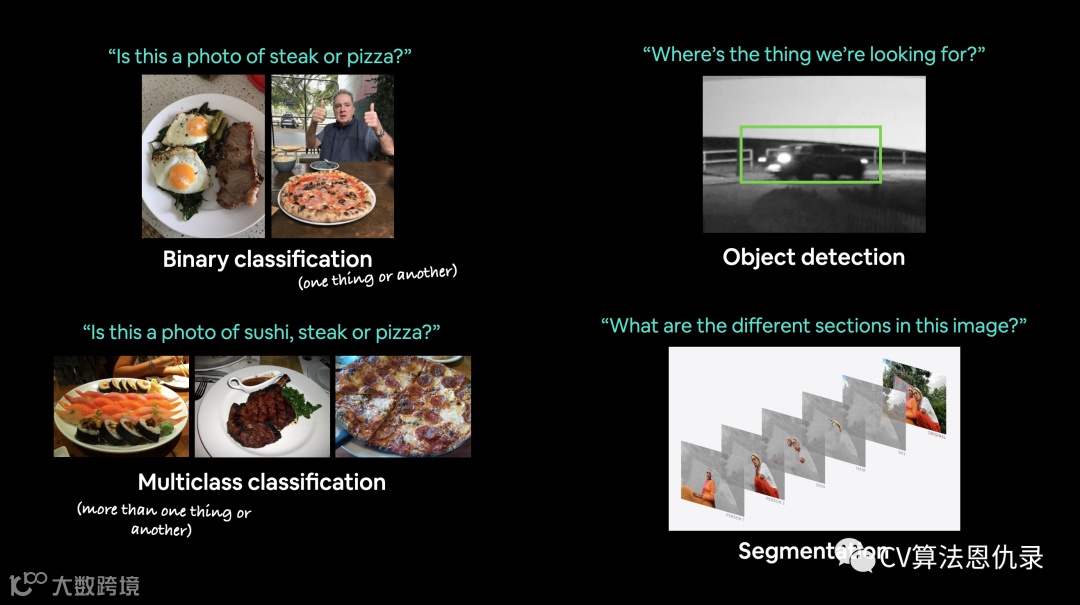
计算机视觉在哪里使用?
如果读者正在使用智能手机,那么已经使用过计算机视觉。相机和照片应用程序使用计算机视觉来增强和分类图像。现代汽车使用计算机视觉来避开其他汽车并保持在车道线内。制造商使用计算机视觉来识别各种产品中的缺陷。安全摄像头使用计算机视觉来检测潜在的入侵者。本质上,任何可以用视觉描述的东西都可能是一个潜在的计算机视觉问题。
本节分享的内容
将把 PyTorch 工作流应用到计算机视觉中。
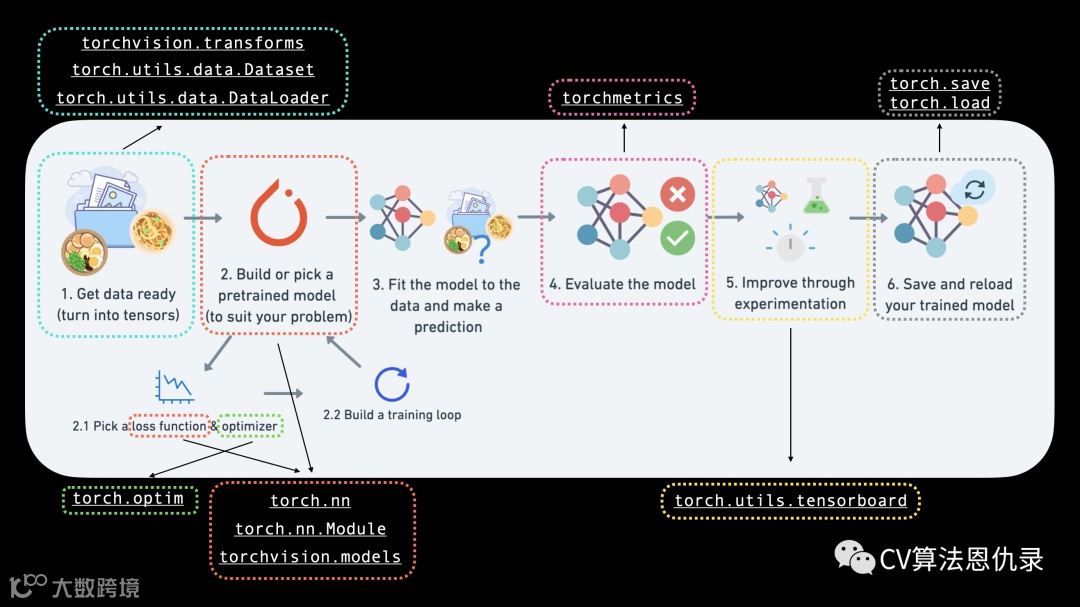
具体内容如下:
| 主题 | 内容 |
|---|---|
| 0. PyTorch 中的计算机视觉库 | PyTorch 有一堆内置的有用的计算机视觉库,让我们来看看它们。 |
| 1. 加载数据 | 将从 FashionMNIST 衣服数据集开始。 |
| 2. 准备数据 | 用 PyTorch DataLoader 加载数据,在训练循环中使用它们。 |
| 3. 模型 0:构建基线模型 | 将创建一个多类分类模型来学习数据中的模式,还将选择损失函数、优化器并构建一个训练循环。 |
| 4. 做出预测并评估模型 0 | 用基线模型做一些预测并评估它们。 |
| 5. 根据设备选择配置 | 编写与设备无关的代码。 |
| 6. 模型 1:添加非线性 | 实验是机器学习的很大一部分,让我们尝试通过添加非线性层来改进基线模型。 |
| 7. 模型 2:卷积神经网络(CNN) | 是时候具体了解计算机视觉并介绍强大的卷积神经网络架构了。 |
| 8. 比较模型 | 构建了三种不同的模型,让我们比较一下。 |
| 9. 评估最好的模型 | 对随机图像进行一些预测并评估出最佳模型。 |
| 10. 制作混淆矩阵 | 混淆矩阵是评估分类模型的好方法,让我们看看如何制作一个。 |
| 11. 保存和加载性能最好的模型 | 保存模型并确保它正确加载回来。 |
Kaggle练习地址
https://www.kaggle.com/zymzym/pytorch-computer-vision-03
0.PyTorch中的计算机视觉库
在开始编写代码之前,让我们先了解的一些 PyTorch 计算机视觉库。
| PyTorch 模块 | 作用 |
|---|---|
torchvision |
包含经常用于计算机视觉问题的数据集、模型架构和图像转换。 |
torchvision.datasets |
在这里,将找到许多计算机视觉数据集示例,有图像分类、对象检测、图像字幕、视频分类等。它还包含一系列用于制作自定义数据集的基类。 |
torchvision.models |
该模块包含在 PyTorch 中实现的性能良好且常用的计算机视觉模型架构,可以将它们用于解决自己的问题。 |
torchvision.transforms |
与模型一起使用之前,通常需要对图像进行转换(转换为数字/处理/增强),可以在此处找到常见的图像转换。 |
torch.utils.data.Dataset |
PyTorch 的基本数据集类。 |
torch.utils.data.DataLoader |
创建 Python 迭代形式的数据集 (用 torch.utils.data.Dataset). |
torch.utils.data.Dataset 和 torch.utils.data.DataLoader 不仅适用于 PyTorch 中的计算机视觉,它们还能够处理许多不同类型的数据。现在我们了解了一些最重要的 PyTorch 计算机视觉库,让我们导入相关的依赖项。
# 导入 PyTorch
import torch
from torch import nn

# 导入 torchvision
import torchvision
from torchvision import datasets
from torchvision.transforms import ToTensor

# 导入 matplotlib 用作可视化
import matplotlib.pyplot as plt

# 检查版本
# 注意:你的 PyTorch 版本不能低于 1.10.0 和 torchvision 版本不应低于 0.11
print(f"PyTorch version: {torch.__version__}\ntorchvision version: {torchvision.__version__}")
PyTorch version: 1.11.0
torchvision version: 0.12.0
1.获取数据集
要开始处理计算机视觉问题,让我们获取计算机视觉数据集。FashionMNIST 由 Zalando Research 制作,包含 10 种不同服装的灰度图像。
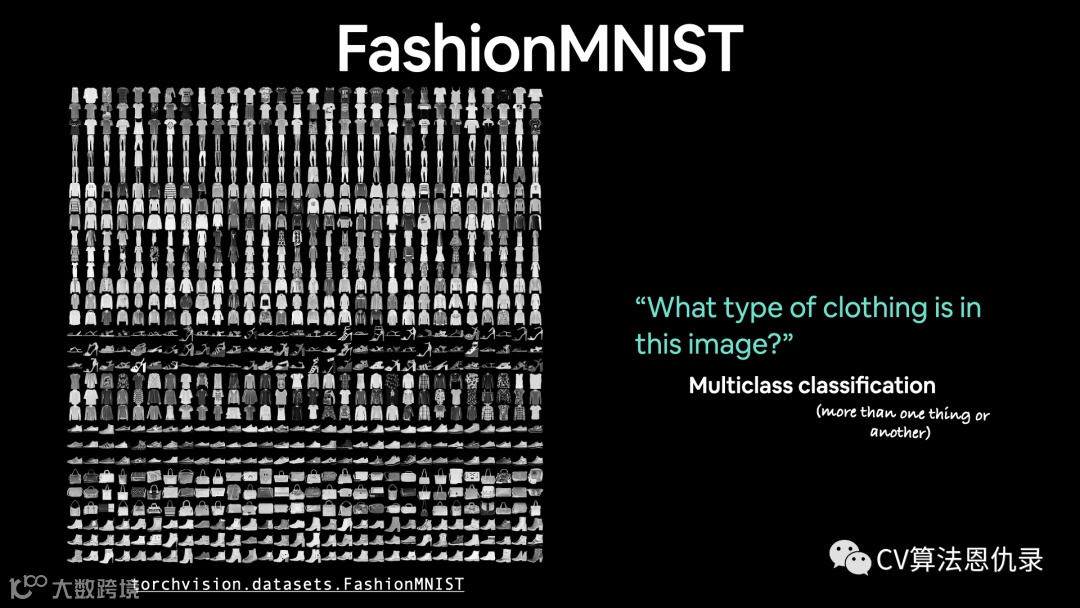
torchvision.datasets 含许多示例数据集,读者可以使用它们来练习编写计算机视觉代码。FashionMNIST 有 10 个不同的图像类别(不同类型的服装),是一个多类别分类问题。
稍后,我们将构建一个计算机视觉神经网络来识别这些图像中不同风格的服装。PyTorch 有一堆常见的计算机视觉数据集存储在 torchvision.datasets 。FashionMNIST 的形式是 torchvision.datasets.FashionMNIST()。
要下载它,提供以下参数:
-
root: str- 将数据下载到哪个文件夹? -
train: Bool- 想要训练还是测试? -
download: Bool- 应该下载数据吗? -
transform: torchvision.transforms- 想对数据进行哪些转换? -
target_transform- 可以对标签进行转化。
torchvision 中许多数据集都含有以上参数。
# 设置训练数据
train_data = datasets.FashionMNIST(
    root="data", # 下载数据到哪里?
    train=True, # 获取训练数据
    download=True,  # 如果磁盘上不存在则下载数据
    transform=ToTensor(), # 图片为 PIL 格式,我们想变成 Torch 张量
    target_transform=None # 你也可以转换标签
)

# 设置测试数据
test_data = datasets.FashionMNIST(
    root="data",
    train=False, # 获取测试数据
    download=True,
    transform=ToTensor()
)
让我们检查训练数据的第一个样本。
# 查看第一个训练样本
image, label = train_data[0]
image, label
1.1 计算机视觉模型的输入输出形状
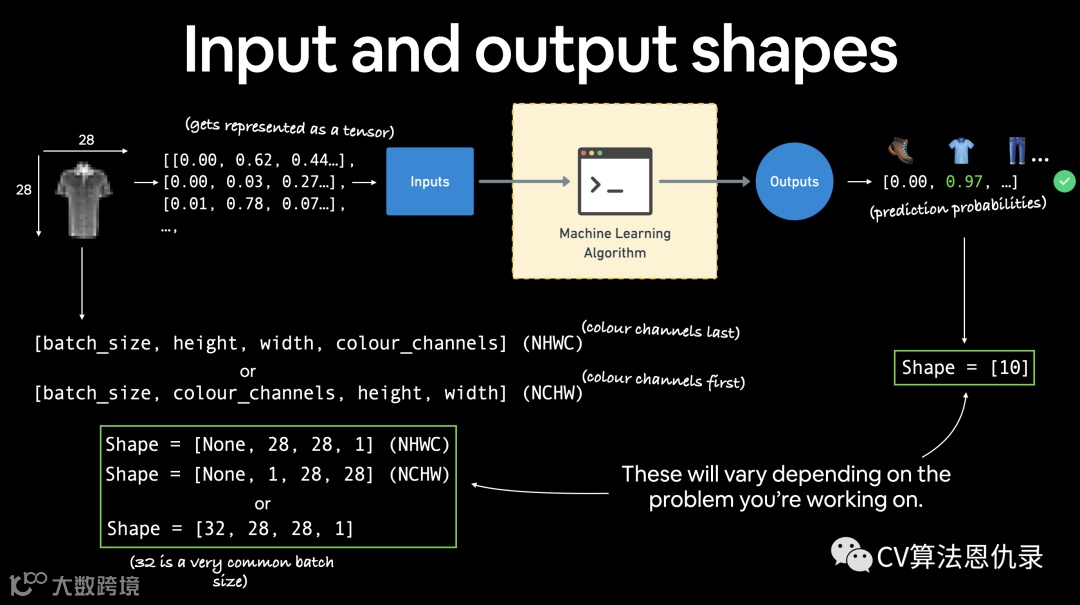
如下图所示,有一个很大的张量值(图像)对应目标(标签)的单个值。让我们看看图像的形状。
# 图片的形状是什么?
image.shape
torch.Size([1, 28, 28])
图像张量的形状是 [1, 28, 28] 更具体地说是:
[color_channels=1, height=28, width=28]
color_channels=1 意味着图像是灰度的。如果 color_channels=3,图像具有红色、绿色和蓝色的像素值(这也称为 RGB color model)。当前张量的顺序通常称为 CHW (Color Channels, Height, Width)(颜色通道、高度、宽度)。除了 CHW (color channels first) 还有 HWC (color channels last)。
注意:读者还会看到 NCHW 和 NHWC ,其中 N 表示图像数量。例如 batch_size=32,张量的形状是 [32, 1, 28, 28]。
PyTorch 通常使用 NCHW (channels first) 作为许多运算符的默认值。PyTorch 还解释说 NHWC (channels last) 表现更好,更多细节请查看 https://pytorch.org/blog/tensor-memory-format-matters/#pytorch-best-practice。
查看数据集数量。
# 有多少样本?
len(train_data.data), len(train_data.targets), len(test_data.data), len(test_data.targets)
(60000, 60000, 10000, 10000)
有 60,000 个训练样本和 10,000 个测试样本。通过 .classes 查看标签。
# 查看标签
class_names = train_data.classes
class_names
['T-shirt/top',
 'Trouser',
 'Pullover',
 'Dress',
 'Coat',
 'Sandal',
 'Shirt',
 'Sneaker',
 'Bag',
 'Ankle boot']
我们正在处理 10 个不同的类,这意味着问题是多类分类。让我们更多可视化。
1.2 可视化数据
import matplotlib.pyplot as plt
image, label = train_data[0]
print(f"Image shape: {image.shape}")
plt.imshow(image.squeeze()) # 图像形状为 [1, 28, 28] (colour channels, height, width)
plt.title(label);
Image shape: torch.Size([1, 28, 28])
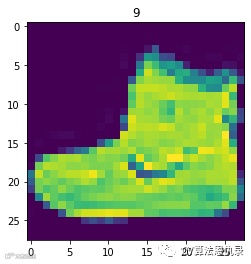
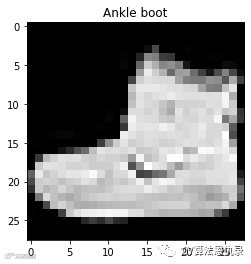
我们可以使用 plt.imshow() 中参数 cmap 将图像变成灰度。
plt.imshow(image.squeeze(), cmap="gray")
plt.title(class_names[label]);
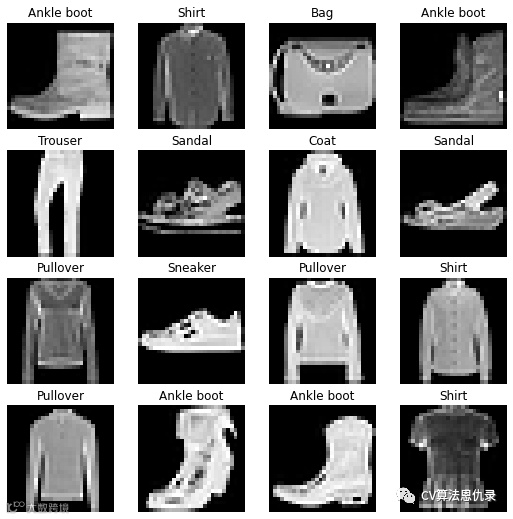
# 绘制更多图像
torch.manual_seed(42)
fig = plt.figure(figsize=(9, 9))
rows, cols = 4, 4
for i in range(1, rows * cols + 1):
    random_idx = torch.randint(0, len(train_data), size=[1]).item()
    img, label = train_data[random_idx]
    fig.add_subplot(rows, cols, i)
    plt.imshow(img.squeeze(), cmap="gray")
    plt.title(class_names[label])
    plt.axis(False);
2.准备好DataLoader
现在已经准备好了数据集,下一步是用 torch.utils.data.DataLoader (简称为 DataLoader)。DataLoader 有助于将数据加载到模型中,用于训练和推理。它将一个大块 的 Dataset 变成一个由较小块组成的 Python 可迭代的对象。这些较小的块称为批次 batches 或小批次 mini-batches ,可以通过 batch_size 参数设置。
为什么要这样做?因为它的计算效率更高。在理想情况下,读者可以一次对所有数据进行正向传递和反向传递。但是一旦开始使用非常大的数据集,除非有无限的计算能力,否则将它们分成批次会更容易。它还为模型提供了更多改进的机会。
对于小批量(数据的一小部分),每个时期更频繁地执行梯度下降(每个小批量一次而不是每个时期一次)。
什么是好的批量大小?32 是解决大量问题的好起点。但由于这是一个可以设置的值(超参数),可以尝试所有不同类型的值,尽管通常最常使用 2 的幂(例如 32、64、128、256、512)。
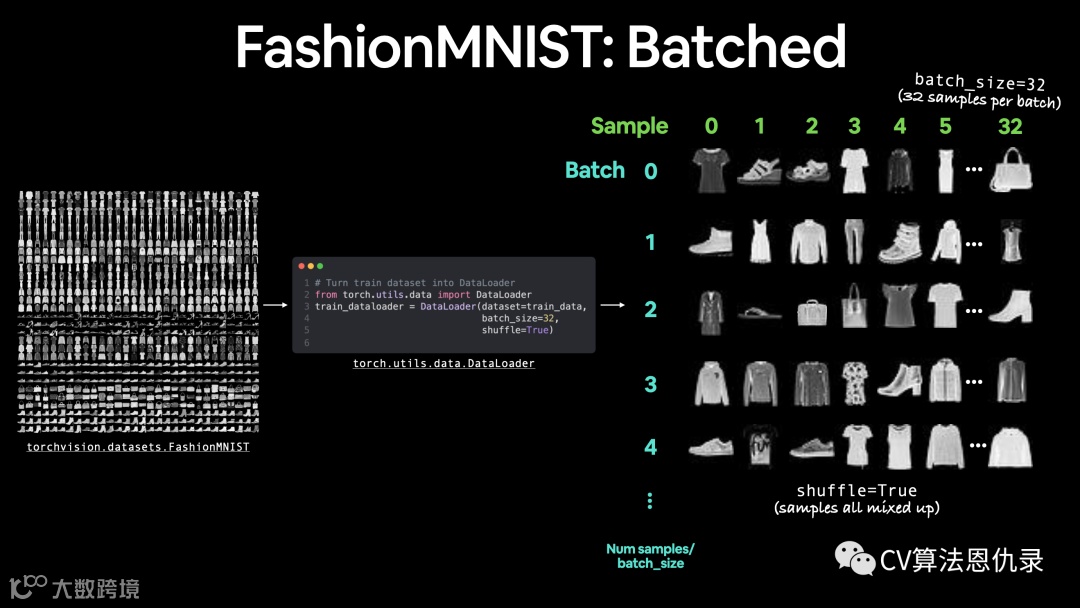
使用 DataLoader 创建训练和测试集。
from torch.utils.data import DataLoader

#  设置批量大小超参数
BATCH_SIZE = 32

# 将数据集转换为可迭代 (batches)
train_dataloader = DataLoader(train_data, # dataset to turn into iterable
    batch_size=BATCH_SIZE,  # 每批有多少样本?
    shuffle=True # 每个时期都打乱数据
)

test_dataloader = DataLoader(test_data,
    batch_size=BATCH_SIZE,
    shuffle=False # 测试集不用打乱数据
)

# 让我们检查
print(f"Dataloaders: {train_dataloader, test_dataloader}")
print(f"Length of train dataloader: {len(train_dataloader)} batches of {BATCH_SIZE}")
print(f"Length of test dataloader: {len(test_dataloader)} batches of {BATCH_SIZE}")
Dataloaders: (<torch.utils.data.dataloader.DataLoader object at 0x7fb900f8b050>, <torch.utils.data.dataloader.DataLoader object at 0x7fb900f8b190>)
Length of train dataloader: 1875 batches of 32
Length of test dataloader: 313 batches of 32
# 查看训练数据加载器中的内容
train_features_batch, train_labels_batch = next(iter(train_dataloader))
train_features_batch.shape, train_labels_batch.shape
(torch.Size([32, 1, 28, 28]), torch.Size([32]))
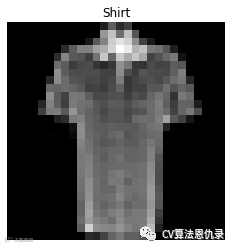
我们可以看到,通过检查单个样本,数据保持不变。
# Show a sample
torch.manual_seed(42)
random_idx = torch.randint(0, len(train_features_batch), size=[1]).item()
img, label = train_features_batch[random_idx], train_labels_batch[random_idx]
plt.imshow(img.squeeze(), cmap="gray")
plt.title(class_names[label])
plt.axis("Off");
print(f"Image size: {img.shape}")
print(f"Label: {label}, label size: {label.shape}")
Image size: torch.Size([1, 28, 28])
Label: 6, label size: torch.Size([])
3.Model 0:建立基线模型
是时候通过子类化来构建基线模型 nn.Module 了。基线模型是最简单的模型之一。可以使用基线作为起点,并尝试使用后续的更复杂的模型对其进行改进。基线将由两层 nn.Linear() 组成,还有 nn.Flatten() 层 将张量的维度压缩为单个向量。
# 创建一个展平层
flatten_model = nn.Flatten() # all nn modules function as a model (can do a forward pass)

# 获取单个样本
x = train_features_batch[0]

# 扁平化样本
output = flatten_model(x) # perform forward pass

# 打印出发生了什么
print(f"Shape before flattening: {x.shape} -> [color_channels, height, width]")
print(f"Shape after flattening: {output.shape} -> [color_channels, height*width]")

# 尝试取消下面的注释,看看会发生什么
#print(x)
#print(output)
Shape before flattening: torch.Size([1, 28, 28]) -> [color_channels, height, width]

Shape after flattening: torch.Size([1, 784]) -> [color_channels, height*width]
该 nn.Flatten() 层使形状从 [color_channels, height, width] 到 [color_channels, height*width]。现在已经将像素数据从高度和宽度维度变成了一个长的 特征向量 feature vector。nn.Linear() 层的输入是特征向量的形式。创建第一个模型, nn.Flatten() 作为第一层。
from torch import nn
class FashionMNISTModelV0(nn.Module):
    def __init__(self, input_shape: int, hidden_units: int, output_shape: int):
        super().__init__()
        self.layer_stack = nn.Sequential(
            nn.Flatten(), # neural networks like their inputs in vector form
            nn.Linear(in_features=input_shape, out_features=hidden_units), # in_features = 数据样本中的特征数 (784 像素)
            nn.Linear(in_features=hidden_units, out_features=output_shape)
        )

    def forward(self, x):
        return self.layer_stack(x)
参数如下:
-
input_shape=784- 这是模型中有多少个特征,在我们的例子中,它对应目标图像中的每个像素(28 像素高 x 28 像素宽 = 784 个特征)。 -
hidden_units=10- 隐藏层中的单元/神经元数量,这个数字可以是任意整数,但为了保持模型小,选择 10。 -
output_shape=len(class_names)- 正在处理多类分类问题,需要每个类的输出神经元。
3.1 设置损失、优化器和评估指标
导入和使用自己的准确度函数或评估指标(helper_functions.py)。
import requests
from pathlib import Path

# Download helper functions from Learn PyTorch repo (if not already downloaded)
if Path("helper_functions.py").is_file():
  print("helper_functions.py already exists, skipping download")
else:
  print("Downloading helper_functions.py")
  # Note: you need the "raw" GitHub URL for this to work
  request = requests.get("https://raw.githubusercontent.com/mrdbourke/pytorch-deep-learning/main/helper_functions.py")
  with open("helper_functions.py", "wb") as f:
    f.write(request.content)
Downloading helper_functions.py
torch.manual_seed(42)

# Need to setup model with input parameters
model_0 = FashionMNISTModelV0(input_shape=784, # one for every pixel (28x28)
    hidden_units=10, # how many units in the hiden layer
    output_shape=len(class_names) # one for every class
)
model_0.to("cpu") # keep model on CPU to begin with
FashionMNISTModelV0(
  (layer_stack): Sequential(
    (0): Flatten(start_dim=1, end_dim=-1)
    (1): Linear(in_features=784, out_features=10, bias=True)
    (2): Linear(in_features=10, out_features=10, bias=True)
  )
)
# Import accuracy metric
# 注意:也可以使用 torchmetrics.Accuracy()
from helper_functions import accuracy_fn

# Setup loss function and optimizer
loss_fn = nn.CrossEntropyLoss() # this is also called "criterion"/"cost function" in some places
optimizer = torch.optim.SGD(params=model_0.parameters(), lr=0.1)
3.2 训练和评估模型
由于数据现在是批处理形式,我们将添加另一个循环来遍历数据批处理。数据批次在 DataLoader 中,train_dataloader 和 test_dataloader 分别是训练和测试数据。
一个批次指的一组 BATCH_SIZE 个样本,含特征和标签,因为我们使用的批次是32,则有 32 个图像和标签的样本。那损失和评估指标将按批次计算,而不是跨整个数据集计算。这意味着我们必须将损失和准确度值除以每个数据集的批次数。
from timeit import default_timer as timer
def print_train_time(start: float, end: float, device: torch.device = None):
    """Prints difference between start and end time.

    Args:
        start (float): Start time of computation (preferred in timeit format).
        end (float): End time of computation.
        device ([type], optional): Device that compute is running on. Defaults to None.

    Returns:
        float: time between start and end in seconds (higher is longer).
    """
    total_time = end - start
    print(f"Train time on {device}: {total_time:.3f} seconds")
    return total_time
# Import tqdm for progress bar
from tqdm.auto import tqdm
from  timeit  import  default_timer  as  timer

# 设置种子并启动定时器
torch.manual_seed(42)
train_time_start_on_cpu = timer()

# 设置 epoch 的数量(为了更快的训练时间,我们将保持这个小)
epochs = 3

# 创建训练和测试循环
for epoch in tqdm(range(epochs)):
    print(f"Epoch: {epoch}\n-------")
    ### Training
    train_loss = 0
    # 添加一个循环来遍历 batch 的训练
    for batch, (X, y) in enumerate(train_dataloader):
        model_0.train()
        # 1.  正向传播
        y_pred = model_0(X)

        # 2. 计算损失(每批次)
        loss = loss_fn(y_pred, y)
        train_loss += loss # 累计累加每个 epoch 的损失

        # 3. 优化器梯度清零
        optimizer.zero_grad()

        # 4. 反向传播
        loss.backward()

        # 5. 优化器步近
        optimizer.step()

        # Print out how many samples have been seen
        if batch % 400 == 0:
            print(f"Looked at {batch * len(X)}/{len(train_dataloader.dataset)} samples")

    #  将总训练损失除以训练数据加载器的长度(每个时期每批次的平均损失)
    train_loss /= len(train_dataloader)

    ### Testing
    # Setup variables for accumulatively adding up loss and accuracy
    test_loss, test_acc = 0, 0
    model_0.eval()
    with torch.inference_mode():
        for X, y in test_dataloader:
            # 1. Forward pass
            test_pred = model_0(X)

            # 2. Calculate loss (accumatively)
            test_loss += loss_fn(test_pred, y) # accumulatively add up the loss per epoch

            # 3. Calculate accuracy (preds need to be same as y_true)
            test_acc += accuracy_fn(y_true=y, y_pred=test_pred.argmax(dim=1))

        # 测试指标的计算需要在 torch.inference_mode() 中进行
        # 将总测试损失除以测试数据加载器的长度(每批)
        test_loss /= len(test_dataloader)

        # 将总精度除以测试数据加载器的长度(每批)
        test_acc /= len(test_dataloader)

    ## Print out what's happening
    print(f"\nTrain loss: {train_loss:.5f} | Test loss: {test_loss:.5f}, Test acc: {test_acc:.2f}%\n")

# Calculate training time
train_time_end_on_cpu = timer()
total_train_time_model_0 = print_train_time(start=train_time_start_on_cpu,
                                           end=train_time_end_on_cpu,
                                           device=str(next(model_0.parameters()).device))
Epoch: 0
-------
Looked at 0/60000 samples
Looked at 12800/60000 samples
Looked at 25600/60000 samples
Looked at 38400/60000 samples
Looked at 51200/60000 samples

Train loss: 0.44395 | Test loss: 0.46506, Test acc: 83.65%

Epoch: 1
-------
Looked at 0/60000 samples
Looked at 12800/60000 samples
Looked at 25600/60000 samples
Looked at 38400/60000 samples
Looked at 51200/60000 samples

Train loss: 0.43662 | Test loss: 0.46453, Test acc: 83.89%

Epoch: 2
-------
Looked at 0/60000 samples
Looked at 12800/60000 samples
Looked at 25600/60000 samples
Looked at 38400/60000 samples
Looked at 51200/60000 samples

Train loss: 0.43045 | Test loss: 0.46594, Test acc: 83.93%

Train time on cpu: 22.239 seconds
4.进行预测并得到Model 0结果
由于我们要构建一些模型,因此最好编写一些代码以类似的方式对它们进行评估。也就是说,让我们创建一个接受训练模型的函数,还有 DataLoader、损失函数和精度函数。该函数将使用模型对 DataLoader 中的数据进行预测,然后使用损失函数和精度函数评估这些预测。
torch.manual_seed(42)
def eval_model(model: torch.nn.Module,
               data_loader: torch.utils.data.DataLoader,
               loss_fn: torch.nn.Module,
               accuracy_fn):
    """返回一个字典,包含模型在data_loader上预测结果。

    Args:
        model (torch.nn.Module): 一个能够对 data_loader 进行预测的 PyTorch 模型。
        data_loader (torch.utils.data.DataLoader): 要预测的目标数据集。
        loss_fn (torch.nn.Module): 模型的损失函数。
        accuracy_fn: 将模型预测与真实标签进行比较的准确度函数。

    Returns:
        (dict): 模型对 data_loader 进行预测的结果。
    """
    loss, acc = 0, 0
    model.eval()
    with torch.inference_mode():
        for X, y in data_loader:
            # Make predictions with the model
            y_pred = model(X)

            # Accumulate the loss and accuracy values per batch
            loss += loss_fn(y_pred, y)
            acc += accuracy_fn(y_true=y,
                                y_pred=y_pred.argmax(dim=1)) # For accuracy, need the prediction labels (logits -> pred_prob -> pred_labels)

        # Scale loss and acc to find the average loss/acc per batch
        loss /= len(data_loader)
        acc /= len(data_loader)

    return {"model_name": model.__class__.__name__, # only works when model was created with a class
            "model_loss": loss.item(),
            "model_acc": acc}

# Calculate model 0 results on test dataset
model_0_results = eval_model(model=model_0, data_loader=test_dataloader,
    loss_fn=loss_fn, accuracy_fn=accuracy_fn
)
model_0_results
{'model_name': 'FashionMNISTModelV0',
'model_loss': 0.4659360349178314,
'model_acc': 83.92571884984025}5.设置设备不可知代码(用于使用GPU,如果有的话)
# Setup device agnostic code
import torch
device = "cuda" if torch.cuda.is_available() else "cpu"
device
'cuda'6.模型1:建立更好的非线性模型
将通过重新创建与之前类似的模型,这次我们将在每个线性层之间放置非线性函数 nn.ReLU()。
# Create a model with non-linear and linear layers
class FashionMNISTModelV1(nn.Module):
    def __init__(self, input_shape: int, hidden_units: int, output_shape: int):
        super().__init__()
        self.layer_stack = nn.Sequential(
            nn.Flatten(), # flatten inputs into single vector
            nn.Linear(in_features=input_shape, out_features=hidden_units),
            nn.ReLU(),
            nn.Linear(in_features=hidden_units, out_features=output_shape),
            nn.ReLU()
        )

    def forward(self, x: torch.Tensor):
        return self.layer_stack(x)
现在让我们使用之前使用的相同设置来实例化,设置 input_shape=784(等于图像数据的特征数量)、hidden_units=10 (与基线模型相同)和 output_shape=len(class_names) (每个类一个输出单元)。
torch.manual_seed(42)
model_1 = FashionMNISTModelV1(input_shape=784, # number of input features
    hidden_units=10,
    output_shape=len(class_names) # number of output classes desired
).to(device) # send model to GPU if it's available
next(model_1.parameters()).device # check model device
device(type='cuda', index=0)
6.1 设置损失、优化器和评估指标
from helper_functions import accuracy_fn
loss_fn = nn.CrossEntropyLoss()
optimizer = torch.optim.SGD(params=model_1.parameters(),
                            lr=0.1)
6.2 训练和测试循环的函数
到目前为止,我们在一遍又一遍地编写训练和测试循环。但这次我们将把它们放在函数中,这样它们就可以被一次又一次地调用。对于训练循环,我们将创建一个名为的函数 train_step() ,传入模型、DataLoader、损失函数和优化器。测试循环是一样的,命名为 test_step(),传入模型、DataLoader、损失函数和评估函数。
def train_step(model: torch.nn.Module,
               data_loader: torch.utils.data.DataLoader,
               loss_fn: torch.nn.Module,
               optimizer: torch.optim.Optimizer,
               accuracy_fn,
               device: torch.device = device):
    train_loss, train_acc = 0, 0
    for batch, (X, y) in enumerate(data_loader):
        # Send data to GPU
        X, y = X.to(device), y.to(device)

        # 1. Forward pass
        y_pred = model(X)

        # 2. Calculate loss
        loss = loss_fn(y_pred, y)
        train_loss += loss
        train_acc += accuracy_fn(y_true=y,
                                 y_pred=y_pred.argmax(dim=1)) # Go from logits -> pred labels

        # 3. Optimizer zero grad
        optimizer.zero_grad()

        # 4. Loss backward
        loss.backward()

        # 5. Optimizer step
        optimizer.step()

    # Calculate loss and accuracy per epoch and print out what's happening
    train_loss /= len(data_loader)
    train_acc /= len(data_loader)
    print(f"Train loss: {train_loss:.5f} | Train accuracy: {train_acc:.2f}%")

def test_step(data_loader: torch.utils.data.DataLoader,
              model: torch.nn.Module,
              loss_fn: torch.nn.Module,
              accuracy_fn,
              device: torch.device = device):
    test_loss, test_acc = 0, 0
    model.eval() # put model in eval mode
    # Turn on inference context manager
    with torch.inference_mode():
        for X, y in data_loader:
            # Send data to GPU
            X, y = X.to(device), y.to(device)

            # 1. Forward pass
            test_pred = model(X)

            # 2. Calculate loss and accuracy
            test_loss += loss_fn(test_pred, y)
            test_acc += accuracy_fn(y_true=y,
                y_pred=test_pred.argmax(dim=1) # Go from logits -> pred labels
            )

        # Adjust metrics and print out
        test_loss /= len(data_loader)
        test_acc /= len(data_loader)
        print(f"Test loss: {test_loss:.5f} | Test accuracy: {test_acc:.2f}%\n")
现在我们已经有了一些用于训练和测试模型的函数,让我们运行它们。
torch.manual_seed(42)

# Measure time
from timeit import default_timer as timer
train_time_start_on_gpu = timer()

epochs = 3
for epoch in tqdm(range(epochs)):
    print(f"Epoch: {epoch}\n---------")
    train_step(data_loader=train_dataloader,
        model=model_1,
        loss_fn=loss_fn,
        optimizer=optimizer,
        accuracy_fn=accuracy_fn
    )
    test_step(data_loader=test_dataloader,
        model=model_1,
        loss_fn=loss_fn,
        accuracy_fn=accuracy_fn
    )

train_time_end_on_gpu = timer()
total_train_time_model_1 = print_train_time(start=train_time_start_on_gpu,
                                            end=train_time_end_on_gpu,
                                            device=device)
Epoch: 0
---------
Train loss: 1.09199 | Train accuracy: 61.34%
Test loss: 0.95636 | Test accuracy: 65.00%

Epoch: 1
---------
Train loss: 0.78101 | Train accuracy: 71.93%
Test loss: 0.72227 | Test accuracy: 73.91%

Epoch: 2
---------
Train loss: 0.67027 | Train accuracy: 75.94%
Test loss: 0.68500 | Test accuracy: 75.02%

Train time on cuda: 25.996 seconds
已经将数据和模型设置为与设备无关的代码,如何把 eval_model() 函数设置为与设备无关?同样传递 device 参数,实现如下。
# Move values to device
torch.manual_seed(42)
def eval_model(model: torch.nn.Module,
               data_loader: torch.utils.data.DataLoader,
               loss_fn: torch.nn.Module,
               accuracy_fn,
               device: torch.device = device):
    """Evaluates a given model on a given dataset.

    Args:
        model (torch.nn.Module): 一个能够对 data_loader 进行预测的 PyTorch 模型。
        data_loader (torch.utils.data.DataLoader): 要预测的目标数据集。
        loss_fn (torch.nn.Module): 模型的损失函数。
        accuracy_fn: 将模型预测与真实标签进行比较的准确度函数。
        device (str, optional): 要计算的目标设备。

    Returns:
        (dict): 模型对 data_loader 进行预测的结果。
    """
    loss, acc = 0, 0
    model.eval()
    with torch.inference_mode():
        for X, y in data_loader:
            # Send data to the target device
            X, y = X.to(device), y.to(device)
            y_pred = model(X)
            loss += loss_fn(y_pred, y)
            acc += accuracy_fn(y_true=y, y_pred=y_pred.argmax(dim=1))

        # Scale loss and acc
        loss /= len(data_loader)
        acc /= len(data_loader)
    return {"model_name": model.__class__.__name__, # only works when model was created with a class
            "model_loss": loss.item(),
            "model_acc": acc}

# Calculate model 1 results with device-agnostic code
model_1_results = eval_model(model=model_1, data_loader=test_dataloader,
    loss_fn=loss_fn, accuracy_fn=accuracy_fn,
    device=device
)
model_1_results
{'model_name': 'FashionMNISTModelV1',
 'model_loss': 0.6850008368492126,
 'model_acc': 75.01996805111821}
# Check baseline results
model_0_results
{'model_name': 'FashionMNISTModelV0',
 'model_loss': 0.4659360349178314,
 'model_acc': 83.92571884984025}
看起来向模型添加非线性使其性能比基线更差。模型似乎对训练数据过度拟合。过度拟合意味着模型很好地学习了训练数据,但这些模式没有推广到测试数据。解决过度拟合的两个主要方法包括:
-
使用较小或不同的模型(某些模型比其他模型更适合某些类型的数据)。
-
使用更大的数据集(数据越多,模型学习可泛化模式的机会就越大)。
把它作为一个挑战留给读者去探索。
7.模型2:构建卷积神经网络(CNN)
由于我们正在处理视觉数据,让我们看看使用 CNN 模型是否可以改进基线。我们将使用的 CNN 模型(在 CNN Explainer 网站上被称为 TinyVGG)。它遵循卷积神经网络的典型结构:
Input layer -> [Convolutional layer -> activation layer -> pooling layer] -> Output layer
其中 [Convolutional layer -> activation layer -> pooling layer] 可以根据需要重复多次。
如何选择模型
问题: 是否还有其他适用于图像的 CNN 模型,需要注意什么吗?
以下总结了通用模型。
| 问题类型 | 一般使用的模型 | 代码示例 |
|---|---|---|
| 结构化数据(Excel 电子表格、行和列数据) | Gradient boosted models, Random Forests, XGBoost | sklearn.ensemble, XGBoost library |
| 非结构化数据(图像、音频、语言) | Convolutional Neural Networks, Transformers | torchvision.models, HuggingFace Transformers |
模型已经说得够多了,现在让我们构建一个 CNN 来复制CNN Explainer 网站上的模型。
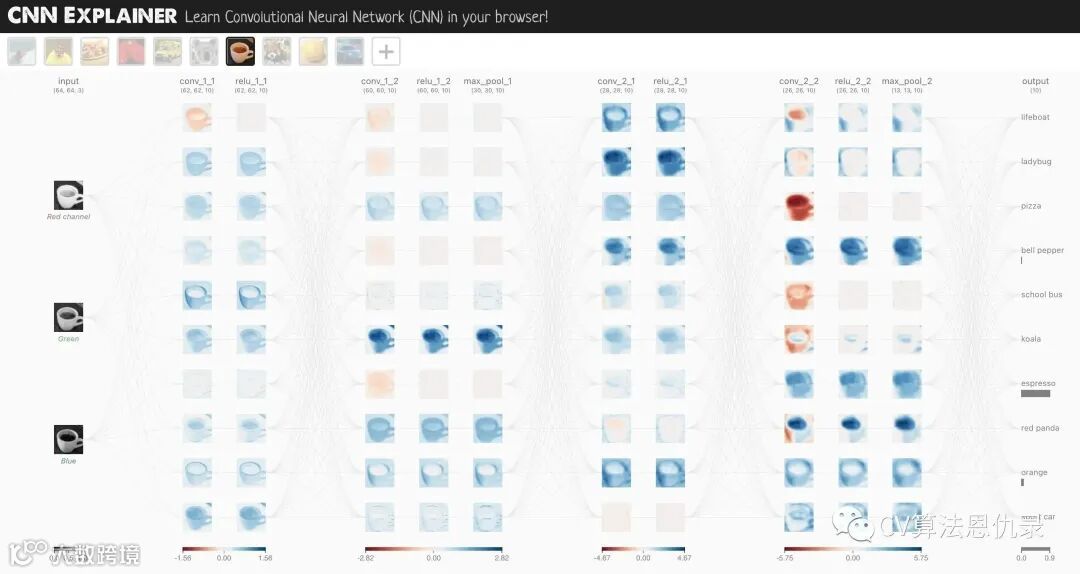
使用 torch.nn 中的 nn.Conv2d() 和 nn.MaxPool2d()。
# Create a convolutional neural network
class FashionMNISTModelV2(nn.Module):
    """
    Model architecture copying TinyVGG from:
    https://poloclub.github.io/cnn-explainer/
    """
    def __init__(self, input_shape: int, hidden_units: int, output_shape: int):
        super().__init__()
        self.block_1 = nn.Sequential(
            nn.Conv2d(in_channels=input_shape,
                      out_channels=hidden_units,
                      kernel_size=3, # 图像上的正方形有多大?
                      stride=1, # default
                      padding=1),# options = "valid" (no padding) or "same" (输出与输入具有相同的形状)或特定数字
            nn.ReLU(),
            nn.Conv2d(in_channels=hidden_units,
                      out_channels=hidden_units,
                      kernel_size=3,
                      stride=1,
                      padding=1),
            nn.ReLU(),
            nn.MaxPool2d(kernel_size=2,
                         stride=2) # 默认步幅值与 kernel_size 相同
        )
        self.block_2 = nn.Sequential(
            nn.Conv2d(hidden_units, hidden_units, 3, padding=1),
            nn.ReLU(),
            nn.Conv2d(hidden_units, hidden_units, 3, padding=1),
            nn.ReLU(),
            nn.MaxPool2d(2)
        )
        self.classifier = nn.Sequential(
            nn.Flatten(),
            # 这个 in_features 形状是从哪里来的?
            # 这是因为网络的每一层都压缩并改变了输入数据的形状。
            nn.Linear(in_features=hidden_units*7*7,
                      out_features=output_shape)
        )

    def forward(self, x: torch.Tensor):
        x = self.block_1(x)
        # print(x.shape)
        x = self.block_2(x)
        # print(x.shape)
        x = self.classifier(x)
        # print(x.shape)
        return x

torch.manual_seed(42)
model_2 = FashionMNISTModelV2(input_shape=1,
    hidden_units=10,
    output_shape=len(class_names)).to(device)
model_2
FashionMNISTModelV2(
  (block_1): Sequential(
    (0): Conv2d(1, 10, kernel_size=(3, 3), stride=(1, 1), padding=(1, 1))
    (1): ReLU()
    (2): Conv2d(10, 10, kernel_size=(3, 3), stride=(1, 1), padding=(1, 1))
    (3): ReLU()
    (4): MaxPool2d(kernel_size=2, stride=2, padding=0, dilation=1, ceil_mode=False)
  )
  (block_2): Sequential(
    (0): Conv2d(10, 10, kernel_size=(3, 3), stride=(1, 1), padding=(1, 1))
    (1): ReLU()
    (2): Conv2d(10, 10, kernel_size=(3, 3), stride=(1, 1), padding=(1, 1))
    (3): ReLU()
    (4): MaxPool2d(kernel_size=2, stride=2, padding=0, dilation=1, ceil_mode=False)
  )
  (classifier): Sequential(
    (0): Flatten(start_dim=1, end_dim=-1)
    (1): Linear(in_features=490, out_features=10, bias=True)
  )
)
7.1 单步执行 nn.Conv2d()
我们可以开始使用上面的模型,看看会发生什么,但让我们先来看看添加的两个新层:
-
nn.Conv2d(),也称为卷积层。 -
nn.MaxPool2d(),也称为最大池化层。
问题: nn.Conv2d() 中的 "2d" 代表什么?
2d 用于二维数据。就像图像有两个维度:高度和宽度。是的,还有颜色通道维度,但每个颜色通道维度都有两个维度:高度和宽度。
对于其他维度数据(例如文本的 1D 或 3D 对象的 3D),还有 nn.Conv1d() 和 nn.Conv3d()。
创建一些数据,测试这些层。
torch.manual_seed(42)

# 创建与图像批次大小相同的随机数样本批次
images = torch.randn(size=(32, 3, 64, 64)) # [batch_size, color_channels, height, width]
test_image = images[0] # 获取单张图片进行测试
print(f"Image batch shape: {images.shape} -> [batch_size, color_channels, height, width]")
print(f"Single image shape: {test_image.shape} -> [color_channels, height, width]")
print(f"Single image pixel values:\n{test_image}")
nn.Conv2d() 各种参数的示例:
-
in_channels(int) - 输入图像中的通道数。 -
out_channels(int) - 卷积产生的通道数。 -
kernel_size(int or tuple) - 卷积内核/过滤器的大小。 -
stride(int or tuple, optional) - 卷积内核一次采取多大的步骤。默认值:1。 -
padding(int, tuple, str) - 添加到输入四个边的填充。默认值:0。
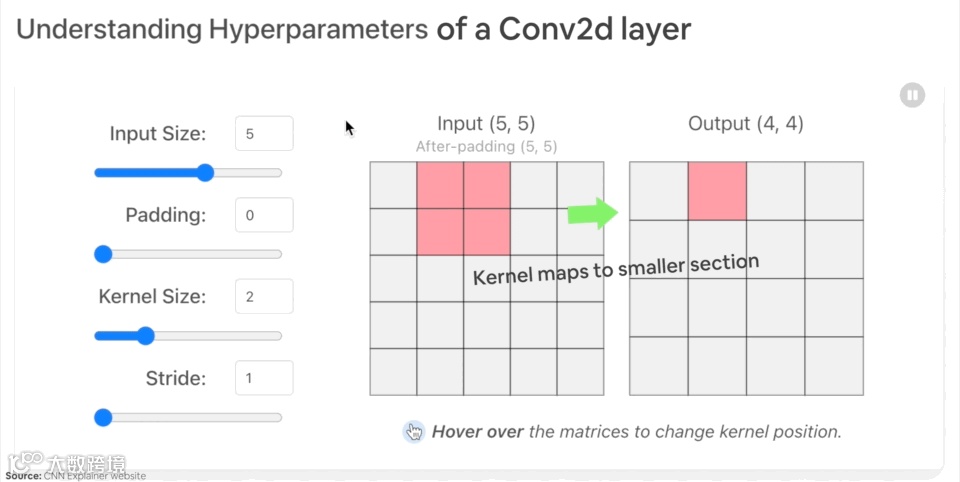
nn.Conv2d() 层使用示例。
torch.manual_seed(42)

# Create a convolutional layer with same dimensions as TinyVGG
# (try changing any of the parameters and see what happens)
conv_layer = nn.Conv2d(in_channels=3,
                       out_channels=10,
                       kernel_size=3,
                       stride=1,
                       padding=0) # also try using "valid" or "same" here

# Pass the data through the convolutional layer
conv_layer(test_image) # Note: If running PyTorch <1.11.0, this will error because of shape issues (nn.Conv.2d() expects a 4d tensor as input)
如果我们尝试传入单个图像,若出现形状不匹配的错误,如下:
RuntimeError: Expected 4-dimensional input for 4-dimensional weight [10, 3, 3, 3], but got 3-dimensional input of size [3, 64, 64] instead
注意: PyTorch 1.11.0+,则不会发生此错误。
这是因为 nn.Conv2d() 层需要一个 4 维张量作为输入,大小为 (N, C, H, W) 或 [batch_size, color_channels, height, width]。
而 test_image 只有 [color_channels, height, width] 或 [3, 64, 64]。
使用 test_image.unsqueeze(dim=0) 增加一个额外的维度 N。
# 为测试图像添加额外维度
test_image.unsqueeze(dim=0).shape
torch.Size([1, 3, 64, 64])
# 通过 conv_layer 传递额外维度的测试图像
conv_layer(test_image.unsqueeze(dim=0)).shape
torch.Size([1, 10, 62, 62])
读者注意形状发生了什么变化吗?(与 CNN Explainer 上的 TinyVGG 的第一层形状相同)
我们得到不同的通道大小和不同的像素大小。如果我们 conv_layer 的值?
torch.manual_seed(42)
# Create a new conv_layer with different values (try setting these to whatever you like)
conv_layer_2 = nn.Conv2d(in_channels=3, # same number of color channels as our input image
                         out_channels=10,
                         kernel_size=(5, 5), # kernel is usually a square so a tuple also works
                         stride=2,
                         padding=0)

# Pass single image through new conv_layer_2 (this calls nn.Conv2d()'s forward() method on the input)
conv_layer_2(test_image.unsqueeze(dim=0)).shape
torch.Size([1, 10, 30, 30])
这次又换了一个形状。图像的形状是 [1, 10, 30, 30] (如果使用不同的值,它会有所不同)或 [batch_size=1, color_channels=10, height=30, width=30]。
这里发生了什么?nn.Conv2d()正在压缩图像中存储的信息。它通过根据其内部参数对输入(测试图像)执行操作来实现。类似于我们一直在构建的其他神经网络。通过优化器,数据进入网络后,尝试更新它们的内部参数(模式)以降低损失函数。
执行 conv_layer_2.state_dict() 可查看权重和偏差设置。
# Check out the conv_layer_2 internal parameters
print(conv_layer_2.state_dict())
# 获取 conv_layer_2 中权重和偏置张量的形状
print(f"conv_layer_2 weight shape: \n{conv_layer_2.weight.shape} -> [out_channels=10, in_channels=3, kernel_size=5, kernel_size=5]")
print(f"\nconv_layer_2 bias shape: \n{conv_layer_2.bias.shape} -> [out_channels=10]")
conv_layer_2 weight shape:
torch.Size([10, 3, 5, 5]) -> [out_channels=10, in_channels=3, kernel_size=5, kernel_size=5]

conv_layer_2 bias shape:
torch.Size([10]) -> [out_channels=10]
7.2 单步执行 nn.MaxPool2d()
数据通过 nn.MaxPool2d()后有什么变化?
# Print out original image shape without and with unsqueezed dimension
print(f"Test image original shape: {test_image.shape}")
print(f"Test image with unsqueezed dimension: {test_image.unsqueeze(dim=0).shape}")

# 创建样本 nn.MaxPoo2d() 层
max_pool_layer = nn.MaxPool2d(kernel_size=2)

# 仅通过 conv_layer 传递数据
test_image_through_conv = conv_layer(test_image.unsqueeze(dim=0))
print(f"Shape after going through conv_layer(): {test_image_through_conv.shape}")

# 通过最大池层传递数据
test_image_through_conv_and_max_pool = max_pool_layer(test_image_through_conv)
print(f"Shape after going through conv_layer() and max_pool_layer(): {test_image_through_conv_and_max_pool.shape}")
Test image original shape: torch.Size([3, 64, 64])
Test image with unsqueezed dimension: torch.Size([1, 3, 64, 64])
Shape after going through conv_layer(): torch.Size([1, 10, 62, 62])
Shape after going through conv_layer() and max_pool_layer(): torch.Size([1, 10, 31, 31])
nn.MaxPool2d() 中的 kernel_size 将影响输出形状的大小。代码示例中 62x62 的图像形状减半到 31x31。
torch.manual_seed(42)
# Create a random tensor with a similiar number of dimensions to our images
random_tensor = torch.randn(size=(1, 1, 2, 2))
print(f"Random tensor:\n{random_tensor}")
print(f"Random tensor shape: {random_tensor.shape}")

# Create a max pool layer
max_pool_layer = nn.MaxPool2d(kernel_size=2) # see what happens when you change the kernel_size value

# Pass the random tensor through the max pool layer
max_pool_tensor = max_pool_layer(random_tensor)
print(f"\nMax pool tensor:\n{max_pool_tensor} <- this is the maximum value from random_tensor")
print(f"Max pool tensor shape: {max_pool_tensor.shape}")
Random tensor:
tensor([[[[0.3367, 0.1288],
          [0.2345, 0.2303]]]])
Random tensor shape: torch.Size([1, 1, 2, 2])

Max pool tensor:
tensor([[[[0.3367]]]]) <- this is the maximum value from random_tensor
Max pool tensor shape: torch.Size([1, 1, 1, 1])
请注意 random_tensor 和 max_pool_tensor 的最后两个维度, 它们从 [2, 2] 到 [1, 1]。从本质上讲,它们减半了。并且 max_pool_tensor 的数值是 random_tensor 的最大值。
本质上,神经网络中的每一层都试图将数据从高维空间压缩到低维空间。换句话说,获取大量数字(原始数据)并学习这些数字中的模式,这些模式具有预测性,同时在大小上也小于原始值。从人工智能的角度来看,可以将神经网络的整个目标视为压缩信息。
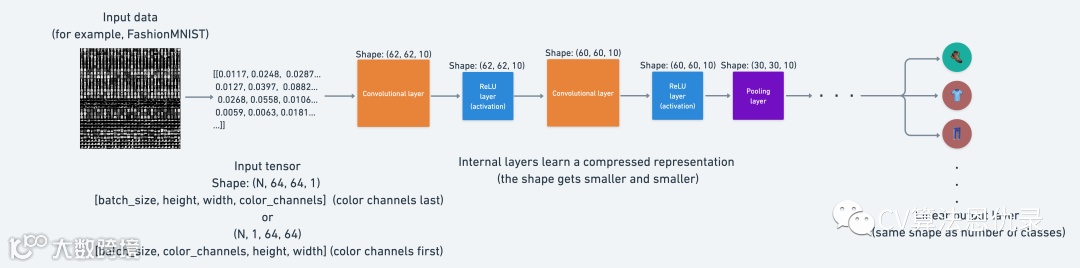
这意味着,从神经网络的角度来看,智能是压缩。这就是使用 nn.MaxPool2d() 层的思想:从张量的一部分中取最大值并忽略其余部分。
本质上,降低张量的维数同时仍然保留重要的信息部分。nn.Conv2d() 层也是如此。除了不只是取最大值,nn.Conv2d()它还对数据执行卷积运算。
7.3 model_2 设置损失函数和优化器
# Setup loss and optimizer
loss_fn = nn.CrossEntropyLoss()
optimizer = torch.optim.SGD(params=model_2.parameters(),
                             lr=0.1)
7.4 model_2 进行训练和测试
torch.manual_seed(42)

# Measure time
from timeit import default_timer as timer
train_time_start_model_2 = timer()

# Train and test model
epochs = 3
for epoch in tqdm(range(epochs)):
    print(f"Epoch: {epoch}\n---------")
    train_step(data_loader=train_dataloader,
        model=model_2,
        loss_fn=loss_fn,
        optimizer=optimizer,
        accuracy_fn=accuracy_fn,
        device=device
    )
    test_step(data_loader=test_dataloader,
        model=model_2,
        loss_fn=loss_fn,
        accuracy_fn=accuracy_fn,
        device=device
    )

train_time_end_model_2 = timer()
total_train_time_model_2 = print_train_time(start=train_time_start_model_2,
                                           end=train_time_end_model_2,
                                           device=device)
Epoch: 0
---------
Train loss: 0.59396 | Train accuracy: 78.42%
Test loss: 0.40666 | Test accuracy: 85.22%

Epoch: 1
---------
Train loss: 0.35905 | Train accuracy: 87.06%
Test loss: 0.34628 | Test accuracy: 87.15%

Epoch: 2
---------
Train loss: 0.32271 | Train accuracy: 88.31%
Test loss: 0.33112 | Test accuracy: 87.90%

Train time on cuda: 37.574 seconds
# Get model_2 results
model_2_results = eval_model(
    model=model_2,
    data_loader=test_dataloader,
    loss_fn=loss_fn,
    accuracy_fn=accuracy_fn
)
model_2_results
{'model_name': 'FashionMNISTModelV2',
 'model_loss': 0.3311220407485962,
 'model_acc': 87.89936102236422}
8.模型比较
有三个模型,如下。
-
model_0- 2 层nn.Linear()基线模型。 -
model_1- 与基线模型类似,在nn.Linear()层后添加nn.ReLU()层。 -
model_2- TinyVGG 架构。
构建多个模型并执行多个训练实验以查看哪个表现最好。
import pandas as pd
compare_results = pd.DataFrame([model_0_results, model_1_results, model_2_results])
compare_results
| model_name | model_loss | model_acc |
|---|---|---|
| FashionMNISTModelV0 | 0.465936 | 83.925719 |
| FashionMNISTModelV1 | 0.685001 | 75.019968 |
| FashionMNISTModelV2 | 0.331122 | 87.899361 |
# Add training times to results comparison
compare_results["training_time"] = [total_train_time_model_0,
                                    total_train_time_model_1,
                                    total_train_time_model_2]
compare_results
| model_name | model_loss | model_acc | training_time |
|---|---|---|---|
| FashionMNISTModelV0 | 0.46 | 83.92 | 22.23 |
| FashionMNISTModelV1 | 0.68 | 75.01 | 25.99 |
| FashionMNISTModelV2 | 0.33 | 87.89 | 37.57 |
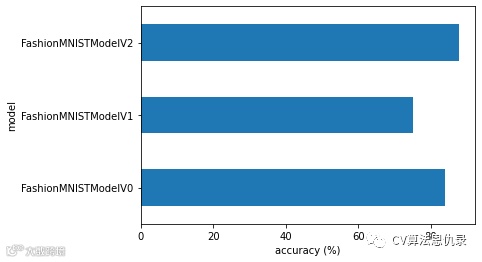
这看起来 (FashionMNISTModelV2) 模型表现的最好(损失最低,准确度最高)但训练时间最长。
基线模型 (FashionMNISTModelV0) 比 model_1 (FashionMNISTModelV1) 表现的更好。
性能-速度权衡
在机器学习中需要注意的是性能与速度的权衡。通常,可以从更大、更复杂的模型中获得更好的性能(就像 model_2)。然而,这种性能提升通常是以牺牲训练速度和推理速度为代价的。
注意: 时间将在很大程度上取决于使用的硬件。通常,拥有的 CPU 内核越多,模型在 CPU 上的训练速度就越快,和 GPU 类似。
由于结合了技术进步,较新的硬件通常也会更快地训练模型。
# Visualize our model results
compare_results.set_index("model_name")["model_acc"].plot(kind="barh")
plt.xlabel("accuracy (%)")
plt.ylabel("model");
9.使用最佳模型进行随机预测并评估
创建一个函数 make_predictions(), 可以在其中传递模型和一些数据以供预测。
def make_predictions(model: torch.nn.Module, data: list, device: torch.device = device):
    pred_probs = []
    model.eval()
    with torch.inference_mode():
        for sample in data:
            # 准备样本
            sample = torch.unsqueeze(sample, dim=0).to(device) # 添加额外维度并将样本发送到设备

            # 前向传播 (model outputs raw logit)
            pred_logit = model(sample)

            # 获取预测概率 (logit -> prediction probability)
            pred_prob = torch.softmax(pred_logit.squeeze(), dim=0)

            # 关闭 pred_prob off 的 GPU, 以进行进一步计算
            pred_probs.append(pred_prob.cpu())

    # 堆叠 pred_probs, 将列表变成张量
    return torch.stack(pred_probs)
import random
random.seed(42)
test_samples = []
test_labels = []
for sample, label in random.sample(list(test_data), k=9):
    test_samples.append(sample)
    test_labels.append(label)

# 查看第一个样本的形状和标签
print(f"Test sample image shape: {test_samples[0].shape}\nTest sample label: {test_labels[0]} ({class_names[test_labels[0]]})")
Test sample image shape: torch.Size([1, 28, 28])
Test sample label: 5 (Sandal)
And now we can use our make_predictions() function to predict on test_samples.
# 使用模型 2 对测试样本进行预测
pred_probs= make_predictions(model=model_2,
                             data=test_samples)

# 查看前两个预测概率列表
pred_probs[:2]
tensor([[3.9027e-08, 7.2132e-08, 1.7172e-07, 1.1997e-07, 2.1429e-08, 9.9959e-01,
         3.0081e-07, 2.0256e-05, 1.0110e-04, 2.9202e-04],
        [6.9488e-02, 3.3283e-01, 1.6287e-03, 3.7193e-01, 1.3222e-01, 7.4163e-05,
         9.1377e-02, 1.5910e-04, 2.5456e-04, 3.6999e-05]])
使用 torch.argmax() 函数处理激活函数 torch.softmax() 的输出,从预测概率中获得预测标签
# Turn the prediction probabilities into prediction labels by taking the argmax()
pred_classes = pred_probs.argmax(dim=1)
pred_classes
tensor([5, 3, 7, 4, 3, 0, 4, 7, 1])
# Are our predictions in the same form as our test labels?
test_labels, pred_classes
([5, 1, 7, 4, 3, 0, 4, 7, 1], tensor([5, 3, 7, 4, 3, 0, 4, 7, 1]))
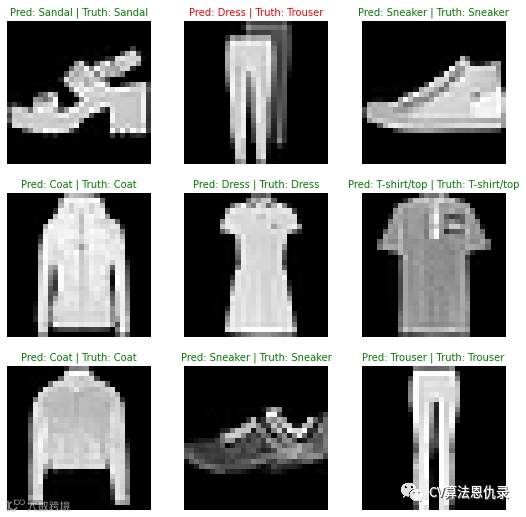
可视化预测结果
# Plot predictions
plt.figure(figsize=(9, 9))
nrows = 3
ncols = 3
for i, sample in enumerate(test_samples):
  # Create a subplot
  plt.subplot(nrows, ncols, i+1)

  # Plot the target image
  plt.imshow(sample.squeeze(), cmap="gray")

  # Find the prediction label (in text form, e.g. "Sandal")
  pred_label = class_names[pred_classes[i]]

  # Get the truth label (in text form, e.g. "T-shirt")
  truth_label = class_names[test_labels[i]]

  # Create the title text of the plot
  title_text = f"Pred: {pred_label} | Truth: {truth_label}"

  # Check for equality and change title colour accordingly
  if pred_label == truth_label:
      plt.title(title_text, fontsize=10, c="g") # green text if correct
  else:
      plt.title(title_text, fontsize=10, c="r") # red text if wrong
  plt.axis(False);
10.用混淆矩阵进一步预测评估
我们可以使用许多不同的评估指标来解决分类问题,最直观的一种是混淆矩阵confusion matrix。混淆矩阵展示分类模型在预测和真实标签之间混淆的位置。
制作混淆矩阵,将经历三个步骤:
-
model_2进行预测。(混淆矩阵将预测与真实标签进行比较) -
使用 torch.ConfusionMatrix制作混淆矩阵。 -
使用 mlxtend.plotting.plot_confusion_matrix()绘制混淆矩阵。
# Import tqdm for progress bar
from tqdm.auto import tqdm

# 1. Make predictions with trained model
y_preds = []
model_2.eval()
with torch.inference_mode():
  for X, y in tqdm(test_dataloader, desc="Making predictions"):
    # Send data and targets to target device
    X, y = X.to(device), y.to(device)
    # Do the forward pass
    y_logit = model_2(X)
    # Turn predictions from logits -> prediction probabilities -> predictions labels
    y_pred = torch.softmax(y_logit, dim=1).argmax(dim=1)
    # Put predictions on CPU for evaluation
    y_preds.append(y_pred.cpu())
# Concatenate list of predictions into a tensor
y_pred_tensor = torch.cat(y_preds)
现在我们有了预测,让我们完成第 2 步和第 3 步,首先,需要确保已经安装 torchmetrics、mlxtend(这两个库将帮助制作和可视化混淆矩阵)。
# 查看 torchmetrics 是否存在,如果不存在,请安装它
try:
    import torchmetrics, mlxtend
    print(f"mlxtend version: {mlxtend.__version__}")
    assert int(mlxtend.__version__.split(".")[1]) >= 19, "mlxtend verison should be 0.19.0 or higher"
except:
    !pip install -q torchmetrics -U mlxtend # <- Note: If you're using Google Colab, this may require restarting the runtime
    import torchmetrics, mlxtend
    print(f"mlxtend version: {mlxtend.__version__}")
mlxtend version: 0.21.0
确保 mlxtend 版本是 0.19.0 及以上。
# 导入 mlxtend 升级版本
import mlxtend
print(mlxtend.__version__)
assert int(mlxtend.__version__.split(".")[1]) >= 19 # should be version 0.19.0 or higher
0.21.0
torchmetrics 和 mlxtend 已经安装,让我们做一个混淆矩阵!
首先,我们将创建一个 torchmetrics.ConfusionMatrix 实例,通过设置 num_classes=len(class_names) 告诉它我们正在处理多少个类。然后,我们将模型的预测 (preds=y_pred_tensor) 和标签 (target=test_data.targets) 传递给我们的实例来创建一个混淆矩阵(以张量格式)。最后,我们可以使用函数 plot_confusion_matrix() 绘制混淆矩阵。
from torchmetrics import ConfusionMatrix
from mlxtend.plotting import plot_confusion_matrix

# 2. Setup confusion matrix instance and compare predictions to targets
confmat = ConfusionMatrix(num_classes=len(class_names), task='multiclass')
confmat_tensor = confmat(preds=y_pred_tensor,
                         target=test_data.targets)

# 3. Plot the confusion matrix
fig, ax = plot_confusion_matrix(
    conf_mat=confmat_tensor.numpy(), # matplotlib likes working with NumPy
    class_names=class_names, # turn the row and column labels into class names
    figsize=(10, 7)
);
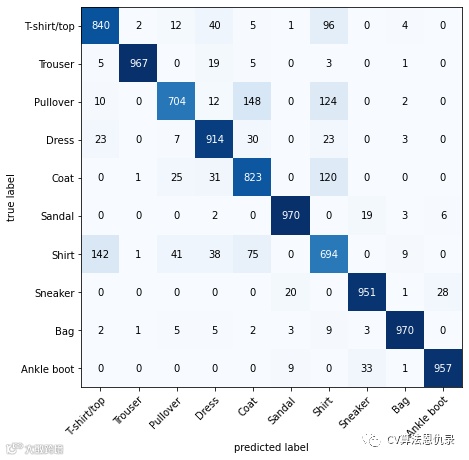
可以看到模型表现相当不错,因为大多数深色方块都位于从左上角到右下角的对角线下方(理想模型将仅在这些方块中具有值,而在其他任何地方都为 0)。
该模型在相似的类别上变得最“困惑”,例如为实际标记为“Shirt 衬衫”的图像预测“ Pullover 套头衫”。
对于实际标记为“ T-shirt/top T 恤/上衣”的类别,预测“Shirt衬衫”也是如此。
这种信息通常比单一的准确性指标更有帮助,因为它告诉用户模型在哪里出错了。
它还暗示了为什么模型可能会出错。
模型有时会为标记为“T 恤/上衣”的图像预测“衬衫”,这是可以理解的。
11.保存和加载性能最好的模型
可以使用以下组合保存和加载 PyTorch 模型:
-
torch.save- 保存整个 PyTorch 模型或模型的state_dict(). -
torch.load- 加载保存的 PyTorch 对象的函数。 -
torch.nn.Module.load_state_dict()- 将保存的文件state_dict()加载到现有模型实例中。
You can see more of these three in the PyTorch saving and loading models documentation.
现在保存 model_2 的 state_dict() ,然后加载模型,进行评估。
from pathlib import Path

# 创建模型路径 (if it doesn't already exist), see: https://docs.python.org/3/library/pathlib.html#pathlib.Path.mkdir
MODEL_PATH = Path("models")
MODEL_PATH.mkdir(parents=True, # 如果需要创建父目录
                 exist_ok=True # 如果模型目录已经存在,不要报错
)

# 创建模型保存路径
MODEL_NAME = "03_pytorch_computer_vision_model_2.pth"
MODEL_SAVE_PATH = MODEL_PATH / MODEL_NAME

# 保存模型状态 dict
print(f"Saving model to: {MODEL_SAVE_PATH}")
torch.save(obj=model_2.state_dict(), # 只保存 state_dict(),只保存学习到的参数
           f=MODEL_SAVE_PATH)
Saving model to: models/03_pytorch_computer_vision_model_2.pth
现在我们有一个保存的模型,我们可以使用 load_state_dict() 和 torch.load() 的组合将模型的 state_dict() 加载回来。
由于我们正在使用 load_state_dict(), 因此我们在创建 FashionMNISTModelV2() 的新实例,需要使用与保存的模型 state_dict() 相同的输入参数。
# 创建 FashionMNISTModelV2 的新实例(与我们保存的 state_dict() 相同的类)
# 注意:如果此处的形状与保存的版本不同,加载模型将出错
loaded_model_2 = FashionMNISTModelV2(input_shape=1,
                                    hidden_units=10, # try changing this to 128 and seeing what happens
                                    output_shape=10)

# 加载保存的 state_dict()
loaded_model_2.load_state_dict(torch.load(f=MODEL_SAVE_PATH))

# Send model to GPU
loaded_model_2 = loaded_model_2.to(device)
现在有了一个加载的模型,我们可以用 eval_model() 来评估它,确保它的参数与 model_2 保存之前的工作方式相似。
# 评估模型
torch.manual_seed(42)

loaded_model_2_results = eval_model(
    model=loaded_model_2,
    data_loader=test_dataloader,
    loss_fn=loss_fn,
    accuracy_fn=accuracy_fn
)

loaded_model_2_results
{'model_name': 'FashionMNISTModelV2',
 'model_loss': 0.3311220407485962,
 'model_acc': 87.89936102236422}
结果与 model_2_results 一样吗?
model_2_results
{'model_name': 'FashionMNISTModelV2',
 'model_loss': 0.3311220407485962,
 'model_acc': 87.89936102236422}
我们可以通过设置 torch.isclose() 的参数 atol (绝对容差)和 rtol(相对容差)来确定两个张量是否彼此接近,如果很接近,torch.isclose() 输出为真。
# Check to see if results are close to each other (if they are very far away, there may be an error)
torch.isclose(torch.tensor(model_2_results["model_loss"]),
              torch.tensor(loaded_model_2_results["model_loss"]),
              atol=1e-08, # absolute tolerance 绝对
              rtol=0.0001) # relative tolerance 相对
tensor(True)
作者介绍