

到目前为止,我们已经手工构建了一些模型。但他们的表现一直很差。读者可能会想,对于我们的问题是否已经存在一个性能良好的模型?而在深度学习的世界里,答案往往是肯定的。
我们将看到如何使用称为迁移学习的强大技术。
一、什么是迁移学习
迁移学习允许我们采用另一个模型从另一个问题中学到的模式(也称为权重),并将它们用于我们自己的问题。例如,我们可以采用计算机视觉模型,它是从 ImageNet(不同物体的数百万张图像)等数据集中学习的模式,并使用它们为FoodVision Mini 模型提供动力。
或者我们可以从语言模型(通过大量文本学习语言表示的模型)中获取模式,并将它们用作模型的基础来对不同的文本样本进行分类。前提仍然是:找到一个性能良好的现有模型并将其应用于您自己的问题。
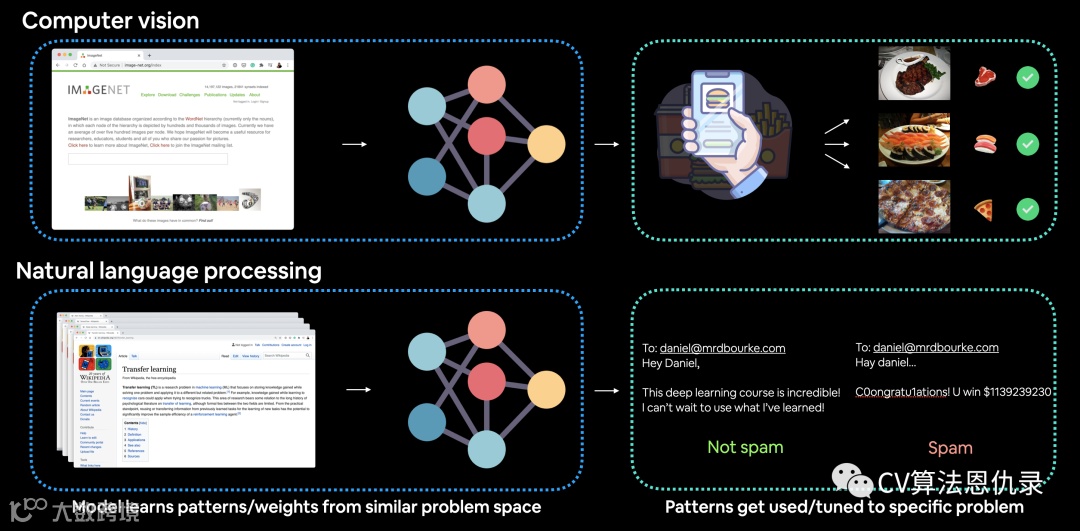
迁移学习应用于计算机视觉和自然语言处理 (NLP) 的示例。就计算机视觉而言,计算机视觉模型可能会在 ImageNet 中的数百万张图像上学习模式,然后使用这些模式来推断另一个问题。对于 NLP,语言模型可以通过阅读所有维基百科(也许更多)来学习语言结构,然后将这些知识应用于不同的问题。
二、为什么要使用迁移学习
使用迁移学习有两个主要好处:
-
1.可以利用现有的模型,已经证明可以解决与我们类似的问题(通常是神经网络架构)。
-
2.可以利用学习到的模式(在相似的数据),这样用较少的自定义数据能获得很好的结果。
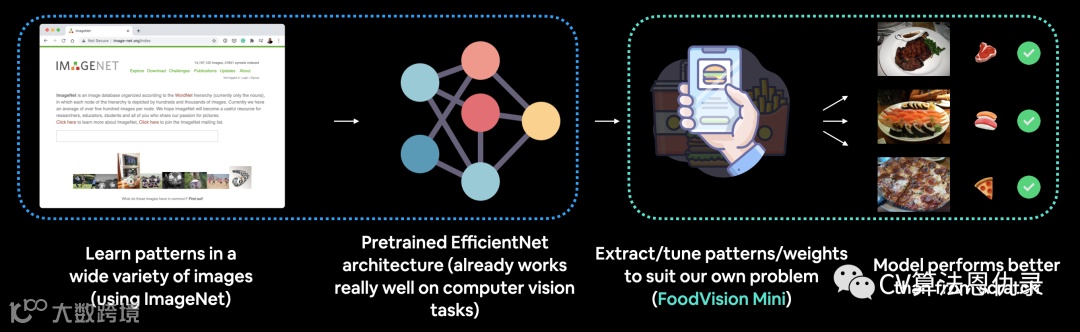
我们将针对 FoodVision Mini 问题进行测试,将采用在 ImageNet 上预训练的计算机视觉模型,并尝试利用其学习表示对披萨饼、牛排和寿司的图像进行分类。
最近一篇机器学习研究论文的一项发现建议从业者尽可能使用迁移学习。

从从业者的角度来看,一项关于从头开始训练还是使用迁移学习的效果更好的研究发现,迁移学习在成本和时间方面要有利得多。 资料来源: How to train your ViT? Data, Augmentation, and Regularization in Vision Transformers paper section 6 (conclusion).
三、在哪里可以找到预训练模型
深度学习的世界是一个神奇的地方。世界各地的许多人都在分享他们的作品。通常,最新研究成果的代码和预训练模型会在发布后几天内发布。读者可以在多个地方找到用于解决自己的问题的预训练模型。
| 地点 | 在哪里 | 链接 |
|---|---|---|
| PyTorch domain libraries | 每个 PyTorch 域库 (torchvision, torchtext) 都带有某种形式的预训练模型。那里的模型可以在 PyTorch 中正常工作。 |
torchvision.models, torchtext.models, torchaudio.models, torchrec.models |
| HuggingFace Hub | 来自世界各地的组织在许多不同领域(视觉、文本、音频等)上的一系列预训练模型。还有很多不同的数据集。 | https://huggingface.co/models, https://huggingface.co/datasets |
timm (PyTorch Image Models) library |
PyTorch 代码中几乎所有最新最好的计算机视觉模型以及大量其他有用的计算机视觉功能。 | https://github.com/rwightman/pytorch-image-models |
| Paperswithcode | 最新最先进的机器学习论文集,附有代码实现。您还可以在此处找到模型在不同任务上的性能基准。 | https://paperswithcode.com/ |

有了上述这些高质量的资源,在开始处理每个深度学习问题时,通常的做法应该是问:“我的问题是否存在预训练模型?”
四、分享的内容
我们将从 torchvision.models 中获取预训练模型,并对其进行自定义以处理,希望改进 FoodVision Mini 问题的效果。
| 主题 | 内容 |
|---|---|
| 0. 开始设置 | 在过去的几节中编写了一些有用的代码,让我们下载它并确保我们可以再次使用它。 |
| 1. 获取数据 | 获取披萨、牛排和寿司图像分类数据集。 |
| 2. 创建数据集和数据加载器 | 将使用 data_setup.py 脚本。设置数据加载器。 |
| 3. 获取并自定义预训练模型 | 将下载一个预训练模型 torchvision.models,并将其定制为适合自己的问题。 |
| 4. 训练模型 | 看看新的预训练模型如何处理披萨、牛排、寿司数据集。 |
| 5. 通过绘制损失曲线评估模型 | 第一个迁移学习模型进展如何?它是过拟合还是欠拟合? |
| 6. 对测试集中的图像进行预测 | 检查模型的评估指标是一回事,但查看其对测试样本的预测是另一回事,让我们可视化、可视化、可视化! |
五、Kaggle练习地址
https://www.kaggle.com/zymzym/06-pytorch
0.开始设置
让我们开始导入/下载本节所需的模块。
# 为了让这个笔记本运行更新的 API ,需要 torch 1.12+ 和 torchvision 0.13+
try:
    import torch
    import torchvision
    assert int(torch.__version__.split(".")[1]) >= 12, "torch version should be 1.12+"
    assert int(torchvision.__version__.split(".")[1]) >= 13, "torchvision version should be 0.13+"
    print(f"torch version: {torch.__version__}")
    print(f"torchvision version: {torchvision.__version__}")
except:
    print(f"[INFO] torch/torchvision versions not as required, installing nightly versions.")
    !pip3 install -U torch torchvision torchaudio --extra-index-url https://download.pytorch.org/whl/cu113
    import torch
    import torchvision
    print(f"torch version: {torch.__version__}")
    print(f"torchvision version: {torchvision.__version__}")
torch version: 1.13.0
torchvision version: 0.14.0
# Continue with regular imports
import matplotlib.pyplot as plt
import torch
import torchvision

from torch import nn
from torchvision import transforms

# 尝试获取 torchinfo,如果它不起作用请安装它
try:
    from torchinfo import summary
except:
    print("[INFO] Couldn't find torchinfo... installing it.")
    !pip install -q torchinfo
    from torchinfo import summary

# 尝试导入 going_modular 目录,如果它不起作用,请从 GitHub 下载它
try:
    from going_modular.going_modular import data_setup, engine
except:
    # Get the going_modular scripts
    print("[INFO] Couldn't find going_modular scripts... downloading them from GitHub.")
    !git clone https://github.com/mrdbourke/pytorch-deep-learning
    !mv pytorch-deep-learning/going_modular .
    !rm -rf pytorch-deep-learning
    from going_modular.going_modular import data_setup, engine
# Setup device agnostic code
device = "cuda" if torch.cuda.is_available() else "cpu"
device
'cuda'
1.获取数据
在开始使用迁移学习之前,我们需要一个数据集。要了解迁移学习与之前构建的模型进行对比,将下载 FoodVision Mini 使用的数据集。pizza_steak_sushi.zip。
import os
import zipfile

from pathlib import Path

import requests

# 设置数据文件夹路径
data_path = Path("data/")
image_path = data_path / "pizza_steak_sushi"

# 如果图像文件夹不存在,请下载并准备
if image_path.is_dir():
    print(f"{image_path} directory exists.")
else:
    print(f"Did not find {image_path} directory, creating one...")
    image_path.mkdir(parents=True, exist_ok=True)

    # 下载 pizza, steak, sushi data
    with open(data_path / "pizza_steak_sushi.zip", "wb") as f:
        request = requests.get("https://github.com/mrdbourke/pytorch-deep-learning/raw/main/data/pizza_steak_sushi.zip")
        print("Downloading pizza, steak, sushi data...")
        f.write(request.content)

    # 解压 pizza, steak, sushi data
    with zipfile.ZipFile(data_path / "pizza_steak_sushi.zip", "r") as zip_ref:
        print("Unzipping pizza, steak, sushi data...")
        zip_ref.extractall(image_path)

    # 移除 .zip file
    os.remove(data_path / "pizza_steak_sushi.zip")
Did not find data/pizza_steak_sushi directory, creating one...
Downloading pizza, steak, sushi data...
Unzipping pizza, steak, sushi data...
现在有了之前使用的相同数据集,一系列标准图像分类格式的比萨饼、牛排和寿司图像。现在让我们创建训练和测试目录的路径。
# Setup Dirs
train_dir = image_path / "train"
test_dir = image_path / "test"
2.创建数据集和数据加载器
将使用来自 torchvision.models 的预训练模型,因此需要先进行特定的转换来准备图像。
2.1 为 torchvision.models(手动创建)创建一个转换
使用预训练模型时,进入模型的自定义数据的准备方式与进入模型的原始训练数据的准备方式相同,这一点很重要。
torchvision.models 文档指出:
所有预训练模型都期望输入图像以相同的方式归一化,即形状为 (3 x H x W) 的 3 通道 RGB 图像的小批量,其中 H 和 W 预计至少为 224。
必须将图像加载到 [0, 1] 的范围内, 然后使用 mean = [0.485, 0.456, 0.406] 和 std = [0.229, 0.224, 0.225] 对其进行归一化。
可以使用以下转换进行规范化:
normalize = transforms.Normalize(mean=[0.485, 0.456, 0.406],
                                 std=[0.229, 0.224, 0.225])
或者通过以下组合实现上述转换:
| 变换数 | 需要转换 | 执行转换的代码 |
|---|---|---|
| 1 | 小批量的尺寸为 [batch_size, 3, height, width] 高度和宽度至少为 224x224^。 |
torchvision.transforms.Resize() 将图像调整为 [3, 224, 224]^ 并且使用 torch.utils.data.DataLoader() 创建图像批次。 |
| 2 | 介于 0 和 1 之间的值。 | torchvision.transforms.ToTensor() |
| 3 | [0.485, 0.456, 0.406] (每个颜色通道的值)的平均值。 |
torchvision.transforms.Normalize(mean=...) 调整图像的平均值。 |
| 4 | [0.229, 0.224, 0.225] (每个颜色通道的值)的标准偏差。 |
torchvision.transforms.Normalize(std=...) 调整图像的标准偏差。 |
Note: torchvision.models 的一些预训练模型,尺寸可能不同于 [3, 224, 224], 例如 [3, 240, 240],请参阅文档。
问题: 均值和标准差值从何而来?为什么我们需要这样做?
这些是根据数据计算的。具体来说,ImageNet 数据集通过图像子集取均值和标准差。
我们也可以不需要这样做。神经网络通常非常有能力找出合适的数据分布(它们会自行计算平均值和标准差的位置),但在开始时设置它们可以帮助我们的网络更快地实现更好的性能。
让我们编写一系列 torchvision.transforms 来执行上述步骤。
# 手动创建转换管道(需要 torchvision < 0.13)
manual_transforms = transforms.Compose([
    transforms.Resize((224, 224)), # 1. 将所有图像重塑为 224x224(尽管某些模型可能需要不同的尺寸)
    transforms.ToTensor(), # 2. 将图像值转换为 0 和 1 之间的
    transforms.Normalize(mean=[0.485, 0.456, 0.406], # 3. [0.485, 0.456, 0.406] 的平均值(跨每个颜色通道)
                         std=[0.229, 0.224, 0.225]) # 4. [0.229, 0.224, 0.225] 的标准偏差(跨每个颜色通道),
])
创建训练和测试 DataLoader,将设置 batch_size=32,以便模型一次看到 32 个样本的小批量。
# 创建训练和测试 DataLoader 并获取类名列表
train_dataloader, test_dataloader, class_names = data_setup.create_dataloaders(train_dir=train_dir,
                                                                               test_dir=test_dir,
                                                                               transform=manual_transforms, # resize, convert images to between 0 & 1 and normalize them
                                                                               batch_size=32) # set mini-batch size to 32

train_dataloader, test_dataloader, class_names
    (<torch.utils.data.dataloader.DataLoader at 0x7f934c91c310>,
     <torch.utils.data.dataloader.DataLoader at 0x7f93531657d0>,
     ['pizza', 'steak', 'sushi'])
2.2 为 torchvision.models(自动创建)创建一个转换
使用预训练模型时,模型的自定义数据的准备方式与模型的原始训练数据的准备方式相同,这一点很重要。
当您设置模型 torchvision.models 并选择想要使用的预训练模型权重时,假设想要使用:
weights = torchvision.models.EfficientNet_B0_Weights.DEFAULT
其中,
-
EfficientNet_B0_Weights是我们想要使用的模型架构权重(中有许多不同的模型架构选项torchvision.models)。 -
DEFAULT表示最佳可用权重(ImageNet 中的最佳性能)。 -
注意: 根据选择的模型架构,可能还会看到其他选项,例如 IMAGENET_V1和IMAGENET_V2,通常版本号越高越好。不过,如果您想要最好的,DEFAULT那是最简单的选择。有关更多信息,请参阅torchvision.models文档。
# 获取一组预训练模型权重
weights = torchvision.models.EfficientNet_B0_Weights.DEFAULT # .DEFAULT = best available weights from pretraining on ImageNet
weights
EfficientNet_B0_Weights.IMAGENET1K_V1
现在要访问与我们关联的转换 weights,我们可以使用该 transforms() 方法。
# Get the transforms used to create our pretrained weights
auto_transforms = weights.transforms()
auto_transforms
    ImageClassification(
        crop_size=[224]
        resize_size=[256]
        mean=[0.485, 0.456, 0.406]
        std=[0.229, 0.224, 0.225]
        interpolation=InterpolationMode.BICUBIC
    )
请注意 auto_transforms 与 manual_transforms 非常相似,唯一的区别是 auto_transforms 是我们选择的模型架构附带。因此必须手动创建 manual_transforms。
自动创建转换 weights.transforms() 的好处是确保使用与预训练模型相同的数据转换。然而,使用自动创建的转换的代价是缺乏定制。
可以像以前一样使用 auto_transforms 创建 DataLoader create_dataloaders()。
# 创建训练和测试 DataLoader 并获取类名列表
train_dataloader, test_dataloader, class_names = data_setup.create_dataloaders(train_dir=train_dir,
                                                                               test_dir=test_dir,
                                                                               transform=auto_transforms, # perform same data transforms on our own data as the pretrained model
                                                                               batch_size=32) # set mini-batch size to 32

train_dataloader, test_dataloader, class_names
    (<torch.utils.data.dataloader.DataLoader at 0x7f93f4a09f90>,
     <torch.utils.data.dataloader.DataLoader at 0x7f93f49fad50>,
     ['pizza', 'steak', 'sushi'])
3.获得预训练模型
浏览文档 torchvision.models,会发现许多常见的计算机视觉架构主干,例如:
| 架构骨干 | 代码 |
|---|---|
| ResNet | torchvision.models.resnet18(), torchvision.models.resnet50()... |
| VGG (与 TinyVGG 类似) | torchvision.models.vgg16() |
| EfficientNet | torchvision.models.efficientnet_b0(), torchvision.models.efficientnet_b1()... |
| VisionTransformer (ViT) | torchvision.models.vit_b_16(), torchvision.models.vit_b_32()... |
| ConvNeXt | torchvision.models.convnext_tiny(), torchvision.models.convnext_small()... |
更多在 torchvision.models |
torchvision.models... |
3.1 应该使用哪个预训练模型?
这取决于正在处理的问题/使用的设备。通常,模型名称中的数字越大(例如 efficientnet_b0() -> efficientnet_b1() -> efficientnet_b7())意味着性能越好但模型越大。
您可能认为更好的性能总是更好,对吧?的确如此,但一些性能更好的模型对于某些设备来说太大了。
例如,假设您想在移动设备上运行您的模型,您必须考虑设备上有限的计算资源,因此您需要寻找更小的模型。
了解这种性能与速度与大小的权衡需要时间和实践。
3.2 建立预训练模型
我们将要使用的预训练模型是 torchvision.models.efficientnet_b0().
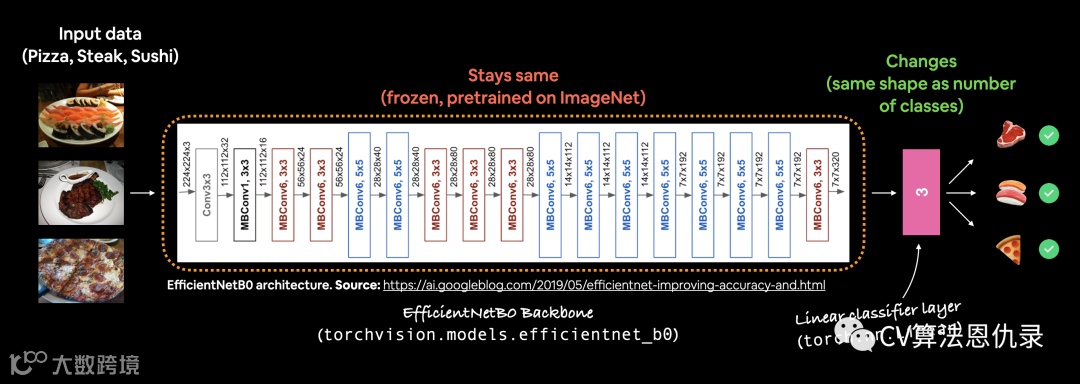
我们将要创建的示例,一个预训练 EfficientNet_B0 model 模型,其输出层针对萨饼、牛排和寿司图像进行了调整。
weights = torchvision.models.EfficientNet_B0_Weights.DEFAULT # .DEFAULT = best available weights for ImageNet
这意味着该模型已经在数百万张图像上进行了训练,并且具有良好的图像数据基础表示。
此预训练模型的 PyTorch 版本能够在 ImageNet 的 1000 个类别中实现约 77.7% 的准确度。
# OLD: Setup the model with pretrained weights and send it to the target device (this was prior to torchvision v0.13)
# model = torchvision.models.efficientnet_b0(pretrained=True).to(device) # OLD method (with pretrained=True)

# NEW: Setup the model with pretrained weights and send it to the target device (torchvision v0.13+)
weights = torchvision.models.EfficientNet_B0_Weights.DEFAULT # .DEFAULT = best available weights
model = torchvision.models.efficientnet_b0(weights=weights).to(device)

#model # uncomment to output (it's very long)
打印模型,会得到类似于以下内容的信息:
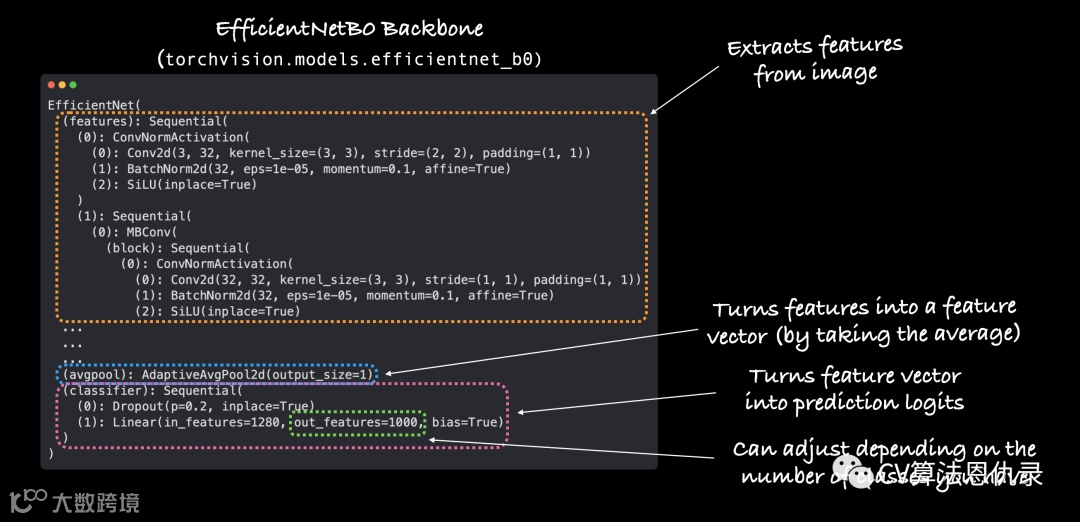
efficientnet_b0 分为三个主要部分:
-
features- 卷积层和其他各种激活层的集合,用于学习视觉数据的基础表示(这种基础表示/层集合通常称为特征或特征提取器,“模型的基础层学习图像的不同特征”)。 -
avgpool- 取 features 层输出的平均值并将其转换为特征向量。 -
classifier- 将特征向量转换为与所需输出类的数量具有相同维数的向量(因为 efficientnet_b0在 ImageNet 上进行了预训练,并且因为 ImageNet 有 1000 个类,所以 out_features=1000是默认值)。
3.3 总结模型 torchinfo.summary()
使用 torchinfo 的 summary() method。
为此,将传入:
-
model- 想要总结的模型。 -
input_size- 传递给模型的数据形状,对于 efficientnet_b0,输入大小为(batch_size, 3, 224, 224)。 -
注意: 由于 torch.nn.AdaptiveAvgPool2d()模型可以处理不同大小的输入图像。该层output_size根据给定输入自适应调整。使用summary(), 将不同大小的输入图像传递给模型可以查看。 -
col_names- 有关模型的各种信息。 -
col_width- 摘要的列应该有多宽。 -
row_settings- 连续显示哪些功能。
# Print a summary using torchinfo (uncomment for actual output)
summary(model=model,
        input_size=(32, 3, 224, 224), # make sure this is "input_size", not "input_shape"
        # col_names=["input_size"], # uncomment for smaller output
        col_names=["input_size", "output_size", "num_params", "trainable"],
        col_width=20,
        row_settings=["var_names"]
)
    ============================================================================================================================================
    Layer (type (var_name))                                      Input Shape          Output Shape         Param #              Trainable
    ============================================================================================================================================
    EfficientNet (EfficientNet)                                  [32, 3, 224, 224]    [32, 1000]           --                   True
    ├─Sequential (features)                                      [32, 3, 224, 224]    [32, 1280, 7, 7]     --                   True
    │    └─Conv2dNormActivation (0)                              [32, 3, 224, 224]    [32, 32, 112, 112]   --                   True
    │    │    └─Conv2d (0)                                       [32, 3, 224, 224]    [32, 32, 112, 112]   864                  True
    │    │    └─BatchNorm2d (1)                                  [32, 32, 112, 112]   [32, 32, 112, 112]   64                   True
    │    │    └─SiLU (2)                                         [32, 32, 112, 112]   [32, 32, 112, 112]   --                   --
    │    └─Sequential (1)                                        [32, 32, 112, 112]   [32, 16, 112, 112]   --                   True
    │    │    └─MBConv (0)                                       [32, 32, 112, 112]   [32, 16, 112, 112]   1,448                True
    │    └─Sequential (2)                                        [32, 16, 112, 112]   [32, 24, 56, 56]     --                   True
    │    │    └─MBConv (0)                                       [32, 16, 112, 112]   [32, 24, 56, 56]     6,004                True
    │    │    └─MBConv (1)                                       [32, 24, 56, 56]     [32, 24, 56, 56]     10,710               True
    │    └─Sequential (3)                                        [32, 24, 56, 56]     [32, 40, 28, 28]     --                   True
    │    │    └─MBConv (0)                                       [32, 24, 56, 56]     [32, 40, 28, 28]     15,350               True
    │    │    └─MBConv (1)                                       [32, 40, 28, 28]     [32, 40, 28, 28]     31,290               True
    │    └─Sequential (4)                                        [32, 40, 28, 28]     [32, 80, 14, 14]     --                   True
    │    │    └─MBConv (0)                                       [32, 40, 28, 28]     [32, 80, 14, 14]     37,130               True
    │    │    └─MBConv (1)                                       [32, 80, 14, 14]     [32, 80, 14, 14]     102,900              True
    │    │    └─MBConv (2)                                       [32, 80, 14, 14]     [32, 80, 14, 14]     102,900              True
    │    └─Sequential (5)                                        [32, 80, 14, 14]     [32, 112, 14, 14]    --                   True
    │    │    └─MBConv (0)                                       [32, 80, 14, 14]     [32, 112, 14, 14]    126,004              True
    │    │    └─MBConv (1)                                       [32, 112, 14, 14]    [32, 112, 14, 14]    208,572              True
    │    │    └─MBConv (2)                                       [32, 112, 14, 14]    [32, 112, 14, 14]    208,572              True
    │    └─Sequential (6)                                        [32, 112, 14, 14]    [32, 192, 7, 7]      --                   True
    │    │    └─MBConv (0)                                       [32, 112, 14, 14]    [32, 192, 7, 7]      262,492              True
    │    │    └─MBConv (1)                                       [32, 192, 7, 7]      [32, 192, 7, 7]      587,952              True
    │    │    └─MBConv (2)                                       [32, 192, 7, 7]      [32, 192, 7, 7]      587,952              True
    │    │    └─MBConv (3)                                       [32, 192, 7, 7]      [32, 192, 7, 7]      587,952              True
    │    └─Sequential (7)                                        [32, 192, 7, 7]      [32, 320, 7, 7]      --                   True
    │    │    └─MBConv (0)                                       [32, 192, 7, 7]      [32, 320, 7, 7]      717,232              True
    │    └─Conv2dNormActivation (8)                              [32, 320, 7, 7]      [32, 1280, 7, 7]     --                   True
    │    │    └─Conv2d (0)                                       [32, 320, 7, 7]      [32, 1280, 7, 7]     409,600              True
    │    │    └─BatchNorm2d (1)                                  [32, 1280, 7, 7]     [32, 1280, 7, 7]     2,560                True
    │    │    └─SiLU (2)                                         [32, 1280, 7, 7]     [32, 1280, 7, 7]     --                   --
    ├─AdaptiveAvgPool2d (avgpool)                                [32, 1280, 7, 7]     [32, 1280, 1, 1]     --                   --
    ├─Sequential (classifier)                                    [32, 1280]           [32, 1000]           --                   True
    │    └─Dropout (0)                                           [32, 1280]           [32, 1280]           --                   --
    │    └─Linear (1)                                            [32, 1280]           [32, 1000]           1,281,000            True
    ============================================================================================================================================
    Total params: 5,288,548
    Trainable params: 5,288,548
    Non-trainable params: 0
    Total mult-adds (G): 12.35
    ============================================================================================================================================
    Input size (MB): 19.27
    Forward/backward pass size (MB): 3452.35
    Params size (MB): 21.15
    Estimated Total Size (MB): 3492.77
    ============================================================================================================================================
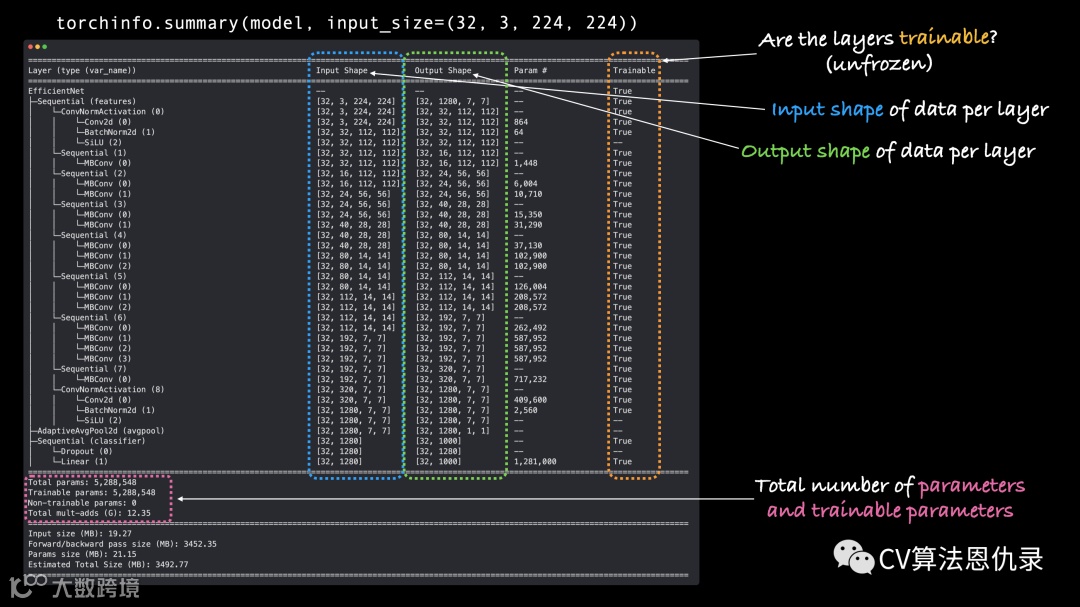
从摘要的输出中,我们可以看到当图像数据通过模型时,所有各种输入和输出形状都会发生变化。
还有一大堆更多的总参数(预训练权重)来识别数据中的不同模式。
作为参考,我们之前的模型 TinyVGG 有 8,083 个参数,而 efficientnet_b0 有 5,288,548 个参数,增加了 ~654x!
3.4 冻结基础模型并更改输出层以满足我们的需要
迁移学习的过程通常是这样的:冻结预训练模型的一些基础层(通常是 features),然后调整输出层(也称为头/分类器层)以满足需要。
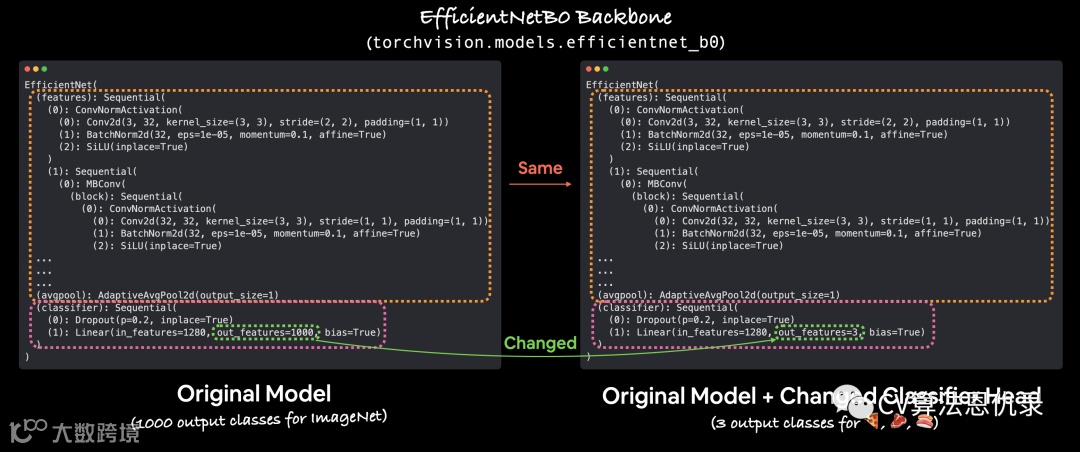
您可以通过更改输出层,自定义预训练模型的输出,以适合正在处理的问题。原来的 torchvision.models.efficientnet_b0()中 out_features=1000,因为 ImageNet 中有 1000 个类,它是在其上训练的数据集。然而,对于我们的问题,只需要对披萨、牛排和寿司的图像进行分类,设置 out_features=3。
让我们冻结 efficientnet_b0 模型中部分 features 的所有层/参数。
注意:冻结层意味着在训练期间保持它们的状态。例如,如果模型有预训练层,冻结它们就是说,“在训练期间不要改变这些层中的任何模式,让它们保持原样。” 本质上,希望保留模型从 ImageNet 中学到的预训练权重/模式作为主干,然后仅更改输出层。
我们可以通过设置属性 requires_grad=False, 来冻结该部分中 features 的所有层/参数。
对于带有 requires_grad=False 的参数,PyTorch 不跟踪梯度更新,反过来,优化器在训练期间不会更改这些参数。
本质上,具有 requires_grad=False 的参数是“无法训练”或“冻结”的。
# Freeze all base layers in the "features" section of the model (the feature extractor) by setting requires_grad=False
for param in model.features.parameters():
    param.requires_grad = False
冻结特征提取层!
现在让我们根据需要调整输出层或预训练模型的一部分。
现在我们的预训练模型有 out_features=1000,因为 ImageNet 中有 1000 个类。但是,我们没有 1000 个类,我们只有三个类,披萨、牛排和寿司。
我们可以在 classifier 通过创建一系列新层来更改模型的一部分。
目前 classifier 包括:
(classifier): Sequential(
    (0): Dropout(p=0.2, inplace=True)
    (1): Linear(in_features=1280, out_features=1000, bias=True)
我们将使用 torch.nn.Dropout(p=0.2, inplace=True) 保持 Dropout 层不变。
注意: Dropout 层 以 p 的概率随机移除两个神经网络层之间的连接。例如,如果p=0.2,神经网络层之间 20% 的连接将每次通过随机移除。这种做法旨在通过确保保留的连接学习功能来补偿其他连接的移除(希望这些剩余的功能更通用)来帮助规范化(防止过度拟合)模型。
将保留输出 Linear 层 in_features=1280 ,但我们会将 out_features 值更改为 class_names (len(['pizza', 'steak', 'sushi']) = 3)。
# Set the manual seeds
torch.manual_seed(42)
torch.cuda.manual_seed(42)

# Get the length of class_names (one output unit for each class)
output_shape = len(class_names)

# Recreate the classifier layer and seed it to the target device
model.classifier = torch.nn.Sequential(
    torch.nn.Dropout(p=0.2, inplace=True),
    torch.nn.Linear(in_features=1280,
                    out_features=output_shape, # same number of output units as our number of classes
                    bias=True)).to(device)
# # Do a summary *after* freezing the features and changing the output classifier layer (uncomment for actual output)
summary(model,
        input_size=(32, 3, 224, 224), # make sure this is "input_size", not "input_shape" (batch_size, color_channels, height, width)
        verbose=0,
        col_names=["input_size", "output_size", "num_params", "trainable"],
        col_width=20,
        row_settings=["var_names"]
)
    ============================================================================================================================================
    Layer (type (var_name))                                      Input Shape          Output Shape         Param #              Trainable
    ============================================================================================================================================
    EfficientNet (EfficientNet)                                  [32, 3, 224, 224]    [32, 3]              --                   Partial
    ├─Sequential (features)                                      [32, 3, 224, 224]    [32, 1280, 7, 7]     --                   False
    │    └─Conv2dNormActivation (0)                              [32, 3, 224, 224]    [32, 32, 112, 112]   --                   False
    │    │    └─Conv2d (0)                                       [32, 3, 224, 224]    [32, 32, 112, 112]   (864)                False
    │    │    └─BatchNorm2d (1)                                  [32, 32, 112, 112]   [32, 32, 112, 112]   (64)                 False
    │    │    └─SiLU (2)                                         [32, 32, 112, 112]   [32, 32, 112, 112]   --                   --
    │    └─Sequential (1)                                        [32, 32, 112, 112]   [32, 16, 112, 112]   --                   False
    │    │    └─MBConv (0)                                       [32, 32, 112, 112]   [32, 16, 112, 112]   (1,448)              False
    │    └─Sequential (2)                                        [32, 16, 112, 112]   [32, 24, 56, 56]     --                   False
    │    │    └─MBConv (0)                                       [32, 16, 112, 112]   [32, 24, 56, 56]     (6,004)              False
    │    │    └─MBConv (1)                                       [32, 24, 56, 56]     [32, 24, 56, 56]     (10,710)             False
    │    └─Sequential (3)                                        [32, 24, 56, 56]     [32, 40, 28, 28]     --                   False
    │    │    └─MBConv (0)                                       [32, 24, 56, 56]     [32, 40, 28, 28]     (15,350)             False
    │    │    └─MBConv (1)                                       [32, 40, 28, 28]     [32, 40, 28, 28]     (31,290)             False
    │    └─Sequential (4)                                        [32, 40, 28, 28]     [32, 80, 14, 14]     --                   False
    │    │    └─MBConv (0)                                       [32, 40, 28, 28]     [32, 80, 14, 14]     (37,130)             False
    │    │    └─MBConv (1)                                       [32, 80, 14, 14]     [32, 80, 14, 14]     (102,900)            False
    │    │    └─MBConv (2)                                       [32, 80, 14, 14]     [32, 80, 14, 14]     (102,900)            False
    │    └─Sequential (5)                                        [32, 80, 14, 14]     [32, 112, 14, 14]    --                   False
    │    │    └─MBConv (0)                                       [32, 80, 14, 14]     [32, 112, 14, 14]    (126,004)            False
    │    │    └─MBConv (1)                                       [32, 112, 14, 14]    [32, 112, 14, 14]    (208,572)            False
    │    │    └─MBConv (2)                                       [32, 112, 14, 14]    [32, 112, 14, 14]    (208,572)            False
    │    └─Sequential (6)                                        [32, 112, 14, 14]    [32, 192, 7, 7]      --                   False
    │    │    └─MBConv (0)                                       [32, 112, 14, 14]    [32, 192, 7, 7]      (262,492)            False
    │    │    └─MBConv (1)                                       [32, 192, 7, 7]      [32, 192, 7, 7]      (587,952)            False
    │    │    └─MBConv (2)                                       [32, 192, 7, 7]      [32, 192, 7, 7]      (587,952)            False
    │    │    └─MBConv (3)                                       [32, 192, 7, 7]      [32, 192, 7, 7]      (587,952)            False
    │    └─Sequential (7)                                        [32, 192, 7, 7]      [32, 320, 7, 7]      --                   False
    │    │    └─MBConv (0)                                       [32, 192, 7, 7]      [32, 320, 7, 7]      (717,232)            False
    │    └─Conv2dNormActivation (8)                              [32, 320, 7, 7]      [32, 1280, 7, 7]     --                   False
    │    │    └─Conv2d (0)                                       [32, 320, 7, 7]      [32, 1280, 7, 7]     (409,600)            False
    │    │    └─BatchNorm2d (1)                                  [32, 1280, 7, 7]     [32, 1280, 7, 7]     (2,560)              False
    │    │    └─SiLU (2)                                         [32, 1280, 7, 7]     [32, 1280, 7, 7]     --                   --
    ├─AdaptiveAvgPool2d (avgpool)                                [32, 1280, 7, 7]     [32, 1280, 1, 1]     --                   --
    ├─Sequential (classifier)                                    [32, 1280]           [32, 3]              --                   True
    │    └─Dropout (0)                                           [32, 1280]           [32, 1280]           --                   --
    │    └─Linear (1)                                            [32, 1280]           [32, 3]              3,843                True
    ============================================================================================================================================
    Total params: 4,011,391
    Trainable params: 3,843
    Non-trainable params: 4,007,548
    Total mult-adds (G): 12.31
    ============================================================================================================================================
    Input size (MB): 19.27
    Forward/backward pass size (MB): 3452.09
    Params size (MB): 16.05
    Estimated Total Size (MB): 3487.41
    ============================================================================================================================================
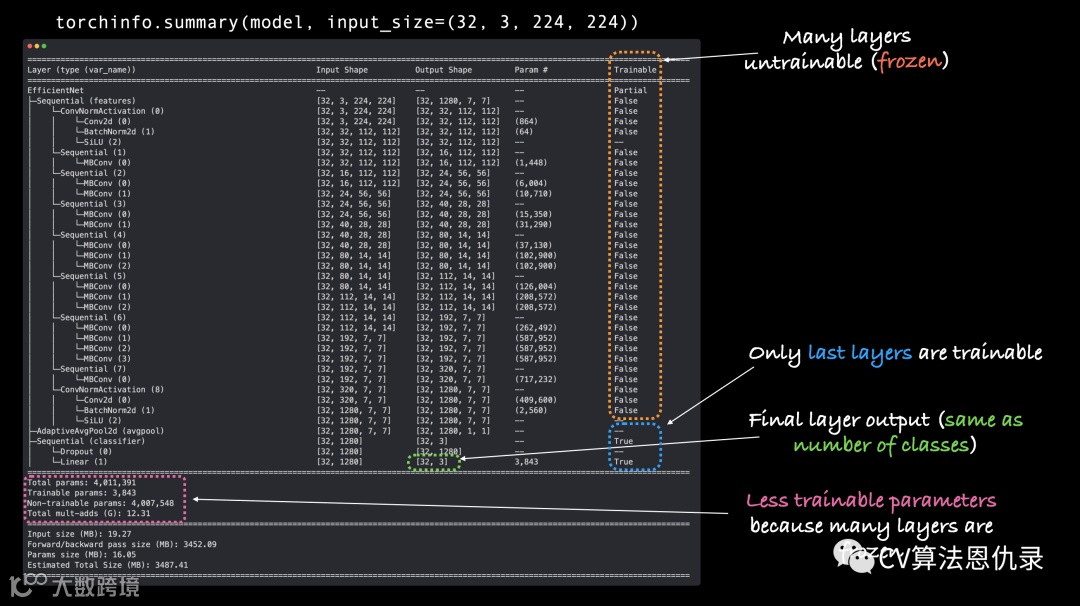
这里有一些变化!让我们来看看它们:
-
可训练的列 - 您会看到许多基础层(该features部分中的那些)的可训练值为 False。这是因为我们设置了它们的属性 requires_grad=False。除非我们改变这一点,否则这些层将不会在未来的训练中更新。
-
classifier 输出形状 - classifier 模型的这一部分现在有一个 Output Shape 值是 [32, 3] 而不是 [32, 1000]。它的 Trainable 值也是 True。这意味着它的参数将在训练期间更新。本质上,我们正在使用该 features 部分提供 classifier 图像的基本表示,然后 classifier 层将学习如何使基本表示与我们的问题保持一致。
更少的可训练参数 - 以前有 5,288,548 个可训练参数。但是由于我们冻结了模型的许多层并且只留下 classifier 可训练的,所以现在只有 3,843 个可训练参数(甚至比我们的 TinyVGG 模型还少)。尽管还有 4,007,548 个不可训练的参数,但这些参数将创建输入图像的基本表示以馈入 classifier 层。
注意: 模型具有的可训练参数越多,计算能力越强/训练所需的时间越长。冻结我们模型的基础层并使其具有较少的可训练参数意味着我们的模型应该训练得非常快。这是迁移学习的一个巨大好处,它采用在与您的问题类似的问题上训练的模型的已经学习的参数,并且仅稍微调整输出以适应您的问题。
4.训练模型
现在我们已经有了一个半冻结的预训练模型,并且有一个自定义的 classifier,我们来看看迁移学习的实际情况如何?
要开始训练,让我们创建一个损失函数和一个优化器。因为我们仍在使用多类分类,所以我们将使用 nn.CrossEntropyLoss() 损失函数。
我们将坚持使用 torch.optim.Adam() ,其中 lr=0.001。
# Define loss and optimizer
loss_fn = nn.CrossEntropyLoss()
optimizer = torch.optim.Adam(model.parameters(), lr=0.001)
# Set the random seeds
torch.manual_seed(42)
torch.cuda.manual_seed(42)

# Start the timer
from timeit import default_timer as timer
start_time = timer()

# Setup training and save the results
results = engine.train(model=model,
                       train_dataloader=train_dataloader,
                       test_dataloader=test_dataloader,
                       optimizer=optimizer,
                       loss_fn=loss_fn,
                       epochs=5,
                       device=device)

# End the timer and print out how long it took
end_time = timer()
print(f"[INFO] Total training time: {end_time-start_time:.3f} seconds")
    Epoch: 1 | train_loss: 1.0929 | train_acc: 0.4023 | test_loss: 0.9125 | test_acc: 0.5502
    Epoch: 2 | train_loss: 0.8703 | train_acc: 0.7773 | test_loss: 0.7900 | test_acc: 0.8153
    Epoch: 3 | train_loss: 0.7648 | train_acc: 0.8008 | test_loss: 0.7433 | test_acc: 0.8561
    Epoch: 4 | train_loss: 0.7114 | train_acc: 0.7578 | test_loss: 0.6344 | test_acc: 0.8655
    Epoch: 5 | train_loss: 0.6252 | train_acc: 0.7930 | test_loss: 0.6238 | test_acc: 0.8864
    [INFO] Total training time: 13.537 seconds
有了 efficientnet_b0 主干,我们的模型在测试数据集上的准确率几乎达到了 85% 以上,几乎是 TinyVGG 能够达到的两倍。
5.通过绘制损失曲线评估模型
# Get the plot_loss_curves() function from helper_functions.py, download the file if we don't have it
try:
    from helper_functions import plot_loss_curves
except:
    print("[INFO] Couldn't find helper_functions.py, downloading...")
    with open("helper_functions.py", "wb") as f:
        import requests
        request = requests.get("https://raw.githubusercontent.com/mrdbourke/pytorch-deep-learning/main/helper_functions.py")
        f.write(request.content)
    from helper_functions import plot_loss_curves

# Plot the loss curves of our model
plot_loss_curves(results)
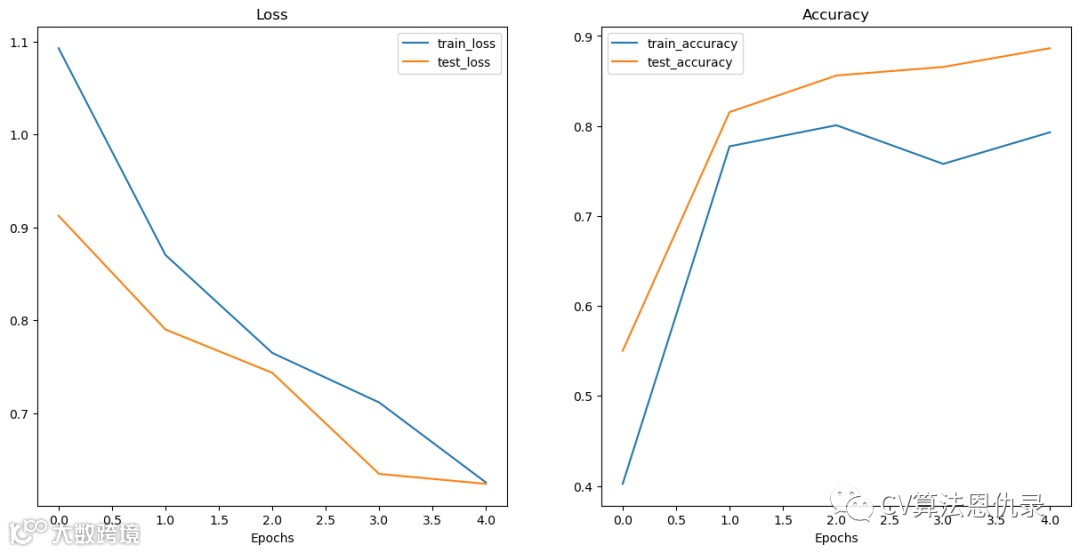
看起来两个数据集(训练和测试)的损失都朝着正确的方向发展。与精度值相同,呈上升趋势。这显示了迁移学习的力量。使用预训练模型通常可以在更短的时间内使用少量数据获得非常好的结果。
6.对测试集中的图像进行预测
让模型对图像进行预测,该图像必须与模型所训练的图像具有相同的格式。
-
相同的形状 - 如果我们的图像与我们的模型训练的形状不同,我们将得到形状错误。
-
相同的数据类型 - 如果我们的图像是不同的数据类型(例如torch.int8vs. torch.float32),我们将得到数据类型错误。
-
同一设备 - 如果我们的图像与我们的模型在不同的设备上,我们将收到设备错误。
-
相同的转换 - 如果我们的模型是在以某种方式转换的图像上训练的(例如,使用特定的均值和标准差进行归一化),并且我们尝试对以不同方式转换的图像进行预测,则这些预测可能会关闭。
注意:如果您尝试使用经过训练的模型进行预测,则这些要求适用于所有类型的数据。您要预测的数据应采用与训练模型相同的格式。
将创建一个函数 pred_and_plot_image() :
-
输入经过训练的模型、类名称列表、目标图像的文件路径、图像大小、转换和目标设备。 -
用 PIL.Image.open()打开图像。 -
为图像创建一个转换(这将默认上方创建的 manual_transforms,或者它可以使用从weights.transforms()生成的转换)。 -
确保模型在目标设备上。 -
打开模型评估模式 model.eval()(这会关闭像nn.Dropout()的层,因此它们不用于推理)和推理模式上下文管理器。
-
使 用步骤 3 中的变换对目标图像进行变换,并添加一个额外的批处理维度, torch.unsqueeze(dim=0), 以便输入图像的形状为[batch_size, color_channels, height, width]。
-
通过将图像传递给模型来对图像进行预测,确保它位于目标设备上。 -
使用 torch.softmax()将模型的输出 logits 转换为预测概率 -
使 用 torch.argmax()将模型的预测概率转换为预测标签 -
绘制图像 并将 matplotlib标题设置为来自步骤 9 的预测标签和来自步骤 8 的预测概率。
from typing import List, Tuple

from PIL import Image

# 1. Take in a trained model, class names, image path, image size, a transform and target device
def pred_and_plot_image(model: torch.nn.Module,
                        image_path: str,
                        class_names: List[str],
                        image_size: Tuple[int, int] = (224, 224),
                        transform: torchvision.transforms = None,
                        device: torch.device=device):


    # 2. Open image
    img = Image.open(image_path)

    # 3. Create transformation for image (if one doesn't exist)
    if transform is not None:
        image_transform = transform
    else:
        image_transform = transforms.Compose([
            transforms.Resize(image_size),
            transforms.ToTensor(),
            transforms.Normalize(mean=[0.485, 0.456, 0.406],
                                 std=[0.229, 0.224, 0.225]),
        ])

    ### Predict on image ###

    # 4. Make sure the model is on the target device
    model.to(device)

    # 5. Turn on model evaluation mode and inference mode
    model.eval()
    with torch.inference_mode():
      # 6. Transform and add an extra dimension to image (model requires samples in [batch_size, color_channels, height, width])
      transformed_image = image_transform(img).unsqueeze(dim=0)

      # 7. Make a prediction on image with an extra dimension and send it to the target device
      target_image_pred = model(transformed_image.to(device))

    # 8. Convert logits -> prediction probabilities (using torch.softmax() for multi-class classification)
    target_image_pred_probs = torch.softmax(target_image_pred, dim=1)

    # 9. Convert prediction probabilities -> prediction labels
    target_image_pred_label = torch.argmax(target_image_pred_probs, dim=1)

    # 10. Plot image with predicted label and probability
    plt.figure()
    plt.imshow(img)
    plt.title(f"Pred: {class_names[target_image_pred_label]} | Prob: {target_image_pred_probs.max():.3f}")
    plt.axis(False);
让我们通过对测试集中的一些随机图像进行预测来对其进行测试。
我们可以使用 list(Path(test_dir).glob("*/*.jpg")) 获取所有测试图像路径的列表,glob() 方法中的星号表示“匹配此模式的任何文件”, 换句话说,任何以 .jpg 结尾的文件。
使用 Python 随机抽样 random.sample(populuation, k),其中 population 是要抽样的序列, k 是要检索的样本数。
# Get a random list of image paths from test set
import random
num_images_to_plot = 3
test_image_path_list = list(Path(test_dir).glob("*/*.jpg")) # get list all image paths from test data
test_image_path_sample = random.sample(population=test_image_path_list, # go through all of the test image paths
                                       k=num_images_to_plot) # randomly select 'k' image paths to pred and plot

# Make predictions on and plot the images
for image_path in test_image_path_sample:
    pred_and_plot_image(model=model,
                        image_path=image_path,
                        class_names=class_names,
                        # transform=weights.transforms(), # optionally pass in a specified transform from our pretrained model weights
                        image_size=(224, 224))
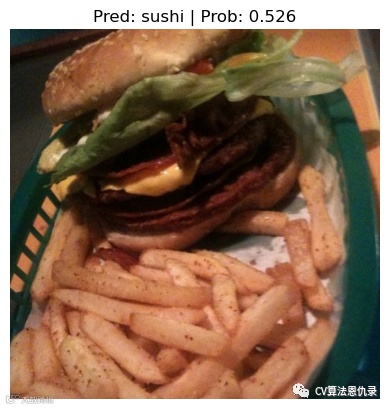
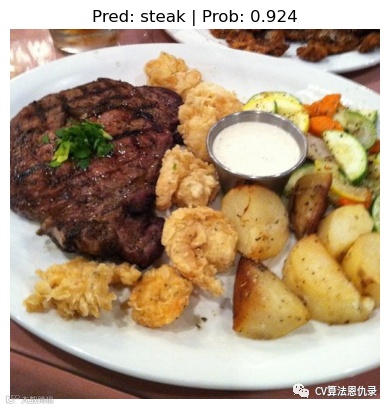
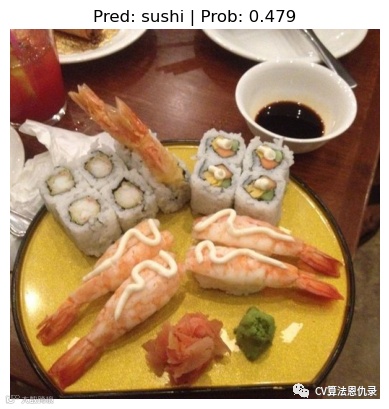
这些预测看起来比 TinyVGG 模型做出的预测要好得多。
6.1 对自定义图像进行预测
看起来模型在测试集中的数据上定性很好,若在自定义图像呢?为了在自定义图像上测试模型,导入 pizza-dad.jpeg 。
# Download custom image
import requests

# Setup custom image path
custom_image_path = data_path / "04-pizza-dad.jpeg"

# Download the image if it doesn't already exist
if not custom_image_path.is_file():
    with open(custom_image_path, "wb") as f:
        # When downloading from GitHub, need to use the "raw" file link
        request = requests.get("https://raw.githubusercontent.com/mrdbourke/pytorch-deep-learning/main/images/04-pizza-dad.jpeg")
        print(f"Downloading {custom_image_path}...")
        f.write(request.content)
else:
    print(f"{custom_image_path} already exists, skipping download.")

# Predict on custom image
pred_and_plot_image(model=model,
                    image_path=custom_image_path,
                    class_names=class_names)

这次 efficientnet_b0 模型预测概率高于 TinyVGG() 的预测概率。
总结
-
迁移学习通常允许使用相对少量的自定义数据获得良好的结果。
-
了解迁移学习的力量后,最好在每个问题开始时问“是否存在适用于我的问题的现有性能良好的模型?”
-
使用预训练模型时,请务必按照与训练原始模型相同的方式对自定义数据进行格式化/预处理,否则性能可能会下降。
-
预测自定义数据也是如此,确保自定义数据与训练模型的数据格式相同。
几个找到预训练模型的地方:PyTorch 域库、HuggingFace Hub 等。
作者介绍