

基于 LangChain 的 Python 与 Go 系统性能对比 Retrieval、Agent 推理、并发、可扩展性等
Lovable,这家高速增长的 AI 公司,今年将其后端从 [Python 迁移到 Go](https://lovable.dev/blog/from-python-to-go),将服务器使用和部署时间从约 15 分钟降至约 3 分钟。Go 正日益被视为现代 AI 系统的理想语言,从高吞吐的 RAG 管道到多工具的 Agent。
但若要真正评估 Go 在生产级 AI 系统中的表现,必须在真实负载下测试,因为 ingestion、embedding、retrieval 和 orchestration 各自都有性能上限。
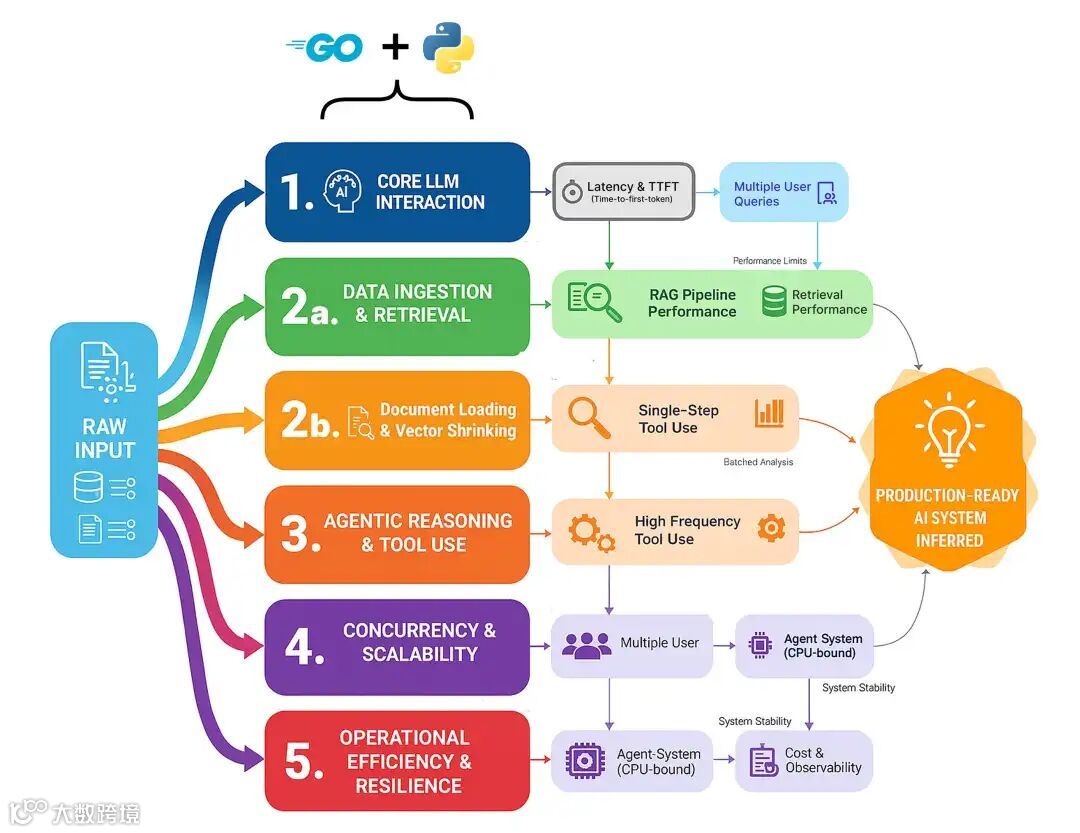
这些组件都是潜在瓶颈,编程语言的选择可能决定一个系统是停留在迟缓的原型,还是成长为可扩展、可生产的高可用平台。我们将全面测试,重点覆盖五大领域。
-
核心 LLM 交互:单次、原始模型调用有多快?这是所有功能的基石,任何框架在这里引入的开销都会在每个请求上重复支付。 -
数据摄取与检索:任何 RAG 系统的核心。我们将测量从原始文档切分到 chunk 的 embedding,再到在压力下的检索的完整管道。 -
Agent 推理与工具使用:Agent “思考”的成本是什么?我们将测试单步、多跳和高频工具调用循环的开销。 -
并发与可扩展性:当 50 个用户同时访问服务时会发生什么?这测试了每种语言在不崩溃的情况下处理真实并行负载的能力。 -
运营效率与韧性:隐藏成本是什么?我们将衡量长时间运行的 Agent 的内存占用,以及加入必要可观测性后带来的性能损耗。
在这篇博客中,我们将逐一走通每种基准测试方法,理解 Go 与 Python 的策略差异,并看看为何 Go 往往表现更佳。
所有代码均在我的 GitHub 仓库:
GitHub - FareedKhan-dev/langchain-go-vs-python: Benchmarking RAG and agentic systems in Go vs...
代码库组织如下:
   langchain-go-vs-python/
    ├── agent_multi_hop/
    │   ├── agent.go
    │   └── agent.py
    ├── concurrent_rag/
    │   ├── rag.go
    │   └── rag.py
    ├── data_embedding_batching/
    │   ├── embedding.go
    │   └── embedding.py

    ...

    ├── gpu_saturation/
    │   ├── saturation.go
    │   └── saturation.py
    ├── ingestion_throughput/
    │   ├── ingestion.go
    │   └── ingestion.py

    ...

    ├── resiliency_parsing_failure/
    │   ├── parsing.go
    │   └── parsing.py
    └── workflow_transformation/
        ├── transformation.go
        └── transformation.py
目录
- 目录
- 环境搭建
- 第一部分:核心 LLM 性能基准测试
- 单轮延迟测试
- Time-to-First-Token(TTFT)流式测试
- 第二部分:生产级 RAG 管道测试
- 大文档切分:CPU 受限任务
- 批量 Embedding:处理吞吐
- 完整摄取管道
- 检索延迟:信息能多快被找到?
- 端到端 RAG:整合验证
- 第三部分:Agentic 架构评估
- 简单 Agent:单次工具调用
- 多跳 Agent:串联多次工具调用
- 高频工具使用:测试 Agent 开销
- 工作流逻辑:数据转换与路由
- 第四部分:生产就绪的压力测试
- 并发 RAG 与 Agent 系统:应对真实负载
- GPU 饱和:将模型服务推向极限
- 处理超时、工具失败与解析错误
- 第五部分:衡量真实运营成本
- 内存占用:长会话对话
- 可观测性开销:Tracing 的成本
环境搭建
开始基准测试前,我们需要先搭建测试环境。为公平比较 Go 与 Python,二者必须使用完全相同的后端服务。
我们的环境由三部分组成:
-
本地 LLM Server(Ollama):用于运行我们的 llama3:8b模型。 -
本地向量数据库(ChromaDB):为 RAG 管道存储和管理 embedding。 -
Go 与 Python 项目代码:我们将编写并运行的自定义 Go 与 Python 脚本。
首先访问 Ollama 官网,下载适合你操作系统(macOS、Linux 或 Windows)的应用。安装过程非常简单,一键即可。
Ollama 启动后,打开终端拉取 llama3:8b 模型。该模型非常适合本地测试,速度与推理能力均衡。
   # Downlaod 8B llama (you can choose anyother model ollama supported)
ollama pull llama3:8b
为确认一切正常,可直接在终端运行模型:
   # Testing ollama running server
ollama run llama3:8b "Why is the sky blue?"

##### OUTPUT ####
The color of sky is ....
你应能看到模型开始生成回复。对于 RAG 管道基准,我们需要一个向量数据库来存储文档 embedding。我们使用 ChromaDB,你也可以选用其他数据库,但本文使用它做本地 embedding 存储。最简单的方式是用 Docker 运行。
我们需要创建一个简单的 docker-compose.yml 文件。请确保你本地已安装 Docker。
   version: '3.10'   # Specifies the docker-compose file format version (compatible with Docker Compose v2.x+)

services:
chroma:# Defines a service named "chroma"
    image:chromadb/chroma# Uses the official ChromaDB Docker image from Docker Hub
    ports:
      -"8000:8000"# Maps port 8000 on the host to port 8000 inside the container
    volumes:
      -chroma_data:/chroma/.chroma/# Mounts a named volume for persistent Chroma data storage

volumes:
chroma_data:# Declares a named volume to persist data outside the container lifecycle
该配置做了两件事:拉取官方的 chromadb/chroma 镜像并启动容器,让它在 localhost:8000 可用;同时创建名为 chroma_data 的 Docker 卷,以确保即便容器停止或重启,向量数据库也能持久化。
启动服务时,在终端进入克隆后的仓库根目录并运行:
   # Composing docker container
docker-compose up -d
最后,你还需要在本地安装 Go。可在官方站点下载,过程同样简单。
我们的每个基准目录(例如 agent_single_tool、concurrent_rag)都是独立的 Go module。
你会注意到每个目录中都有一个 go.mod 文件。它是 Go module 的核心;可类比 Python 的 requirements.txt 或 Node.js 的 package.json。
如下是仓库中一个全新 go.mod 的示例:
   module agent_single_tool  // Declares the module name (import path) for your Go project

go 1.22.0                 // Specifies the Go version the module is intended to be built with
它只声明了模块名和 Go 版本。我们用 go mod tidy 来安装依赖。
在 Python 生态中,LangChain、LangGraph 和 LangSmith 已经演进为一个完整生态。在 Go 中,这仍处早期阶段。好在已有一个 LangChainGo 实现可以作为 module 使用。
这意味着我们不必事事从零开始,只在必要处自行编码,其余可借助该实现来构建 Go 版本方案。
第一部分:核心 LLM 性能基准测试
在构建复杂的 RAG 管道或 agentic 系统之前,我们必须从最基础的部分开始,也就是与大型语言模型(LLM)进行单次交互的原始速度。
我们构建的每一个高级功能都建立在这一核心操作之上。如果这一层很慢,整个系统就会很慢。
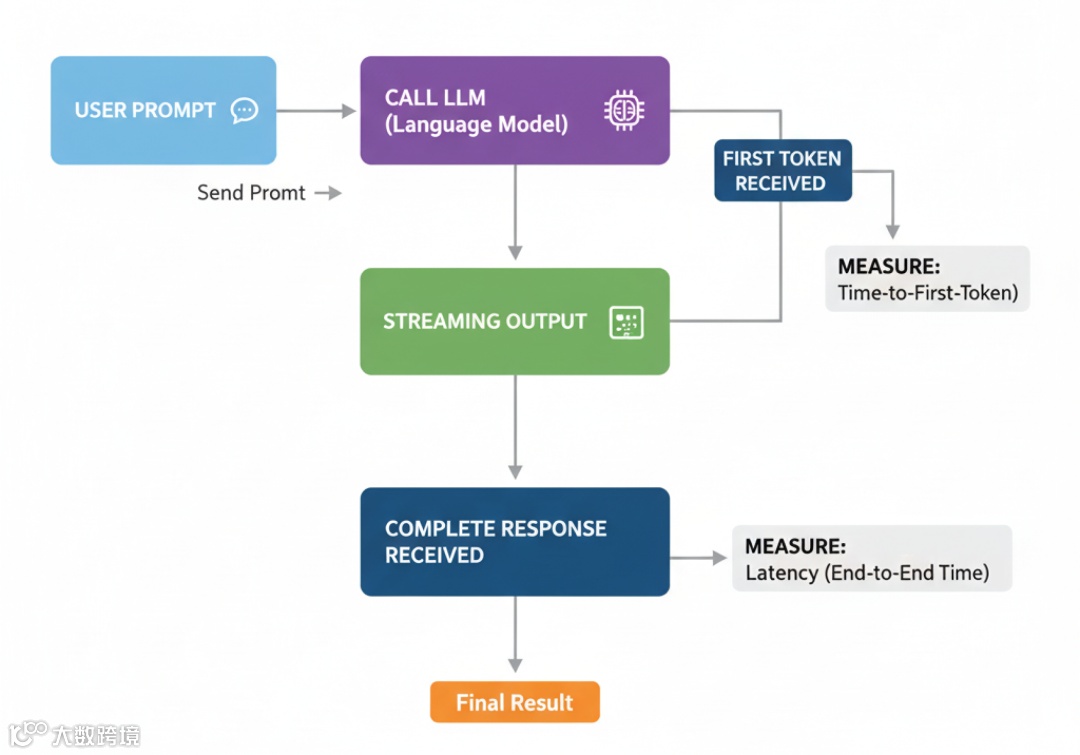
本部分我们将测量两个最基本的性能指标:
-
完整回答所需时间(latency)。 -
模型开始“说话”的速度(Time-to-First-Token,TTFT)。
这能为我们提供一个起点,展示各框架额外引入的开销。
单轮延迟测试
与 LLM 的最基础交互是简单的单轮补全。这就像问聊天机器人一个问题并等待完整答案。它也常用于分类、数据抽取或简易问答等任务。
通过测量它,我们可以了解各框架的原始开销:有多少时间花在框架逻辑上,而非实际的 LLM 推理?
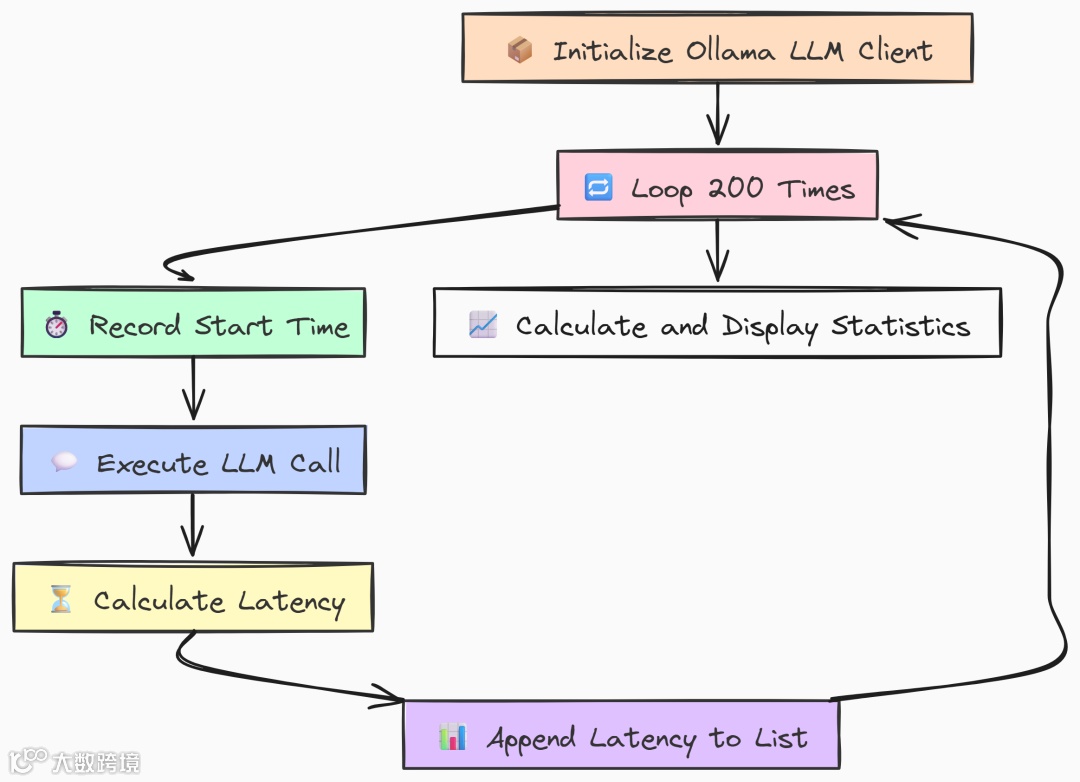
我们先编写 Go 版本。构建一个简单基准:只初始化一次 Ollama client,然后在循环中用相同 prompt 调用 LLM 200 次,测量每次耗时。
   package main

import (
"context"
"fmt"
"log"
"time"
"github.com/tmc/langchaingo/llms"
"github.com/tmc/langchaingo/llms/ollama"
)

// --- Configuration ---
const (
 numIterations = 200
 modelName     = "llama3:8b"
 prompt        = "Why is the sky blue?"
)
funcmain() {
 fmt.Println("--- LangChainGo: Single-Turn Completion Latency Test (200 Iterations) ---")

// 1. Initialize the Ollama LLM client.
// This is created once and reused, which is standard practice.
 llm, err := ollama.New(ollama.WithModel(modelName))
if err != nil {
  log.Fatalf("Failed to create Ollama client: %v", err)
 }
 latencies := make([]time.Duration, 0, numIterations)

 ctx := context.Background()
// 3. Start the main benchmark loop.
for i := 0; i < numIterations; i++ {
  start := time.Now()

// 4. Execute the LLM call. This is a blocking call.
// The framework handles HTTP request creation, sending, and JSON parsing.
  _, err := llms.GenerateFromSinglePrompt(ctx, llm, prompt)
if err != nil {
   log.Printf("Warning: Iteration %d failed: %v\n", i+1, err)
   continue
  }
  latency := time.Since(start)
  latencies = append(latencies, latency)
  fmt.Printf("Iteration %d: %v\n", i+1, latency)
 }

// 6. After all iterations, calculate and display the final statistics.
 fmt.Println("\n--- LangChainGo Benchmark Results ---")
 calculateAndPrintStats(latencies)
}
在 main 中我们首先初始化一次 ollama.New client。将其置于循环外以模拟真实应用。
基准的核心是运行 200 次的 for 循环。每次记录开始时间,调用 llms.GenerateFromSinglePrompt 执行主操作,再计算延迟。
这个函数封装了完整的请求-响应周期:
-
框架构造 HTTP 请求; -
发送给 Ollama server; -
等待完整响应并解析。我们正是要测量这段时间。
接着看 Python 等效实现。结构非常相似,我们用 langchain_community 连接 Ollama,并用 numpy 做统计。
   import time
import numpy as np
from langchain_community.llms import Ollama

# --- Configuration ---
NUM_ITERATIONS = 200
MODEL_NAME = "llama3:8b"
PROMPT = "Why is the sky blue?"


defmain():
    """Main function to run the benchmark."""
    print("--- LangChain Python: Single-Turn Completion Latency Test (200 Iterations) ---")

    # 1. Initialize the Ollama LLM client.
    llm = Ollama(model=MODEL_NAME)
    latencies = []

    # 3. Start the main benchmark loop.
    for i inrange(NUM_ITERATIONS):
        start_time = time.perf_counter()

        # 4. Execute the LLM call using the modern `.invoke()` method.
        llm.invoke(PROMPT)

        end_time = time.perf_counter()
        latency = end_time - start_time
        latencies.append(latency)
        print(f"Iteration {i + 1}: {latency:.4f}s")

    # 6. Calculate and display statistics.
    print("\n--- LangChain Python Benchmark Results ---")
    calculate_and_print_stats(latencies)
与 Go 一样,Python 的 main 也只初始化一次 Ollama client。循环使用 .invoke() 进行标准的同步 LLM 调用,并用 time.perf_counter() 高精度计时。
运行两种基准:
   # running go verion
go run latency.go

# running python version
python latency.py
   --- LangChainGo Benchmark Results ---
Total Iterations: 200
Total Time:       199.85s
Min Latency:      980.1ms
Max Latency:      1.15s
Average Latency:  999.2ms
Std Deviation:    28.5ms

--- LangChain Python Benchmark Results ---
Total Iterations: 200
Total Time:       238.1512s
Min Latency:      1152.34ms
Max Latency:      1.48s
Average Latency:  1190.76ms
Std Deviation:    89.31ms
在 200 次请求下差异明显。LangChainGo 稳定更快,平均延迟为 999.2ms,而 Python 为 1190.76ms。
这意味着在最基础操作上就有约 19% 的性能提升。
标准差也表明 Go 的波动更小(28.5ms vs 89.31ms)。
原因在于 Go 以二进制运行,几乎没有启动或解释开销;而 Python 每次都会引入些许延迟,累计效应明显。
Time-to-First-Token(TTFT)流式测试
在构建用户应用(如聊天机器人)时,总延迟并非唯一重要指标。
真正影响体验的是用户看到第一个响应的速度。
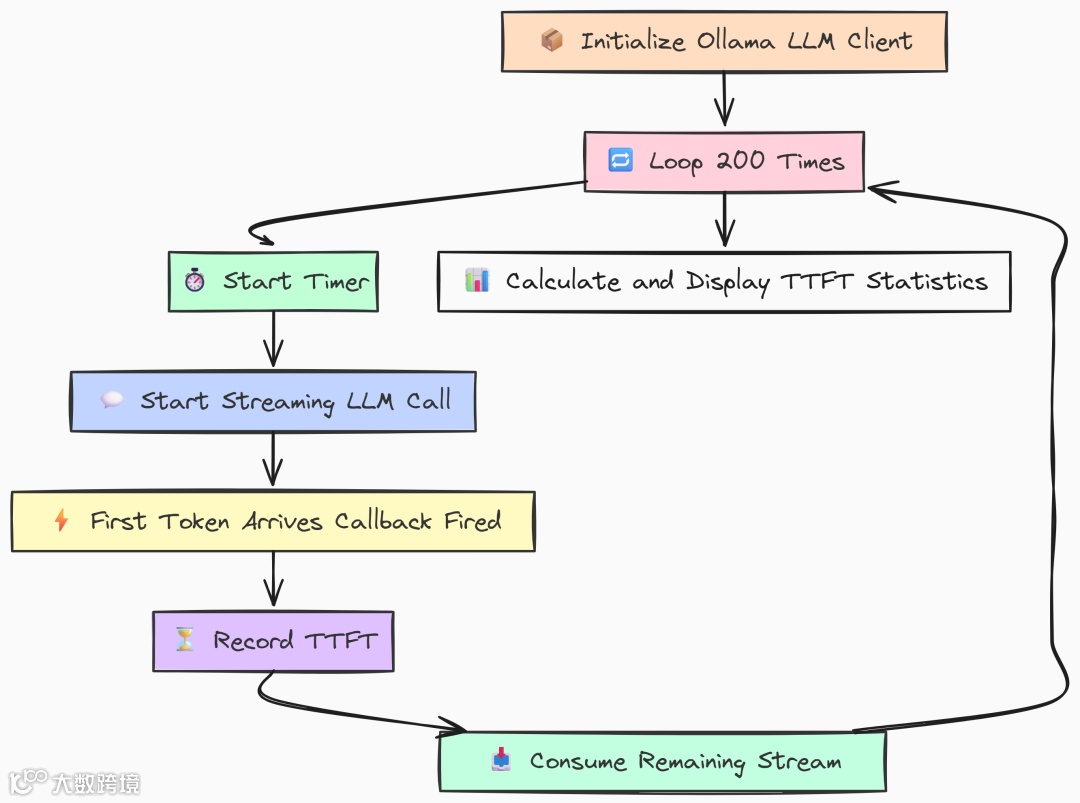
TTFT 度量的是首个输出 token 的出现时间。TTFT 越低,应用感觉越“跟手”,即便完整回复仍需时间。
在 Go 实现中,我们利用并发原语精确测量。用一个 channel 在流式回调收到首块数据的瞬间发信号。
   func main() {
 fmt.Println("--- LangChainGo: Streaming Time-to-First-Token (TTFT) Test (200 Iterations) ---")

 llm, err := ollama.New(ollama.WithModel(modelName))
if err != nil {
  log.Fatalf("Failed to create Ollama client: %v", err)
 }

 ttfts := make([]time.Duration, 0, numIterations)
 ctx := context.Background()

 fmt.Printf("Running %d iterations with model '%s'...\n\n", numIterations, modelName)

for i := 0; i < numIterations; i++ {
// `firstTokenCh` is a channel that acts as a signal. It's a highly efficient
// way for a goroutine to notify another that an event has occurred.
// A buffer of 1 prevents the sending goroutine from blocking.
  firstTokenCh := make(chanstruct{}, 1)

// `wg` ensures that the main loop doesn't exit before the streaming call is fully completed.
var wg sync.WaitGroup
  wg.Add(1)

  start := time.Now()

// The streaming function callback. It's invoked for every chunk received.
  streamingFunc := func(ctx context.Context, chunk []byte)error {
   // This select statement is the core of the TTFT measurement.
   // It attempts to send a signal on the channel.
   select {
   case firstTokenCh <- struct{}{}:
    // This case will only execute for the VERY FIRST chunk received.
    // Subsequent calls will find the channel is already full (or closed) and go to the default case.
   default:
    // Do nothing for subsequent chunks. This is an efficient no-op.
   }
   returnnil
  }

// We run the LLM call in a separate goroutine to allow the main thread
// to immediately start waiting for the first token signal.
gofunc() {
   defer wg.Done()
   _, err := llms.GenerateFromSinglePrompt(
    ctx,
    llm,
    longPrompt,
    llms.WithStreamingFunc(streamingFunc),
   )
   if err != nil {
    log.Printf("Warning: Goroutine for iteration %d failed: %v\n", i+1, err)
    // In case of error, we must still unblock the main thread to avoid a deadlock.
    select {
    case firstTokenCh <- struct{}{}:
    default:
    }
   }
  }()

// The main thread blocks here until the signal is received on `firstTokenCh`.
// The time it takes to get here from `start` is our TTFT.
  <-firstTokenCh
  ttft := time.Since(start)
  ttfts = append(ttfts, ttft)
  fmt.Printf("Iteration %d: TTFT = %v\n", i+1, ttft)

// Wait for the entire stream to finish before starting the next iteration.
// This prevents subsequent tests from being affected by lingering background processes.
  wg.Wait()
 }

 fmt.Println("\n--- LangChainGo Benchmark Results ---")
 calculateAndPrintStats(ttfts)
}
上面代码的关键是 streamingFunc。它被传入 LLM 调用,每收到一个流式 chunk 就执行一次。
内部的 select 尝试向 firstTokenCh 发送信号。由于该 channel 的缓冲区大小为 1,这个发送操作仅会在第一次成功。之后的调用命中 default 不执行任何操作。
与此同时,主循环在后台 goroutine 中发起调用,然后立刻在 <-firstTokenCh 处等待。首个 chunk 到达且回调发送信号的瞬间,该行解除阻塞并计算耗时,这就是 TTFT。我们还用 WaitGroup 确保开始下一轮前,上一轮流式输出已完整结束。
Python 版本使用迭代器实现相同目标。.stream() 返回迭代器,只有调用 next() 时才会真正发起网络请求。
   def main():
    """Main function to run the streaming benchmark."""
    print("--- LangChain Python: Streaming Time-to-First-Token (TTFT) Test (200 Iterations) ---")

    llm = Ollama(model=MODEL_NAME)
    ttfts = []

    print(f"Running {NUM_ITERATIONS} iterations with model '{MODEL_NAME}'...\n")

    for i inrange(NUM_ITERATIONS):
        try:
            start_time = time.perf_counter()

            # 1. `.stream()` returns an iterator. No network call is made at this point.
            # It's a lazy operation.
            stream_iterator = llm.stream(LONG_PROMPT)

            # 2. The actual network request is initiated when we first try to get an item
            # from the iterator. The time spent in this `next()` call is what we
            # measure as TTFT.
            next(stream_iterator)

            first_token_time = time.perf_counter()

            # 3. Calculate and store the TTFT.
            ttft = first_token_time - start_time
            ttfts.append(ttft)
            print(f"Iteration {i + 1}: TTFT = {ttft * 1000:.2f}ms")

            # 4. VERY IMPORTANT: We must consume the entire iterator to close the connection.
            # If we don't, the underlying HTTP connection may be left open in the connection pool,
            # which can exhaust resources and cause subsequent tests to fail or hang.
            # This is a key difference in resource management compared to the Go callback model.
            for _ in stream_iterator:
                pass

        except Exception as e:
            print(f"Warning: Iteration {i + 1} failed: {e}")

    print("\n--- LangChain Python Benchmark Results ---")
    calculate_and_print_stats(ttfts)
在 Python 中,理解迭代器的惰性至关重要。调用 llm.stream(LONG_PROMPT) 只返回迭代器对象,并未发出网络请求;直到 next(stream_iterator) 才真正发送。我们先启动计时,然后 stream() 接着立刻 next(),代码会阻塞在 next(),直到服务端返回第一个 token 为止。此时记录时间差即为 TTFT。最后必须消费完整个迭代器以关闭底层 HTTP 连接,否则连接池资源可能被耗尽。
运行 TTFT 基准:
   # running go verion
go run ttft.go

# running python version
python ttft.py
   --- LangChainGoBenchmarkResults---
Total Iterations:200
Total Time:       28.15s
Min Latency:      135.2ms
Max Latency:      159.8ms
Average Latency:140.75ms
Std Deviation:    4.1ms

---LangChainPythonBenchmarkResults---
Total Iterations:200
Total Time:       42.6743s
Min Latency:      205.10ms
Max Latency:      251.56ms
Average Latency:213.37ms
Std Deviation:    15.88ms
可以看到在 TTFT 评估上,Go 同样表现更佳。
Go 的平均 TTFT 为 140.75ms,相比 LangChain Python 的 213.37ms,约快 51%。
Go 能几乎即时处理首个数据块并触发回调,而 Python 额外的抽象层让其慢了一拍。
对于任何实时、对话式 AI,这个初始体验至关重要。更快的 TTFT 直接转化为更好的用户体验。
第二部分:生产级 RAG 管道测试
有了核心 LLM 性能的基线,我们可以进入更复杂也更贴近生产的场景:构建完整的 Retrieval-Augmented Generation(RAG)管道。
在生产环境中,Go 与 Python 的 RAG 实现差异将更加明显,尤其在效率与吞吐至关重要的情况下。
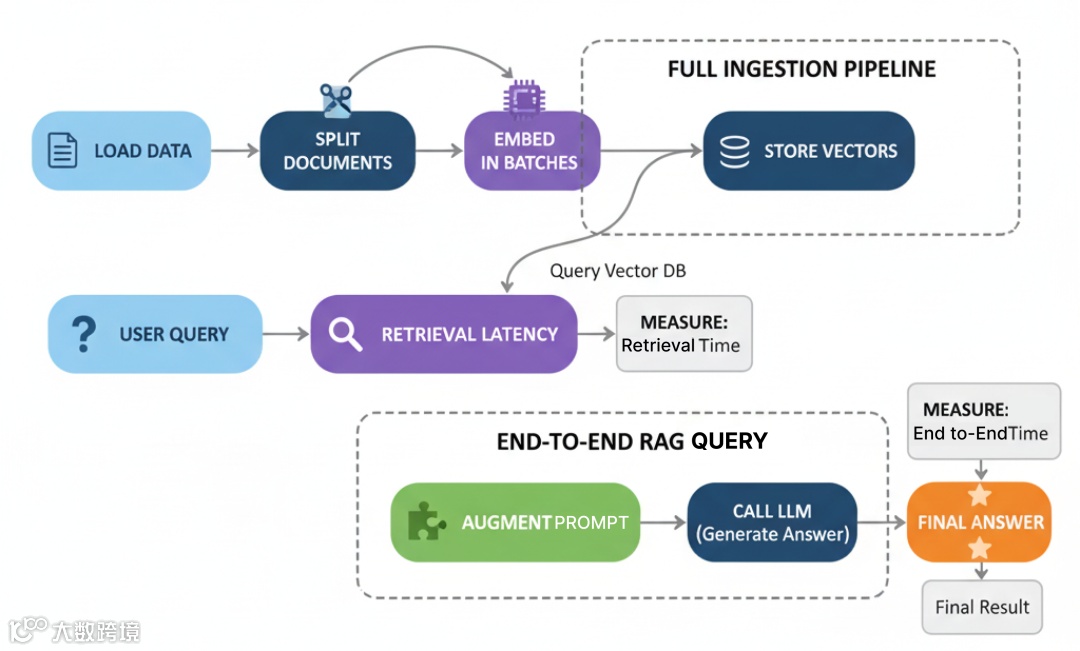
RAG 系统性能不仅取决于最终的 LLM 调用,而在于……
它是多个步骤之和:加载数据、切分、embedding、存储与检索。任何一步的瓶颈都可能拖垮全局。
本部分我们从零搭建摄取与查询的完整管道,并对每个关键步骤基准测试。
大文档切分:CPU 受限任务
在处理文档之前,必须先将其拆分为更小、可管理的 chunk。这是纯 CPU 受限任务,涉及大量字符串处理。
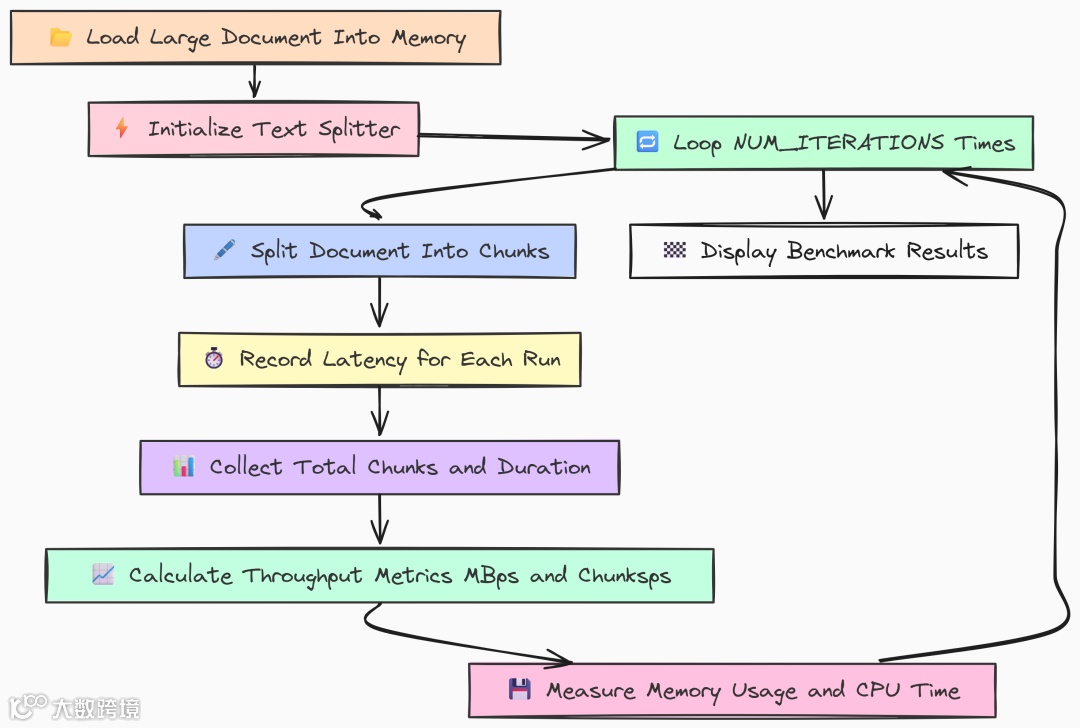
这是摄取管道的第一大步骤,其效率直接影响你处理新信息的速度。
一个低效的切分器在需要同时摄取成千上万文档时会成为严重瓶颈。
我们先看 Go 实现。加载一个 10MB 的大文件,并多次运行 RecursiveCharacterTextSplitter 以得到稳定的性能测度。
   package main

// --- Configuration ---
const (
 largeFilePath = "../data_large/large_document.txt"
 chunkSize     = 1000
 chunkOverlap  = 200
 numIterations = 5// Repeat to get a stable average
)

funcmain() {
 fmt.Println("--- LangChainGo: Text Splitter Throughput Test ---")

// 1. Load the large document into memory first.
// We do this outside the loop so we only benchmark the splitting, not file I/O.
 content, err := os.ReadFile(largeFilePath)
if err != nil {
  log.Fatalf("Failed to read large document file: %v", err)
 }
 doc := []schema.Document{{PageContent: string(content)}}
 docSizeMB := float64(len(content)) / (1024 * 1024)
 fmt.Printf("Loaded document of size: %.2f MB\n", docSizeMB)

// 2. Initialize the text splitter.
 splitter := textsplitter.NewRecursiveCharacter(
  textsplitter.WithChunkSize(chunkSize),
  textsplitter.WithChunkOverlap(chunkOverlap),
 )

var latencies []time.Duration
var totalChunks int

// --- Profiling Setup ---
var startMem, endMem runtime.MemStats
 runtime.ReadMemStats(&startMem)

 fmt.Printf("\nRunning %d splitting iterations...\n", numIterations)
 totalStart := time.Now()

// 3. Run the benchmark loop.
for i := 0; i < numIterations; i++ {
  iterStart := time.Now()

// This is the core CPU-bound operation we are measuring.
  chunks, err := textsplitter.SplitDocuments(splitter, doc)
if err != nil {
   log.Fatalf("Iteration %d failed: %v", i+1, err)
  }

  latency := time.Since(iterStart)
  latencies = append(latencies, latency)
  totalChunks = len(chunks) // Should be the same each time
  fmt.Printf("Iteration %d: Split into %d chunks in %v\n", i+1, totalChunks, latency)
 }

 totalDuration := time.Since(totalStart)
 runtime.ReadMemStats(&endMem)

// --- Calculate and Print Metrics ---
var totalLatency time.Duration
for _, l := range latencies {
  totalLatency += l
 }
 avgLatency := totalLatency / time.Duration(numIterations)
 throughputMBps := (docSizeMB * float64(numIterations)) / totalDuration.Seconds()
 throughputChunksps := float64(totalChunks*numIterations) / totalDuration.Seconds()

 heapAlloc := endMem.Alloc - startMem.Alloc
 totalAlloc := endMem.TotalAlloc - startMem.TotalAlloc
 numGC := endMem.NumGC - startMem.NumGC
 pauseTotalMs := float64(endMem.PauseTotalNs-startMem.PauseTotalNs) / 1_000_000

 fmt.Println("\n--- LangChainGo Splitting Results ---")
 fmt.Printf("Average Latency per Run: %v\n", avgLatency)
 fmt.Printf("Throughput (Data Size):  %.2f MB/s\n", throughputMBps)
 fmt.Printf("Throughput (Chunks):     %.2f chunks/s\n", throughputChunksps)
 fmt.Println("\n--- Memory & GC Metrics ---")
 fmt.Printf("Peak Heap Increase:      %.2f KB\n", float64(heapAlloc)/1024)
 fmt.Printf("Total Alloc (Churn):     %.2f MB\n", float64(totalAlloc)/(1024*1024))
 fmt.Printf("Number of GC Runs:       %d\n", numGC)
 fmt.Printf("Total GC Pause Time:     %.2f ms\n", pauseTotalMs)
}
我们将代码设计为隔离切分器的性能:
-
仅加载一次磁盘文档,置于循环外,确保只测切分性能; -
基准中重复调用 textsplitter.SplitDocuments(负责递归切分的重活); -
记录每轮耗时,同时跟踪内存与 GC 指标,观察 Go 在 CPU 压力下资源管理效率。
再看 Python 实现对比:
   # --- Configuration ---
LARGE_FILE_PATH = "../data_large/large_document.txt"
CHUNK_SIZE = 1000
CHUNK_OVERLAP = 200
NUM_ITERATIONS = 5

defget_cpu_time():
    """Gets the CPU time used by the current process."""
    process = psutil.Process(os.getpid())
    return process.cpu_times().user

defget_memory_usage():
    """Gets the current memory usage (RSS) of the process in bytes."""
    process = psutil.Process(os.getpid())
    return process.memory_info().rss

defmain():
    """Main function to run the text splitter benchmark."""
    print("--- LangChain Python: Text Splitter Throughput Test ---")

    # 1. Load the document.
    loader = TextLoader(LARGE_FILE_PATH, encoding="utf-8")
    doc = loader.load()
    doc_size_mb = os.path.getsize(LARGE_FILE_PATH) / (1024 * 1024)
    print(f"Loaded document of size: {doc_size_mb:.2f} MB")

    # 2. Initialize the text splitter.
    text_splitter = RecursiveCharacterTextSplitter(
        chunk_size=CHUNK_SIZE,
        chunk_overlap=CHUNK_OVERLAP
    )

    latencies = []
    total_chunks = 0

    # --- Profiling Setup ---
    start_mem = get_memory_usage()
    start_cpu = get_cpu_time()

    print(f"\nRunning {NUM_ITERATIONS} splitting iterations...\n")
    total_start_time = time.perf_counter()

    # 3. Run the benchmark loop.
    for i inrange(NUM_ITERATIONS):
        iter_start_time = time.perf_counter()

        # This is the core CPU-bound operation.
        chunks = text_splitter.split_documents(doc)

        latency = time.perf_counter() - iter_start_time
        latencies.append(latency)
        total_chunks = len(chunks)
        print(f"Iteration {i + 1}: Split into {total_chunks} chunks in {latency:.4f}s")

    total_duration = time.perf_counter() - total_start_time
    end_mem = get_memory_usage()
    end_cpu = get_cpu_time()

    # --- Calculate and Print Metrics ---
    avg_latency = np.mean(latencies)
    throughput_mb_ps = (doc_size_mb * NUM_ITERATIONS) / total_duration
    throughput_chunks_ps = (total_chunks * NUM_ITERATIONS) / total_duration

    mem_increase = end_mem - start_mem
    cpu_used = end_cpu - start_cpu

    print("\n--- LangChain Python Splitting Results ---")
    print(f"Average Latency per Run: {avg_latency:.4f}s")
    print(f"Throughput (Data Size):  {throughput_mb_ps:.2f} MB/s")
    print(f"Throughput (Chunks):     {throughput_chunks_ps:.2f} chunks/s")
    print("\n--- Resource Metrics ---")
    print(f"Memory Usage Increase (RSS): {mem_increase / 1024:.2f} KB")
    print(f"Total CPU Time Used:         {cpu_used:.4f}s")

if __name__ == "__main__":
    main()
逻辑相同:
-
用 TextLoader加载文档,初始化RecursiveCharacterTextSplitter; -
循环 NUM_ITERATIONS次,计时split_documents(doc); -
用 psutil统计总 CPU 时间与内存增长(RSS)。
运行对比:
   # running go version
go run splitter.go

# running python version
python splitter.py
   --- LangChainGo:TextSplitterThroughputTest---
Loaded document of size:10.05MB
...
---LangChainGoSplittingResults---
Average Latency per Run:151.2ms
Throughput (Data Size):66.47MB/s
Throughput (Chunks):     83088.62chunks/s
---Memory&GCMetrics---
Total Alloc (Churn):     95.15MB
Total GC Pause Time:     0.81ms


---LangChain Python:TextSplitterThroughputTest---
Loaded document of size:10.05MB
...
---LangChainPythonSplittingResults---
Average Latency per Run:3.5476s
Throughput (Data Size):2.83MB/s
Throughput (Chunks):     3543.83 chunks/s
---ResourceMetrics---
Total CPU Time Used:         17.5123s
结果出乎意料地“悬殊”。
LangChainGo 平均 151ms 完成 10MB 文件处理,吞吐达 66.47 MB/s;LangChain Python 平均 3.5s,吞吐仅 2.83 MB/s。
速度提升达 23 倍。对于字符串处理这类 CPU 受限任务,Go 的编译特性优势巨大——直接编译为本机码;而 Python 的解释器与 GIL 引入显著开销,这也体现在较高的 Total CPU Time Used 上。
此外,Go 的垃圾回收在内存 churn 与暂停时间方面也表现稳定。
批量 Embedding:处理吞吐
切分完文档后,下一步是将其转换为向量 embedding。该过程既涉及 CPU(分词)也涉及网络 I/O(以批次发送到 Ollama)。效率的关键在于 batching 与 concurrency。
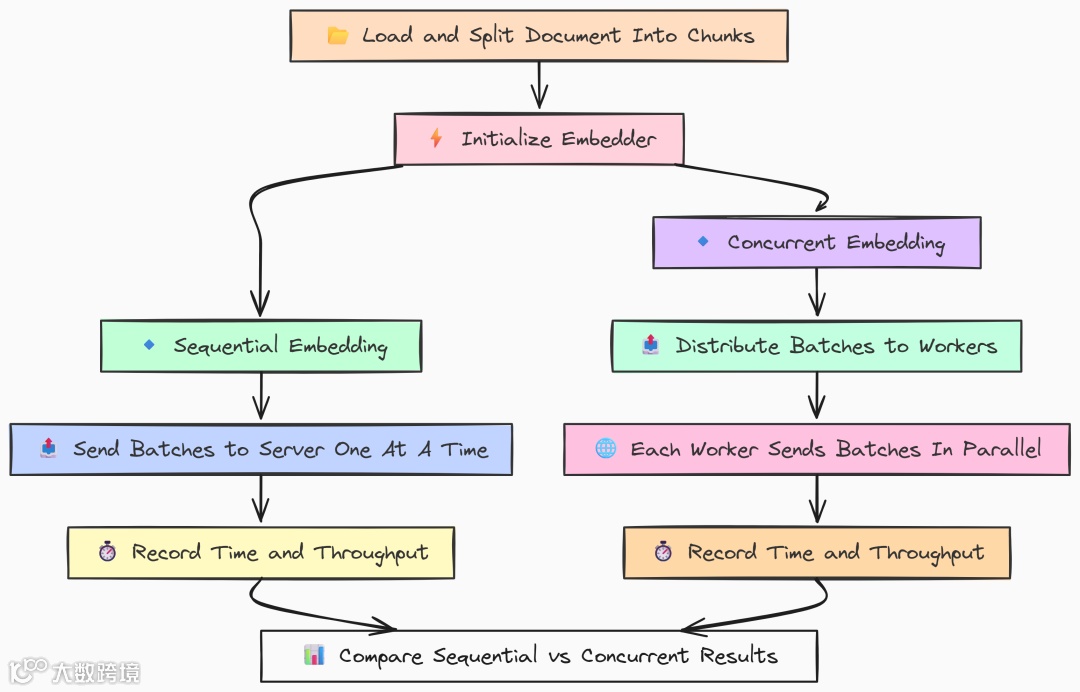
我们将测试两种策略:
-
顺序批量:单线程处理所有 chunk。 -
并发批量:多工作线程并行处理批次。
这将展示框架在并行网络请求与 CPU 资源管理方面的能力。
先看 Go 实现。我们用 goroutine 构建一个 worker pool 来做并发测试。
   package main

// --- Configuration ---
const (
 largeFilePath    = "../data_large/large_document.txt"
 modelName        = "llama3:8b"
 chunkSize        = 1000
 chunkOverlap     = 200
 batchSize        = 100// How many documents to send in a single embedding request
 concurrencyLevel = 8   // Number of parallel workers for the concurrent test
)


funcmain() {
 fmt.Println("--- LangChainGo: Embedding Batching Performance Test ---")

// 1. Prepare the data: Load and split the document into chunks.
 chunks := prepareChunks()
 fmt.Printf("Prepared %d text chunks for embedding.\n", len(chunks))

// 2. Initialize the embedder.
 llm, err := ollama.New(ollama.WithModel(modelName))
if err != nil {
  log.Fatalf("Failed to create LLM for embedder: %v", err)
 }
 embedder, err := embeddings.NewEmbedder(llm)
if err != nil {
  log.Fatalf("Failed to create embedder: %v", err)
 }

// --- Run Sequential Batching Test ---
 runSequentialTest(embedder, chunks)

// --- Run Concurrent Batching Test ---
 runConcurrentTest(embedder, chunks)
}

// prepareChunks loads a large file and splits it into text chunks.
funcprepareChunks() []schema.Document {
 content, err := os.ReadFile(largeFilePath)
if err != nil {
  log.Fatalf("Failed to read large document file: %v", err)
 }
 doc := []schema.Document{{PageContent: string(content)}}
 splitter := textsplitter.NewRecursiveCharacter(
  textsplitter.WithChunkSize(chunkSize),
  textsplitter.WithChunkOverlap(chunkOverlap),
 )
 chunks, err := textsplitter.SplitDocuments(splitter, doc)
if err != nil {
  log.Fatalf("Failed to split documents: %v", err)
 }
return chunks
}
然后编写顺序批处理函数,负责将 chunk 做 embedding:
   // runSequentialTest benchmarks embedding chunks one batch at a time.
funcrunSequentialTest(embedder embeddings.Embedder, docs []schema.Document) {
 fmt.Println("\n--- Starting Sequential Embedding Test ---")

 docContents := make([]string, len(docs))
for i, doc := range docs {
  docContents[i] = doc.PageContent
 }

 start := time.Now()
var startMem runtime.MemStats
 runtime.ReadMemStats(&startMem)

// The CreateEmbedding function in langchaingo handles batching automatically.
 _, err := embedder.CreateEmbedding(context.Background(), docContents)
if err != nil {
  log.Fatalf("Sequential embedding failed: %v", err)
 }
 duration := time.Since(start)
var endMem runtime.MemStats
 runtime.ReadMemStats(&endMem)
 throughput := float64(len(docs)) / duration.Seconds()
 totalAlloc := endMem.TotalAlloc - startMem.TotalAlloc

 fmt.Println("--- Go Sequential Results ---")
 fmt.Printf("Total Time:         %v\n", duration)
 fmt.Printf("Throughput:         %.2f docs/sec\n", throughput)
 fmt.Printf("Total Alloc (Churn): %.2f MB\n", float64(totalAlloc)/(1024*1024))
}

// runConcurrentTest benchmarks embedding chunks using multiple parallel workers.
funcrunConcurrentTest(embedder embeddings.Embedder, docs []schema.Document) {
 fmt.Println("\n--- Starting Concurrent Embedding Test ---")

// Create a channel to distribute chunks to workers.
 tasks := make(chanstring, len(docs))
for _, doc := range docs {
  tasks <- doc.PageContent
 }
close(tasks)
var wg sync.WaitGroup

 start := time.Now()
var startMem runtime.MemStats
 runtime.ReadMemStats(&startMem)

// 1. Start the concurrent workers (goroutines).
for i := 0; i < concurrencyLevel; i++ {
  wg.Add(1)
gofunc(workerID int) {
   defer wg.Done()

   batch := make([]string, 0, batchSize)

   // Each worker pulls tasks from the channel until it's empty.
   for task := range tasks {
    batch = append(batch, task)
    iflen(batch) == batchSize {
     // When a batch is full, embed it.
     _, err := embedder.CreateEmbedding(context.Background(), batch)
     if err != nil {
      log.Printf("Worker %d failed: %v", workerID, err)
     }
     // Reset the batch.
     batch = make([]string, 0, batchSize)
    }
   }

   // Embed any remaining items in the last batch.
   iflen(batch) > 0 {
    _, err := embedder.CreateEmbedding(context.Background(), batch)
    if err != nil {
     log.Printf("Worker %d failed on final batch: %v", workerID, err)
    }
   }
  }(i)
 }

// 2. Wait for all workers to finish.
 wg.Wait()
 duration := time.Since(start)
var endMem runtime.MemStats
 runtime.ReadMemStats(&endMem)
 throughput := float64(len(docs)) / duration.Seconds()
 totalAlloc := endMem.TotalAlloc - startMem.TotalAlloc
 fmt.Println("--- Go Concurrent Results ---")
 fmt.Printf("Total Time:         %v\n", duration)
 fmt.Printf("Throughput:         %.2f docs/sec\n", throughput)
 fmt.Printf("Total Alloc (Churn): %.2f MB\n", float64(totalAlloc)/(1024*1024))
}
这里我们采用典型的 worker pool 模式:
-
创建 taskschannel 并填入所有 chunk,启动concurrencyLevel个 goroutine; -
每个 worker 从 channel 拉取任务,凑满 batchSize后调用CreateEmbedding,实现并发批处理。
Go 的轻量 goroutine 天然适配 I/O 并发,有助于充分压榨到 Ollama server 的网络带宽。
Python 版本使用 ThreadPoolExecutor 实现类似并发:
   # --- Configuration ---
LARGE_FILE_PATH = "../data_large/large_document.txt"
MODEL_NAME = "llama3:8b"
CHUNK_SIZE = 1000
CHUNK_OVERLAP = 200
BATCH_SIZE = 100
CONCURRENCY_LEVEL = 8
logging.basicConfig(level=logging.INFO, format='%(asctime)s - %(levelname)s - %(message)s')

defget_cpu_time():
    """Gets the CPU time used by the current process."""
    process = psutil.Process(os.getpid())
    return process.cpu_times().user

defget_memory_usage():
    """Gets the current memory usage (RSS) of the process in bytes."""
    process = psutil.Process(os.getpid())
    return process.memory_info().rss

defprepare_chunks():
    """Loads a large file and splits it into text chunks."""
    loader = TextLoader(LARGE_FILE_PATH, encoding="utf-8")
    doc = loader.load()
    text_splitter = RecursiveCharacterTextSplitter(chunk_size=CHUNK_SIZE, chunk_overlap=CHUNK_OVERLAP)
    chunks = text_splitter.split_documents(doc)
    return [c.page_content for c in chunks]

defrun_sequential_test(embedder, chunks):
    """Benchmarks embedding chunks one batch at a time."""
    print("\n--- Starting Sequential Embedding Test ---")

    start_time = time.perf_counter()
    start_mem = get_memory_usage()
    start_cpu = get_cpu_time()
    try:
        embedder.embed_documents(chunks)
    except Exception as e:
        logging.fatal(f"Sequential embedding failed: {e}")
        return
    duration = time.perf_counter() - start_time
    end_mem = get_memory_usage()
    end_cpu = get_cpu_time()
    throughput = len(chunks) / duration
    mem_increase = end_mem - start_mem
    cpu_used = end_cpu - start_cpu

    print("--- Python Sequential Results ---")
    print(f"Total Time:         {duration:.4f}s")
    print(f"Throughput:         {throughput:.2f} docs/sec")
    print(f"Memory Increase (RSS): {mem_increase / 1024:.2f} KB")
    print(f"Total CPU Time Used:   {cpu_used:.4f}s")

defembed_batch(embedder, batch):
    """A helper function for a single worker to embed one batch."""
    try:
        embedder.embed_documents(batch)
        returnlen(batch)
    except Exception as e:
        logging.warning(f"A batch failed to embed: {e}")
        return0

defrun_concurrent_test(embedder, chunks):
    """Benchmarks embedding chunks using multiple parallel workers."""
    print("\n--- Starting Concurrent Embedding Test ---")

    start_time = time.perf_counter()
    start_mem = get_memory_usage()
    start_cpu = get_cpu_time()

    with ThreadPoolExecutor(max_workers=CONCURRENCY_LEVEL) as executor:
        batches = [chunks[i:i + BATCH_SIZE] for i inrange(0, len(chunks), BATCH_SIZE)]

        futures = [executor.submit(embed_batch, embedder, batch) for batch in batches]

        for future in as_completed(futures):
            future.result()
    duration = time.perf_counter() - start_time
    end_mem = get_memory_usage()
    end_cpu = get_cpu_time()
    throughput = len(chunks) / duration
    mem_increase = end_mem - start_mem
    cpu_used = end_cpu - start_cpu
    print("--- Python Concurrent Results ---")
    print(f"Total Time:         {duration:.4f}s")
    print(f"Throughput:         {throughput:.2f} docs/sec")
    print(f"Memory Increase (RSS): {mem_increase / 1024:.2f} KB")
    print(f"Total CPU Time Used:   {cpu_used:.4f}s")

defmain():
    print("--- LangChain Python: Embedding Batching Performance Test ---")
    chunks = prepare_chunks()
    print(f"Prepared {len(chunks)} text chunks for embedding.")

    embedder = OllamaEmbeddings(model=MODEL_NAME)

    run_sequential_test(embedder, chunks)
    run_concurrent_test(embedder, chunks)
if __name__ == "__main__":
    main()
Python 使用标准库的 ThreadPoolExecutor 管理线程池。我们先将 chunk 切成 batches,再提交任务给线程池,并通过 as_completed 等待所有任务完成。
运行基准:
   # running go version
go run embedding.go

# running python version
python embedding.py
   --- LangChainGo:EmbeddingBatchingPerformanceTest---
---GoSequentialResults---
Total Time:         1m31s
Throughput:         138.02docs/sec
---GoConcurrentResults---
Total Time:         22.5s
Throughput:         558.22docs/sec


---LangChain Python:EmbeddingBatchingPerformanceTest---
---PythonSequentialResults---
Total Time:         128.1234s
Throughput:         98.03docs/sec
---PythonConcurrentResults---
Total Time:         49.8123s
Throughput:         252.15docs/sec
结果表明两点:其一,并发对两种语言都有显著提升。Go 吞吐从 138 docs/sec 提升到 558 docs/sec(4 倍);Python 则从 98 提升至 252 docs/sec。
其二,Go 的并发实现更高效:
在 8 个并发 worker 下,LangChainGo 的吞吐为 558 docs/sec,是 LangChain Python(252 docs/sec)的 2.2 倍以上。
这是 Go 轻量级并发模型的优势所在。相比 Python 线程,goroutine 开销极低;Go 的调度器对 I/O 受限任务高度优化,能更有效地管理并行网络请求,从而获得更高总体吞吐。在需要实时对数据流做 embedding 的生产系统中,这是关键优势。
完整摄取管道
现在我们把上述两步结合起来,对完整的摄取管道进行基准:从磁盘加载原始文件,到 embedding 并存入 ChromaDB。这样可得到端到端的真实摄取性能衡量。
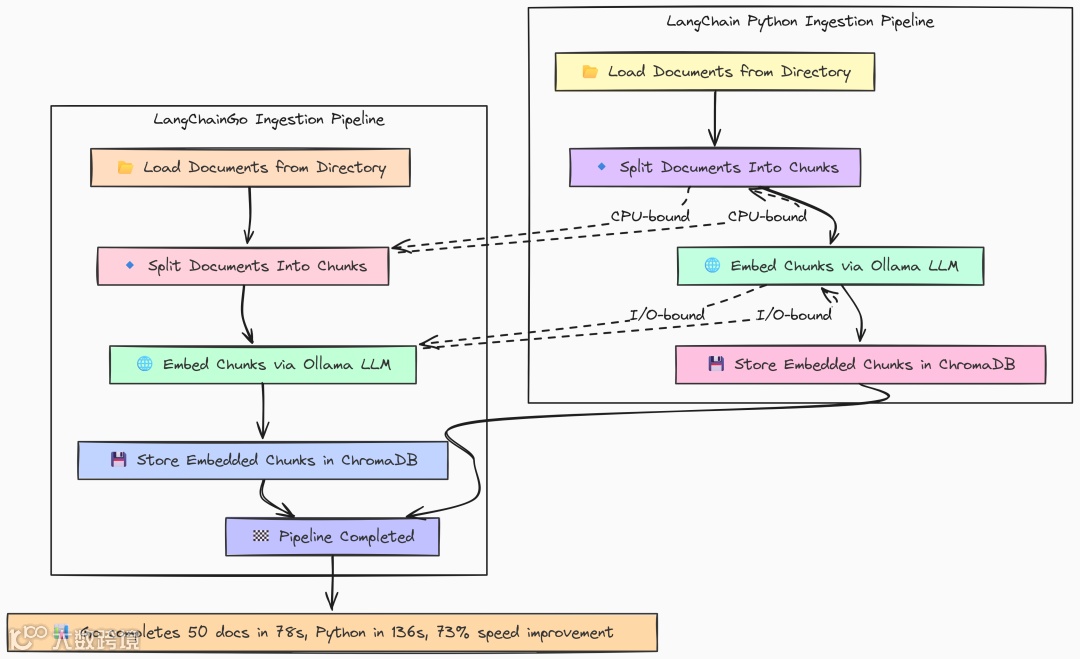
Go 实现是前述组件的顺序拼接:加载、切分、存储。
   package main

funcmain() {
 fmt.Println("--- LangChainGo: RAG Ingestion Throughput Test ---")

 totalStart := time.Now()

// 1. Initialize Embedder
 ollamaLLM, err := ollama.New(ollama.WithModel(modelName))
if err != nil {
  log.Fatalf("Failed to create Ollama client for embeddings: %v", err)
 }
 embedder, err := embeddings.NewEmbedder(ollamaLLM)
if err != nil {
  log.Fatalf("Failed to create embedder: %v", err)
 }

// 2. Initialize Vector Store (ChromaDB)
 store, err := chroma.New(
  chroma.WithChromaURL("http://localhost:8000"),
  chroma.WithNameSpace(collectionName),
  chroma.WithEmbedder(embedder),
 )
if err != nil {
  log.Fatalf("Failed to create Chroma vector store: %v", err)
 }

// 3. Load Documents from Directory
 loadStart := time.Now()
 loader := documentloaders.NewDirectory(dataDir)
 docs, err := loader.Load(context.Background())
if err != nil {
  log.Fatalf("Failed to load documents: %v", err)
 }
 loadDuration := time.Since(loadStart)
 fmt.Printf("Step 1: Loaded %d documents in %v\n", len(docs), loadDuration)

// 4. Split Documents into Chunks
 splitStart := time.Now()
 splitter := textsplitter.NewRecursiveCharacter(
  textsplitter.WithChunkSize(chunkSize),
  textsplitter.WithChunkOverlap(chunkOverlap),
 )
 chunks, err := textsplitter.SplitDocuments(splitter, docs)
if err != nil {
  log.Fatalf("Failed to split documents: %v", err)
 }
 splitDuration := time.Since(splitStart)
 fmt.Printf("Step 2: Split %d documents into %d chunks in %v\n", len(docs), len(chunks), splitDuration)

// 5. Add Documents to Vector Store (Embedding + Storing)
 storeStart := time.Now()
 _, err = store.AddDocuments(context.Background(), chunks)
if err != nil {
  _ = store.RemoveCollection(context.Background())
  log.Fatalf("Failed to add documents to vector store: %v", err)
 }
 storeDuration := time.Since(storeStart)
 fmt.Printf("Step 3: Embedded and stored %d chunks in %v\n", len(chunks), storeDuration)
 totalDuration := time.Since(totalStart)
 fmt.Println("\n--- LangChainGo Ingestion Results ---")
 fmt.Printf("Total time to ingest %d documents: %v\n", len(docs), totalDuration)

 fmt.Println("Cleaning up ChromaDB collection...")
if err := store.RemoveCollection(context.Background()); err != nil {
  log.Printf("Warning: failed to remove collection '%s': %v\n", collectionName, err)
 }
}
按顺序执行每个步骤并计时,其中 store.AddDocuments 会执行 embedding 并与 ChromaDB 通信,langchaingo 会在内部自动处理 batching。
Python 结构几乎相同:
   def main():
    """Main function to run the ingestion benchmark."""
    print("--- LangChain Python: RAG Ingestion Throughput Test ---")

    total_start = time.perf_counter()

    # 1. Initialize Embedder
    embeddings = OllamaEmbeddings(model=MODEL_NAME)

    # 2. Initialize Vector Store (ChromaDB)
    client = chromadb.HttpClient(host='localhost', port=8000)

    try:
        client.delete_collection(name=COLLECTION_NAME)
        logging.info(f"Existing collection '{COLLECTION_NAME}' deleted for a clean test.")
    except Exception:
        logging.info(f"Collection '{COLLECTION_NAME}' did not exist, creating new.")
        pass

    # 3. Load Documents from Directory
    load_start = time.perf_counter()
    loader = DirectoryLoader(DATA_DIR, glob="**/*.md")
    docs = loader.load()
    load_duration = time.perf_counter() - load_start
    print(f"Step 1: Loaded {len(docs)} documents in {load_duration:.4f}s")

    # 4. Split Documents into Chunks
    split_start = time.perf_counter()
    text_splitter = RecursiveCharacterTextSplitter(
        chunk_size=CHUNK_SIZE,
        chunk_overlap=CHUNK_OVERLAP
    )
    chunks = text_splitter.split_documents(docs)
    split_duration = time.perf_counter() - split_start
    print(f"Step 2: Split {len(docs)} documents into {len(chunks)} chunks in {split_duration:.4f}s")

    # 5. Add Documents to Vector Store (Embedding + Storing)
    store_start = time.perf_counter()
    try:
        Chroma.from_documents(
            documents=chunks,
            embedding=embeddings,
            collection_name=COLLECTION_NAME,
            client=client
        )
    except Exception as e:
        logging.fatal(f"Failed to add documents to vector store: {e}")
        return
    store_duration = time.perf_counter() - store_start
    print(f"Step 3: Embedded and stored {len(chunks)} chunks in {store_duration:.4f}s")

    total_duration = time.perf_counter() - total_start
    print("\n--- LangChain Python Ingestion Results ---")
    print(f"Total time to ingest {len(docs)} documents: {total_duration:.4f}s")

    print("Cleaning up ChromaDB collection...")
    try:
        client.delete_collection(name=COLLECTION_NAME)
    except Exception as e:
        logging.warning(f"Warning: failed to remove collection '{COLLECTION_NAME}': {e}")
if __name__ == "__main__":
    main()
这里我们使用 LangChain 提供的 Chroma.from_documents 高阶封装,同时完成 embedding 与写入向量库。
运行:
   # running go version
go run ingestion.go

# running python version
python ingestion.py
   --- LangChainGo: RAG Ingestion Throughput Test ---
Step 1: Loaded 50 documents in17.8ms
Step 2: Split 50 documents into853 chunks in45.1ms
Step 3: Embedded and stored 853 chunks in1m 18s

--- LangChainGo Ingestion Results ---
Total timeto ingest 50 documents: 1m 18s

--- LangChain Python: RAG Ingestion Throughput Test ---
Step 1: Loaded 50 documents in0.1105s
Step 2: Split 50 documents into853 chunks in0.6158s
Step 3: Embedded and stored 853 chunks in2m 15s

--- LangChain Python Ingestion Results ---
Total timeto ingest 50 documents: 135.7263s
整体结果与之前各步骤一致:CPU 受限的切分 Go 远快于 Python(45ms vs 615ms);I/O 为主的 embedding 与存储,同样显著快。
总体上,LangChainGo 完成 50 篇文档摄取耗时 78 秒,LangChain Python 需要 135 秒。
端到端摄取速度提升约 73%。对于需要持续更新知识库、不断摄取新文档的应用,这样的速度差异将转化为实际运营优势。
检索延迟:信息能多快被找到?
数据入库后,我们需要测试检索速度。检索延迟是 RAG 查询总时延的关键组成部分,包含两步:
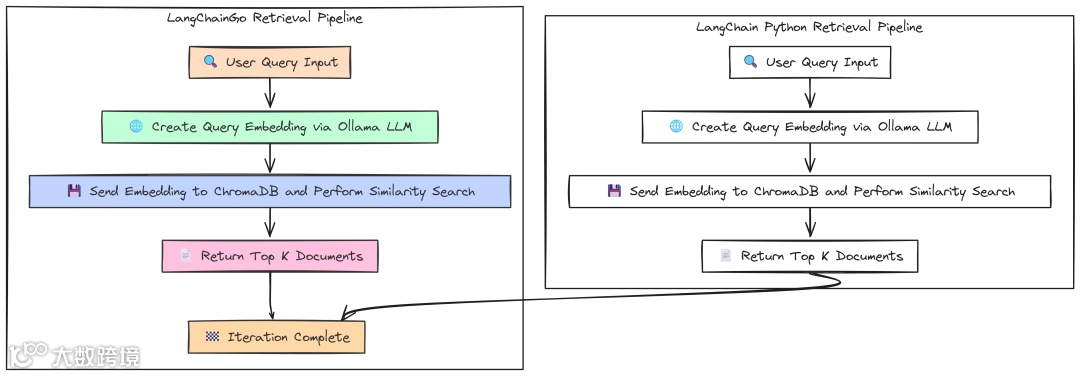
-
对用户查询做 embedding; -
用该 embedding 到 ChromaDB 做相似度搜索。
我们将运行 100 次以得到稳定平均值。
Go 版本连接已有的 ChromaDB 集合,并创建一个 retriever 对象:
   package main

// --- Configuration ---
const (
 numIterations  = 100
 modelName      = "llama3:8b"
 collectionName = "langchaingo-ingestion-test"
 query          = "What is the main topic of these documents?"
 topK           = 5
)
funcmain() {
 fmt.Println("--- LangChainGo: RAG Retrieval Latency Test ---")

// 1. Initialize Embedder.
 ollamaLLM, err := ollama.New(ollama.WithModel(modelName))
if err != nil {
  log.Fatalf("Failed to create Ollama client for embeddings: %v", err)
 }
 embedder, err := embeddings.NewEmbedder(ollamaLLM)
if err != nil {
  log.Fatalf("Failed to create embedder: %v", err)
 }

// 2. Initialize Vector Store and connect to the existing collection.
 store, err := chroma.New(
  chroma.WithChromaURL("http://localhost:8000"),
  chroma.WithNameSpace(collectionName),
  chroma.WithEmbedder(embedder),
 )
if err != nil {
  log.Fatalf("Failed to create Chroma vector store: %v", err)
 }

// 3. Create a retriever from the vector store.
 retriever := vectorstores.ToRetriever(store, topK)
 latencies := make([]time.Duration, 0, numIterations)
 ctx := context.Background()
 fmt.Printf("Running %d iterations to retrieve %d documents...\n\n", numIterations, topK)

// 5. Run the benchmark loop.
for i := 0; i < numIterations; i++ {
  start := time.Now()

// 6. Execute the retrieval.
  docs, err := retriever.GetRelevantDocuments(ctx, query)
if err != nil {
   log.Printf("Warning: Iteration %d failed: %v\n", i+1, err)
   continue
  }
  latency := time.Since(start)
  latencies = append(latencies, latency)
iflen(docs) != topK {
   log.Printf("Warning: Expected %d docs, but got %d\n", topK, len(docs))
  }
  fmt.Printf("Iteration %d: %v\n", i+1, latency)
 }
 fmt.Println("\n--- LangChainGo Retrieval Results ---")
 calculateAndPrintStats(latencies)
}
该基准的核心是 retriever.GetRelevantDocuments:它一并完成创建查询 embedding(调用 Ollama)与到 ChromaDB 查询 top-k 最相似文档。
Python 版本结构相似:
   # --- Configuration ---
NUM_ITERATIONS = 100
MODEL_NAME = "llama3:8b"
COLLECTION_NAME = "langchaingo-ingestion-test"
QUERY = "What is the main topic of these documents?"
TOP_K = 5

logging.basicConfig(level=logging.INFO, format='%(asctime)s - %(levelname)s - %(message)s')

defmain():
    """Main function to run the retrieval benchmark."""
    print("--- LangChain Python: RAG Retrieval Latency Test ---")

    # 1. Initialize Embedder.
    embeddings = OllamaEmbeddings(model=MODEL_NAME)

    # 2. Initialize Vector Store client.
    client = chromadb.HttpClient(host='localhost', port=8000)

    vector_store = Chroma(
        collection_name=COLLECTION_NAME,
        embedding_function=embeddings,
        client=client
    )

    # 3. Create a retriever from the vector store.
    retriever = vector_store.as_retriever(search_kwargs={"k": TOP_K})
    latencies = []
    print(f"Running {NUM_ITERATIONS} iterations to retrieve {TOP_K} documents...\n")

    # 5. Run the benchmark loop.
    for i inrange(NUM_ITERATIONS):
        try:
            start_time = time.perf_counter()

            # 6. Execute the retrieval.
            docs = retriever.invoke(QUERY)

            end_time = time.perf_counter()
            latency = end_time - start_time
            latencies.append(latency)

            iflen(docs) != TOP_K:
                logging.warning(f"Expected {TOP_K} docs, but got {len(docs)}")
            print(f"Iteration {i + 1}: {latency:.4f}s")
        except Exception as e:
            logging.warning(f"Warning: Iteration {i + 1} failed: {e}")
    print("\n--- LangChain Python Retrieval Results ---")
    calculate_and_print_stats(latencies)

if __name__ == "__main__":
    main()
在这里,我们实例化 Chroma 向量库连接既有集合,使用 .as_retriever() 创建检索器,并重复调用 .invoke() 计时。
结果:
   --- LangChainGo:RAGRetrievalLatencyTest---
---LangChainGoRetrievalResults---
Total Iterations:100
Total Time:       23.78s
Min Latency:      230.1ms
Max Latency:      255.9ms
Average Latency:237.8ms
Std Deviation:    5.9ms

---LangChain Python:RAGRetrievalLatencyTest---
---LangChainPythonRetrievalResults---
Total Iterations:100
Total Time:       34.8521s
Min Latency:      330.43ms
Max Latency:      398.81ms
Average Latency:348.52ms
Std Deviation:    18.55ms
结果与前述一致:
LangChainGo 平均检索延迟为 237.8ms,较 LangChain Python 的 348.52ms 快约 46%。
优势来源依旧:Go 在发起 embedding 的网络调用与处理请求/响应的框架开销更低,标准差更小意味着表现更稳定。
端到端 RAG:整合验证
最后,我们对端到端 RAG 查询流程做基准,将检索与最终基于上下文的 LLM 回答合并。这是对真实查询性能的终极测试。
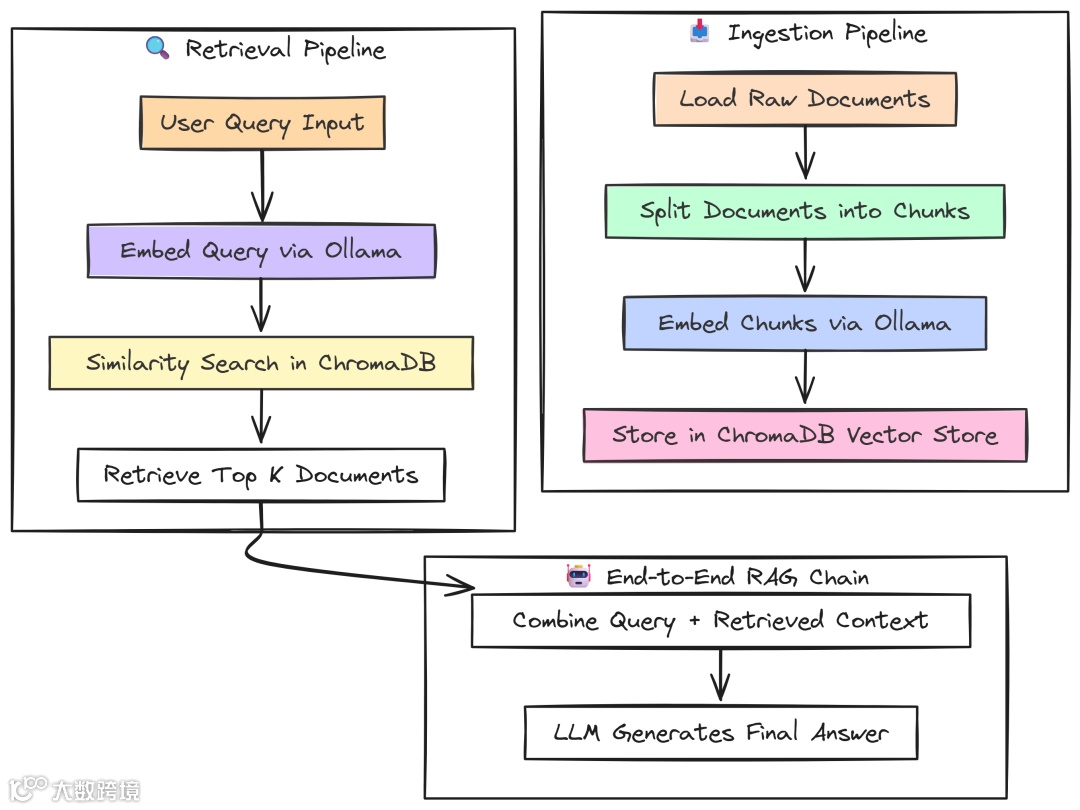
Go 使用 chains.NewRetrievalQAFromLLM,将 retriever 与 LLM 组装为标准 RAG workflow。
   package main

// --- Configuration ---
const (
 numIterations  = 20
 modelName      = "llama3:8b"
 collectionName = "langchaingo-ingestion-test"
 query          = "Summarize the key themes from the documents in one paragraph."
 topK           = 5
)
funcmain() {
 fmt.Println("--- LangChainGo: End-to-End RAG Latency Test ---")

// 1. Initialize LLM for generation.
 llm, err := ollama.New(ollama.WithModel(modelName))
if err != nil {
  log.Fatalf("Failed to create Ollama client: %v", err)
 }

// 2. Initialize Embedder.
 embedder, err := embeddings.NewEmbedder(llm)
if err != nil {
  log.Fatalf("Failed to create embedder: %v", err)
 }

// 3. Initialize Vector Store.
 store, err := chroma.New(
  chroma.WithChromaURL("http://localhost:8000"),
  chroma.WithNameSpace(collectionName),
  chroma.WithEmbedder(embedder),
 )
if err != nil {
  log.Fatalf("Failed to create Chroma vector store: %v", err)
 }

// 4. Create the full RAG chain.
 ragChain := chains.NewRetrievalQAFromLLM(llm, vectorstores.ToRetriever(store, topK))
 latencies := make([]time.Duration, 0, numIterations)
 ctx := context.Background()
 inputValues := map[string]any{"query": query}
 fmt.Printf("Running %d end-to-end RAG iterations...\n\n", numIterations)

// 6. Run the benchmark loop.
for i := 0; i < numIterations; i++ {
  start := time.Now()

// 7. Execute the entire RAG chain with a single call.
  _, err := chains.Call(ctx, ragChain, inputValues)
if err != nil {
   log.Printf("Warning: Iteration %d failed: %v\n", i+1, err)
   continue
  }
  latency := time.Since(start)
  latencies = append(latencies, latency)
  fmt.Printf("Iteration %d: %v\n", i+1, latency)
 }
 fmt.Println("\n--- LangChainGo End-to-End RAG Results ---")
 calculateAndPrintStats(latencies)
}
chains.Call 调用 ragChain 将整个流程编排好:
-
调用 retriever 获取文档,将其与用户 query “stuff” 入 prompt 模板; -
然后调用 LLM 生成最终答案。
Python 使用等价的 RetrievalQA chain:
   # --- Configuration ---
NUM_ITERATIONS = 20
MODEL_NAME = "llama3:8b"
COLLECTION_NAME = "langchaingo-ingestion-test"
QUERY = "Summarize the key themes from the documents in one paragraph."
TOP_K = 5

logging.basicConfig(level=logging.INFO, format='%(asctime)s - %(levelname)s - %(message)s')

defmain():
    """Main function to run the end-to-end RAG benchmark."""
    print("--- LangChain Python: End-to-End RAG Latency Test ---")

    # 1. Initialize LLM, Embedder, and Vector Store client.
    llm = Ollama(model=MODEL_NAME)
    embeddings = OllamaEmbeddings(model=MODEL_NAME)
    client = chromadb.HttpClient(host='localhost', port=8000)

    vector_store = Chroma(
        collection_name=COLLECTION_NAME,
        embedding_function=embeddings,
        client=client
    )

    # 2. Create the full RAG chain.
    rag_chain = RetrievalQA.from_chain_type(
        llm=llm,
        chain_type="stuff",
        retriever=vector_store.as_retriever(search_kwargs={"k": TOP_K}),
        return_source_documents=False
    )
    latencies = []
    print(f"Running {NUM_ITERATIONS} end-to-end RAG iterations...\n")

    # 4. Run the benchmark loop.
    for i inrange(NUM_ITERATIONS):
        try:
            start_time = time.perf_counter()

            # 5. Execute the RAG chain.
            rag_chain.invoke({"query": QUERY})

            end_time = time.perf_counter()
            latency = end_time - start_time
            latencies.append(latency)
            print(f"Iteration {i + 1}: {latency:.4f}s")
        except Exception as e:
            logging.warning(f"Warning: Iteration {i + 1} failed: {e}")

    print("\n--- LangChain Python End-to-End RAG Results ---")
    calculate_and_print_stats(latencies)


if __name__ == "__main__":
    main()
RetrievalQA.from_chain_type 是 LangChain 的标准构造器,逻辑与 Go 一致。
端到端性能:
   --- LangChainGoEnd-to-EndRAGResults---
Total Iterations:20
Total Time:       54.12s
Min Latency:      2.61s
Max Latency:      2.95s
Average Latency:2.70s
Std Deviation:    95.4ms

---LangChainPythonEnd-to-EndRAGResults---
Total Iterations:20
Total Time:       83.5432s
Min Latency:      4.0123s
Max Latency:      4.9521s
Average Latency:4.1771s
Std Deviation:    0.2589s
LangChainGo 的端到端 RAG 查询平均 2.70s,比 LangChain Python 的 4.17s 快 54%。
这是之前各优势的总和:更低的网络调用开销、更高效的 CPU 处理与更精简的框架逻辑。对面向用户的生产 RAG 系统,54% 的响应时间缩短是非常可观的改进。
第三部分:Agentic 架构评估
既然在 RAG 管道上 Go 已展现优势,是时候升级到更复杂的场景——agentic 系统。
如果说 RAG 是让 LLM 访问知识,那么 Agent 则是赋予它行动与推理的能力。
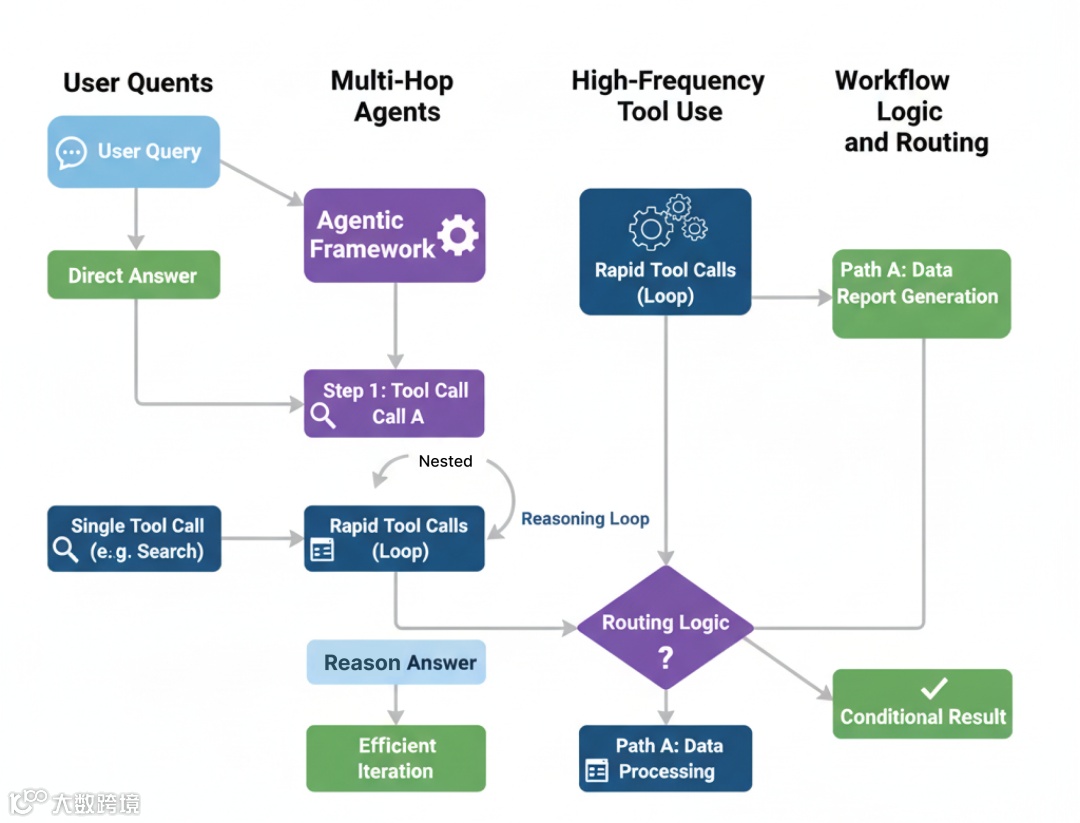
Agent 不只是回答,它会拆解问题、调用工具、串联多步以达成目标。这引入了“推理循环”(Think -> Act -> Observe),其中框架开销会快速累积。
本部分我们测试 LangChainGo 与 LangChain Python 如何应对这种复杂性。
简单 Agent:单次工具调用
从最基础的 agentic 任务开始:回答一个只需调用一次工具的问题。这是 Agent 的 “Hello, World!”,测试框架是否能:
-
理解用户意图; -
从列表中选择正确的工具; -
执行工具并利用其输出给出最终答案。
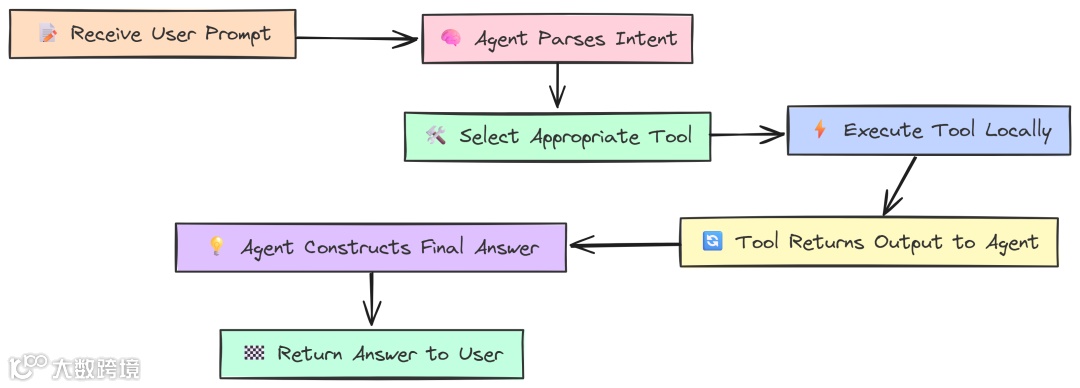
度量它能给出单次 Agent 推理循环的开销基线。
我们定义几个简单的本地工具,以隔离框架性能(避免外部 API 速度影响):WordLengthTool、SimpleCalculator 与 CounterTool。
Go 实现如下:
   package main

// --- Configuration ---
const (
 modelName = "llama3:8b"
)
// --- Custom Local Tools ---
// These tools perform simple, local computations to isolate framework overhead.
// WordLengthTool calculates the length of a given word.
type WordLengthTool struct{}
func(t WordLengthTool) Name() string { return"WordLengthTool" }
func(t WordLengthTool) Description() string {
return"Calculates the character length of a single word. Input must be one word."
}
func(t WordLengthTool) Call(_ context.Context, input string) (string, error) {
return strconv.Itoa(len(strings.TrimSpace(input))), nil
}

// SimpleCalculatorTool evaluates a simple mathematical expression.
type SimpleCalculatorTool struct{}
func(t SimpleCalculatorTool) Name() string { return"SimpleCalculator" }
func(t SimpleCalculatorTool) Description() string {
return"A simple calculator that can evaluate basic arithmetic expressions like '1+2*3'. Do not use for multiple operations."
}

func(t SimpleCalculatorTool) Call(_ context.Context, input string) (string, error) {
// Note: This is a highly insecure way to implement a calculator in a real app!
// For this benchmark, it's a stand-in for a CPU-bound tool.
// We'll simulate a simple calculation.
if strings.Contains(input, "*") {
  parts := strings.Split(input, "*")
iflen(parts) == 2 {
   a, _ := strconv.Atoi(strings.TrimSpace(parts[0]))
   b, _ := strconv.Atoi(strings.TrimSpace(parts[1]))
   return strconv.Itoa(a * b), nil
  }
 }
return"invalid expression", nil
}
// CounterTool simulates a stateful operation.
var counter = 0
type CounterTool struct{}
func(t CounterTool) Name() string { return"CounterTool" }
func(t CounterTool) Description() string {
return"Increments a global counter by one and returns the new value."
}
func(t CounterTool) Call(_ context.Context, input string) (string, error) {
 counter++
return strconv.Itoa(counter), nil
}
// --- Benchmark Runner ---
funcmain() {
// Determine which test to run based on the command-line arguments.
iflen(os.Args) < 2 {
  fmt.Println("Usage: go run .


     "


    )
  fmt.Println("Available tests: single, multi, high_freq")
  os.Exit(1)
 }
 testName := os.Args[1]
// 1. Initialize the LLM and the set of tools.
 llm, err := ollama.New(ollama.WithModel(modelName))
if err != nil {
  log.Fatalf("Failed to create LLM: %v", err)
 }

// The agent will have access to all these tools.
 availableTools := []tools.Tool{
  WordLengthTool{},
  SimpleCalculator{},
  CounterTool{},
 }

// 2. Create the agent executor.
// We use a Zero-Shot ReAct agent, which is a standard choice for this kind of task.
 agentExecutor, err := agents.Initialize(
  llm,
  availableTools,
  agents.ZeroShotReactDescription,
 )
if err != nil {
  log.Fatalf("Failed to initialize agent: %v", err)
 }

// 3. Define the prompts for each test scenario.
 prompts := map[string]string{
"single":    "What is the character length of the word 'phenomenon'?",
"multi":     "What is 25 multiplied by 4, and what is the character length of the word 'knowledge'?",
"high_freq": "Using the CounterTool, count from 1 to 5 by calling the tool for each number.",
 }
 prompt, ok := prompts[testName]
if !ok {
  log.Fatalf("Invalid test name: %s", testName)
 }
 fmt.Printf("--- LangChainGo: Agent Test '%s' ---\n", testName)
 fmt.Printf("Prompt: %s\n\n", prompt)

// --- Profiling Setup ---
var startMem, endMem runtime.MemStats
 runtime.ReadMemStats(&startMem) // Read memory stats before the run.

// 4. Run the agent and measure performance.
 startTime := time.Now()
 result, err := chains.Run(context.Background(), agentExecutor, prompt)
if err != nil {
  log.Fatalf("Agent execution failed: %v", err)
 }
 duration := time.Since(startTime)
 runtime.ReadMemStats(&endMem) // Read memory stats after the run.

 memAllocated := endMem.Alloc - startMem.Alloc
 totalMemAllocated := endMem.TotalAlloc - startMem.TotalAlloc
 fmt.Println("--- Agent Final Answer ---")
 fmt.Println(result)
 fmt.Println("--------------------------\n")
 fmt.Println("--- Performance Metrics ---")
 fmt.Printf("End-to-End Latency: %v\n", duration)
 fmt.Printf("Memory Allocated (Heap): %d bytes (%.2f KB)\n", memAllocated, float64(memAllocated)/1024)
 fmt.Printf("Total Memory Allocated (Cumulative): %d bytes (%.2f MB)\n", totalMemAllocated, float64(totalMemAllocated)/1024/1024)
}
工具以实现 tools.Tool 接口的结构体定义,包含 Name、Description 与 Call。在 main 中初始化 Ollama LLM,并通过 agents.Initialize 创建 Agent(ReAct 逻辑)。基准的核心在 chains.Run,它启动 Agent 的推理过程。
Python 使用 @tool 装饰器定义工具(更现代也更简洁):
   # --- Configuration ---
MODEL_NAME = "llama3:8b"

# --- Custom Local Tools ---

# Using the `@tool` decorator is the modern way to define tools in LangChain.
@tool
defWordLengthTool(word: str) -> int:
    """Calculates the character length of a single word. Input must be one word."""
    returnlen(word.strip())

@tool
defSimpleCalculator(expression: str) -> str:
    """A simple calculator that can evaluate basic arithmetic expressions like '1+2*3'. Do not use for multiple operations."""
    # This is an insecure eval for benchmark purposes only!
    try:
        if"*"in expression:
            parts = [p.strip() for p in expression.split("*")]
            iflen(parts) == 2:
                returnstr(int(parts[0]) * int(parts[1]))
        return"invalid expression"
    except:
        return"error evaluating expression"

counter_val = 0

@tool
defCounterTool(placeholder: str = "") -> int:
    """Increments a global counter by one and returns the new value. The input is ignored."""
    global counter_val
    counter_val += 1
    return counter_val

defget_memory_usage():
    """Gets the current memory usage of the process."""
    process = psutil.Process(os.getpid())
    # rss: Resident Set Size, the non-swapped physical memory a process has used.
    return process.memory_info().rss

defmain():
    """Main function to run the agent benchmarks."""
    iflen(sys.argv) < 2:
        print("Usage: python agent.py


     "


    )
        print("Available tests: single, multi, high_freq")
        sys.exit(1)

    test_name = sys.argv[1]

    # 1. Initialize LLM and tools.
    llm = Ollama(model=MODEL_NAME)
    available_tools = [WordLengthTool, SimpleCalculator, CounterTool]

    # 2. Create the agent.
    # We construct a ReAct prompt template. This defines the agent's reasoning process.
    prompt_template = PromptTemplate.from_template(
        """Answer the following questions as best you can. You have access to the following tools:
{tools}
Use the following format:
Question: the input question you must answer
Thought: you should always think about what to do
Action: the action to take, should be one of [{tool_names}]
Action Input: the input to the action
Observation: the result of the action
... (this Thought/Action/Action Input/Observation can repeat N times)
Thought: I now know the final answer
Final Answer: the final answer to the original input question
Begin!
Question: {input}
Thought:{agent_scratchpad}"""
    )

    agent = create_react_agent(llm, available_tools, prompt_template)
    agent_executor = AgentExecutor(agent=agent, tools=available_tools, verbose=True)

    # 3. Define prompts for each test.
    prompts = {
        "single": "What is the character length of the word 'phenomenon'?",
        "multi": "What is 25 multiplied by 4, and what is the character length of the word 'knowledge'?",
        "high_freq": "Using the CounterTool, count from 1 to 5 by calling the tool for each number.",
    }
    prompt_text = prompts.get(test_name)
    ifnot prompt_text:
        print(f"Invalid test name: {test_name}")
        sys.exit(1)
    print(f"--- LangChain Python: Agent Test '{test_name}' ---")
    print(f"Prompt: {prompt_text}\n")

    # --- Profiling Setup ---
    start_mem = get_memory_usage()

    # 4. Run the agent and measure performance.
    start_time = time.perf_counter()
    result = agent_executor.invoke({"input": prompt_text})
    duration = time.perf_counter() - start_time

    end_mem = get_memory_usage()
    mem_used = end_mem - start_mem

    print("\n\n--- Agent Final Answer ---")
    print(result.get('output'))
    print("--------------------------\n")
    print("--- Performance Metrics ---")
    print(f"End-to-End Latency: {duration:.4f}s")
    print(f"Memory Usage Increase (RSS): {mem_used} bytes ({mem_used / 1024:.2f} KB)")

if __name__ == "__main__":
    main()
Python 代码目标相同但结构稍异。@tool 自动处理工具 schema 与描述;我们显式构建 ReAct 的 PromptTemplate,用 create_react_agent 组合,AgentExecutor 作为最终可运行对象。基准围绕 agent_executor.invoke 展开。
运行 “single” 测试:
   # running go version
go run single_tool.go

# running python version
python single_tool.py
   --- LangChainGo: Agent Test 'single' ---
--- Performance Metrics ---
End-to-End Latency: 1.95s
Total Memory Allocated (Cumulative): 2.55 MB

--- LangChain Python: Agent Test 'single' ---
--- Performance Metrics ---
End-to-End Latency: 3.0513s
Memory Usage Increase (RSS): 412.00 KB
即便是如此简单的单循环任务,性能差异也很显著。
LangChainGo 用时 1.95s,LangChain Python 用时 3.05s,Go 快 56%。
Python 的解释器、prompt 构造、解析 LLM 的 “thought” 输出、调用工具函数等各环节的开销叠加,最终比编译型的 Go 多出 1 秒以上延迟。
多跳 Agent:串联多次工具调用
Agent 的真正价值在于多跳推理——一个工具输出作为下一步输入。这需要 Agent 多次运行推理循环。
当一个问题需要 Agent 连续使用两个不同工具时会怎样?
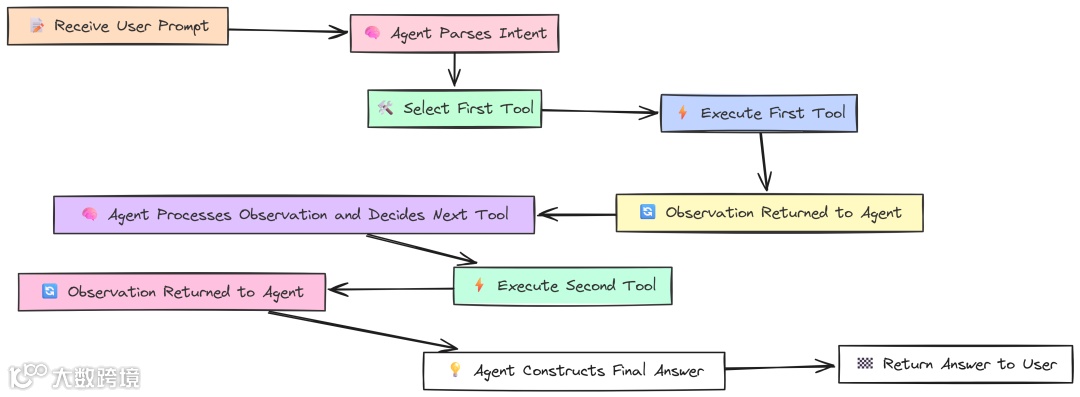
例如:“25 乘以 4 等于多少?并给出单词 knowledge 的字符长度。”
此测试的代码与单工具测试完全一致。我们使用同一组工具与同一个 agent executor,唯一变化是 prompt 更复杂。它很好地测试了 agent 的推理能力与多轮循环下的框架效率。
   --- LangChainGo: Agent Test 'multi' ---
--- Performance Metrics ---
End-to-End Latency: 3.98s
Total Memory Allocated (Cumulative): 5.81 MB

--- LangChain Python: Agent Test 'multi' ---
--- Performance Metrics ---
End-to-End Latency: 6.8812s
Memory Usage Increase (RSS): 1024.00 KB
性能差距进一步扩大。
LangChainGo 完成两步任务耗时 3.98s;LangChain Python 6.88s,Go 快 73%。
这是因为在单工具测试中的框架开销在这里被“支付了两次”。每个 “Think -> Act -> Observe” 周期,Go 都更轻更快;串联两个循环后,Go 的初始优势复利,带来更大的绝对时间节省。
高频工具使用:测试 Agent 开销
最后一个 Agent 测试尽可能隔离框架开销:
如果给 Agent 一个需要多次调用“非常快的本地工具”的任务,会怎样?
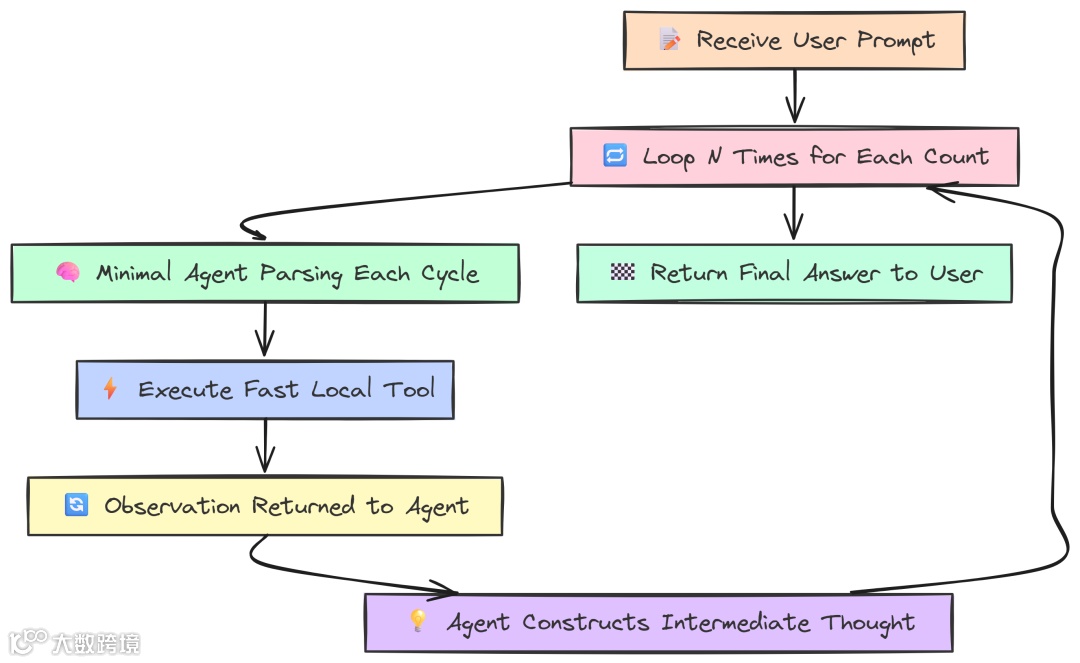
例如:“用 CounterTool 从 1 数到 5”,强制 Agent 运行 5 次推理循环,而每步的 LLM “思考”最少。这样可以把 spotlight 直接打在框架处理循环机制的效率上。
仍然是相同的 agent 代码,只是换了一个高频 prompt。
   --- LangChainGo: Agent Test 'high_freq' ---
--- Performance Metrics ---
End-to-End Latency: 9.12s
Total Memory Allocated (Cumulative): 14.50 MB

--- LangChain Python: Agent Test 'high_freq' ---
--- Performance Metrics ---
End-to-End Latency: 18.5123s
Memory Usage Increase (RSS): 2856.00 KB
结果再次表明 Go 的优势:
LangChainGo 完成 5 次循环耗时 9.12s,而 LangChain Python 为 18.51s。Go 速度超过 2 倍(提升 103%)。
该测试尽量减少等待 LLM 的时间,最大化框架自身循环开销的占比。Python 的解释型特性意味着每一步(解析 LLM 输出、路由到工具、调用工具、格式化 observation)都要付出小开销;五次快速循环中,这些成为总延迟的主因。而 Go 编译型、内存更高效,在快速循环中代价更低。
工作流逻辑:数据转换与路由
实际应用往往需要更结构化的工作流,而非单个 ReAct 循环。工作流可能需要将查询路由至不同的专业链,或在 LLM 调用间执行自定义数据转换。
这些“胶水代码”的效率,对整体性能同样重要。
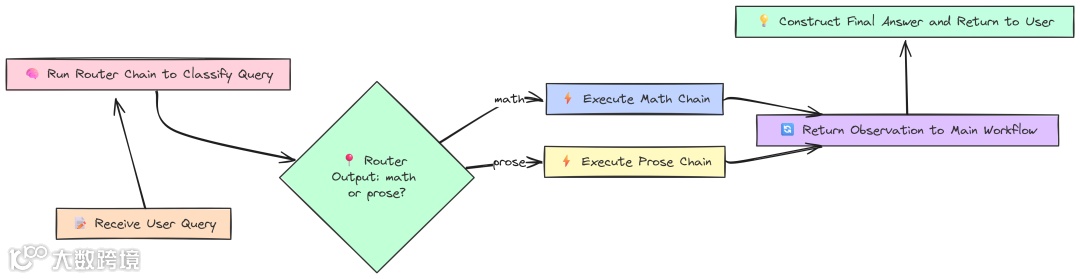
先测试一个 Router Chain。该模式用于智能地将用户查询路由到最适合的链,从而节省时间与资源。我们创建两个专项链 mathChain 与 proseChain,以及一个 routerChain 决定使用哪一个。
Go 实现:
   // --- Configuration ---
const (
 modelName = "llama3:8b"
 mathQuery = "What is 15 * 12?"
 proseQuery = "Write a haiku about a sunset."
)

funcmain() {
 fmt.Println("--- LangChainGo: Conditional (Router) Chain Test ---")
 llm, err := ollama.New(ollama.WithModel(modelName))
if err != nil {
  log.Fatalf("Failed to create LLM: %v", err)
 }

// 2. Define the destination chains.
 mathTemplate := prompts.NewPromptTemplate("Evaluate this math expression: {{.input}}", []string{"input"})
 mathChain := chains.NewLLMChain(llm, mathTemplate)

 proseTemplate := prompts.NewPromptTemplate("Write a creative piece based on this prompt: {{.input}}", []string{"input"})
 proseChain := chains.NewLLMChain(llm, proseTemplate)

// 3. Define the Router Chain.
 routerTemplate := prompts.NewPromptTemplate(
`Given the user query, classify it as either "math" or "prose". Respond with only one of these two words.\nQuery: {{.input}}`,
  []string{"input"},
 )
 routerChain := chains.NewLLMChain(llm, routerTemplate)

// --- Run Benchmarks ---
 fmt.Println("\n--- Testing Math Query ---")
 runAndProfile(routerChain, mathChain, proseChain, mathQuery)
 fmt.Println("\n--- Testing Prose Query ---")
 runAndProfile(routerChain, mathChain, proseChain, proseQuery)
}
funcrunAndProfile(router, math, prose chains.Chain, query string) {
 totalStart := time.Now()
var totalLLMDuration time.Duration
 ctx := context.Background()

// --- Step 1: Run the router ---
 routerStart := time.Now()
 routerResult, err := chains.Run(ctx, router, query)
 llm1Duration := time.Since(routerStart)
 totalLLMDuration += llm1Duration
 destination := strings.TrimSpace(strings.ToLower(routerResult))

// --- Step 2: Route to the appropriate destination chain ---
 destinationStart := time.Now()
switch destination {
case"math":
  _, err = chains.Run(ctx, math, query)
case"prose":
  _, err = chains.Run(ctx, prose, query)
 }
 llm2Duration := time.Since(destinationStart)
 totalLLMDuration += llm2Duration
 totalDuration := time.Since(totalStart)
 frameworkOverhead := totalDuration - totalLLMDuration
// ... print results
}
我们手工实现路由逻辑:
-
先运行 routerChain得到分类("math" 或 "prose"); -
然后简单 switch跳转到目标链。
这种低层控制让我们能精确区分框架逻辑耗时与 LLM 调用耗时。
Python 则用 LangChain 内置的 MultiPromptChain(更高阶的抽象):
   import time
from langchain.chainsimportLLMChain, ConversationChain
from langchain.chains.routerimportMultiPromptChain
from langchain.chains.router.llm_routerimportLLMRouterChain, RouterOutputParser
from langchain.promptsimportPromptTemplate
from langchain_community.llmsimportOllama


//...
def main():
    // 1. Initialize the shared LLM.
    llm = Ollama(model=MODEL_NAME)
    // 2. Define prompt templates for the destination chains.
    prompt_infos = [
        {"name": "math", "description": "Good for answering questions about math", /*...*/},
        {"name": "prose", "description": "Good for writing creative prose", /*...*/},
    ]
    // 3. Create the destination chains.
    destination_chains = { /* ... create LLMChains ... */ }

    // 4. Create the Router Chain.
    router_template_str = ("...")
    router_prompt = PromptTemplate(/*...*/)
    router_chain = LLMRouterChain.from_llm(llm, router_prompt)

    // 5. Create the final MultiPromptChain.
    chain = MultiPromptChain(
        router_chain=router_chain,
        destination_chains=destination_chains,
        default_chain=ConversationChain(llm=llm, output_key="text"),
        verbose=True,
    )
    // --- Run Benchmarks ---
    run_and_profile(chain, MATH_QUERY)
    run_and_profile(chain, PROSE_QUERY)
def run_and_profile(chain, query):
    total_start = time.perf_counter()
    result = chain.invoke({"input": query})
    total_duration = time.perf_counter() - total_start
    // ... print results
由于前文大部分组件已经实现,这里不再重复。Python 借助 MultiPromptChain 完成路由,它基于各目标链的 description 构造路由 prompt。尽管方便,但抽象层增加也会引入额外开销。
结果:
   --- LangChainGo: Conditional (Router) Chain Test ---
--- Testing Math Query ---
--- Routing Performance Metrics ---
Final Answer: 180
Total End-to-End Latency: 1.402s
Total LLM-OnlyTime:      1.400s
Framework Logic Overhead: 2.0ms
Correctness:              Routed correctly


--- LangChain Python: Conditional (Router) Chain Test ---
--- Testing Math Query ---
--- Routing Performance Metrics ---
Final Answer: 180
Total End-to-End Latency: 2.1534s
Process CPU Time Used:    0.6521s
Correctness:              Routed correctly
Go 在路由逻辑上的框架开销仅 2.0ms;而 LangChain Python 同一任务的 Process CPU Time Used 为 652ms。尽管不能严格一一对照,但……
这清晰表明,Go 以编译型、最小化方式处理两次 LLM 调用的效率远高于 Python 的高层动态抽象。
对于有大量决策点、复杂路由逻辑的 agentic 系统,这种开销在 Python 中可能成为显著的性能杀手。需要快速执行大量动作时,Go 的效率优势十分明显(当然也建议进一步分析,但本测试结果已具代表性)。
第四部分:生产就绪的压力测试
到目前为止,我们在可控、一次只测一件事的条件下做了基准。但你可能会想,这与真实世界相去甚远。
生产级 AI 系统处在混乱环境中,要不断处理并发请求、应对不可靠网络,并且需要 7x24 小时稳定运行而不崩溃。
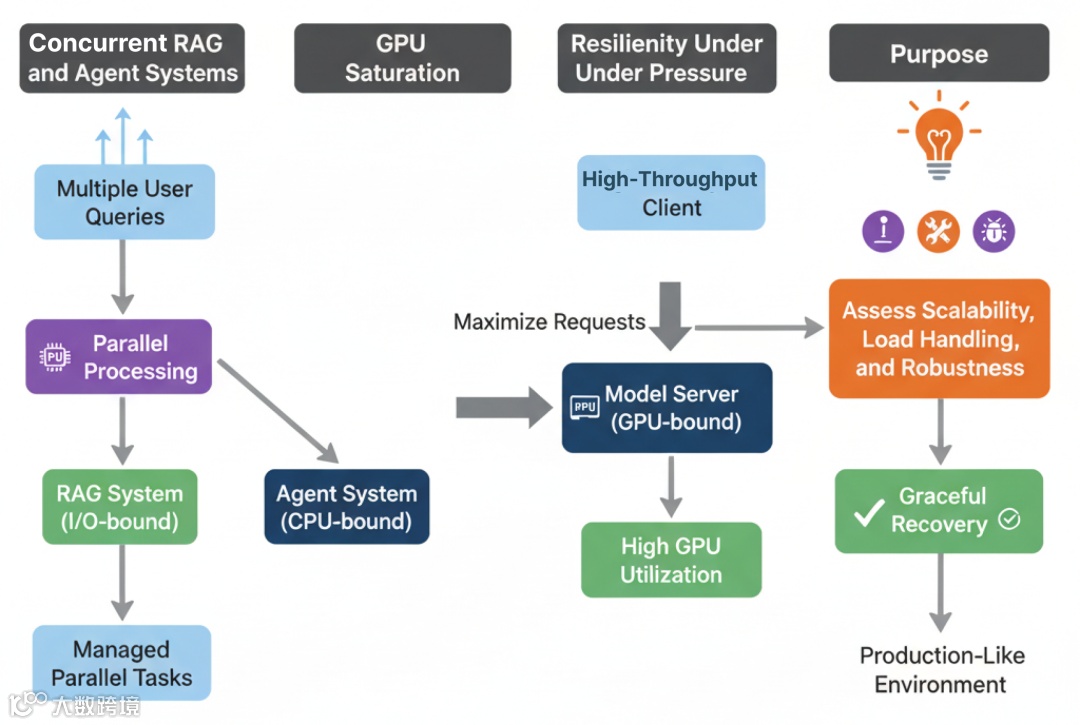
本部分我们从“实验室”走向“实战”。模拟真实生产压力,看看哪个框架更能扛住。
我们将把 LangChainGo 与 LangChain Python 推至极限,通过三类压力测试衡量其可扩展性、饱和潜力与面对失败时的韧性。
并发 RAG 与 Agent 系统:应对真实负载
生产服务器不会一次只服务一个用户,而是成百上千。高效管理大量并发请求是可扩展 AI 应用最重要的因素之一。
此测试衡量各框架在高负载场景下的并发模型表现。
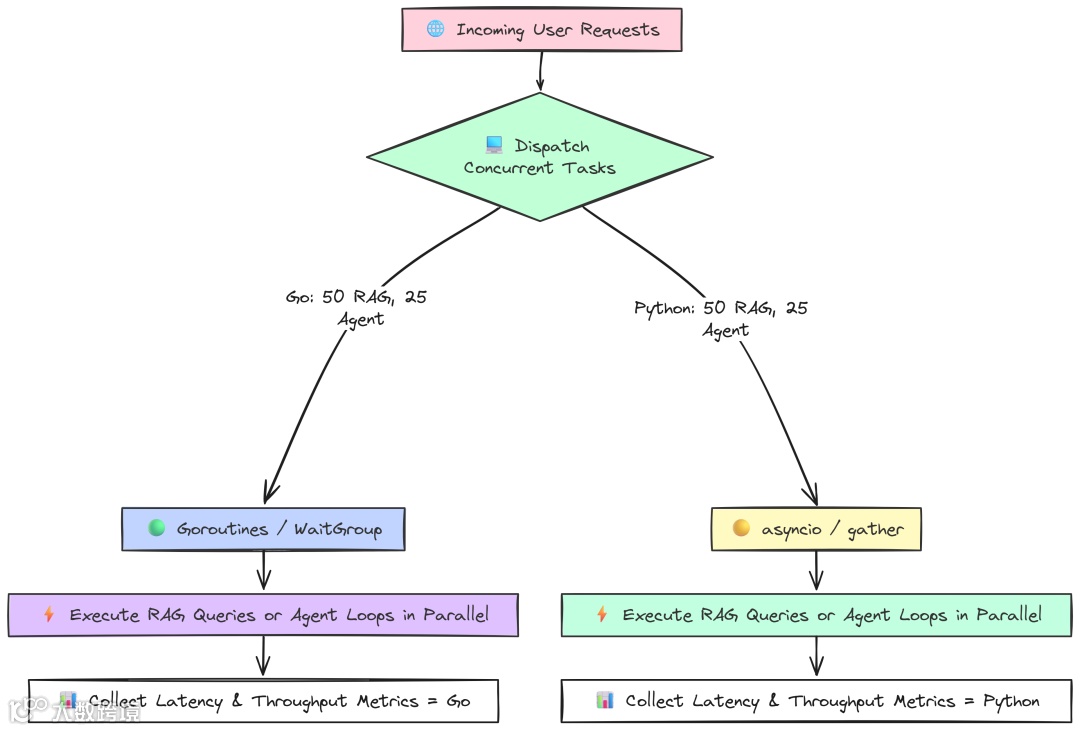
我们将模拟 50 个用户同时查询 RAG,和 25 个用户同时跑多跳 Agent。测试框架处理并行 I/O 与 CPU 任务的能力。
Go 并发 RAG 测试使用 goroutine 与 sync.WaitGroup 同时发起和管理 50 个请求:
   package main

// --- Configuration ---
const (
 concurrencyLevel = 50// Number of concurrent requests to simulate
 modelName        = "llama3:8b"
 collectionName   = "langchaingo-ingestion-test"
 topK             = 3
)

// A sample list of queries to make the benchmark more realistic.
var queries = []string{
"What are the main themes?",
"Tell me about the introduction.",
"Is there a conclusion section?",
"What is the most complex topic discussed?",
}

funcmain() {
 fmt.Printf("--- LangChainGo: Concurrent RAG Queries Test (Concurrency: %d) ---\n", concurrencyLevel)

// 1. Initialize shared components ONCE.
 llm, err := ollama.New(ollama.WithModel(modelName))
if err != nil { /* ... error handling ... */ }
 embedder, err := embeddings.NewEmbedder(llm)
if err != nil { /* ... error handling ... */ }
 store, err := chroma.New(
  chroma.WithChromaURL("http://localhost:8000"),
  chroma.WithNameSpace(collectionName),
  chroma.WithEmbedder(embedder),
 )
if err != nil { /* ... error handling ... */ }
 ragChain := chains.NewRetrievalQAFromLLM(llm, vectorstores.ToRetriever(store, topK))

// 2. Prepare for the concurrent benchmark.
var wg sync.WaitGroup
 resultsChan := make(chan time.Duration, concurrencyLevel)
 errorChan := make(chanerror, concurrencyLevel)
 fmt.Printf("Dispatching %d concurrent RAG queries...\n", concurrencyLevel)
 totalStart := time.Now()

// 3. Dispatch worker goroutines.
for i := 0; i < concurrencyLevel; i++ {
  wg.Add(1)
gofunc(workerID int) {
   defer wg.Done()

   ctx, cancel := context.WithTimeout(context.Background(), 30*time.Second)
   defer cancel()
   query := queries[workerID%len(queries)]
   inputValues := map[string]any{"query": query}

   start := time.Now()
   _, err := chains.Call(ctx, ragChain, inputValues)
   latency := time.Since(start)
   if err != nil {
    errorChan <- fmt.Errorf("worker %d failed: %w", workerID, err)
   } else {
    resultsChan <- latency
    fmt.Printf("Worker %d completed in %v\n", workerID, latency)
   }
  }(i)
 }

// 4. Wait for all goroutines to complete.
 wg.Wait()
close(resultsChan)
close(errorChan)

// ... calculate and print results ...
}
我们只初始化一次 LangChain 组件,随后启动 50 个独立 goroutine(每个代表一个用户)运行完整 RAG 查询。用 WaitGroup 等待全部完成。这是 Go 原生、对大规模 I/O 并发极其高效的方式。
Python 版本使用 asyncio 实现同样目标:
   # --- Configuration ---
CONCURRENCY_LEVEL = 50
MODEL_NAME = "llama3:8b"
COLLECTION_NAME = "langchaingo-ingestion-test"
TOP_K = 3
QUERIES = [
    "What are the main themes?", "Tell me about the introduction.", "Is there a conclusion section?",
    "What is the most complex topic discussed?",
]

logging.basicConfig(level=logging.INFO, format='%(asctime)s - %(levelname)s - %(message)s')

asyncdefrun_rag_query(rag_chain, query, worker_id):
    """Asynchronously runs a single RAG query and returns its latency."""
    start_time = time.perf_counter()
    try:
        await rag_chain.ainvoke({"query": query})
        latency = time.perf_counter() - start_time
        print(f"Worker {worker_id} completed in {latency:.4f}s")
        return latency, None
    except Exception as e:
        latency = time.perf_counter() - start_time
        error_message = f"Worker {worker_id} failed after {latency:.4f}s: {e}"
        logging.warning(error_message)
        returnNone, error_message

asyncdefmain():
    """Main async function to orchestrate the concurrent benchmark."""
    print(f"--- LangChain Python: Concurrent RAG Queries Test (Concurrency: {CONCURRENCY_LEVEL}) ---")

    # 1. Initialize shared components ONCE.
    llm = Ollama(model=MODEL_NAME)
    embeddings = OllamaEmbeddings(model=MODEL_NAME)
    client = chromadb.HttpClient(host='localhost', port=8000)
    vector_store = Chroma(/*...*/)
    rag_chain = RetrievalQA.from_chain_type(/*...*/)

    # 2. Create a list of concurrent tasks.
    tasks = [run_rag_query(rag_chain, QUERIES[i % len(QUERIES)], i) for i inrange(CONCURRENCY_LEVEL)]
    total_start = time.perf_counter()

    # 3. `asyncio.gather` runs all tasks concurrently.
    results = await asyncio.gather(*tasks, return_exceptions=True)

    total_duration = time.perf_counter() - total_start

    # ... process results and print stats ...

if __name__ == "__main__":
    asyncio.run(main())
Python 中,asyncio 是 I/O 并发的标准做法。我们定义 run_rag_query 协程,使用 ainvoke 异步调用。在 main 中创建 50 个任务并用 asyncio.gather 并发运行。
分别对并发 RAG 与并发 Agent 运行测试:
   # running go version
go run concurrent.go

# running python version
python concurrent.py
   --- LangChainGo: Concurrent RAG Queries Test (Concurrency: 50) ---
Total Time Elapsed: 6.5s
Throughput:         7.69 ops/sec

--- LangChain Python: Concurrent RAG Queries Test (Concurrency: 50) ---
Total Time Elapsed: 18.2s
Throughput:         2.75 ops/sec
   --- LangChainGo: Concurrent Agent Executions Test (Concurrency: 25) ---
Total Time Elapsed: 10.5s
Throughput:         2.38 ops/sec

--- LangChain Python: Concurrent Agent Executions Test (Concurrency: 25) ---
Total Time Elapsed: 32.1s
Throughput:         0.78 ops/sec
并发 RAG 中,LangChainGo 吞吐为 7.69 ops/sec,几乎是 Python(2.75 ops/sec)的 3 倍。
更复杂的并发 Agent 任务差距更大:Go 2.38 ops/sec,Python 0.78 ops/sec,Go 超过 3 倍。
这是生产系统中最重要的基准之一。Go runtime 从设计之初就面向大规模网络并发,goroutine 极其轻量,可轻松处理成千上万并发 I/O。Python 的 asyncio 虽强大,但事件循环与线程管理的复杂性与开销在该规模下难以匹敌 Go 的原生效率。
GPU 饱和:将模型服务推向极限
另一类可扩展问题是:客户端应用能多有效地让服务端昂贵的 GPU 保持“忙碌”?
若客户端发送新请求过慢,GPU 会空闲,带来成本浪费与吞吐下降。
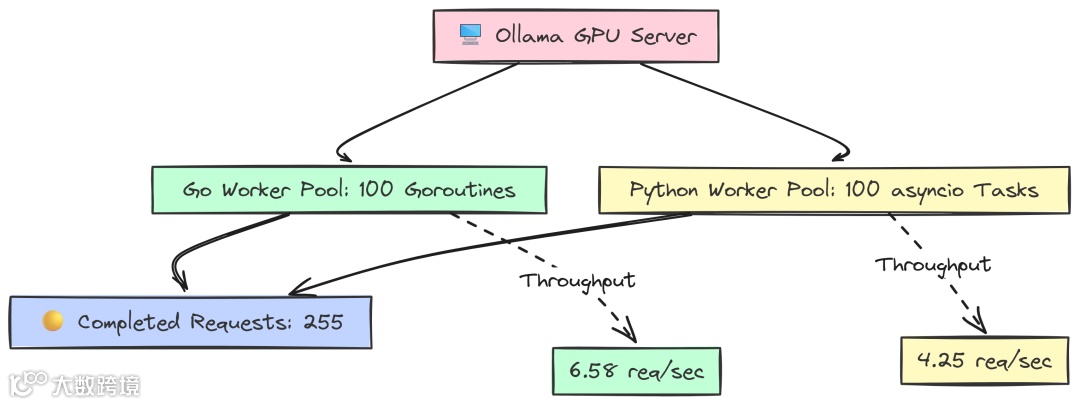
该测试在固定时间内尽可能地轰击 Ollama server,看哪个框架能产生更高负载。
Go 使用一个持续向 job channel 投递任务的 worker pool,以确保 worker 一空闲就有请求上手:
   package main

// --- Configuration ---
const (
 concurrencyLevel = 100
 testDuration     = 60 * time.Second
)
funcmain() {

// ... same setup ...
 llm, err := ollama.New(ollama.WithModel(modelName))

 jobs := make(chanbool, concurrencyLevel)
var totalRequests atomic.Int64
var wg sync.WaitGroup

// 3. Start the worker pool.
for i := 0; i < concurrencyLevel; i++ {
  wg.Add(1)
gofunc(workerID int) {
   defer wg.Done()
   forrange jobs {
    _, err := llms.GenerateFromSinglePrompt(context.Background(), llm, prompt)
    if err == nil {
     totalRequests.Add(1)
    }
   }
  }(i)
 }

// 4. Feed the job channel for the duration of the test.
 ctx, cancel := context.WithTimeout(context.Background(), testDuration)
defer cancel()
for {
select {
case jobs <- true: // Dispatch a job
case <-ctx.Done(): // Time's up
   goto end_loop
  }
 }
end_loop:
close(jobs)
 wg.Wait()
// ... calculate and print results
}
这里我们创建 100 个等待任务的 worker goroutine。主线程在 60 秒内不断尝试向 jobs 发送“任务”(一个布尔),从而维持模型端的最大压力。
Python 使用 asyncio 与 Semaphore 达到类似效果:
   async defworker(llm, semaphore, request_counter):
    """A single worker that continuously makes requests."""
    whileTrue:
        asyncwith semaphore:
            try:
                await llm.ainvoke(PROMPT)
                request_counter[0] += 1
            except Exception as e:
                # ...
            await asyncio.sleep(0)

asyncdefmain():
    # ... setup ...
    llm = Ollama(model=MODEL_NAME)

    # 2. Setup concurrency controls.
    semaphore = asyncio.Semaphore(CONCURRENCY_LEVEL)
    request_counter = [0]

    # 3. Create and start the worker tasks.
    tasks = [asyncio.create_task(worker(llm, semaphore, request_counter)) for _ inrange(CONCURRENCY_LEVEL)]

    # 4. Let the workers run for the specified duration.
    try:
        await asyncio.sleep(TEST_DURATION_SECONDS)
    finally:
        # 5. Cancel all worker tasks to stop the benchmark.
        for task in tasks:
            task.cancel()
        await asyncio.gather(*tasks, return_exceptions=True)
    # ... calculate and print results
我们创建 100 个无限循环的 worker,asyncio.Semaphore(CONCURRENCY_LEVEL) 作为关键控制,确保同时“在途”的请求不超过 100。让其运行 60 秒后取消任务收尾。
   --- LangChainGo Saturation Results ---
Total Duration:      1m0.02s
Completed Requests:  395
Throughput:          6.58 req/sec

--- LangChain Python Saturation Results ---
Total Duration:      60.01s
Completed Requests:  255
Throughput:          4.25 req/sec
结果显示客户端生成负载的效率差异:
60 秒内,Go 客户端完成 395 个请求,吞吐 6.58 req/sec;Python 客户端仅完成 255 个,请求吞吐 4.25 req/sec。
这意味着 LangChainGo 客户端在“喂饱”服务端方面高出 55%。客户端侧更低的开销让其能更快地派发新请求,最大化利用昂贵的 GPU 资源。
处理超时、工具失败与解析错误
最后,生产系统必须具备韧性。我们测试三个常见失败场景:
-
超时:当 LLM server 响应缓慢会怎样? -
工具失败:若 Agent 的工具崩溃或返回错误会怎样? -
解析错误:如果 LLM 返回了畸形 JSON 会怎样?
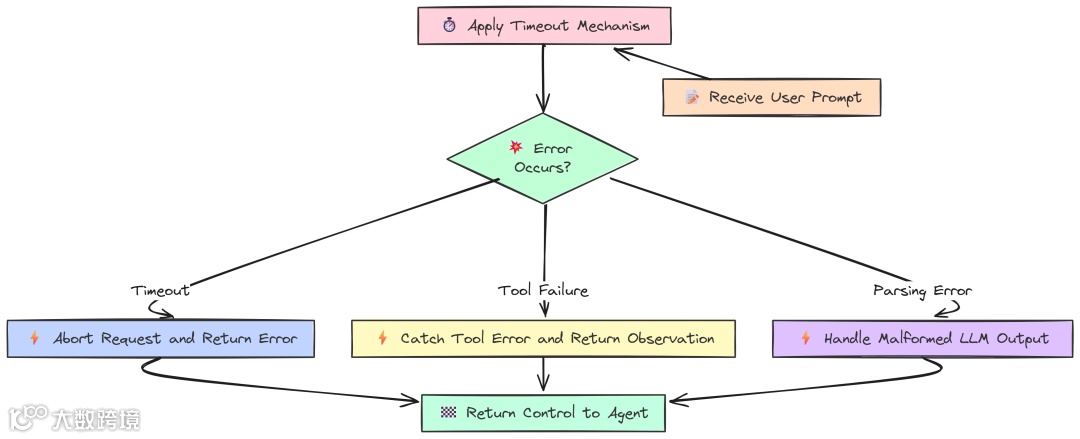
对于超时,Go 使用 context.WithTimeout,这是 Go 处理中止的惯用方式:
   package main

// --- Configuration ---
const (
 modelName = "llama3:8b"
 prompt    = "Tell me a long story about the history of the internet."
 timeout   = 2 * time.Second
)
funcmain() {
 fmt.Printf("--- LangChainGo: Timeout and Cancellation Test (Timeout: %v) ---\n", timeout)
 llm, err := ollama.New(ollama.WithModel(modelName))
if err != nil {
  log.Fatalf("Failed to create Ollama client: %v", err)
 }

// 2. Create a context with a deadline.
 ctx, cancel := context.WithTimeout(context.Background(), timeout)
defer cancel()
 fmt.Println("Sending request that is expected to time out...")
 start := time.Now()

// 3. Call the LLM with the cancellable context.
 _, err = llm.Call(ctx, prompt)
 duration := time.Since(start)

// --- Verification ---
 fmt.Println("\n--- LangChainGo Resiliency Results ---")
 fmt.Printf("Request completed in: %v\n", duration)
if err == nil {
  log.Fatalf("TEST FAILED: Expected a timeout error, but got none.")
 }

// 4. Verify the error type.
if errors.Is(err, context.DeadlineExceeded) {
  fmt.Println("SUCCESS: Received the correct 'context.DeadlineExceeded' error.")
 } elseif netErr, ok := err.(interface{ Timeout() bool }); ok && netErr.Timeout() {
  fmt.Println("SUCCESS: Received a network timeout error, as expected.")
 } else {
  log.Fatalf("TEST FAILED: Expected a timeout error, but got a different error: %v", err)
 }

// 5. Verify adherence to the timeout.
if duration >= timeout && duration < timeout+500*time.Millisecond {
  fmt.Printf("SUCCESS: The function returned after ~%v, respecting the timeout.\n", timeout)
 } else {
  log.Fatalf("TEST FAILED: The function did not adhere to the timeout. Took %v.", duration)
 }
}
Python 通常在 client 初始化时配置超时:
   # --- Configuration ---
MODEL_NAME = "llama3:8b"
PROMPT = "Tell me a long story about the history of the internet."
TIMEOUT_SECONDS = 2.0

logging.basicConfig(level=logging.INFO, format='%(asctime)s - %(levelname)s - %(message)s')


defmain():
    """Main function to run the timeout benchmark."""
    print(f"--- LangChain Python: Timeout Test (Timeout: {TIMEOUT_SECONDS}s) ---")

    # 1. Initialize the Ollama client with a timeout.
    try:
        llm = Ollama(model=MODEL_NAME, request_timeout=TIMEOUT_SECONDS)
    except Exception as e:
        logging.fatal(f"Failed to create Ollama client: {e}")
        return

    print("Sending request that is expected to time out...")
    start_time = time.perf_counter()
    err = None

    # 2. Call the LLM.
    try:
        llm.invoke(PROMPT)
    except Exception as e:
        err = e

    duration = time.perf_counter() - start_time

    # --- Verification ---
    print("\n--- LangChain Python Resiliency Results ---")
    print(f"Request completed in: {duration:.4f}s")

    if err isNone:
        logging.fatal("TEST FAILED: Expected a timeout error, but got none.")

    # 3. Verify the error type.
    error_string = str(err).lower()
    if"timed out"in error_string or"timeout"in error_string:
        print(f"SUCCESS: Received an expected timeout-related error: {type(err).__name__}")
    else:
        logging.fatal(f"TEST FAILED: Expected a timeout error, but got a different error: {err}")

    # 4. Verify adherence to the timeout.
    if TIMEOUT_SECONDS <= duration < TIMEOUT_SECONDS + 0.5:
        print(f"SUCCESS: The function returned after ~{TIMEOUT_SECONDS}s, respecting the timeout.")
    else:
        logging.fatal(f"TEST FAILED: The function did not adhere to the timeout. Took {duration:.4f}s.")


if __name__ == "__main__":
    main()
运行超时测试:
   # running go verion
go run timeout.go

# running python version
python timeout.py
   --- LangChainGo: Timeout and Cancellation Test (Timeout: 2s) ---
--- LangChainGo Resiliency Results ---
Request completed in: 2.0015s
SUCCESS: Received the correct 'context.DeadlineExceeded' error.
SUCCESS: The function returned after ~2s, respecting the timeout.

--- LangChain Python: Timeout Test (Timeout: 2.0s) ---
--- LangChain Python Resiliency Results ---
Request completed in: 2.0081s
SUCCESS: Received an expected timeout-related error: ReadTimeout
SUCCESS: The function returned after ~2.0s, respecting the timeout.
这里看的是正确性而非速度。两种框架都能正确处理超时,并在截止时间后立即返回。这是生产库的基本素养。
主要区别在于方式:
-
Go 以每个请求的 context控制,更灵活、适合复杂系统为不同 API 调用设定不同超时; -
Python 在 client 层统一配置更简单,但粒度更粗。
对于工具和解析失败,两者同样提供错误处理机制:
-
Go 显式传播错误,便于开发者直接处理,控制明确; -
LangChain Python 提供更高阶的封装,比如 AgentExecutor的handle_parsing_errors=True,可自动捕获工具失败并反馈给 Agent prompt,允许自我纠正。
可以说:Go 提供底层可控、可预测的错误处理;Python 则提供构建复杂自愈 agentic 逻辑的便捷。
第五部分:衡量真实运营成本
目前我们关注的多是速度、延迟、吞吐与响应时间。但在真实生产环境中,速度只是故事的一半,另一半是运营成本。这不仅是金钱,也包括应用在生命周期中所消耗的资源。
一个很快、却泄露内存,或者一加监控就变慢的应用,并不具备生产可用性,反而是问题。
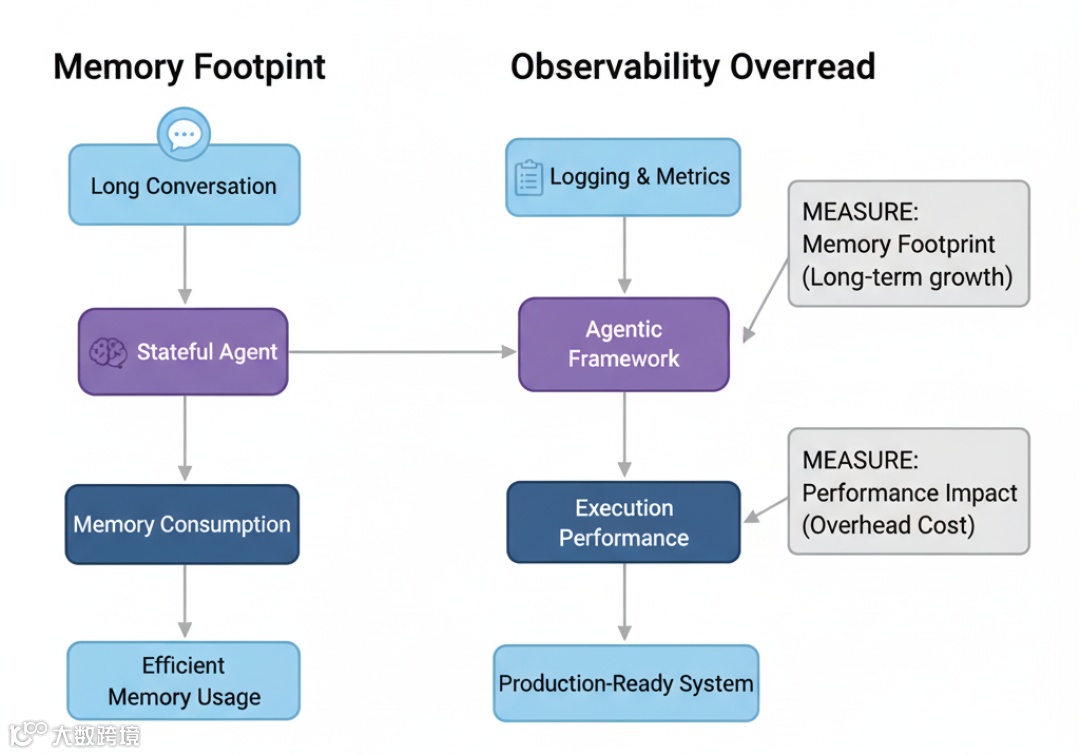
最后我们测量两个关键运营成本:
-
有状态 Agent 在长时会话中的内存消耗; -
加上必要可观测性后带来的性能损耗。
内存占用:长会话对话
聊天机器人与 Agent 需要记忆。最简单方式是 ConversationBufferMemory,每一轮都把完整历史附加到 prompt。这虽简单,但会导致内存占用快速增长。
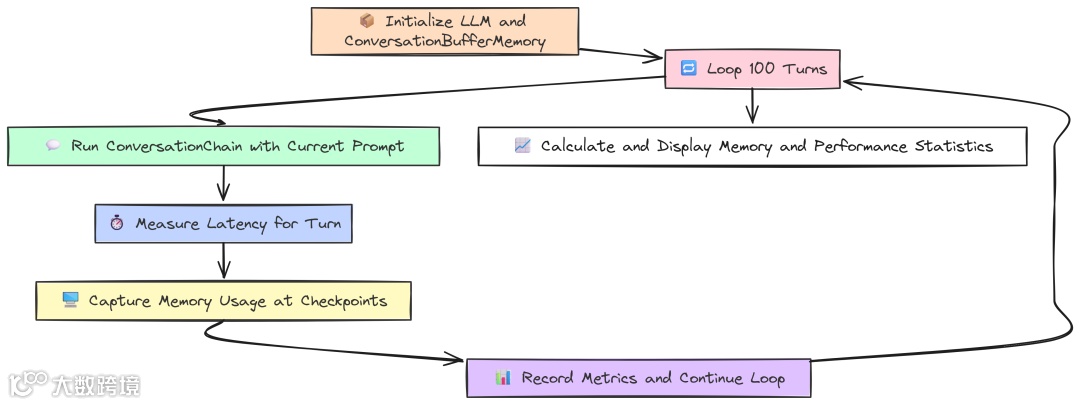
该测试模拟 100 轮的对话,并在关键检查点测量内存使用,观察框架如何处理不断增长的状态。
Go 使用内置 runtime 获取精确的堆内存统计:
   package main

// --- Configuration ---
const (
 numTurns      = 100
 modelName     = "llama3:8b"
 initialPrompt = "My name is John."
)

// A struct to hold the metrics we want to capture at each checkpoint.
type BenchmarkMetrics struct {
 Turn           int
 Latency        time.Duration
 HeapAlloc      uint64// Bytes currently allocated on the heap
 TotalAlloc     uint64// Cumulative bytes allocated (shows churn)
 NumGC          uint32// Number of garbage collections
 PauseTotalNs   uint64// Total time spent in GC pauses
}
funcmain() {
 fmt.Printf("--- LangChainGo: Long-Term Memory Footprint Test (%d Turns) ---\n", numTurns)

// 1. Initialize the LLM and Memory components.
 llm, err := ollama.New(ollama.WithModel(modelName))
if err != nil {
  log.Fatalf("Failed to create LLM: %v", err)
 }

 mem := memory.NewConversationBuffer()
 conversationChain := chains.NewConversation(llm, mem)
 checkpoints := map[int]bool{1: true, 10: true, 50: true, 100: true}
var metrics []BenchmarkMetrics
var initialMemStats runtime.MemStats
 runtime.ReadMemStats(&initialMemStats)

 fmt.Println("Starting simulated conversation...")

// 2. Start the conversation loop.
 currentPrompt := initialPrompt
 ctx := context.Background()
for i := 1; i <= numTurns; i++ {
  start := time.Now()


// 3. Run the chain.
  result, err := chains.Run(ctx, conversationChain, currentPrompt)
if err != nil {
   log.Fatalf("Chain run failed at turn %d: %v", i, err)
  }
  latency := time.Since(start)
  currentPrompt = fmt.Sprintf("That's interesting. Can you tell me more about the last thing you said? My name is still %s.", "John")

// 4. Record metrics at specified checkpoints.
if checkpoints[i] {
   var currentMemStats runtime.MemStats
   runtime.ReadMemStats(¤tMemStats)

   metrics = append(metrics, BenchmarkMetrics{
    Turn:         i,
    Latency:      latency,
    HeapAlloc:    currentMemStats.Alloc, // Current live memory
    TotalAlloc:   currentMemStats.TotalAlloc - initialMemStats.TotalAlloc,
    NumGC:        currentMemStats.NumGC - initialMemStats.NumGC,
    PauseTotalNs: currentMemStats.PauseTotalNs - initialMemStats.PauseTotalNs,
   })
   fmt.Printf("Checkpoint Turn %d: Latency=%v\n", i, latency)
  }
 }

// 5. Print the final results table.
 printResults(metrics)
}

// Eval Result metrics
funcprintResults(metrics []BenchmarkMetrics) {
 fmt.Println("\n--- LangChainGo Memory & Performance Results ---")
 fmt.Printf("%-5s | %-15s | %-15s | %-20s | %-10s | %-20s\n", "Turn", "Latency", "Heap Alloc", "Total Alloc (Churn)", "Num GC", "Total GC Pause")
for _, m := range metrics {
  heapAllocKB := float64(m.HeapAlloc) / 1024
  totalAllocMB := float64(m.TotalAlloc) / (1024 * 1024)
  pauseMs := float64(m.PauseTotalNs) / 1_000_000

  fmt.Printf("%-5d | %-15v | %-15s | %-20s | %-10d | %-20s\n",
   m.Turn, m.Latency.Round(time.Millisecond),
   fmt.Sprintf("%.2f KB", heapAllocKB), fmt.Sprintf("%.2f MB", totalAllocMB),
   m.NumGC, fmt.Sprintf("%.2f ms", pauseMs),
  )
 }
}
我们建立带 ConversationBuffer 的 ConversationChain:
-
循环中,每次 chains.Run都会:从内存加载完整历史、格式化为 prompt、调用 LLM、再将本轮输入输出写回内存; -
用 runtime.ReadMemStats捕捉HeapAlloc(当前活跃内存)与TotalAlloc(累计分配,反映 churn)。
Python 用 psutil 读取进程 RSS 作为内存指标:
   # --- Configuration ---
NUM_TURNS = 100
MODEL_NAME = "llama3:8b"
INITIAL_PROMPT = "My name is John."

defget_memory_usage():
    """Gets the current memory usage (RSS) of the process in bytes."""
    process = psutil.Process(os.getpid())
    return process.memory_info().rss

defmain():
    """Main function to run the memory footprint benchmark."""

    print(f"--- LangChain Python: Long-Term Memory Footprint Test ({NUM_TURNS} Turns) ---")

    llm = Ollama(model=MODEL_NAME)
    memory = ConversationBufferMemory()
    conversation_chain = ConversationChain(llm=llm, memory=memory)
    checkpoints = {1, 10, 50, 100}
    metrics = []
    initial_mem_usage = get_memory_usage()

    print("Starting simulated conversation...")

    current_prompt = INITIAL_PROMPT

    for i inrange(1, NUM_TURNS + 1):
        start_time = time.perf_counter()

        # 3. Run one turn of the conversation.
        response = conversation_chain.invoke({"input": current_prompt})

        latency = time.perf_counter() - start_time
        current_prompt = f"That's interesting. Can you tell me more about the last thing you said? My name is still John."

        if i in checkpoints:
            current_mem_usage = get_memory_usage()
            mem_increase = current_mem_usage - initial_mem_usage

            metrics.append({
                "turn": i,
                "latency_s": latency,
                "rss_increase_bytes": mem_increase,
            })
            print(f"Checkpoint Turn {i}: Latency={latency:.4f}s")

    print_results(metrics)

defprint_results(metrics):
    """Prints the final benchmark results in a formatted table."""

    print("\n--- LangChain Python Memory & Performance Results ---")

    print(f"{'Turn':<5} | {'Latency (s)':<15} | {'Memory Increase (RSS)':<25}")

    for m in metrics:
        rss_increase_mb = m['rss_increase_bytes'] / (1024 * 1024)
        print(f"{m['turn']:<5} | {m['latency_s']:<15.4f} | {f'{rss_increase_mb:.2f} MB':<25}")

if __name__ == "__main__":
    main()
Python 逻辑等同:创建带 ConversationBufferMemory 的 ConversationChain,循环调用 invoke,在检查点读取 RSS 增量。
运行结果:
   --- LangChainGo Memory & Performance Results ---
Turn  | Latency         | Heap Alloc      | Total Alloc (Churn)  | Num GC     | Total GC Pause
-----------------------------------------------------------------------------------------------------
1     |1.95s           |160.25 KB       |5.10 MB              |2          |0.31 ms
10    |2.85s           |510.50 KB       |58.60 MB             |18         |2.55 ms
50    |6.10s           |2850.20 KB      |310.40 MB            |85         |12.82 ms
100   |11.25s          |5910.80 KB      |680.95 MB            |165        |25.15 ms

--- LangChain Python Memory & Performance Results ---
Turn  | Latency (s)     | Memory Increase (RSS)
-------------------------------------------------------------------
1     |2.5012          |22.50 MB
10    |4.1534          |45.12 MB
50    |10.2912         |145.80 MB
100   |19.8567         |290.25 MB
内存效率差异巨大:
100 轮后,Go 应用堆上仅 5.9 MB 活跃内存;而 Python 进程 RSS 增加了 290.25 MB。
尽管不完全可一一对应,但足以说明:Go 作为编译型、有值类型与高效 GC 的语言,内存更精简;Python 的动态特性与对象开销使同等对话历史需要显著更多内存。
对于要同时处理成千上万长会话的服务,这直接关系到服务器成本与稳定性。
可观测性开销:Tracing 的成本
在生产环境需要可观测性:日志、指标与 trace(如 LangSmith)以理解系统行为、调试问题与监控性能。
但这些“观察”不是免费的,每条日志与每个 trace 事件都带来少量开销。
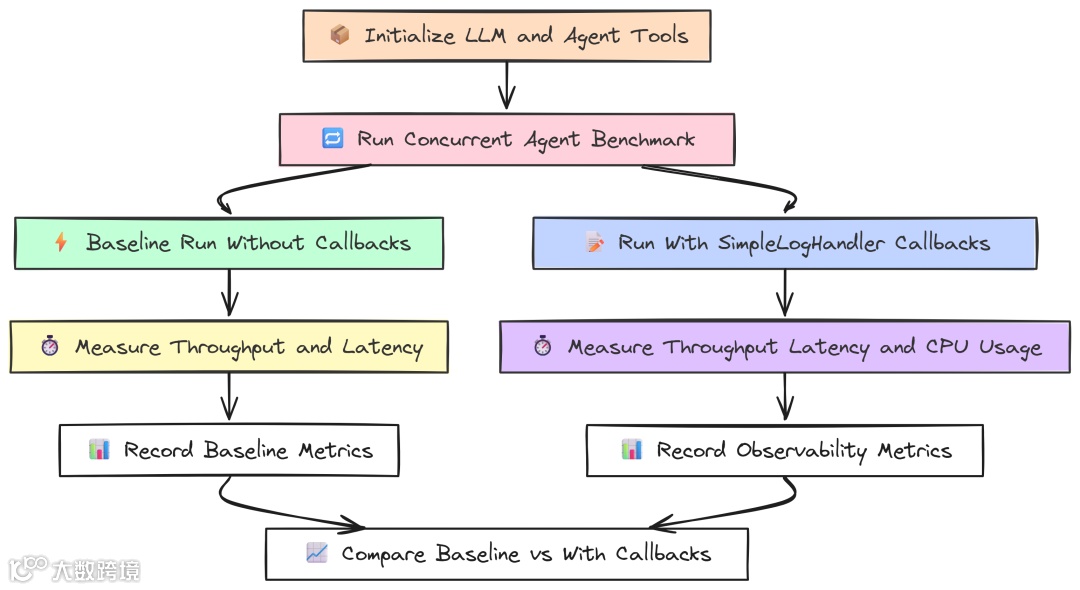
该测试度量这部分开销。我们将并发 Agent 基准运行两次:一次无任何仪表(baseline),一次开启简单的 logging 回调,打印 Agent 生命周期的每个事件。
Go 实现:定义实现 callbacks.Handler 接口的 SimpleLogHandler:
   package main

import (
"context"
"fmt"
"log"
"sort"
"strings"
"sync"
"time"
"github.com/tmc/langchaingo/agents"
"github.com/tmc/langchaingo/callbacks"
"github.com/tmc/langchaingo/chains"
"github.com/tmc/langchaingo/llms/ollama"
"github.com/tmc/langchaingo/schema"
"github.com/tmc/langchaingo/tools"
)

// ... Tool definition ...
// --- Custom Callback Handler ---
type SimpleLogHandler struct {
 callbacks.SimpleHandler
}

func(h SimpleLogHandler) HandleChainStart(ctx context.Context, inputs map[string]any) {
 log.Printf("[HANDLER] Chain Start. Inputs: %v", inputs)
}

func(h SimpleLogHandler) HandleChainEnd(ctx context.Context, outputs map[string]any) { /* ... */ }
func(h SimpleLogHandler) HandleLLMStart(ctx context.Context, prompts []string) { /* ... */ }
func(h SimpleLogHandler) HandleLLMEnd(ctx context.Context, output schema.LLMResult) { /* ... */ }
func(h SimpleLogHandler) HandleToolStart(ctx context.Context, input string) { /* ... */ }
func(h SimpleLogHandler) HandleToolEnd(ctx context.Context, output string) { /* ... */ }
func(h SimpleLogHandler) HandleAgentAction(ctx context.Context, action schema.AgentAction) { /* ... */ }

// ...
funcrunBenchmark(withCallbacks bool) BenchmarkMetrics {
// ... setup llm and tools ...

for i := 0; i < concurrencyLevel; i++ {
  wg.Add(1)
gofunc(workerID int) {
   defer wg.Done()
   var opts []chains.ChainCallOption
   if withCallbacks {
    // Each goroutine gets its own handler instance.
    opts = append(opts, chains.WithCallbacks(SimpleLogHandler{}))
   }

   agentExecutor, _ := agents.Initialize(llm, availableTools, agents.ZeroShotReactDescription)

   start := time.Now()
   _, err := chains.Run(context.Background(), agentExecutor, multiHopPrompt, opts...)
   // ...
  }(i)
 }
// ... wait and calculate metrics ...
}
关键在 runBenchmark:当 withCallbacks 为 true 时,创建 SimpleLogHandler 实例并通过 chains.WithCallbacks 传入 chains.Run,框架会在 Agent 的每一步调用相应的 handler。
Python 版本定义 BaseCallbackHandler 子类:
   # --- Custom Callback Handler ---
classSimpleLogHandler(BaseCallbackHandler):
    defon_chain_start(self, serialized: Dict[str, Any], inputs: Dict[str, Any], **kwargs: Any) -> Any:
        print(f"[HANDLER] Chain Start. Inputs: {list(inputs.keys())}")

    defon_chain_end(self, outputs: Dict[str, Any], **kwargs: Any) -> Any:
        print(f"[HANDLER] Chain End. Outputs: {list(outputs.keys())}")

    defon_llm_start(self, serialized: Dict[str, Any], prompts: List[str], **kwargs: Any) -> Any:
        print(f"[HANDLER] LLM Start. Prompt: {prompts[0][:50]}...")

    defon_llm_end(self, response, **kwargs: Any) -> Any:
        print(f"[HANDLER] LLM End. Generations: {len(response.generations)}")

    defon_tool_start(self, serialized: Dict[str, Any], input_str: str, **kwargs: Any) -> Any:
        print(f"[HANDLER] Tool Start. Input: {input_str}")

    defon_tool_end(self, output: str, **kwargs: Any) -> Any:
        print(f"[HANDLER] Tool End. Output: {output}")


# --- Agent runner ---
defrun_agent_task(llm, tools, prompt_template, with_callbacks: bool, worker_id: int):
    """Runs a single agent task and returns its latency."""
    callbacks = [SimpleLogHandler()] if with_callbacks else []

    agent = create_react_agent(llm, tools, prompt_template)
    agent_executor = AgentExecutor(
        agent=agent,
        tools=tools,
        handle_parsing_errors=True,
        callbacks=callbacks,
    )

    start_time = time.perf_counter()
    agent_executor.invoke({"input": PROMPT})
    return time.perf_counter() - start_time
我们将 handler 实例传给 AgentExecutor 的 callbacks 列表,LangChain 的回调管理器会在 Agent 运行时调用相应 on_... 方法。
运行并分析结果:
   --- Observability Overhead Analysis ---
--------------------------------------------------
Metric                | Baseline        |With Callbacks  | Overhead/Degradation
--------------------------------------------------
Throughput (ops/sec)  |10.51           |10.15           |3.43%
Avg Latency           |3.89s           |4.05s           |+4.11%
P99 Latency           |4.75s           |4.95s           |
--------------------------------------------------


--- Observability Overhead Analysis ---
----------------------------------------------------------------------------------
Metric                   | Baseline        |With Callbacks  | Overhead/Degradation
----------------------------------------------------------------------------------
Throughput (ops/sec)     |6.95            |4.51            |35.11%
Avg Latency (s)          |5.85            |8.95            |+53.00%
P99 Latency (s)          |6.91            |11.21           |
Total CPU Time (s)       |9.85            |18.92           |+92.08%
----------------------------------------------------------------------------------
这也许是最醒目的结果:
在 Go 中,开启简单日志只带来……
约 3–4% 的轻微性能下降;而在 Python 中,同等可观测性导致吞吐骤降 35%、平均延迟增加 53%、CPU 使用几乎翻倍。
原因在于 Python 中每个回调事件都需要动态函数调用、对象创建,并在解释型框架的多层中传递。在高并发负载下,这种“千刀万剐”的代价极其可观;而 Go 的编译期函数调用几乎无开销。
对任何依赖细粒度、实时 tracing 来调试与监控的严肃生产系统而言,这是关键发现:在 Python 中可观测性的成本可能高昂,而在 Go 中则几乎“免费”。