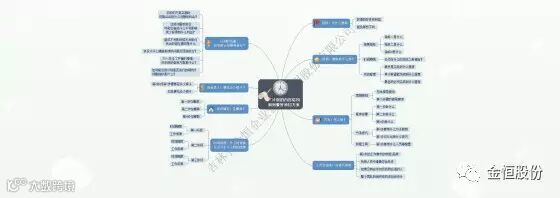
为了在较短的时间内高效率地完成一些事情,我们往往会选择做计划。思维导图将有助于我们更有效合理地进行计划的制定。
<webps-widget-flowsheet-section-title class="flowsheet-component style-scope webps-widget-flowsheet" env_device="pc" env_pc="" env_viewer="" env_pc_viewer="" style="margin-bottom: 10px; max-width: 100%; width: 560px; height: auto; position: relative; display: block; word-break: break-word; word-wrap: break-word;"></webps-widget-flowsheet-section-title>
一、思维导图可以帮助我们做计划。
<webps-widget-flowsheet-section-content class="flowsheet-component style-scope webps-widget-flowsheet x-scope webps-widget-flowsheet-section-content-0" env_device="pc" env_pc="" type="data" theme="white" env_viewer="" env_pc_viewer="" style="padding-bottom: 16px; height: auto; width: 560px; display: flex; flex-wrap: nowrap; position: relative; word-break: break-word; word-wrap: break-word;"></webps-widget-flowsheet-section-content>
1. 思维导图可以让我们做计划的过程变得直观。
因为思维导图是一种可视化的思维工具,所以可以让我们的思考过程变得很直观。
<webps-widget-flowsheet-section-content class="flowsheet-component style-scope webps-widget-flowsheet x-scope webps-widget-flowsheet-section-content-0" env_device="pc" env_pc="" type="data" theme="white" env_viewer="" env_pc_viewer="" style="padding-bottom: 16px; height: auto; width: 560px; display: flex; flex-wrap: nowrap; position: relative; word-break: break-word; word-wrap: break-word;"></webps-widget-flowsheet-section-content>
2. 思维导图可以帮助我们考虑到计划的各个方方面面。
因为思维导图把要点和细节都画在一张纸上,所以非常方便我们考虑重点和细节。
<webps-widget-flowsheet-section-content class="flowsheet-component style-scope webps-widget-flowsheet x-scope webps-widget-flowsheet-section-content-0" env_device="pc" env_pc="" type="data" theme="white" env_viewer="" env_pc_viewer="" style="padding-bottom: 16px; height: auto; width: 560px; display: flex; flex-wrap: nowrap; position: relative; word-break: break-word; word-wrap: break-word;"></webps-widget-flowsheet-section-content>
3. 思维导图可以帮助我们把计划做得更系统。
因为思维导图把所有要素都画上去了,我们可以看着这些要素进行进一步思考,所以更容易把计划做得更详细
<webps-widget-flowsheet-section-content class="flowsheet-component style-scope webps-widget-flowsheet x-scope webps-widget-flowsheet-section-content-0" env_device="pc" env_pc="" type="data" theme="white" env_viewer="" env_pc_viewer="" style="padding-bottom: 16px; height: auto; width: 560px; display: flex; flex-wrap: nowrap; position: relative; word-break: break-word; word-wrap: break-word;"></webps-widget-flowsheet-section-content>
4. 思维导图可以促进我们更有效地完成计划。
因为思维导图是可视化的工具,所以在完成计划的整个过程中,都可以用思维导图进行跟踪和完善,从而更好的完成计划。
<webps-widget-flowsheet-section-content class="flowsheet-component style-scope webps-widget-flowsheet x-scope webps-widget-flowsheet-section-content-0" env_device="pc" env_pc="" type="data" theme="white" env_viewer="" env_pc_viewer="" style="padding-bottom: 16px; height: auto; width: 560px; display: flex; flex-wrap: nowrap; position: relative; word-break: break-word; word-wrap: break-word;"></webps-widget-flowsheet-section-content>
5. 思维导图可以帮助我们积累做计划的经验。
因为思维导图总结功能很强,所以做了一次计划并完成后,我们可以用思维导图进行总结,为下一次做计划积累经验。
<webps-widget-flowsheet-section-title class="flowsheet-component style-scope webps-widget-flowsheet" env_device="pc" env_pc="" env_viewer="" env_pc_viewer="" style="margin-bottom: 10px; max-width: 100%; width: 560px; height: auto; position: relative; display: block; word-break: break-word; word-wrap: break-word;"></webps-widget-flowsheet-section-title>
二、思维导图怎么样做计划呢?
<webps-widget-flowsheet-section-content class="flowsheet-component style-scope webps-widget-flowsheet x-scope webps-widget-flowsheet-section-content-0" env_device="pc" env_pc="" type="location" theme="white" env_viewer="" env_pc_viewer="" style="padding-bottom: 16px; height: auto; width: 560px; display: flex; flex-wrap: nowrap; position: relative; word-break: break-word; word-wrap: break-word;"></webps-widget-flowsheet-section-content>
1. 首先中心写出做什么计划。
<webps-widget-flowsheet-section-content class="flowsheet-component style-scope webps-widget-flowsheet x-scope webps-widget-flowsheet-section-content-0" env_device="pc" env_pc="" type="location" theme="white" env_viewer="" env_pc_viewer="" style="padding-bottom: 16px; height: auto; width: 560px; display: flex; flex-wrap: nowrap; position: relative; word-break: break-word; word-wrap: break-word;"></webps-widget-flowsheet-section-content>
2. 然后分别发散出做这次计划要考虑的要素。
<webps-widget-flowsheet-section-content class="flowsheet-component style-scope webps-widget-flowsheet x-scope webps-widget-flowsheet-section-content-0" env_device="pc" env_pc="" type="location" theme="white" env_viewer="" env_pc_viewer="" style="padding-bottom: 16px; height: auto; width: 560px; display: flex; flex-wrap: nowrap; position: relative; word-break: break-word; word-wrap: break-word;"></webps-widget-flowsheet-section-content>
3. 接着逐一把要素画出来,包括负责人、时间、涉及的东西、沟通等。
<webps-widget-flowsheet-section-content class="flowsheet-component style-scope webps-widget-flowsheet x-scope webps-widget-flowsheet-section-content-0" env_device="pc" env_pc="" type="location" theme="white" env_viewer="" env_pc_viewer="" style="padding-bottom: 16px; height: auto; width: 560px; display: flex; flex-wrap: nowrap; position: relative; word-break: break-word; word-wrap: break-word;"></webps-widget-flowsheet-section-content>
4. 最后思考哪些要素需要精简、优化,并在执行计划的过程中跟踪优化完善。