


点击蓝字丨关注我们吧!

Singularity是一个简单、安全和快速的开源容器平台,它的设计初衷是为 HPC 环境提供安全、简洁且高效的容器化方案。相较于Docker,Singularity拥有许多优点:
兼容Docker镜像:Singularity可以直接使用Docker Hub上的Docker镜像,而不需要重新创建容器。这使得用户可以方便地将现有的Docker镜像转变为Singularity容器,并在HPC环境中运行。
更高的安全性:Singularity避免了Docker中root权限可能带来的安全漏洞问题。它使用非root方式运行,防止容器内进程在主机上提权或越权访问资源。
容器的不可变性:Singularity容器在执行时是只读的,容器内容不会再运行时改变,这种不可变性确保了容器的可重复性。所有更改都在单独的可写层或外部持久存储中进行,而Docker允许容器在运行时被更改,这可能导致某些意外的发生,特别是在需要保持容器一致性的场景中。
在安全性、易用性、可移植性上都更优越。
一、软件下载方式
Singularity可通过源码、包管理器、Conda等方式安装。
(1)源码安装:
使用源码安装要求用户拥有root权限:
git clone https://github.com/singularityware/singularity.gitcd singularity./autogen.sh./configure --prefix=/usr/localmakesudo make install # 或直接使用root用户进行make install
(2)包管理器安装:
版本较新的Ubuntu、CentOS用户可通过包管理器安装,此种方式要求用户拥有root权限:
# Ubuntusudo apt install singularity-container# CentOSsudo dnf install singularity -y
(3)conda安装:
conda install conda-forge::singularity二、软件使用
输入singularity显示参数及说明。
Usage:singularity [global options...] <command>Available Commands:build Build a Singularity imagecache Manage the local cachecapability Manage Linux capabilities for users and groupscompletion Generate the autocompletion script for the specified shellconfig Manage various singularity configuration (root user only)delete Deletes requested image from the libraryexec Run a command within a containerinspect Show metadata for an imageinstance Manage containers running as serviceskey Manage OpenPGP keyskeyserver Manage singularity keyserversoci Manage OCI containersoverlay Manage an EXT3 writable overlay imageplugin Manage Singularity pluginspull Pull an image from a URIpush Upload image to the provided URIregistry Manage authentication to OCI/Docker registriesremote Manage singularity remote endpointsrun Run the user-defined default command within a containerrun-help Show the user-defined help for an imagesearch Search a Container Library for imagesshell Run a shell within a containersif Manipulate Singularity Image Format (SIF) imagessign Add digital signature(s) to an imagetest Run the user-defined tests within a containerverify Verify digital signature(s) within an imageversion Show the version for Singularity
2.1 基本使用
(1)拉取镜像库
Singularity 从 3.0 版本开始支持 OCI (Open Container Initiative)规范,这意味着用户可以使用 OCI 兼容的容器镜像。具体来说,Singularity 可以拉取、运行和转换 OCI 镜像。用户可使用singularity search命令在线查找镜像:
# 在线搜索镜像singularity search lolcow
并且Singularity支持很多云平台,用户可以在云平台上搜索后,直接使用singularity pull命令下载所需镜像,也可以指定library拉取镜像:
# 拉取镜像singularity pull lolcow# Sylabs Cloudsingularity pull ubuntu.sif library://library/default/ubuntu:21.04# Docker Hubsingularity pull ubuntu.sif docker://ubuntu:latest# Singularity Hubsingularity pull singularity-images.sif shub://vsoch/singularity-images# 支持ORAS的OCI镜像云平台singularity pull image.sif oras://registry/namespace/image:tag
(2)使用镜像库
拉取镜像后,可以使用singularity run执行容器的默认命令,也可使用singularity exec执行容器中的命令,或用singularity shell进入容器的shell与容器进行交互。
使用singularity run执行容器的默认命令。
我们可以使用singluarity inspect命令查看容器的默认命令,可以看到容器的默认命令是date | cowsay | lolcat:
# 检视容器的默认命令singularity inspect -r lolcow_latest.sif

Fig1 查看容器默认命令
对容器执行singularity命令,可以看到如下结果:
# singularity run 执行容器默认命令singularity run lolcow_latest.sif

Fig2 singularity run命令
使用singularity exec命令,执行容器中的命令。
上一小节中我们得知了容器默认的命令,可以将其视作一个shell脚本。通过容器中的bash执行这个脚本,可以看到,与singularity run命令执行得到的内容并无区别:
# singularity exec执行容器中的命令singularity exec lolcow_latest.sif bash -c "date | cowsay | lolcat"

Fig3 singularity exec命令
使用singularity shell命令进入容器,并与容器交互。
进入容器后,会有“Singularity>”的提示符,意味着进入容器成功。执行第一步获得的默认命令,可以看到获得的内容与singularity run、singularity exec没有区别。
# singularity shell 进入容器singularity shell lolcow_latest.sif# 进入容器后执行命令Singularity> date | cowsay | lolcat
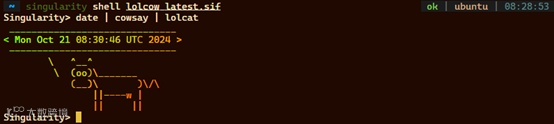
Fig4 使用镜像
(3)构建容器
当镜像库平台没有找到适用的镜像,往往需要用户自主构建容器。通常用2中方式自主构建容器:从头构建,或往现有容器中添加所需要的软件。
从头构建容器
从头构建需要一份配置文件lolcow.yml。配置文件中Header指定了容器的基础镜像与引导程序;environment设置了容器的环境变量;runscript应以了容器运行时的执行脚本;post是在构建容器时执行的脚本。获得配置文件后,使用singularity build构建容器,此种方法要求用户拥有root权限:
# 从头构建容器sudo singularity build lolcow.sif lolcow.def
配置文件示例:
bootstrap: dockerfrom: ubuntu:22.04%environmentexport LC_ALL=Cexport PATH=/usr/games:$PATH%runscriptdate | cowsay | lolcat%postif [ "$(uname -m)" != "x86_64" ]thenecho "deb http://ports.ubuntu.com/ubuntu-ports/ focal universe" >> /etc/apt/sources.listelseecho "deb http://us.archive.ubuntu.com/ubuntu/ focal universe" >> /etc/apt/sources.listfiapt-get updateapt-get -y updateapt-get -y install cowsay lolcatapt-get -y clean
添加软件至本地基础镜像
需要往镜像中添加新程序时,用户可以将本地软件添加至已有基础镜像,并打包成新镜像,使用这种重新打包方式构建容器不需要root权限。
首先使用singularity build将已有镜像创建为沙盒new_sif:
# 构建沙盒singularity build –sandbox new_sif lolcow.def
使用C语言编写一个Hello World程序并编译为二进制文件,命名为testbin,并放入沙盒的usr/bin/(可执行文件的环境变量)中:
# 程序内容int main(){printf(“Hello World!“)}
# 编译程序gcc -c test.c -o testbin# 拷贝程序到镜像cp testbin new_sif/usr/bin/# 打包为新镜像 new_sif.sifsingularity build new_sif.sif new_sif
对重新打包好的镜像重新运行singularity exec:
# 对新镜像使用exec执行导入的程序singularity exec new_sif.sif testbin

Fig5 镜像打包成功
可以看到成功执行命令并输出“Hello World!”,添加了testbin的新镜像已经打包好了。
TIPS
更多singularity使用方法请查询 Singularity Command Line Interface:https://docs.sylabs.io/guides/latest/user-guide/cli.html
参考文献:
[1] Kurtzer GM, Sochat V, Bauer MW (2017) Singularity: Scientific containers for mobility of compute. PLoS ONE 12(5):e0177459. https://doi.org/10.1371/journal.pone.0177459
[2] https://docs.sylabs.io/guides/latest/user-guide/
关于万摩科技
武汉万摩科技有限公司(下称“万摩科技”)成立于2021年,总部位于武汉软件新城,是一家以多组学数据分析和研发为技术核心的科技公司。公司专注于为科研院校、研究机构、测序公司、制药公司、农业生产及育种公司提供基因测序、数据分析、软件研发、数据库搭建和平台开发服务。
基于二、三代基因测序,万摩科技深耕生物信息技术的开发和应用。依托团队十多年的技术积累,万摩科技每年完成上百个物种的基因组从头构建。同时,在泛基因组构建、性状关联遗传位点定位、转基因和基因编辑插入片段检测等多个领域建立了极具优势和特色的技术与应用体系。
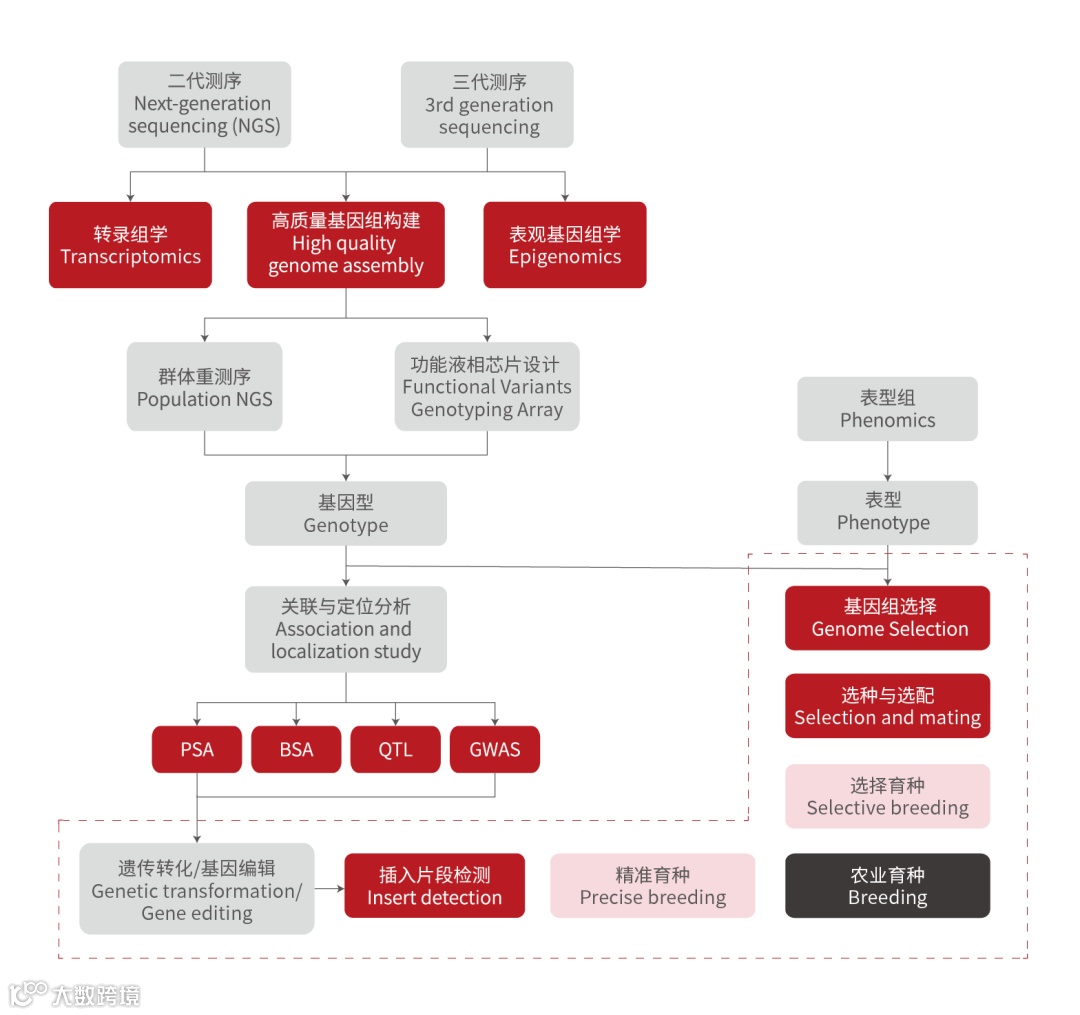
万摩科技亦致力于成为一家数据公司。数据是生命科学表现与解读的承载体,数据的广泛连接与深度挖掘是多组学技术应用的必经之路。万摩科技聚焦于成为这一产业发展过程中的引领者,推动多组学数据多频次多维度的解析,促进组学技术的广泛应用。
万摩科技秉承“专注生命科学,勇攀技术高峰”的理念,致力于“打造生命科学数据创新应用中心,力争成为生物科技转化先锋企业”的发展愿景,力图通过不断的原始创新与积累,促进生物技术的数据化转型,让生命科学更好更快的应用并服务人类社会。

T:027-63494989
E:service@onemore-tech.com