企业互联网双出口流量负载分担和线路故障自动切换配置
一、组网需求
1、 用户走电信出去用户源地址转换成电信的地址
2、 用户走电信出去用户源地址转换成联通的地址
3、 内网vlan 10默认走电信,电信线路断了后自动切换到联通
4、 内网vlan 20默认走联通,联通线路断了后自动切换到电信
5、 互联网区域运行OSPF
二、实验清单和网络拓扑
1、路由器4台;三层交换机1台;PC机两台。
2、IP地址说明:
R1与R2之间使用12.1.1.0/24 R1的地址12.1.1.1/24,R2的地址12.1.1.2/24
R1与R6之间用16.1.1.0/24, R1的地址16.1.1.1/24,R6的地址16.1.1./24
依次一样
3、网络拓扑
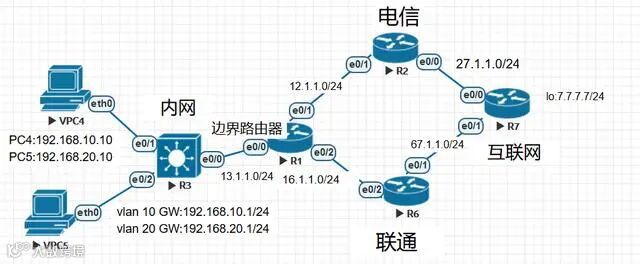
拓扑图
三、配置步骤
3.1设备基础配置
配置各接口的IP地址和路由可达
R1:
interface Ethernet0/0
ip address 13.1.1.1 255.255.255.0
interface Ethernet0/1
ip address 12.1.1.1 255.255.255.0
interface Ethernet0/2
ip address 16.1.1.1 255.255.255.0
ip route 192.168.0.0 255.255.0.0 13.1.1.3
-------------------------------------------------------------
R2:
interface Ethernet0/0
ip address 27.1.1.2 255.255.255.0
interface Ethernet0/1
ip address 12.1.1.2 255.255.255.0
router ospf 1
network 12.1.1.2 0.0.0.0 area 0
network 27.1.1.2 0.0.0.0 area 0
-------------------------------------------------------------
R3:
interface Ethernet0/0
no switchport
ip address 13.1.1.3 255.255.255.0
interface Ethernet0/1
switchport access vlan 10
switchport mode access
interface Ethernet0/2
switchport access vlan 20
switchport mode access
interface Vlan10
ip address 192.168.10.1 255.255.255.0
interface Vlan20
ip address 192.168.20.1 255.255.255.0
ip route 0.0.0.0 0.0.0.0 13.1.1.1
-------------------------------------------------------------
R6:
interface Ethernet0/1
ip address 67.1.1.6 255.255.255.0
interface Ethernet0/2
ip address 16.1.1.6 255.255.255.0
router ospf 1
network 16.1.1.6 0.0.0.0 area 0
network 67.1.1.6 0.0.0.0 area 0
ip address 192.168.20.1 255.255.255.0
-------------------------------------------------------------
R7:
interface Loopback0
ip address 7.7.7.7 255.255.255.0
interface Ethernet0/0
ip address 27.1.1.7 255.255.255.0
interface Ethernet0/1
ip address 67.1.1.7 255.255.255.0
router ospf 1
network 7.7.7.7 0.0.0.0 area 0
network 27.1.1.7 0.0.0.0 area 0
-------------------------------------------------------------
3.2 出口路由器R1策略路由和NAT的配置
access-list 1 permit 192.168.10.0 0.0.0.255
access-list 2 permit 192.168.20.0 0.0.0.255
route-map 1 permit 10
match ip address 1
match interface Ethernet0/1
route-map 2 permit 10
match ip address 1
match interface Ethernet0/2
route-map 3 permit 10
match ip address 2
match interface Ethernet0/2
route-map 4 permit 10
match ip address 2
match interface Ethernet0/1
route-map 10 permit 10
match ip address 1
set ip next-hop verify-availability 12.1.1.2 1 track 1
set ip next-hop verify-availability 16.1.1.6 2 track 2
route-map 10 permit 20
match ip address 2
set ip next-hop verify-availability 16.1.1.6 1 track 2
set ip next-hop verify-availability 12.1.1.2 2 track 1
ip sla 1
icmp-echo 12.1.1.2 source-ip 12.1.1.1
frequency 5
ip sla schedule 1 life 1 start-time now
track 1 rtr 1 reachability
ip sla 2
icmp-echo 16.1.1.6 source-ip 16.1.1.1
frequency 5
ip sla schedule 2 life 2 start-time now
track 2 rtr 2 reachability
ip nat inside source route-map 1 interface Ethernet0/1 overload
ip nat inside source route-map 2 interface Ethernet0/2 overload
ip nat inside source route-map 3 interface Ethernet0/2 overload
ip nat inside source route-map 4 interface Ethernet0/1 overload
interface Ethernet0/0
ip nat inside
ip policy route-map 10
interface Ethernet0/1
ip nat outside
interface Ethernet0/2
ip nat outside
四、验证配置结果
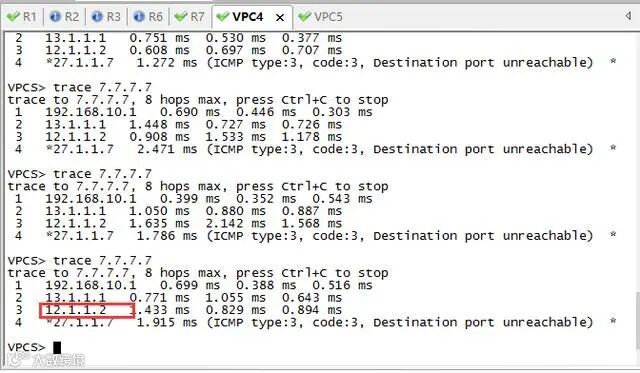
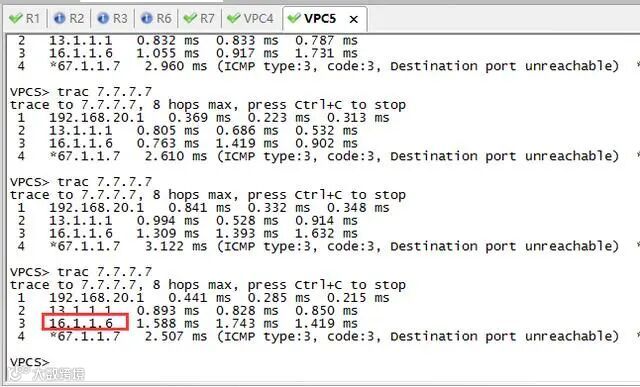
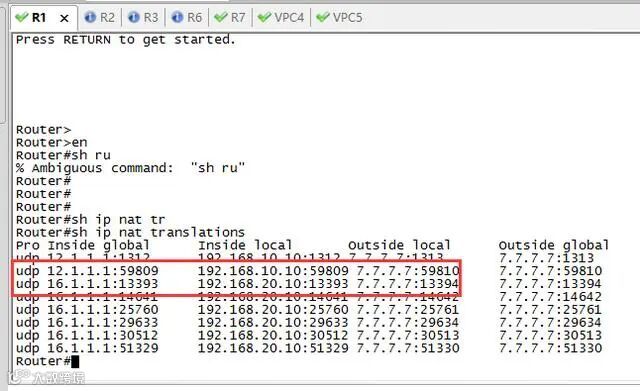
4.1正常情况下的路由
正常PC4从R2出去,转换成12.1.1.1
正常PC5从R6出去,转换成16.1.1.1
4.2 线路切换
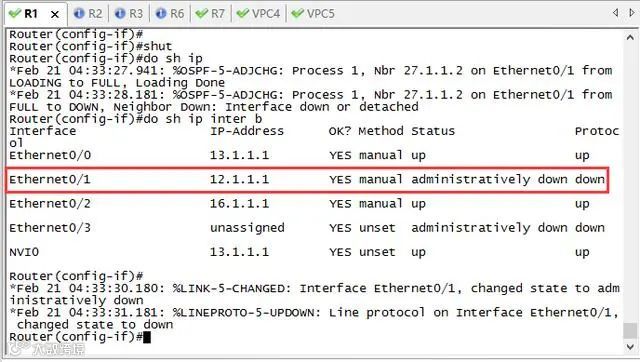
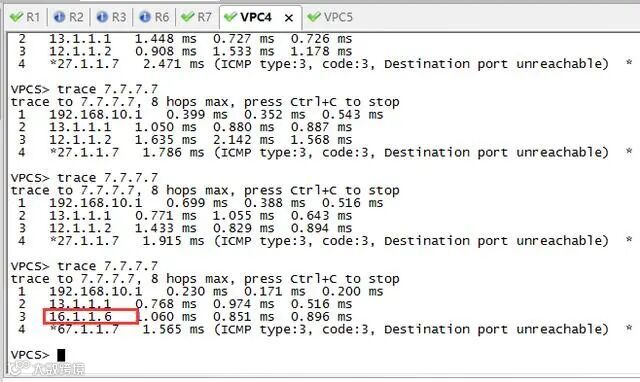
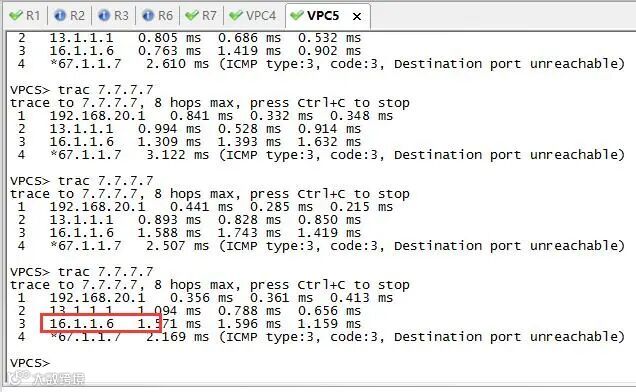
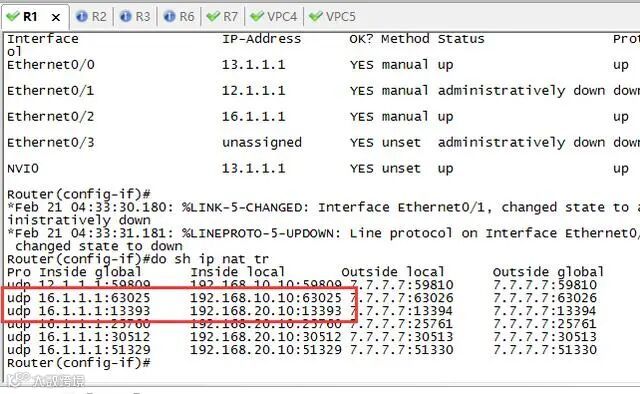
1、当E0/1故障
当E0/1线路或故障接口down,PC4从R6出去,转换成16.1.1.1
当E0/1线路或故障接口down,PC5从R6出去,转换成16.1.1.1
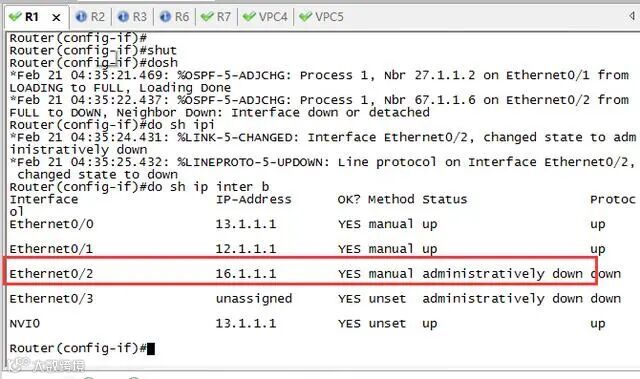
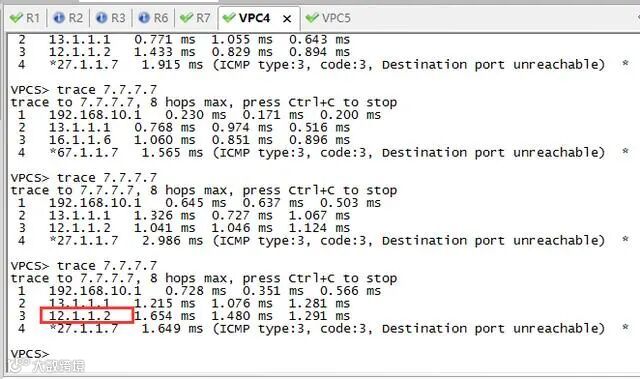
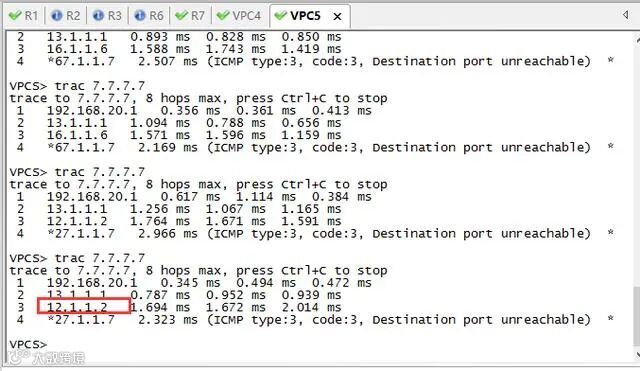
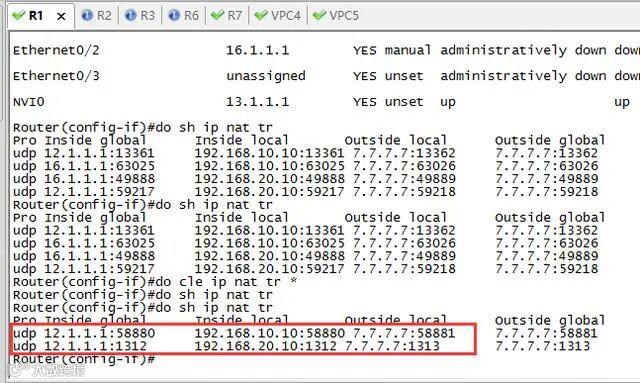
2、当E0/2故障
当E0/2线路故障或接口down,PC5从R2出去,转换成12.1.1.1
当E0/2线路故障或接口down,PC4从R2出去,转换成12.1.1.1