


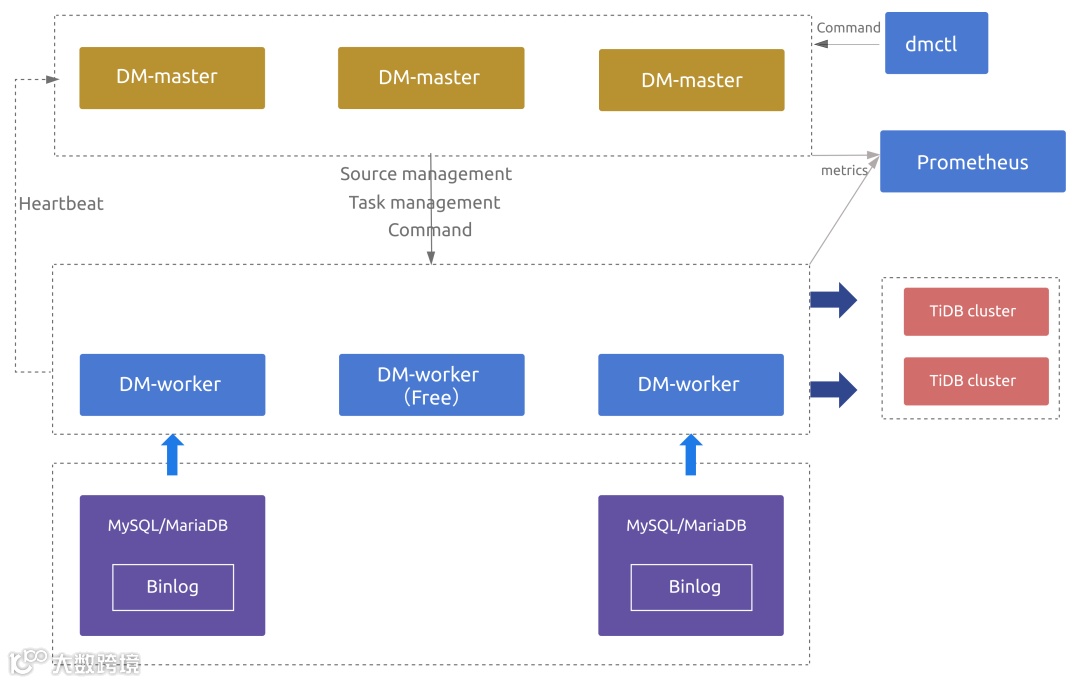
-
从兼容 MySQL 的单一实例中全量和增量迁移数据到 TiDB -
将小数据量(小于 1 TB)分库分表 MySQL 合并迁移数据到 TiDB -
在业务数据中台、业务数据实时汇聚等数据中枢场景中,作为数据同步中间件来使用
安装tiupcurl --proto '=https' --tlsv1.2 -sSf https://tiup-mirrors.pingcap.com/install.sh | sh安装dmctltiup install dm dmctl查看版本tiup dmctl --versiontiup dmctl:7.5.1 --version
tiup dm template# 修改后的 topology.yaml 文件内容如下:# The topology template is used deploy a minimal DM cluster, which suitable# for scenarios with only three machinescontains. The minimal cluster contains# - 3 master nodes# - 3 worker nodes# You can change the hosts according your environment---global:user: "tidb"# systemd_mode: "system"ssh_port: 22deploy_dir: "/home/tidb/dm/deploy"data_dir: "/home/tidb/dm/data"# arch: "amd64"master_servers:host: 192.168.198.133worker_servers:host: 192.168.198.133monitoring_servers:host: 192.168.198.133grafana_servers:host: 192.168.198.133alertmanager_servers:host: 192.168.198.133
[]source-id: "mysql-01"from:host: "127.0.0.1"user: "root"password: "V6MZRIs3HM2JwEdL+nRqd0Cj0LHz+Q=="port: 3306tiup dmctl:v7.5.1 encrypt '123456'
tiup dmctl --master-addr=192.168.198.133:8261 operate-source create mysql-01.yaml# --master-addr 填写 master_servers 其中之一。
--在mysql官方网站下载5.7版本安装包--卸载mariadb软件包--新建配置文件[root@tidb ~]# cat /etc/my.cnf[mysqld]basedir=/usr/local/mysqldatadir=/usr/local/mysql/dataserver-id=1001user=mysqlport=3306log-bin=/usr/local/mysql/data/mysql-bin--安装配置MySQL> groupadd mysql> useradd -r -g mysql -s /bin/false mysql> cd /usr/local> tar zxvf mysql-5.7.37-el7-x86_64.tar.gz> ln -s mysql-5.7.37-el7-x86_64 mysql> cd mysql> mkdir mysql,-files> chown mysql:mysql mysql-files> chmod 750 mysql-files> bin/mysqld --initialize --user=mysql> bin/mysql_ssl_rsa_setup> bin/mysqld_safe --user=mysql &Next command is optional> cp support-files/mysql.server /etc/init.d/mysql.server--杀掉MySQL进程,通过服务启动systemctl status mysql.serversystemctl start mysql.server
drop database if exists `testdm`;create database `testdm`;use `testdm`;create table t1 (id bigint, uid int, name varchar(80), info varchar(100), primary key (`id`), unique key(`uid`)) DEFAULT CHARSET=utf8mb4 COLLATE=utf8mb4_bin;create table t2 (id bigint, uid int, name varchar(80), info varchar(100), primary key (`id`), unique key(`uid`)) DEFAULT CHARSET=utf8mb4 COLLATE=utf8mb4_bin;insert into t1 (id, uid, name) values (1, 10001, 'Gabriel García Márquez'), (2, 10002, 'Cien años de soledad');insert into t2 (id, uid, name) values (3, 20001, 'José Arcadio Buendía'), (4, 20002, 'Úrsula Iguarán'), (5, 20003, 'José Arcadio');mysql> select * from t1;+----+-------+--------------------------+------+| id | uid | name | info |+----+-------+--------------------------+------+| 1 | 10001 | Gabriel García Márquez | NULL || 2 | 10002 | Cien años de soledad | NULL |+----+-------+--------------------------+------+2 rows in set (0.00 sec)mysql> select * from t2;+----+-------+------------------------+------+| id | uid | name | info |+----+-------+------------------------+------+| 3 | 20001 | José Arcadio Buendía | NULL || 4 | 20002 | Úrsula Iguarán | NULL || 5 | 20003 | José Arcadio | NULL |+----+-------+------------------------+------+3 rows in set (0.00 sec)
[root@tidb ~]# cat testdm-task.yamlname: testdmtask-mode: alltarget-database:host: "192.168.198.133"port: 4000user: "root"password: "E9F7OhWFcYuzuqMxy/h0c0BLrYiwH5XbB1fS7kCf4kJCymg="# 如果密码不为空,则推荐使用经过 ( tiup dmctl:v7.5.1 encrypt '123456') 加密的密文# 填写一个或多个所需同步的数据源信息mysql-instances:- source-id: "mysql-01"block-allow-list: "ba-rule1"block-allow-list:ba-rule1:do-dbs: ["testdm"]
[]Starting component dmctl: /root/.tiup/components/dmctl/v8.0.0/dmctl/dmctl --master-addr 192.168.198.133 start-task testdm-task.yaml{"result": true,"msg": "","sources": [{"result": true,"msg": "","source": "mysql-01","worker": "dm-192.168.198.133-8262"}],"checkResult": "pre-check is passed. "}
tiup dmctl --master-addr 192.168.198.133:8261 query-status testdm[]Starting component dmctl: /root/.tiup/components/dmctl/v8.0.0/dmctl/dmctl --master-addr 127.0.0.1:8261 query-status testdm{"result": true,"msg": "","sources": [{"result": true,"msg": "","sourceStatus": {"source": "mysql-01","worker": "dm-192.168.198.133-8262","result": null,"relayStatus": null},"subTaskStatus": [{"name": "testdm","stage": "Running","unit": "Sync","result": null,"unresolvedDDLLockID": "","sync": {"totalEvents": "0","totalTps": "0","recentTps": "0","masterBinlog": "(mysql-bin.000001, 154)","masterBinlogGtid": "","syncerBinlog": "(mysql-bin.000001, 154)","syncerBinlogGtid": "","blockingDDLs": [],"unresolvedGroups": [],"synced": true,"binlogType": "remote","secondsBehindMaster": "0","blockDDLOwner": "","conflictMsg": "","totalRows": "0","totalRps": "0","recentRps": "0"},"validation": null}]}]}
[]Starting component dm: /root/.tiup/components/dm/v1.15.1/tiup-dm listName User Version Path PrivateKey---- ---- ------- ---- ----------dm-test tidb v7.5.1 /root/.tiup/storage/dm/clusters/dm-test /root/.tiup/storage/dm/clusters/dm-test/ssh/id_rsa
dm-test 集群中实例 ID、角色、主机、监听端口和状态(由于还未启动,所以状态为 Down/inactive)、目录信息。[root@tidb ~]# tiup dm display dm-testStarting component dm: /root/.tiup/components/dm/v1.15.1/tiup-dm display dm-testCluster type: dmCluster name: dm-testCluster version: v7.5.1Deploy user: tidbSSH type: builtinGrafana URL: http://192.168.198.133:3000ID Role Host Ports OS/Arch Status Data Dir Deploy Dir---- ---- ----- ------- ------ -------- ----------:9093 alertmanager 192.168.198.133 9093/9094 linux/x86_64 Up /home/tidb/dm/data/alertmanager-9093 /home/tidb/dm/deploy/alertmanager-9093:8261 dm-master 192.168.198.133 8261/8291 linux/x86_64 Healthy|L /home/tidb/dm/data/dm-master-8261 /home/tidb/dm/deploy/dm-master-8261:8262 dm-worker 192.168.198.133 8262 linux/x86_64 Bound /home/tidb/dm/data/dm-worker-8262 /home/tidb/dm/deploy/dm-worker-8262:3000 grafana 192.168.198.133 3000 linux/x86_64 Up - /home/tidb/dm/deploy/grafana-3000:9090 prometheus 192.168.198.133 9090 linux/x86_64 Up /home/tidb/dm/data/prometheus-9090 /home/tidb/dm/deploy/prometheus-9090
[root@tidb ~]# tiup dm stop dm-testStarting component dm: /root/.tiup/components/dm/v1.15.1/tiup-dm stop dm-testWill stop the cluster dm-test with nodes: , roles: .Do you want to continue? [y/N]:(default=N) y+ [ Serial ] - SSHKeySet: privateKey=/root/.tiup/storage/dm/clusters/dm-test/ssh/id_rsa, publicKey=/root/.tiup/storage/dm/clusters/dm-test/ssh/id_rsa.pub+ [Parallel] - UserSSH: user=tidb, host=192.168.198.133+ [Parallel] - UserSSH: user=tidb, host=192.168.198.133+ [Parallel] - UserSSH: user=tidb, host=192.168.198.133+ [Parallel] - UserSSH: user=tidb, host=192.168.198.133+ [Parallel] - UserSSH: user=tidb, host=192.168.198.133+ [ Serial ] - StopClusterStopping component alertmanagerStopping instance 192.168.198.133Stop alertmanager 192.168.198.133:9093 successStopping component grafanaStopping instance 192.168.198.133Stop grafana 192.168.198.133:3000 successStopping component prometheusStopping instance 192.168.198.133Stop prometheus 192.168.198.133:9090 successStopping component dm-workerStopping instance 192.168.198.133Stop dm-worker 192.168.198.133:8262 successStopping component dm-masterStopping instance 192.168.198.133Stop dm-master 192.168.198.133:8261 successStopped cluster `dm-test` successfully
[root@tidb ~]# tiup dm start dm-testStarting component dm: /root/.tiup/components/dm/v1.15.1/tiup-dm start dm-testStarting cluster dm-test...+ [ Serial ] - SSHKeySet: privateKey=/root/.tiup/storage/dm/clusters/dm-test/ssh/id_rsa, publicKey=/root/.tiup/storage/dm/clusters/dm-test/ssh/id_rsa.pub+ [Parallel] - UserSSH: user=tidb, host=192.168.198.133+ [Parallel] - UserSSH: user=tidb, host=192.168.198.133+ [Parallel] - UserSSH: user=tidb, host=192.168.198.133+ [Parallel] - UserSSH: user=tidb, host=192.168.198.133+ [Parallel] - UserSSH: user=tidb, host=192.168.198.133+ [ Serial ] - StartClusterStarting component dm-masterStarting instance 192.168.198.133:8261Start instance 192.168.198.133:8261 successStarting component dm-workerStarting instance 192.168.198.133:8262Start instance 192.168.198.133:8262 successStarting component prometheusStarting instance 192.168.198.133:9090Start instance 192.168.198.133:9090 successStarting component grafanaStarting instance 192.168.198.133:3000Start instance 192.168.198.133:3000 successStarting component alertmanagerStarting instance 192.168.198.133:9093Start instance 192.168.198.133:9093 successStarted cluster `dm-test` successfully
[root@tidb ~]# mysql -h 192.168.198.133 -P 4000 -u root -p全文完,希望可以帮到正在阅读的你,如果觉得有帮助,可以分享给你身边的朋友,同事,你关心谁就分享给谁,一起学习共同进步~~~