
当当当当!!RapidMiner小技巧迎来了第二篇~今天我将向您介绍可从PDF中提取数据表的扩展:PDF Table Extraction。 让我们看看这个扩展如何为RapidMiner流程增加价值~
Today, I will introduce you to the ‘PDF Table Extraction’ - another extension developed at RapidMiner Research. So let us see how this extension adds value to RapidMiner processes.
问题发现

在数据处理中,我们经常会遇到要使用PDF文档中的数据表的情况,使用一些细粒度的抓取技术从PDF中提取数据表当然是有可能的,但是以这种方式解析内容是非常耗费时间和精力的。在最坏的情况下,如果其他文档中的表使用不同的表头结构,则之前的操作将不可再次使用。问题在于如何以简单的方式从PDF文档中提取具有任意表头结构的数据表。
Problem: You may have already faced a situation where you wanted to use data tables from PDF documents. It is certainly possible and sometimes unavoidable to extract data tables out of PDF using fine grained scraping techniques, but content parsing in this way is a meticulous activity. In the worst case, your efforts might not be reusable if tables in other documents use a different header structure. The problem is to raise the level of abstraction so data tables (having arbitrary header structure) can be extracted out of the PDF document in an easy way.
解决方案

在PDF Table Extraction扩展中我们引入了一个新的算子Read PDF Table。
Solution: We introduce a new operator"Read PDF Table" in this extension.

Read PDF Table算子解决了这个问题,只需提供您的PDF文件的路径或其URL地址,并执行流程,它可以自动从PDF文档中检测和提取数据表来作为RapidMiner的示例集。通过以下例子,我将分享一些有用的提示帮助您处理复杂表头结构的数据表。
The ‘Read PDF Table’ operator solves this problem. It provides a generic solution to automatically detect and extract data tables from a PDF document as RapidMiner example sets. Simply provide it the path of your PDF file, or its URL address and execute the process. Let’s try some examples, with which I will share a few hints you might find useful when dealing with tables whose headers are complex.
示例1

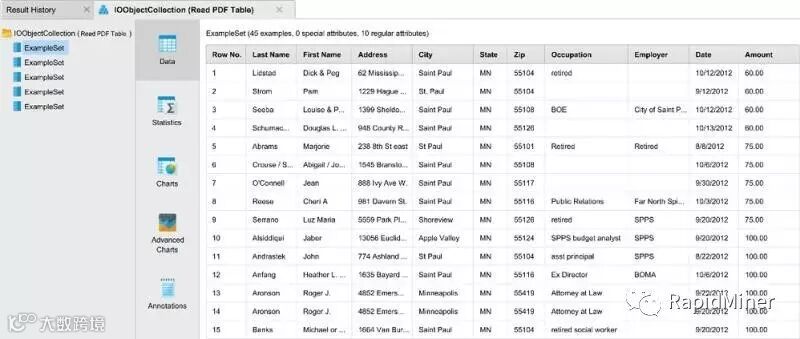
我们使用一个文档【1】,表格中只有一个清晰的单层表头。Read PDF Table算子能够准确检测并提取表格,如下所示。

Examples1:
We use a document where tables have a clear single layer header, available here[1]. The operator accurately detects and extracts tables as seen below.
示例2

在第二个例子中,文档【2】包含一个带有3层表头的表格。
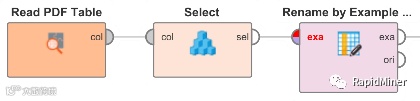
Read PDF Table算子使用第一层构建示例集属性,利用Rename by Example Values算子将第二行作为更具描述性的新表头。

Example2:
In the second example, the document[2] contains a table with 3-layer header. The operator uses the first layer to construct example set attributes. We can imagine that the second row serves as a more descriptive table header. The ‘Rename by Example Values’ operator easily resolves this task.


扩展安装

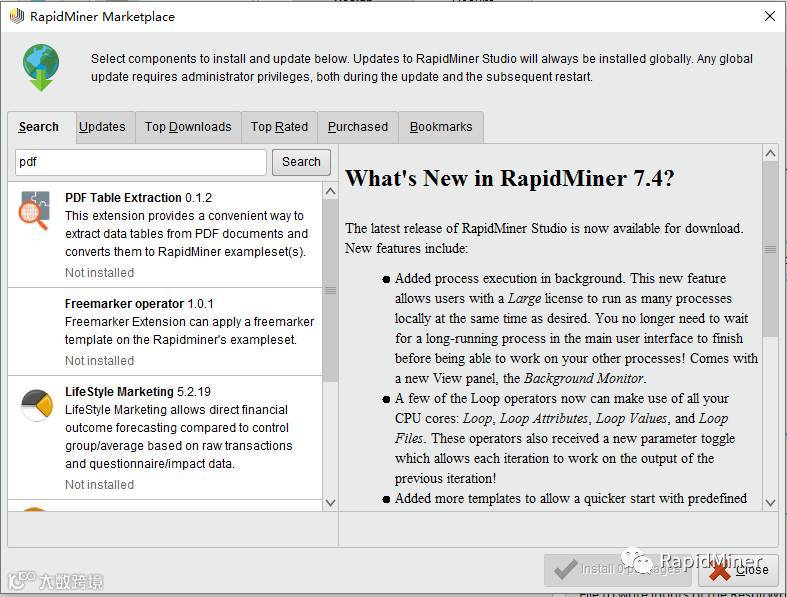
打开RapidMiner Studio,在Marketplace中搜索关键字“pdf”进行安装。
Install ‘PDF Table Extraction’ Extension:
Open RapidMiner Studio and search the Marketplace for the keyword "pdf" for installation.
在本文中,介绍了PDF数据表提取的RapidMiner扩展。您可以根据提供的数据集【3】进行更多的尝试,发现更多的见解!
In this post, the RapidMiner extension for PDF data table extraction was introduced. You can make more attempts based on the provided data set [3]. Have fun discovering more insights!
References:
[1] https://bitbucket.org/ds4dm/repository-of-pdf-documents/raw/3fcdfcf2ff3b3f61b38bc2a93fb8354f7beb0d95/schools.pdf
[2] https://bitbucket.org/ds4dm/repository-of-pdf-documents/raw/b1631df4542b0a9a73fedb12a9477473ec8ee001/frx_2012_disclosure.pdf
[3] http://ec.europa.eu/eurostat/web/digital-economy-and-society/data/main-tables
了解更多RapidMiner相关信息:
网址:https://www.rapidminerchina.com
电话:4006 326 339
邮箱:sales@rapidminerchina.com

阅读往期精彩内容:
最新资讯:
RapidMiner在2017年连续第四年被Gartner评为数据科学平台魔力象限领导者
RapidMiner被Forrester誉为预测分析和机器学习解决方案的领导者
RapidMiner 更新至7.4啦!-10x倍加速数据分析,赶快升级吧~
干货分享:
机器学习平台RapidMiner技巧篇(1):Excel报表处理