
今天我们来学习RapidMiner文本处理扩展的安装与应用。
Today we'll learn how to install and use RapidMiner text processing extensions.
当您进行基于统计的文本分析与自然语言处理时,有时单词在分组时具有不同的含义。例如,“策略”本身只是一个没有上下文的名词。另一方面,如果它与“军事 ”, “经济”, 或者“政治”配对,它有很大的不同的意义。“策略”, “军事策略”, “经济策略”和“政治策略”都具有不同的词语解释。基于统计的文本处理不会提取这些词语的上下文,但它会告诉你在你的文档或数据中的“策略”, “军事”, “经济”和“政治”这些单语显示的次数。这给了你某些方面的信息,但缺乏上下文。那么问题来了,您如何在 RapidMiner 中通过基于统计的文本处理提取上下文? 答案就是Generate n-Grams算子。
When you do statistical based text analysis compared to natural language processing, sometimes words carry a different meaning when grouped together. For example, ‘strategy’ by itself is just a noun there is no context involved. On the other hand, if it is paired with‘military’,‘economic’, or ‘political’ it has a far different meaning.‘strategy’,‘military strategy’, ‘economic strategy’, and ‘political strategy’ are all different ideas. Statistical based text processing will not extract the context of these words, but it will tell you how many times ‘strategy’, ‘military’,‘economic’, and‘political’ shows up in your documents or data. This gives you information but lacks context. So the question is "How do you extract this context via statistical based text processing in RapidMiner?". The answer: Generate n-Grams (terms).
算子的算法非常简单。Generate n-Grams算子将检查单词是否紧随其后。按照上面的例子,RapidMiner 将选择“策略”和“军事”作为新的属性,它们每一个都是单词。接着我们就可以想象到,“策略”这个词伴随着“军事”。因此,它创造了一个新的属性“军事策略”。这个选择也可以通过修改来改善,稍后将会有一个修改脚注。结果现在有 3 个属性:“策略”,“军事”和“军事策略”。没有机器理解上下文,它仍然能够识别分组的词,现在数据科学家可以区分“军事策略”相关的上下文。这里的关键是,它绕过了机器的理解语言的需要,并推送到用户,同时仍然保留在数据集中相关联的词组。
The operator’s algorithm is quite simple. Generate n-Grams (terms) will check for words that frequently follow one another. Following the example above, RapidMiner will pick out ‘strategy’ and‘military’as new attributes, each of which are words. Next it will say, often‘strategy’ is followed by ‘military’. Thus, it makes a new attribute ‘military_strategy’ This selection can also be improved via pruning. There will be a footnote on pruning later. The result is now that there are 3 attributes:‘strategy’,‘military’, and ‘military_strategy’. Without having the machine understand the context, it was still able to identify grouped words in which the data scientist can now understand the context in which ‘military strategy’ is related. The key here is that it bypasses the machines’ need to understand the language and pushes it onto the user while still maintaining groups of associated words within our data set.
开始使用
Getting started
·您需要文本处理扩展,以便可以同时使用process documents算子和 generate n-gram 算子。 还有一些其他的算子也需要这个扩展。
·文本文档。您可以创建一个新的文件或调用文本文件,本指南将包括第一部分。
·You will need the Text Processing extension in order to use both the process documents operator and the generate n-grams operator. There are a few other operators you will need from this extension as well.
·Text document. You can either create one or call a text file. This guide will encompass the first.
步骤 1:生成文档
Step 1: Generating the Document
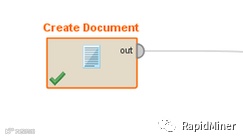
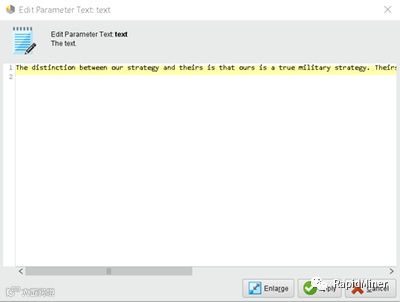
这里所有地方都需要放置document算子。 然后进入参数窗口并打开 “Edit Text”按钮。 这时会弹出一个窗口,允许您输入或插入文本以便将 process documents 算子推送出去。任意长度的文本都可以被添加,但需要知道的是: 这个示例文本将使用我们上面讨论的示例。这会让 RapidMiner 找到“军事”和“策略”之间的联系。
All that is needed here is to place a create document operator. Then proceed to parameters window and open the 'Edit Text' button. This should pull up a window that will allow you to type or insert text to be pushed through the process documents operator for text processing. Any amount of text can be added but these 2 sentences should do the trick: "The distinction between our strategy and theirs is that ours is a true military strategy. Theirs is a poor excuse of military strategy that can be summed up by hit and run tactics with a side of cowardice."This sample text will utilize the example we talked about above. This will allow RapidMiner to find the connection between‘military’ and‘strategy’.
步骤 2:处理文档
Step 2: Process Documents
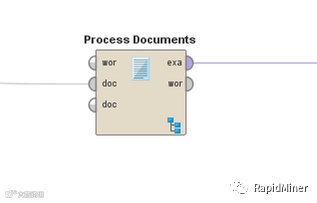
·下一步是文本处理算子的添加。一旦添加成功,在右下方将会出现一个“sub-process”图标,表示算子子流程。
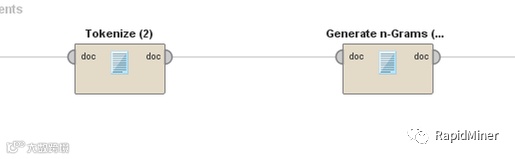
·双击将带你进入子流程,一旦存在,就需要一个tokenize算子。
·然后,需要选择参数选项卡中的“generate a word whenever two non-letters”选项。这两个算子说明,每当两个非字母由字母字符分隔时生成一个字。例如“空格”,空格和句点是生成字空格的两个非字母。
·接下来,还需要将变换案例运算符设置为小写。这将确保“The”和“the”被拉出 为同一个词。
·The next step is to add in the text processing operator. Once its in place, there is a sub-process icon in the bottom right which denotes that there is another level to the operator.
·Double clicking will bring you into that level. Once there, a tokenize operator is needed.
·Then the "Any non-letters" option in the parameters tab needs to be selected. These two operators in conjunction will say, 'generate a word whenever two non-letters are separated by letter characters. For example ' Space.', the empty space and the period are the two non-letters that generate the word space.
·Next, a transform cases operator set to lowercase is also needed. This will ensure that "The" and "the" are pulled out as the same word.
步骤 3: Generate n-Grams 算子
Step 3: Generate n-Grams
最后需要一个generate n-grams算子。在这里,最大长度为 2 是用于长度参数的充分设置。如果没有大量的文本要使用,就不需要设置大于2的长度。最后我们所需要做的是将wordlist 和 set 的示例连接到右侧的结果节点。连接后,该过程可以通过运行‘run’按钮或F11运行。
The last operator needed is generate n-grams (terms). Here, a max length of two is a sufficient setting for the length parameter. There is not a large amount of text to use so there is no need for a length larger than two. The last task required is to connect the wordlist and the example set out puts to the result nodes on the right. Once this is hooked up, the process can be ran by either pressing the run button or F11.

请注意,“strategy”, “military”,和“military_strategy”都被当作独立个体被挖掘出来。这是我们想要的结果。同时我们也可以进行不同文本间的频次关联分析。
Notice that ‘strategy’, ‘military’, and ‘military_strategy’ were all pulled out as unique words. This is the desired result. There are also term frequencies associated with each attribute.
补充: Pruning 在 process documents算子中,有一个用于 pruning 的参数。如果被设置为 ‘absolute pruning’并且设置为 2,那么RapidMiner将只保留文档中显示两次或更多次的单词。它将减少最终结果的次数,并只显示频繁项。对于这种情况,low prune产生的结果将更符合期望。
Footnote: Pruning On the process documents operator, there is a parameter for pruning. If this is set to absolute pruning and that is set to two, then RapidMiner will only keep words in the document that show up two times or more. It will cut down the final result and only show frequent engrams. For this case, a low prune generates the desired result but pruning can be an extremely tedious task once there are thousands of words being processed.
明天我们将介绍如何使用RapidMiner进行情感分析,敬请期待~
Tomorrow we will show you how to use RapidMiner for sentiment analysis, coming soon ~
马上登录www.rapidminerchina.com下载免费版本试用吧~
Visit www.rapidminerchina.com to download the latest version of RapidMiner now~