
前言
随着实时通信技术的发展,在线教育、视频会议、在线金融等实时互动应用的使用量越来越多,通过线上共享文档和桌面进行教学、协作、产品演示也日益普遍。多样化的场景也催生了对实时互动技术更个性化的需求,其中就包括对屏幕共享内容进行实时标注。
拍乐云Pano推出业内首个支持基于实时视频、屏幕共享、文档内容流的实时标注产品,解决多个行业在线上复杂交互场景下的实时互动和实时标注痛点,更好地提升线上互动的效率和效果。
拍乐云开发者账户(通过拍乐云官网注册)
-
Pano SDK v1.3.3+版本 -
接入拍乐云屏幕共享功能(https://developer.pano.video/features/rtc/screen/)
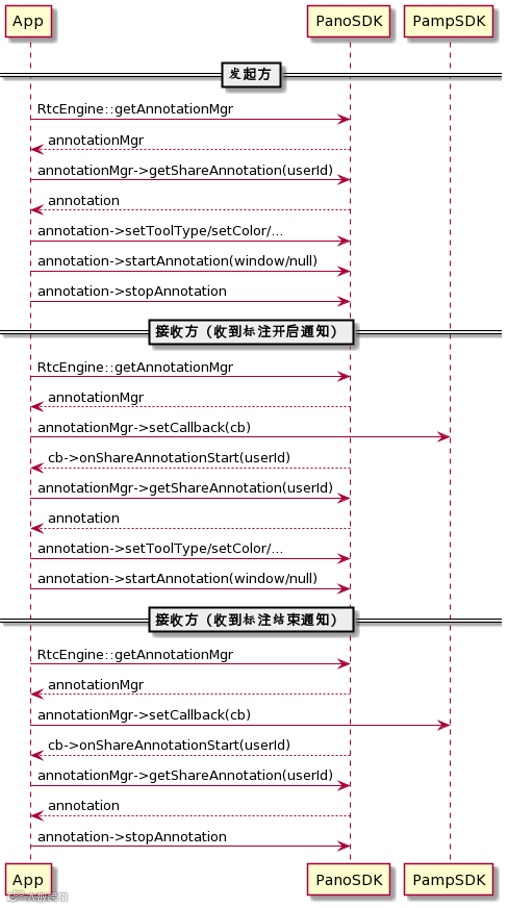
RtcEngine/*** @~english* @brief get annotation manager.* @return* - non-null: a pointer to annotation manager* - others: Failure* @note DO NOT delete this pointer, RtcEngine can handle its life cycle.* @~chinese* @brief 获取标注管理器* @return* - 非空指针:指向标注管理器的指针。* - 空指针: 失败* @note不要删除此指针, RtcEgine会维护其生命周期。*/virtual AnnotationManager* getAnnotationManager() = 0;AnnotationManager/*** @~english* @brief get share annotation object.* @param userId User ID* @return* - non-null: a pointer to the share annotation object* - others: Failure* @note DO NOT delete this pointer, AnnotationManager can handle its le cycle.* @~chinese* @brief 获取共享标注对象* @param userId用户ID* @return* - 非空指针:指向共享标注对象的指针。* - 空指针: 失败* @note不要删除此指针, AnnotationManager会维护其生命周期。*/virtual PanoAnnotation* getShareAnnotation(uint64_t userId) = 0;
在获得共享标注对象后,可以开始/结束标注,并通知各端共享标注开始/结束
PanoAnnotation/*** @~english* @brief Start annotation and set render window* @param window Platform specified window object, it should HWND on Windows platform.* @return* - OK: Success* - Others: Fail* @note* - Please make sure that whiteboard service is available before start annotation* - For share annotation at presenter, pass NULL for window parameter* @~chinese* @brief 开启标注并且设置显示窗口* @param window 平台相关的窗口对象, 在windows平台, 该参数必须是HWND对象。* @return* - OK:成功* - Others: 失败* @note* - 开启标注前需要保证白板服务是正常的。* - 对共享标注的共享端,window参数传NULL*/virtual QResult startAnnotation(void* window) = 0;/*** @~english* @brief Stop the annotation.* @return* - OK: Success* - Others: Fail* @~chinese* @brief 停止标注* @return* - OK:成功* - Others: 失败*/virtual QResult stopAnnotation() = 0;
AnnotationManager::Callback/*!* @~english* @brief Notification of share annotation start* @param userId User ID* @~chinese* @brief 开始共享标注通知* @param userId 用户ID*/virtualvoidonShareAnnotationStart(uint64_tuserId) {}/*!* @~english* @brief Notification of share annotation stop* @param userId User ID* @~chinese* @brief 终止共享标注通知* @param userId 用户ID*/virtual void onShareAnnotationStop(uint64_t userId) {}
标注提供了多种工具和操作。通过相应接口设置或调用。目前提供的功能包括,画笔,直线,矩形,椭圆,文字等。颜色,线宽,文字粗斜体,撤消/重做,清除等。不支持填充类型对象。支持用户角色设置(Admin, Attendee, Viewer);
清除全部标注内容,清除非本人标注内容需要 Admin 角色权限。Viewer 角色仅可观看,不可标注;
通过设置 Viewer 角色可以关闭某个用户的标注绘制功能。设置为 Attendee 或 Admin 可以重新开启标注绘制功能;
快照功能可以快速获得包含当前标注与共享内容的截图。
PanoAnnotation/*** @~english* @brief Set annotation role type.* @param type The annotation role type.* @~chinese* @brief 设置标注角色类型。* @param type 标注角色。*/virtual QResult setRoleType(WBRoleType type) = 0;/*** @~english* @brief set tool type* @param type tool type* @return* - OK: Success* - Others: Fail* @~chinese* @brief 设置工具类型* @param type 工具类型* @return* - OK:成功* - Others: 失败*/virtual QResult setToolType(WBToolType type) = 0;/*** @~english* @brief set line width* @param size line width. Valid value range [1, 20]* @return* - OK: Success* - Others: Fail* @~chinese* @brief 设置线宽* @param size 线宽。有效值范围 [1, 20]* @return* - OK:成功* - Others: 失败*/virtual QResult setLineWidth(int size) = 0;/*** @~english* @brief Set color* @param color Color* @return* - OK: Success* - Others: Fail* @~chinese* @brief 设置颜色* @param color 颜色* @return* - OK:成功* - Others: 失败*/virtual QResult setColor(WBColor color) = 0;/*** @~english* @brief Set font style* @param style font style* @return* - OK: Success* - Others: Fail* @~chinese* @brief 设置字体样式* @param style 字体样式* @return* - OK:成功* - Others: 失败*/virtual QResult setFontStyle(WBFontStyle style) = 0;/*** @~english* @brief Set font size* @param size font size* @return* - OK: Success* - Others: Fail* @~chinese* @brief 设置字体大小* @param size 字体大小* @return* - OK:成功* - Others: 失败*/virtual QResult setFontSize(int size) = 0;/*** @~english* @brief undo* @return* - OK: Success* - Others: Fail* @~chinese* @brief 撤消上一次操作* @return* - OK:成功* - Others: 失败*/virtual QResult undo() = 0;/*** @~english* @brief redo* @return* - OK: Success* - Others: Fail* @~chinese* @brief 重做标注的上一次被撤销操作* @return* - OK:成功* - Others: 失败*/virtual QResult redo() = 0;/*** @~english* @brief clear annotation content by specific user ID* @param userId user ID* @return* - OK: Success* - NO_PRIVILEGE: need ADMIN role to call this API* - Others: Fail* @note ADMIN role is required if the userId is not local user* @~chinese* @brief清除指定用户标注内容* @param userId用户ID* @return* - OK:成功* - NO_PRIVILEGE: 没有权限* - Others: 失败* @note 只有 ADMIN 角色才可以清除非本地用户的内容*/virtual QResult clearUserContents(uint64_tuserId) = 0;/*** @~english* @brief clear annotation content* @return* - OK: Success* - NO_PRIVILEGE: need ADMIN role to call this API* - Others: Fail* @note this API need ADMIN role* @~chinese* @brief 清除标注内容,需要 ADMIN 角色才可调用成功* @return* - OK:成功* - NO_PRIVILEGE: 没有权限* - Others: 失败* @note 此接口只有 ADMIN 角色才可调用*/virtual QResult clearContents() = 0;/*** @~english* @brief save annotation contents to image.* @param outputDir output directory* @return* - OK: Success* - Others: Fail* @note snapshot result and image filename is returned in callback onSnapshotComplete* @~chinese* @brief 保存标注内容到图像。* @param outputDir输出路径* @return* - OK:成功* - Others: 失败* @note 快照结果和图像文件名通过回调函数onSnapshotComplete返回*/virtual QResult snapshot(const char* outputDir) = 0;
PanoAnnotation::Callback/*** @~english* @brief Notification of annotation role type changed* @param newRole The new role type.* @~chinese* @brief 标注角色类型变化通知* @param newRole 新角色。*/virtual void onAnnoRoleChanged(WBRoleType newRole) {}/*** @~english* @brief Notification of annotation snapshot complete* @param result Snapshot result* @param filename Snapshot image full path with name.* @~chinese* @brief 标注快照完成通知* @param result 快照结果* @param filename 快照文件名*/virtual void onSnapshotComplete(QResult result, const char* filename) {}