接上一篇:SpringBoot2 整合OAuth2实现统一认证
在授权码模式下,输入正确的用户名和密码后发现页面直接跳转到了redirect_uri地址上去。现在加有个确认的过程。
在上一篇的核心配置类中配置ClientDetailsService中我们加入如下一行代码:
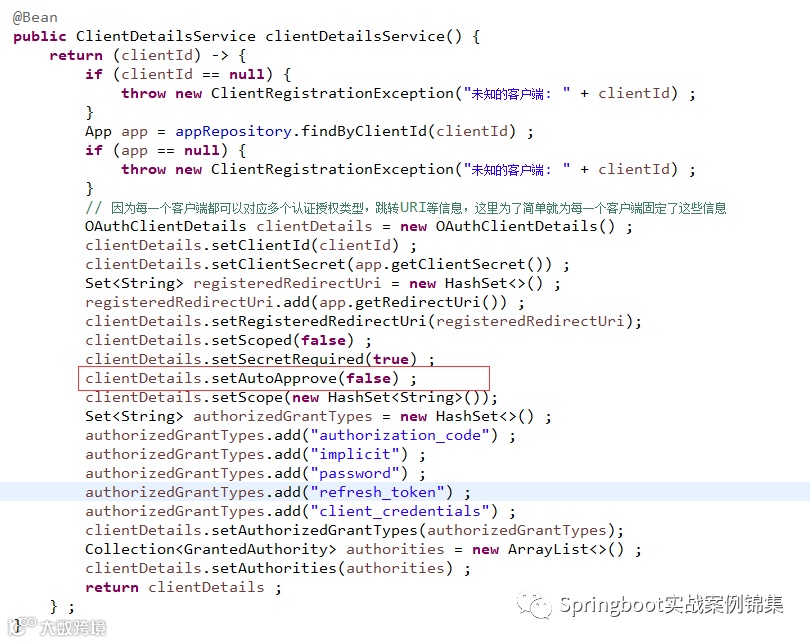
自动放行设置为false。接下来测试
发现设置了也无效还是直接自动跳到了目标地址,并没有确认的一个过程。
跟踪了下代码:
AuthorizationEndpoint.java
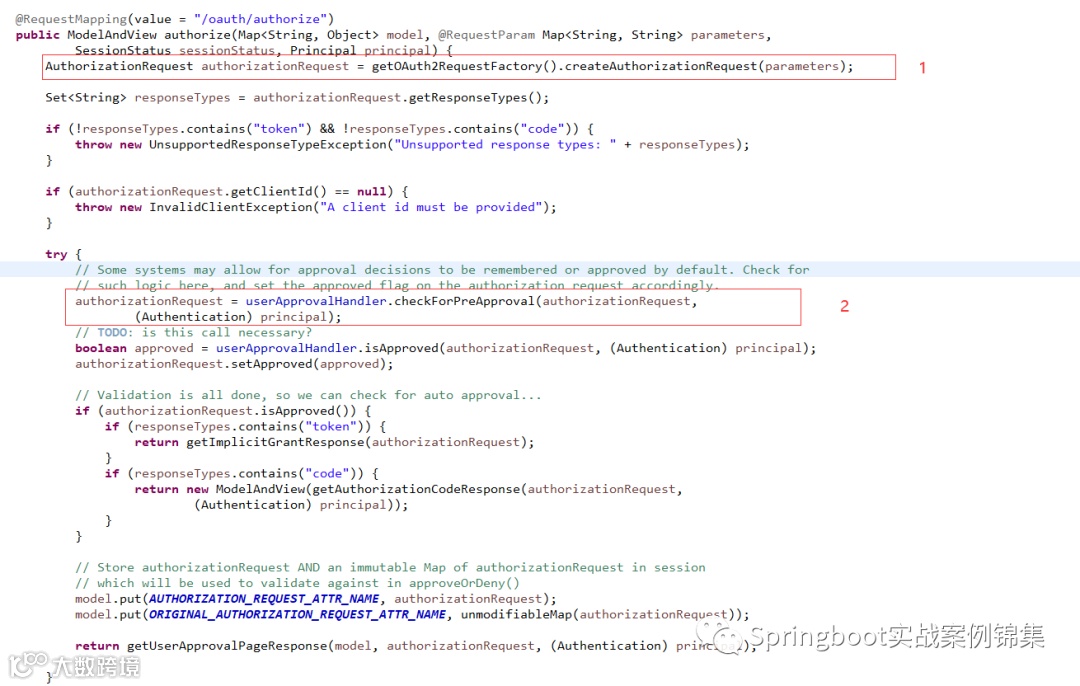
进入1,代码如下:
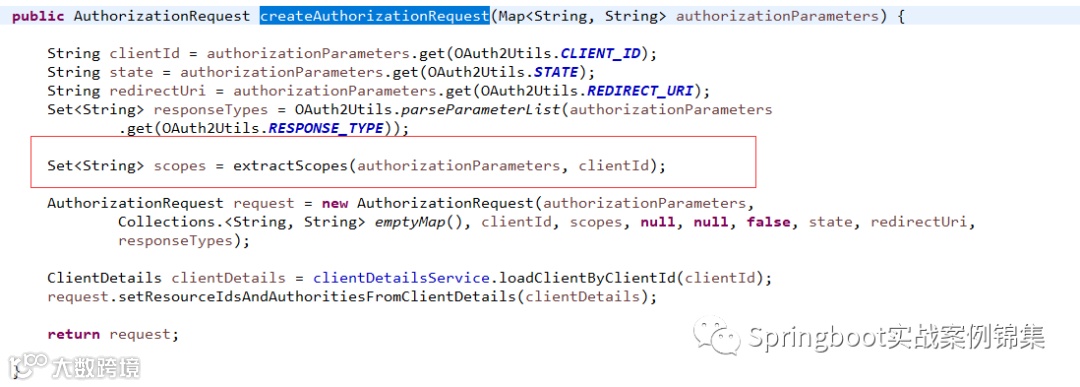
进入extractScopes方法:
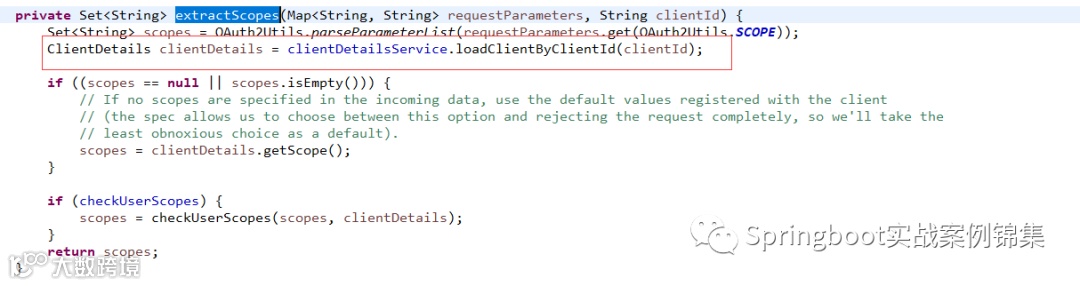
这里通过clientId获取Client的所有信息。这里getScope就获取了所有的Scope。
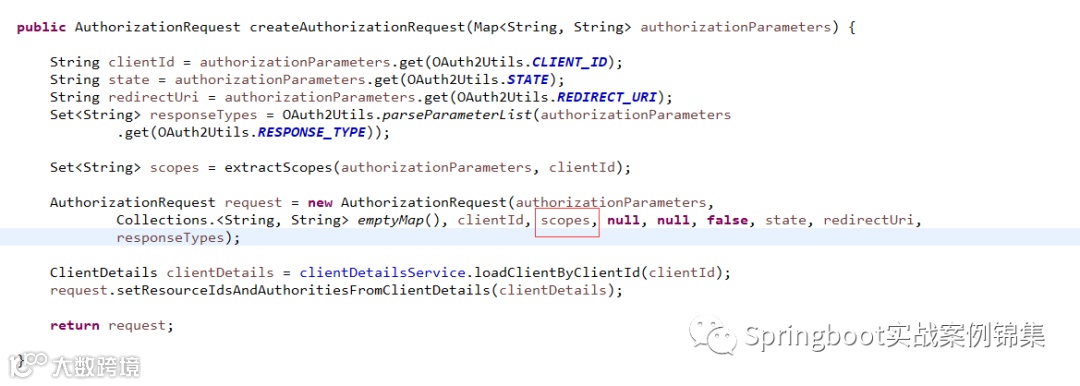
这里把获取到的Scope放到了AuthorizationRequest对象中。
进入2,代码如下:
进入到checkForPreApproval方法:
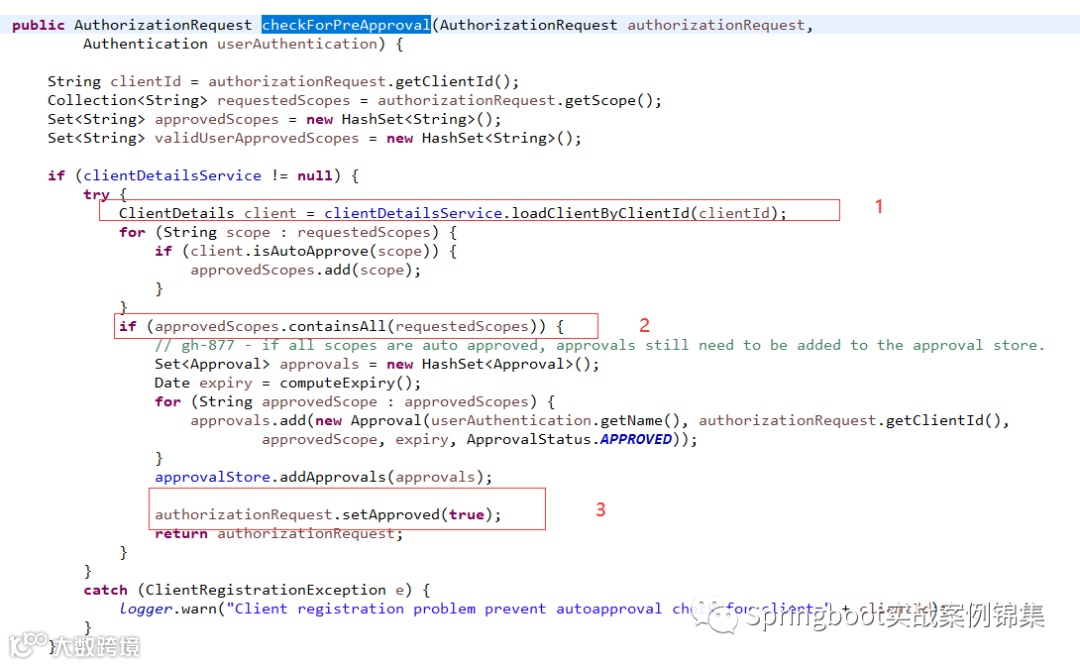
代码1:这里通过clientId获取Client的所有信息。
代码2:通过AuthorizationRequest中的Scope和当前再次查询的Scope结合进行比较由于都是同一个,肯定相同,所以就执行了代码3。将我们设置的false又重新置为true了,也就没有了确认那一步。这里重写这里的源码直接改成false,再次登录:
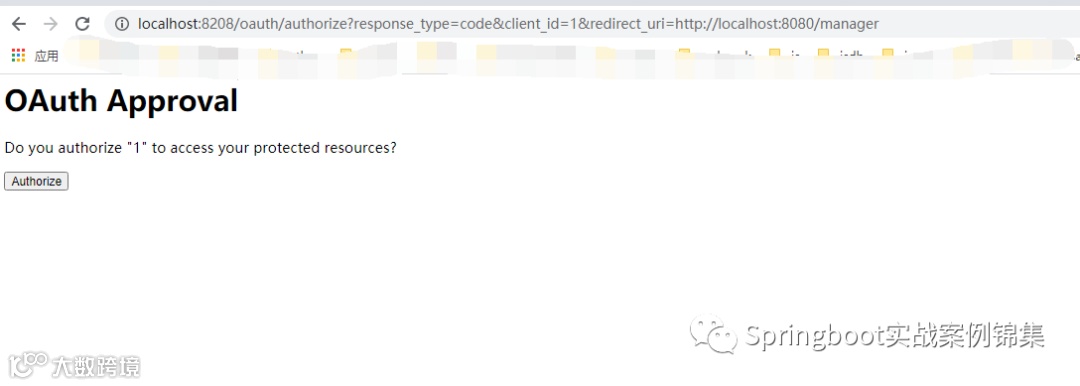
这次进入了确认页面。
接下来重写确认页面:
自定义页面
<htmlxmlns:th="http://www.thymeleaf.org"><head><meta charset="UTF-8"></meta><title>授权确认</title><link rel="stylesheet" th:href="@{/resources/bootstrap/css/bootstrap.min.css}"/><style type="text/css">html, body {margin: 0px ;padding: 0px ;width: 100% ;height: 100% ;overflow: hidden;}.loginContainer {width: 100% ;height: 100% ;background: #EEEEEE ;display: flex ;flex-direction: column ;align-items: center;justify-content: center;padding-top: 20px;}.loginPanel {border: 2px solid #337ab7 ;border-radius: 8px;width: 50%;height: 308px;position: relative ;}.pageTitle {margin-top: -200px;}.pageTitle h3 {font-weight: bold;}.loginTitle {height: 100px;width: 100%;background: #337ab7 ;border-radius: 4px 4px 0px 0px;line-height: 40px;font-size: 16px;color: #FFFFFF;padding-left: 10px;box-sizing: border-box;}.loginContent {position: absolute ;top: 40px;bottom: 0px;left: 0;right: 0;background: #FFFFFF;border-radius: 0px 0px 8px 8px;display: flex ;flex-direction: column ;justify-content: center;}.loginContent .c-row {height: 50px;display:flex;justify-content: center ;align-items: center ;}.loginContent .c-row label {margin-bottom: 0px ;padding-right: 5px;}.input-control {display: block;height: 28px;padding: 3px 7px;font-size: 14px;line-height: 1.42857143;color: #555;flex: 0.6;background-color: #fff;background-image: none;border: 1px solid #ccc;border-radius: 4px;-webkit-box-shadow: inset 0 1px 1px rgba(0,0,0,0.075);box-shadow: inset 0 1px 1px rgba(0,0,0,0.075);-webkit-transition: border-color ease-in-out .15s, -webkit-box-shadow ease-in-out .15s;-o-transition: border-color ease-in-out .15s, box-shadow ease-in-out .15s;transition: border-color ease-in-out .15s, box-shadow ease-in-out .15s;}</style></head><body><div class="loginContainer"><div class="pageTitle"><h3>授权确认</h3></div><div class="loginPanel"><div class="loginTitle"><p th:text="'客户端:' + ${clientId}+' 请求授权'"></p></div><div class="loginContent"><form method="post" action="/oauth/authorize"><input type="hidden" name="user_oauth_approval" value="true"><button class="btn btn-sm btn-primary" style="padding: 10px 15px;width: 60%;border-radius: 20px;" type="submit">同意/授权</button></form></div></div></div><script th:src="@{/resources/jquery/jquery.min.js}"></script><script th:src="@{/resources/bootstrap/bootstrap.min.js}"></script></body></html>
自定义controller
public class GrantController {public ModelAndView getAccessConfirmation(Map<String, Object> model, HttpServletRequest request) throws Exception {AuthorizationRequest authorizationRequest = (AuthorizationRequest) model.get("authorizationRequest");ModelAndView view = new ModelAndView();view.setViewName("grant-page");view.addObject("clientId", authorizationRequest.getClientId());return view;}}
核心配置类中添加映射
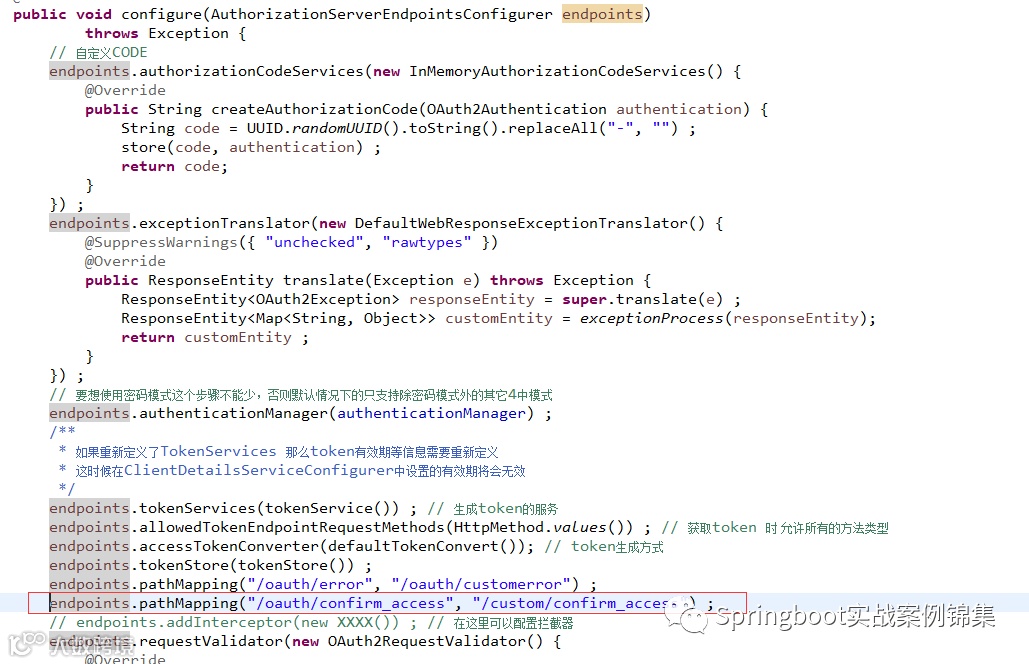
测试:
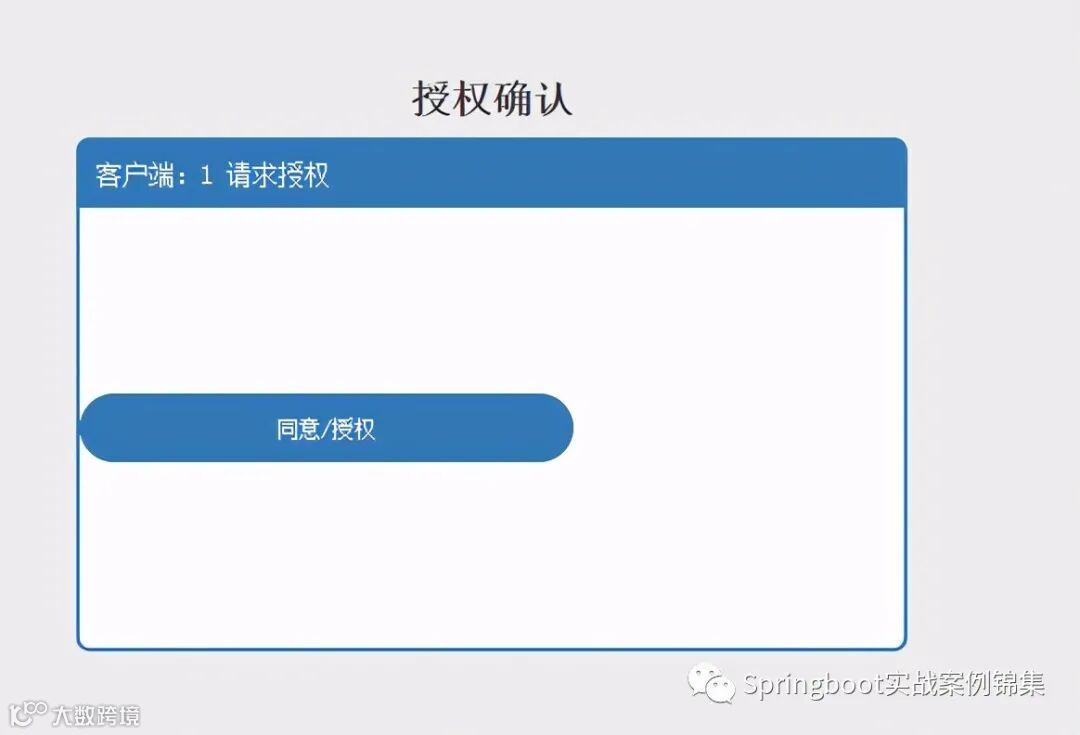
成功登录后跳到了确认页面。
到此自定义授权页面完成。
自定义登录页面:
登录页面
<html xmlns:th="http://www.thymeleaf.org"><head><meta charset="UTF-8"></meta><title>安全登录</title><link rel="stylesheet" th:href="@{/resources/bootstrap/css/bootstrap.min.css}"/><style type="text/css">html, body { margin: 0px ; padding: 0px ; width: 100% ; height: 100% ;overflow: hidden; } .loginContainer { width: 100% ; height: 100% ; background:#EEEEEE ; display: flex ; flex-direction: column ; align-items: center;justify-content: center; padding-top: 20px; } .loginPanel { border: 2pxsolid #337ab7 ; border-radius: 8px; width: 400px; height: 308px; position:relative ; } .pageTitle { margin-top: -200px; } .pageTitle h3 { font-weight:bold; } .loginTitle { height: 40px; width: 100%; background: #337ab7 ;border-radius: 4px 4px 0px 0px; line-height: 40px; font-size: 16px; color:#FFFFFF; padding-left: 10px; box-sizing: border-box; } .loginContent {position: absolute ; top: 40px; bottom: 0px; left: 0; right: 0; background:#FFFFFF; border-radius: 0px 0px 8px 8px; display: flex ; flex-direction:column ; justify-content: center; } .loginContent .c-row { height: 50px;display:flex; justify-content: center ; align-items: center ; } .loginContent.c-row label { margin-bottom: 0px ; padding-right: 5px; } .input-control{ display: block; height: 28px; padding: 3px 7px; font-size: 14px; line-height:1.42857143; color: #555; flex: 0.6; background-color: #fff; background-image:none; border: 1px solid #ccc; border-radius: 4px; -webkit-box-shadow: inset0 1px 1px rgba(0,0,0,0.075); box-shadow: inset 0 1px 1px rgba(0,0,0,0.075);-webkit-transition: border-color ease-in-out .15s, -webkit-box-shadow ease-in-out.15s; -o-transition: border-color ease-in-out .15s, box-shadow ease-in-out.15s; transition: border-color ease-in-out .15s, box-shadow ease-in-out.15s; }</style></head><body><div class="loginContainer"><div class="pageTitle"><h3>认证登录</h3></div><div class="loginPanel"><div class="loginTitle">安全登录</div><div class="loginContent"><form method="post" action="login"><div class="c-row"><label>安全帐号</label><input type="text" class="input-control" id="username" name="username"placeholder="帐号"></div><div class="c-row"><label>安全密码</label><input type="password" class="input-control" id="password" name="password"placeholder="密码"></div><div class="c-row" style="margin-top: 20px;"><button type="submit" class="btn btn-sm btn-primary" style="padding: 10px 15px;width: 60%;border-radius: 20px;">安全登录</button></div></form><div class="c-row"><div th:if="${param.error}" th:text="${session.SPRING_SECURITY_LAST_EXCEPTION?.message }"class="alert alert-danger" style="padding:5px; margin-bottom:5px;"></div></div></div></div></div><script th:src="@{/resources/jquery/jquery.min.js}"></script><script th:src="@{/resources/bootstrap/bootstrap.min.js}"></script></body></html>
自定义controller
public class LoginController {public String login() {return "login" ;}}
安全配置类
public class WebSecurityConfig extends WebSecurityConfigurerAdapter {public AuthenticationManager authenticationManagerBean() throws Exception {return super.authenticationManagerBean();}public ServletListenerRegistrationBean<HttpSessionEventPublisher> httpSessionListener() {return new ServletListenerRegistrationBean<>(new HttpSessionEventPublisher()) ;}protected void configure(HttpSecurity http) throws Exception {http.csrf().disable().authorizeRequests().antMatchers("/sign/login", "/login").permitAll().and().authorizeRequests().anyRequest().authenticated().and().formLogin().usernameParameter("username").passwordParameter("password").loginPage("/sign/login").permitAll().and().logout().logoutUrl("/sign/logout").invalidateHttpSession(true).and().sessionManagement().maximumSessions(1) ;//super.configure(http) ;}public void configure(WebSecurity webSecurity) throws Exception{webSecurity.ignoring().antMatchers("/resources/**");//放开所有静态资源}}
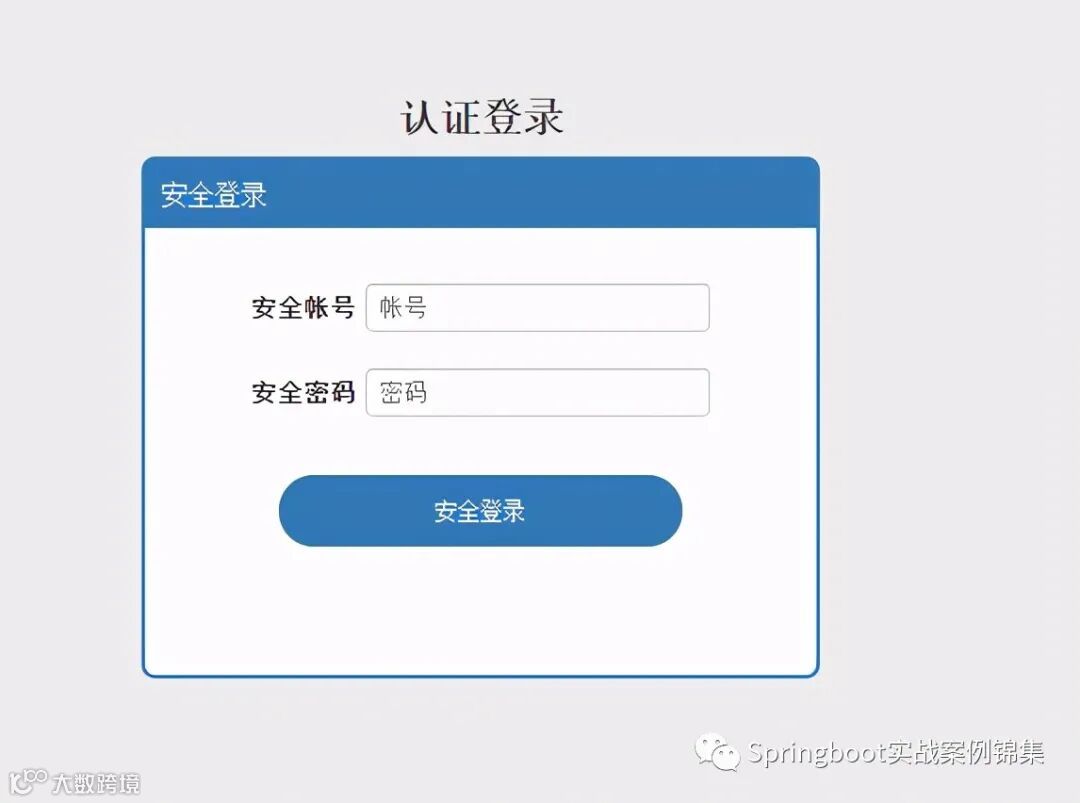
测试:
授权码模式:
完毕!!!