环境:Springboot2.4.12 + Spring Security 5.4.9
本篇主要内容:
基于数据库的用户认证
上一篇:《Spring Security权限控制系列(四)》
注意事项
有如下的自定义配置
public class SecurityConfig extends WebSecurityConfigurerAdapter {public AuthenticationManager authenticationManagerBean() throws Exception {return super.authenticationManagerBean();}protected void configure(HttpSecurity http) throws Exception {http.csrf().disable() ;http.authorizeRequests().antMatchers("/resources/**", "/cache/**", "/process/login").permitAll() ;http.authorizeRequests().antMatchers("/demos/**").hasRole("USERS") ;http.authorizeRequests().antMatchers("/api/**").hasRole("ADMIN") ;http.formLogin() ;}}
同时系统中也没有提供任何的AuthenticationProvider类型的Bean和当前也没有任何 AuthenticationManager 实例,那么你进行登录的时候会出现死循环。原因如下:
// 当在自定义安全配置的时候没有重写protected void configure(AuthenticationManagerBuilder auth)// 方法或没有将WebSecurityConfigurerAdapter中的disableLocalConfigureAuthenticationBldr置为false(默认关闭本地的AuthenticationManagerBuilder对象构建)// 如果关闭了那么就会从容器中AuthenticationConfiguration对象内的方法进行构建// 这个构建就是WebSecurityConfigurerAdapter中进行public class AuthenticationConfiguration {public AuthenticationManager getAuthenticationManager() {// 这里将会返回nullthis.authenticationManager = authBuilder.build();if (this.authenticationManager == null) {// 通过延迟加载方式(代理)获取容器中是否有自定义的AuthenticationManager类型的Beanthis.authenticationManager = getAuthenticationManagerBean();}}private AuthenticationManager getAuthenticationManagerBean() {return lazyBean(AuthenticationManager.class);}private <T> T lazyBean(Class<T> interfaceName) {LazyInitTargetSource lazyTargetSource = new LazyInitTargetSource();// 从容器中查找AuthenticationManager类型的Bean// 这里就会获取上面SecurityConfig配置中定义的authenticationManagerBeanString[] beanNamesForType = BeanFactoryUtils.beanNamesForTypeIncludingAncestors(this.applicationContext, interfaceName);if (beanNamesForType.length == 0) {return null;}String beanName = getBeanName(interfaceName, beanNamesForType);lazyTargetSource.setTargetBeanName(beanName);lazyTargetSource.setBeanFactory(this.applicationContext);ProxyFactoryBean proxyFactory = new ProxyFactoryBean();proxyFactory = this.objectPostProcessor.postProcess(proxyFactory);proxyFactory.setTargetSource(lazyTargetSource);// 获取代理对象,代理的就是下面WebSecurityConfigurerAdapter#authenticationManagerBean方法的返回值return (T) proxyFactory.getObject();}}
SecurityConfig#authenticationManagerBean方法
public abstract class WebSecurityConfigurerAdapter {public AuthenticationManager authenticationManagerBean() throws Exception {// authenticationBuilder = DefaultPasswordEncoderAuthenticationManagerBuilder// 在setApplicationContext中创建的对象return new AuthenticationManagerDelegator(this.authenticationBuilder, this.context);}protected final HttpSecurity getHttp() throws Exception {// 这里构建的就是上面的AuthenticationManagerDelegator的代理对象AuthenticationManager authenticationManager = authenticationManager();// 这里的父对象又指向了自己,这样就产生了死循环递归调用this.authenticationBuilder.parentAuthenticationManager(authenticationManager);}}
基于数据库认证授权 - 原理
在前面几篇文章中我们都是通过在配置文件中配置或基于Java代码配置的内存用户进行用户的设置,这种方式在学习中使用了解还可以,但在实际的项目中肯定不会这么来玩,都会基于自己项目中的用户进行登录授权管理。本篇内容将会带详细了解如何基于数据库中的用户进行登录授权。
在《Spring Security权限控制系列(四)》文章中我们介绍了Spring Security的核心是通过过滤器来实现认证授权管理的,在这一些列的过滤器中有个非常重要的过滤器UsernamePasswordAuthenticationFilter 该过滤器就会拦截登录的URI,进行验证用户密码。
public abstract class AbstractAuthenticationProcessingFilter {private AuthenticationManager authenticationManager;public void doFilter(ServletRequest request, ServletResponse response, FilterChain chain) throws IOException, ServletException {doFilter((HttpServletRequest) request, (HttpServletResponse) response, chain);}private void doFilter(HttpServletRequest request, HttpServletResponse response, FilterChain chain) throws IOException, ServletException {// 这里将会判断当前的请求是否是POST /loging(这个是默认的登录认证URI)// 如果是则则执行if之后的逻辑if (!requiresAuthentication(request, response)) {chain.doFilter(request, response);return;}try {// 开始认证处理,该方法在子类UsernamePasswordAuthenticationFilter过滤器重写Authentication authenticationResult = attemptAuthentication(request, response);if (authenticationResult == null) {return;}this.sessionStrategy.onAuthentication(authenticationResult, request, response);if (this.continueChainBeforeSuccessfulAuthentication) {chain.doFilter(request, response);}successfulAuthentication(request, response, chain, authenticationResult);}}protected AuthenticationManager getAuthenticationManager() {return this.authenticationManager;}}
UsernamePasswordAuthenticationFilter
public class UsernamePasswordAuthenticationFilter extends AbstractAuthenticationProcessingFilter {public Authentication attemptAuthentication(HttpServletRequest request, HttpServletResponse response) throws AuthenticationException {if (this.postOnly && !request.getMethod().equals("POST")) {throw new AuthenticationServiceException("Authentication method not supported: " + request.getMethod());}// 获取用户名String username = obtainUsername(request);username = (username != null) ? username : "";username = username.trim();// 获取密码String password = obtainPassword(request);password = (password != null) ? password : "";// 构造基于用户名密码的认证对象UsernamePasswordAuthenticationToken authRequest = new UsernamePasswordAuthenticationToken(username, password);// 默认根据当前request对象构造明细信息;该方法是protected,自己可以进行重写setDetails(request, authRequest);// 真正的认证处理,一般该对象是ProviderManagerreturn this.getAuthenticationManager().authenticate(authRequest);}}
ProviderManager
public class ProviderManager implements AuthenticationManager {public Authentication authenticate(Authentication authentication) {for (AuthenticationProvider provider : getProviders()) {result = provider.authenticate(authentication);}if (result == null && this.parent != null) {try {parentResult = this.parent.authenticate(authentication);result = parentResult;}}}}
从上面的ProviderManager知道了它所需要的就是AuthenticationProvider
接下来自定义AuthenticationProvider
自定义AuthenticationProvider
通常情况我们不会直接去实现AuthenticationProvider,可以通过继承AbstractUserDetailsAuthenticationProvider该类为我们实现了认证的通用模板,源码如下:
public abstract class AbstractUserDetailsAuthenticationProvider {public Authentication authenticate(Authentication authentication) {UserDetails user = ...// 获取用户,注意这里的对象是UserDetials;后面将会看到如何使用该类型对象// 该方法是个抽象的方法,需要我们子类自己实现获取用户的细节user = retrieveUser(username, (UsernamePasswordAuthenticationToken) authentication);// ...// 该方法作用就是添加额外的认证(比如:密码验证)// 本类中该方法还是一个抽象的方法,需要子类来实现additionalAuthenticationChecks(user, (UsernamePasswordAuthenticationToken) authentication);}protected abstract UserDetails retrieveUser(String username, UsernamePasswordAuthenticationToken authentication) throws AuthenticationException;protected abstract void additionalAuthenticationChecks(UserDetails userDetails, UsernamePasswordAuthenticationToken authentication) throws AuthenticationException;}
上面的retrieveUser方法是需要子类来实现,但如何实现呢?系统还提供了一个类DaoAuthenticationProvider类,该类是AbstractUserDetailsAuthenticationProvider的子类。
public class DaoAuthenticationProvider extends AbstractUserDetailsAuthenticationProvider {private PasswordEncoder passwordEncoder;private UserDetailsService userDetailsService;protected final UserDetails retrieveUser(String username, UsernamePasswordAuthenticationToken authentication) throws AuthenticationException {try {// 获取UserDetialsService对象,该对象的loadUserByUsername作用就是通过用户名获取Userdetails// 这就是我们通过数据库查询获取UserDetails loadedUser = this.getUserDetailsService().loadUserByUsername(username);if (loadedUser == null) {throw new InternalAuthenticationServiceException("UserDetailsService returned null, which is an interface contract violation");}return loadedUser;}}protected UserDetailsService getUserDetailsService() {return this.userDetailsService;}protected void additionalAuthenticationChecks(UserDetails userDetails, UsernamePasswordAuthenticationToken authentication) throws AuthenticationException {// 如果不存在凭证(密码)则直接抛出异常if (authentication.getCredentials() == null) {throw new BadCredentialsException(this.messages.getMessage("AbstractUserDetailsAuthenticationProvider.badCredentials", "Bad credentials"));}String presentedPassword = authentication.getCredentials().toString();// 验证密码if (!this.passwordEncoder.matches(presentedPassword, userDetails.getPassword())) {throw new BadCredentialsException(this.messages.getMessage("AbstractUserDetailsAuthenticationProvider.badCredentials", "Bad credentials"));}}}
通过上面的分析发现DaoAuthenticationProvider类能够满足我们认证用户名及密码的功能,所以我们也就没有必要自己在一步一步的去实现用户名及密码的认证,直接继承DaoAuthenticationProvider类,为该类提供上面分析的两个重要的认证类:
UserDetailsService 通过用户名查询UserDetials
PasswordEncoder 验证上一步查询出用户的密码
其实我们也完全不用继承DaoAuthenticationProvider实现一个子类,完全没有必要直接创建该实例设置上面两个核心类即可。接下来我们就按照当前的分析来依次实现如下的类即可
POJO类实现UserDetails
自定义UserDetailsService
自定义PasswordEncoder
配置AuthenticationProvider
环境准备
依赖
<dependency><groupId>org.springframework.boot</groupId><artifactId>spring-boot-starter-data-jpa</artifactId></dependency><dependency><groupId>mysql</groupId><artifactId>mysql-connector-java</artifactId></dependency>
配置
spring:datasource:driverClassName: com.mysql.cj.jdbc.Driverurl: jdbc:mysql://localhost:3306/lua?serverTimezone=GMT%2B8&nullCatalogMeansCurrent=trueusername: rootpassword: xxxxxxtype: com.zaxxer.hikari.HikariDataSourcehikari:minimumIdle: 10maximumPoolSize: 200autoCommit: trueidleTimeout: 30000poolName: MasterDatabookHikariCPmaxLifetime: 1800000connectionTimeout: 30000connectionTestQuery: SELECT 1
自定义UserDetails
我们的实体类需要实现UserDetails
(name = "t_users")public class Users implements UserDetails {private String id ;private String username ;private String password ;(columnDefinition = "int default 1")private Integer enabled = 1;(columnDefinition = "int default 0")private Integer locked = 0 ;private Collection<GrantedAuthority> authorities = new ArrayList<>() ;}
Repository
public interface UsesRepository extends JpaRepository<Users, String> {Users findByUsername(String username) ;}
自定义UserDetailsService
实现该类主要用来通过用户名查询用户信息
public class CustomUserDetailsService implements UserDetailsService {private UsersRepository usersRepository ;public UserDetails loadUserByUsername(String username) throws UsernameNotFoundException {return usersRepository.findByUsername(username) ;}}
该类非常简单直接就是调用Repository查询用户,如果不存在系统会自动的抛出异常
自定义PasswordEncoder
如果上一步能正确的获取UserDetails对象,那么接下来就是验证密码了。根据自身系统的密码处理方式实现PasswordEncoder
public class CustomPasswordEncoder implements PasswordEncoder {// 如果你的密码是用MD5进行处理的,那么在这里你需要对明文rawPassword做处理后返回public String encode(CharSequence rawPassword) {return rawPassword.toString() ;}public boolean matches(CharSequence rawPassword, String encodedPassword) {return rawPassword.equals(encodedPassword) ;}}
上面实现的PasswordEncoder 没有对密码做任何处理(也就是明文),实际你可以根据自己的需要做相应的逻辑处理,Spring Security提供了如下实现:
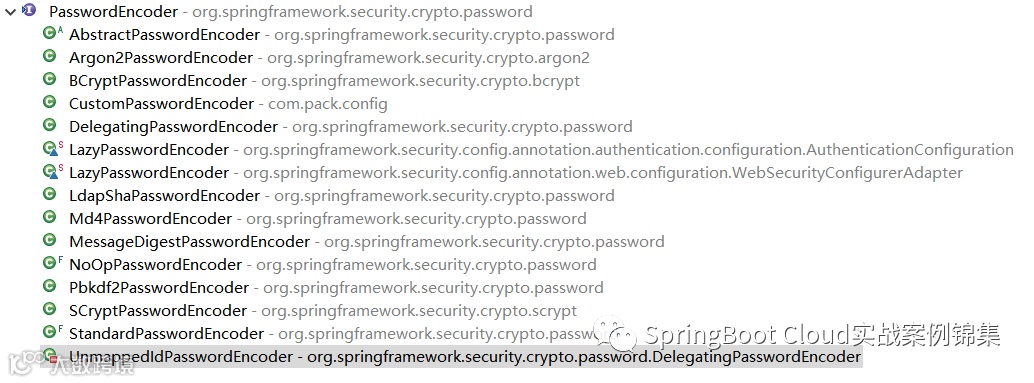
上图中的实现大部分你可以直接拿来使用。
配置AuthenticationProvider
public DaoAuthenticationProvider daoAuthenticationProvider(UserDetailsService userDetailsService, PasswordEncoder passwordEncoder) {DaoAuthenticationProvider authenticationProvider = new DaoAuthenticationProvider() ;authenticationProvider.setUserDetailsService(userDetailsService) ;authenticationProvider.setPasswordEncoder(passwordEncoder) ;return authenticationProvider ;}
到此所有的配置及自定义都已经完成了。测试这里就不进行了。
总结:
基于数据库认证的实现原理
自定义核心认证的实现
到此本篇内容结束。下一篇将介绍:
业务接口权限认证