环境:SpringBoot2.5.13
Spring Cloud Gateway提供了一个名为ProxyExchange的实用程序对象。你可以在常规Spring web处理程序中使用它作为方法参数。它通过镜像HTTP动词的方法支持基本的下游HTTP交换。在MVC中,它还支持通过forward()方法转发到本地处理程序。要使用ProxyExchange,需要在classpath中包含正确的模块(spring-cloud-gateway-mvc(3.1.5)或
spring-cloud-gateway-webflux)。
下面的MVC示例将请求代理到/test下游到远程服务器:
public class GatewaySampleApplication {private URI home;public ResponseEntity<?> proxy(ProxyExchange<byte[]> proxy) throws Exception {return proxy.uri(home.toString() + "/image/png").get();}}
下面的例子对Webflux做了相同的事情:
public class GatewaySampleApplication {private URI home;public Mono<ResponseEntity<?>> proxy(ProxyExchange<byte[]> proxy) throws Exception {return proxy.uri(home.toString() + "/image/png").get();}}
ProxyExchange上的便利方法使处理程序方法能够发现并增强传入请求的URI路径。例如,你可能想提取路径末尾的元素并将其传递到下游:
public ResponseEntity<?> proxyPath(ProxyExchange<byte[]> proxy) throws Exception {// 如这里请求的/proxy/path/666,那么这里path = 666String path = proxy.path("/proxy/path/");return proxy.uri(home.toString() + "/foos/" + path).get();}
目标服务接口
("/business")public class BusinessController {("/index")public Object index( Map<String ,Object> body) {System.out.println("业务接口接收到的内容:" + body) ;Map<String, Object> result = new HashMap<>() ;result.put("code", 0) ;result.put("data", "业务处理成功 - " + LocalDateTime.now().getNano()) ;result.put("message", "success") ;return result ;}}
网关服务接口
("/proxy/api")public class GatewayController {("")public Object order(("token") String token,Integer id, ProxyExchange<Map<String, Object>> exchange) {System.out.println("token = " + token + ", id = " + id) ;Map<String, Object> body = new HashMap<>() ;body.put("id", id) ;body.put("token", token) ;return exchange.uri("http://localhost:9000/business/index").body(body).post() ;}}
调用结果
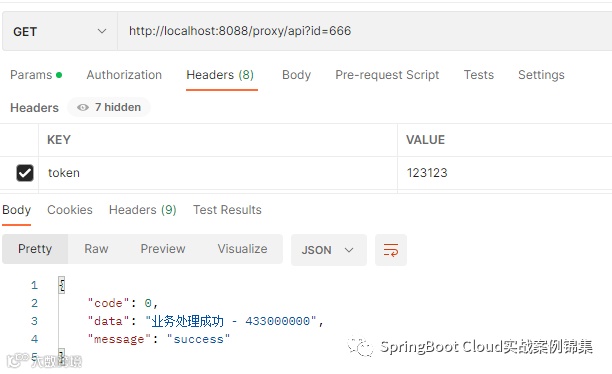
Postman请求
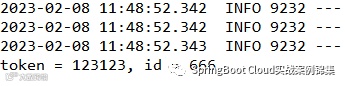
控制台输出
你还可以使用ProxyExchange的header()方法向下游响应添加header。
exchange.uri("http://localhost:9000/business/index").header("key", "123123").body(body).post() ;你还可以通过在get()方法(以及其他方法)中添加一个mapper来操作响应头(以及响应中的其他任何内容)。mapper是一个Function,接收传入的ResponseEntity并将其转换为传出的ResponseEntity,如下:
exchange.uri("http://localhost:9000/business/index").header("key", "123123").body(body).post(result -> {System.out.println("Resposne Header: " + result.getHeaders()) ;return ResponseEntity.ok("success") ;}) ;
对于“敏感”标头(默认情况下为cookie和authorization)和“代理”(x-forward-*)头,提供了非常好的支持,这些头不会向下游传递。如:
当我们的请求中有Authorization 请求Header信息时,默认将不会向下游传递,这是默认行为还有cookie。我们可以通过修改配置文件覆盖
spring:cloud:gateway:proxy:sensitive:''
完毕!!!
求关注