环境:SpringBoot2.7.16
1. 统一路径
如果你希望所有Controller接口对外都有统一的路径,那么你可以通过如下方式进行配置
public class WebConfig implements WebFluxConfigurer {public void configurePathMatching(PathMatchConfigurer configurer) {configurer.addPathPrefix("/api", t -> true) ;}}
这使得所有的Controller请求必须统一加"/api"前缀。
2. 静态资源注册
在SpringBoot环境下,默认支持以下位置的静态资源访问:
classpath:[/META-INF/resources/, /resources/, /static/, /public/]
你可以通过如下方式注册自定义位置的静态资源访问
public class StaticResourceConfig implements WebMvcConfigurer {public void addResourceHandlers(ResourceHandlerRegistry registry) {// 本地系统路径 要指明前缀:file:registry.addResourceHandler("/static/**").addResourceLocations("file:D:/images/") ;}}
3. 参数验证
关于参数验证基本上我们都是使用的基于注解的方式,只要项目中引入spring-boot-starter-validation就可以使用基于注解@Validated或@Valid对Controller请求参数进行验证。如果你的验证不是基于注解的,而是自定义的验证逻辑,那么你可以通过如下方式注册自己的验证器。
("/users")public class UserController {protected void initBinder(WebDataBinder binder) {binder.addValidators(new UserValidator()) ;}}// UserValidator验证器public class UserValidator implements Validator {public boolean supports(Class<?> clazz) {return clazz.isAssignableFrom(User.class) ;}public void validate(Object target, Errors errors) {User user = (User) target ;if (user.getAge() > 150) {errors.reject("age", "年龄不能超过150") ;}if (user.getName() == null || user.getName().equals("")) {errors.reject("name", "姓名不能为空") ;}}}
4. 异常处理
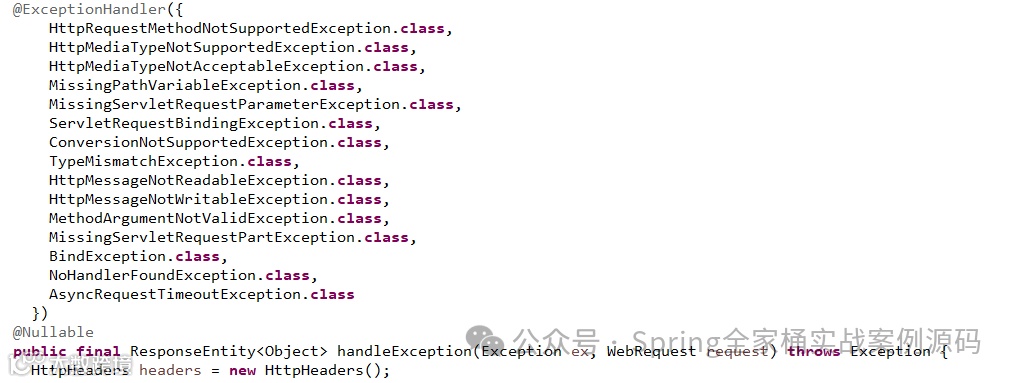
很多时候我们都会自定义自己的@RestControllerAdvice类,在该类中定义使用@ExceptionHandler注解的方法进行全局的异常拦截统一处理。这种方式应该是最简单最有效的处理方式了。其实在SpringWeb中提供了一个ResponseEntityExceptionHandler类,该类是个抽象类,该类定义了@ExceptionHandler方法,该异常处理句柄能够处理常见的一些异常,我们可以基础该类,针对这些不同的异常进行特殊的处理。
@Componentpublic class CustomResponseEntityExceptionHandler extends ResponseEntityExceptionHandler {@Overrideprotected ResponseEntity<Object> handleExceptionInternal(Exception ex, Object body, HttpHeaders headers,HttpStatus status, WebRequest request) {// 实现自己的逻辑return new ResponseEntity<>(ex.getMessage(), headers, status) ;}}
默认支持如下的异常处理
5. 获取请求完整信息
Controller接口获取整个请求的完整信息可以通过HttpEntity对象进行接收,该对象暴露了请求头和请求体。
@RetController@RequestMapping("/users")public class UserController {@PostMapping("")public Object save(HttpEntity<User> entity) {// 通过HttpEntity可以获取body及header信息。}}
6. 内置跨域Filter
Spring Web提供了内置过滤器解决跨域问题。可以通过如下方式配置注册:
CorsFilter corsFitler() {CorsConfiguration config = new CorsConfiguration();config.setAllowCredentials(true);config.addAllowedOrigin("http://www.pack.com");config.addAllowedHeader("*");config.addAllowedMethod("*");UrlBasedCorsConfigurationSource source = new UrlBasedCorsConfigurationSource();source.registerCorsConfiguration("/**", config);CorsFilter filter = new CorsFilter(source);return filter ;}
7. 修改默认错误页
在SpringBoot中,默认配置了/error错误展示页。我们可通过如下方式自定义错误页的处理逻辑
("/error")public class PackErrorController implements ErrorController {("")public Object e() {return "error..." ;}}
ErrorController接口没有定义任何的方法,所以我们只需要按照正常编写Controller进行即可。不过你需要注意你这里的请求uri要和配置文件中的uri一致,否则会出现404。你可以通过如下配置修改默认的错误uri。
server:error:#上面自定义的ErrorController要与这里的配置一致path: /pack/error
8. 正确获取ServletContext
在嵌入式容器设置中,ServletContext 是在应用程序上下文初始化过程中作为服务器启动的一部分设置的。因此,ApplicationContext 中的 Bean 无法可靠地使用 ServletContext 进行初始化。解决这个问题的方法之一是将 ApplicationContext 作为 bean 的依赖注入,只有在需要时才访问 ServletContext。另一种方法是在服务器启动后使用回调。可以使用 ApplicationListener 监听 ApplicationStartedEvent,具体方法如下:
public class PackComponent implements ApplicationListener<ApplicationStartedEvent> {private final ServletContext servletContext;public void onApplicationEvent(ApplicationStartedEvent event) {ApplicationContext applicationContext = event.getApplicationContext() ;this.servletContext = ((WebApplicationContext) applicationContext).getServletContext() ;}}
ApplicationStartedEvent事件将会在整个应用程序基本启动完成后发布(调用相应*Runner回调之前)。
以上是本篇文章的全部内容,希望对你有帮助。
完毕!!!