🎉🎉《Spring Boot实战案例合集》目前已更新170个案例,我们将持续不断的更新。文末有电子书目录。
💪💪永久更新承诺
我们郑重承诺,所有订阅合集的粉丝都将享受永久免费的后续更新服务。
💌💌如何获取
订阅我们的合集《点我订阅》,并通过私信联系我们,我们将第一时间将电子书发送给您。
环境:SpringBoot3.4.2
1. 简介
在企业级应用中,PDF生成是常见的文档处理需求。无论是订单确认、发票开具、合同签署,还是报表导出,用户普遍期望获得格式规范、内容完整且可打印的PDF文件作为正式凭证或存档依据。相比HTML或Excel,PDF具有跨平台一致性、防篡改性强、布局固定等优势,尤其适用于金融、电商、政务等对文档合规性要求较高的场景。
本篇文章将通过通过itextpdf + html模板生成pdf文档(支持外部资源)。
2.1 环境准备
<dependency><groupId>com.itextpdf</groupId><artifactId>kernel</artifactId><version>9.3.0</version></dependency><dependency><groupId>com.itextpdf</groupId><artifactId>html2pdf</artifactId><version>6.2.1</version></dependency><dependency><groupId>ognl</groupId><artifactId>ognl</artifactId><version>3.4.7</version></dependency><dependency><groupId>org.springframework.boot</groupId><artifactId>spring-boot-starter-thymeleaf</artifactId></dependency>
我们将通过thymeleaf模板技术生成PDF。thymeleaf支持各种强大的表达式,非常适合生成各种复杂的文档。
配置thymeleaf
spring:thymeleaf:mode: HTMLencoding: UTF-8prefix: classpath:/templates/suffix: .htmlcache: false
2.2 准备数据 & 模板
public class Receipt {// 收单机构信息private String scope;// 商户信息private String merchantName;private String merchantId;private String terminalId;private String merchantCity;// 交易基本信息private String stan; // 系统跟踪号private String transactionDate; // 交易日期private String transactionType; // 交易类型private BigDecimal requestAmount; // 交易金额// 交易详情private String mcc; // 商户类别码private String scheme; // 卡组织private String maskedPan; // 掩码卡号private String acquirer; // 收单机构BIN// 系统信息private String approvalNumber; // 授权号private String processingCode; // 处理代码private String responseCode; // 响应码private String retrievalNumber; // 检索参考号private String displayMessage; // 交易状态信息// getters, setters}
模板定义
<html lang="zh-CN" xmlns:th="http://www.thymeleaf.org"><head><meta charset="UTF-8"><meta http-equiv="X-UA-Compatible" content="IE=edge"><meta name="viewport" content="width=device-width, initial-scale=1.0"><title>收据副本</title><link href="/google.css" rel='stylesheet' type='text/css' /><style>html, body {font-family: "Microsoft YaHei", sans-serif;;}.wrapper {width: 440px;height: 1024px;}.bolded {font-weight: bolder;}.content {width: 45vh;padding: 20px 40px;}.section {border-bottom: 2px dashed black;padding: 20px 0px;}.section-item {margin-bottom: 20px;overflow-wrap: break-word;}.section-item:last-child {margin-bottom: 0px;}small:last-child {text-align: right;float: right;}</style></head><body><div class="wrapper"><div class="content"><h1 style="text-align: center; border-bottom: 2px dashed black; padding-bottom: 20px;">** 收据副本 **<img src="/seo.png" width="32" height="32"/></h1><div class="section"><div class="section-item"><small>收单机构名称:</small><small style="word-wrap: anywhere" th:text="${receipt.scope}"></small></div><div class="section-item"><small>商户名称:</small><small style="word-wrap: anywhere" th:text="${receipt.merchantName}"></small></div><div class="section-item"><small>商户ID:</small><small th:text="${receipt.merchantId}"></small></div><div class="section-item"><small>终端ID:</small><small th:text="${receipt.terminalId}"></small></div><div class="section-item"><small>商户城市:</small><small th:text="${receipt.merchantCity}"></small></div></div><div class="section"><div class="section-item"><small>系统跟踪号(STAN):</small><small th:text="${receipt.stan}"></small></div><div class="section-item"><small>交易日期:</small><small th:text="${receipt.transactionDate}"></small></div></div><div class="section"><div class="section-item"><small>交易类型:</small><small th:text="${receipt.transactionType}"></small></div><div class="section-item"><small>交易金额:</small><small th:text="'NGN ' + ${receipt.requestAmount}"><b></b></small></div></div><div class="section"><div class="section-item"><small>商户类别码(MCC):</small><small th:text="${receipt.mcc}"></small></div><div class="section-item"><small>卡组织:</small><small th:text="${receipt.scheme}"></small></div><div class="section-item"><small>卡号:</small><small th:text="${receipt.maskedPan}"></small></div><div class="section-item"><small>收单机构识别码(BIN)</small><small th:text="${receipt.acquirer}"></small></div></div><div class="section"><div class="section-item"><small>授权号:</small><small th:text="${receipt.approvalNumber}"></small></div><div class="section-item"><small>处理代码:</small><small th:text="${receipt.processingCode}"></small></div><div class="section-item"><small>响应码:</small><small th:text="${receipt.responseCode}"></small></div><div class="section-item"><small>检索参考号(RRN):</small><small th:text="${receipt.retrievalNumber}"></small></div><div class="section-item"><small>状态</small><small th:text="${receipt.displayMessage}"></small></div></div><h3 style="text-align: center; padding-bottom: 20px;">感谢您的光临!</h3></div></div></body></html>
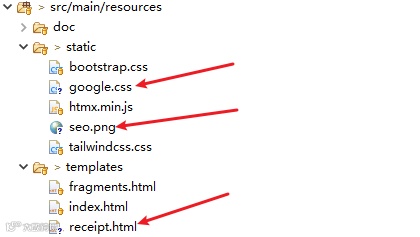
在该模板中,我们使用了外部的css资源以及图片资源。
如下是我们需要准备的资源
2.3 Controller接口定义
public class Html2PdfController {private final ITemplateEngine templateEngine ;public Html2PdfController(ITemplateEngine templateEngine) {this.templateEngine = templateEngine;}public ResponseEntity<byte[]> downloadEJournalFile( HttpServletRequest request,HttpServletResponse response) throws Exception {// 1.准备数据Map<String, Object> variables = Map.of("receipt", getData()) ;// 2.创建上下文并添加变量(模板需要的数据)Context context = new Context();context.setVariables(variables);// 2.1.获取解析后的模板内容String receiptTemplate = templateEngine.process("receipt", context);// 3.配置模板中使用的基础资源信息ConverterProperties converterProperties = new ConverterProperties();// 如果你的模板中引用了样式,那么你需要设置converterProperties.setBaseUri("http://localhost:8080") ;// 3.1.设置字体FontProvider fontProvider = new FontProvider();// 加载系统所有字体(最简单方式)fontProvider.addSystemFonts() ;converterProperties.setFontProvider(fontProvider) ;// 3.2.HTML到PDF转换ByteArrayOutputStream target = new ByteArrayOutputStream();HtmlConverter.convertToPdf(receiptTemplate, target, converterProperties);// 4.设置下载信息String fileName = URLEncoder.encode("收据明细.pdf", "UTF-8");HttpHeaders header = new HttpHeaders();header.add(HttpHeaders.CONTENT_DISPOSITION, "attachment; filename=" + fileName);header.add("Cache-Control", "no-cache, no-store, must-revalidate") ;header.add("Pragma", "no-cache") ;header.add("Expires", "0") ;return ResponseEntity.ok().headers(header).contentType(MediaType.APPLICATION_PDF).body(target.toByteArray()) ;}public Receipt getData() {return ... ;}}
该接口中已经详细的说明关键代码的作用。
2.4 测试
调用上面接口后,生成的pdf如下:
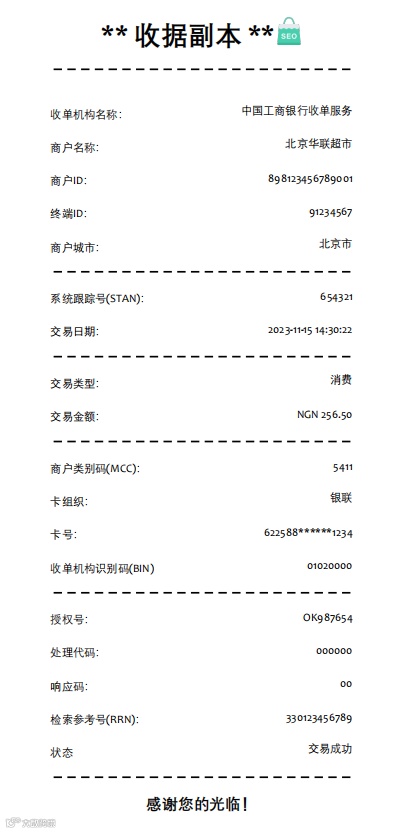
图片、样式都正确的加载。
Spring Boot + JavaScript 实时数据流:2种完整实现
告别 JSON 烦恼!Spring Boot 中 12 个必知的 Jackson 强大注解
告别OOM!Spring Boot 流式导出百万数据:支持MyBatis/JPA/Jdbc
小心此Bug!Spring Boot 事务方法没有异常,为什么事务还是回滚了?
性能优化!Spring Boot + JPA 9 大逆天调优手段,让系统性能起飞
告别轮询!Spring Boot+Webhook 构建实时响应系统
优雅!Spring 基于 Plugin 插件开发(官方推荐)
万字长文!深入源码,彻底掌握Spring Cloud Gateway底层原理
太神了!Spring Boot官方推荐模板引擎Mustache,简直强到离谱!
再见 Feign!Spring Boot + JSON-RPC远程调用新选择