


pip install reportlab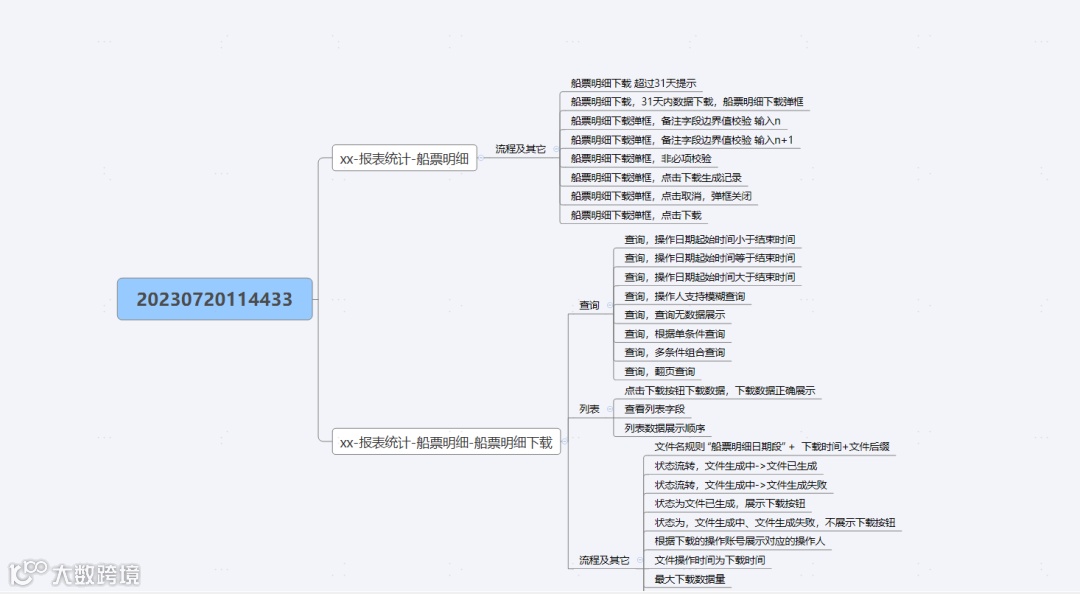
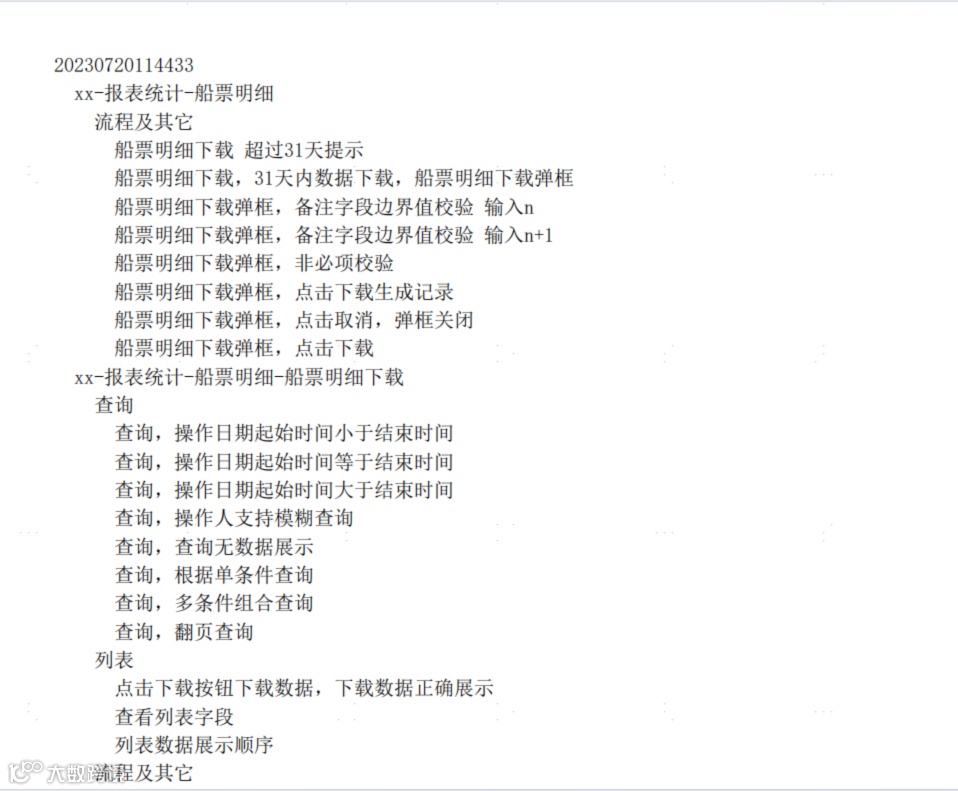
import xmindfrom reportlab.lib.pagesizes import letterfrom reportlab.pdfgen import canvasfrom reportlab.pdfbase import pdfmetricsfrom reportlab.pdfbase.ttfonts import TTFont# 注册支持中文的字体,这里使用宋体,需要确保系统中存在该字体文件pdfmetrics.registerFont(TTFont('SimSun', 'simsun.ttc'))def xmind_to_pdf(xmind_file_path, pdf_file_path):workbook = xmind.load(xmind_file_path)sheet = workbook.getPrimarySheet()root_topic = sheet.getRootTopic()c = canvas.Canvas(pdf_file_path, pagesize=letter)y = 750font_size = 12# 使用注册的支持中文的字体c.setFont('SimSun', font_size)def draw_topic(topic, indent=0):nonlocal ytitle = topic.getTitle()if title:text = ' ' * indent + titleif y < 20:c.showPage()y = 750c.drawString(50, y, text)y -= font_size + 5sub_topics = topic.getSubTopics()if sub_topics:for sub_topic in sub_topics:draw_topic(sub_topic, indent + 1)draw_topic(root_topic)c.save()if __name__ == "__main__":xmind_file = r"D:\py_project\functional-use-case-generation-master\xmindfile\20230720114433.xmind"pdf_file = 'output23.pdf'xmind_to_pdf(xmind_file, pdf_file)
以下是对上述代码的详细解析,帮助你理解每一部分的功能和实现逻辑。
1. 导入模块
import xmindfrom reportlab.lib.pagesizes import letterfrom reportlab.pdfgen import canvasfrom reportlab.pdfbase import pdfmetricsfrom reportlab.pdfbase.ttfonts import TTFont
xmind:用于解析 XMind 文件。 reportlab.lib.pagesizes:提供页面尺寸常量(如 letter)。reportlab.pdfgen:用于生成 PDF 文件。 reportlab.pdfbase:提供字体注册功能。 reportlab.pdfbase.ttfonts:用于加载 TrueType 字体。
2. 注册字体
def xmind_to_pdf(xmind_file_path, pdf_file_path, font_path='simsun.ttc'):try:pdfmetrics.registerFont(TTFont('SimSun', font_path))except Exception as e:print(f"字体注册失败: {e}")return
- 功能
:注册支持中文的字体(如宋体 SimSun)。 - 细节
:
pdfmetrics.registerFont:注册字体。 TTFont:加载 TrueType 字体文件。 -
如果字体文件不存在或注册失败,会捕获异常并退出函数。
3. 加载 XMind 文件
try:workbook = xmind.load(xmind_file_path)sheet = workbook.getPrimarySheet()root_topic = sheet.getRootTopic()except Exception as e:print(f"XMind 文件加载失败: {e}")return
- 功能
:加载 XMind 文件并获取根主题。 - 细节
:
xmind.load:加载 XMind 文件。 workbook.getPrimarySheet:获取主工作表。 sheet.getRootTopic:获取根主题。 -
如果文件加载失败,会捕获异常并退出函数。
4. 创建 PDF 文件
try:c = canvas.Canvas(pdf_file_path, pagesize=letter)y = 750font_size = 12line_spacing = 15c.setFont('SimSun', font_size)
- 功能
:初始化 PDF 画布并设置字体。 - 细节
:
canvas.Canvas:创建 PDF 画布。 y = 750:初始 Y 坐标(从页面顶部开始)。 font_size和 line_spacing:设置字体大小和行间距。c.setFont:设置字体为注册的 SimSun。
5. 递归绘制主题
try:c = canvas.Canvas(pdf_file_path, pagesize=letter)y = 750font_size = 12line_spacing = 15c.setFont('SimSun', font_size)
- 功能
:递归遍历 XMind 文件的树形结构,并将每个主题的标题绘制到 PDF 中。 - 细节
:
nonlocal y:声明 y为外部变量,用于跨递归调用共享。topic.getTitle:获取当前主题的标题。 text = ' ' * indent + title:根据缩进级别添加空格。 if y < 20:如果 Y 坐标接近页面底部,创建新页面并重置 Y 坐标。 c.drawString(50, y, text):在指定位置绘制文本。 y -= font_size + line_spacing:更新 Y 坐标。 topic.getSubTopics:获取子主题列表。 -
递归调用 draw_topic处理子主题。
6. 保存 PDF 文件
draw_topic(root_topic)c.save()print(f"PDF 文件已生成: {pdf_file_path}")
- 功能
:从根主题开始绘制,并保存 PDF 文件。 - 细节
:
draw_topic(root_topic):从根主题开始递归绘制。 c.save():保存 PDF 文件。 -
打印生成文件的路径。
7. 错误处理
except Exception as e:print(f"PDF 生成失败: {e}")
- 功能
:捕获 PDF 生成过程中的异常并打印错误信息。
8. 主程序入口
if __name__ == "__main__":xmind_file = r"D:\py_project\functional-use-case-generation-master\xmindfile\20230720114433.xmind"pdf_file = 'output23.pdf'xmind_to_pdf(xmind_file, pdf_file)
- 功能
:定义 XMind 文件和 PDF 文件的路径,并调用 xmind_to_pdf函数。 - 细节
:
xmind_file:XMind 文件路径。 pdf_file:生成的 PDF 文件路径。 -
以下是对上述代码的详细解析,帮助你理解每一部分的功能和实现逻辑。
1. 导入模块
import xmind
from reportlab.lib.pagesizes import letter
from reportlab.pdfgen import canvas
from reportlab.pdfbase import pdfmetrics
from reportlab.pdfbase.ttfonts import TTFontxmind:用于解析 XMind 文件。 reportlab.lib.pagesizes:提供页面尺寸常量(如 letter)。reportlab.pdfgen:用于生成 PDF 文件。 reportlab.pdfbase:提供字体注册功能。 reportlab.pdfbase.ttfonts:用于加载 TrueType 字体。
2. 注册字体
def xmind_to_pdf(xmind_file_path, pdf_file_path, font_path='simsun.ttc'):
    try:
        pdfmetrics.registerFont(TTFont('SimSun', font_path))
    except Exception as e:
        print(f"字体注册失败: {e}")
return- 功能
:注册支持中文的字体(如宋体 SimSun)。 - 细节
:
pdfmetrics.registerFont:注册字体。 TTFont:加载 TrueType 字体文件。 -
如果字体文件不存在或注册失败,会捕获异常并退出函数。
3. 加载 XMind 文件
try:
    workbook = xmind.load(xmind_file_path)
    sheet = workbook.getPrimarySheet()
    root_topic = sheet.getRootTopic()
except Exception as e:
    print(f"XMind 文件加载失败: {e}")
return- 功能
:加载 XMind 文件并获取根主题。 - 细节
:
xmind.load:加载 XMind 文件。 workbook.getPrimarySheet:获取主工作表。 sheet.getRootTopic:获取根主题。 -
如果文件加载失败,会捕获异常并退出函数。
4. 创建 PDF 文件
try:
    c = canvas.Canvas(pdf_file_path, pagesize=letter)
    y = 750
    font_size = 12
    line_spacing = 15
c.setFont('SimSun', font_size)- 功能
:初始化 PDF 画布并设置字体。 - 细节
:
canvas.Canvas:创建 PDF 画布。 y = 750:初始 Y 坐标(从页面顶部开始)。 font_size和 line_spacing:设置字体大小和行间距。c.setFont:设置字体为注册的 SimSun。
5. 递归绘制主题
def draw_topic(topic, indent=0):
    nonlocal y
    title = topic.getTitle()
    if title:
        text = '  ' * indent + title
        if y < 20:
            c.showPage()
            y = 750
        c.drawString(50, y, text)
        y -= font_size + line_spacing
    sub_topics = topic.getSubTopics()
    if sub_topics:
        for sub_topic in sub_topics:
draw_topic(sub_topic, indent + 1)- 功能
:递归遍历 XMind 文件的树形结构,并将每个主题的标题绘制到 PDF 中。 - 细节
:
nonlocal y:声明 y为外部变量,用于跨递归调用共享。topic.getTitle:获取当前主题的标题。 text = ' ' * indent + title:根据缩进级别添加空格。 if y < 20:如果 Y 坐标接近页面底部,创建新页面并重置 Y 坐标。 c.drawString(50, y, text):在指定位置绘制文本。 y -= font_size + line_spacing:更新 Y 坐标。 topic.getSubTopics:获取子主题列表。 -
递归调用 draw_topic处理子主题。
6. 保存 PDF 文件
draw_topic(root_topic)
c.save()
print(f"PDF 文件已生成: {pdf_file_path}")- 功能
:从根主题开始绘制,并保存 PDF 文件。 - 细节
:
draw_topic(root_topic):从根主题开始递归绘制。 c.save():保存 PDF 文件。 -
打印生成文件的路径。
7. 错误处理
except Exception as e:
print(f"PDF 生成失败: {e}")- 功能
:捕获 PDF 生成过程中的异常并打印错误信息。
8. 主程序入口
if __name__ == "__main__":
    xmind_file = r"D:\py_project\functional-use-case-generation-master\xmindfile\20230720114433.xmind"
    pdf_file = 'output23.pdf'
xmind_to_pdf(xmind_file, pdf_file)- 功能
:定义 XMind 文件和 PDF 文件的路径,并调用 xmind_to_pdf函数。 - 细节
:
xmind_file:XMind 文件路径。 pdf_file:生成的 PDF 文件路径。 xmind_to_pdf:调用主函数生成 PDF。
9. 代码运行流程
-
注册字体。 -
加载 XMind 文件并获取根主题。 -
初始化 PDF 画布。 -
递归遍历 XMind 文件的树形结构,将每个主题的标题绘制到 PDF 中。 -
保存 PDF 文件。 -
如果过程中发生错误,捕获异常并打印错误信息。
10. 示例输出
假设 XMind 文件内容如下:
Root
  - Topic 1
    - Subtopic 1.1
    - Subtopic 1.2
  - Topic 2
    - Subtopic 2.1
生成的 PDF 文件内容如下:
Root
  Topic 1
    Subtopic 1.1
    Subtopic 1.2
  Topic 2
    Subtopic 2.1
总结
这段代码通过递归遍历 XMind 文件的树形结构,将每个主题的标题绘制到 PDF 中,并支持分页和中文显示。通过改进错误处理和字体支持,代码的健壮性和可读性得到了提升。