模块安装
pip install pygame代码
import pygameimport randomimport time# 初始化 Pygamepygame.init()# 定义颜色WHITE = (255, 255, 255)GREEN = (0, 255, 0)RED = (255, 0, 0)BLACK = (0, 0, 0)# 设置屏幕大小SCREEN_WIDTH = 600SCREEN_HEIGHT = 400screen = pygame.display.set_mode((SCREEN_WIDTH, SCREEN_HEIGHT))pygame.display.set_caption("贪吃蛇游戏")# 定义蛇和食物的大小SNAKE_SIZE = 20FOOD_SIZE = 20# 设置时钟clock = pygame.time.Clock()SNAKE_SPEED = 15# 定义字体font = pygame.font.SysFont(None, 50)# 定义蛇类class Snake:def __init__(self):self.length = 1self.positions = [(SCREEN_WIDTH // 2, SCREEN_HEIGHT // 2)]self.direction = 'RIGHT'def move(self):x, y = self.positions[0]if self.direction == 'UP':y -= SNAKE_SIZEelif self.direction == 'DOWN':y += SNAKE_SIZEelif self.direction == 'LEFT':x -= SNAKE_SIZEelif self.direction == 'RIGHT':x += SNAKE_SIZEself.positions.insert(0, (x, y))if len(self.positions) > self.length:self.positions.pop()def change_direction(self, direction):if direction == 'UP' and self.direction != 'DOWN':self.direction = 'UP'elif direction == 'DOWN' and self.direction != 'UP':self.direction = 'DOWN'elif direction == 'LEFT' and self.direction != 'RIGHT':self.direction = 'LEFT'elif direction == 'RIGHT' and self.direction != 'LEFT':self.direction = 'RIGHT'def draw(self, surface):for position in self.positions:pygame.draw.rect(surface, GREEN, (position[0], position[1], SNAKE_SIZE, SNAKE_SIZE))def check_collision(self):x, y = self.positions[0]if x < 0 or x >= SCREEN_WIDTH or y < 0 or y >= SCREEN_HEIGHT:return Trueif self.positions[0] in self.positions[1:]:return Truereturn False# 定义食物类class Food:def __init__(self):self.position = (0, 0)self.spawn()def spawn(self):self.position = (random.randint(0, (SCREEN_WIDTH - FOOD_SIZE) // FOOD_SIZE) * FOOD_SIZE,random.randint(0, (SCREEN_HEIGHT - FOOD_SIZE) // FOOD_SIZE) * FOOD_SIZE)def draw(self, surface):pygame.draw.rect(surface, RED, (self.position[0], self.position[1], FOOD_SIZE, FOOD_SIZE))# 定义游戏函数def game_loop():snake = Snake()food = Food()running = Truewhile running:for event in pygame.event.get():if event.type == pygame.QUIT:running = Falseelif event.type == pygame.KEYDOWN:if event.key == pygame.K_UP:snake.change_direction('UP')elif event.key == pygame.K_DOWN:snake.change_direction('DOWN')elif event.key == pygame.K_LEFT:snake.change_direction('LEFT')elif event.key == pygame.K_RIGHT:snake.change_direction('RIGHT')snake.move()if snake.check_collision():running = Falseif snake.positions[0] == food.position:snake.length += 1food.spawn()screen.fill(BLACK)snake.draw(screen)food.draw(screen)pygame.display.update()clock.tick(SNAKE_SPEED)game_over()def game_over():screen.fill(BLACK)text = font.render("Game Over! Press 'R' to restart or 'Q' to quit.", True, WHITE)screen.blit(text, (SCREEN_WIDTH // 2 - text.get_width() // 2, SCREEN_HEIGHT // 2 - text.get_height() // 2))pygame.display.update()waiting = Truewhile waiting:for event in pygame.event.get():if event.type == pygame.QUIT:waiting = Falsepygame.quit()quit()elif event.type == pygame.KEYDOWN:if event.key == pygame.K_r:waiting = Falsegame_loop()elif event.key == pygame.K_q:waiting = Falsepygame.quit()quit()# 启动游戏game_loop()
游戏玩法
1、使用方向键(上下左右)控制蛇的移动。
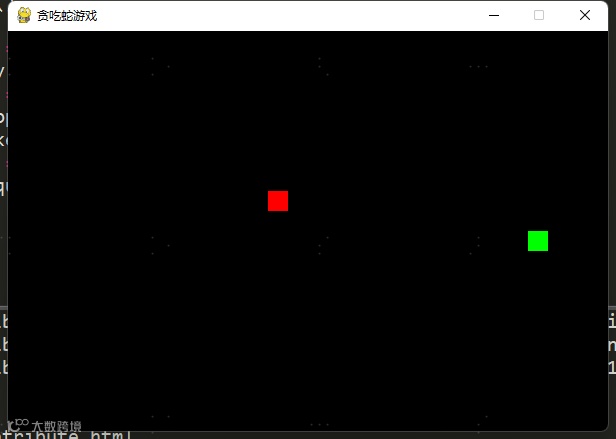
2、目标是吃到红色的食物,每吃一个食物,蛇的长度会增加,得分也会增加。
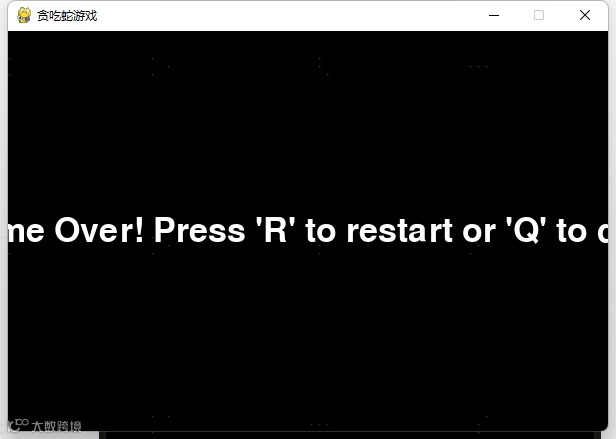
3、如果蛇撞到墙壁或自身,游戏结束。
游戏图片