


Streamlit 提供了很多基础控件,但是并没有对控件的显示内容做「国际化」的支持,比如常用的文件上传组件, 无论你电脑是什么语言,他都显示中文。
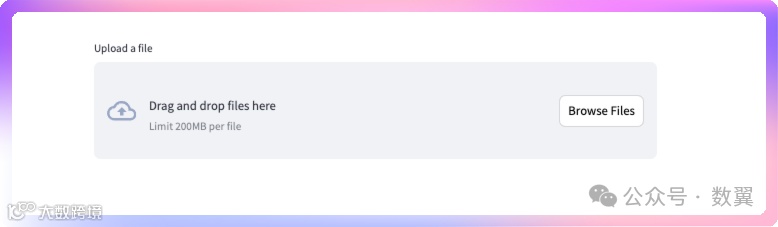
这个的地方其实不多,而且对大多的 Streamlit 用户来说无伤大雅, 不过如果你要是较真,想要现实中文,当然也可以。
中文版文件上传控件
最简单的方案就是使用 CSS 来修改,大家不要以为 CSS 只能修改样式、改改颜色、大小啥的, 如果魔性的使用 CSS,能轻量级的达到很多 JS 才能达到的效果。
Streamlit 通过使用 Markdown 执行 HTML 代码来实现 CSS 的插入(记得增加 unsafe_allow_html=True 参数):
css=  ```<style></style>```
st.markdown(css, unsafe_allow_html=True)
为了修改上传控件的文字,我们使用如下代码:
css = '''
<style>
[data-testid="stFileUploaderDropzone"] div div::before {content:"将文件拖放到此处"}
[data-testid="stFileUploaderDropzone"] div div span {display:none;}
[data-testid="stFileUploaderDropzone"] div div::after {color:rgba(49, 51, 63, 0.6); font-size: .8em; content:"每个文件限制 200MB • XLSX"}
[data-testid="stFileUploaderDropzone"] div div small{display:none;}
[data-testid="stFileUploaderDropzone"] [data-testid="baseButton-secondary"] { font-size: 0px;}
[data-testid="stFileUploaderDropzone"] [data-testid="baseButton-secondary"]::after {content: "浏览文件";  font-size: 17px;}
</style>
'''
st.markdown(css, unsafe_allow_html=True)
然后刷新界面,可以看到上传控件变成中文了:

完整的代码如下:
import streamlit as st

css = '''
<style>
[data-testid="stFileUploaderDropzone"] div div::before {content:"将文件拖放到此处"}
[data-testid="stFileUploaderDropzone"] div div span {display:none;}
[data-testid="stFileUploaderDropzone"] div div::after {color:rgba(49, 51, 63, 0.6); font-size: .8em; content:"每个文件限制 200MB • XLSX"}
[data-testid="stFileUploaderDropzone"] div div small{display:none;}
[data-testid="stFileUploaderDropzone"] [data-testid="baseButton-secondary"] { font-size: 0px;}
[data-testid="stFileUploaderDropzone"] [data-testid="baseButton-secondary"]::after {content: "浏览文件";  font-size: 17px;}
</style>
'''

st.markdown(css, unsafe_allow_html=True)

uploaded_file = st.file_uploader("上传 Excel 文件", type="xlsx")
如果大家是为了给 Streamlit 程序汉化,那么到这里就结束了。
多语言切换
我们多想一点:既然实现了中文的上传,那么是不是可以实现多语言的切换。
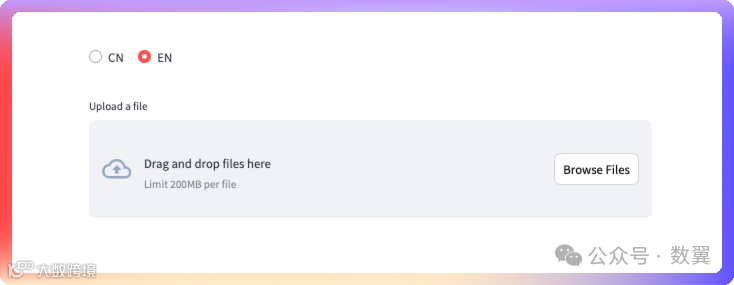
使用类似的思路,增加一个多语言切换的选项,在多语言切换的时候来修改样式:
选择中文的时候:
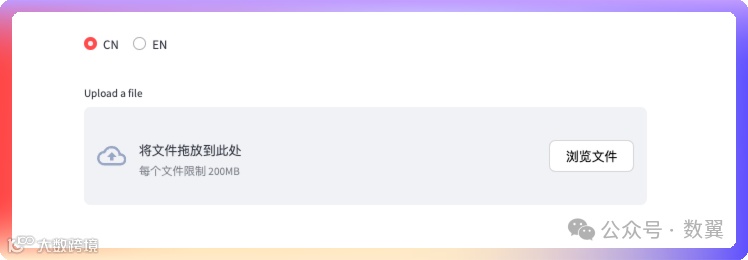
选择英文的时候:
我们也可以支持 URL 指定语言:
http://localhost:8502/?lang=EN这样我们就不需要切换按钮就可以控制语言的切换了。
完整的代码如下:
下面我参考了社区的代码,和我写的 CSS 不一样,对主题色不支持, 大家熟悉熟悉原理就好,我就不修改了。
import streamlit as st

languages = {
    "CN": {
        "button": "浏览文件",
        "instructions": "将文件拖放到此处",
        "limits": "每个文件限制 200MB",
    },
    "EN": {
        "button": "Browse Files",
        "instructions": "Drag and drop files here",
        "limits": "Limit 200MB per file",
    },
}

lang = None


def _style_language_uploader():
    language = 'CN'
    if 'lang' in st.query_params:
        if st.query_params['lang']:
            language = st.query_params['lang']
            lang = language
    if lang:
        language = lang

    hide_label = (
        """
    <style>
        div[data-testid="stFileUploader"]>section[data-testid="stFileUploaderDropzone"]>button[data-testid="baseButton-secondary"] {
           color: white;
        }
        div[data-testid="stFileUploader"]>section[data-testid="stFileUploaderDropzone"]>button[data-testid="baseButton-secondary"]::after {
            content: "BUTTON_TEXT";
            color:black;
            display: block;
            position: absolute;
        }
        div[data-testid="stFileUploaderDropzoneInstructions"]>div>span {
           visibility:hidden;
        }
        div[data-testid="stFileUploaderDropzoneInstructions"]>div>span::after {
           content:"INSTRUCTIONS_TEXT";
           visibility:visible;
           display:block;
        }
         div[data-testid="stFileUploaderDropzoneInstructions"]>div>small {
           visibility:hidden;
        }
        div[data-testid="stFileUploaderDropzoneInstructions"]>div>small::before {
           content:"FILE_LIMITS";
           visibility:visible;
           display:block;
        }
    </style>
    """.replace(
            "BUTTON_TEXT", languages.get(language).get("button")
        )
        .replace("INSTRUCTIONS_TEXT", languages.get(language).get("instructions"))
        .replace("FILE_LIMITS", languages.get(language).get("limits"))
    )

    st.markdown(hide_label, unsafe_allow_html=True)


_style_language_uploader()

lang = st.radio("", options=["CN", "EN"], horizontal=True)

if lang:
    _style_language_uploader()

file_uploader = st.file_uploader(label="Upload a file", type=["xlsx"])