


效果图

1.整体结构

-
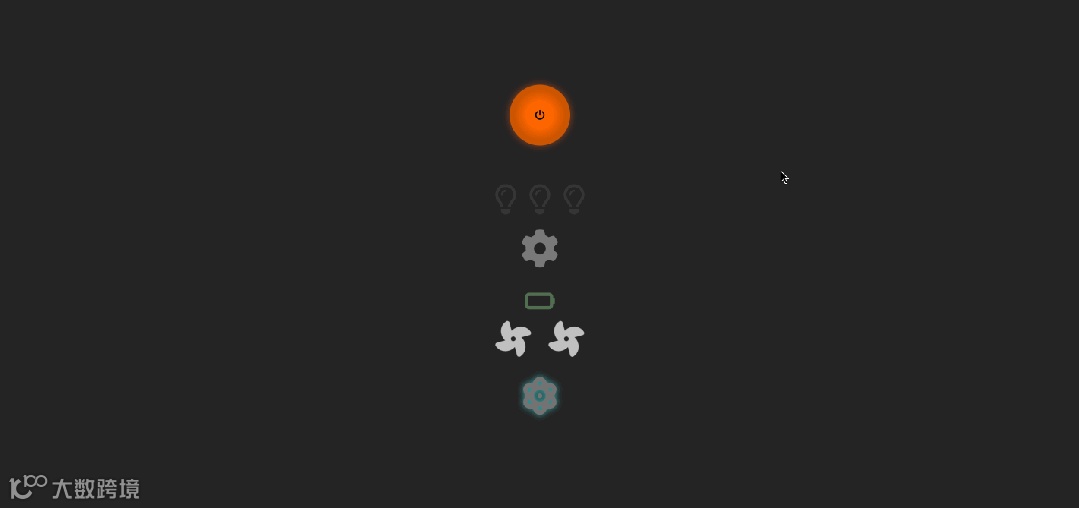
<页面整体围绕一个电源按钮展开,通过点击按钮实现系统的启动与关闭,并伴随一系列元素的状态变化,如灯泡亮起 / 熄灭、齿轮转动 / 停止、电池充电 / 耗电等,营造出系统启动和关闭的动态效果。




2.HTML 部分

-
创建了一个按钮元素,用于控制整个系统的启动与关闭,按钮内包含一个电源关闭图标。
-
定义了显示系统状态文本的 div 元素,用于提示系统当前是开启还是关闭状态。
-
构建了多个 div 容器,分别用于放置灯泡图标、齿轮图标、电池图标、风扇图标以及原子图标,每个图标都代表系统的一个组件或功能。

3. CSS 部分

-
通用样式:设置页面的整体布局为垂直居中,背景颜色为深灰色,使页面内容在屏幕中心展示。
-
按钮样式:电源按钮设计为圆形,通过径向渐变设置背景颜色,添加阴影效果,并定义了鼠标悬停和开启状态下的样式变化,包括背景色、阴影和缩放效果,增强按钮的交互感。
-
状态文本样式:系统状态文本初始透明度为 0,通过过渡效果在显示与隐藏时实现淡入淡出。
-
组件图标样式:为灯泡、齿轮、电池、WiFi、原子、风扇等图标设置了初始样式,如颜色、透明度。对于开启状态下的图标,通过添加特定类名来改变颜色、透明度、阴影、缩放以及动画效果,如灯泡亮起、齿轮转动、电池变色、WiFi 脉冲、原子旋转与发光、风扇旋转等,生动地展示各组件的工作状态。
-
动画效果:定义了多个关键帧动画,如 pulse 用于 WiFi 的脉冲效果,flicker 用于模拟屏幕闪烁,pulseGlow 用于页面背景的脉冲发光效果,spinAtom 用于原子图标旋转,spinFan 用于风扇图标旋转,这些动画为页面增添了动态视觉效果。

4. JavaScript 部分

-
获取元素:通过 getElementById 和 querySelectorAll 方法获取页面中的按钮、状态文本、各组件图标等元素,以便后续操作。
-
功能函数:
-
原子图标:activateAtom 函数用于激活原子图标,添加 active 类并通过 GSAP 库设置淡入效果;deactivateAtom 函数则相反,先通过 GSAP 库设置淡出效果,延迟一段时间后移除 active 类并停止动画。
-
灯泡:turnOnLightbulbs 函数使灯泡依次亮起,turnOffLightbulbs 函数使灯泡依次熄灭,通过 setTimeout 控制每个灯泡状态改变的时间间隔,实现逐个点亮或熄灭的效果。
-
齿轮:startGear 函数利用 GSAP 库使齿轮图标旋转并设置无限循环,stopGear 函数先使齿轮图标淡出,延迟一段时间后停止动画并重置旋转角度。
-
电池:chargeBattery 函数通过循环逐步改变电池图标类名,模拟电池充电过程;drainBattery 函数在延迟一段时间后将电池图标恢复为初始的空电状态。
-
风扇:startFans 函数为风扇图标添加旋转类名,使其开始旋转;stopFans 函数在延迟一段时间后移除旋转类名,使风扇停止旋转。
-
背景脉冲:enableBackgroundPulse 函数为页面 body 添加类名,触发背景脉冲动画;disableBackgroundPulse 函数在延迟一段时间后移除该类名,停止背景脉冲动画。
-
按钮点击事件:为电源按钮添加点击事件监听器,根据按钮当前是否具有 on 类名判断系统是开启还是关闭状态,然后执行相应的启动或关闭操作。在启动或关闭过程中,通过 setTimeout 控制各组件状态变化的先后顺序,实现系统启动和关闭的有序动画效果。




5.代码

<html lang="en"><head><meta charset="UTF-8" /><title>能量启动</title><linkrel="stylesheet"href="https://cdnjs.cloudflare.com/ajax/libs/font-awesome/6.7.2/css/all.min.css"/><style>/* General Styles */body {display: flex;justify-content: center;align-items: center;height: 100vh;background-color: #1a1a1a;margin: 0;flex-direction: column;}/* Power Button */.power-btn {width: 80px;height: 80px;border: none;border-radius: 50%;background: radial-gradient(circle, #ff6600 30%, #cc5500 60%);box-shadow: 0 4px 8px rgba(255, 102, 0, 0.5),inset 0 2px 6px rgba(0, 0, 0, 0.4);display: flex;justify-content: center;align-items: center;cursor: pointer;transition: all 0.3s ease-in-out;position: relative;}.power-btn:hover {box-shadow: 0 0 10px rgba(255, 102, 0, 0.8);transform: scale(1.05);}.power-btn.on {background: radial-gradient(circle, #ff3300 30%, #cc2200 60%);box-shadow: 0 0 20px rgba(255, 102, 0, 0.8);}/* Status Text */.status {margin-top: 10px;font-size: 18px;color: white;font-family: Arial, sans-serif;opacity: 0;transition: opacity 0.5s ease-in-out;}/* Lightbulbs */.lightbulbs {display: flex;gap: 15px;margin-top: 20px;}.lightbulb {font-size: 40px;color: gray;opacity: 0.2;transition: opacity 0.5s ease-in-out, transform 0.3s;}.lightbulb.on {color: yellow;opacity: 1;text-shadow: 0 0 15px rgba(255, 255, 0, 0.7);transform: scale(1.1);}/* Gear */.gear-container {margin-top: 20px;}.gear {font-size: 50px;color: silver;opacity: 0.5;transition: opacity 0.5s ease-in-out;}/* Battery */.battery-container {margin-top: 20px;font-size: 35px;}.battery {color: gray;opacity: 0.5;transition: opacity 0.5s ease-in-out, color 0.5s;}.battery.on {color: green;opacity: 1;}/* WiFi */.wifi-container {margin-top: 20px;font-size: 35px;}.wifi {color: black;opacity: 0.5;transition: opacity 0.5s ease-in-out, color 0.5s;}.wifi.connected {color: lightblue;opacity: 1;animation: pulse 1s infinite alternate;}@keyframes pulse {0% {transform: scale(1);}100% {transform: scale(1.1);}}.atom-icon {padding: 10px;font-size: 50px;color: gray;opacity: 0.3;transition: opacity 0.5s ease-in-out, text-shadow 0.5s ease-in-out;}.atom-icon.active {color: cyan;opacity: 1;text-shadow: 0 0 10px rgba(0, 255, 255, 0.8);animation: spinAtom 3s linear infinite, glow 1.5s alternate infinite;}#screen-flicker {position: fixed;top: 0;left: 0;width: 100%;height: 100%;background: black;opacity: 0;visibility: hidden;z-index: 100;transition: opacity 0.2s ease-in-out;}#screen-flicker.active {visibility: visible;animation: flicker 1s ease-in-out;}@keyframes flicker {0% {opacity: 1;}25% {opacity: 0.7;}50% {opacity: 1;}75% {opacity: 0.5;}100% {opacity: 0;}}body.power-on {animation: pulseGlow 3s infinite alternate;}@keyframes pulseGlow {0% {background-color: #1a1a1a;}100% {background-color: #242424;}}/* Fan Container */.fan-container {display: flex;justify-content: center;gap: 20px;margin-bottom: 15px; /* Spacing above the atom */}/* Fans (default state) */.fan-icon {font-size: 50px;color: gray;opacity: 0.3;transition: opacity 0.5s ease-in-out;}/* Fans Spin Animation */.fan-icon.spinning {opacity: 1;color: silver;animation: spinFan 2s linear infinite;}@keyframes spinFan {0% {transform: rotate(0deg);}100% {transform: rotate(360deg);}}</style></head><body><!-- partial:index.partial.html --><button id="powerButton" class="power-btn"><i class="fa-solid fa-power-off"></i></button><div class="status" id="statusText">System On</div><div class="lightbulbs"><i class="fa-regular fa-lightbulb lightbulb" id="lightbulb1"></i><i class="fa-regular fa-lightbulb lightbulb" id="lightbulb2"></i><i class="fa-regular fa-lightbulb lightbulb" id="lightbulb3"></i></div><div class="gear-container"><i class="fa-solid fa-gear gear" id="gear"></i></div><div class="battery-container"><i class="fa-solid fa-battery-empty battery" id="battery"></i></div><div class="fan-container"><i class="fa-solid fa-fan fan-icon" id="fan1"></i><i class="fa-solid fa-fan fan-icon" id="fan2"></i></div><div class="atom-container"><i class="fa-solid fa-atom atom-icon"></i></div><!-- partial --><script src="https://unpkg.com/gsap@3/dist/gsap.min.js"></script><script>const powerButton = document.getElementById('powerButton');const statusText = document.getElementById('statusText');const lightbulbs = document.querySelectorAll('.lightbulb');const gear = document.getElementById('gear');const battery = document.getElementById('battery');const wifi = document.getElementById('wifi');const atomIcon = document.querySelector('.atom-icon');const fans = document.querySelectorAll('.fan-icon');const batteryLevels = ['fa-battery-empty','fa-battery-quarter','fa-battery-half','fa-battery-three-quarters','fa-battery-full',];// Atom activationfunction activateAtom() {atomIcon.classList.add('active');gsap.to(atomIcon, { opacity: 1, duration: 0.5 });}function deactivateAtom() {gsap.to(atomIcon, { opacity: 0.3, duration: 0.5 }); // Fade out smoothlysetTimeout(() => {atomIcon.classList.remove('active');gsap.killTweensOf(atomIcon); // Stop animation}, 500); // Delay before fully stopping the atom}// Lightbulbsfunction turnOnLightbulbs() {lightbulbs.forEach((bulb, index) => {setTimeout(() => {bulb.classList.add('on');}, index * 250);});}function turnOffLightbulbs() {lightbulbs.forEach((bulb, index) => {setTimeout(() => {bulb.classList.remove('on');}, index * 250);});}// Gearfunction startGear() {gsap.to(gear, {opacity: 1,rotation: 360,duration: 2,repeat: -1,ease: 'linear',});}function stopGear() {gsap.to(gear, { opacity: 0.5, duration: 0.5 }); // Fade out firstsetTimeout(() => {gsap.killTweensOf(gear); // Stop animationgsap.set(gear, { rotation: 0 }); // Reset rotation}, 500);}// Batteryfunction chargeBattery() {battery.classList.add('on');let level = 0;function nextChargeStep() {if (level < batteryLevels.length) {battery.classList.remove(...batteryLevels);battery.classList.add(batteryLevels[level]);level++;setTimeout(nextChargeStep, 600);}}nextChargeStep();}function drainBattery() {setTimeout(() => {battery.classList.remove('on', ...batteryLevels);battery.classList.add('fa-battery-empty');}, 800); // Battery drains after 0.8s}// Fansfunction startFans() {fans.forEach((fan) => fan.classList.add('spinning'));}function stopFans() {setTimeout(() => {fans.forEach((fan) => fan.classList.remove('spinning'));}, 1000); // Fans stop after 1s for a gradual effect}// Background Pulsefunction enableBackgroundPulse() {document.body.classList.add('power-on');}function disableBackgroundPulse() {setTimeout(() => {document.body.classList.remove('power-on');}, 1200); // Background pulse stops last}// Unified Power Button Event ListenerpowerButton.addEventListener('click', function () {if (this.classList.contains('on')) {// Powering OFFthis.classList.remove('on');gsap.to(this, { scale: 1, duration: 0.2 });gsap.to(this, {boxShadow: '0 0 10px rgba(255, 102, 0, 0.5)',duration: 0.5,});gsap.to(statusText, { opacity: 0, duration: 0.5 });// Delayed Shutdown SequencesetTimeout(turnOffLightbulbs, 500);setTimeout(drainBattery, 1000);setTimeout(stopGear, 1200);setTimeout(deactivateAtom, 1400);setTimeout(stopFans, 1600);setTimeout(disableBackgroundPulse, 1800);} else {// Powering ONthis.classList.add('on');gsap.to(this, { scale: 1.08, duration: 0.5, yoyo: true, repeat: 1 });gsap.to(this, {boxShadow: '0 0 20px rgba(255, 102, 0, 0.8)',duration: 1,});gsap.to(statusText, { opacity: 1, duration: 1 });// Delayed Startup SequencesetTimeout(enableBackgroundPulse, 100);setTimeout(turnOnLightbulbs, 500);setTimeout(chargeBattery, 800);setTimeout(startGear, 1200);setTimeout(activateAtom, 1400);setTimeout(startFans, 1600);}});</script></body></html>



点个赞吧!