


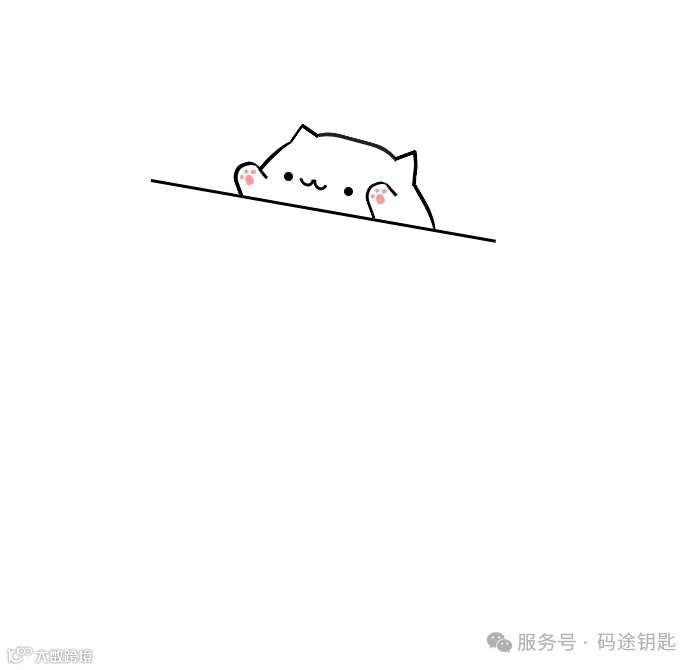
效果图

1.整体代码
这段代码实现了一个类似罗盘风格的时钟效果,能够实时这是一个网页代码,呈现出一只猫咪的图形界面,点击猫咪图形时会触发 JavaScript 函数,改变猫咪部分元素的样式类,可能实现猫咪形态的变化效果,标题为 “别点这只喵咪”。




2.HTML 部分
声明了 HTML 文档类型,设置了字符编码为 UTF-8,并定义了页面标题。
页面主体包含一个类名为 container 的 <div> 作为容器,内部有类名为 cat 的猫咪图形相关元素,以及类名为 surface 的元素,cat 元素绑定了点击事件 onclick="hello()"。猫咪图形由多个 <div> 和 <span> 元素组成,分别表示猫的头部、耳朵、眼睛、嘴巴、爪子等部位。




3.JavaScript部分
定义了 hello 函数,当猫咪被点击时触发。函数获取猫咪爪子等相关元素的类列表,通过 toggle 方法切换元素的类名,从而改变猫咪部分部位的样式,可能实现猫咪形态的动态变化。




4.CSS 部分
对页面整体样式进行设置,包括字体、颜色等。
对超链接 a 和列表 ul、li 进行样式重置,去除默认样式。
定义了 container 类的样式,设置其宽度、居中显示、背景颜色和内边距。
详细定义了猫咪各个部位的样式,通过不同的类名(如 catHead、catEars 等)设置元素的形状、大小、颜色、位置、边框、圆角以及旋转角度等,使用了伪元素 :before 和 :after 来添加更多细节。
还定义了一些特殊样式类(如 rotate、red、green 等)用于特定的样式效果。




5.代码
<html lang="zh"><head><meta charset="utf-8" /><title>别点这只喵咪</title><style>body {font-family: 'Helvetica Neue';font-weight: 300;color: #000;}a {color: #000;text-decoration: none;}ul {list-style: none;}li {padding: 15px;}.container {width: 400px;margin: 0 auto;background: #fff;padding-top: 120px;}.cat {width: 400px;height: 200px;margin: 0 auto;background: #fff;position: relative;cursor: pointer;}.hidden {display: none;}.block {display: block ;}.catHead {width: 100px;height: 71px;background: transparent;position: absolute;top: 15px;left: 150px;border-top: 4px solid #222;border-left: 3px solid transparent;border-right: 3px solid transparent;border-radius: 35% 35% 10px 11px;transform: rotate(15deg);z-index: 1;}.catHead:before {content: '';display: block;width: 30px;height: 55px;background: transparent;position: absolute;top: 29px;left: 110px;border-right: 4px solid #000;border-radius: 0 0 50%/50px 20px;transform: rotate(-45deg);}.catHead:after {content: '';display: block;width: 30px;height: 55px;background: transparent;position: absolute;top: 9px;right: 95px;border-left: 4px solid #000;border-radius: 50%/50px 20px 0 0;transform: rotate(25deg);}/* left ear */.catEars {width: 18px;height: 18px;background: #fff;border-left: 3px solid #000;border-top: 4px solid #000;transform: rotate(35deg);position: absolute;left: 150px;top: 5px;border-radius: 15% 0 0 10%;z-index: 2;}.catEars:before {content: '';height: 23px;background: #fff;border-left: 4px solid #000;transform: rotate(35deg);position: absolute;left: 98px;bottom: 43px;border-radius: 0 0 0 20%;}.rightEar {display: block;background: transparent;width: 2px;height: 15px;border-right: 4px solid #000;position: absolute;left: 106px;bottom: 50px;transform: rotate(-40deg);border-radius: 10% 10% 30% 10%;}.rightEar:before {content: '';width: 5px;height: 13px;border-right: 4px solid #000;transform: rotate(10deg);position: absolute;left: -4px;top: 13px;border-radius: 10% 10% 30% 10%;}.rightEar:after {content: '';width: 5px;height: 10px;border-right: 4px solid #000;transform: rotate(9deg);position: absolute;left: -6px;top: 25px;border-radius: 10% 10% 30% 10%;}/* eyes */.face {width: 9px;height: 9px;border-radius: 50%;background: #000;position: absolute;left: 140px;top: 50px;}.face:before {content: '';display: block;width: 9px;height: 9px;border-radius: 50%;background: #000;position: absolute;left: 60px;top: 15px;}.mouth {display: block;width: 10px;height: 8px;position: absolute;left: 15px;top: 0ps;transform: rotate(45deg);border-radius: 50%;border: 3px solid #000;border-left-color: transparent;border-top-color: transparent;}.mouth:before {content: '';display: block;width: 10px;height: 8px;position: absolute;left: 9px;top: -10px;transform: rotate(20deg);border-radius: 50%;border: 3px solid #000;border-left-color: transparent;border-top-color: transparent;}.leftPaw {width: 25px;height: 30px;background: #fff;border: 4px solid #000;border-bottom: 0 solid transparent;border-right: 0 solid transparent;border-radius: 50% 40% 0 0;position: absolute;left: 90px;top: 40px;transform: rotate(-20deg);z-index: 2;}.leftPaw:before {content: '';display: block;width: 3px;height: 15px;background: #000;border-radius: 100% 0 0 0;position: absolute;left: 24px;top: 4px;transform: rotate(-20deg);}.rightPaw {width: 25px;height: 30px;background: #fff;border: 3px solid #000;border-bottom: 0 solid transparent;border-right: 0 solid transparent;border-radius: 50% 40% 0 0;position: absolute;left: 222px;top: 60px;transform: rotate(-20deg);z-index: 2;}.rightPaw:before {content: '';display: block;width: 3px;height: 15px;background: #000;border-radius: 100% 0 0 0;position: absolute;left: 23px;top: 2px;transform: rotate(-23deg);}.surface {width: 350px;height: 50px;background: #fff;border-top: 3px solid #000;transform: rotate(10deg);position: absolute;top: 215px;z-index: 3;}.inner-wrapper {padding-top: 6px;display: flex;}.paws {display: block;width: 8px;height: 10px;background: #f19ba5;border-radius: 50% 50% 30% 30%;position: absolute;top: 9px;left: 7px;}.circles {display: block;width: 5px;height: 4px;background: #f19ba5;border-radius: 50% 50% 30% 30%;position: absolute;top: -3px;left: 8px;}.circles:before {content: '';display: block;width: 4px;height: 4px;background: #f19ba5;border-radius: 50% 50% 30% 30%;position: absolute;top: -3px;left: -6px;}.circles:after {content: '';display: block;width: 4px;height: 4px;background: #f19ba5;border-radius: 50% 30%;position: absolute;top: 1px;left: -12px;}i {font-size: 24px;font-weight: 800;color: #abbac6;position: relative;left: 80px;padding: 10px 100px 10px 0;}.rotate {transform: scale(1, -1);}.red {color: red;}.green {color: limegreen;}.leftPaw2 {width: 40px;height: 28px;background: #fff;border: 4px solid #000;border-bottom: 0 solid transparent;border-right: 0 solid transparent;border-radius: 50% 4px 50% 50%;position: absolute;left: 87px;top: 58px;transform: rotate(-43deg);z-index: 4;}.leftPaw2:before {content: '';display: block;width: 30px;height: 5px;background: #fff;border-bottom: 4px solid #000;border-radius: 50% 4px 50% 50%;position: absolute;top: 20px;transform: rotate(20deg);}.rightPaw2 {width: 45px;height: 24px;background: #fff;border-bottom: 3px solid #000;border-left: 3px solid #000;border-radius: 50% 4px 0 40%;position: absolute;left: 207px;top: 85px;transform: rotate(-23deg);z-index: 4;}.rightPaw2:before {content: '';display: block;width: 20px;height: 5px;background: #fff;border-top: 3px solid #000;border-radius: 50% 4px 50% 50%;position: absolute;top: 0px;left: 2px;transform: rotate(-20deg);}.author {font-size: 10px;position: relative;top: -50px;left: 250px;}</style></head><body><div class="container"><div class="cat" onclick="hello()"><div class="catHead"></div><div class="catEars"><span class="rightEar"></span></div><div class="face"><span class="mouth"></span></div><div id="leftPaw" class="leftPaw"><span id="paws" class="paws"><span id="circles" class="circles"></span></span></div><div id="rightPaw" class="rightPaw"><span id="rpaws" class="paws"><span id="rcircles" class="circles"></span></span></div></div><div class="surface"></div></div><script>function hello() {const x = 5;const leftPaw = document.getElementById('leftPaw').classList;const rightPaw = document.getElementById('rightPaw').classList;const paws = document.getElementById('paws').classList;const circles = document.getElementById('circles').classList;const rpaws = document.getElementById('rpaws').classList;const rcircles = document.getElementById('rcircles').classList;leftPaw.toggle('leftPaw');rightPaw.toggle('rightPaw');paws.toggle('paws');circles.toggle('circles');rpaws.toggle('paws');rcircles.toggle('circles');leftPaw.toggle('leftPaw2');rightPaw.toggle('rightPaw2');}</script></body></html>



关注码途钥匙,成为技术先锋
点个关注吧!