效果图
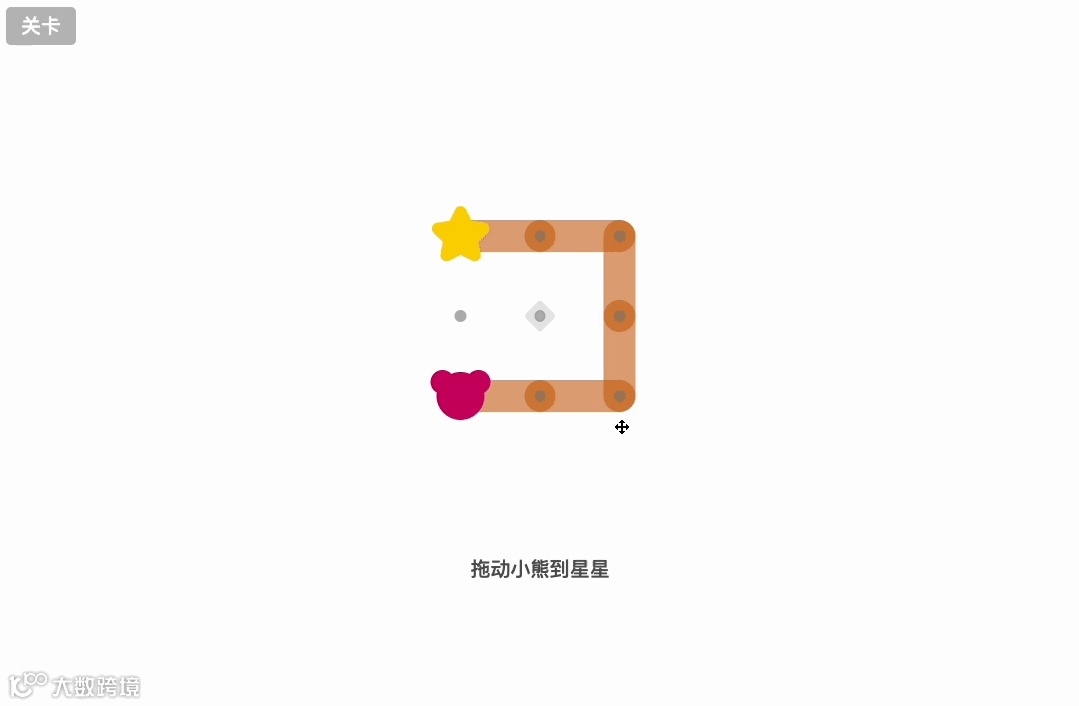
在 “小熊吃星星” 中,JS 的核心能力体现在三方面:一是解析关卡数据,读取 HTML 中
标签存储的符号,自动生成对应关卡的网格、线段、小熊和星星位置;二是实现交互逻辑,比如监听鼠标拖动事件 —— 拖动网格时计算旋转角度,让线段跟着转动;拖动小熊时判断是否沿线段移动,防止 “穿墙”;三是判断游戏胜负,实时检测小熊是否到达星星位置,若通关则触发胜利动画,并弹出 “下一关” 按钮。此外,JS 还通过localStorage记录已通关关卡,让用户下次打开时能接着玩。
<html lang="zh"><head><meta charset="UTF-8" /><title>让小熊吃到星星</title><meta name="viewport" content="width=device-width, initial-scale=1" /><style>* {box-sizing: border-box;}body {margin: 0;padding: 0;overflow-x: hidden;font-family: "Avenir Next", Avenir, sans-serif;font-weight: 500;font-size: 20px;color: #555;}canvas {cursor: move;display: block;position: absolute;max-width: 100%;left: 0;top: 0;}.is-cub-hovered,.is-cub-hovered canvas {cursor: -webkit-grab;cursor: grab;}.is-cub-dragging,.is-cub-dragging canvas {cursor: -webkit-grabbing;cursor: grabbing;}.instruction {padding: 0 10px;text-align: center;position: absolute;width: 100%;padding-bottom: 40px;}.button {font-family: "Avenir Next", Avenir, sans-serif;font-weight: 500;font-size: 20px;padding: 5px 15px;margin: 10px;background: #bbb;color: white;border-radius: 5px;border: none;cursor: pointer;}.button:hover {background: #09f;}.top-bar {position: absolute;left: 0;top: 0;}.level-select-button {position: relative;z-index: 2; /* above canvas */}.next-level-button {position: absolute;left: 50%;-webkit-transform: translateX(-110px) scale(0.5);transform: translateX(-110px) scale(0.5);opacity: 0;background: #09f;width: 200px;height: 80px;pointer-events: none;-webkit-transition: -webkit-transform 0.2s, opacity 0.2s;transition: transform 0.2s, opacity 0.2s;}.next-level-button:hover {background: #2bf;}.next-level-button.is-open {display: inline-block;pointer-events: auto;-webkit-transform: translateX(-110px) scale(1);transform: translate(-110px) scale(1);opacity: 1;}/* ---- level list ---- */.level-list {position: absolute;background: #eee;width: 100%;min-height: 100%;left: 0;top: 0;margin: 0;list-style: none;padding: 10px;z-index: 3; /* above canvas, level select button */left: -100%;transition: left 0.2s;}.level-list.is-open {left: 0;}.level-list__item {display: inline-block;background: #ddd;margin: 5px;padding: 10px;width: 80px;height: 80px;text-align: center;border-radius: 10px;position: relative;}.level-list__item:hover {color: #09f;cursor: pointer;background: white;}.level-list__item.is-playing {background: #09f;color: white;}.level-list__item__number {display: block;font-size: 30px;line-height: 35px;}.level-list__item__blurb {display: block;font-size: 16px;}.level-list__item__check {position: absolute;right: -10px;top: -10px;width: 30px;line-height: 30px;background: #555;border-radius: 15px;color: white;display: none;}.level-list__item.did-complete .level-list__item__check {display: block;}/* ---- level pres ---- */.levels {display: none;}</style></head><body><div class="top-bar"><button class="button level-select-button">关卡</button></div><ol class="level-list"></ol><canvas></canvas><p class="instruction"></p><button class="button next-level-button">下一关</button><div class="levels"><pre id="intro-fixed1" data-blurb="Tutorial">blurb: Tutorialinstruction: 拖动小熊到星星---*=.=.!. . .!@=.=.</pre><pre id="intro-fixed2" data-blurb="Tutorial">blurb: Tutorialinstruction: 拖动网格来旋转。小熊和星星会随着网格一起移动。橙线会保持不动。---* . .!. . .!@=.=.</pre><pre id="intro-fixed3" data-blurb="★">blurb: ★---@=. .. . .!*=. .</pre><pre id="intro-free1" data-blurb="Tutorial">blurb: Tutorialinstruction: 蓝线会随着网格移动。旋转网格来连接蓝线和橙线。---@-. .! |. . .|*-.-.</pre><pre id="m3x3-2-med" data-blurb="★">blurb: ★---. . *| | |. . .| | |@ .=.</pre><pre id="m3x3-fixed-switch" data-blurb="★">blurb: ★---*=.-.. . .|@-. .</pre><pre id="m4x4-2" data-blurb="★">blurb: ★---. .=. .| !. . .-*|. . . .. @-. .</pre><pre id="m4x4-1" data-blurb="★">blurb: ★---. . . .* . . @| ! |. . . .!. . . .</pre><pre id="m4x4-3" data-blurb="★">blurb: ★---. @ . .! |. . . .|.=.=.-.|. * . .</pre><pre id="m4x4-4" data-blurb="★">blurb: ★---. . . .* . . .!. . .-.!.=.=. @</pre><pre id="m4x4-5" data-blurb="★">blurb: ★---.-.-.-.|@ .-.-.* .=. .! |.-.-. .</pre><pre id="m4x4-6-med" data-blurb="★">blurb: ★---. * . ..-.=. .|. . . .! |.=. @ .</pre><pre id="m4x4-7-hard1" data-blurb="★★">blurb: ★★---. . *-..-.=. .|.=. . .| |@-.-.=.</pre><pre id="m4x4-8-hard2" data-blurb="★★">blurb: ★★---.-@ .=.. . . .|.-. .-*|. .=.-.</pre><pre id="m4x4-9-hard1" data-blurb="★★">blurb: ★★---. . .=.!@-. .-.. .=. .. . * .</pre>