效果图
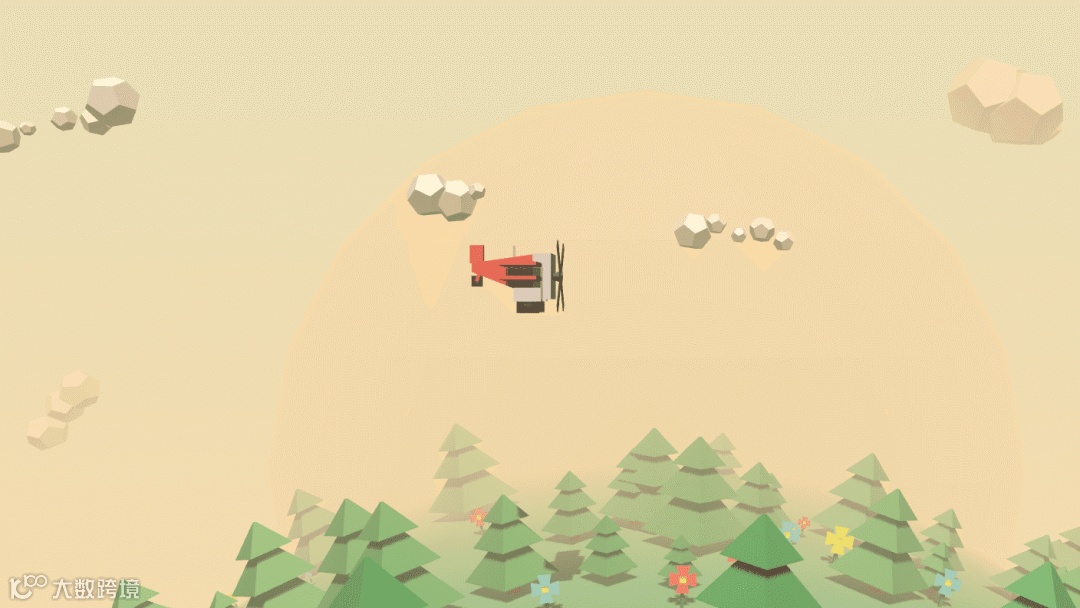
HTML 搭建页面结构,划定 3D 领地。
CSS 用渐变渲染质感,奠定视觉基调。
JavaScript 赋予动态交互,让元素 “活” 起来。
<html><head><meta charset="UTF-8" /><title>起飞咯</title><style>* {margin: 0;padding: 0;}#world{position: absolute;width: 100%;height: 100%;overflow: hidden;background: linear-gradient(#e4e0ba,#f7d9aa);}</style></head><body><div></div><script src="https://cdnjs.cloudflare.com/ajax/libs/three.js/86/three.min.js"></script><script>var Colors = {red: 0xf25346,yellow: 0xedeb27,white: 0xd8d0d1,brown: 0x59332e,pink: 0xf5986e,brownDark: 0x23190f,blue: 0x68c3c0,green: 0x458248,purple: 0x551a8b,lightgreen: 0x629265,};var scene,camera,fieldOfView,aspectRatio,nearPlane,farPlane,HEIGHT,WIDTH,renderer,container;function createScene() {// Get the width and height of the screen// and use them to setup the aspect ratio// of the camera and the size of the renderer.HEIGHT = window.innerHeight;WIDTH = window.innerWidth;// Create the scene.scene = new THREE.Scene();// Add FOV Fog effect to the scene. Same colour as the BG int he stylesheet.scene.fog = new THREE.Fog(0xf7d9aa, 100, 950);// Create the cameraaspectRatio = WIDTH / HEIGHT;fieldOfView = 60;nearPlane = 1;farPlane = 10000;camera = new THREE.PerspectiveCamera(fieldOfView,aspectRatio,nearPlane,farPlane