


大家好,我是TOP君,今天分享一款强大的、免费的视频编辑工具!
vidcutter
源代码地址:
https://github.com/ozmartian/vidcutter
免费工具啊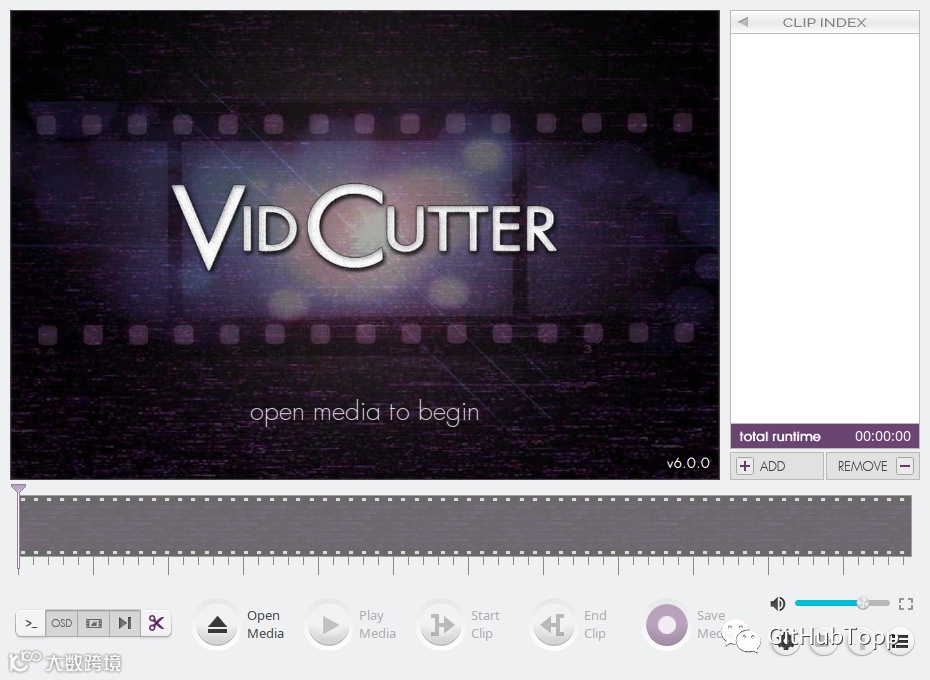
VidCutter 是一款功能强大且免费的在线视频编辑工具。它可以帮助您完成各种视频编辑任务,如视频剪切、合并、转换格式、添加滤镜和特效等。
以下是关于 VidCutter 的一些详细介绍:
功能:
1. 视频剪切:您可以使用 VidCutter 精确地剪切视频片段,提取您需要的部分。
2. 视频合并:将多个视频文件合并为一个文件,方便您进行二次编辑或直接分享。
3. 视频转换:支持多种视频格式之间的转换,如 AVI、MP4、MKV、FLV 等。
4. 添加滤镜和特效:VidCutter 提供了多种滤镜和特效,使您的视频更具创意和个性。
5. 调整视频参数:您可以自由调整视频的亮度、对比度、饱和度等参数,以满足您的需求。
6. 音频处理:进行音频剪辑、合并、调整音量等操作。
优点:
1. 免费:VidCutter 是一款完全免费的在线视频编辑工具,无需注册或购买许可证。
2. 界面简洁:操作界面简洁易用,上手速度快。
3. 高效:VidCutter 处理速度较快,适用于批量视频编辑。
4. 支持多种格式:支持多种视频和音频格式,满足不同需求。

安装
linux通过终端:
$ sudo snap install vidcutterUbuntu(包括 Mint/Debian/KDE Neon/等)
用户可以通过以下方式安装最新版本:
ppa:ozmartian/apps
以下命令集将帮助您启动并运行:
$ sudo add-apt-repository ppa:ozmartian/apps
$ sudo apt update
$ sudo apt install vidcutter
使用
非常简单
开发手册
用于调试的命令行(仅限 Linux/macOS)
$ vidcutter --help

Usage: vidcutter [options] [video] [project]

VidCutter - the simplest + fastest video cutter & joiner

Options:
  --debug        debug mode; verbose console output & logging. This will
                 basically output what is being logged to file to the console
                 stdout. Mainly useful for debugging problems with your system
                 video and/or audio stack and codec configuration.
  --dev          developer mode; disables the use of compiled resource files so
                 that all app resources & assets are accessed directly from the
                 file system allowing you to see UI changes immediately. this
                 typically relates to changes made to Qt stylesheets (.qss),
                 layout/templates, content includes and images. basically all
                 assets defined in .qrc files throughout the codebase.
  -v, --version  Displays version information.
  -h, --help     Displays this help.

Arguments:
  video          Preload video file
  project        Open VidCutter project file (.vcp)
地址:
源代码地址:
https://github.com/ozmartian/vidcutter
国内镜像
http://www.gitpp.com/goodeda/vidcutter
我们收集了10000+ 开源项目 下载 点击 阅读原文