


思科VPP(Vector Packet Processing)是一款由思科开发的商用代码,后来其开源版本被加入到Linux基金会的FD.io项目中,并成为该项目的核心。以下是关于思科VPP的概要介绍:
一、VPP的基础信息
全称:Vector Packet Processing(向量包处理)
开发者:思科
初始开发时间:2002年
开源时间:2016年,加入Linux基金会的FD.io项目
二、VPP的主要特点和功能
高性能:VPP运行在用户空间,支持多种收包方式,如DPDK,从而实现高性能的包处理。
框架可扩展:VPP构建基于“包处理图”,可以方便地“插入”新的节点,实现功能的拓展和自定义。
成熟的交换/路由功能:VPP提供了丰富的交换和路由功能,适用于各种网络环境。
三、VPP的应用场景
云计算和数据中心网络:VPP可以与虚拟化和容器化技术结合使用,加速云计算平台中的网络数据包处理。
网络功能虚拟化(NFV):VPP可以作为NFV架构中的虚拟网络功能(VNF)组件,提高网络功能的部署和管理效率。
边缘计算和物联网:VPP适用于边缘设备,能处理海量的网络数据包,为边缘计算和物联网应用提供高效支持。
四、VPP的技术优势
模块化与灵活性:VPP的模块化设计使得新的插件易于使用和与现存图节点结合,提高了系统的灵活性。
包处理革新:VPP将包处理由逐个处理变为批量处理(向量包),提高了处理效率。
易于扩展:VPP引擎运行在纯用户空间上,无需源代码即可扩展引擎功能。
OS:Ubuntu 22.04
root@inspur6680:/home/ubuntu/work/vpp# lsb_release -aNo LSB modules are available.Distributor ID: UbuntuDescription: Ubuntu 22.04.2 LTSRelease: 22.04Codename: jammyroot@inspur6680:/home/ubuntu/work/vpp#
VPP:VPP branch 24.02
VPP 源代码下载
通过执行命令:git clone -b stable/2402 https://gerrit.fd.io/r/vpp 从官网拉取 vpp 24.02 版本
执行操作如下所示,当前全新的ubuntu 22.04版本拉取代码。
问题一:操作日志显示git not found 错误。日志如下所示:
ubuntu:~/work$ git clone -b stable/2402 https://gerrit.fd.io/r/vppCommand 'git' not found, but can be installed with:sudo apt install git
解决方法:使用apt install git 命令从unbuntu 官方源拉取git工具安装到本地。
#安装git工具:~/work$ sudo supassword for ubuntu::/home/ubuntu/work# apt install gitReading package lists... DoneBuilding dependency tree... DoneReading state information... DoneThe following additional packages will be installed:liberror-perlSuggested packages:| git-daemon-sysvinit git-doc git-email git-gui gitk gitweb git-cvs git-mediawiki git-svnThe following NEW packages will be installed:git git-man liberror-perl0 upgraded, 3 newly installed, 0 to remove and 413 not upgraded.Need to get 4,147 kB of archives.After this operation, 21.0 MB of additional disk space will be used.Do you want to continue? [Y/n] yGet:1 http://mirrors.tuna.tsinghua.edu.cn/ubuntu jammy/main amd64 liberror-perl all 0.17029-1 [26.5 kB]Get:2 http://mirrors.tuna.tsinghua.edu.cn/ubuntu jammy-updates/main amd64 git-man all 1:2.34.1-1ubuntu1.10 [954 kB]Get:3 http://mirrors.tuna.tsinghua.edu.cn/ubuntu jammy-updates/main amd64 git amd64 1:2.34.1-1ubuntu1.10 [3,166 kB]Fetched 4,147 kB in 4s (1,166 kB/s)Selecting previously unselected package liberror-perl.database ... 198809 files and directories currently installed.)Preparing to unpack .../liberror-perl_0.17029-1_all.deb ...Unpacking liberror-perl (0.17029-1) ...Selecting previously unselected package git-man.Preparing to unpack .../git-man_1%3a2.34.1-1ubuntu1.10_all.deb ...Unpacking git-man (1:2.34.1-1ubuntu1.10) ...Selecting previously unselected package git.Preparing to unpack .../git_1%3a2.34.1-1ubuntu1.10_amd64.deb ...Unpacking git (1:2.34.1-1ubuntu1.10) ...Setting up liberror-perl (0.17029-1) ...Setting up git-man (1:2.34.1-1ubuntu1.10) ...Setting up git (1:2.34.1-1ubuntu1.10) ...Processing triggers for man-db (2.10.2-1) ...
然后使用git 命令,使用-b 参数下载指定版本的vpp代码。其操作指令为: git clone -b stable/2402 https://gerrit.fd.io/r/vpp
root:/home/ubuntu/work#root:/home/ubuntu/work# git clone -b stable/2402 https://gerrit.fd.io/r/vppCloning into 'vpp'...remote: Counting objects: 156, doneremote: Finding sources: 100% (23/23)remote: Total 146173 (delta 2), reused 146160 (delta 2)Receiving objects: 100% (146173/146173), 75.17 MiB | 1.74 MiB/s, done.Resolving deltas: 100% (112839/112839), done.root:/home/ubuntu/work# lsvpproot:/home/ubuntu/work# cd vpp/root:/home/ubuntu/work/vpp# lsbuild build-data build-root configure docs extras INFO.yaml LICENSE MAINTAINERS Makefile README.md src testroot:/home/ubuntu/work/vpp#root:/home/ubuntu/work/vpp#root:/home/ubuntu/work/vpp# git branch* stable/2402root:/home/ubuntu/work/vpp#
该步骤通过使用 make install-dep 命令安装编译需要的工具链等配置。
问题二:make 工具未安装
root@inspur6680:/home/ubuntu/work/vpp#root@inspur6680:/home/ubuntu/work/vpp# make install-depCommand 'make' not found, but can be installed with:apt install make # version 4.3-4.1build1, orapt install make-guile # version 4.3-4.1build1
解决方法:按照提示安装工具,使用apt install make 命令从OS的源拉取make工具安装到本地。
:/home/ubuntu/work/vpp# apt install makeReading package lists... DoneBuilding dependency tree... DoneReading state information... DoneSuggested packages:make-docThe following NEW packages will be installed:make0 upgraded, 1 newly installed, 0 to remove and 413 not upgraded.Need to get 180 kB of archives.After this operation, 426 kB of additional disk space will be used.Get:1 http://mirrors.tuna.tsinghua.edu.cn/ubuntu jammy/main amd64 make amd64 4.3-4.1build1 [180 kB]Fetched 180 kB in 2s (108 kB/s)Selecting previously unselected package make.database ... 199794 files and directories currently installed.)Preparing to unpack .../make_4.3-4.1build1_amd64.deb ...Unpacking make (4.3-4.1build1) ...Setting up make (4.3-4.1build1) ...Processing triggers for man-db (2.10.2-1) ...:/home/ubuntu/work/vpp# make -vGNU Make 4.3Built for x86_64-pc-linux-gnuCopyright (C) 1988-2020 Free Software Foundation, Inc.License GPLv3+: GNU GPL version 3 or later <http://gnu.org/licenses/gpl.html>This is free software: you are free to change and redistribute it.There is NO WARRANTY, to the extent permitted by law.:/home/ubuntu/work/vpp#
然后继续执行make install-dep命令,搭建编译依赖的环境。
root@inspur6680:/home/ubuntu/work/vpp# make install-depGet:1 http://security.ubuntu.com/ubuntu jammy-security InRelease [110 kB]Hit:2 http://mirrors.tuna.tsinghua.edu.cn/ubuntu jammy InReleaseHit:3 http://mirrors.tuna.tsinghua.edu.cn/ubuntu jammy-updates InReleaseHit:4 http://mirrors.tuna.tsinghua.edu.cn/ubuntu jammy-backports InReleaseFetched 110 kB in 4s (28.2 kB/s)Reading package lists... DoneReading package lists... DoneBuilding dependency tree... DoneReading state information... Doneenchant-2 is already the newest version (2.3.2-1ubuntu2).enchant-2 set to manually installed.python3-yaml is already the newest version (5.4.1-1ubuntu1).python3-yaml set to manually installed.ethtool is already the newest version (1:5.16-1ubuntu0.1).ethtool set to manually installed.git is already the newest version (1:2.34.1-1ubuntu1.10).
中间略去N行 log信息,无错误提示,标识该步骤执行成功。
Setting up libpython3.10-dev:amd64 (3.10.12-1~22.04.3) ...Setting up python3.10-dev (3.10.12-1~22.04.3) ...Setting up g++ (4:11.2.0-1ubuntu1) ...update-alternatives: using /usr/bin/g++ to provide /usr/bin/c++ (c++) in auto modeSetting up build-essential (12.9ubuntu3) ...Setting up llvm-14-dev (1:14.0.0-1ubuntu1.1) ...Setting up libpython3-dev:amd64 (3.10.6-1~22.04) ...Setting up debhelper (13.6ubuntu1) ...Setting up lcov (1.15-1) ...Setting up python3-dev (3.10.6-1~22.04) ...Processing triggers for libc-bin (2.35-0ubuntu3.1) ...Processing triggers for ufw (0.36.1-4build1) ...Processing triggers for man-db (2.10.2-1) ...Processing triggers for shared-mime-info (2.1-2) ...Processing triggers for sgml-base (1.30) ...Processing triggers for install-info (6.8-4build1) ...Processing triggers for mailcap (3.70+nmu1ubuntu1) ...Processing triggers for desktop-file-utils (0.26-1ubuntu3) ...Processing triggers for hicolor-icon-theme (0.17-2) ...Processing triggers for gnome-menus (3.36.0-1ubuntu3) ...Setting up libpcap0.8-dev:amd64 (1.10.1-4build1) ...Setting up libpcap-dev:amd64 (1.10.1-4build1) ...git config commit.template .git_commit_template.txtroot@inspur6680:/home/ubuntu/work/vpp#
二、执行vpp代码构造操作
该步骤通过使用make build 或者make build-release 编译版本,其分别对应编译调试的debug版本,和发布的release版本。其区别在于debug版本编译的版本含有gcc 调试的符号,而 release 发布版本使用gcc -O3 优化,删除了一些调试的符号。gcc -O3 等优化细节,详情可以参考网上相关资料, Google is the best answer.
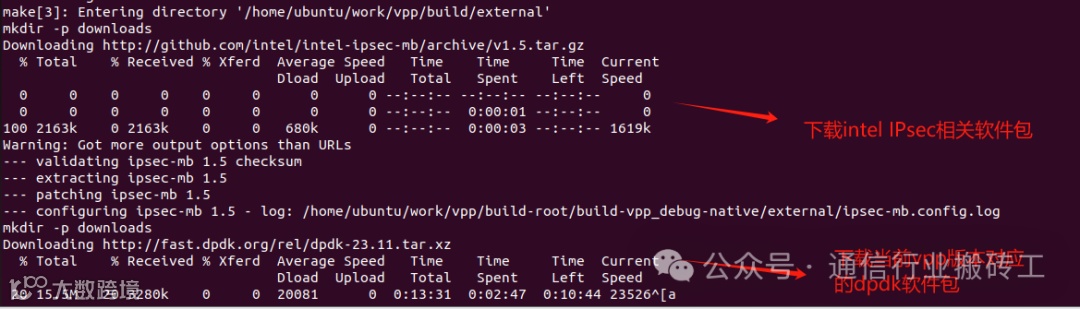
提示:该步骤需要联网下载如dpdk等相关依赖包,因此需要连接网络。
root@inspur6680:/home/ubuntu/work/vpp# make buildmake[1]: Entering directory '/home/ubuntu/work/vpp/build-root'@@@@ Arch for platform 'vpp' is native @@@@@@@@ Finding source for external @@@@@@@@ Makefile fragment found in /home/ubuntu/work/vpp/build-data/packages/external.mk @@@@@@@@ Source found in /home/ubuntu/work/vpp/build @@@@@@@@ Arch for platform 'vpp' is native @@@@@@@@ Finding source for vpp @@@@@@@@ Makefile fragment found in /home/ubuntu/work/vpp/build-data/packages/vpp.mk @@@@@@@@ Source found in /home/ubuntu/work/vpp/src @@@@@@@@ Configuring external in /home/ubuntu/work/vpp/build-root/build-vpp_debug-native/external @@@@@@@@ Building external in /home/ubuntu/work/vpp/build-root/build-vpp_debug-native/external @@@@@@@@ Installing external @@@@make[2]: Entering directory '/home/ubuntu/work/vpp/build/external'==========================================================Building vpp-ext-deps from source. Consider installingdevelopment package by invoking 'make install-ext-deps'from the top level directory==========================================================make configmake[3]: Entering directory '/home/ubuntu/work/vpp/build/external'mkdir -p downloadsDownloading http://github.com/intel/intel-ipsec-mb/archive/v1.5.tar.gz% Total % Received % Xferd Average Speed Time Time Time CurrentDload Upload Total Spent Left Speed0 0 0 0 0 0 0 0 --:--:-- --:--:-- --:--:-- 00 0 0 0 0 0 0 0 --:--:-- 0:00:01 --:--:-- 0100 2163k 0 2163k 0 0 680k 0 --:--:-- 0:00:03 --:--:-- 1619kWarning: Got more output options than URLs--- validating ipsec-mb 1.5 checksum--- extracting ipsec-mb 1.5--- patching ipsec-mb 1.5--- configuring ipsec-mb 1.5 - log: /home/ubuntu/work/vpp/build-root/build-vpp_debug-native/external/ipsec-mb.config.logmkdir -p downloadsDownloading http://fast.dpdk.org/rel/dpdk-23.11.tar.xz% Total % Received % Xferd Average Speed Time Time Time CurrentDload Upload Total Spent Left Speed
问题三:构造过程中,需要下载RDMA包,但是因网络不稳定,出现问题:RDMA软件包下载失败!
Downloading http://github.com/linux-rdma/rdma-core/releases/download/v49.0/rdma-core-49.0.tar.gz% Total % Received % Xferd Average Speed Time Time Time CurrentDload Upload Total Spent Left Speed0 0 0 0 0 0 0 0 --:--:-- --:--:-- --:--:-- 00 0 0 0 0 0 0 0 --:--:-- 0:00:21 --:--:-- 0^[acurl: (7) Failed to connect to github.com port 443 after 21007 ms: Connection refusedWarning: Got more output options than URLsmake[3]: *** [packages/rdma-core.mk:58: downloads/rdma-core-49.0.tar.gz] Error 7make[3]: Leaving directory '/home/ubuntu/work/vpp/build/external'make[2]: *** [Makefile:161: ebuild-build] Error 2make[2]: Leaving directory '/home/ubuntu/work/vpp/build/external'make[1]: *** [Makefile:732: external-install] Error 2make[1]: Leaving directory '/home/ubuntu/work/vpp/build-root'make: *** [Makefile:411: build] Error 2root@inspur6680:/home/ubuntu/work/vpp#
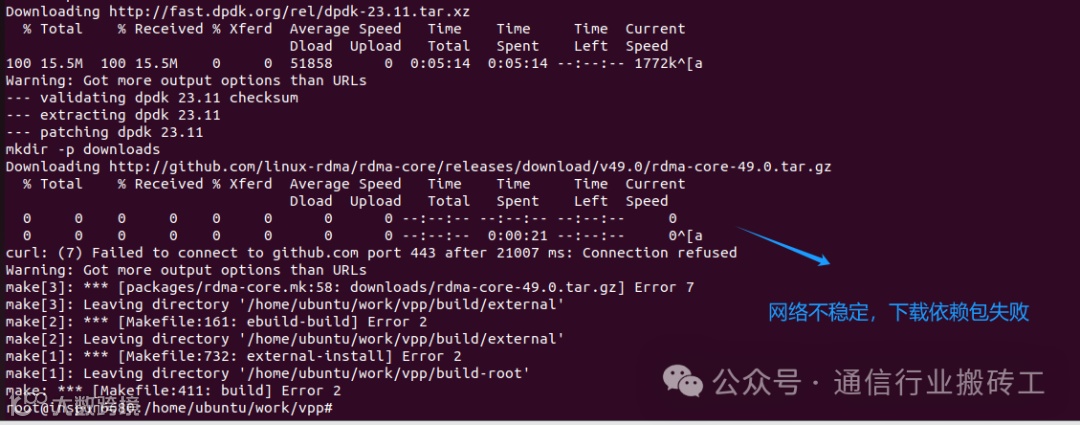
解决方法:重新执行 make build命令,会从上次下载失败的软件包处重新开始下载依赖包
root@inspur6680:/home/ubuntu/work/vpp# make buildmake[1]: Entering directory '/home/ubuntu/work/vpp/build-root'@@@@ Arch for platform 'vpp' is native @@@@@@@@ Finding source for external @@@@@@@@ Makefile fragment found in /home/ubuntu/work/vpp/build-data/packages/external.mk @@@@@@@@ Source found in /home/ubuntu/work/vpp/build @@@@@@@@ Arch for platform 'vpp' is native @@@@@@@@ Finding source for vpp @@@@@@@@ Makefile fragment found in /home/ubuntu/work/vpp/build-data/packages/vpp.mk @@@@@@@@ Source found in /home/ubuntu/work/vpp/src @@@@find: ‘/home/ubuntu/work/vpp/build-root/config.site’: No such file or directory@@@@ Configuring external: nothing to do @@@@@@@@ Building external in /home/ubuntu/work/vpp/build-root/build-vpp_debug-native/external @@@@@@@@ Installing external @@@@make[2]: Entering directory '/home/ubuntu/work/vpp/build/external'==========================================================Building vpp-ext-deps from source. Consider installingdevelopment package by invoking 'make install-ext-deps'from the top level directory==========================================================make configmake[3]: Entering directory '/home/ubuntu/work/vpp/build/external'mkdir -p downloadsDownloading http://github.com/linux-rdma/rdma-core/releases/download/v49.0/rdma-core-49.0.tar.gz% Total % Received % Xferd Average Speed Time Time Time CurrentDload Upload Total Spent Left Speed0 0 0 0 0 0 0 0 --:--:-- --:--:-- --:--:-- 0
在此构造过程中,需要编译DPDK,因此消耗时间较多。
问题四:缺少meson 工具导致无法编译dpdk
ls: cannot access '/home/ubuntu/work/vpp/build/external/downloads/meson*': No such file or directoryLooking in links: /root/DownloadsWARNING: Location '/root/Downloads' is ignored: it is either a non-existing path or lacks a specific scheme.WARNING: Retrying (Retry(total=4, connect=None, read=None, redirect=None, status=None)) after connection broken by 'NewConnectionError('<pip._vendor.urllib3.connection.HTTPSConnection object at 0x7b4bb39bf0d0>: Failed to establish a new connection: [Errno -3] Temporary failure in name resolution')': /simple/meson/WARNING: Retrying (Retry(total=3, connect=None, read=None, redirect=None, status=None)) after connection broken by 'NewConnectionError('<pip._vendor.urllib3.connection.HTTPSConnection object at 0x7b4bb39be710>: Failed to establish a new connection: [Errno -3] Temporary failure in name resolution')': /simple/meson/WARNING: Retrying (Retry(total=2, connect=None, read=None, redirect=None, status=None)) after connection broken by 'NewConnectionError('<pip._vendor.urllib3.connection.HTTPSConnection object at 0x7b4bb39bf370>: Failed to establish a new connection: [Errno -3] Temporary failure in name resolution')': /simple/meson/WARNING: Retrying (Retry(total=1, connect=None, read=None, redirect=None, status=None)) after connection broken by 'NewConnectionError('<pip._vendor.urllib3.connection.HTTPSConnection object at 0x7b4bb39bf520>: Failed to establish a new connection: [Errno -3] Temporary failure in name resolution')': /simple/meson/WARNING: Retrying (Retry(total=0, connect=None, read=None, redirect=None, status=None)) after connection broken by 'NewConnectionError('<pip._vendor.urllib3.connection.HTTPSConnection object at 0x7b4bb39bf6d0>: Failed to establish a new connection: [Errno -3] Temporary failure in name resolution')': /simple/meson/ERROR: Could not find a version that satisfies the requirement meson==0.55.3 (from versions: none)ERROR: No matching distribution found for meson==0.55.3make[3]: *** [packages/dpdk.mk:222: /home/ubuntu/work/vpp/build-root/build-vpp_debug-native/external/.dpdk.config.ok] Error 1make[3]: Leaving directory '/home/ubuntu/work/vpp/build/external'make[2]: *** [Makefile:161: ebuild-build] Error 2make[2]: Leaving directory '/home/ubuntu/work/vpp/build/external'make[1]: *** [Makefile:732: external-install] Error 2make[1]: Leaving directory '/home/ubuntu/work/vpp/build-root'make: *** [Makefile:411: build] Error 2
解决方法:
方法一:重新执行make build 操作,通过log可以清晰看到meson工具被安装。
方法二:安装与之对应版本的meson工具。
Successfully downloaded meson wheel pyelftools setuptoolsLooking in links: /home/ubuntu/work/vpp/build/external/downloads/Processing /home/ubuntu/work/vpp/build/external/downloads/meson-0.55.3.tar.gzInstalling build dependencies ... doneGetting requirements to build wheel ... donePreparing metadata (pyproject.toml) ... doneProcessing /home/ubuntu/work/vpp/build/external/downloads/pyelftools-0.31-py3-none-any.whlBuilding wheels for collected packages: mesonBuilding wheel for meson (pyproject.toml) ... doneCreated wheel for meson: filename=meson-0.55.3-py3-none-any.whl size=662410 sha256=a5d5d59152173762ae71348a90528f5f75a947f75f3c6af321a74b8056679895Stored in directory: /root/.cache/pip/wheels/b4/40/ca/d2efc458cc9b5e9aa3dae3fe0bb2622cd6c217aa64edb99e69Successfully built mesonInstalling collected packages: pyelftools, mesonSuccessfully installed meson-0.55.3 pyelftools-0.31The Meson build systemVersion: 0.55.3Source dir: /home/ubuntu/work/vpp/build-root/build-vpp_debug-native/external/src-dpdkBuild dir: /home/ubuntu/work/vpp/build-root/build-vpp_debug-native/external/build-dpdkBuild type: native build
最终编译成功
-- Looking for SSL_set_async_callback-- Looking for SSL_set_async_callback - found-- Found picotls in /home/ubuntu/work/vpp/build-root/install-vpp_debug-native/external/include and /home/ubuntu/work/vpp/build-root/install-vpp_debug-native/external/lib/libpicotls-core.a-- Configuration:VPP platform : defaultVPP version : 24.02.0-8~g80e950381VPP library version : 24.02.0GIT toplevel dir : /home/ubuntu/work/vppBuild type : debugC compiler : /usr/lib/ccache/clang (Clang 14.0.0)C flags :Linker flags (apps) :Linker flags (libs) :Host processor : x86_64Target processor : x86_64Prefix path : /opt/vpp/external/x86_64 /home/ubuntu/work/vpp/build-root/install-vpp_debug-native/externalInstall prefix : /home/ubuntu/work/vpp/build-root/install-vpp_debug-native/vppLibrary dir : lib/x86_64-linux-gnuMultiarch variants : hsw skx icl-- Configuring done-- Generating done-- Build files have been written to: /home/ubuntu/work/vpp/build-root/build-vpp_debug-native/vpp@@@@ Building vpp in /home/ubuntu/work/vpp/build-root/build-vpp_debug-native/vpp @@@@[2738/2738] Linking C shared library lib/x86_64-linux-gnu/vat2_plugins/wireguard_test_plugin_wireguard_plugin.so@@@@ Installing vpp @@@@[0/1] Install the project...-- Install configuration: "debug"/usr/lib/python3/dist-packages/setuptools/command/install.py:34: SetuptoolsDeprecationWarning: setup.py install is deprecated. Use build and pip and other standards-based tools.warnings.warn(make[1]: Leaving directory '/home/ubuntu/work/vpp/build-root'root@inspur6680:/home/ubuntu/work/vpp#
可执行程序vpp在路径 build-root/build-vpp_debug-native/vpp/bin/ 下
:/home/ubuntu/work/vpp# ls -ls build-root/build-vpp_debug-native/vpp/bin/total 676856 -rwxr-xr-x 1 root root 53296 5月 23 15:31 sock_test_client52 -rwxr-xr-x 1 root root 50008 5月 23 15:31 sock_test_server48 -rwxr-xr-x 1 root root 48720 5月 23 15:24 svmdbtool60 -rwxr-xr-x 1 root root 59616 5月 23 15:24 svmtool1236 -rwxr-xr-x 1 root root 1263656 5月 23 15:24 test_infra284 -rwxr-xr-x 1 root root 287104 5月 23 15:33 test_pnat56 -rwxr-xr-x 1 root root 55776 5月 23 15:29 test_vat240 -rwxr-xr-x 1 root root 39456 5月 23 15:29 test_vppapiclient2472 -rwxr-xr-x 1 root root 2528696 5月 23 15:29 vapi_cpp_test684 -rwxr-xr-x 1 root root 699304 5月 23 15:29 vapi_c_test60 -rwxr-xr-x 1 root root 61368 5月 23 15:29 vat2112 -rwxr-xr-x 1 root root 112096 5月 23 15:31 vcl_test_client96 -rwxr-xr-x 1 root root 97456 5月 23 15:31 vcl_test_server468 -rwxr-xr-x 1 root root 478712 5月 23 15:29 vpp364 -rwxr-xr-x 1 root root 370512 5月 23 15:29 vpp_api_test32 -rwxr-xr-x 1 root root 29968 5月 23 15:29 vppctl440 -rwxr-xr-x 1 root root 448952 5月 23 15:31 vpp_echo24 -rwxr-xr-x 1 root root 22352 5月 23 15:30 vpp_fateshare_monitor28 -rwxr-xr-x 1 root root 27664 5月 23 15:29 vpp_get_metrics32 -rwxr-xr-x 1 root root 30200 5月 23 15:29 vpp_get_stats52 -rwxr-xr-x 1 root root 50640 5月 23 15:29 vpp_json_test44 -rwxr-xr-x 1 root root 44640 5月 23 15:29 vpp_prometheus_export28 -rwxr-xr-x 1 root root 25016 5月 23 15:29 vpp_restart:/home/ubuntu/work/vpp#
当前版本对应的lib库路径:
build-root/build-vpp_debug-native/vpp/lib/x86_64-linux-gnu/
:~/work/vpp$ ls -ls build-root/build-vpp_debug-native/vpp/lib/x86_64-linux-gnu/total 473080 lrwxrwxrwx 1 root root 17 5月 23 15:32 liblcp.so -> liblcp.so.24.02.0316 -rwxr-xr-x 1 root root 321896 5月 23 15:32 liblcp.so.24.02.00 lrwxrwxrwx 1 root root 17 5月 23 15:32 libnat.so -> libnat.so.24.02.0228 -rwxr-xr-x 1 root root 231528 5月 23 15:32 libnat.so.24.02.00 lrwxrwxrwx 1 root root 19 5月 23 15:24 libsvmdb.so -> libsvmdb.so.24.02.080 -rwxr-xr-x 1 root root 78856 5月 23 15:24 libsvmdb.so.24.02.00 lrwxrwxrwx 1 root root 17 5月 23 15:24 libsvm.so -> libsvm.so.24.02.0380 -rwxr-xr-x 1 root root 385192 5月 23 15:24 libsvm.so.24.02.00 lrwxrwxrwx 1 root root 24 5月 23 15:29 libvapiclient.so -> libvapiclient.so.24.02.0192 -rwxr-xr-x 1 root root 194200 5月 23 15:29 libvapiclient.so.24.02.00 lrwxrwxrwx 1 root root 23 5月 23 15:28 libvatclient.so -> libvatclient.so.24.02.056 -rwxr-xr-x 1 root root 54936 5月 23 15:28 libvatclient.so.24.02.00 lrwxrwxrwx 1 root root 23 5月 23 15:29 libvatplugin.so -> libvatplugin.so.24.02.056 -rwxr-xr-x 1 root root 54032 5月 23 15:29 libvatplugin.so.24.02.00 lrwxrwxrwx 1 root root 27 5月 23 15:29 libvcl_ldpreload.so -> libvcl_ldpreload.so.24.02.0156 -rwxr-xr-x 1 root root 157384 5月 23 15:29 libvcl_ldpreload.so.24.02.00 lrwxrwxrwx 1 root root 21 5月 23 15:24 libvlibapi.so -> libvlibapi.so.24.02.0176 -rwxr-xr-x 1 root root 179472 5月 23 15:24 libvlibapi.so.24.02.00 lrwxrwxrwx 1 root root 30 5月 23 15:24 libvlibmemoryclient.so -> libvlibmemoryclient.so.24.02.0140 -rwxr-xr-x 1 root root 140696 5月 23 15:24 libvlibmemoryclient.so.24.02.00 lrwxrwxrwx 1 root root 24 5月 23 15:24 libvlibmemory.so -> libvlibmemory.so.24.02.0528 -rwxr-xr-x 1 root root 540416 5月 23 15:24 libvlibmemory.so.24.02.00 lrwxrwxrwx 1 root root 18 5月 23 15:24 libvlib.so -> libvlib.so.24.02.02616 -rwxr-xr-x 1 root root 2676176 5月 23 15:24 libvlib.so.24.02.00 lrwxrwxrwx 1 root root 18 5月 23 15:28 libvnet.so -> libvnet.so.24.02.039992 -rwxr-xr-x 1 root root 40948360 5月 23 15:28 libvnet.so.24.02.00 lrwxrwxrwx 1 root root 26 5月 23 15:29 libvppapiclient.so -> libvppapiclient.so.24.02.096 -rwxr-xr-x 1 root root 97136 5月 23 15:29 libvppapiclient.so.24.02.00 lrwxrwxrwx 1 root root 20 5月 23 15:29 libvppcom.so -> libvppcom.so.24.02.0632 -rwxr-xr-x 1 root root 643392 5月 23 15:29 libvppcom.so.24.02.00 lrwxrwxrwx 1 root root 22 5月 23 15:24 libvppinfra.so -> libvppinfra.so.24.02.01620 -rwxr-xr-x 1 root root 1658712 5月 23 15:24 libvppinfra.so.24.02.00 lrwxrwxrwx 1 root root 28 5月 23 15:29 libvppmem_preload.so -> libvppmem_preload.so.24.02.024 -rwxr-xr-x 1 root root 21240 5月 23 15:29 libvppmem_preload.so.24.02.012 drwxr-xr-x 2 root root 12288 5月 23 15:34 vat2_plugins4 drwxr-xr-x 2 root root 4096 5月 23 15:34 vpp_api_test_plugins4 drwxr-xr-x 2 root root 4096 5月 23 15:34 vpp_plugins:~/work/vpp$
VPP软件库中各个插件对应的lib库路径:
build-root/build-vpp_debug-native/vpp/lib/x86_64-linux-gnu/vpp_plugins/
:~/work/vpp$ ls -ls build-root/build-vpp_debug-native/vpp/lib/x86_64-linux-gnu/vpp_plugins/total 196052316 -rwxr-xr-x 1 root root 322784 5月 23 15:29 abf_plugin.so1404 -rwxr-xr-x 1 root root 1435632 5月 23 15:29 acl_plugin.so356 -rwxr-xr-x 1 root root 361072 5月 23 15:29 adl_plugin.so888 -rwxr-xr-x 1 root root 908864 5月 23 15:29 af_packet_plugin.so2240 -rwxr-xr-x 1 root root 2290608 5月 23 15:29 af_xdp_plugin.so176 -rwxr-xr-x 1 root root 178016 5月 23 15:29 arping_plugin.so1344 -rwxr-xr-x 1 root root 1373152 5月 23 15:29 avf_plugin.so92 -rwxr-xr-x 1 root root 92552 5月 23 15:28 bpf_trace_filter_plugin.so68 -rwxr-xr-x 1 root root 68368 5月 23 15:29 bufmon_plugin.so124 -rwxr-xr-x 1 root root 124952 5月 23 15:29 builtinurl_plugin.so276 -rwxr-xr-x 1 root root 282408 5月 23 15:29 cdp_plugin.so1028 -rwxr-xr-x 1 root root 1051032 5月 23 15:30 cnat_plugin.so632 -rwxr-xr-x 1 root root 645976 5月 23 15:30 crypto_native_plugin.so116 -rwxr-xr-x 1 root root 118416 5月 23 15:30 crypto_openssl_plugin.so132 -rwxr-xr-x 1 root root 133872 5月 23 15:30 crypto_sw_scheduler_plugin.so548 -rwxr-xr-x 1 root root 559080 5月 23 15:30 ct6_plugin.so880 -rwxr-xr-x 1 root root 900880 5月 23 15:33 det44_plugin.so872 -rwxr-xr-x 1 root root 890352 5月 23 15:30 dev_ena_plugin.so892 -rwxr-xr-x 1 root root 912688 5月 23 15:30 dev_iavf_plugin.so1320 -rwxr-xr-x 1 root root 1351008 5月 23 15:30 dhcp_plugin.so100 -rwxr-xr-x 1 root root 100320 5月 23 15:30 dispatch_trace_plugin.so120 -rwxr-xr-x 1 root root 119544 5月 23 15:30 dma_intel_plugin.so400 -rwxr-xr-x 1 root root 409408 5月 23 15:30 dns_plugin.so141316 -rwxr-xr-x 1 root root 144705240 5月 23 15:31 dpdk_plugin.so740 -rwxr-xr-x 1 root root 756216 5月 23 15:33 dslite_plugin.so56 -rwxr-xr-x 1 root root 55264 5月 23 15:30 fateshare_plugin.so368 -rwxr-xr-x 1 root root 375568 5月 23 15:30 flowprobe_plugin.so808 -rwxr-xr-x 1 root root 827032 5月 23 15:30 geneve_plugin.so664 -rwxr-xr-x 1 root root 679072 5月 23 15:31 gre_plugin.so952 -rwxr-xr-x 1 root root 972656 5月 23 15:31 gtpu_plugin.so592 -rwxr-xr-x 1 root root 602448 5月 23 15:31 hs_apps_plugin.so104 -rwxr-xr-x 1 root root 103912 5月 23 15:31 hsi_plugin.so228 -rwxr-xr-x 1 root root 230368 5月 23 15:31 http_plugin.so304 -rwxr-xr-x 1 root root 308888 5月 23 15:31 http_static_plugin.so388 -rwxr-xr-x 1 root root 394208 5月 23 15:31 idpf_plugin.so680 -rwxr-xr-x 1 root root 694544 5月 23 15:31 igmp_plugin.so860 -rwxr-xr-x 1 root root 878936 5月 23 15:31 ikev2_plugin.so136 -rwxr-xr-x 1 root root 138040 5月 23 15:31 ila_plugin.so2252 -rwxr-xr-x 1 root root 2305240 5月 23 15:31 ioam_plugin.so208 -rwxr-xr-x 1 root root 210840 5月 23 15:31 ip_session_redirect_plugin.so580 -rwxr-xr-x 1 root root 590776 5月 23 15:31 l2tp_plugin.so240 -rwxr-xr-x 1 root root 243696 5月 23 15:31 l3xc_plugin.so472 -rwxr-xr-x 1 root root 481944 5月 23 15:32 lacp_plugin.so464 -rwxr-xr-x 1 root root 474664 5月 23 15:32 lb_plugin.so336 -rwxr-xr-x 1 root root 341656 5月 23 15:32 linux_cp_plugin.so60 -rwxr-xr-x 1 root root 60072 5月 23 15:32 linux_cp_unittest_plugin.so240 -rwxr-xr-x 1 root root 245456 5月 23 15:32 linux_nl_plugin.so2200 -rwxr-xr-x 1 root root 2251688 5月 23 15:32 lisp_plugin.so256 -rwxr-xr-x 1 root root 260048 5月 23 15:32 lisp_unittest_plugin.so392 -rwxr-xr-x 1 root root 398160 5月 23 15:32 lldp_plugin.so268 -rwxr-xr-x 1 root root 271384 5月 23 15:32 mactime_plugin.so680 -rwxr-xr-x 1 root root 693976 5月 23 15:32 map_plugin.so124 -rwxr-xr-x 1 root root 126272 5月 23 15:32 mdata_plugin.so1152 -rwxr-xr-x 1 root root 1179360 5月 23 15:32 memif_plugin.so192 -rwxr-xr-x 1 root root 192760 5月 23 15:32 mss_clamp_plugin.so1876 -rwxr-xr-x 1 root root 1918656 5月 23 15:32 nat44_ei_plugin.so1120 -rwxr-xr-x 1 root root 1143696 5月 23 15:33 nat64_plugin.so492 -rwxr-xr-x 1 root root 501352 5月 23 15:33 nat66_plugin.so2360 -rwxr-xr-x 1 root root 2415104 5月 23 15:32 nat_plugin.so308 -rwxr-xr-x 1 root root 314192 5月 23 15:33 npt66_plugin.so1240 -rwxr-xr-x 1 root root 1269112 5月 23 15:33 nsh_plugin.so436 -rwxr-xr-x 1 root root 443800 5月 23 15:33 nsim_plugin.so276 -rwxr-xr-x 1 root root 280992 5月 23 15:33 oddbuf_plugin.so508 -rwxr-xr-x 1 root root 518248 5月 23 15:33 perfmon_plugin.so272 -rwxr-xr-x 1 root root 276448 5月 23 15:33 ping_plugin.so428 -rwxr-xr-x 1 root root 437464 5月 23 15:33 pnat_plugin.so644 -rwxr-xr-x 1 root root 657816 5月 23 15:33 pppoe_plugin.so132 -rwxr-xr-x 1 root root 131304 5月 23 15:33 prom_plugin.so1628 -rwxr-xr-x 1 root root 1665336 5月 23 15:33 quic_plugin.so548 -rwxr-xr-x 1 root root 559096 5月 23 15:33 snort_plugin.so236 -rwxr-xr-x 1 root root 240312 5月 23 15:33 srv6adflow_plugin.so172 -rwxr-xr-x 1 root root 174544 5月 23 15:33 srv6ad_plugin.so132 -rwxr-xr-x 1 root root 132320 5月 23 15:33 srv6am_plugin.so172 -rwxr-xr-x 1 root root 175000 5月 23 15:33 srv6as_plugin.so480 -rwxr-xr-x 1 root root 488736 5月 23 15:33 srv6mobile_plugin.so176 -rwxr-xr-x 1 root root 177416 5月 23 15:33 stn_plugin.so204 -rwxr-xr-x 1 root root 206528 5月 23 15:33 svs_plugin.so312 -rwxr-xr-x 1 root root 319136 5月 23 15:34 tlsopenssl_plugin.so716 -rwxr-xr-x 1 root root 731272 5月 23 15:34 tlspicotls_plugin.so244 -rwxr-xr-x 1 root root 248480 5月 23 15:34 tracedump_plugin.so356 -rwxr-xr-x 1 root root 364088 5月 23 15:34 tracenode_plugin.so2800 -rwxr-xr-x 1 root root 2863536 5月 23 15:34 unittest_plugin.so592 -rwxr-xr-x 1 root root 604464 5月 23 15:34 urpf_plugin.so1184 -rwxr-xr-x 1 root root 1209216 5月 23 15:34 vhost_plugin.so796 -rwxr-xr-x 1 root root 814616 5月 23 15:34 vmxnet3_plugin.so880 -rwxr-xr-x 1 root root 900984 5月 23 15:34 vrrp_plugin.so692 -rwxr-xr-x 1 root root 706696 5月 23 15:34 vxlan_plugin.so1004 -rwxr-xr-x 1 root root 1024752 5月 23 15:34 wireguard_plugin.so:~/work/vpp$
小伙伴们,本章节关于Ubuntu 22.04环境下编译思科VPP 24.02版本的软件编译就先介绍到这了。后续章节我们继续讲解VPP的相关知识,感谢小伙伴们的阅读,下期再见!

作者简介

作者:通信行业搬砖工 云网络高级软件工程师
数通领域行业从业人员
现云网络行业从业者
公众号:通信行业搬砖工
更多互联网技术与咨询分享,欢迎关注我们的公众号
通信行业搬砖工

(正文完)

转载与投稿
文章转载需注明:来源公众号:通信行业搬砖工,并且附上链接
文章错误之处,欢迎指导斧正,各位大拿留言交流,探讨技术。


点个在看你最好看