


背景
在 Android 5.1 系统上,在项目中遇到一个WebView引起的问题,每打开一个带webview的界面,退出后,这个activity都不会被释放,activity的实例会被持有,由于我们项目中经常会用到浏览web页面的地方,可能引起内存积压,导致内存溢出的现象,所以这个问题还是比较严重的。
问题分析
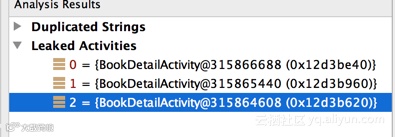
使用Android Studio的内存monitor,得到了以下的内存分析,我打开了三个BookDetailActivity界面(都有webview),检查结果显示有3个activity泄漏,如下图所示:
这个问题还是比较严重的,那么进一步看详细的信息,找出到底是哪里引起的内存泄漏,详情的reference tree如下图所示:
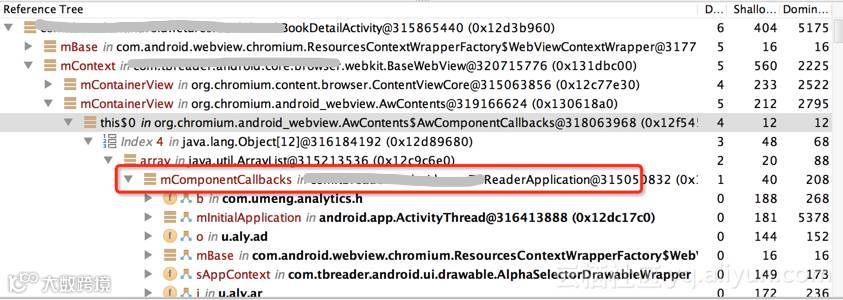
从上图中可以看出,在第1层中的 TBReaderApplication 中的 mComponentCallbacks 成员变量,它是一个array list,它里面会持有住activity,引导关系是 mComponentCallbacks->AwContents->BaseWebView->BookDetailActivity, 代码在 Application 类里面,代码如下所示:
public void registerComponentCallbacks(ComponentCallbacks callback) {
synchronized (mComponentCallbacks) {
mComponentCallbacks.add(callback);
}
}
public void unregisterComponentCallbacks(ComponentCallbacks callback) {
synchronized (mComponentCallbacks) {
mComponentCallbacks.remove(callback);
}
}
上面两个方法,会在 Context 基类中被调用,代码如下:
/**
* Add a new {@link ComponentCallbacks} to the base application of the
* Context, which will be called at the same times as the ComponentCallbacks
* methods of activities and other components are called. Note that you
* <em>must</em> be sure to use {@link #unregisterComponentCallbacks} when
* appropriate in the future; this will not be removed for you.
*
* @param callback The interface to call. This can be either a
* {@link ComponentCallbacks} or {@link ComponentCallbacks2} interface.
*/
public void registerComponentCallbacks(ComponentCallbacks callback) {
getApplicationContext().registerComponentCallbacks(callback);
}
/**
* Remove a {@link ComponentCallbacks} object that was previously registered
* with {@link #registerComponentCallbacks(ComponentCallbacks)}.
*/
public void unregisterComponentCallbacks(ComponentCallbacks callback) {
getApplicationContext().unregisterComponentCallbacks(callback);
}
从第二张图我们已经知道,是webview引起的内存泄漏,而且能看到是在 org.chromium.android_webview.AwContents 类中,难道是这个类注册了component callbacks,但是未反注册?一般按系统设计,都会反注册的,最有可能的原因就是某些情况下导致不能正常反注册,不多说,read the fucking source。基于这个思路,我把chromium的源码下载下来,代码在这里 chromium_org(https://android.googlesource.com/platform/external/chromium_org/?spm=5176.100239.blogcont61612.7.j9EPtE)
然后找到 org.chromium.android_webview.AwContents 类,看看这两个方法 onAttachedToWindow 和 onDetachedFromWindow:
@Override
public void onAttachedToWindow() {
if (isDestroyed()) return;
if (mIsAttachedToWindow) {
Log.w(TAG, "onAttachedToWindow called when already attached. Ignoring");
return;
}
mIsAttachedToWindow = true;
mContentViewCore.onAttachedToWindow();
nativeOnAttachedToWindow(mNativeAwContents, mContainerView.getWidth(),
mContainerView.getHeight());
updateHardwareAcceleratedFeaturesToggle();
if (mComponentCallbacks != null) return;
mComponentCallbacks = new AwComponentCallbacks();
mContext.registerComponentCallbacks(mComponentCallbacks);
}
@Override
public void onDetachedFromWindow() {
if (isDestroyed()) return;
if (!mIsAttachedToWindow) {
Log.w(TAG, "onDetachedFromWindow called when already detached. Ignoring");
return;
}
mIsAttachedToWindow = false;
hideAutofillPopup();
nativeOnDetachedFromWindow(mNativeAwContents);
mContentViewCore.onDetachedFromWindow();
updateHardwareAcceleratedFeaturesToggle();
if (mComponentCallbacks != null) {
mContext.unregisterComponentCallbacks(mComponentCallbacks);
mComponentCallbacks = null;
}
mScrollAccessibilityHelper.removePostedCallbacks();
}
系统会在attach处detach进行注册和反注册component callback,注意到 onDetachedFromWindow() 方法的第一行,if (isDestroyed()) return;, 如果 isDestroyed() 返回 true 的话,那么后续的逻辑就不能正常走到,所以就不会执行unregister的操作,通过看代码,可以得到,调用主动调用 destroy()方法,会导致 isDestroyed() 返回 true。
/**
* Destroys this object and deletes its native counterpart.
*/
public void destroy() {
if (isDestroyed()) return;
// If we are attached, we have to call native detach to clean up
// hardware resources.
if (mIsAttachedToWindow) {
nativeOnDetachedFromWindow(mNativeAwContents);
}
mIsDestroyed = true;
new Handler().post(new Runnable() {
@Override
public void run() {
destroyNatives();
}
});
}
一般情况下,我们的activity退出的时候,都会主动调用 WebView.destroy() 方法,经过分析,destroy()的执行时间在onDetachedFromWindow之前,所以就会导致不能正常进行unregister()。
解决方案
找到了原因后,解决方案也比较简单,核心思路就是让onDetachedFromWindow先走,那么在主动调用之前destroy(),把webview从它的parent上面移除掉。
ViewParent parent = mWebView.getParent();
if (parent != null) {
((ViewGroup) parent).removeView(mWebView);
}
mWebView.destroy();
完整的代码如下:
public void destroy() {
if (mWebView != null) {
// 如果先调用destroy()方法,则会命中if (isDestroyed()) return;这一行代码,需要先onDetachedFromWindow(),再
// destory()
ViewParent parent = mWebView.getParent();
if (parent != null) {
((ViewGroup) parent).removeView(mWebView);
}
mWebView.stopLoading();
// 退出时调用此方法,移除绑定的服务,否则某些特定系统会报错
mWebView.getSettings().setJavaScriptEnabled(false);
mWebView.clearHistory();
mWebView.clearView();
mWebView.removeAllViews();
try {
mWebView.destroy();
} catch (Throwable ex) {
}
}
}
Android 5.1之前的代码
对比了5.1之前的代码,它是不会存在这样的问题的,以下是kitkat的代码,它少了一行 if (isDestroyed()) return;,有点不明白,为什么google在高版本把这一行代码加上。
/**
* @see android.view.View#onDetachedFromWindow()
*/
public void onDetachedFromWindow() {
mIsAttachedToWindow = false;
hideAutofillPopup();
if (mNativeAwContents != 0) {
nativeOnDetachedFromWindow(mNativeAwContents);
}
mContentViewCore.onDetachedFromWindow();
if (mComponentCallbacks != null) {
mContainerView.getContext().unregisterComponentCallbacks(mComponentCallbacks);
mComponentCallbacks = null;
}
if (mPendingDetachCleanupReferences != null) {
for (int i = 0; i < mPendingDetachCleanupReferences.size(); ++i) {
mPendingDetachCleanupReferences.get(i).cleanupNow();
}
mPendingDetachCleanupReferences = null;
}
}
结束
在开发过程中,还发现一个支付宝SDK的内存问题,也是因为这个原因,具体的类是 com.alipay.sdk.app.H5PayActivity,我们没办法,也想了一个不是办法的办法,在每个activity destroy时,去主动把 H5PayActivity 中的webview从它的parent中移除,但这个问题限制太多,不是特别好,但的确也能解决问题,方案如下:
/**
* 解决支付宝的 com.alipay.sdk.app.H5PayActivity 类引起的内存泄漏。
*
* <p>
* 说明:<br>
* 这个方法是通过监听H5PayActivity生命周期,获得实例后,通过反射将webview拿出来,从
* 它的parent中移除。如果后续支付宝SDK官方修复了该问题,则我们不需要再做什么了,不管怎么
* 说,这个方案都是非常恶心的解决方案,非常不推荐。同时,如果更新了支付宝SDK后,那么内部被混淆
* 的字段名可能更改,所以该方案也无效了。
* </p>
*
* @param activity
*/
public static void resolveMemoryLeak(Activity activity) {
if (activity == null) {
return;
}
String className = activity.getClass().getCanonicalName();
if (TextUtils.equals(className, "com.alipay.sdk.app.H5PayActivity")) {
Object object = Reflect.on(activity).get("a");
if (DEBUG) {
LogUtils.e(TAG, "AlipayMemoryLeak.resolveMemoryLeak activity = " + className
+ ", field = " + object);
}
if (object instanceof WebView) {
WebView webView = (WebView) object;
ViewParent parent = webView.getParent();
if (parent instanceof ViewGroup) {
((ViewGroup) parent).removeView(webView);
}
}
}
}
以上是对发现的WebView内存泄漏的一个简单分析,权且记录一下。
参考文章: 零号路杂货铺 - Android 5.1 Webview 内存泄漏新场景 , 我也是在这个基础之上进行一些学习,感谢。
过去数年,大数据开源生态圈完成了从无到有的转变,时下更是各种技术框架林立——从收集到处理,一直到数据可视化和储存。在这个Hadoop已经不是唯一的时代,企业又该如何选择开源大数据技术去架构自己的平台,Kyligence创始人兼CEO韩卿 & 阿里云技术专家曹龙将和你一起探讨。
开始时间:2016-10-27 20:00:00