



Nginx 动态模块
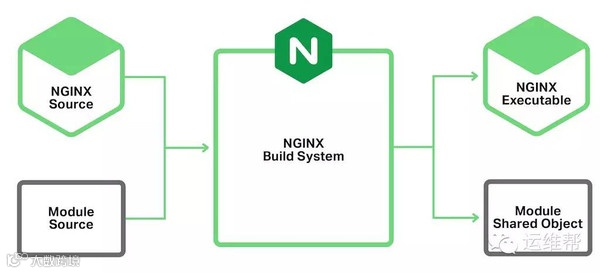
开发环境
sudo apt-get updatesudo apt-get install build-essential libpcre3-dev zlib1g-dev -y
nginx -vnginx version: nginx/1.14.0 (Ubuntu)
git clone -b release-1.14.0 --depth 1 https://github.com/nginx/nginx.git
auto/configure && make
-
auto/configure 脚本检查开发环境和所需依赖,生成 Makefile 脚本,如果有报错按提示修复后重试即可。 -
make 命令使用 Makefile 构建生成 nginx 可执行文件。 -
默认在代码仓库目录下新建一个名为 objs/ 的目录作为构建目录,构建脚本自动生成的相关文件和最终编译生成的 nginx 可执行文件也在该目录下。
objs/nginx -vnginx version: nginx/1.14.0
源码配置与目录结构
nginx/ # nginx 代码仓库├── auto/ # nginx 构建脚本目录└── src/ # nginx 源码目录, 其他文件夹暂未列出。nginx-hello-module/ # 模块源码目录├── config # 模块配置脚本, shell 脚本└── hello_module.c # 模块源码文件
# vim: set ft=sh et:ngx_addon_name=ngx_http_hello_modulengx_module_type=HTTPngx_module_name="$ngx_addon_name"ngx_module_srcs="$ngx_addon_dir/hello_module.c". auto/module
-
插件名 ngx_addon_name 和模块名 ngx_module_name 设置为 ngx_http_hello_module 。 -
模块类型 ngx_module_type 设置为 HTTP 。 -
源码文件列表 ngx_module_srcs 设置为 $ngx_addon_dir/hello_module.c。注意: 源码路径必须添加 $ngx_addon_dir/ 前缀,构建脚本才能正确找到源码文件。 -
语句 . auto/module 调用 nginx 提供的模块配置脚本,这条语句固定添加到 config 文件最后。
auto/configure --add-dynamic-module=../nginx-hello-module/
make modules
一个空模块
typedef struct ngx_module_s ngx_module_t;struct ngx_module_s {/* 私有字段 ... ... */void *ctx;ngx_command_t *commands;ngx_uint_t type;ngx_int_t (*init_master)(ngx_log_t *log);ngx_int_t (*init_module)(ngx_cycle_t *cycle);ngx_int_t (*init_process)(ngx_cycle_t *cycle);ngx_int_t (*init_thread)(ngx_cycle_t *cycle);void (*exit_thread)(ngx_cycle_t *cycle);void (*exit_process)(ngx_cycle_t *cycle);void (*exit_master)(ngx_cycle_t *cycle);/* 扩展备用字段 ... ... */};
-
模块类型 ngx_uint_t type 和模块类型特定的信息 void *ctx 。模块类型必须与 config 脚本配置的类型一致,本例即为 HTTP ,源码中用 NGX_HTTP_MODULE 表示。 -
模块提供的指令列表 ngx_command_t *commands 。列表以 ngx_null_command 结尾,列表可以为空 (仅包含一个 ngx_null_command 结尾标记) 。 -
其余为模块生命周期管理函数,可全部设置为 NULL 。
typedef struct {ngx_int_t (*preconfiguration)(ngx_conf_t *cf);ngx_int_t (*postconfiguration)(ngx_conf_t *cf);void *(*create_main_conf)(ngx_conf_t *cf);char *(*init_main_conf)(ngx_conf_t *cf, void *conf);void *(*create_srv_conf)(ngx_conf_t *cf);char *(*merge_srv_conf)(ngx_conf_t *cf, void *prev, void *conf);void *(*create_loc_conf)(ngx_conf_t *cf);char *(*merge_loc_conf)(ngx_conf_t *cf, void *prev, void *conf);} ngx_http_module_t;
extern ngx_module_t ngx_http_hello_module;
static ngx_http_module_t ngx_http_hello_module_ctx = {NULL, /* preconfiguration */NULL, /* postconfiguration */NULL, /* create main configuration */NULL, /* init main configuration */NULL, /* create server configuration */NULL, /* merge server configuration */NULL, /* create location configuration */NULL /* merge location configuration */};
static ngx_command_t ngx_http_hello_commands[] = {ngx_null_command};
ngx_module_t ngx_http_hello_module = {NGX_MODULE_V1,&ngx_http_hello_module_ctx, /* module context */ngx_http_hello_commands, /* module directives */NGX_HTTP_MODULE, /* module type */NULL, /* init master */NULL, /* init module */NULL, /* init process */NULL, /* init thread */NULL, /* exit thread */NULL, /* exit process */NULL, /* exit master */NGX_MODULE_V1_PADDING};
测试运行 nginx
# vim: set ft=nginx et:daemon off; # default onpid objs/nginx.pid;error_log stderr notice;load_module objs/ngx_http_hello_module.so;events {}http {access_log objs/access.log;server {listen 8080 default_server;return 200 "test\n";}}
-
daemon off; 设置 nginx 进程不要后台化,保持前台运行,按 Ctrl+C 即可退出 nginx 。 -
error_log stderr notice; 错误日志直接输出到终端,方便测试运行时查看错误日志,设置日志级别为 notice 。 -
load_module objs/ngx_http_hello_module.so; 加载我们开发的动态模块 ngx_http_hello_module.so 。 -
listen 8080 default_server; HTTP 服务器监听 8080 端口,这样使用普通用户即可运行测试。 -
return 200 "test\n"; HTTP 请求直接返回 "test" 字符串。
objs/nginx -p "$PWD" -c objs/nginx.conf-
-p "$PWD" 设置 nginx prefix 为当前目录。配置文件路径和配置文件中使用的相对路径使用相对于 prefix 的路径。 -
-c objs/nginx.conf 设置配置文件路径。
Nginx 配置指令 - 世界你好
创建配置存储结构体
static void*hello_create_main_conf(ngx_conf_t *cf){ngx_str_t *conf;conf = ngx_pcalloc(cf->pool, sizeof(ngx_str_t));if (conf == NULL) {return NULL;}return conf;}
-
从配置内存池 cf->pool 分配一个字符串 ngx_str_t, 分配结构体将初始化为 0, 对 ngx_str_t 即空字符串。 -
如果函数返回 NULL 则表示分配失败, nginx 将报错退出。
static ngx_http_module_t ngx_http_hello_module_ctx = {NULL, /* preconfiguration */NULL, /* postconfiguration */hello_create_main_conf, /* create main configuration */NULL, /* init main configuration */NULL, /* create server configuration */NULL, /* merge server configuration */NULL, /* create location configuration */NULL /* merge location configuration */};
创建指令
typedef struct ngx_command_s ngx_command_t;struct ngx_command_s {ngx_str_t name;ngx_uint_t type;char *(*set)(ngx_conf_t *cf, ngx_command_t *cmd, void *conf);ngx_uint_t conf;ngx_uint_t offset;void *post;};
-
name 指定指令名,如 hello 。 -
type 是一个混合结构,包含指令类型、指令使用位置、指令参数个数等多种特性信息。使用 NGX_HTTP_MAIN_CONF 表示指令可在 http 主配置使用,NGX_CONF_TAKE1 表示指令接受 1 个参数。 -
set 为指令处理函数,即 nginx 配置设置函数。 -
conf 指示保存配置结构体的位置。使用 NGX_HTTP_MAIN_CONF_OFFSET 表示指令配置在 http 主配置下存储生效。 -
offset 指示指令配置字段的位置。通常一个模块的配置是一个结构体,而一个指令的配置是其中一个字段,set 函数通过 offset 访问字段,这样不需要知道结构体的类型 (结构),就可以读写配置字段。模块只有一个配置项时,设置为 0 即可。 -
post 对特定处理函数可增加后置处理函数,或增加传入参数。通常不使用,设为 NULL 。
static char* hello(ngx_conf_t *cf, ngx_command_t *cmd, void *conf);
static ngx_command_t ngx_http_hello_commands[] = {{ ngx_string("hello"),NGX_HTTP_MAIN_CONF | NGX_CONF_TAKE1,hello,NGX_HTTP_MAIN_CONF_OFFSET,0,NULL },ngx_null_command};
编写指令处理函数
-
nginx 根据指令 type 字段设置的特性自动校验指令位置,参数个数等信息,并将指令语句解析为字符串数组 (类似 shell 命令行) ,保存到 cf->args ,再调用指令处理函数。 -
指令处理函数执行成功时返回 NGX_CONF_OK ,发生错误时返回错误消息。 -
为了简化和统一指令处理, nginx 预定义了许多标准指令处理函数,如 ngx_conf_set_str_slot() 将一个字符串参数解析保存为一个 ngx_str_t 配置项。 -
hello 指令可复用 ngx_conf_set_str_slot() 函数获取参数值,再添加额外逻辑打印 hello 语句。
static char*hello(ngx_conf_t *cf, ngx_command_t *cmd, void *conf){ngx_str_t *str = conf;char *rv;rv = ngx_conf_set_str_slot(cf, cmd, str);if (rv != NGX_CONF_OK) {return rv;}ngx_log_error(NGX_LOG_NOTICE, cf->log, 0, "HELLO %V", str);return NGX_CONF_OK;}
-
ngx_log_error() 是一个宏,最终将调用 ngx_log_error_core() 函数。 -
ngx_log_error() 第 3 个参数 err 表示系统错误码,无对应错误码时使用 0 。 -
nginx 未使用 C 标准库的 snprintf() 字符串格式化函数,而是自己实现了 ngx_snprintf() 函数,并自定义了类似的格式化字符串,其中 %V 表示输出 ngx_str_t * 指针指向的字符串。
hello Nginx;
objs/nginx -p "$PWD" -c objs/nginx.conf
HTTP 请求处理器
typedef ngx_int_t (*ngx_http_handler_pt)(ngx_http_request_t *r);
-
参数 r 为 HTTP 请求结构体。 -
返回值为 NGX_DECLINED 时,表示继续执行下一个处理器。 -
发生错误时,返回 HTTP 错误码,如服务器错误 500 NGX_HTTP_INTERNAL_SERVER_ERROR ,nginx 将立即返回请求。
static ngx_int_thello_handler(ngx_http_request_t *r){ngx_str_t * str = ngx_http_get_module_main_conf(r, ngx_http_hello_module);ngx_log_error(NGX_LOG_NOTICE, r->connection->log, 0, "HELLO %V, uri: %V", str, &r->uri);return NGX_DECLINED;}
static ngx_int_thello_init(ngx_conf_t *cf){ngx_http_handler_pt *h;ngx_http_core_main_conf_t *cmcf;cmcf = ngx_http_conf_get_module_main_conf(cf, ngx_http_core_module);h = ngx_array_push(&cmcf->phases[NGX_HTTP_POST_READ_PHASE].handlers);if (h == NULL) {return NGX_ERROR;}*h = hello_handler;return NGX_OK;}
static ngx_http_module_t ngx_http_hello_module_ctx = {NULL, /* preconfiguration */hello_init, /* postconfiguration */hello_create_main_conf, /* create main configuration */NULL, /* init main configuration */NULL, /* create server configuration */NULL, /* merge server configuration */NULL, /* create location configuration */NULL /* merge location configuration */};
objs/nginx -p "$PWD" -c objs/nginx.conf
2020/05/16 22:46:26 [notice] 7279
热更新 (reload)
hello "阿泉";
objs/nginx -p "$PWD" -c objs/nginx.conf -s reload
2020/05/16 23:09:31 [notice] 9617#0: HELLO 阿泉2020/05/16 23:09:31 [notice] 9617#0: signal process started
2020/05/16 23:09:31 [notice] 9384#0: signal 1 (SIGHUP) received from 9617, reconfiguring2020/05/16 23:09:31 [notice] 9384#0: reconfiguring2020/05/16 23:09:31 [notice] 9384#0: HELLO 阿泉# ... ...2020/05/16 23:09:31 [notice] 9384#0: start worker process 96232020/05/16 23:09:31 [notice] 9385#0: gracefully shutting down
2020/05/16 23:09:49 [notice] 9623#0: *3 HELLO 阿泉, uri: /, client: 127.0.0.1, server: , request: "GET / HTTP/1.1", host: "localhost:8080"
后浪
更多精彩

识别二维码观看直播

闲鱼靠什么支撑起万亿的交易规模?

蚂蚁mPaaS:有人修建高楼,有人重构城市


点此阅读作者更多好文!