


 作 者 | 虚镜
来 源 | 阿里云云原生团队
概述
Continuous Profiling 在软件开发生命周期的位置
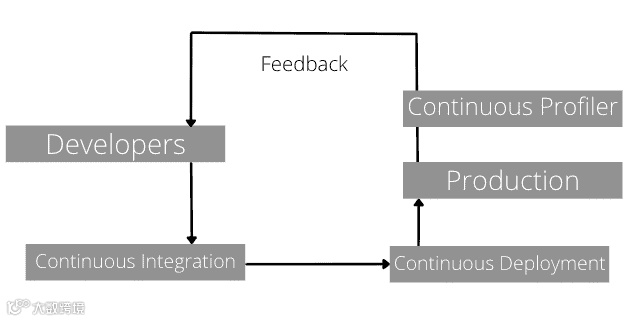
CI/CD 的概念非本文重点,不解释了。从上图可以看出。Continuous Profiling(持续性能分析,下文简称为 CP)是生产向开发进行反馈的非常重要的手段。
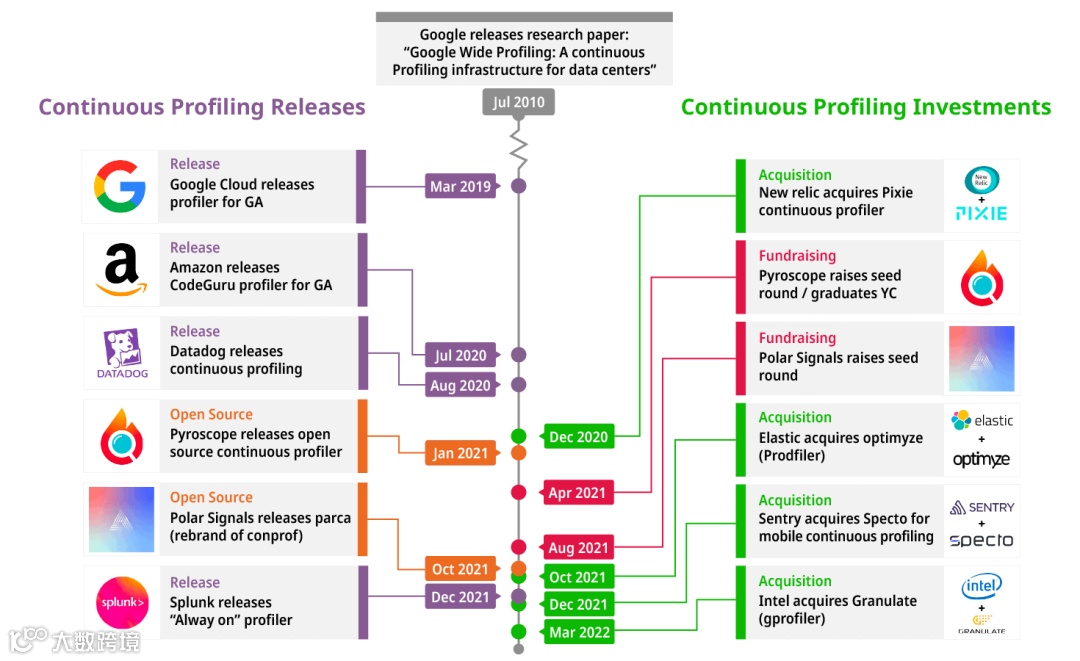
发展历史
CP 概念的起源于 Google 的论文[1]:
Google Wide Profiling:A continuous Profiling infrastucture for data centers
基本思路
Profiling 的基本思想
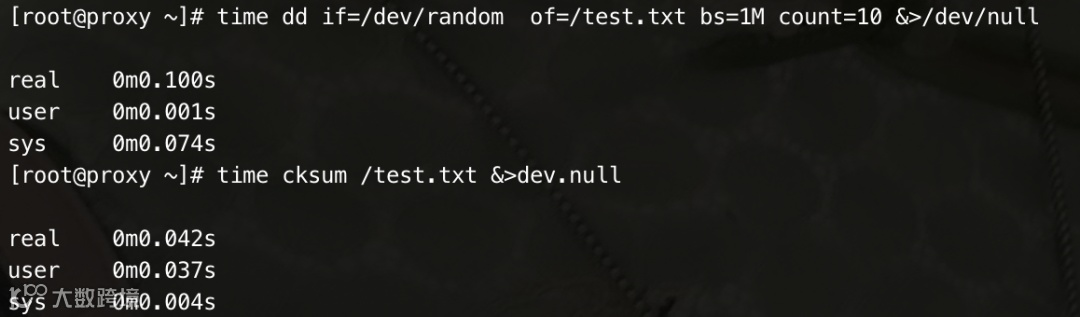
-
real:总消耗时间 -
user:用户态消耗时间 -
sys:内核态消耗时
-
程序在 CPU 上执行的时间(即 user CPU time + system CPU time)称为 CPU time(或 on-CPU time); -
程序处于睡眠等状态的时间称为 off-CPU time(or blocked time); -
程序实际运行的时间称为 wall clock time(挂钟时间);
-
对于 IO 密集型的 workload(负载),off-CPU time 是不能忽略的; -
对于 CPU 密集型 workload(负载),on-CPU time 基本和 wall clock time 相等;
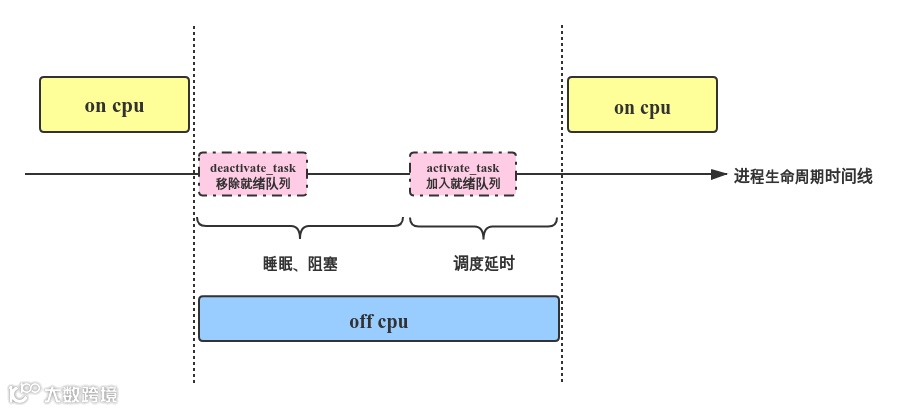
-
On-CPU: where threads are spending time running on-CPU. -
Off-CPU: where time is spent waiting while blocked on I/O, locks, timers, paging/swapping, etc.
可以看到 Off-CPU 分析类型是一系统结果的汇总统计,因此也可以将 Off-CPU 因为引起睡眠或者等待的原因不同,可以进一步划分为 file profiling,socket profiling,lock profiling 等等类型。
Continuous 的基本思想
理解 profiling
-
用户交互和可视化

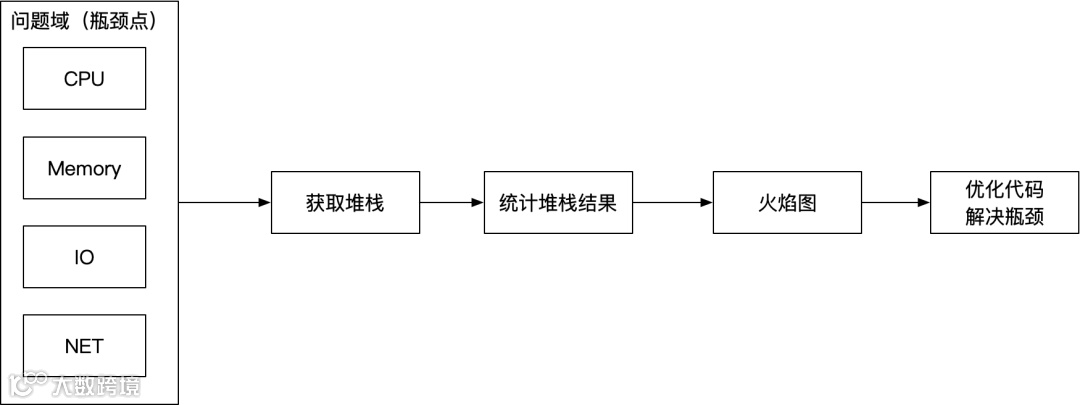
理解火焰图
-
在 cpu profiling 上,表达花费时间多少; -
在 alloc profling 上,表达成内存大小; -
......
         a();b();c() 1
a();b();d() 2
c();b() 3
常见的 Profiling Tools(生成堆栈数据)
-
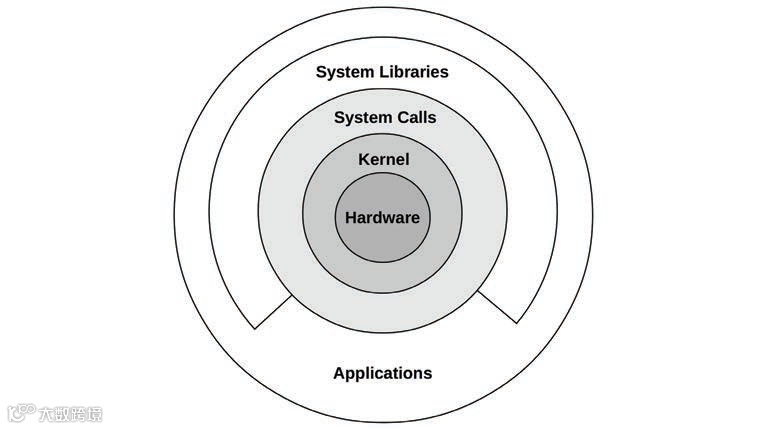
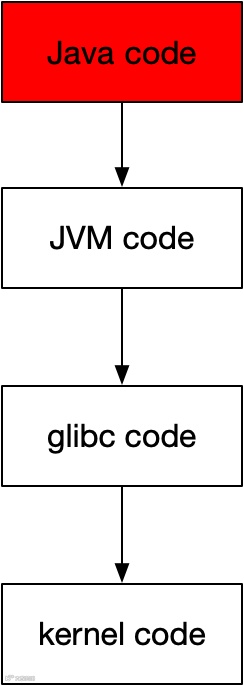
System Profile:which shows system code paths (eg, JVM GC, syscalls, TCP), but not Java methods.
-
language Profile:These show language methods(eg java method), but usually not system code paths.
-
JVM Profile -
golang Profile -
....
JVM Profiling
-
golang 内置 pprof[2]
-
java11 内置 JFR[3] -
其他高级语言有的有自身的工具,有的没有高级语言没有自身工具,这类通常可以借助 System Profiling Tools(如 perf 或者 ebpf)来实现性能分析。
-
java 开发者更关心 java 线程状态机而不是 JVM 进程的进程状态机; -
java 开发者更关心 java heap,stack,nio 等内存统计而不是 native heap,native stack 以及 rss,pagecache 的统计; -
java 开发者关心 CMS 或 G1 垃圾回收情况而不是 Page Reclaim; -
java 开发者更关心 synchronized,JUC 锁,而不是 OS 锁;
-
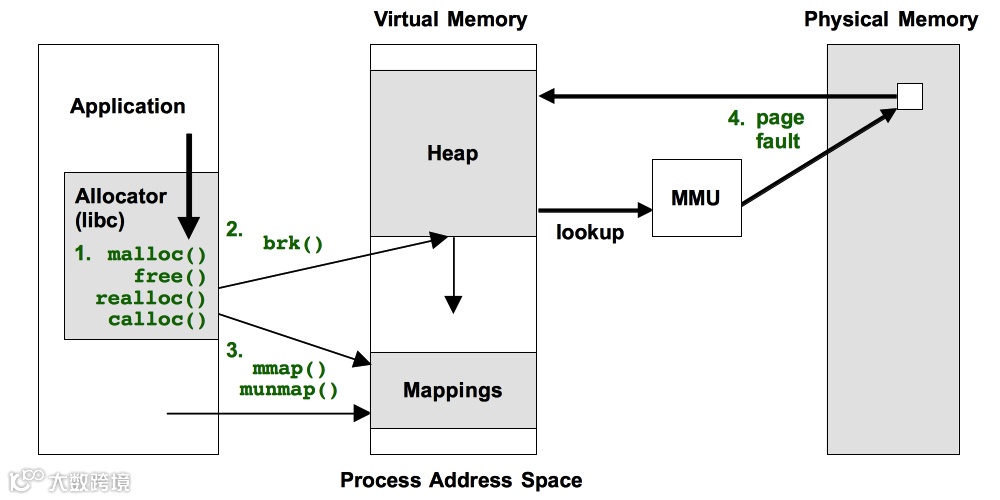
system alloc profiling 关心的是用户态内存分配器(malloc 分配器或者其他的)的分配速度;
-
JVM alloc profiling 关心的则是 TLAB 分配器的分配速度;
JVM Profiling Tools
-
Async-profiler[4]:
-
jetbrains IntelliJ IDEA[5] -
alibaba Arthas
-
JProfiler -
Honest profiler[6] -
Uber JVM Profiler[7] -
Fight Recorder[8]
-
JEP 349: JFR Event Streaming[9]
1. JFR
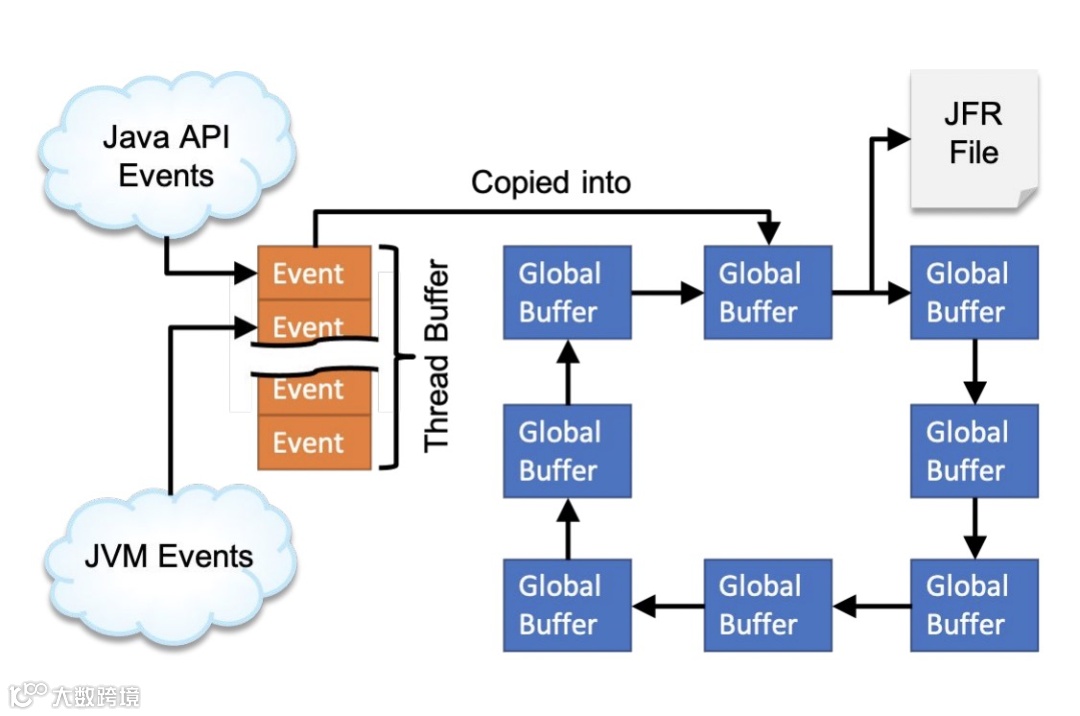
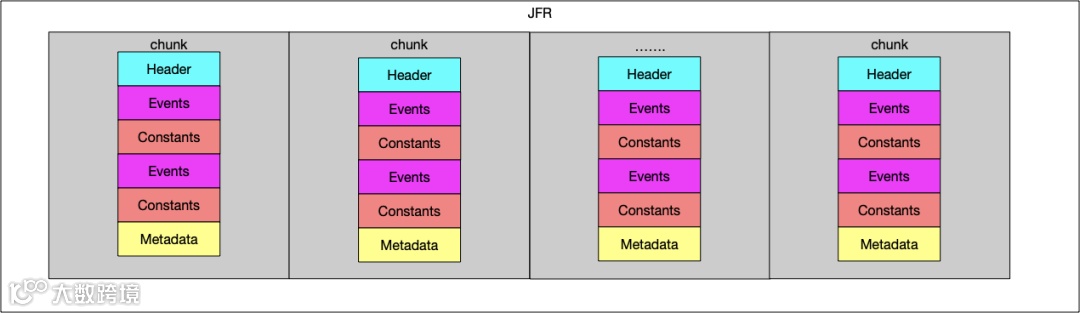
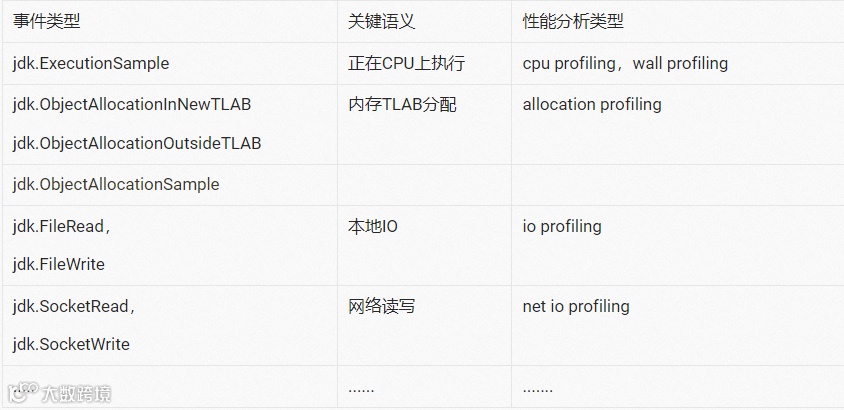
-
on cpu profiling -
alloc profiling -
lock profiling -
file read(write) profiling -
socket read(write) profiling -
......
Support lis
OpenJDK
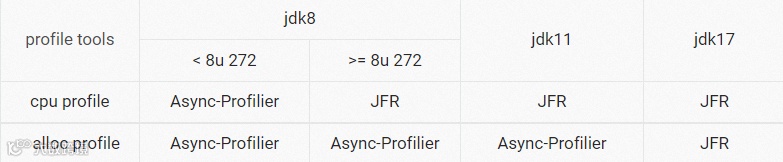
-
jdk8u272 以下的版本选择 Async-Profilier 和核心原因是没有 JFR 可用; -
jdk8u272 之后直到 jdk16 之前,JFR 实现的 alloc 相关事件的开销比较大,因此选择 Async-Profilier; -
其他情况,能用 JFR 都用 JFR
-
Oracle JDK

-
OracleJDK8 上 JFR 是商业特性,因此选择 Async-Profilier -
OracleJDK11 之后的版本的 JFR 是开源特性,alloc 选择 Async-Profilier 的原因一样是因为 JFR 实现的 alloc 相关事件的开销比较大,因此选择 Async-Profilier -
其他情况,能用 JFR 都用 JFR。
性能分析类型
-
CPU Time:全称 On-CPU Profiling In Java Code,统计 java 代码占用 CPU 时间; -
Allocations:统计 TLAB 分配次数 -
Allocated Memory:统计 TLAB 分配内存总量,单位 bytes;
产品的 roadmap 中后续会考虑搞 lock,file,socket 等等性能分析的能力,这中间的主要核心考量是每一种实现对应的 overhead 评估和实现约束情况。
OverHead
-
Async-profiler:官方未给出数据性结论,只是说开销很低; -
JFR:按照缺省配置,整体性能下降低于 2% 。[10]
-
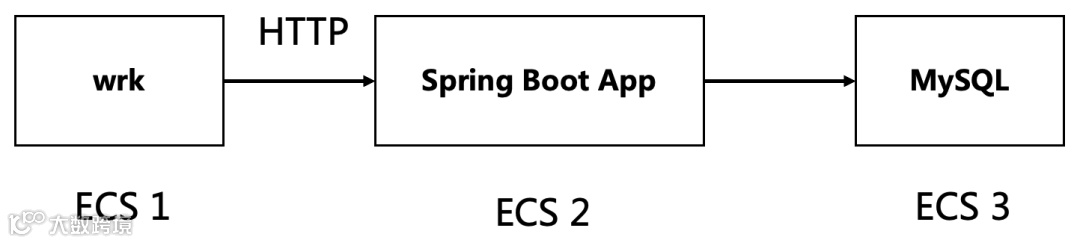
压力测试模型
-
压力测试客户端
JFR Alloc 依赖的两个 JFR Event 有非常严重的性能问题:
1. jdk.ObjectAllocationInNewTLAB 2. jdk.ObjectAllocationOutsideTLAB
因此本测试不包含 JFR Alloc;JFR 的这个问题直到 JAVA15 以后才得到解决。
最佳实践路径
-
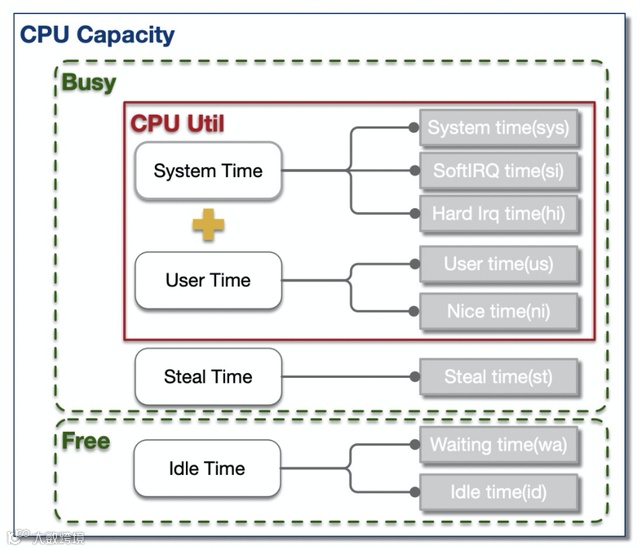
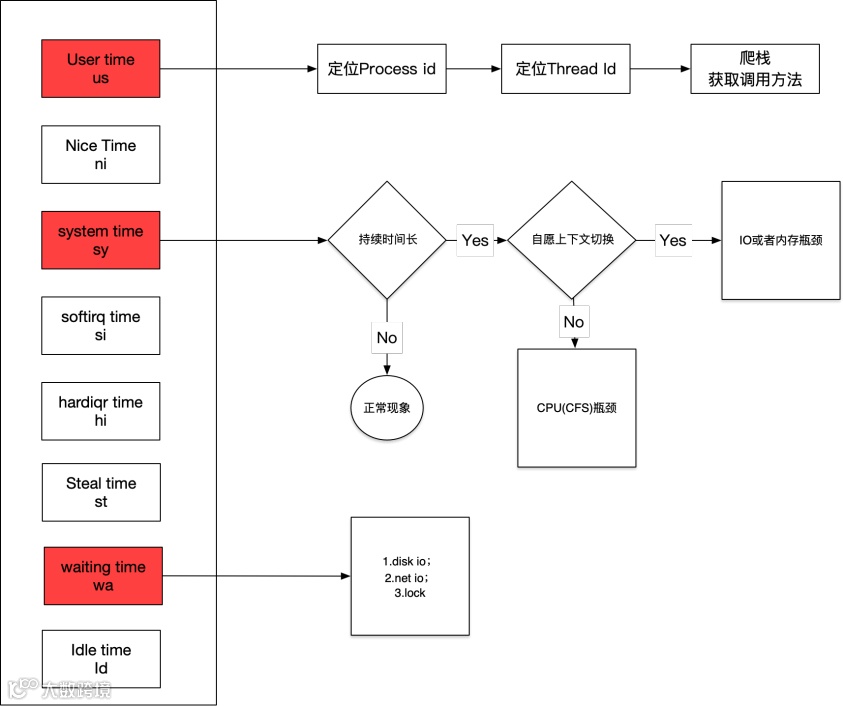
CPU 高排查路径

频繁 GC
                    85.013: [GC (Allocation Failure) [PSYoungGen: 29518K->3328K(36352K)] 47116K->21252K(123904K), 0.0065644 secs] [Times: user=0.02 sys=0.00, real=0.00 secs]
89.993: [GC (Allocation Failure) [PSYoungGen: 31736K->3328K(35840K)] 49660K->21260K(123392K), 0.0061679 secs] [Times: user=0.02 sys=0.00, real=0.00 secs]
94.062: [GC (Allocation Failure) [PSYoungGen: 31608K->3232K(36864K)] 49540K->21196K(124416K), 0.0070968 secs] [Times: user=0.02 sys=0.00, real=0.00 secs]
99.090: [GC (Allocation Failure) [PSYoungGen: 32934K->1344K(36864K)] 50898K->19332K(124416K), 0.0051987 secs] [Times: user=0.01 sys=0.00, real=0.01 secs]
103.114: [GC (Allocation Failure) [PSYoungGen: 29079K->2368K(37376K)] 47067K->20432K(124928K), 0.0056821 secs] [Times: user=0.01 sys=0.00, real=0.00 secs]
108.134: [GC (Allocation Failure) [PSYoungGen: 32528K->1344K(36864K)] 50592K->19464K(124416K), 0.0067361 secs] [Times: user=0.02 sys=0.00, real=0.00 secs]
113.086: [GC (Allocation Failure) [PSYoungGen: 31748K->3264K(37376K)] 49869K->21503K(124928K), 0.0059270 secs] [Times: user=0.02 sys=0.00, real=0.01 secs]
117.178: [GC (Allocation Failure) [PSYoungGen: 31709K->3328K(37376K)] 49948K->21591K(124928K), 0.0049904 secs] [Times: user=0.02 sys=0.01, real=0.01 secs]
121.192: [GC (Allocation Failure) [PSYoungGen: 32615K->3607K(37376K)] 50878K->21878K(124928K), 0.0076185 secs] [Times: user=0.01 sys=0.00, real=0.01 secs]
126.217: [GC (Allocation Failure) [PSYoungGen: 33278K->1312K(37376K)] 51549K->19615K(124928K), 0.0045188 secs] [Times: user=0.01 sys=0.00, real=0.00 secs]
131.159: [GC (Allocation Failure) [PSYoungGen: 32080K->3488K(37376K)] 50383K->21799K(124928K), 0.0046074 secs] [Times: user=0.01 sys=0.00, real=0.01 secs]
135.256: [GC (Allocation Failure) [PSYoungGen: 33274K->3488K(37376K)] 51585K->21807K(124928K), 0.0044789 secs] [Times: user=0.01 sys=0.00, real=0.00 secs]
140.276: [GC (Allocation Failure) [PSYoungGen: 33871K->1472K(37888K)] 52190K->19799K(125440K), 0.0043370 secs] [Times: user=0.01 sys=0.00, real=0.00 secs]
145.296: [GC (Allocation Failure) [PSYoungGen: 32925K->1472K(37888K)] 51252K->19799K(125440K), 0.0044817 secs] [Times: user=0.01 sys=0.01, real=0.00 secs]
150.321: [GC (Allocation Failure) [PSYoungGen: 32944K->1440K(37888K)] 51271K->19767K(125440K), 0.0041987 secs] [Times: user=0.01 sys=0.00, real=0.01 secs]
155.345: [GC (Allocation Failure) [PSYoungGen: 32896K->1472K(37888K)] 51223K->19799K(125440K), 0.0045417 secs] [Times: user=0.01 sys=0.00, real=0.00 secs]
160.374: [GC (Allocation Failure) [PSYoungGen: 33168K->1568K(37888K)] 51495K->19903K(125440K), 0.0051167 secs] [Times: user=0.01 sys=0.00, real=0.00 secs]
165.261: [GC (Allocation Failure) [PSYoungGen: 33469K->3616K(37888K)] 51804K->21959K(125440K), 0.0048307 secs] [Times: user=0.01 sys=0.01, real=0.01 secs]
170.286: [GC (Allocation Failure) [PSYoungGen: 35284K->3552K(37888K)] 53627K->21895K(125440K), 0.0143238 secs] [Times: user=0.03 sys=0.01, real=0.01 secs]
175.316: [GC (Allocation Failure) [PSYoungGen: 35008K->3584K(37888K)] 53351K->21927K(125440K), 0.0060600 secs] [Times: user=0.01 sys=0.00, real=0.00 secs]
180.338: [GC (Allocation Failure) [PSYoungGen: 35061K->3584K(37888K)] 53404K->21935K(125440K), 0.0044581 secs] [Times: user=0.01 sys=0.00, real=0.00 secs]
185.359: [GC (Allocation Failure) [PSYoungGen: 35044K->3584K(35840K)] 53395K->21935K(123392K), 0.0054453 secs] [Times: user=0.01 sys=0.00, real=0.01 secs]
190.384: [GC (Allocation Failure) [PSYoungGen: 35314K->3584K(37376K)] 53665K->21943K(124928K), 0.0050957 secs] [Times: user=0.01 sys=0.00, real=0.00 secs]
194.502: [GC (Allocation Failure) [PSYoungGen: 33085K->3584K(37376K)] 51444K->22007K(124928K), 0.0045832 secs] [Times: user=0.01 sys=0.00, real=0.01 secs]
199.526: [GC (Allocation Failure) [PSYoungGen: 33952K->1600K(37888K)] 52375K->20039K(125440K), 0.0051886 secs] [Times: user=0.01 sys=0.00, real=0.00 secs]