



大家好,我是Edison。
最近我一直在跟着圣杰的《.NET+AI智能体开发进阶》课程学习MAF的开发技巧,我强烈推荐你也上车跟我一起出发!
上一篇,我们学习了MAF中进行了Agent和Executor的混合编排,相信你一定有了更多地理解。本篇,我们来通过一个经典的例子了解下MAF中工作流如何实现状态的共享。
状态共享的应用场景
在实际业务场景中,一个AI工作流的多个步骤之间往往需要共享上下文数据,例如用户原始输入、模型的输出缓存等。在MAF中,提供了一个 WorkflowContext 的模型,它原生提供了工作流上下文的状态共享能力。举个例子,在下面这个聚合统计流程中,创建了一个FileContentState的共享内容通过WorkflowContext进行传递共享给后续的两个统计Executor使用,进而进行聚合输出结果。

WorkflowContext API一览
在WorkflowContext API中,它提供了以下一些状态读取和设置的接口,作为字典我们可以了解一下: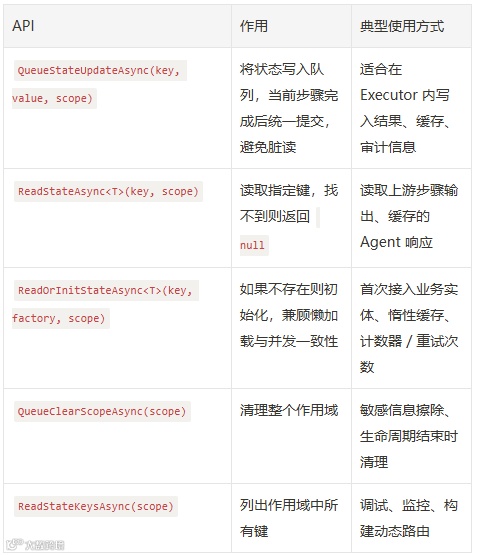
实验案例
今天来实践一个文档统计的工作流案例,和上面的例子相似: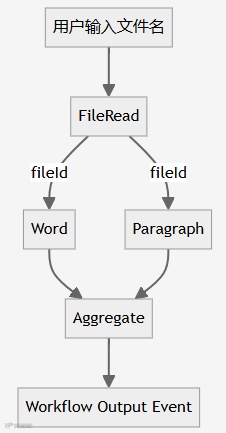
准备工作
在今天的这个案例中,我们仍然创建了一个.NET控制台应用程序,安装了以下NuGet包:-
Microsoft.Agents.AI.OpenAI -
Microsoft.Agents.AI.Workflows -
Microsoft.Extensions.AI.OpenAI
{"OpenAI": {"EndPoint": "https://api.siliconflow.cn","ApiKey": "******************************","ModelId": "Qwen/Qwen3-30B-A3B-Instruct-2507"}}
var config = new ConfigurationBuilder().AddJsonFile($"appsettings.json", optional: false, reloadOnChange: true).Build();var openAIProvider = config.GetSection("OpenAI").Get<OpenAIProvider>();
定义数据传输模型
首先,我们定义一下在这个工作流中需要生成传递的数据模型:
(1)FileStats :统计结果DTO
internal sealed class FileStats{public int WordCount { get; init; }public int ParagraphCount { get; init; }}
(2)FileContentStateConstants :常量,类似于Cache Key的作用
internal static class FileContentStateConstants{public const string ScopeName = "FileContentState";}
定义示例数据集
internal static class SharedStateSampleData{private static readonly IReadOnlyDictionary<string, string> Documents = new Dictionary<string, string>{["ProductBrief"] = "MAF Workflow 让 .NET 团队可以像积木一样组合 Agent、Executor 与工具, 支持流式事件、并发节点和可观测性。\n\n它强调企业级能力, 包括状态管理、依赖注入、权限控制, 适合搭建端到端 AI 业务流程。",["WeeklyReport"] = "本周平台完成了 Shared State 功能的代码走查, 已经覆盖 Fan-out/Fan-in, Loop, Human-in-the-Loop 三种场景。\n\n下周计划: 1) 集成多模型投票; 2) 增加异常回滚; 3) 落地监控指标。"};public static string GetDocument(string name)=> Documents.TryGetValue(name, out var content)? content: throw new ArgumentException($"未找到文档: {name}");}
文件读取Executor
internal sealed class FileReadExecutor() : Executor<string, string>("FileReadExecutor"){public override async ValueTask<string> HandleAsync(string message, IWorkflowContext context, CancellationToken cancellationToken = default){var content = SharedStateSampleData.GetDocument(message);var fileId = Guid.NewGuid().ToString("N");await context.QueueStateUpdateAsync(fileId, content,FileContentStateConstants.ScopeName, cancellationToken);Console.WriteLine($"📦 FileReadExecutor 已成功将 {message} 写入 Scope:{FileContentStateConstants.ScopeName}");return fileId;}}
在这个Executor中,接收了用户的输入文件名,然后模拟从Mock文档内容中读取文件内容,并将文件ID 和 文件内容 通过 QueueStateUpdateAsync 方法传入共享状态存储区中,以便后续节点在需要的时候可以从共享状态中读取传递的内容。
最后,将文件ID直接传递给下一个节点。
文字统计 和 段落统计Executor
internal sealed class WordCountingExecutor() : Executor<string, FileStats>("WordCountingExecutor"){public override async ValueTask<FileStats> HandleAsync(string fileId, IWorkflowContext context, CancellationToken cancellationToken = default){string? content = await context.ReadStateAsync<string>(fileId, FileContentStateConstants.ScopeName, cancellationToken);if (content is null){throw new InvalidOperationException($"无法在 Scope:{FileContentStateConstants.ScopeName} 中找到 fileId={fileId}");}int wordCount = content.Split([' ', '\n', '\r'], StringSplitOptions.RemoveEmptyEntries).Length;return new FileStats { WordCount = wordCount };}}
internal sealed class ParagraphCountingExecutor() : Executor<string, FileStats>("ParagraphCountingExecutor"){public override async ValueTask<FileStats> HandleAsync(string fileId, IWorkflowContext context, CancellationToken cancellationToken = default){string? content = await context.ReadStateAsync<string>(fileId, FileContentStateConstants.ScopeName, cancellationToken);if (content is null){throw new InvalidOperationException($"无法在 Scope:{FileContentStateConstants.ScopeName} 中找到 fileId={fileId}");}int paragraphCount = content.Split(['\n', '\r'], StringSplitOptions.RemoveEmptyEntries).Length;return new FileStats { ParagraphCount = paragraphCount };}}
聚合输出Executor
internal sealed class AggregationExecutor : Executor<FileStats>{private readonly AIAgent _aggregationAgent;private readonly AgentThread _thread;private readonly List<FileStats> _buffer = [];public AggregationExecutor(IChatClient chatClient) : base("AggregationExecutor"){// 创建 Agent 和对话线程this._aggregationAgent = chatClient.CreateAIAgent("你是一个专业的文档统计结果输出大师,你可以将收到的JSON格式统计结果(如总词数、总段落数 以及 统计时间等)进行友好的信息输出给用户。","output_agent","Output user friendly message based on input document stats result"); ;this._thread = this._aggregationAgent.GetNewThread();}public override async ValueTask HandleAsync(FileStats message, IWorkflowContext context, CancellationToken cancellationToken = default){this._buffer.Add(message);if (this._buffer.Count < 2){return;}int totalWords = this._buffer.Sum(x => x.WordCount);int totalParagraphs = this._buffer.Sum(x => x.ParagraphCount);var output = new{总词数 = totalWords,总段落数 = totalParagraphs,统计时间 = DateTimeOffset.UtcNow};var response = await this._aggregationAgent.RunAsync(JsonSerializer.Serialize(output), this._thread, cancellationToken: cancellationToken);await context.YieldOutputAsync(response.Text, cancellationToken);}}
构建工作流
Step1: 获取ChatClient
var chatClient = new OpenAIClient(new ApiKeyCredential(openAIProvider.ApiKey),new OpenAIClientOptions { Endpoint = new Uri(openAIProvider.Endpoint) }).GetChatClient(openAIProvider.ModelId).AsIChatClient();
Step2: 实例化自定义Agent & Executors
var fileRead = new FileReadExecutor();var wordCounting = new WordCountingExecutor();var paragraphCounting = new ParagraphCountingExecutor();var aggregate = new AggregationExecutor(chatClient);
Step3: 创建Fan-out/Fan-in工作流
var sharedStateWorkflow = new WorkflowBuilder(fileRead).AddFanOutEdge(fileRead, [wordCounting, paragraphCounting]).AddFanInEdge([wordCounting, paragraphCounting], aggregate).WithOutputFrom(aggregate).Build();Console.OutputEncoding = Encoding.UTF8;Console.WriteLine("✅ Shared State Workflow 构建完成");
Step4: 测试工作流
var documentKey = "ProductBrief";Console.WriteLine("━━━━━━━━━━━━━━━━━━━━━━━━━━━━━━━━━━");Console.WriteLine($"📂 演示文档: {documentKey}");Console.WriteLine("━━━━━━━━━━━━━━━━━━━━━━━━━━━━━━━━━━");await using (var run = await InProcessExecution.StreamAsync(sharedStateWorkflow, documentKey)){await foreach (WorkflowEvent evt in run.WatchStreamAsync()){switch (evt){case WorkflowStartedEvent started:Console.WriteLine($"🚀 Workflow Started");break;case ExecutorCompletedEvent executorCompleted:Console.WriteLine($"✅ {executorCompleted.ExecutorId} 完成");break;case WorkflowOutputEvent outputEvent:Console.WriteLine("━━━━━━━━━━━━━━━━━━━━━━━━━━━━━━━━━━━━━━━━━━━━━━");Console.WriteLine("🎉 工作流执行完成");Console.WriteLine("━━━━━━━━━━━━━━━━━━━━━━━━━━━━━━━━━━━━━━━━━━━━━━\n");Console.WriteLine($"{outputEvent.Data}");break;case WorkflowErrorEvent errorEvent:Console.WriteLine("✨ 收到 Workflow Error Event:");Console.WriteLine($"{errorEvent.Data}");break;default:break;}}await run.DisposeAsync();}
测试结果如下图所示:
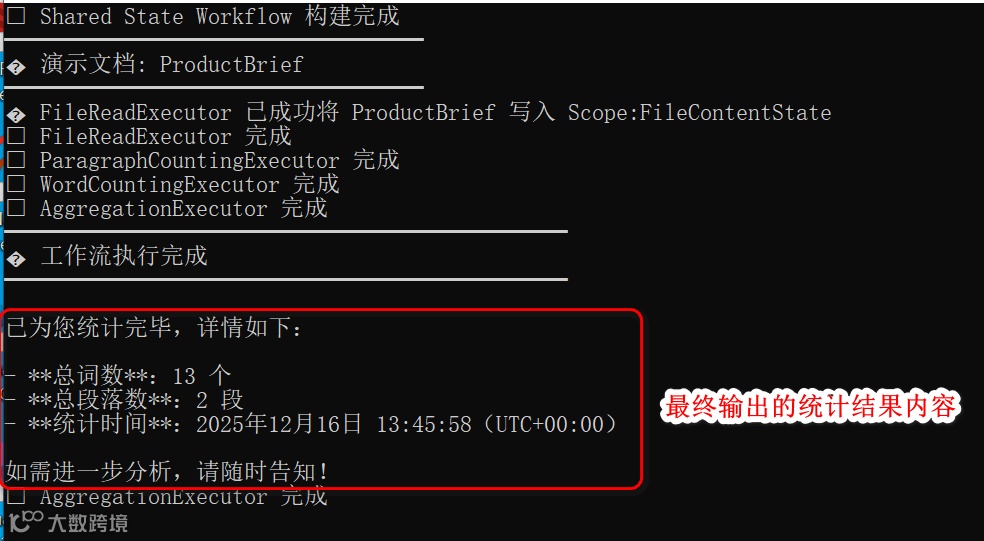
可以看见,经过多个节点的统计和聚合,由LLM总结输出了用户友好的统计结果内容。
小结
