


SSPR:移动端友好的平面反射技术解析
SSPR 原理与优势
在 Unity 2022 与 URP 14.0 环境下,屏幕空间反射(SSR)虽能实现高质量反射效果,但其依赖 color buffer、depth buffer 和 normal buffer,并需在 GPU 中执行 raymarching,计算开销较大。
为优化性能,针对水面等平面场景,提出了一种无需 raymarching 的替代方案——屏幕空间平面反射(Screen Space Planar Reflection, SSPR)。与 SSR 通过法线缓冲计算反射方向不同,SSPR 利用着色点的世界坐标与已知平面高度直接推导反射点坐标,大幅降低计算复杂度。
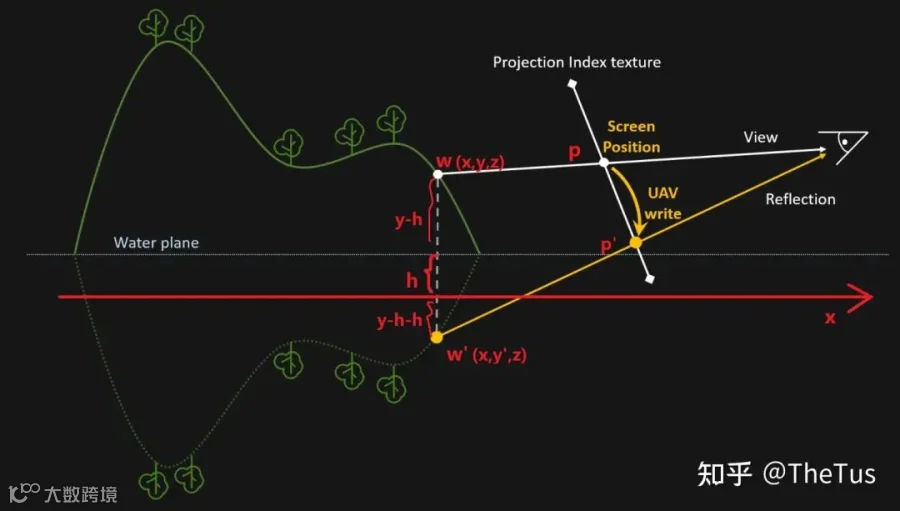
其核心流程如下:
- 通过深度缓冲重建当前着色点的世界坐标
- 根据平面反射公式计算反射点的世界坐标
- 将反射点坐标投影至裁剪空间并转换为 UV 坐标
- 将着色点颜色写入反射点对应位置
最终,水面材质通过屏幕 UV 采样生成的反射纹理实现动态反射效果。该过程采用无序访问视图(UAV)实现“随机写入”,避免重复计算,提升效率。
常见问题与解决方案
渲染顺序错误:基础实现中可能出现像素闪烁现象,主视图中两个不同像素可能映射至同一反射位置(并发共点反射),导致深度冲突。同时,主视角遮挡的物体在反射中可能可见,但因无对应像素信息造成反射缺失。
解决方案为引入 HeightBuffer,仅当着色点高度低于当前反射缓冲中对应位置时才更新颜色与深度值,确保反射可见性一致性。
// 高度测试,每次只写入更低的颜色if(wpos.y > HeightBuffer[reflectID]) return;Write into ColorBufferWrite into HepthBuffer
边缘缺失:当反射所需内容超出相机视野范围时,会出现大块空白区域。可通过边缘 UV 拉伸技术缓解,结合高度差、视角角度与屏幕位置动态调整投影 UV。
float HeightStretch = (PosWS.z – WaterHeight);float AngleStretch = saturate(- CameraDirection.z);float ScreenStretch = saturate(abs(ReflPosUV.x * 2 - 1) – Threshold);ReflPosUV.x *= 1 + HeightStretch * AngleStretch * ScreenStretch * Intensity;
反射空洞:由于透视投影的“近大远小”特性,反射点映射可能出现像素偏移,导致部分纹理索引未被写入,形成空洞。可通过在计算着色器中对周围有效像素进行采样填补来修复。
遮挡错误:被遮挡物体表面可能出现遮挡物的反射投影,源于屏幕空间信息丢失问题。此问题在 SSR 中同样存在,可通过噪声扰动等方式轻微缓解。
总结
相较于 SSR,SSPR 在性能上有显著提升,尤其适用于移动端和平面反射场景。然而其精度较低,且受限于平面假设,无法处理复杂曲面反射,同时仍面临屏幕空间技术共有的信息丢失问题。
RendererFeature 实现
通过自定义 ScriptableRendererFeature 在透明物体渲染后注入 SSPR 渲染通道。在相机初始化时向 ComputeShader 传递参数,并在 Execute 阶段调度计算任务,生成反射纹理并设置为全局变量供后续采样使用。
using System;using UnityEngine;using UnityEngine.Experimental.Rendering;using UnityEngine.Rendering;using UnityEngine.Rendering.Universal;namespace SSPR{[Serializable]internal class SSPRSettings{[SerializeField] internal int RTSize = 512;[SerializeField] internal float ReflectHeight = 0.2f;[SerializeField] [Range(0.0f, 0.1f)] internal float StretchIntensity = 0.1f;[SerializeField] [Range(0.0f, 1.0f)] internal float StretchThreshold = 0.3f;[SerializeField] internal float EdgeFadeOut = 0.6f;internal int GroupThreadX;internal int GroupThreadY;internal int GroupX;internal int GroupY;}[DisallowMultipleRendererFeature("SSPR")]public class SSPR : ScriptableRendererFeature{[SerializeField] private SSPRSettings mSettings = new SSPRSettings();private const string mComputeShaderName = "SSPR";private SSPRPass mRenderPass;private ComputeShader mComputeShader;public override void Create() {if (mRenderPass == null) {mRenderPass = new SSPRPass();mRenderPass.renderPassEvent = RenderPassEvent.AfterRenderingTransparents;}}public override void AddRenderPasses(ScriptableRenderer renderer, ref RenderingData renderingData) {if (renderingData.cameraData.postProcessEnabled) {if (!GetComputeShaders()) {Debug.LogErrorFormat("{0}.AddRenderPasses(): Missing computeShader. {1} render pass will not be added.", GetType().Name, name);return;}bool shouldAdd = mRenderPass.Setup(ref mSettings, ref mComputeShader);if (shouldAdd)renderer.EnqueuePass(mRenderPass);}}protected override void Dispose(bool disposing) {mRenderPass?.Dispose();mRenderPass = null;}private bool GetComputeShaders() {if (mComputeShader == null)mComputeShader = (ComputeShader)Resources.Load(mComputeShaderName);return mComputeShader != null;}class SSPRPass : ScriptableRenderPass{private SSPRSettings mSettings;private ComputeShader mComputeShader;private int mSSPRKernelID, mFillHoleKernelID;private string mSSPRKernelName = "SSPR",mFillHoleKernelName = "FillHole";private ProfilingSampler mProfilingSampler = new ProfilingSampler("SSPR");private RenderTextureDescriptor mSSPRReflectionDescriptor;private RTHandle mCameraColorTexture;private RTHandle mCameraDepthTexture;private static readonly int mReflectPlaneHeihgtID = Shader.PropertyToID("_ReflectPlaneHeight"),mRTSizeID = Shader.PropertyToID("_SSPRReflectionSize"),mSSPRReflectionTextureID = Shader.PropertyToID("_SSPRReflectionTexture"),mCameraColorTextureID = Shader.PropertyToID("_CameraColorTexture"),mCameraDepthTextureID = Shader.PropertyToID("_CameraDepthTexture"),mSSPRHeightBufferID = Shader.PropertyToID("_SSPRHeightBuffer"),mCameraDirectionID = Shader.PropertyToID("_CameraDirection"),mStretchParamsID = Shader.PropertyToID("_StretchParams"),mEdgeFadeOutID = Shader.PropertyToID("_EdgeFadeOut");private const string mSSPRReflectionTextureName = "_SSPRReflectionTexture",mSSPRHeightTextureName = "_SSPRHeightBufferTexture";private RTHandle mSSPRReflectionTexture;private RTHandle mSSPRHeightTexture;internal SSPRPass() {mSettings = new SSPRSettings();}internal bool Setup(ref SSPRSettings featureSettings, ref ComputeShader computeShader) {mComputeShader = computeShader;mSettings = featureSettings;ConfigureInput(ScriptableRenderPassInput.Normal);return mComputeShader != null;}public override void OnCameraSetup(CommandBuffer cmd, ref RenderingData renderingData) {var renderer = renderingData.cameraData.renderer;ConfigureTarget(renderer.cameraColorTargetHandle);ConfigureClear(ClearFlag.None, Color.white);mCameraColorTexture = renderer.cameraColorTargetHandle;mCameraDepthTexture = renderer.cameraDepthTargetHandle;float aspect = (float)Screen.height / Screen.width;mSettings.GroupThreadX = 8;mSettings.GroupThreadY = 8;mSettings.GroupY = Mathf.RoundToInt((float)mSettings.RTSize / mSettings.GroupThreadY);mSettings.GroupX = Mathf.RoundToInt(mSettings.GroupY / aspect);mSSPRReflectionDescriptor = new RenderTextureDescriptor(mSettings.GroupThreadX * mSettings.GroupX, mSettings.GroupThreadY * mSettings.GroupY, RenderTextureFormat.BGRA32, 0, 0);mSSPRReflectionDescriptor.enableRandomWrite = true;RenderingUtils.ReAllocateIfNeeded(ref mSSPRReflectionTexture, mSSPRReflectionDescriptor, FilterMode.Bilinear, TextureWrapMode.Clamp, name: mSSPRReflectionTextureName);mSSPRReflectionDescriptor.colorFormat = RenderTextureFormat.RFloat;RenderingUtils.ReAllocateIfNeeded(ref mSSPRHeightTexture, mSSPRReflectionDescriptor, FilterMode.Bilinear, TextureWrapMode.Clamp, name: mSSPRHeightTextureName);mSSPRKernelID = mComputeShader.FindKernel(mSSPRKernelName);mComputeShader.SetFloat(mReflectPlaneHeihgtID, mSettings.ReflectHeight);mComputeShader.SetVector(mRTSizeID, new Vector4(mSSPRReflectionDescriptor.width, mSSPRReflectionDescriptor.height, 1.0f / (float)mSSPRReflectionDescriptor.width, 1.0f / (float)mSSPRReflectionDescriptor.height));mComputeShader.SetTexture(mSSPRKernelID, mSSPRReflectionTextureID, mSSPRReflectionTexture);mComputeShader.SetTexture(mSSPRKernelID, mSSPRHeightBufferID, mSSPRHeightTexture);mComputeShader.SetTexture(mSSPRKernelID, mCameraColorTextureID, mCameraColorTexture);mComputeShader.SetTexture(mSSPRKernelID, mCameraDepthTextureID, mCameraDepthTexture);mComputeShader.SetVector(mCameraDirectionID, renderingData.cameraData.camera.transform.forward);mComputeShader.SetVector(mStretchParamsID, new Vector4(mSettings.StretchIntensity, mSettings.StretchThreshold, 0.0f, 0.0f));mComputeShader.SetFloat(mEdgeFadeOutID, mSettings.EdgeFadeOut);mFillHoleKernelID = mComputeShader.FindKernel(mFillHoleKernelName);mComputeShader.SetTexture(mFillHoleKernelID, mSSPRReflectionTextureID, mSSPRReflectionTexture);}public override void Execute(ScriptableRenderContext context, ref RenderingData renderingData) {if (mComputeShader == null) {Debug.LogErrorFormat("{0}.Execute(): Missing computeShader. SSPR pass will not execute. Check for missing reference in the renderer resources.", GetType().Name);return;}var cmd = CommandBufferPool.Get();context.ExecuteCommandBuffer(cmd);cmd.Clear();using (new ProfilingScope(cmd, mProfilingSampler)) {cmd.DispatchCompute(mComputeShader, mSSPRKernelID, mSettings.GroupX, mSettings.GroupY, 1);cmd.DispatchCompute(mComputeShader, mFillHoleKernelID, mSettings.GroupX / 2, mSettings.GroupY / 2, 1);cmd.SetGlobalTexture(mSSPRReflectionTextureID, mSSPRReflectionTexture);cmd.SetGlobalVector(mRTSizeID, new Vector4(mSSPRReflectionDescriptor.width, mSSPRReflectionDescriptor.height, 1.0f / (float)mSSPRReflectionDescriptor.width, 1.0f / (float)mSSPRReflectionDescriptor.height));}context.ExecuteCommandBuffer(cmd);CommandBufferPool.Release(cmd);}public override void OnCameraCleanup(CommandBuffer cmd) {mCameraColorTexture = null;}public void Dispose() {mSSPRReflectionTexture?.Release();mSSPRReflectionTexture = null;mSSPRHeightTexture?.Release();mSSPRHeightTexture = null;}}}}基础SSPR实现
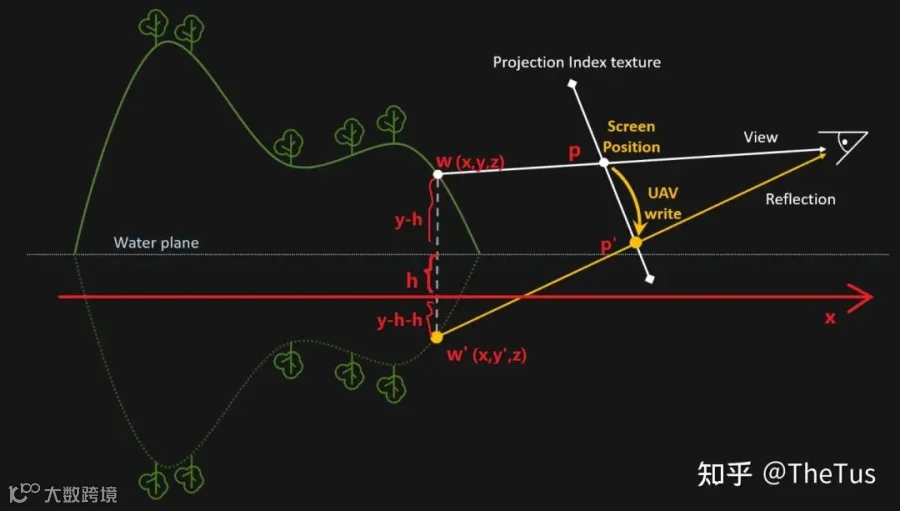
SSPR(Screen Space Planar Reflection)是一种在屏幕空间中实现平面反射的技术。其基本实现流程如下:
- 将线程ID(SV_DispatchThreadID)转换为屏幕UV坐标
- 利用深度缓冲重建当前像素的世界坐标
- 计算该世界坐标关于反射平面的对称点
- 将反射点投影至裁剪空间并转换为UV坐标
- 将原像素颜色写入反射纹理的对应位置
#include "Packages/com.unity.render-pipelines.universal/ShaderLibrary/Core.hlsl"#pragma kernel SSPRRWTexture2D<half4> _SSPRReflectionTexture;Texture2D<float4> _CameraColorTexture;Texture2D<float4> _CameraDepthTexture;SAMPLER(sampler_CameraDepthTexture);SAMPLER(sampler_CameraColorTexture);float4 _SSPRReflectionSize;float _ReflectPlaneHeight;[numthreads(8,8,1)]void SSPR(uint3 id : SV_DispatchThreadID) {_SSPRReflectionTexture[id.xy] = half4(0.0, 0.0, 0.0, 0.0);float2 uv = id.xy * _SSPRReflectionSize.zw;float depth = _CameraDepthTexture.SampleLevel(sampler_CameraDepthTexture, uv, 0).r;float3 wpos = ComputeWorldSpacePosition(uv, depth, UNITY_MATRIX_I_VP);if (wpos.y < _ReflectPlaneHeight) return;float3 rwpos = wpos;rwpos.y = -rwpos.y + 2 * _ReflectPlaneHeight;float4 rcpos = TransformWorldToHClip(rwpos);float2 ruv = float2(rcpos.x, rcpos.y * _ProjectionParams.x) * rcp(rcpos.w) * 0.5 + 0.5;if (any(ruv) < 0.0 || any(ruv) > 1.0) return;float2 ridx = ruv * _SSPRReflectionSize.xy;half4 col = _CameraColorTexture.SampleLevel(_CameraColorTexture, uv, 0);_SSPRReflectionTexture[ridx] = col;}
随后,在水面Shader中采样生成的反射纹理即可呈现反射效果。
Shader "My Shader/SSPRReflector" {Properties {}SubShader {Tags {"RenderPipeline" = "UniversalPipeline""Queue" = "Overlay"}Pass {Name "SSPR Reflector Pass"HLSLPROGRAM#include "Packages/com.unity.render-pipelines.universal/ShaderLibrary/Core.hlsl"#include "SSPRReflectorPass.hlsl"#pragma vertex SSPRReflectorPassVertex#pragma fragment SSPRReflectorPassFragmentENDHLSL}}}#ifndef _SSPRREFLECTOR_PASS_INCLUDED#define _SSPRREFLECTOR_PASS_INCLUDEDstruct Attributes {float4 positionOS : POSITION;};struct Varyings {float4 positionCS : SV_POSITION;float4 positionNDC : TEXCOORD0;};TEXTURE2D(_SSPRReflectionTexture);SAMPLER(sampler_SSPRReflectionTexture)Varyings SSPRReflectorPassVertex(Attributes input) {Varyings output;VertexPositionInputs vertexInputs = GetVertexPositionInputs(input.positionOS.xyz);output.positionCS = vertexInputs.positionCS;output.positionNDC = vertexInputs.positionNDC;return output;}half4 SSPRReflectorPassFragment(Varyings input) : SV_Target {float2 suv = input.positionNDC.xy / input.positionNDC.w;half3 finalCol = SAMPLE_TEXTURE2D(_SSPRReflectionTexture, sampler_SSPRReflectionTexture, suv);return half4(finalCol, 1.0);}#endif
此时可观察到基础SSPR效果,但存在明显瑕疵。
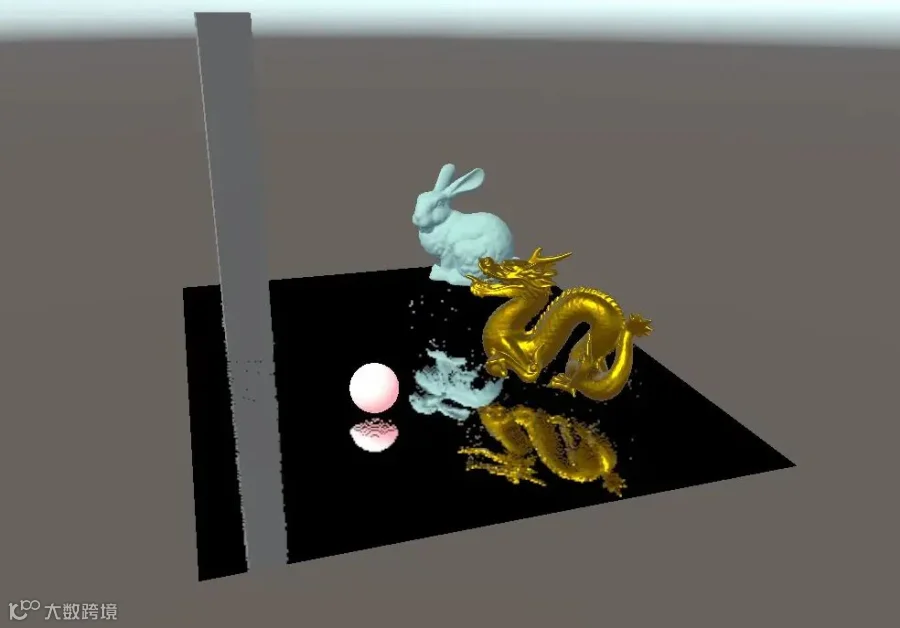
高度顺序写入优化
为解决反射图像中因写入顺序导致的错乱问题,引入HeightBuffer记录反射纹理中各像素对应的世界高度,并仅允许较低高度的像素覆盖原有值。
#include "Packages/com.unity.render-pipelines.universal/ShaderLibrary/Core.hlsl"RWTexture2D<half4> _SSPRReflectionTexture;RWTexture2D<float> _SSPRHeightBuffer;Texture2D<float4> _CameraColorTexture;Texture2D<float4> _CameraDepthTexture;SAMPLER(sampler_CameraDepthTexture);SAMPLER(sampler_CameraColorTexture);float4 _SSPRReflectionSize;float _ReflectPlaneHeight;#pragma kernel SSPR[numthreads(8,8,1)]void SSPR(uint3 id : SV_DispatchThreadID) {_SSPRReflectionTexture[id.xy] = half4(0.0, 0.0, 0.0, 0.0);_SSPRHeightBuffer[id.xy] = HALF_MAX;float2 uv = id.xy * _SSPRReflectionSize.zw;float depth = _CameraDepthTexture.SampleLevel(sampler_CameraDepthTexture, uv, 0).r;float3 wpos = ComputeWorldSpacePosition(uv, depth, UNITY_MATRIX_I_VP);if (wpos.y < _ReflectPlaneHeight) return;float3 rwpos = wpos;rwpos.y = -rwpos.y + 2 * _ReflectPlaneHeight;float4 rcpos = TransformWorldToHClip(rwpos);float2 ruv = float2(rcpos.x, rcpos.y * _ProjectionParams.x) * rcp(rcpos.w) * 0.5 + 0.5;if (any(ruv) < 0.0 || any(ruv) > 1.0) return;float2 rid = ruv * _SSPRReflectionSize.xy;if (wpos.y > _SSPRHeightBuffer[rid]) return;_SSPRHeightBuffer[rid] = wpos.y;_SSPRReflectionTexture[rid] = _CameraColorTexture.SampleLevel(sampler_CameraColorTexture, uv, 0);}
通过此优化可有效解决反射图像中的重叠错乱问题。
边缘缺失修复
由于屏幕空间信息有限,反射在画面边缘常出现缺失。参考《Ghost Recon Wildlands》中的技术方案,通过对边缘UV进行拉伸扩展反射覆盖范围。
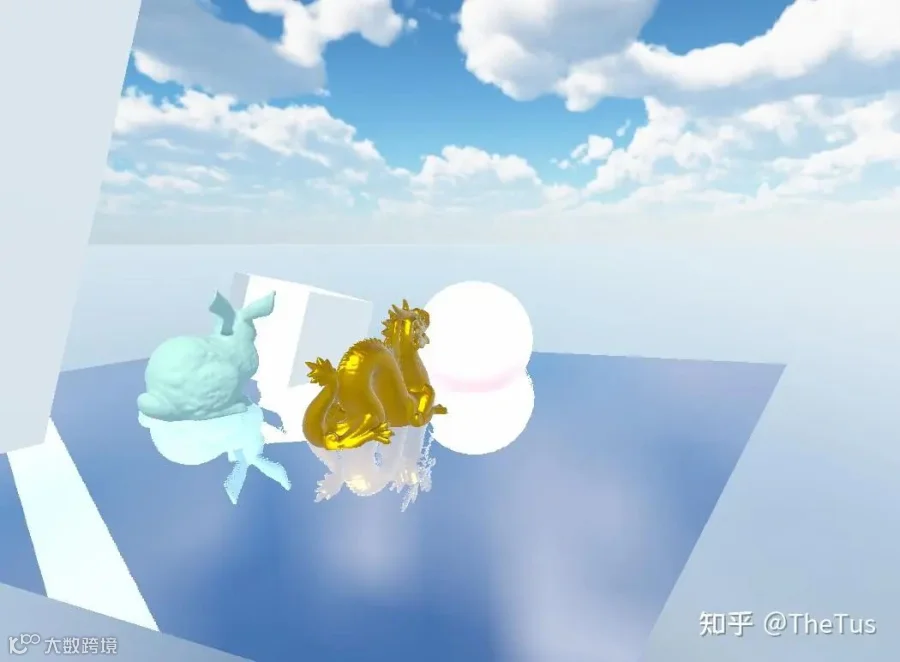
具体实现中,引入高度、屏幕位置和视角角度三个因素综合计算拉伸强度:
- 高度差越大,拉伸越强
- 越靠近屏幕边缘,拉伸越强
- 视角越垂直水面,拉伸越弱
...if (any(ruv) < 0.0 || any(ruv) > 1.0) return;float HeightStretch = abs(rwpos.y - _ReflectPlaneHeight);float ScreenStretch = saturate(abs(ruv.x * 2.0 - 1.0) - STRETCHTHRESHOLD);float AngleStretch = saturate(-_CameraDirection.z);ruv.x = ruv.x * 2.0 - 1.0;ruv.x *= 1 + saturate(1 - abs(HeightStretch * AngleStretch * ScreenStretch)) * STRETCHINTENSITY;ruv.x = saturate(ruv.x * 0.5 + 0.5);float2 rid = ruv * _SSPRReflectionSize.xy;if (wpos.y >= _SSPRHeightBuffer[rid]) return;....
屏幕空间平面反射(SSPR)技术优化方案解析
边缘UV拉伸与反射淡化处理
传统的边缘UV拉伸方法效果有限,仅对低入射角区域的UV产生作用,且视觉效果不理想。为改善反射边缘质量,可采用SDF(有符号距离场)计算像素与屏幕边缘的距离,并将其作为Alpha遮罩写入反射纹理。在Shader采样时,依据Alpha值对反射颜色进行渐变淡化,从而实现更自然的过渡效果。
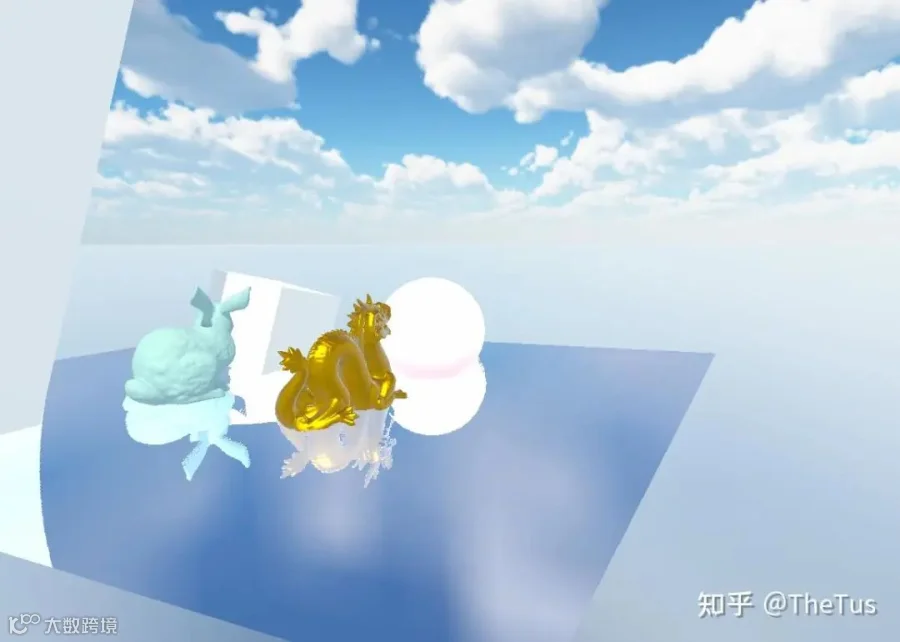
Stretch
float SdfCube(float2 pos) {float2 dis = abs(pos) - float2(1, 1);return length(max(dis, 0.0)) - min(max(dis.x, dis.y), 0.0);}...float mask = SdfCube(uv * 2.0 - 1.0);mask = Smootherstep(0, _EdgeFadeOut, abs(mask));_SSPRHeightBuffer[rid] = wpos.y;_SSPRReflectionTexture[rid] = float4(_CameraColorTexture.SampleLevel(sampler_CameraColorTexture, uv, 0).rgb, mask);...
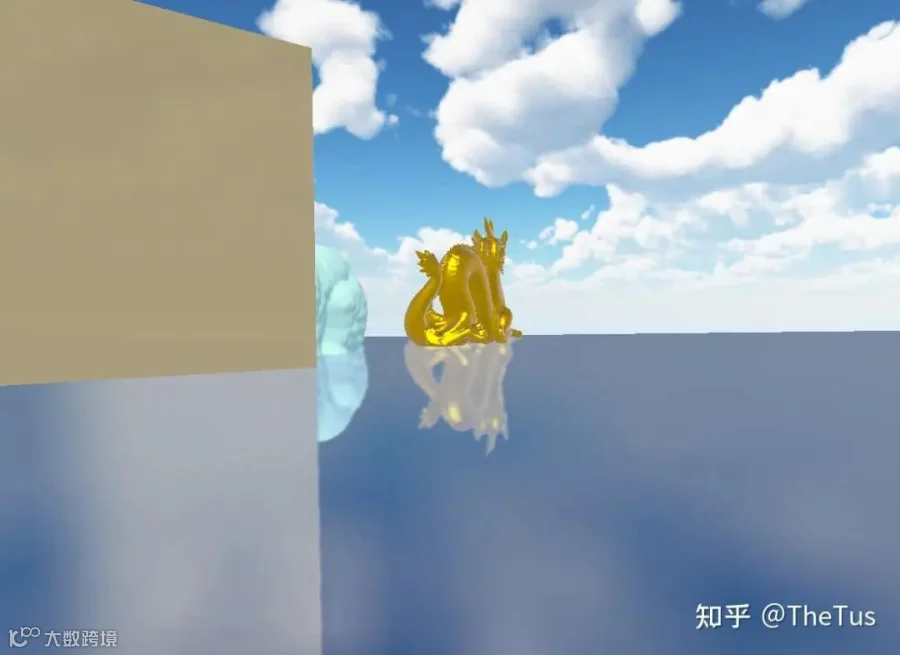
边缘淡化
反射空洞修复技术
在SSPR渲染过程中,由于“texel index fight”问题,常出现反射纹理中的空洞现象。解决方法是在SSPR内核执行后,通过Compute Shader对反射贴图进行后处理,将周围有效像素的颜色填充至空洞区域。
cmd.DispatchCompute(mComputeShader, mSSPRKernelID, mSettings.GroupX, mSettings.GroupY, 1);cmd.DispatchCompute(mComputeShader, mFillHoleKernelID, mSettings.GroupX, mSettings.GroupY, 1);#pragma kernel FillHole[numthreads(8,8,1)]void FillHole(uint3 id : SV_DispatchThreadID) {id.xy *= 2;half4 center = _SSPRReflectionTexture[id.xy + uint2(0, 0)];half4 right = _SSPRReflectionTexture[id.xy + uint2(0, 1)];half4 bottom = _SSPRReflectionTexture[id.xy + uint2(1, 0)];half4 bottomRight = _SSPRReflectionTexture[id.xy + uint2(1, 1)];half4 best = center;best = right.a > best.a + 0.5 ? right : best;best = bottom.a > best.a + 0.5 ? bottom : best;best = bottomRight.a > best.a + 0.5 ? bottomRight : best;_SSPRReflectionTexture[id.xy + uint2(0, 0)] = best.a > center.a + 0.5 ? best : center;_SSPRReflectionTexture[id.xy + uint2(0, 1)] = best.a > right.a + 0.5 ? best : right;_SSPRReflectionTexture[id.xy + uint2(1, 0)] = best.a > bottom.a + 0.5 ? best : bottom;_SSPRReflectionTexture[id.xy + uint2(1, 1)] = best.a > bottomRight.a + 0.5 ? best : bottomRight;}
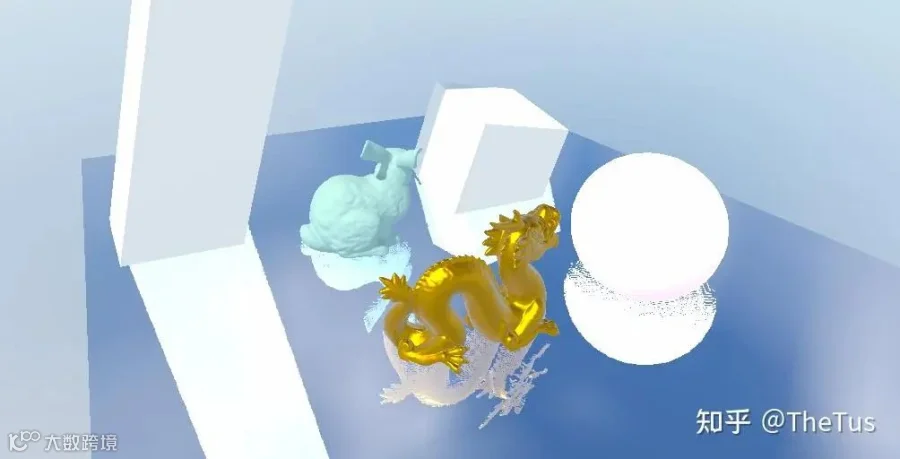
Fix Hole
天空盒反射截断问题处理
当视角较低时,天空盒在反射中可能出现截断现象。解决方案是在SSPR流程中跳过深度值为1.0的天空盒区域,并在Shader中单独处理天空盒的反射采样。
float depth = _CameraDepthTexture.SampleLevel(sampler_CameraDepthTexture, uv, 0).r;float linearDepth = Linear01Depth(depth, _ZBufferParams);if(linearDepth > 0.99) return;...
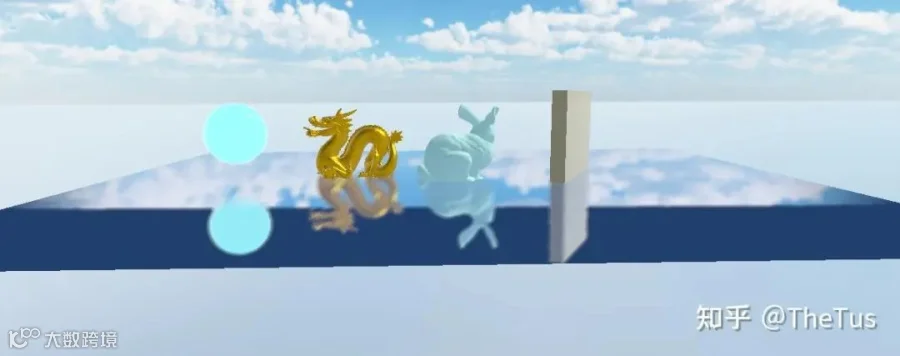
天空盒截断
参考文献
Screen Space Planar Reflections in Ghost Recon Wildlands[2]
易水:幽灵行动.荒野中的屏幕空间反射(SSPR)[3]
烟雨迷离半世殇:【URP】屏幕空间平面反射(ScreenSpacePlanarReflection)学习笔记[4]
雪风carel:URP管线的自学HLSL之路 第三十五篇 SSPR屏幕空间平面反射[5]
Colin:UnityURP-MobileScreenSpacePlanarReflection[6]