


点击 蘑菇云创造 关注我们
项目背景
跳绳是一个很好的健身项目,为了获知所跳个数,有的跳绳上会有计数器。但这也只能跳完这后看到,能不能在跳的过程中就能看到,这样能让我们坚持跳的更多,更有趣味性。
项目设计
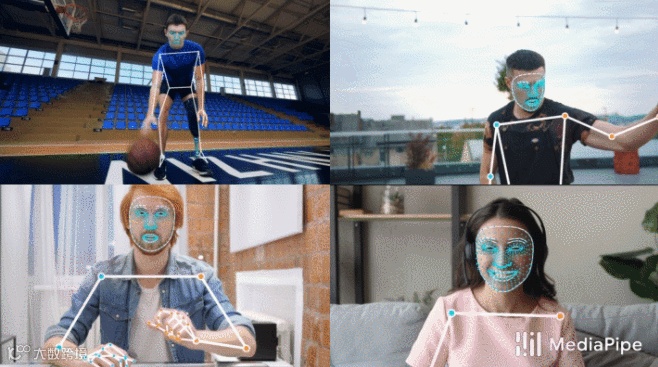
通过Mind+Python模式下加载Google的开源Mediapipe人工智能算法库,识别人体姿态,来判断跳绳次数,并通过Pinpong库控制LED灯实时显示次数。
测试程序
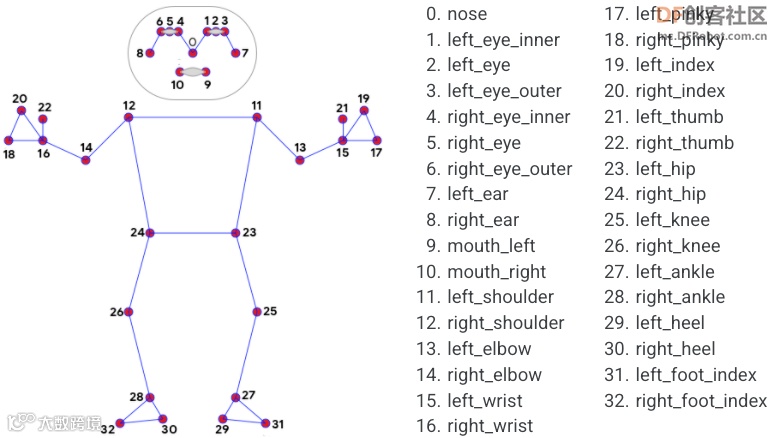
测试程序中,使用人体姿态23,24两坐标点中点与标准点的比较来确认跳绳完成程度。
向上滑动阅览
import numpy as np
import time
import cv2
import PoseModule as pm
cap = cv2.VideoCapture("tiaosheng.mp4")
detector = pm.poseDetector()
count = 0
dir = 0
pTime = 0
success=True
point_sd=0
while success:
success, img = cap.read()
if success:
img = cv2.resize(img, (640, 480))
img = detector.findPose(img, False)
lmList = detector.findPosition(img, False)
if len(lmList) != 0:
point = detector.midpoint(img, 24, 23)
if point_sd==0:
point_sd=point
print(point_sd["y"])
# 计算个数
print(point["y"])
if point["y"]> point_sd["y"]+15:
if dir == 0:
count += 0.5
dir = 1
if point["y"]<point_sd["y"]+5:
if dir == 1:
count += 0.5
dir = 0
#print(count)
cv2.putText(img, str(int(count)), (45, 460), cv2.FONT_HERSHEY_PLAIN, 7,(255, 0, 0), 8)
cTime = time.time()
fps = 1 / (cTime - pTime)
pTime = cTime
cv2.putText(img, str(int(fps)), (50, 100), cv2.FONT_HERSHEY_PLAIN, 5,(255, 0, 0), 5)
cv2.imshow("Image", img)
cv2.waitKey(1)
PoseModule.py
上面程序用到的“PoseModule.py”文件中,在”poseDetector“类中增加了“midpoint”函数,用于求两点的中点坐标。
向上滑动阅览
import math
import mediapipe as mp
import cv2
class poseDetector():
def __init__(self, mode=False, upBody=False, smooth=True,
detectionCon=0.5, trackCon=0.5):
self.mode = mode
self.upBody = upBody
self.smooth = smooth
self.detectionCon = detectionCon
self.trackCon = trackCon
self.mpDraw = mp.solutions.drawing_utils
self.mpPose = mp.solutions.pose
self.pose = self.mpPose.Pose(self.mode, self.upBody, self.smooth,
self.detectionCon, self.trackCon)
def findPose(self, img, draw=True):
imgRGB = cv2.cvtColor(img, cv2.COLOR_BGR2RGB)
self.results = self.pose.process(imgRGB)
if self.results.pose_landmarks:
if draw:
self.mpDraw.draw_landmarks(img, self.results.pose_landmarks,
self.mpPose.POSE_CONNECTIONS)
return img
def findPosition(self, img, draw=True):
self.lmList = []
if self.results.pose_landmarks:
for id, lm in enumerate(self.results.pose_landmarks.landmark):
h, w, c = img.shape
# print(id, lm)
cx, cy = int(lm.x * w), int(lm.y * h)
self.lmList.append([id, cx, cy])
if draw:
cv2.circle(img, (cx, cy), 5, (255, 0, 0), cv2.FILLED)
return self.lmList
def midpoint(self,img,p1,p2,draw=True):
x1, y1 = self.lmList[p1][1:]
x2, y2 = self.lmList[p2][1:]
x3=int((x1+x2)/2)
y3=int((y1+y2)/2)
if draw:
cv2.circle(img, (x3, y3), 10, (0, 0, 255), cv2.FILLED)
cv2.circle(img, (x3, y3), 15, (0, 0, 255), 2)
point={"x":x3,"y":y3}
return point
def findAngle(self, img, p1, p2, p3, draw=True):
# Get the landmarks
x1, y1 = self.lmList[p1][1:]
x2, y2 = self.lmList[p2][1:]
x3, y3 = self.lmList[p3][1:]
# Calculate the Angle
angle = math.degrees(math.atan2(y3 - y2, x3 - x2) -
math.atan2(y1 - y2, x1 - x2))
if angle < 0:
angle += 360
# print(angle)
# Draw
if draw:
cv2.line(img, (x1, y1), (x2, y2), (255, 255, 255), 3)
cv2.line(img, (x3, y3), (x2, y2), (255, 255, 255), 3)
cv2.circle(img, (x1, y1), 10, (0, 0, 255), cv2.FILLED)
cv2.circle(img, (x1, y1), 15, (0, 0, 255), 2)
cv2.circle(img, (x2, y2), 10, (0, 0, 255), cv2.FILLED)
cv2.circle(img, (x2, y2), 15, (0, 0, 255), 2)
cv2.circle(img, (x3, y3), 10, (0, 0, 255), cv2.FILLED)
cv2.circle(img, (x3, y3), 15, (0, 0, 255), 2)
cv2.putText(img, str(int(angle)), (x2 - 50, y2 + 50),
cv2.FONT_HERSHEY_PLAIN, 2, (0, 0, 255), 2)
return angle
测试网络视频
存在的问题
测试结果令人比较满意,但这里存在这样两个问题:1、标准点point_sd这个坐标是以视频开始第一帧画面是站在原地未起跳为前提。
2、标准点纵坐标的判定区间(point_sd["y"]+5与 point_sd["y"]+15)是根据运行后的数据人为分析出来的,只对这一段视频有效,不具有通用性。
解决问题思路
1、在正式跳绳计数前,先试跳,通过数据分析出标准点、判定区间(防止数据在判定点抖动,出现错误计数)。在上个程序中判定点为:point_sd["y"]+10。
2、以手势控制屏幕上的虚拟按钮来分析初始化数据,并启动跳绳计数及终止计数。
解决问题步骤
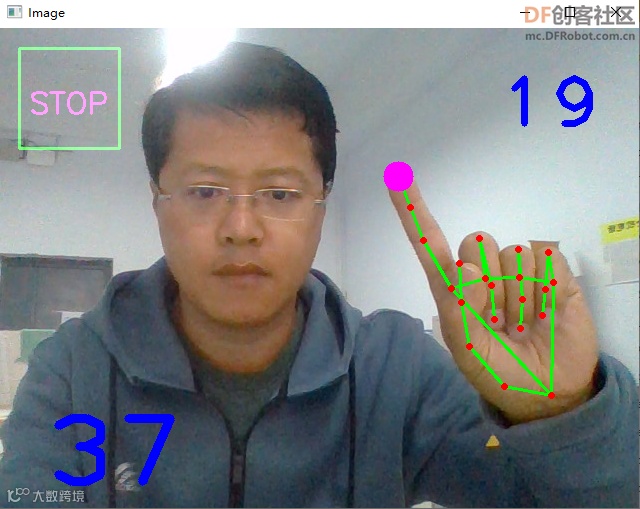
第一步:实现手势控制屏幕按钮。
程序中使用了计时器,以防止连续触发问题。
向上滑动阅览
import cv2
import numpy as np
import time
import os
import HandTrackingModule as htm
#######################
brushThickness = 25
eraserThickness = 100
########################
drawColor = (255, 0, 255)
cap = cv2.VideoCapture(0)
cap.set(3, 640)
cap.set(4, 480)
detector = htm.handDetector(detectionCon=0.65,maxHands=1)
imgCanvas = np.zeros((480, 640, 3), np.uint8)
rect=[(20, 20), (120, 120)]
font = cv2.FONT_HERSHEY_SIMPLEX
cv2.rectangle(imgCanvas, rect[0], rect[1],(0, 255, 0), 2)
cv2.putText(imgCanvas, "SET", (45,85), font, 1, drawColor, 2)
bs=0
bs2=0
while True:
# 1. Import image
success, img = cap.read()
if success:
img = cv2.flip(img, 1)
# 2. Find Hand Landmarks
img = detector.findHands(img)
lmList = detector.findPosition(img, draw=False)
if len(lmList) !=0:
# tip of index and middle fingers
x1, y1 = lmList[8][1:]
x2, y2 = lmList[12][1:]
# 3. Check which fingers are up
fingers = detector.fingersUp()
# print(fingers)
# 5. Index finger is up
if fingers[1] and fingers[2] == False:
cv2.circle(img, (x1, y1), 15, drawColor, cv2.FILLED)
if bs2==1:
if time.time()-time_start>3:
bs2=0
else:
if x1>rect[0][0] and x1<rect[1][0] and y1>rect[0][1] and y1<rect[1][1]:
if bs==0:
print("OK")
imgCanvas = np.zeros((480, 640, 3), np.uint8)
cv2.rectangle(imgCanvas, rect[0], rect[1],(0, 255, 0), 2)
cv2.putText(imgCanvas, "STOP", (30,85), font, 1, drawColor, 2)
bs=1
bs2=1
time_start=time.time()
else:
imgCanvas = np.zeros((480, 640, 3), np.uint8)
imgGray = cv2.cvtColor(imgCanvas, cv2.COLOR_BGR2GRAY)
img = cv2.bitwise_or(img,imgCanvas)
# img = cv2.addWeighted(img,0.5,imgCanvas,0.5,0)
cv2.imshow("Image", img)
cv2.waitKey(1)
上面程序引用的“HandTrackingModule.py”文件。
向上滑动阅览
import cv2
import mediapipe as mp
import time
import math
import numpy as np
class handDetector():
def __init__(self, mode=False, maxHands=2, detectionCon=0.8, trackCon=0.5):
self.mode = mode
self.maxHands = maxHands
self.detectionCon = detectionCon
self.trackCon = trackCon
self.mpHands = mp.solutions.hands
self.hands = self.mpHands.Hands(self.mode, self.maxHands,
self.detectionCon, self.trackCon)
self.mpDraw = mp.solutions.drawing_utils
self.tipIds = [4, 8, 12, 16, 20]
def findHands(self, img, draw=True):
imgRGB = cv2.cvtColor(img, cv2.COLOR_BGR2RGB)
self.results = self.hands.process(imgRGB)
# print(results.multi_hand_landmarks)
if self.results.multi_hand_landmarks:
for handLms in self.results.multi_hand_landmarks:
if draw:
self.mpDraw.draw_landmarks(img, handLms,
self.mpHands.HAND_CONNECTIONS)
return img
def findPosition(self, img, handNo=0, draw=True):
xList = []
yList = []
bbox = []
self.lmList = []
if self.results.multi_hand_landmarks:
myHand = self.results.multi_hand_landmarks[handNo]
for id, lm in enumerate(myHand.landmark):
# print(id, lm)
h, w, c = img.shape
cx, cy = int(lm.x * w), int(lm.y * h)
xList.append(cx)
yList.append(cy)
# print(id, cx, cy)
self.lmList.append([id, cx, cy])
if draw:
cv2.circle(img, (cx, cy), 5, (255, 0, 255), cv2.FILLED)
xmin, xmax = min(xList), max(xList)
ymin, ymax = min(yList), max(yList)
bbox = xmin, ymin, xmax, ymax
if draw:
cv2.rectangle(img, (xmin - 20, ymin - 20), (xmax + 20, ymax + 20),
(0, 255, 0), 2)
return self.lmList
def fingersUp(self):
fingers = []
# Thumb
if self.lmList[self.tipIds[0]][1] > self.lmList[self.tipIds[0] - 1][1]:
fingers.append(1)
else:
fingers.append(0)
# Fingers
for id in range(1, 5):
if self.lmList[self.tipIds[id]][2] < self.lmList[self.tipIds[id] - 2][2]:
fingers.append(1)
else:
fingers.append(0)
# totalFingers = fingers.count(1)
return fingers
def findDistance(self, p1, p2, img, draw=True,r=15, t=3):
x1, y1 = self.lmList[p1][1:]
x2, y2 = self.lmList[p2][1:]
cx, cy = (x1 + x2) // 2, (y1 + y2) // 2
if draw:
cv2.line(img, (x1, y1), (x2, y2), (255, 0, 255), t)
cv2.circle(img, (x1, y1), r, (255, 0, 255), cv2.FILLED)
cv2.circle(img, (x2, y2), r, (255, 0, 255), cv2.FILLED)
cv2.circle(img, (cx, cy), r, (0, 0, 255), cv2.FILLED)
length = math.hypot(x2 - x1, y2 - y1)
return length, img, [x1, y1, x2, y2, cx, cy]
第二步,分析数据,得到判定点纵坐标。思路是,坐标数据是上下波动,将数据中的波峰和波谷分别提取出来计算均值,然后取中值,和差值。中值为判定点,差值用来确定判定区域。波峰和波谷的判定采用的是两边数据与当前数据做差值看差值方向,如果方向相反,即为峰值。但这里就存在,Mediapipe识别准确度的问题,可能在上升或下降的过程中数据不平滑,出现数据波动。可能在分析时,出现误判,采集到错误的峰值。后期可采用滤波算法处理此问题。现在看效果,还不错。
向上滑动阅览
import numpy as np
import time
import cv2
import PoseModule as pm
import math
def max_min(a):
h = []
l = []
for i in range(1, len(a)-1):
if(a[i-1] < a[i] and a[i+1] < a[i]):
h.append(a[i])
elif(a[i-1] > a[i] and a[i+1] > a[i]):
l.append(a[i])
if(len(h) == 0):
h.append(max(a))
if(len(l) == 0):
l.append(min(a[a.index(max(a)):]))
mid=(np.mean(h)+np.mean(l))/2
print(int(mid),int(np.mean(h)-np.mean(l)))
return(int(mid),int(np.mean(h)-np.mean(l)))
cap = cv2.VideoCapture("tiaosheng.mp4")
detector = pm.poseDetector()
count = 0
dir = 0
pTime = 0
success=True
point=[]
while success:
success, img = cap.read()
if success:
img = cv2.resize(img, (640, 480))
img = detector.findPose(img, False)
lmList = detector.findPosition(img, False)
if len(lmList) != 0:
point_tem=detector.midpoint(img, 24, 23)
point.append(point_tem['y'])
cv2.putText(img, str(point_tem['y']), (45, 460), cv2.FONT_HERSHEY_PLAIN, 7,(255, 0, 0), 8)
cTime = time.time()
fps = 1 / (cTime - pTime)
pTime = cTime
cv2.putText(img, str(int(fps)), (50, 100), cv2.FONT_HERSHEY_PLAIN, 5,(255, 0, 0), 5)
cv2.imshow("Image", img)
cv2.waitKey(1)
max_min(point)
cap.release()
cv2.destroyAllWindows()
最终得到“304 26”为“中值 差值”
完整程序
将以上分段程序进行整合,得到完整程序,并进行实地测试。(纯手工敲码)
向上滑动阅览
import cv2
import numpy as np
import time
import os
import HandTrackingModule as htm
import PoseModule as pm
#计算判定点
def max_min(a):
h = []
l = []
for i in range(1, len(a)-1):
if(a[i-1] < a[i] and a[i+1] < a[i]):
h.append(a[i])
elif(a[i-1] > a[i] and a[i+1] > a[i]):
l.append(a[i])
if(len(h) == 0):
h.append(max(a))
if(len(l) == 0):
l.append(min(a[a.index(max(a)):]))
mid=(np.mean(h)+np.mean(l))/2
print(int(mid),int(np.mean(h)-np.mean(l)))
return(int(mid),int(np.mean(h)-np.mean(l)))
#######################
brushThickness = 25
eraserThickness = 100
########################
drawColor = (255, 0, 255)
cap = cv2.VideoCapture(0)
cap.set(3, 640)
cap.set(4, 480)
detector_hand = htm.handDetector(detectionCon=0.65,maxHands=1)
detector_pose = pm.poseDetector()
imgCanvas = np.zeros((480, 640, 3), np.uint8)
rect=[(20, 20), (120, 120)]
font = cv2.FONT_HERSHEY_SIMPLEX
cv2.rectangle(imgCanvas, rect[0], rect[1],(0, 255, 0), 2)
cv2.putText(imgCanvas, "SET", (45,85), font, 1, drawColor, 2)
bs=0
bs2=0
bs3=0
point=[]
count=0
pTime = 0
dire=0
while True:
success, img = cap.read()
if success:
img = cv2.flip(img, 1)
if bs==1 and bs2==0:
if bs3==1:
if time.time()-time_start<4:
cv2.putText(img, str(3-int(time.time()-time_start)), (300, 240), cv2.FONT_HERSHEY_PLAIN, 10,(255, 255, 0), 5)
else:
bs3=0
time_start=time.time()
else:
if time.time()-time_start<11:
img = detector_pose.findPose(img, False)
lmList = detector_pose.findPosition(img, False)
if len(lmList) != 0:
point_tem=detector_pose.midpoint(img, 24, 23)
point.append(point_tem['y'])
cv2.putText(img, str(point_tem['y']), (45, 460), cv2.FONT_HERSHEY_PLAIN, 7,(255, 0, 0), 8)
cv2.putText(img, str(10-int(time.time()-time_start)), (500, 460), cv2.FONT_HERSHEY_PLAIN, 10,(255, 255, 0), 5)
else:
point_sd,l=max_min(point)
bs=2
cv2.rectangle(imgCanvas, rect[0], rect[1],(0, 255, 0), 2)
cv2.putText(imgCanvas, "START", (30,85), font, 1, drawColor, 2)
if bs==3 and bs2==0:
if bs3==1:
if time.time()-time_start<4:
cv2.putText(img, str(3-int(time.time()-time_start)), (300, 240), cv2.FONT_HERSHEY_PLAIN, 10,(255, 255, 0), 5)
else:
bs3=0
time_start=time.time()
else:
img = detector_pose.findPose(img, False)
lmList = detector_pose.findPosition(img, False)
if len(lmList) != 0:
point = detector_pose.midpoint(img, 24, 23)
if point["y"]> point_sd+l/4:
if dire == 0:
count += 0.5
dire = 1
if point["y"]<point_sd-l 4:
if dire == 1:
count += 0.5
dire = 0
cv2.putText(img, str(int(count)), (45, 460), cv2.FONT_HERSHEY_PLAIN, 7,(255, 0, 0), 8)
if bs2==1:#等待三秒
if time.time()-time_start>4:
bs2=0
time_start=time.time()
else:
#手势操作
img = detector_hand.findHands(img)
lmList = detector_hand.findPosition(img, draw=False)
if len(lmList) !=0:
x1, y1 = lmList[8][1:]
x2, y2 = lmList[12][1:]
fingers = detector_hand.fingersUp()
#出示食指
if fingers[1] and fingers[2] == False:
cv2.circle(img, (x1, y1), 15, drawColor, cv2.FILLED)
if x1>rect[0][0] and x1<rect[1][0] and y1>rect[0][1] and y1<rect[1][1]:#食指进入按钮区域
if bs==0:
print("OK")
imgCanvas = np.zeros((480, 640, 3), np.uint8)
bs=1
bs2=1
bs3=1
time_start=time.time()
elif bs==1:
imgCanvas = np.zeros((480, 640, 3), np.uint8)
bs2=1
bs3=1
time_start=time.time()
elif bs==2:
imgCanvas = np.zeros((480, 640, 3), np.uint8)
cv2.rectangle(imgCanvas, rect[0], rect[1],(0, 255, 0), 2)
cv2.putText(imgCanvas, "STOP", (30,85), font, 1, drawColor, 2)
bs=3
bs2=1
bs3=1
time_start=time.time()
elif bs==3:
imgCanvas = np.zeros((480, 640, 3), np.uint8)
cv2.rectangle(imgCanvas, rect[0], rect[1],(0, 255, 0), 2)
cv2.putText(imgCanvas, "START", (30,85), font, 1, drawColor, 2)
bs=2
bs2=1
bs3=1
time_start=time.time()
cTime = time.time()
fps = 1 / (cTime - pTime)
pTime = cTime
cv2.putText(img, str(int(fps)), (500, 100), cv2.FONT_HERSHEY_PLAIN, 5,(255, 0, 0), 5)
imgGray = cv2.cvtColor(imgCanvas, cv2.COLOR_BGR2GRAY)
img = cv2.bitwise_or(img,imgCanvas)
cv2.imshow("Image", img)
cv2.waitKey(1)
计数炫灯
使用Pinpong库,连接Micro:bit,控制LED灯随跳绳次数增加亮灯数。
作品来源:DF创客社区
作者:云天



推荐阅读:
点击“阅读原文”,了解更多!