大数跨境
0
0

【Mind+Python】疲劳驾驶AI提醒器

【Mind+Python】疲劳驾驶AI提醒器 蘑菇云创造
2021-08-20
2
导读:参赛项目欣赏

点击 蘑菇云创造 关注我们


疲劳驾驶AI提醒器


汽车在给我们带来方便的同时,也给我们带来了隐藏的危险,我国现有的汽车保有量已经达到了3亿辆,这么庞大的车辆数目面前,交通事故也是频频发生。据悉,每年因此死亡的人数就高达10万人。


疲劳驾驶的危害我想每个人都知道,开车时切不可疲劳驾驶,因为疲劳驾驶所引发的车祸数不胜数。


根据相关的法律规定,每个人开车的时候如果超过4个小时就属疲劳驾驶,驾驶员处在疲惫、困倦的状态中时,会导致判断能力下降,在遇到危险的时候,根本不能像正常的驾驶员一样在最短的时间内作出判断。不止如此,还会使驾驶员的操作能力呆滞,也可能会一时糊涂把油门当作刹车踩下去,甚至有的驾驶员在开车时完全睡着,最后失去对车子的控制,造成车祸人亡的局面。


项目功能

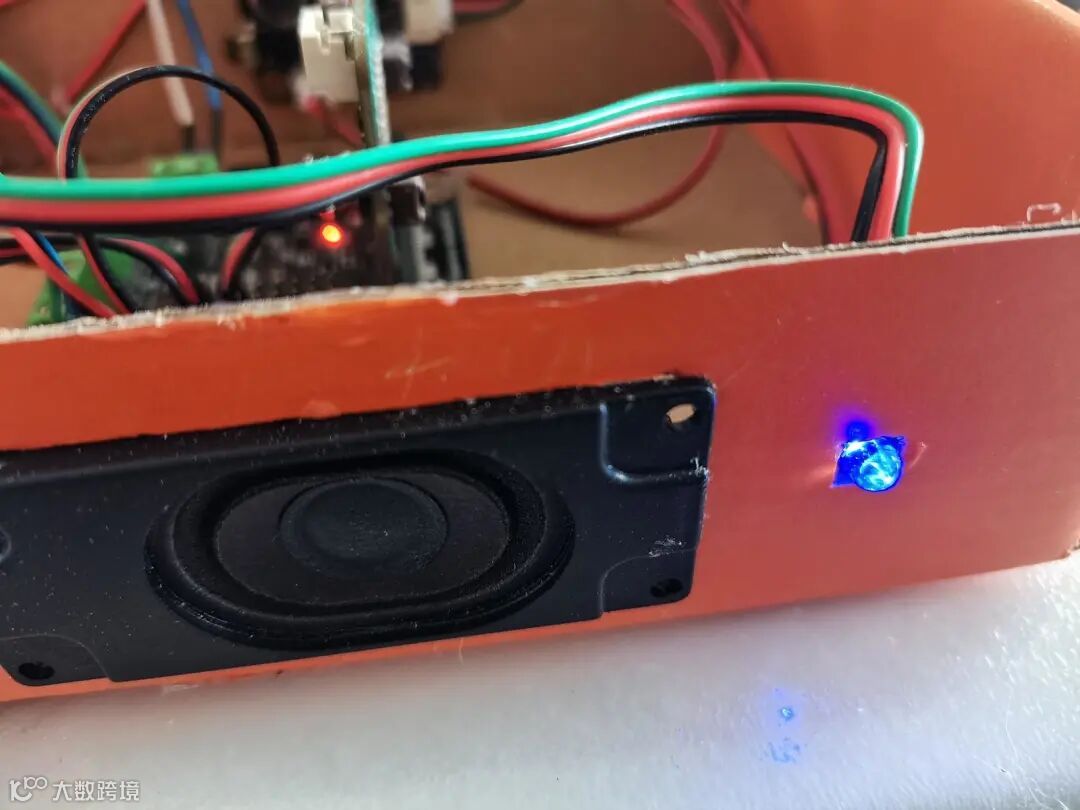
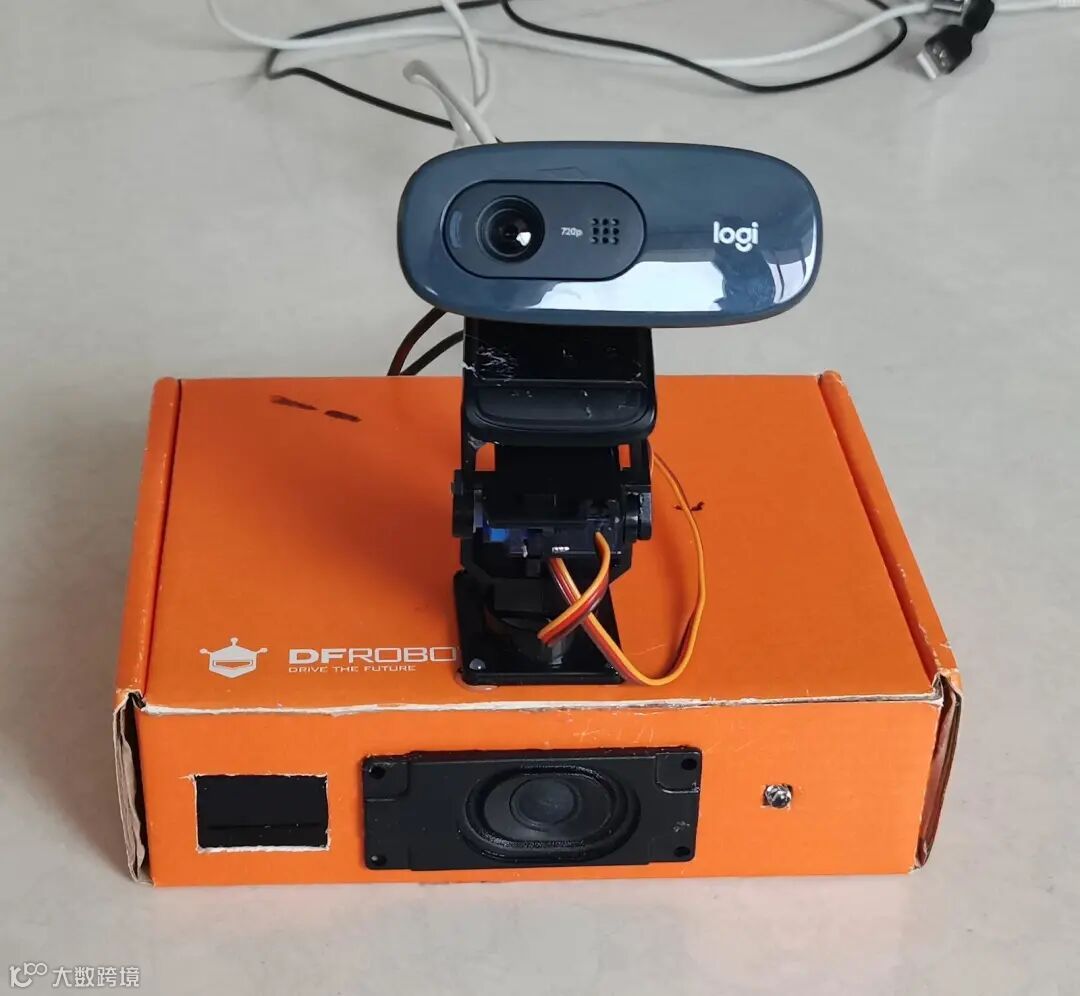
我们设计的疲劳驾驶提醒器系统通过人工智能技术对司机的面部人眼动作进行实时监测,发现司机疲劳驾驶,并及时发出语音、灯光警示,提醒司机安全驾驶。


设计思路

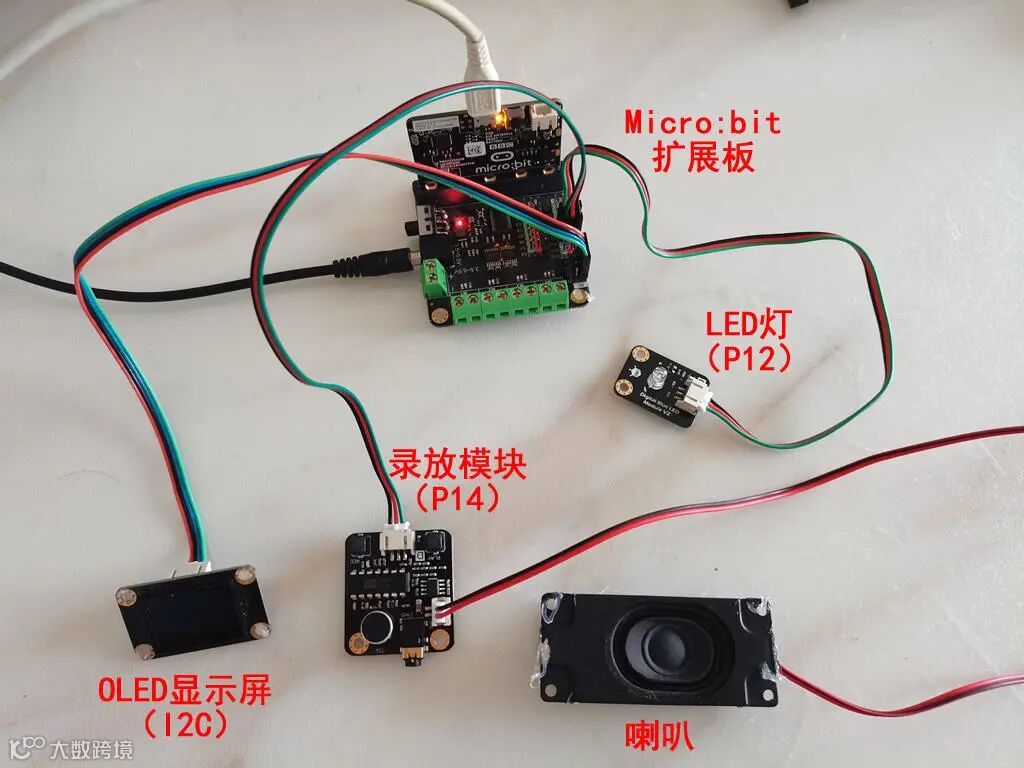
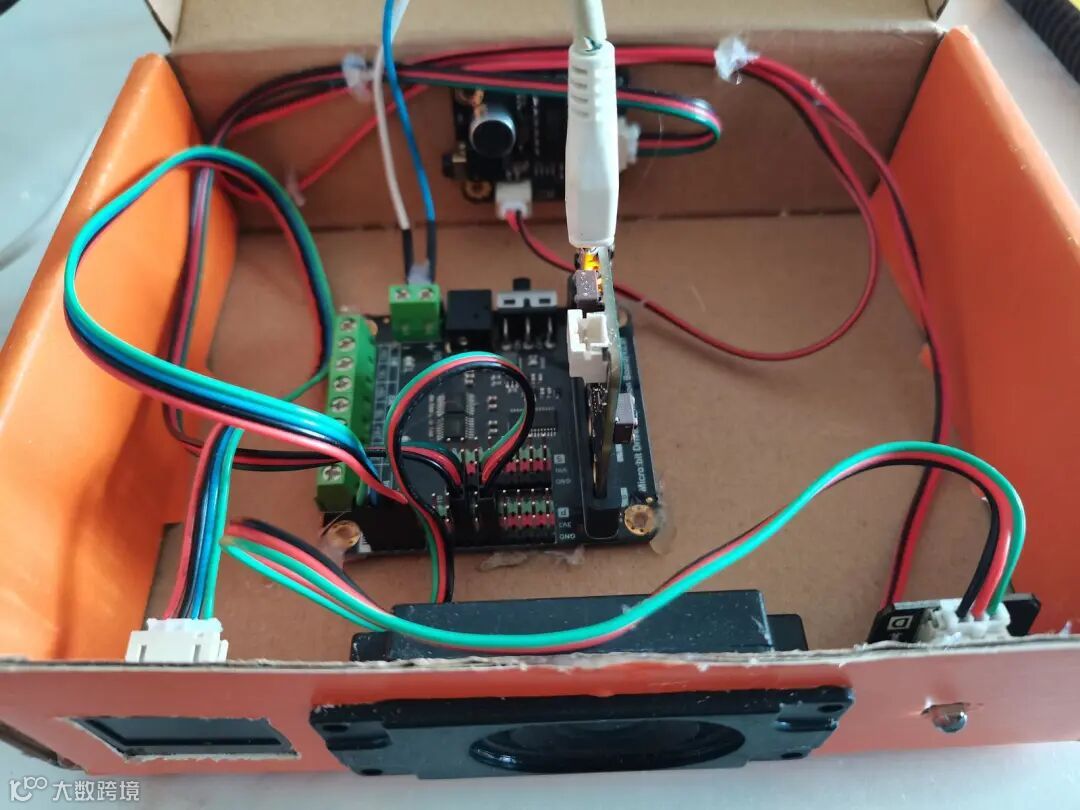
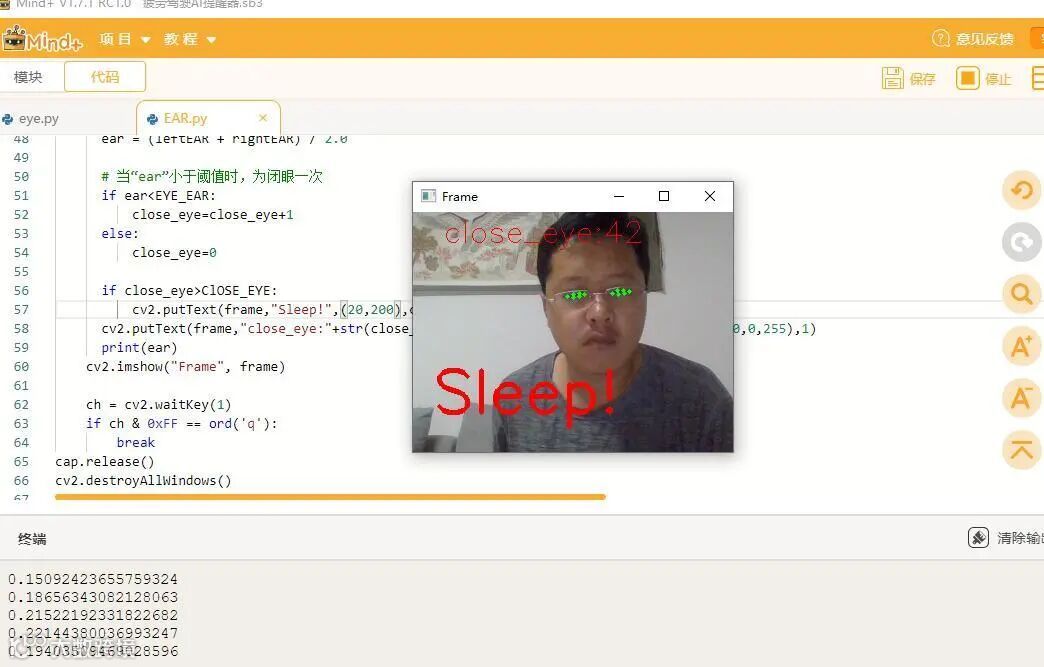
本项目,软件使用Mind+Python模式,电脑PC连接摄像头(以后可替换成树莓派或熊猫板等)获取司机人脸图像,通过人脸识别库和EAR算法判定司机瞌睡,通过Pinpong库连接Micro:bit,控制发光发声,提醒司机及时休息。


安装所需库

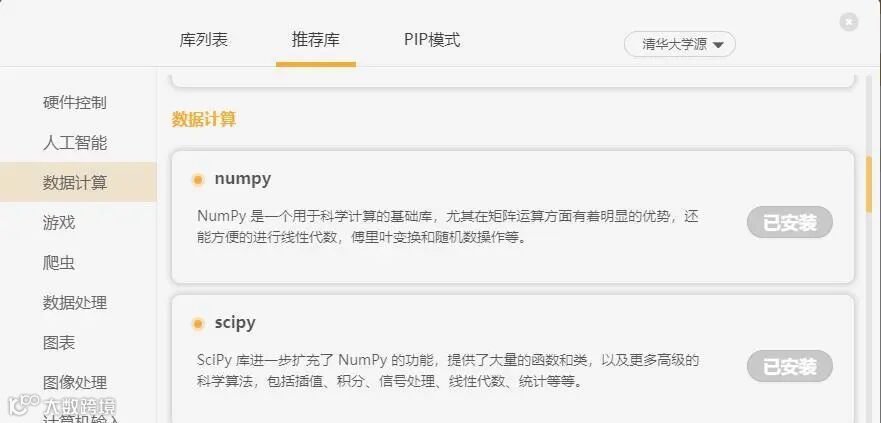
Mind+Python模式下,通过“库管理”,进行相应库安装。



1.安装opencv-python 计算机视觉库。

opencv-python


 2.安装Numpy  开源的数值计算扩展,功能是科学计算,数据分析与处理。

 “Numpy” 


3.安装Scipy  距离计算库。 

“Scipy” 


4.安装pinpong  是一套控制开源硬件主控板的 Pyhton 库。

 “pinpong” 



人眼疲倦检测开源算法

EAR(eye aspect ratio)计算函数 

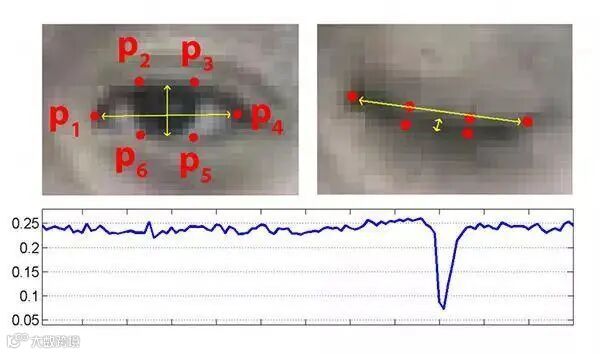
我们首先需要确定眼睛的位置,在确定眼睛位置之后,选择6个点来表示眼睛,具体如下图所示:
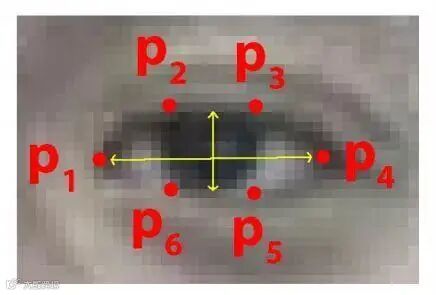


标号的顺序是从眼睛的左角开始,然后顺时针绕着眼睛进行编号。


根据这六个点我们便可以表示眼睛的睁开和闭上的状态。当开启的时候,上图中竖着的黄色箭头会变得比较高,而眼睛闭上(疲劳状态)这个箭头就会变矮。但是由于观看的距离不同,单纯用高度来表示状态缺少参考比较,因此提出如下公式表示状态:
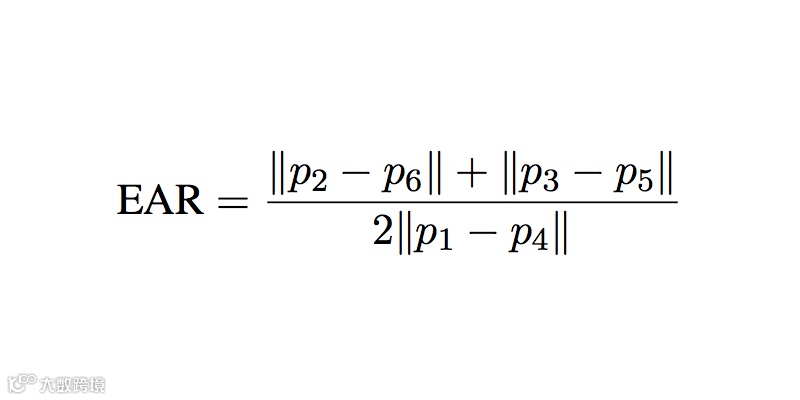
用这个数据便可以相对客观的表示眼睛的状态,于是通过大量测试发现一个统计结果,当EAR小于0.25很多的时候,便是疲劳状态。


face_recognition人脸识别库

1、安装

face_recognition使用世界上最简单的人脸识别库,在Python或命令行中识别和操作人脸。使用dlib最先进的人脸识别技术构建而成,并具有深度学习功能。


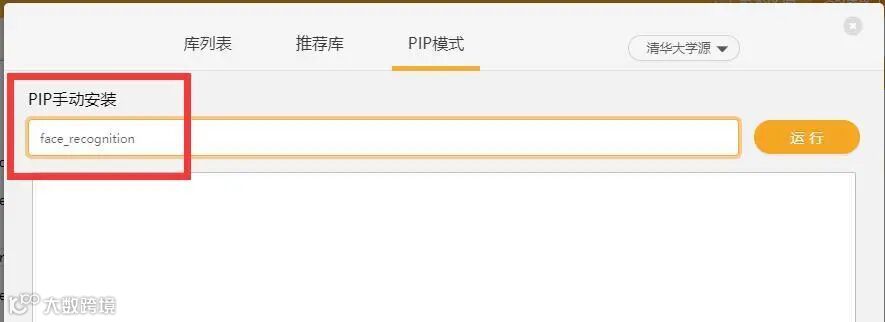
使用Mind+Python模式中“库管理”的“PIP模式”进行安装:


2、识别人脸关键点

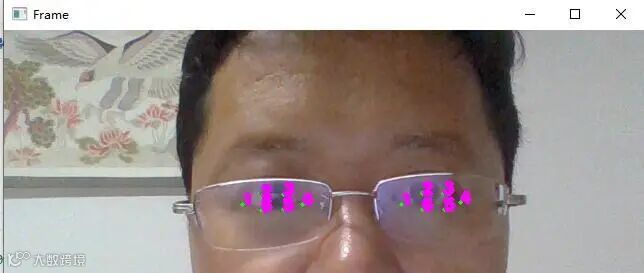
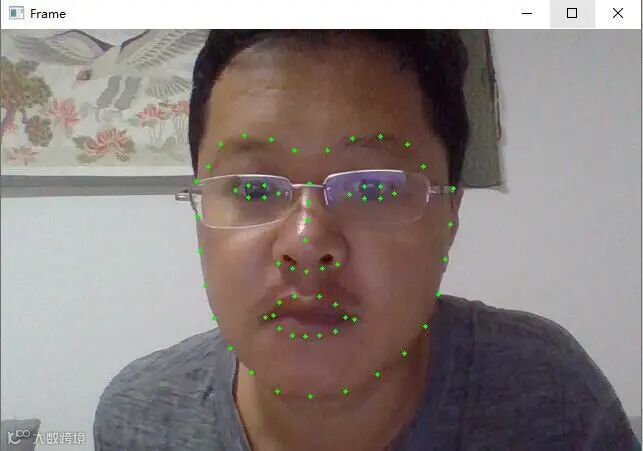
加载图像后,调用face_recognition.face_landmarks(image)可识别出人脸关键点信息,包括眼睛、鼻子、嘴巴和下巴等,参数仍是加载的图像image,返回值是包含面部特征字典的列表,列表中每一项对应一张人脸,包括nose_bridge、right_eyebrow、right_eye、chine、left_eyebrow、bottom_lip、nose_tip、top_lip、left_eye几个部分,每个部分包含若干个特征点(x,y),总共有68个特征点。列表长度就是图中识别出的人脸数,可遍历此列表和字典的键值对,打印出所有面部特征点,也可在图像上画出来,代码如下:

向上滑动阅览

import numpy as np

import cv2

import face_recognition


cap = cv2.VideoCapture(0)


while True:

    ret, frame = cap.read()


    frame = cv2.resize(frame, (0,0), fx=1, fy=1)


    # Find all facial features in all the faces in the video

    face_landmarks_list = face_recognition.face_landmarks(frame)


    for face_landmarks in face_landmarks_list:

        # Loop over each facial feature (eye, nose, mouth, lips, etc)

        for name, list_of_points in face_landmarks.items():


            hull = np.array(face_landmarks[name])

            hull_landmark = cv2.convexHull(hull)

            cv2.drawContours(frame, hull_landmark, -1, (0, 255, 0), 3)


    cv2.imshow("Frame", frame)


    ch = cv2.waitKey(1)

    if ch & 0xFF == ord('q'):

        break

cap.release()

cv2.destroyAllWindows()


3、提取两眼坐标


向上滑动阅览

import numpy as np

import cv2

import face_recognition


cap = cv2.VideoCapture(0)


while True:

    ret, frame = cap.read()


    frame = cv2.resize(frame, (0,0), fx=1, fy=1)


    # Find all facial features in all the faces in the video

    face_landmarks_list = face_recognition.face_landmarks(frame)


    for face_landmarks in face_landmarks_list:

        # Loop over each facial feature (eye, nose, mouth, lips, etc)

        for name, list_of_points in face_landmarks.items():

           if name=='left_eye':

            print(list_of_points)

            hull = np.array(face_landmarks[name])

            hull_landmark = cv2.convexHull(hull)

            cv2.drawContours(frame, hull_landmark, -1, (0, 255, 0), 3)

            font = cv2.FONT_HERSHEY_SIMPLEX # 获取内置字体

            k=1

            for points in list_of_points:

              cv2.putText(frame,str(k), points, font, 0.5, (255,0,255), 4) # 调用函数,对人脸坐标位置,

              k=k+1

           if name=='right_eye':

            print(list_of_points)

            hull = np.array(face_landmarks[name])

            hull_landmark = cv2.convexHull(hull)

            cv2.drawContours(frame, hull_landmark, -1, (0, 255, 0), 3)

            font = cv2.FONT_HERSHEY_SIMPLEX # 获取内置字体

            k=1

            for points in list_of_points:

              cv2.putText(frame,str(k), points, font, 0.5, (255,0,255), 4) # 调用函数,对人脸坐标位置,

              k=k+1

    cv2.imshow("Frame", frame)


    ch = cv2.waitKey(1)

    if ch & 0xFF == ord('q'):

        break

cap.release()

cv2.destroyAllWindows()


4、眼睛纵横比(EAR)函数

# 这个方程的分子是计算垂直眼睛标志之间的距离,而分母是计算水平眼睛标志之间的距离,由于水平点只有一组,而两组垂直点,所以分母乘上了2,以保证两组特征点的权重相同。使用这个简单的方程,我们可以避免使用图像处理技术,简单地依靠眼睛地标距离的比例来确定一个人是否眨眼。

def eye_aspect_ratio(eye):

             # 计算距离,竖直的

         A = dist.euclidean(eye[1], eye[2])

         B = dist.euclidean(eye[4], eye[5])

             # 计算距离,水平的

         C = dist.euclidean(eye[0], eye[3])

             # ear值

         ear = (A + B) / (2.0 * C)

         return ear


判断瞌睡代码

向上滑动阅览

import numpy as np

import cv2

import face_recognition

from scipy.spatial import distance as dist

cap = cv2.VideoCapture(0)

# 眼睛纵横比(EAR)

# 这个方程的分子是计算垂直眼睛标志之间的距离,而分母是计算水平眼睛标志之间的距离,由于水平点只有一组,而两组垂直点,所以分母乘上了2,以保证两组特征点的权重相同。使用这个简单的方程,我们可以避免使用图像处理技术,简单地依靠眼睛地标距离的比例来确定一个人是否眨眼。

def eye_aspect_ratio(eye):

        #计算距离,竖直的

        A=dist.euclidean(eye[1],eye[5])

        B=dist.euclidean(eye[2],eye[4])

        #计算距离,水平的

        C=dist.euclidean(eye[0],eye[3])

        #ear值

        ear=(A+B)/(2.0*C)

        return ear


close_eye=0 # 闭眼计数

ClOSE_EYE=25 # 闭眼次数阈值

EYE_EAR = 0.25 # EAR阈值

while True:

    ret, frame = cap.read()


    frame = cv2.resize(frame, (0,0), fx=0.5, fy=0.5)


    # Find all facial features in all the faces in the video

    face_landmarks_list = face_recognition.face_landmarks(frame)

    left_eye_points=[]

    right_eye_points=[]

    for face_landmarks in face_landmarks_list:

        # Loop over each facial feature (eye, nose, mouth, lips, etc)

        for name, list_of_points in face_landmarks.items():

           if name=='left_eye':

            left_eye_points=list_of_points

            hull = np.array(face_landmarks[name])

            hull_landmark = cv2.convexHull(hull)

            cv2.drawContours(frame, hull_landmark, -1, (0, 255, 0), 3)

           if name=='right_eye':

            right_eye_points=list_of_points

            hull = np.array(face_landmarks[name])

            hull_landmark = cv2.convexHull(hull)

            cv2.drawContours(frame, hull_landmark, -1, (0, 255, 0), 3)

    if len(right_eye_points)!=0 and len(left_eye_points)!=0:

      # 分别计算两眼ear值

      leftEAR = eye_aspect_ratio(left_eye_points)

      rightEAR = eye_aspect_ratio(right_eye_points)

      # 算一个平均的ear值

      ear = (leftEAR + rightEAR) / 2.0


      # 当“ear”小于阈值时,为闭眼一次

      if ear<EYE_EAR:

          close_eye=close_eye+1

      else:

          close_eye=0


      if close_eye>ClOSE_EYE:

          cv2.putText(frame,"Sleep!",(20,200),cv2.FONT_HERSHEY_SIMPLEX,2,(0,0,255),3)

      cv2.putText(frame,"close_eye:"+str(close_eye),(30,30),cv2.FONT_HERSHEY_SIMPLEX,1,(0,0,255),1)

      print(ear)

    cv2.imshow("Frame", frame)


    ch = cv2.waitKey(1)

    if ch & 0xFF == ord('q'):

        break

cap.release()

cv2.destroyAllWindows()


硬件连接


pinpong库测试显示屏


使用Micro:bit主控加扩展板,OLED显示屏连接在IIC接口上。
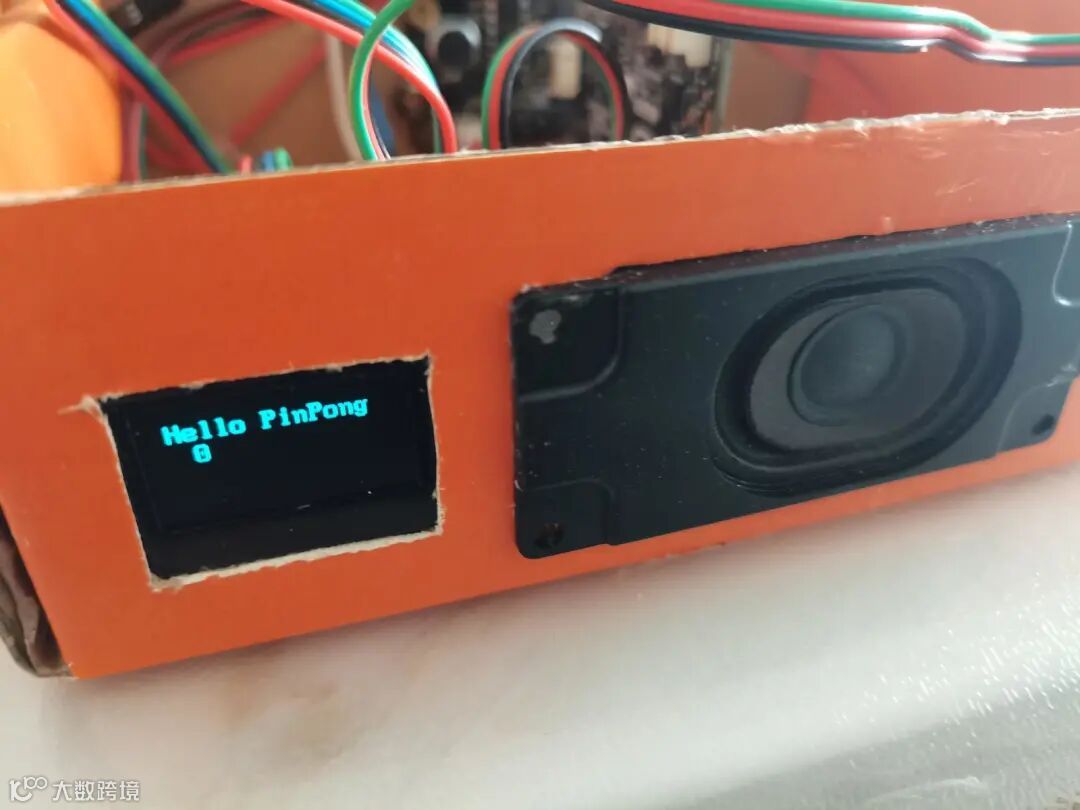

向上滑动阅览

# -*- coding: utf-8 -*-


#实验效果:I2C OLED2864屏控制

#接线:使用windows或linux电脑连接一块arduino主控板,OLED2864显示屏接到I2C口SCL及SDA

import time

from pinpong.board import Board

from pinpong.libs.dfrobot_ssd1306 import SSD1306_I2C #导入ssd1306库


Board("microbit").begin()  #初始化,选择板型和端口号,不输入端口号则进行自动识别

#Board("uno","COM36").begin()  #windows下指定端口初始化

#Board("uno","/dev/ttyACM0").begin()   #linux下指定端口初始化

#Board("uno","/dev/cu.usbmodem14101").begin()   #mac下指定端口初始化


oled=SSD1306_I2C(width=128, height=64) #初始化屏幕,传入屏幕像素点数


while True:

  oled.fill(1) #全部填充显示

  oled.show() #显示生效

  print("1")

  time.sleep(1)


  oled.fill(0) #全部填充熄灭,清屏

  oled.show() #显示生效

  print("0")

  time.sleep(1)


  oled.text(0) #显示数字

  oled.text("Hello PinPong",8,8) #指定位置显示文字

  oled.show()  #显示生效

  time.sleep(2)


pinpong库测试LED灯


向上滑动阅览

# -*- coding: utf-8 -*-


#实验效果:控制arduino UNO板载LED灯一秒闪烁一次

#接线:使用windows或linux电脑连接一块arduino主控板


import time

from pinpong.board import Board,Pin


Board("uno").begin()#初始化,选择板型和端口号,不输入端口号则进行自动识别

#Board("uno","COM36").begin()   #windows下指定端口初始化

#Board("uno","/dev/ttyACM0").begin()   #linux下指定端口初始化

#Board("uno","/dev/cu.usbmodem14101").begin()   #mac下指定端口初始化


led = Pin(Pin.D12, Pin.OUT) #引脚初始化为电平输出

k=0


while True:

  k=1-k

  led.value(k) #闪灯

  time.sleep(1) #等待1秒 保持状态


pinpong录放模块测试


向上滑动阅览

import time

from pinpong.board import Board,Pin


Board("microbit").begin()#初始化,选择板型和端口号,不输入端口号则进行自动识别

#Board("microbit","COM36").begin()   #windows下指定端口初始化

#Board("microbit","/dev/ttyACM0").begin()   #linux下指定端口初始化

#Board("microbit","/dev/cu.usbmodem14101").begin()   #mac下指定端口初始化


sound = Pin(Pin.P14, Pin.OUT) #引脚初始化为电平输出


while True:

  sound.value(1) #输出高电平

  time.sleep(0.1) #等待0.1秒 保持状态

  sound.value(0) #输出低电平

  time.sleep(3) #等待3秒 保持状态


完整程序代码


向上滑动阅览

import numpy as np

import cv2

import face_recognition

from scipy.spatial import distance as dist

import time

from pinpong.board import Board,Pin

from pinpong.libs.dfrobot_ssd1306 import SSD1306_I2C #导入ssd1306库

Board("microbit").begin()  #初始化,选择板型和端口号,不输入端口号则进行自动识别


oled=SSD1306_I2C(width=128, height=64) #初始化屏幕,传入屏幕像素点数

led = Pin(Pin.P12, Pin.OUT) #引脚初始化为电平输出

sound = Pin(Pin.P14, Pin.OUT) #引脚初始化为电平输出

k=0

cap = cv2.VideoCapture(1)

# 眼睛纵横比(EAR)

# 这个方程的分子是计算垂直眼睛标志之间的距离,而分母是计算水平眼睛标志之间的距离,由于水平点只有一组,而两组垂直点,所以分母乘上了2,以保证两组特征点的权重相同。使用这个简单的方程,我们可以避免使用图像处理技术,简单地依靠眼睛地标距离的比例来确定一个人是否眨眼。

def eye_aspect_ratio(eye):

        #计算距离,竖直的

        A=dist.euclidean(eye[1],eye[5])

        B=dist.euclidean(eye[2],eye[4])

        #计算距离,水平的

        C=dist.euclidean(eye[0],eye[3])

        #ear值

        ear=(A+B)/(2.0*C)

        return ear


close_eye=0 # 闭眼计数

ClOSE_EYE=25 # 闭眼次数阈值

EYE_EAR = 0.28 # EAR阈值


while True:

    ret, frame = cap.read()


    frame = cv2.resize(frame, (0,0), fx=0.5, fy=0.5)


    # Find all facial features in all the faces in the video

    face_landmarks_list = face_recognition.face_landmarks(frame)

    left_eye_points=[]

    right_eye_points=[]

    for face_landmarks in face_landmarks_list:

        # Loop over each facial feature (eye, nose, mouth, lips, etc)

        for name, list_of_points in face_landmarks.items():

           if name=='left_eye':

            left_eye_points=list_of_points

            hull = np.array(face_landmarks[name])

            hull_landmark = cv2.convexHull(hull)

            cv2.drawContours(frame, hull_landmark, -1, (0, 255, 0), 3)

           if name=='right_eye':

            right_eye_points=list_of_points

            hull = np.array(face_landmarks[name])

            hull_landmark = cv2.convexHull(hull)

            cv2.drawContours(frame, hull_landmark, -1, (0, 255, 0), 3)

    if len(right_eye_points)!=0 and len(left_eye_points)!=0:

      # 分别计算两眼ear值

      leftEAR = eye_aspect_ratio(left_eye_points)

      rightEAR = eye_aspect_ratio(right_eye_points)

      # 算一个平均的ear值

      ear = (leftEAR + rightEAR) / 2.0


      # 当“ear”小于阈值时,为闭眼一次

      if ear<EYE_EAR:

          close_eye=close_eye+1

      else:

          close_eye=0


      if close_eye>ClOSE_EYE:

          cv2.putText(frame,"Sleep!",(20,200),cv2.FONT_HERSHEY_SIMPLEX,2,(0,0,255),3)

          sound.value(1) #播放提醒音

          sound.value(0)

          oled.text("close_eye:"+str(close_eye),0,8) #指定位置显示文字

          oled.show()  #显示生效

          for j in range(20):

            k=1-k

            led.value(k) #闪灯

            time.sleep(0.2)

      cv2.putText(frame,"close_eye:"+str(close_eye),(30,30),cv2.FONT_HERSHEY_SIMPLEX,1,(0,0,255),1)


      print(ear)

    cv2.imshow("Frame", frame)


    ch = cv2.waitKey(1)

    if ch & 0xFF == ord('q'):

        break

cap.release()

cv2.destroyAllWindows()


视频演示


推荐阅读:


【声明】内容源于网络
0
0
蘑菇云创造
蘑菇云是DFRobot旗下专注于AI人工智能、创客、STEAM、劳动教育的科技创新教育品牌;以为中国培养下一代科技创新人才为使命,为学校提供k12全龄段科技创新教育解决方案。
内容 969
粉丝 0
蘑菇云创造 蘑菇云是DFRobot旗下专注于AI人工智能、创客、STEAM、劳动教育的科技创新教育品牌;以为中国培养下一代科技创新人才为使命,为学校提供k12全龄段科技创新教育解决方案。
总阅读2.2k
粉丝0
内容969