


点击 蘑菇云创造 关注我们
物联网农业土壤养分和气象站监测系统
前言
为监测户外和大棚的作物生长环境,我设计了一个物联网农业监测系统,使用Unihiker作为主要的监测核心,并结合了RS485土壤传感器,温湿度传感器,CO2传感器,环境光传感器等,采集不同节点的土壤养分,包括温湿度、PH和氮磷钾数据,同时采集空气二氧化碳、温湿度,环境光等的数据,同时还配备了摄像头,对作物的成长进行拍摄。Unihiker通过无线WIFI将数据上传至Lattepanda的本地服务器,我们可以使用Flask Web网页端查看数据,如果需要还可以对作物进行实时的监测。这个系统不仅记录大棚温室的环境数据,我还设立了一个Unihiker室外气象站,实时监测户外的重要环境参数,包括风向、风速、温度、气压和雨量。所有上传云端的数据,可以提供实时分析土壤养分、环境光照和环境参数的数据支持,以及为今后的智能农业发展提供数据标记和学习的基础。整体程序使用Python编写,具有自动运行和断网自动重连等功能。Lattepanda服务器可以显示不同节点的在线状态和数据,如果有节点出现问题,会显示节点不在线,方便及时维护。
利用此系统,我们可以更好地检测、控制、研究育种和植物生长。结合本地监测数据,实时掌握大棚内环境参数和图像,进行数据的采集、数据处理、数据可视化、数据分析等环节,为今后科学化育种育苗栽种进行合理方案设计。
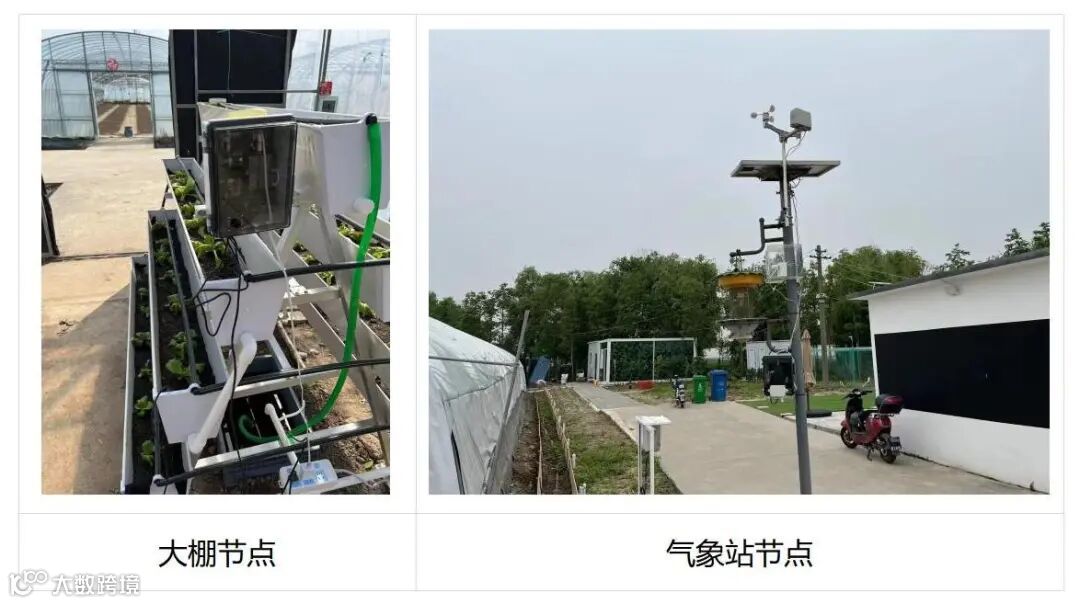
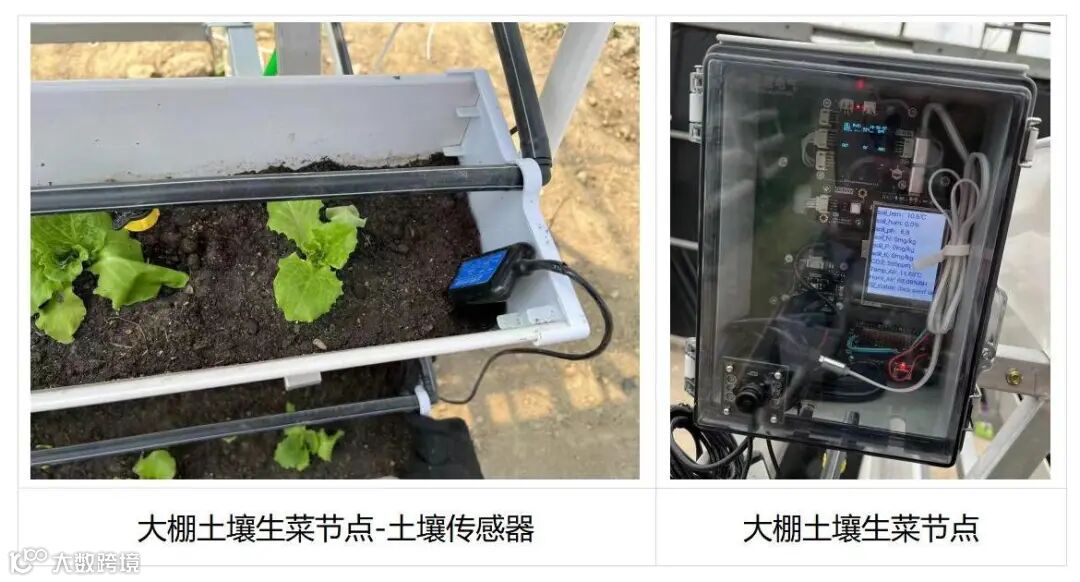
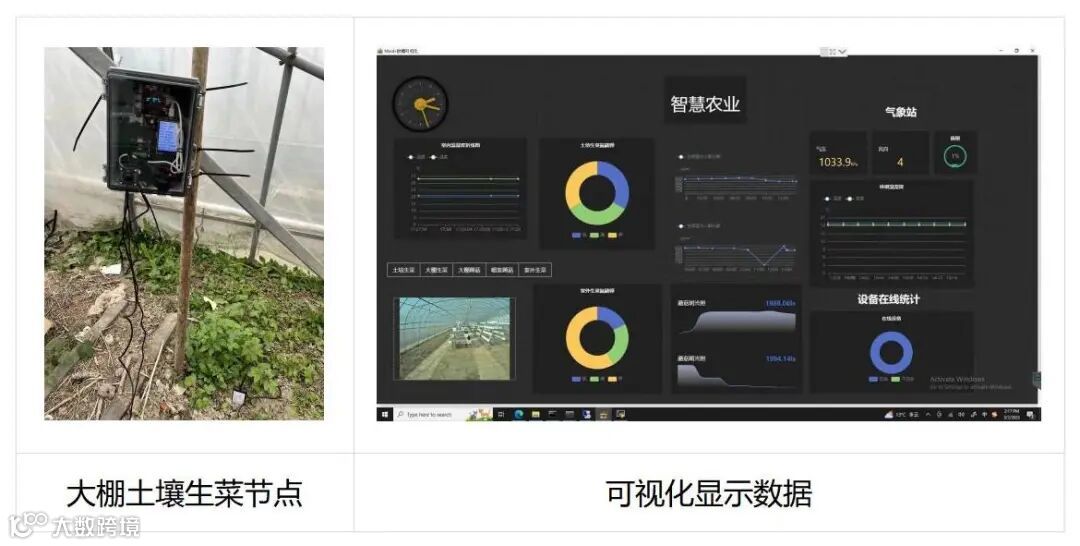
硬件清单
土壤氮磷钾传感器 x5
Lattepanda 3 delta x1
Unihiker x6
气象站 SEN0186 x1
SCI x 6
WIFI 监控摄像头 x1
摄像头 x5
路由器 x1
防水箱体 x6
电源转接模块 x 6
功能
实时监测大棚内“一米田”内主要环境指标(土壤参数:土壤温湿度、土壤pH、土壤营养盐,环境参数:二氧化碳浓度 、温湿度、光照强度)。
苗情监测:图像采集按时自动发送命令远程拍照,自动展示最新作物苗情图片。
气象站监测:实时监测大棚外气象情况(风向、风速、温度、气压和雨量)。
将监测到的数据在云端显示。
离线节点设备在线预警。
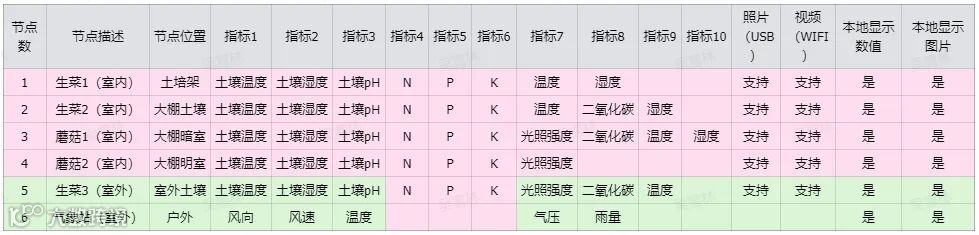
方案拓扑图
Unihiker行空板作为主要的监测核心,并结合了RS485土壤传感器,I2C 温湿度传感器,I2C CO2传感器,I2C 环境光传感器等,采集不同节点的土壤养分,包括温湿度、PH和氮磷钾数据,同时采集空气二氧化碳、温湿度,环境光等的数据,同时还配备了USB摄像头连接Unihiker行空板,对作物的成长进行拍摄。各个节点的Unihiker和Lattepanda都在同一个局域网下,行空板通过无线WIFI将数据上传至Lattepanda的本地服务器。
在气象站节点中,Unihiker通过UART通讯收集气象站数据。
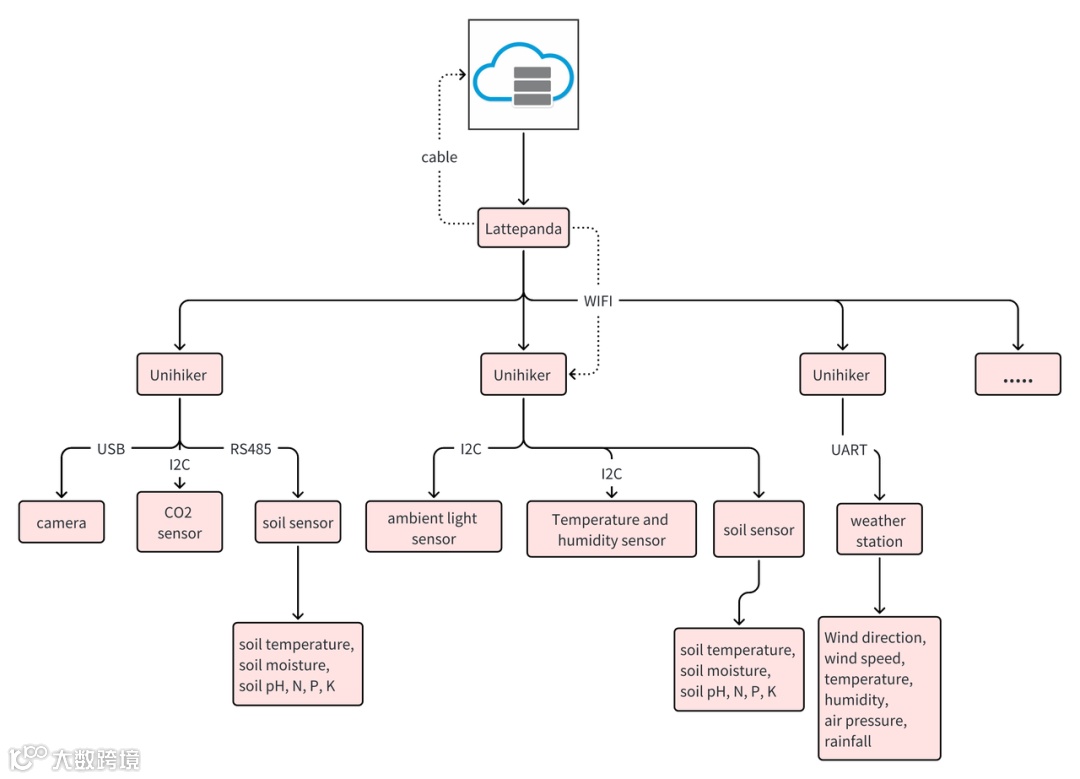
重要技术指标
1、土壤传感器:用于检测土壤养分数据
土壤温湿度,PH值,氮磷钾数据
2、Lattepanda 3 delta:用做本地服务器
处理器: Intel®赛扬®N5105
CPU: 2.0~2.9GHz,四核,四线程
GPU: Intel®UHD显卡(频率:450 - 800MHz)
内存:LPDDR4 8GB 2933MHz
存储:64GB eMMC V5.1
3、Unihiker:用做每个节点的主控
CPU: 国产 4核 1.2GHz
内存: 512MB DDR3
硬盘: 16GB eMMC
内置操作系统:Debian
Wi-Fi: 2.4G
蓝牙: 4.0
实体按键:Home按键,A/B按键
幕:2.8寸240*320 TFT彩屏
供电: Type-C 5V供电
工作电压:3.3V
最大工作电流: 2000mA
接口:
USB Type-C 1
USB TYPE-A 1
microSD卡接口 1
3Pin I/O 4 (其中支持3路PWM 2路ADC)
4Pin I2C 2
流量和存储估算
按每个节点每5分钟上传一次数据(含图片数据),每个节点数据约为1kb,每张JPG图片约为30kb,图片文件可以直接保存在Lattepanda上,节点数据保存在服务器的Siot数据库中,如果有额外内存需求,可以考虑Lattepanda增加内存条。
硬件连接
1. 以节点1土培生菜为例,节点1-节点5接线相同
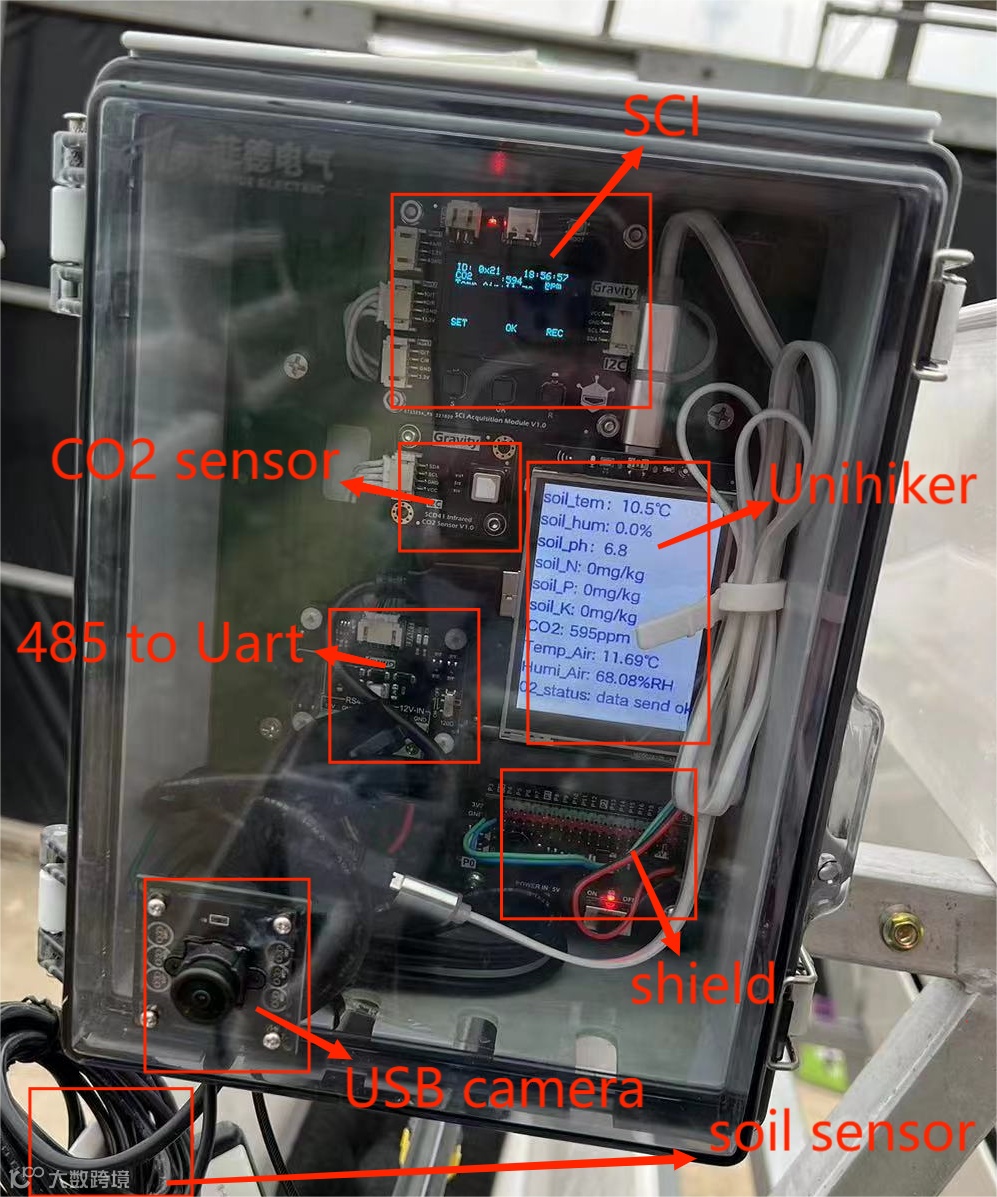
USB摄像头和行空板的USB连接。
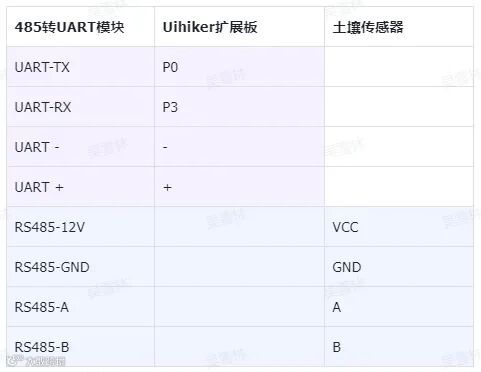
RS485土壤传感器,485转UART模块(DFR0845)和Uihiker扩展板(MBT0008)连接方式如下表。485转UART模块和土壤传感器之间使用接线柱连接较牢固,485转UART模块和Uihiker扩展板使用杜邦线连接,建议使用热熔胶二次固定,防止电线松动。
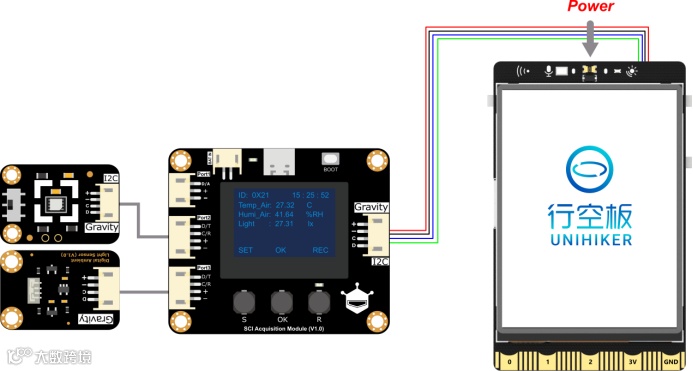
SCI,传感器(SEN0536,SEN0540 ,SEN0334)和Uihiker连接方式如图:
2.气象站节点
气象站(SEN0186)和 Uihiker扩展板(MBT0008)连接方式如下表,使用杜邦线连接,建议使用热熔胶二次固定,防止电线松动。
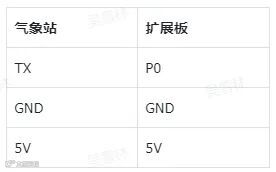
3. 供电:
使用FIT0639和电源转接模块,给Uihiker和扩展板(MBT0008)整体供电。
在LP服务器搭建环境:
安装服务器程序Siot
1、下载windows版本的SIoT解压,双击start SIoT.bat即可启动SIoT,启动之后会弹出命令窗口启动服务器。
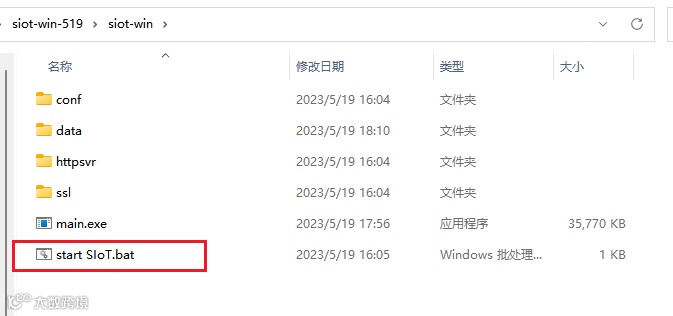
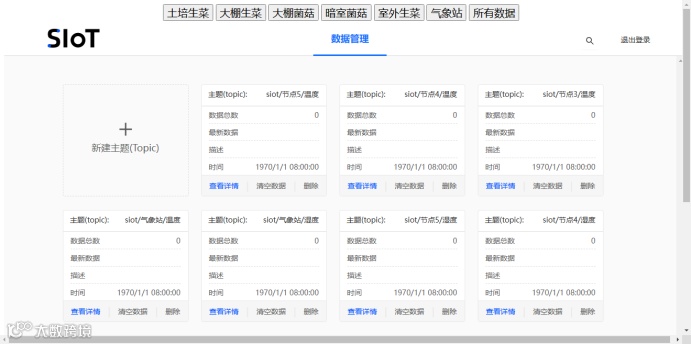
2、在浏览器输入 127.0.0.1:8080 即可打开网页端口,登录账号为siot,密码为dfrobot,打开后可以新建Topic或查看消息。

安装Web应用框架Flask
1、windows安装python3.7,下载网页:
2、Python安装flask库
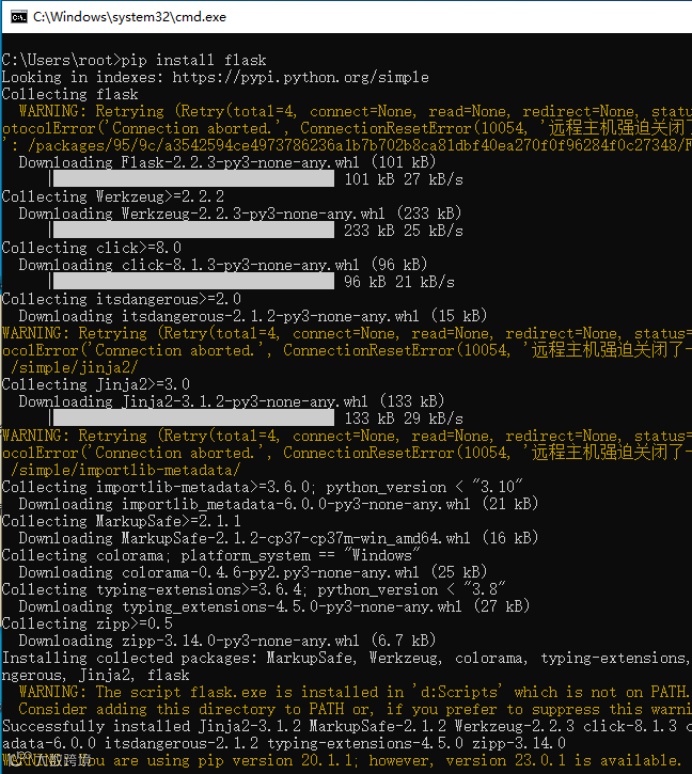
3、访问项目网址下载代码(见第六节),并运行Flask程序
cd flask-demoflask-start.py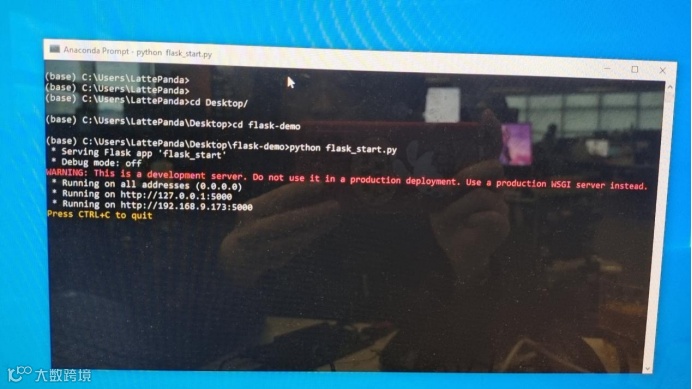
4、网址输入访问http://127.0.0.1:5000/index(需要先启动Siot V2,才可以使用这个Flask Web),在这个网页中,你可以通过上方的按钮选择查看节点的传感器数据。
路由器设置
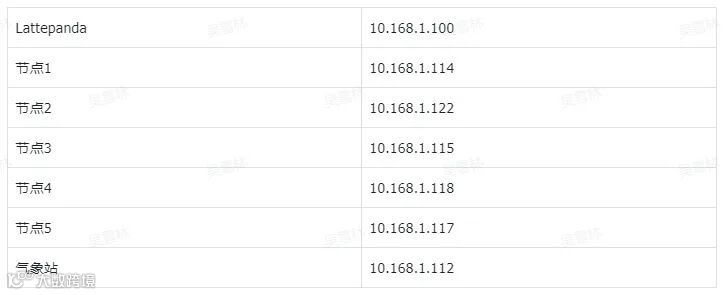
在lattepanda网页登录路由器页面设置,固定Lattepanda、六个Unihiker的IP。
代码:
1. Unihiker 以节点1 土培生菜为例
(请开启Unihiker开机自启动设置)
# -*- coding: utf-8 -*-import timefrom dfrobot_rp2040_sci import *from pinpong.board import Board, UARTimport serialimport timeimport siotimport osfrom unihiker import GUIimport requestsimport base64import cv2Board("").begin() #初始化,选择板型,不输入板型则进行自动识别SCI1 = DFRobot_RP2040_SCI_IIC(addr=0x21)u_gui=GUI()#硬串口1 P0-RX P3-TXuart1 = UART()# ser = serial.Serial("/dev/ttyUSB0",115200,timeout=0.5)#初始化串口 baud_rate 波特率, bits 数据位数(8/9) parity奇偶校验(0 无校验/1 奇校验/2 偶校验) stop 停止位(1/2)uart1.init(baud_rate = 9600, bits=8, parity=0, stop = 1)soil_tem_text=u_gui.draw_text(text="soil temperature:NAN",x=0,y=0,font_size=16, color="#0000FF")soil_hum_text=u_gui.draw_text (text="soil humidity:NAN",x=0,y=30,font_size=16, color="#0000FF")soil_ph_text=u_gui.draw_text(text="soil ph:NAN",x=0,y=60,font_size=16, color="#0000FF")soil_N_text=u_gui.draw_text(text="soil N:NAN",x=0,y=90,font_size=16, color="#0000FF")soil_P_text=u_gui.draw_text(text="soil P:NAN",x=0,y=120,font_size=16, color="#0000FF")soil_K_text=u_gui.draw_text(text="soil K:NAN",x=0,y=150,font_size=16, color="#0000FF")CO2_text = u_gui.draw_text(text="CO2:NAN",x=0,y=180,font_size=16, color="#0000FF")status_text = u_gui.draw_text(text="01_status:NAN",x=0,y=270,font_size=16, color="#0000FF")air_tem_text=u_gui.draw_text(text="air temperature:NAN",x=0,y=210,font_size=16, color="#0000FF")air_hum_text=u_gui.draw_text(text="air humidity:NAN",x=0,y=240,font_size=16, color="#0000FF")#lux_text=u_gui.draw_text(text="light lux:NAN",x=0,y=270,font_size=16, color="#0000FF")while SCI1.begin() != 0:print("Initialization Sensor Universal Adapter Board failed.")time.sleep(1)print("Initialization Sensor Universal Adapter Board done.")#发送给传感器的指令buf = [0x02, 0x03, 0x00, 0x00, 0x00, 0x0A, 0xC5,0xFE]#返回指令 04传感器地址;03功能码;14数据长度;'00', 'e7'温度;'00', '00'湿度;00 00 空白;'00', '28'ph;'00', '00', '00', '00', '00', '00'氮磷钾;'00', '00', '00', '00'空白;'25', '80'波特率9600;25,b2校验和#['04', '03', '14', '00', 'e7', '00', '00', '00', '00', '00', '28', '00', '00', '00', '00', '00', '00', '00', '00', '00', '00', '25', '80', '25', 'b2']def calc_crc(string):#print(string)#data = bytearray.fromhex(string)data = ['{:02x}'.format(i) for i in string]#print(data)data = " ".join(data)data = data.replace('0x','')global data2data2 = dataprint(data2)data = bytearray.fromhex(data)crc = 0xFFFFfor pos in data:crc ^= posfor i in range(8):if ((crc & 1) != 0):crc >>= 1crc ^= 0xA001else:crc >>= 1return hex(((crc & 0xff) << 8) + (crc >> 8))def send_photos():photos_path = '/root/photos'photos_path_list = os.listdir(photos_path)photos_path_list.sort(reverse=False)photos_quan = len(photos_path_list)photos_count = photos_quan+1print("count:"+str(photos_count))cap = cv2.VideoCapture(0)cap.set(cv2.CAP_PROP_FRAME_WIDTH, 320) #设置摄像头图像宽度cap.set(cv2.CAP_PROP_FRAME_HEIGHT, 240) #设置摄像头图像高度cap.set(cv2.CAP_PROP_BUFFERSIZE, 1) #设置OpenCV内部的图像缓存,可以极大提高图像的实时性。ret, frame = cap.read()if ret == True:cv2.imwrite(photos_path+'/Frame'+ str(photos_count) +'.jpg', frame)print("save photo!")cap.release()with open(photos_path+'/Frame'+ str(photos_count) +'.jpg',"rb") as f:# b64encode是编码,b64decode是解码data = base64.b64encode(f.read())src = "data:image/{ext};base64,{data}".format(ext='jpg', data=str(data))#print(src)#print(len(src))siot.publish_save(topic="siot/节点1/image", data=src)siot.publish_save(topic="siot/image", data=src)print("photos send ok")f.close()status_text.config(text="04_status: photo send ok",x=0,y=290)photos_count = int(photos_count) + 1flag = 1count=0while True:air_tem_value=SCI1.get_value0("Temp_Air")air_tem_t = "Temp_Air: "+str(air_tem_value)+"℃"air_tem_text.config(text=air_tem_t,x=0,y=210)air_hum_value=SCI1.get_value0("Humi_Air")air_hum__t = "Humi_Air: "+str(air_hum_value)+"%RH"air_hum_text.config(text=air_hum__t,x=0,y=240)print("-----------write buf-----------")uart1.write(buf)time.sleep(1)count=0while uart1.any()==0:print("any:"+str(count))count=count+1if count>10:breaktime.sleep(0.1)while uart1.any()>0:print("while2:"+str(uart1.any()))#print(uart1.read(uart1.any()))time.sleep(0.01)if uart1.read(1)[0] == 0x02:print("11")time.sleep(0.01)if uart1.read(1)[0] == 0x03:time.sleep(0.01)print("while2:"+str(uart1.any()))data = uart1.read(23)data.insert(0,0x02)data.insert(1,0x03)#print(data)crc = calc_crc((data))#print(data[11],data(12))print("crc="+str(crc))if crc == '0x0':print(data2)data3 = data2.split()#print(str(data3[10])+str(data3[11]))soil_tem = int(str(data3[3])+str(data3[4]),16)/10soil_ph = int(str(data3[9])+str(data3[10]),16)/10soil_hum = int(str(data3[5])+str(data3[6]),16)/10soil_N = int(str(data3[11])+str(data3[12]),16)soil_P = int(str(data3[13])+str(data3[14]),16)soil_K = int(str(data3[15])+str(data3[16]),16)soil_ph_t = "soil_ph:"+ str(soil_ph)soil_ph_text.config(text= soil_ph_t ,x=0,y=60)soil_hum_t = "soil_hum: "+str(soil_hum)+"%"soil_hum_text.config(text= soil_hum_t ,x=0,y=30)soil_tem_t = "soil_tem:"+str(soil_tem)+"℃"soil_tem_text.config(text= soil_tem_t ,x=0,y=0)soil_N_t = "soil_N: "+str(soil_N)+"mg/kg"soil_N_text.config(text= soil_N_t ,x=0,y=90)soil_P_t = "soil_P: "+str(soil_P)+"mg/kg"soil_P_text.config(text= soil_P_t ,x=0,y=120)soil_K_t = "soil_K: "+str(soil_K)+"mg/kg"soil_K_text.config(text= soil_K_t ,x=0,y=150)try :my_variable = requests.get("http://10.1.2.3/wifi/status")print(my_variable.text)status = my_variable.text.split('"')[11]print("wifi: "+status)status_text.config(text="01_wifi:"+status,x=0,y=270)siot.init(client_id="unihiker01",server="10.168.1.100",port=1883,user="siot",password="dfrobot")siot.connect()siot.loop()siot.getsubscribe(topic="siot/节点1/土壤温度")siot.getsubscribe(topic="siot/节点1/土壤湿度")siot.getsubscribe(topic="siot/节点1/土壤pH")siot.getsubscribe(topic="siot/节点1/土壤氮")siot.getsubscribe(topic="siot/节点1/土壤磷")siot.getsubscribe(topic="siot/节点1/土壤钾")#siot.getsubscribe(topic="siot/节点1/二氧化碳")siot.getsubscribe(topic="siot/节点1/空气温度")siot.getsubscribe(topic="siot/节点1/空气湿度")siot.getsubscribe(topic="siot/image")siot.getsubscribe(topic="siot/节点1/image")siot.publish_save(topic="siot/节点1/土壤温度", data=soil_tem)siot.publish_save(topic="siot/节点1/土壤pH", data=soil_ph)siot.publish_save(topic="siot/节点1/土壤湿度", data=soil_hum)siot.publish_save(topic="siot/节点1/土壤氮", data=soil_N)siot.publish_save(topic="siot/节点1/土壤磷", data=soil_P)siot.publish_save(topic="siot/节点1/土壤钾", data=soil_K)siot.publish_save(topic="siot/节点1/空气温度", data=air_tem_value)siot.publish_save(topic="siot/节点1/空气湿度", data=air_hum_value)if flag == 50:flag = 0send_photos()print("send ok")siot.stop()status_text.config(text="01_status: data send ok",x=0,y=270)time.sleep(3600)except :print("wifi正在重连!")status_text.config(text="wifi正在重连!",x=0,y=270)my_variable = requests.get("http://10.1.2.3/wifi/connect?ssid=dfrobot&password=dfrobot2017") # ssid和password后面改为需要连接的wifi名字密码print(my_variable.text)time.sleep(60)print("查看WiFi连接情况:")my_variable = requests.get("http://10.1.2.3/wifi/status")print(my_variable.text)status = my_variable.text.split('"')[11]print(status)status_text.config(text="01_wifi:"+status,x=0,y=270)
2. Unihiker 气象站
# -*- coding: utf-8 -*-import timefrom pinpong.board import Board, UARTimport siotimport osBoard("UNIHIKER").begin() #初始化,选择板型,不输入板型则进行自动识别#行空板硬串口1 P0-RX P3-TXuart1 = UART()#初始化串口 baud_rate 波特率, bits 数据位数(8/9) parity奇偶校验(0 无校验/1 奇校验/2 偶校验) stop 停止位(1/2)uart1.init(baud_rate = 9600, bits=8, parity=0, stop = 1)#uart1.init() #气象站波特率为9600siot.init(client_id="hostclient01",server="10.1.2.3",port=1883,user="siot",password="dfrobot")while True:databuffer = ""#print(len("c000s000g000t082r000p000h48b10022*3C"))默认字长buf = uart1.readline()#uart1.write(buf)#b = type(buf)#print(b)if buf is None:print("recv None")else:for i in buf:#print(i)a = chr(i)databuffer = databuffer + alength = len(databuffer)print(databuffer)if length == 38: # 如果数据长度为38print("databuffer:",databuffer) # 打印显示数据串'''解析获取其中的风向数据'''try:WindDirection = int(databuffer[1:4])except:WindDirection = 0if 0 <= WindDirection and WindDirection < 22.5 or 337.5<=WindDirection and WindDirection < 360:WindDirection_dir = 'S'if 22.5 <= WindDirection and WindDirection < 67.5:WindDirection_dir = 'SW'if 67.5 <= WindDirection and WindDirection < 112.5:WindDirection_dir = 'W'if 112.5 <= WindDirection and WindDirection < 157.5:WindDirection_dir = 'NW'if 157.5 <= WindDirection and WindDirection < 202.5:WindDirection_dir = 'N'if 202.5 <= WindDirection and WindDirection < 247.5:WindDirection_dir = 'NE'if 247.5 <= WindDirection and WindDirection < 292.5:WindDirection_dir = 'E'if 292.5 <= WindDirection and WindDirection < 337.5:WindDirection_dir = 'SE'print("WindDirection:" +str(WindDirection) +" degree","WindDirection_dir:"+WindDirection_dir)'''解析获取其中的风速数据'''# 1英里每小时=1609.34米/3600秒=0.44703889m/s# 前一分钟的平均风速try:WindSpeedAverage = round(0.44704 * float(databuffer[5:8]),1)except:WindSpeedAverage = 0print("Average Wind Speed (One Minute):" + str(WindSpeedAverage) + "m/s ")# 前五分钟的最大风速try:WindSpeedMax = round(0.44704 * float(databuffer[9:12]),1)except:WindSpeedMax = 0print("Max Wind Speed (Five Minutes):" + str(WindSpeedMax) + "m/s")'''解析其中的温度数据'''# 摄氏度=(华氏度-32)*5/9try:Temperature = round((float(databuffer[13:16]) - 32.00) * 5.00 / 9.00,2)except:Temperature = 0print("Temperature:" + str(Temperature)+ "℃ ")# print("Temperature:" + "{:.2f}".format(Temperature)+ "C ")'''解析其中的湿度数据'''try:Humidity = round(float(databuffer[25:27]) ,1)except:Humidity = 0print("Humidity:" + str(Humidity) +"% ")'''解析其中的气压数据'''try:BarPressure = round(float(databuffer[28:33])/ 10.00,1)except:BarPressure = 0print("BarPressure:" + str(BarPressure) + "hPa")else: # 如果长度不是38,那么就令数据为空databuffer = ""time.sleep(0.5)
3. Flask服务器程序
# -*- coding: UTF-8 -*-from flask import Flask,Response,render_template,requestflask_app = Flask(__name__)# 事件回调函数def rec_route_funca():print("b click")return "rount_func"def rec_route_funcb():print("b click")return "b"def rec_index():return render_template("test.html")def route_index():return rec_index()flask_app.run(host='0.0.0.0', port=5000, threaded=True)
4. 服务器程序(保存图片,查询节点在线状态)
# -*- coding: UTF-8 -*-# MindPlus# Pythonimport timeimport siotimport osip = ['ping 10.168.1.114','ping 10.168.1.117','ping 10.168.1.118','ping 10.168.1.122','ping 10.168.1.115','ping 10.168.1.112']# 事件回调函数def on_message_callback(client, userdata, msg):global P1global N1global K1global P5global N5global K5global sendata1global sendata5global sendatawglobal sendataglobal weather_humglobal weather_temglobal indoor_humglobal indoor_temif (msg.topic.find("表格")!=-1):passelse:if (msg.topic.find("节点1/土壤氮")!=-1):N1 = msg.payload.decode()print(msg.topic)print(N1)if (msg.topic.find("节点1/土壤磷")!=-1):P1 = msg.payload.decode()print(msg.topic)print(P1)if (msg.topic.find("节点1/土壤钾")!=-1):K1 = msg.payload.decode()print(msg.topic)print(K1)status = ((not (P1 == 0)) and (not (N1 == 0)))if ((not (status == 0)) and (not (K1 == 0))):sendata1 = N1 +","+ P1 +","+ K1print(sendata1)siot.publish_save(topic="siot/节点1/氮磷钾总和表格", data=sendata1)if (msg.topic.find("节点5/土壤氮")!=-1):N5 = msg.payload.decode()print(msg.topic)print(N5)if (msg.topic.find("节点5/土壤磷")!=-1):P5 = msg.payload.decode()print(msg.topic)print(P5)if (msg.topic.find("节点5/土壤钾")!=-1):K5 = msg.payload.decode()print(msg.topic)print(K5)status = ((not (P5 == 0)) and (not (N5 == 0)))if ((not (status == 0)) and (not (K5 == 0))):sendata5 = N5 +","+ P5 +","+ K5print(sendata5)siot.publish_save(topic="siot/节点5/氮磷钾总和表格", data=sendata5)if (msg.topic.find("气象站/温度")!=-1):weather_tem = msg.payload.decode()print((str(msg.topic) + str(weather_tem)))if (msg.topic.find("气象站/湿度")!=-1):weather_hum = msg.payload.decode()print((str(msg.topic) + str(weather_hum)))if ((not (weather_hum == 0)) and (not (weather_tem == 0))):sendataw = weather_hum+ "," + weather_temprint(sendataw)siot.publish_save(topic="siot/气象站/温湿度表格", data=sendataw)if (msg.topic.find("节点1/温度")!=-1):weather_tem = msg.payload.decode()print((str(msg.topic) + str(weather_tem)))if (msg.topic.find("节点1/湿度")!=-1):weather_hum = msg.payload.decode()print((str(msg.topic) + str(weather_hum)))if ((not (indoor_hum == 0)) and (not (indoor_tem == 0))):sendata = indoor_hum+ "," + indoor_temprint(sendata)siot.publish_save(topic="siot/节点1/温湿度表格", data=sendata)siot.init(client_id="",server="10.168.1.100",port=1883,user="siot",password="dfrobot")siot.set_callback(on_message_callback)siot.connect()siot.loop()P1 = 0N1 = 0K1 = 0P5 = 0N5 = 0K5 = 0weather_hum = 0weather_tem = 0indoor_tem = 0indoor_hum = 0siot.getsubscribe(topic="siot/节点1/温湿度表格")siot.getsubscribe(topic="siot/气象站/温湿度表格")siot.getsubscribe(topic="siot/气象站/温度")siot.getsubscribe(topic="siot/气象站/湿度")siot.getsubscribe(topic="siot/节点1/温度")siot.getsubscribe(topic="siot/节点1/湿度")siot.getsubscribe(topic="siot/devicestatus")siot.getsubscribe(topic="siot/节点1/氮磷钾总和表格")siot.getsubscribe(topic="siot/节点1/土壤氮")siot.getsubscribe(topic="siot/节点1/土壤磷")siot.getsubscribe(topic="siot/节点1/土壤钾")siot.getsubscribe(topic="siot/节点5/氮磷钾总和表格")siot.getsubscribe(topic="siot/节点5/土壤氮")siot.getsubscribe(topic="siot/节点5/土壤磷")siot.getsubscribe(topic="siot/节点5/土壤钾")while True:outdev = 0online = 0for i in ip:result = os.popen(i)status = result.read()loc = "unreachable" in statusprint(loc)if loc != True:loc = status.find('Lost')loss_data = status[loc+7]if loss_data == '4':outdev = outdev+1else:online = online+1else:outdev = outdev+1output = str(online) + ','+ str(outdev)print("online,outdev:")print(output)siot.publish_save(topic="siot/devicestatus", data=output)print("send ok")time.sleep(100)
访问项目下载完整程序:
https://github.com/polamaxu/AgriculturalSmartSystem
总结
该物联网农业监测系统能够稳定地检测土壤养分,包括温湿度、PH和氮磷钾数据,同时还能监测户外和大棚的作物生长环境。通过无线WIFI,将大棚环境和室外气象站的传感器数据和图片实时上传云端,提供土壤养分、环境光照、环境参数的实时分析,为家庭精准农业提供必要的数据支持。
FAQ
1、Unihiker 一直显示wifi正在重连?
观察屏幕是否循环显示wifi connected->wifi 正在重连。如果有,请重启lattepanda上的siot服务器。如果没有出现,请检查路由器是否正常。
2、Unihiker 显示报错:runtimeerror:analog map retrieal time out.
返回Unihiker 菜单页面,重新运行程序,如果还无法解决,可以刷处理器固件,方法:https://www.Unihiker.com/wiki/faq
3、如何远程监控各个行空板的屏幕?
使用windows自带的远程软件remote desktop connection,填入行空的ip来访问
4、如何远程控制查看各个行空板的程序?
使用mobaXterm.exe,选择行空对应的ip就可以打开行空板的系统运行命令行界面,账号是siot,密码是dfrobot。
往期推荐