


本文转载自:
项目背景
2023年10月24日,2023科大讯飞全球1024开发者节在合肥开幕,如期升级发布讯飞星火认知大模型V3.0。科大讯飞讯飞星火认知大模型基于深度学习技术,通过大量的数据训练,具备了强大的自然语言处理能力。这个模型不仅能够理解人类语言,还能够执行各种任务,如问答、机器翻译、文本生成等,亮点在于引入了语音输入识别及语言播报。
项目设计
本项目给行空板插上上带麦克风的USB摄像头,为行空板配上“耳机”和“眼睛”。使用行空板自带的“蓝牙模块”连接上蓝牙音箱,行空板的嘴巴。行空板上的屏幕显示摄像头拍摄的内容。行空板通过Mind+的Python模式编写程序调用“星火认知大模型”API,配上智慧的大脑。(API功能:用户输入一张图片和问题,从而识别出图片中的对象、场景等信息回答用户的问题)
项目实现
1、通过调用Opencv库采集环境图像,通过讯飞语音识别功能识别用户提问,发送给“星火认知大模型”进行“图像理解”,并可结合图像内容进行多轮细节提问。也可让“大模型”结合图像内容编写故事等。再通过“讯飞语音合成”,行空板通过蓝牙音箱播放反馈结果。
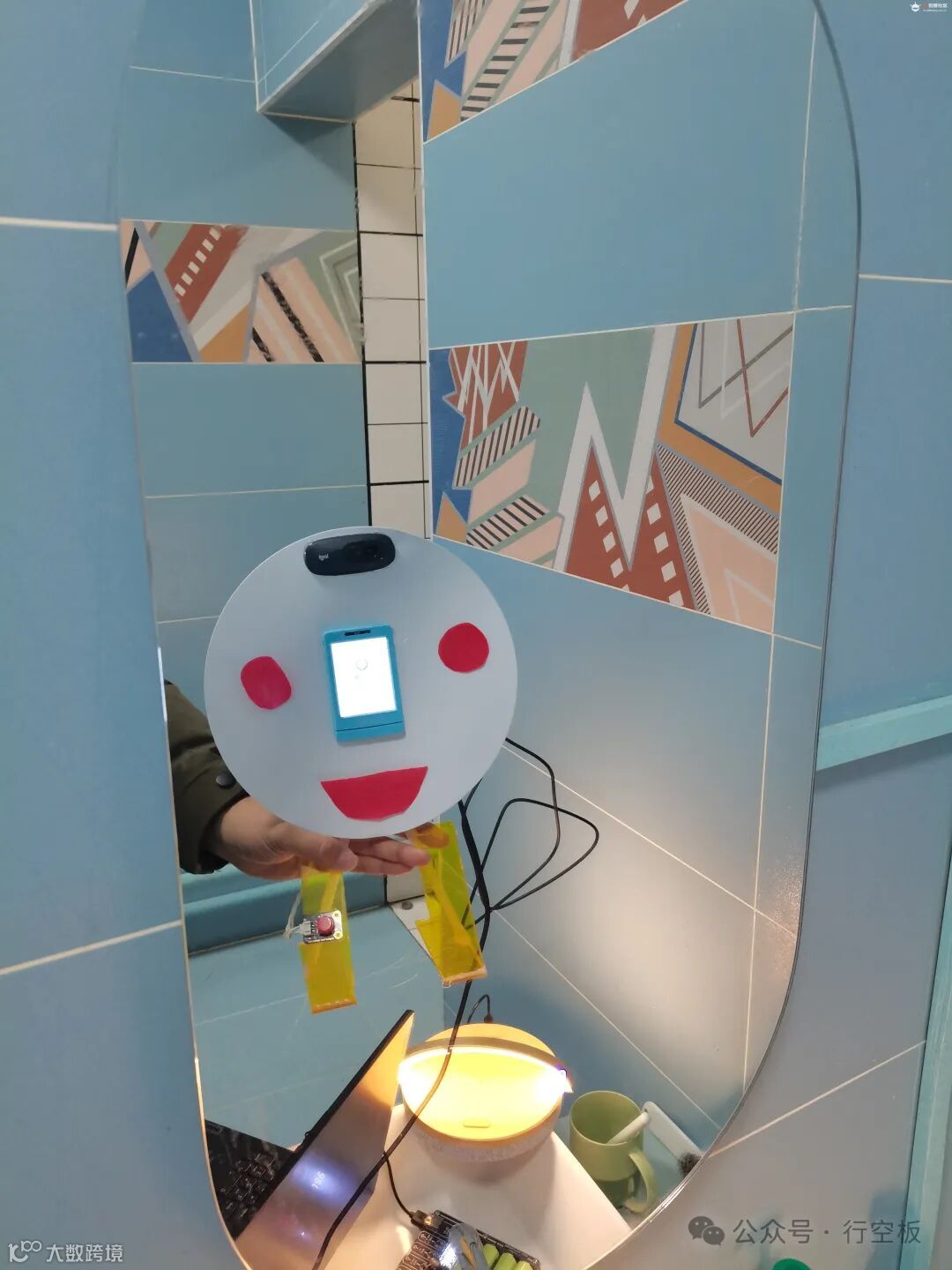
2.本项目重点,让行空板机器人(本人给它做了一个很丑的外形),对着镜子给自己照相,然后我们让它评价一下自己。
机器人外形
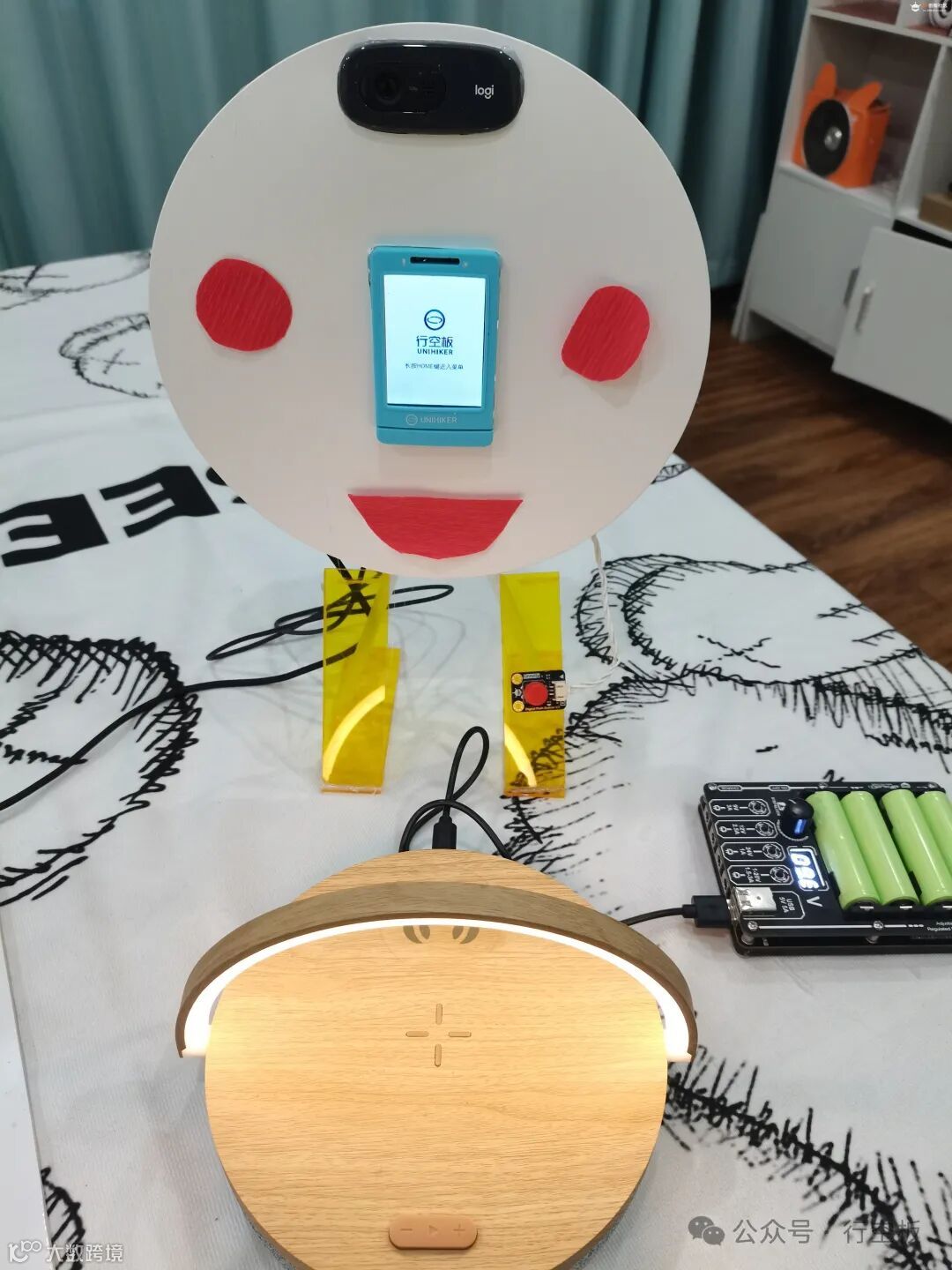
用圆纸板做为机器人的“脸”,中间是行空板、上面是USB摄像头(这两个增加了图像理解难度),为了更像是“脸”,用两个圆形红纸片装饰成两个腮红,再加上一个红红的大嘴吧。丑还是丑!!!
下面是一个蓝牙音箱,右侧是给音箱供电的电源。
测试
把丑丑的它自己的照片传给星火大语言模型进行图片理解,因我做的机器人有点抽象,有时它不太理解我问的问题,比如它找不到“自己的腿”。
所用的代码:
import _thread as threadimport base64import datetimeimport hashlibimport hmacimport jsonfrom urllib.parse import urlparseimport sslfrom datetime import datetimefrom time import mktimefrom urllib.parse import urlencodefrom wsgiref.handlers import format_date_timeimport websocket # 使用websocket_clientappid = "*********************" #填写控制台中获取的 APPID 信息api_secret = "*****************" #填写控制台中获取的 APISecret 信息api_key ="*********************" #填写控制台中获取的 APIKey 信息imagedata = open("pic.jpg",'rb').read()imageunderstanding_url = "wss://spark-api.cn-huabei-1.xf-yun.com/v2.1/image"#云端环境的服务地址text =[{"role": "user", "content": str(base64.b64encode(imagedata), 'utf-8'), "content_type":"image"}]class Ws_Param(object):# 初始化def __init__(self, APPID, APIKey, APISecret, imageunderstanding_url):self.APPID = APPIDself.APIKey = APIKeyself.APISecret = APISecretself.host = urlparse(imageunderstanding_url).netlocself.path = urlparse(imageunderstanding_url).pathself.ImageUnderstanding_url = imageunderstanding_url# 生成urldef create_url(self):# 生成RFC1123格式的时间戳now = datetime.now()date = format_date_time(mktime(now.timetuple()))# 拼接字符串signature_origin = "host: " + self.host + "\n"signature_origin += "date: " + date + "\n"signature_origin += "GET " + self.path + " HTTP/1.1"# 进行hmac-sha256进行加密signature_sha = hmac.new(self.APISecret.encode('utf-8'), signature_origin.encode('utf-8'),digestmod=hashlib.sha256).digest()signature_sha_base64 = base64.b64encode(signature_sha).decode(encoding='utf-8')authorization_origin = f'api_key="{self.APIKey}", algorithm="hmac-sha256", headers="host date request-line", signature="{signature_sha_base64}"'authorization = base64.b64encode(authorization_origin.encode('utf-8')).decode(encoding='utf-8')# 将请求的鉴权参数组合为字典v = {"authorization": authorization,"date": date,"host": self.host}# 拼接鉴权参数,生成urlurl = self.ImageUnderstanding_url + '?' + urlencode(v)#print(url)# 此处打印出建立连接时候的url,参考本demo的时候可取消上方打印的注释,比对相同参数时生成的url与自己代码生成的url是否一致return url# 收到websocket错误的处理def on_error(ws, error):print("### error:", error)# 收到websocket关闭的处理def on_close(ws,one,two):print(" ")# 收到websocket连接建立的处理def on_open(ws):thread.start_new_thread(run, (ws,))def run(ws, *args):data = json.dumps(gen_params(appid=ws.appid, question= ws.question ))ws.send(data)# 收到websocket消息的处理def on_message(ws, message):#print(message)data = json.loads(message)code = data['header']['code']if code != 0:print(f'请求错误: {code}, {data}')ws.close()else:choices = data["payload"]["choices"]status = choices["status"]content = choices["text"][0]["content"]print(content,end ="")global answeranswer += content# print(1)if status == 2:ws.close()def gen_params(appid, question):"""通过appid和用户的提问来生成请参数"""data = {"header": {"app_id": appid},"parameter": {"chat": {"domain": "image","temperature": 0.5,"top_k": 4,"max_tokens": 2028,"auditing": "default"}},"payload": {"message": {"text": question}}}return datadef main(appid, api_key, api_secret, imageunderstanding_url,imagedata,question):wsParam = Ws_Param(appid, api_key, api_secret, imageunderstanding_url)websocket.enableTrace(False)wsUrl = wsParam.create_url()ws = websocket.WebSocketApp(wsUrl, on_message=on_message, on_error=on_error, on_close=on_close, on_open=on_open)ws.appid = appidws.imagedata = imagedataws.question = questionws.run_forever(sslopt={"cert_reqs": ssl.CERT_NONE})def getText(role, content):jsoncon = {}jsoncon["role"] = rolejsoncon["content"] = contenttext.append(jsoncon)return textdef getlength(text):length = 0for content in text:temp = content["content"]leng = len(temp)length += lengreturn lengthdef checklen(text):#print("text-content-tokens:", getlength(text[1:]))while (getlength(text[1:])> 8000):del text[1]return textif __name__ == '__main__':text.clearprint(text)while(1):Input = input("\n" +"问:")question = checklen(getText("user",Input))print(question)answer = ""print("答:",end = "")main(appid, api_key, api_secret, imageunderstanding_url, imagedata,question)getText("assistant", answer)# print(str(text))
行空板摄像头
行空板使用USB摄像头,通过Opencv库打开摄像头获取图像并在屏幕上显示。
#导入所需的模块:import cv2from unihiker import GUI#创建视频对象并打开摄像头:cap = cv2.VideoCapture(0) # 参数为0表示默认摄像头设备u_gui=GUI()#读取每一帧图像并显示:bs=0while True:ret, img = cap.read() # 从摄像头读取当前帧图像if not ret:break # 若无法成功读取图像,则退出循环img=cv2.resize(img,(240,320))cv2.imwrite("img.png", img)if bs==0:AI图=u_gui.draw_image(image="img.png",x=0,y=0)bs=1else:AI图.config(image="img.png")#关闭视频对象:cap.release()
使用A键拍照进行图像理解
使用行空板自带的A键,程序中用“button_a.is_pressed()”判断是否按下。主要用于测试时使用,当整个机器人安装好后,每次去“脸”的后面去按有些不方便。
import _thread as threadimport base64import datetimeimport hashlibimport hmacimport jsonfrom urllib.parse import urlparseimport sslfrom datetime import datetimefrom time import mktimefrom urllib.parse import urlencodefrom wsgiref.handlers import format_date_timeimport websocket # 使用websocket_clientimport cv2import base64from unihiker import GUIfrom pinpong.extension.unihiker import *from pinpong.board import Board,Pinimport timeBoard().begin()#创建视频对象并打开摄像头:cap = cv2.VideoCapture(0) # 参数为0表示默认摄像头设备#读取每一帧图像并显示:bs=0appid = "************" #填写控制台中获取的 APPID 信息api_secret = "******************" #填写控制台中获取的 APISecret 信息api_key ="***********************" #填写控制台中获取的 APIKey 信息imageunderstanding_url = "wss://spark-api.cn-huabei-1.xf-yun.com/v2.1/image"#云端环境的服务地址text =[{"role": "user", "content": "", "content_type":"image"}]class Ws_Param(object):# 初始化def __init__(self, APPID, APIKey, APISecret, imageunderstanding_url):self.APPID = APPIDself.APIKey = APIKeyself.APISecret = APISecretself.host = urlparse(imageunderstanding_url).netlocself.path = urlparse(imageunderstanding_url).pathself.ImageUnderstanding_url = imageunderstanding_url# 生成urldef create_url(self):# 生成RFC1123格式的时间戳now = datetime.now()date = format_date_time(mktime(now.timetuple()))# 拼接字符串signature_origin = "host: " + self.host + "\n"signature_origin += "date: " + date + "\n"signature_origin += "GET " + self.path + " HTTP/1.1"# 进行hmac-sha256进行加密signature_sha = hmac.new(self.APISecret.encode('utf-8'), signature_origin.encode('utf-8'),digestmod=hashlib.sha256).digest()signature_sha_base64 = base64.b64encode(signature_sha).decode(encoding='utf-8')authorization_origin = f'api_key="{self.APIKey}", algorithm="hmac-sha256", headers="host date request-line", signature="{signature_sha_base64}"'authorization = base64.b64encode(authorization_origin.encode('utf-8')).decode(encoding='utf-8')# 将请求的鉴权参数组合为字典v = {"authorization": authorization,"date": date,"host": self.host}# 拼接鉴权参数,生成urlurl = self.ImageUnderstanding_url + '?' + urlencode(v)#print(url)# 此处打印出建立连接时候的url,参考本demo的时候可取消上方打印的注释,比对相同参数时生成的url与自己代码生成的url是否一致return url# 收到websocket错误的处理def on_error(ws, error):print("### error:", error)# 收到websocket关闭的处理def on_close(ws,one,two):print(" ")# 收到websocket连接建立的处理def on_open(ws):thread.start_new_thread(run, (ws,))def run(ws, *args):data = json.dumps(gen_params(appid=ws.appid, question= ws.question ))ws.send(data)# 收到websocket消息的处理def on_message(ws, message):data = json.loads(message)code = data['header']['code']if code != 0:print(f'请求错误: {code}, {data}')ws.close()else:choices = data["payload"]["choices"]status = choices["status"]content = choices["text"][0]["content"]print(content,end ="")global answeranswer += content# print(1)if status == 2:ws.close()def gen_params(appid, question):"""通过appid和用户的提问来生成请参数"""data = {"header": {"app_id": appid},"parameter": {"chat": {"domain": "image","temperature": 0.5,"top_k": 4,"max_tokens": 2028,"auditing": "default"}},"payload": {"message": {"text": question}}}return datadef main(appid, api_key, api_secret, imageunderstanding_url,imagedata,question):wsParam = Ws_Param(appid, api_key, api_secret, imageunderstanding_url)websocket.enableTrace(False)wsUrl = wsParam.create_url()ws = websocket.WebSocketApp(wsUrl, on_message=on_message, on_error=on_error, on_close=on_close, on_open=on_open)ws.appid = appidws.imagedata = imagedataws.question = questionws.run_forever(sslopt={"cert_reqs": ssl.CERT_NONE})def getText(role, content):jsoncon = {}jsoncon["role"] = rolejsoncon["content"] = contenttext.append(jsoncon)return textdef getlength(text):length = 0for content in text:temp = content["content"]leng = len(temp)length += lengreturn lengthdef checklen(text):#print("text-content-tokens:", getlength(text[1:]))while (getlength(text[1:])> 8000):del text[1]return textu_gui=GUI()if __name__ == '__main__':bs=0while(1):ret, img = cap.read() # 从摄像头读取当前帧图像if not ret:break # 若无法成功读取图像,则退出循环img=cv2.resize(img,(240,320))cv2.imwrite("img.jpg", img)if bs==0:AI图=u_gui.draw_image(image="img.jpg",x=0,y=0)bs=1else:AI图.config(image="img.jpg")if (button_a.is_pressed()==True):imagedata = open("img.jpg",'rb').read()text =[{"role": "user", "content": str(base64.b64encode(imagedata), 'utf-8'), "content_type":"image"}]text.clearInput="start"while True:Input = input("\n" +"问:")if Input=="不再提问":breakquestion = checklen(getText("user",Input))answer = ""print("答:",end = "")main(appid, api_key, api_secret, imageunderstanding_url, imagedata,question)getText("assistant", answer)#关闭视频对象:cv2.destroyAllWindows()
语音交互
语音监听及录音使用自定义模块文件“listening.py”(这前项目有源代码,此不在展示),使用一个外置按钮接在22引脚上,方便操作。语音交互使用讯飞语音识别及语音合成。完整代码如下:
import _thread as threadimport base64import datetimeimport hashlibimport hmacimport jsonfrom urllib.parse import urlparseimport sslfrom datetime import datetimefrom time import mktimefrom urllib.parse import urlencodefrom wsgiref.handlers import format_date_timeimport websocket # 使用websocket_clientimport cv2import base64from unihiker import GUIfrom pinpong.extension.unihiker import *from pinpong.board import Board,Pinimport timeimport listeningfrom df_xfyun_speech import XfIatfrom df_xfyun_speech import XfTtsfrom unihiker import Audiou_audio = Audio()appid = "***************" #填写控制台中获取的 APPID 信息api_secret = "**************" #填写控制台中获取的 APISecret 信息api_key ="******************" #填写控制台中获取的 APIKey 信息import xunfeiasrxunfeiasr.xunfeiasr_set(APPID=appid,APISecret=api_secret,APIKey=api_key)options = {}tts = XfTts(appid, api_key, api_secret, options)iat = XfIat(appid, api_key, api_secret)Board().begin()p_p22_in=Pin(Pin.P22, Pin.IN)#创建视频对象并打开摄像头:cap = cv2.VideoCapture(0) # 参数为0表示默认摄像头设备#读取每一帧图像并显示:bs=0imageunderstanding_url = "wss://spark-api.cn-huabei-1.xf-yun.com/v2.1/image"#云端环境的服务地址text =[{"role": "user", "content": "", "content_type":"image"}]class Ws_Param(object):# 初始化def __init__(self, APPID, APIKey, APISecret, imageunderstanding_url):self.APPID = APPIDself.APIKey = APIKeyself.APISecret = APISecretself.host = urlparse(imageunderstanding_url).netlocself.path = urlparse(imageunderstanding_url).pathself.ImageUnderstanding_url = imageunderstanding_url# 生成urldef create_url(self):# 生成RFC1123格式的时间戳now = datetime.now()date = format_date_time(mktime(now.timetuple()))# 拼接字符串signature_origin = "host: " + self.host + "\n"signature_origin += "date: " + date + "\n"signature_origin += "GET " + self.path + " HTTP/1.1"# 进行hmac-sha256进行加密signature_sha = hmac.new(self.APISecret.encode('utf-8'), signature_origin.encode('utf-8'),digestmod=hashlib.sha256).digest()signature_sha_base64 = base64.b64encode(signature_sha).decode(encoding='utf-8')authorization_origin = f'api_key="{self.APIKey}", algorithm="hmac-sha256", headers="host date request-line", signature="{signature_sha_base64}"'authorization = base64.b64encode(authorization_origin.encode('utf-8')).decode(encoding='utf-8')# 将请求的鉴权参数组合为字典v = {"authorization": authorization,"date": date,"host": self.host}# 拼接鉴权参数,生成urlurl = self.ImageUnderstanding_url + '?' + urlencode(v)#print(url)# 此处打印出建立连接时候的url,参考本demo的时候可取消上方打印的注释,比对相同参数时生成的url与自己代码生成的url是否一致return url# 收到websocket错误的处理def on_error(ws, error):print("### error:", error)# 收到websocket关闭的处理def on_close(ws,one,two):print(" ")# 收到websocket连接建立的处理def on_open(ws):thread.start_new_thread(run, (ws,))def run(ws, *args):data = json.dumps(gen_params(appid=ws.appid, question= ws.question ))ws.send(data)# 收到websocket消息的处理def on_message(ws, message):data = json.loads(message)code = data['header']['code']if code != 0:print(f'请求错误: {code}, {data}')ws.close()else:choices = data["payload"]["choices"]status = choices["status"]content = choices["text"][0]["content"]print(content,end ="")global answeranswer += content# print(1)if status == 2:ws.close()def gen_params(appid, question):"""通过appid和用户的提问来生成请参数"""data = {"header": {"app_id": appid},"parameter": {"chat": {"domain": "image","temperature": 0.5,"top_k": 4,"max_tokens": 2028,"auditing": "default"}},"payload": {"message": {"text": question}}}return datadef main(appid, api_key, api_secret, imageunderstanding_url,imagedata,question):wsParam = Ws_Param(appid, api_key, api_secret, imageunderstanding_url)websocket.enableTrace(False)wsUrl = wsParam.create_url()ws = websocket.WebSocketApp(wsUrl, on_message=on_message, on_error=on_error, on_close=on_close, on_open=on_open)ws.appid = appidws.imagedata = imagedataws.question = questionws.run_forever(sslopt={"cert_reqs": ssl.CERT_NONE})def getText(role, content):jsoncon = {}jsoncon["role"] = rolejsoncon["content"] = contenttext.append(jsoncon)return textdef getlength(text):length = 0for content in text:temp = content["content"]leng = len(temp)length += lengreturn lengthdef checklen(text):#print("text-content-tokens:", getlength(text[1:]))while (getlength(text[1:])> 8000):del text[1]return textu_gui=GUI()if __name__ == '__main__':bs=0while(1):ret, img = cap.read() # 从摄像头读取当前帧图像if not ret:break # 若无法成功读取图像,则退出循环img=cv2.resize(img,(240,320))cv2.imwrite("img.jpg", img)if bs==0:AI图=u_gui.draw_image(image="img.jpg",x=0,y=0)bs=1else:AI图.config(image="img.jpg")if (p_p22_in.read_digital()==True):imagedata = open("img.jpg",'rb').read()text =[{"role": "user", "content": str(base64.b64encode(imagedata), 'utf-8'), "content_type":"image"}]text.cleartts.synthesis("拍照已完成,请提出你的问题。", "speech.wav")u_audio.play("speech.wav")time.sleep(2)while True:listening.listen()ShiBieNaRong=xunfeiasr.xunfeiasr(r"record.wav")if ShiBieNaRong=="不再提问":breakif ShiBieNaRong!="":question = checklen(getText("user",ShiBieNaRong))answer = ""print("答:",end = "")main(appid, api_key, api_secret, imageunderstanding_url, imagedata,question)if answer!="":tts.synthesis(answer+"……", "speech.wav")u_audio.play("speech.wav")getText("assistant", answer)time.sleep(2)#关闭视频对象:cv2.destroyAllWindows()
让“它“照镜子
让AI从镜子中找到自己的脸(实际上不太像是脸),并进行描述。开始AI并不认为镜中“圆圆的东西”是张脸,当告诉它后,它说:这是张白色的圆脸,眼睛很大,嘴巴微微张开,好像在笑,脸部表情非常可爱,给人一种友好和亲切的感觉。(真会夸)我要是告诉它这就是它自己,它会怎么说。我还真不敢问,不敢问呀!!!
我的视角:

它的视角:
看”它“的主人及环境
我让AI给我编了一个故事,但当我让AI评价一我的相貌时,它以无法看出我的年龄为由搪塞过去,是不想说,还是不敢说(怕我砸了它)。当我让看周围环境时,AI看的还是蛮认真的。
往期推荐