



一、硬件准备
-
树莓派 -
面包板 -
公母头跳线 -
按钮
二、配置步骤
1.按接线图连接好硬件
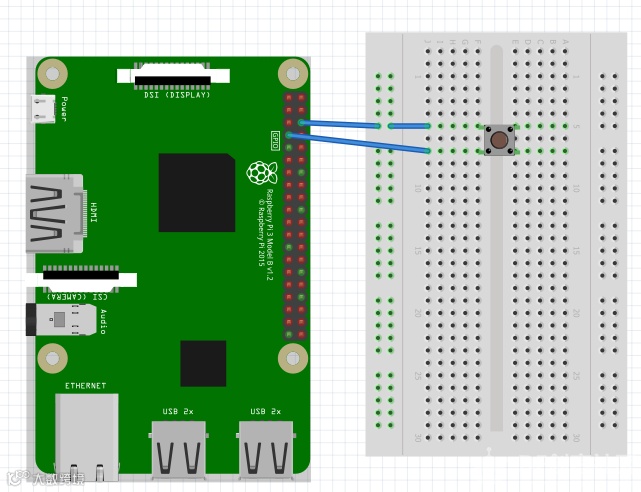
2.进入example文件夹
cd example/

新建编辑一个python文件,命名为shutdown_button.py
nano shutdown_button.py
进入编辑界面,输入代码:
from gpiozero import Button
from subprocess import check_call
from signal import pause

def shutdown():
    check_call(['sudo', 'poweroff'])

shutdown_btn = Button(4, hold_time=2)
shutdown_btn.when_held = shutdown

pause()
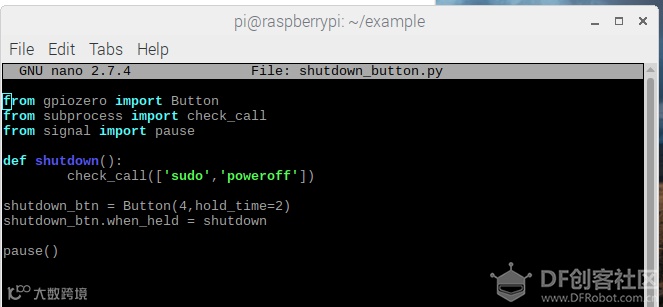
3.完成编辑,ctrl+x 退出,按y回车确认。运行测试,
sudo python 3 shutdown_button.py
长按按钮2s,树莓派就会关机了。
- END -硬件军火库
点击了解详情👆
大家有什么想法,或是对文章的指正,都欢迎在下方留言!
学有余力的小伙伴,可以点击阅读原文,到社区继续学习!
往期回顾
点击阅读👆