


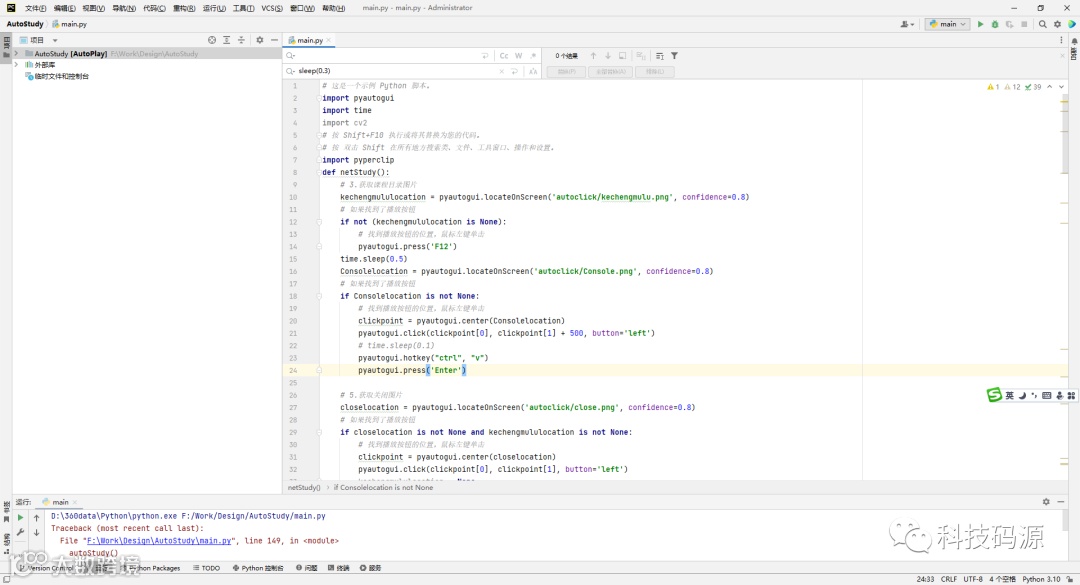
Python编程界面

Python代码
import pyautoguiimport timeimport cv2# 按 Shift+F10 执行或将其替换为您的代码。# 按 双击 Shift 在所有地方搜索类、文件、工具窗口、操作和设置。import pyperclipdef netStudy():# 3.获取课程目录图片kechengmululocation = pyautogui.locateOnScreen('autoclick/kechengmulu.png', confidence=0.8)# 如果找到了播放按钮if not (kechengmululocation is None):# 找到播放按钮的位置,鼠标左键单击pyautogui.press('F12')time.sleep(0.5)Consolelocation = pyautogui.locateOnScreen('autoclick/Console.png', confidence=0.8)# 如果找到了播放按钮if Consolelocation is not None:# 找到播放按钮的位置,鼠标左键单击clickpoint = pyautogui.center(Consolelocation)pyautogui.click(clickpoint[0], clickpoint[1] + 500, button='left')# time.sleep(0.1)pyautogui.hotkey("ctrl", "v")pyautogui.press('Enter')# 5.获取关闭图片closelocation = pyautogui.locateOnScreen('autoclick/close.png', confidence=0.8)# 如果找到了播放按钮if closelocation is not None and kechengmululocation is not None:# 找到播放按钮的位置,鼠标左键单击clickpoint = pyautogui.center(closelocation)pyautogui.click(clickpoint[0], clickpoint[1], button='left')kechengmululocation = Nonetime.sleep(1)# 6.获取离开图片leavelocation = pyautogui.locateOnScreen('autoclick/leave.png', confidence=0.8)# 如果找到了播放按钮if not (leavelocation is None):# 找到播放按钮的位置,鼠标左键单击clickpoint = pyautogui.center(leavelocation)pyautogui.click(clickpoint[0], clickpoint[1], button='left')# 程序休眠0.8秒钟time.sleep(0.3)def autoStudy():# 死循环,每隔5秒去查一次播放状态。这个时间可以自己调整f = open("code.txt", encoding=' utf - 8')text = f.read()pyperclip.copy(text)f.close()while 1:m,n = pyautogui.size()# 2.获取刷新按钮图片shuaxinlocation = pyautogui.locateOnScreen('autoclick/shuaxin.png', confidence=0.8)# 如果找到了播放按钮if not (shuaxinlocation is None):# 找到播放按钮的位置,鼠标左键单击clickpoint = pyautogui.center(shuaxinlocation)pyautogui.click(clickpoint[0], clickpoint[1], button='left')time.sleep(0.3)# 找继续学习按钮percentagelocation = pyautogui.locateOnScreen('autoclick/percentage.png', confidence=0.8)# 如果找到了播放按钮if not (percentagelocation is None):# 找到播放按钮的位置,鼠标左键单击clickpoint = pyautogui.center(percentagelocation)pyautogui.click(clickpoint[0] + 150, clickpoint[1], button='left')time.sleep(0.3)netStudy()else:pyautogui.scroll(-600, m / 2, n / 2)time.sleep(0.3)percentagelocation = pyautogui.locateOnScreen('autoclick/percentage.png', confidence=0.8)# 如果找到了播放按钮if not (percentagelocation is None):# 找到播放按钮的位置,鼠标左键单击clickpoint = pyautogui.center(percentagelocation)pyautogui.click(clickpoint[0] + 150, clickpoint[1], button='left')# 程序休眠0.8秒钟time.sleep(0.3)netStudy()else:pyautogui.click(m / 2+500, n / 2, button='left')else:pyautogui.scroll(600, m / 2, n / 2)time.sleep(0.3)shuaxinlocation = pyautogui.locateOnScreen('autoclick/shuaxin.png', confidence=0.8)# 如果找到了播放按钮if not (shuaxinlocation is None):# 找到播放按钮的位置,鼠标左键单击clickpoint = pyautogui.center(shuaxinlocation)pyautogui.click(clickpoint[0], clickpoint[1], button='left')# 找继续学习按钮percentagelocation = pyautogui.locateOnScreen('autoclick/percentage.png', confidence=0.8)# 如果找到了播放按钮if not (percentagelocation is None):# 找到播放按钮的位置,鼠标左键单击clickpoint = pyautogui.center(percentagelocation)pyautogui.click(clickpoint[0] + 150, clickpoint[1], button='left')netStudy()else:pyautogui.scroll(-600,m / 2, n / 2)time.sleep(0.3)percentagelocation = pyautogui.locateOnScreen('autoclick/percentage.png', confidence=0.8)# 如果找到了播放按钮if not (percentagelocation is None):# 找到播放按钮的位置,鼠标左键单击clickpoint = pyautogui.center(percentagelocation)pyautogui.click(clickpoint[0] + 150, clickpoint[1], button='left')netStudy()# 1.查找刷新总按钮的位置shuaxinAll = pyautogui.locateOnScreen('autoclick/shuaxinAll.png', confidence=0.8)# shuaxinAllcenter = pyautogui.center(shuaxinAll)# # 鼠标移动到播放器上,显示播放按钮# pyautogui.moveTo(shuaxinAll.x + 100, shuaxinAll.y + 100, duration=0.25)if not (shuaxinAll is None):# 找到播放按钮的位置,鼠标左键单击clickpoint = pyautogui.center(shuaxinAll)pyautogui.click(clickpoint[0], clickpoint[1], button='left')time.sleep(0.3)startstudylocation = pyautogui.locateOnScreen('autoclick/startstudy.png', confidence=0.8)# 如果找到了播放按钮if startstudylocation is not None:# 找到播放按钮的位置,鼠标左键单击clickpoint = pyautogui.center(startstudylocation)pyautogui.click(clickpoint[0]+80, clickpoint[1]-10, button='left')time.sleep(1)else:pyautogui.click(m / 2, n / 2, button='left')pyautogui.scroll(-1000)time.sleep(0.3)startstudylocation = pyautogui.locateOnScreen('autoclick/startstudy.png', confidence=0.8)# 如果找到了播放按钮if startstudylocation is not None:# 找到播放按钮的位置,鼠标左键单击clickpoint = pyautogui.center(startstudylocation)pyautogui.click(clickpoint[0] + 80, clickpoint[1] - 10, button='left')time.sleep(1)kechengmululocation = pyautogui.locateOnScreen('autoclick/kechengmulu.png', confidence=0.8)# 如果找到了播放按钮if not (kechengmululocation is None):netStudy()# 按间距中的绿色按钮以运行脚本。if __name__ == '__main__':autoStudy()
code代码
function skip(){let video=document.getElementsByTagName('video')for(let i=0;i<video.length;i++){video[i].currentTime=video[i].duration}}setInterval(skip,200)
编程不易,且用且珍惜!

感谢观看
2023.10.23