



每周五 Nebula 为你播报每周看点,每周看点由固定模块:产品动态、社区问答、推荐阅读,和随机模块:本周大事件构成。
天气渐冷,年味渐浓,不知道本周搬砖的你状态如何,来查收下本周的 Nebula 动态吧~~

Nebula 社区数据公布
本周 Nebula 公布了社区数据报告以及社区年度 nStar 盘点。

本周 Nebula 主要有这些产品动态:
SHOW HOSTS 支持查看具体版本号信息,标签:内核 & 运维,具体 pr 见:https://github.com/vesoft-inc/nebula/pull/3702
支持 gflag 设置表达式深度上限,方便调整适配不同的机器环境,标签:运维,具体 pr 参见:https://github.com/vesoft-inc/nebula/pull/3722

Pick of the Week 每周会从官方论坛、知乎、微信群、微信公众号及开源中国等渠道精选问题同你分享。
本周分享的主题是【如何快速导入 Dgraph 数据】,由社区用户 bjzhaoqing 提出,Nebula 研发解答。
“bjzhaoqing 提问:有没有工具可以快速导入 Dgraph 数据到 Nebula 进行测试?我看 Nebula 可以导入 csv 格式数据。我用什么方式可以将 g01.rdf 转换成 csv 格式呢?”
def writeVertex(spark: SparkSession): Unit = {
    LOG.info("start to write nebula vertices")
    var df = spark.read
      .format("jdbc")
      .option("url", "jdbc:mysql://127.0.0.1:3360/db?useUnicode=true&characterEncoding=utf-8")
      .option("dbtable", "table")
      .option("user", "root")
      .option("password", "nebula")
      .load()

    df = df.select("select id, a as name, b as age from table")

    val config = getNebulaConnectionConfig()
    val nebulaWriteVertexConfig: WriteNebulaVertexConfig = WriteNebulaVertexConfig
      .builder()
      .withSpace("test")
      .withTag("person")
      .withVidField("id")
      .withVidAsProp(false)
      .withBatch(1000)
      .build()
    df.write.nebula(config, nebulaWriteVertexConfig).writeVertices()
  }
本周的 Nebula 进阶技能分享一个【nebula-python 多线程慢的小实验】,来源于 Harris Chu 的分享:https://discuss.nebula-graph.com.cn/t/topic/7285。
-
nebula-python 解码是使用 Python 原生代码来解码的,解码效率会比较慢。 -
受限于 Python 的全局解释锁,nebula-python 多线程时最多只能用到1 个 CPU。
# case 1, 语句
go 2 steps from 2608 over KNOWS yield KNOWS._dst, KNOWS.creationDate as creationDatenormalExecutor: running in 29.527837991714478 seconds
threadExecutor: running in 29.018051624298096 seconds
processExecutor: running in 15.147454977035522 seconds# case 2 语句
go 2 steps from 2608 over KNOWS yield KNOWS._dst, KNOWS.creationDate as creationDate | limit 1000
normalExecutor: running in 1.8793082237243652 seconds
threadExecutor: running in 0.28518009185791016 seconds
processExecutor: running in 0.27771878242492676 secondsimport time
import concurrent
from nebula2.Config import Config
from nebula2.gclient.net import ConnectionPool
worker_num = 10
sessions = []
connection_pool = ConnectionPool()
def run(stmt, index):
session = sessions[index]
resp = session.execute(stmt)
return resp
def threadExecutor(stmt):
with concurrent.futures.ThreadPoolExecutor(max_workers=worker_num) as executor:
runner = []
start = time.time()
for i in range(worker_num):
future = executor.submit(run, stmt, i)
runner.append(future)
for future in concurrent.futures.as_completed(runner):
if future.exception() is not None:
raise future.exception()
else:
rs = future.result()
if rs is not None:
print("row size is {}".format(rs.row_size()))
print("latency is {}".format(rs.latency()))
print("threadExecutor: running in {} seconds".format(time.time() - start))
def processExecutor(stmt):
start = time.time()
with concurrent.futures.ProcessPoolExecutor(max_workers=worker_num) as executor:
runner = []
start = time.time()
for i in range(worker_num):
future = executor.submit(run, stmt, i)
runner.append(future)
for future in concurrent.futures.as_completed(runner):
if future.exception() is not None:
raise future.exception()
else:
rs = future.result()
if rs is not None:
print("row size is {}".format(rs.row_size()))
print("latency is {}".format(rs.latency()))
print("processExecutor: running in {} seconds".format(time.time() - start))
def normalExecutor(stmt):
start = time.time()
for i in range(worker_num):
rs = run(stmt, i)
print("row size is {}".format(rs.row_size()))
print("latency is {}".format(rs.latency()))
print("normalExecutor: running in {} seconds".format(time.time() - start))
if __name__ == "__main__":
stmt = "go 2 steps from 2608 over KNOWS yield KNOWS._dst, KNOWS.creationDate as creationDate| yield count(*)"
config = Config()
config.max_connection_pool_size = worker_num
assert connection_pool.init([("192.168.15.13", 1669)], config)
for _ in range(worker_num):
sess = connection_pool.get_session("root", "nebula")
sess.execute("use sf30")
sessions.append(sess)
normalExecutor(stmt)
threadExecutor(stmt)
processExecutor(stmt)
当查询的数据比较多的时候,受限于全局解释性锁,多线程并不会比串行执行好很多,因为解码这个时候是 CPU 密集;
-
当查询的数据比较少的时候,尤其是 count(*) 比较明显,因为这个时候是 IO 等待了,多线程会比非多线程快很多。

推荐理由:数据库的运维工作至关重要,及时发现及时应对,而 Nebula Dashboard 提供可视化的监控功能让你实时了解集群情况。公众号回复「试用」占限量试用名额抢先体验企业版 Nebula Dashboard~

为什么给图数据库取名 Nebula ?
Nebula 是星云的意思,很大嘛,也是漫威宇宙里面漂亮的星云小姐姐。对了,Nebula 的发音是:[ˈnɛbjələ]
本文星云图讲解–《猎户星座 M78》
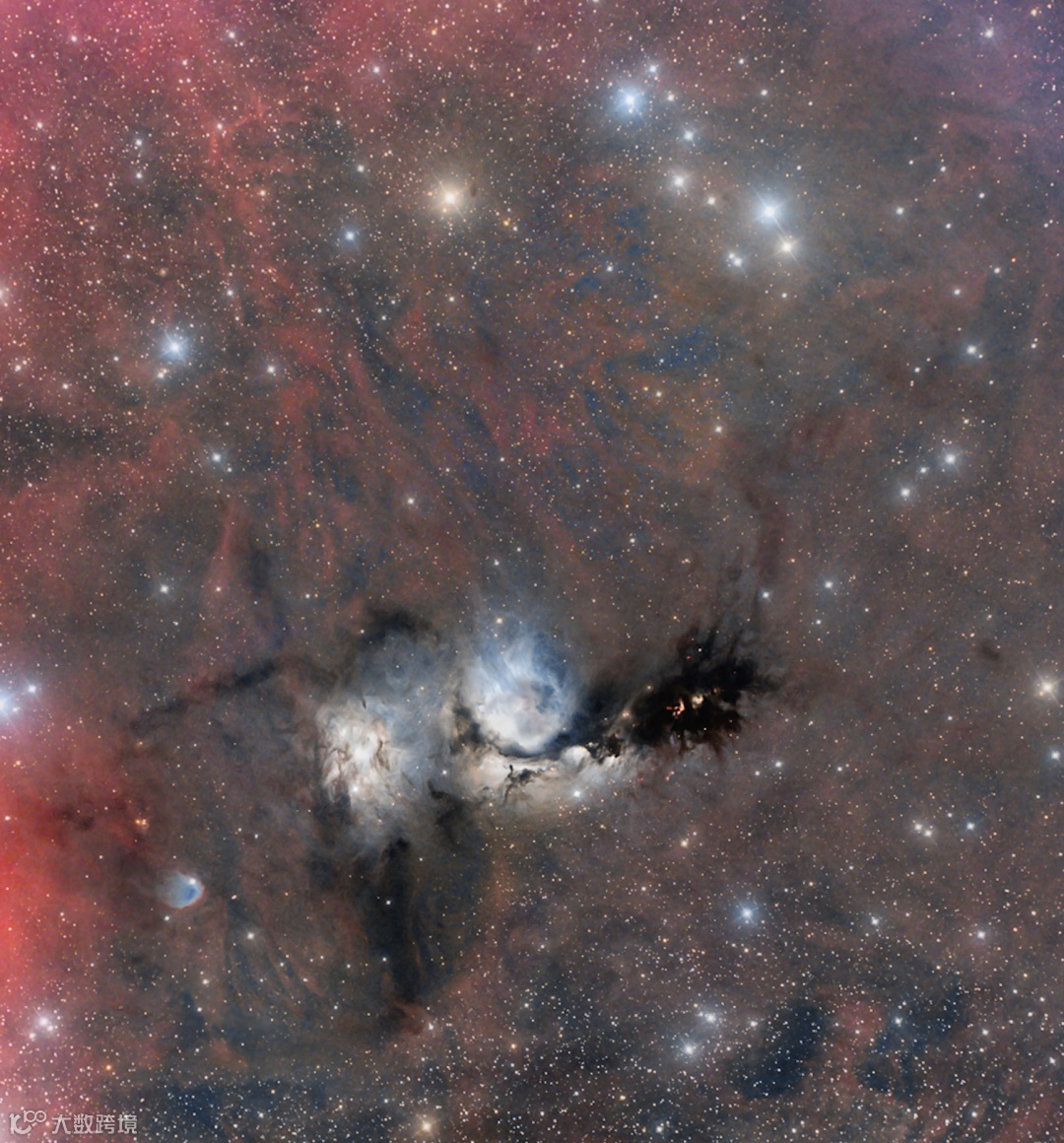
在富饶的猎户座里,M78 是其中最明亮者之一,泛蓝色反射星云 M78 离我们约 1,500 光年远,大小则在 5 光年左右。它的色泽,来自它内部的尘埃偏好反射附近炽热年轻亮星之蓝色星光。紧贴在 M78 左侧的反射星云,为 NGC 2071。
作者与编辑:Robert Nemiroff (MTU) & Jerry Bonnell (UMCP)


🙋♂️ 喜欢本文的话,来个分享、👍 赞、在看
谢谢~~