导读:

-
多个业务使用同一套 NebulaGraph 集群,当其中某一个业务有大量耗时查询或者大量数据加载时,这时此集群的压力可能会急剧上升,导致所有的业务出现服务性能极度下降的情况; -
NebulaGraph 使用古早的 2.6.2 版本,很多业务需求较难快速实现。
-
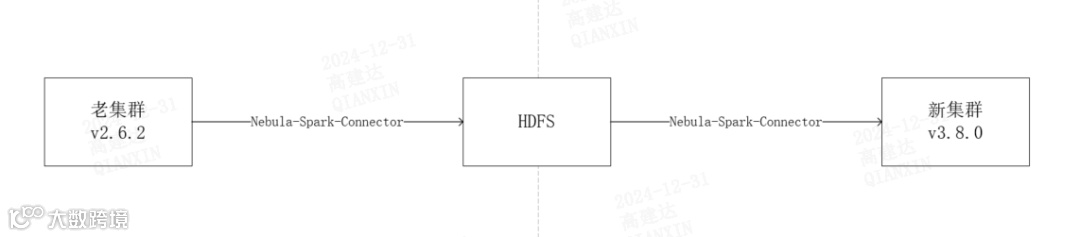
为每个业务搭建一套属于自己的 NebulaGraph 集群; -
将旧集群中的各个业务的数据迁移到自己业务对应的新集群中; -
新集群需要使用 3.8.0 版本 NebulaGraph; -
旧的 NebulaGraph 集群下线。
-
社区版的 NebulaGraph BR:限制是版本为 3.x 才能用;只能恢复到原集群,不可跨集群等等。遂放弃。 -
NebulaGraph Importer:导入数据使用。这个之前没怎么用过,应该是使用官方提供的工具执行相应的命令将数据发送到对应的集群。考虑到失败无法重试的缘故,遂放弃。 -
NebulaGraph Exchange:这个主要考虑到配置文件的繁琐性,且我们集群上的 Spark 客户端一般不暴露出来直接使用,都是通过 dolphinscheduler 使用的。遂放弃。 -
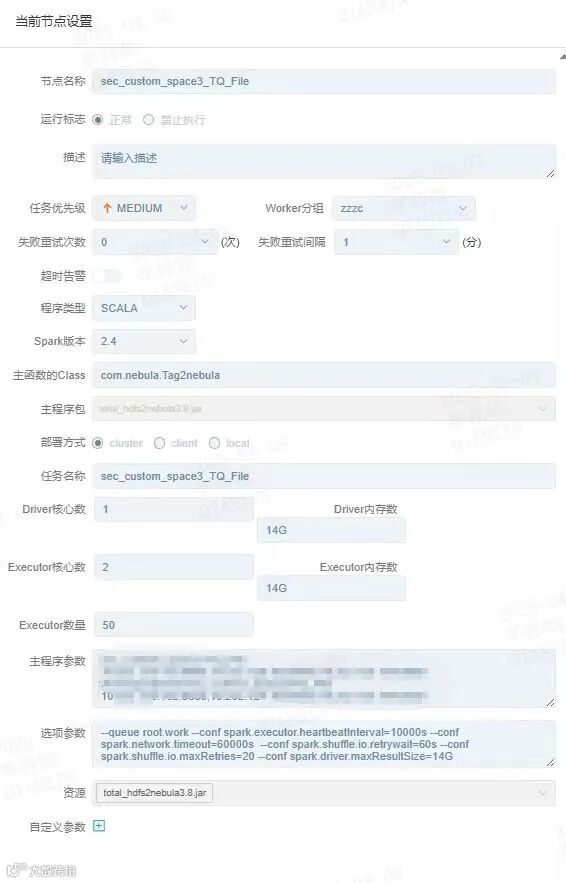
NebulaGraph Spark Connector:连接器使用,通过官网的 demo 发现这个可以将 NebulaGraph 数据写成 DF 格式,还可以将 DF 格式数据写入 NebulaGraph;且通过 dolphinscheduler 好控制。因此,我们决定使用 NebulaGraph Spark Connector 进行数据迁移。
package nebula

import com.vesoft.nebula.connector.connector.{NebulaDataFrameReader, NebulaDataFrameWriter}

import com.vesoft.nebula.connector.{NebulaConnectionConfig, ReadNebulaConfig}

import org.apache.spark.sql.SparkSession

object Edge2HDFS {

  def main(args: Array[String]): Unit = {

    try {

      if (args.length < 4) {

        println("Usage: <space> <edge> <graph_host> <hdfs path>")

        System.exit(-1)

      }

      val space = args(0)

      val edge = args(1)

      val graph_host = args(2)

      val hdfsPath = args(3)

      val spark:SparkSession =SparkSession.builder()

        .appName(space + "_" + edge)

        .getOrCreate()

      val config = NebulaConnectionConfig

        .builder()

        .withMetaAddress(graph_host)

        .withConenctionRetry(2)

        .withExecuteRetry(2)

        .withTimeout(36000000)

        .build()

      val edge_config = ReadNebulaConfig

        .builder()

        .withSpace(space)

        .withLabel(edge)

        .withNoColumn(false)

        .withPartitionNum(400)

        .build()

      val edges = spark.read.nebula(config, edge_config).loadEdgesToDF()

      edges.repartition(400).write.

        format("json").

        mode("overwrite").save(hdfsPath)

    } catch {

      case e: Exception => {

        // 在这里捕获异常,并进行相应的处理

        // 例如,记录异常信息、进行异常恢复操作等

        e.printStackTrace() // 这里只是简单地打印异常信息,你可以根据需要进行适当的处理

      }

    }

}

}
package com.nebula

import com.vesoft.nebula.connector.connector.NebulaDataFrameWriter

import com.vesoft.nebula.connector.{NebulaConnectionConfig, WriteNebulaEdgeConfig}

import org.apache.spark.sql.SparkSession

object Edge2nebula {

  def main(args: Array[String]): Unit = {

    try {

      if (args.length < 5) {

        println("Usage: <space> <edge> <graph_host> <hdfsPath> <meta_host>")

        System.exit(-1)

      }

      val space = args(0)

      val edge = args(1)

      val graph_host = args(2)

      val hdfsPath = args(3)

      val meta_host = args(4)

      val _SPARK_SESSION: SparkSession = SparkSession.builder()

        .appName(edge)

        .getOrCreate()

      val config = NebulaConnectionConfig

        .builder()

        .withMetaAddress(meta_host)

        .withGraphAddress(graph_host)

        .withConenctionRetry(2)

        .withTimeout(36000000)

        .build()

      // HDFS 目录路径

      val edgeHdfsPath = s"hdfs://HACluster" + hdfsPath + "/*.json"

      var edgeDF = _SPARK_SESSION.read

        .format("json")

        .load(edgeHdfsPath)

      edgeDF = edgeDF.withColumnRenamed("_srcId", "_vertexId")

      edgeDF = edgeDF.withColumnRenamed("_dstId", "dstId")

      edgeDF = edgeDF.withColumnRenamed("_rank", "rank")

      edgeDF.show(10)

      val edgeCount = edgeDF.count()

      // 打印记录总数

      println(s"Total number of rows: $edgeCount")

      val nebulaWriteContainConfig: WriteNebulaEdgeConfig = WriteNebulaEdgeConfig

        .builder()

        .withSpace(space)

        .withEdge(edge)

        .withSrcIdField("_vertexId")

        .withSrcPolicy(null)

        .withDstIdField("dstId")

        .withDstPolicy(null)

        .withRankField("rank")

        .withUser("root")

        .withPasswd("nebula")

        .withBatch(50)

        .build()

      edgeDF.write.nebula(config, nebulaWriteContainConfig).writeEdges()

    } catch {

      case e: Exception => {

        // 在这里捕获异常,并进行相应的处理

        // 例如,记录异常信息、进行异常恢复操作等

        e.printStackTrace() // 这里只是简单地打印异常信息,你可以根据需要进行适当的处理

      }

   }

}

}
✦
如果你觉得 NebulaGraph能帮到你,或者你只是单纯支持开源精神,可以在 GitHub 上为 NebulaGraph 点个 Star!每一个 Star 都是对我们的支持和鼓励✨
https://github.com/vesoft-inc/nebula
✦
✦

扫码添加
可爱星云
技术交流
资料分享
NebulaGraph 用户案例
✦
风控场景:携程|Airwallex|众安保险|中国移动|Akulaku|邦盛科技|360数科|BOSS直聘|金蝶征信|快手|青藤云安全
平台建设:博睿数据|携程|众安科技|微信|OPPO|vivo|美团|百度爱番番|携程金融|普适智能|BIGO
✦
✦