导读
刘芷溢同学,在 OSPP 2025 中,为 NebulaGraph 实现了向量数据持久化与 ANN Search(向量近似近邻检索),以赋能 AI 场景。该功能使 NebulaGraph 进一步具备知识图谱和向量检索相结合的能力,高效地用 GraphRAG 来改善传统 RAG 的痛点。
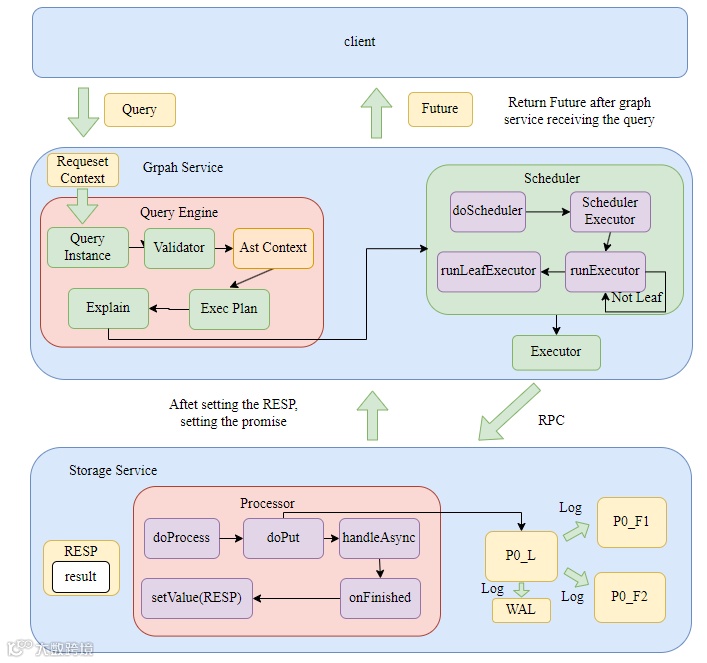
在对 NebulaGraph 进行改动之前,我们必须先了解,一条 Cypher 语句是如何在系统中执行的。当有了对语句执行的基本概念,我们可以开始深入每个模块进行修改来支持向量功能。
这篇文章主要从对 NebulaGraph 的整体执行流程出发,聚焦如何实现 Vector 数据类型以及 Vector 存储。(PR 链接见文末)
一条 Cypher 语句的前世今生
⚠️整个 NebulaGraph 系统的执行路径都是异步的,调用者立即拿到 Future,而执行者在工作完成后通过 Promise 填充结果,然后自动触发 Future 上的回调执行后续逻辑。
Overview
-
用户在 console或者通过sdk输入 Cypher 语句到 Graph Service,立即返回给用户 Future,线程池的工作线程开始执行下面的真实工作流程。 -
Graph Service 将 Query、Session、Storage 等打包成 Request Context,随后将 Request Context 打包成 Query Context,创建 Query Instance 随后开始执行 parse、validate、optimize、execute 整个流程,这里生成了 Graphd 的物理计划。
- Query Context 的生命周期从语句传入 Graphd 开始,到向 client 返回结果。 -
然后将 Request Context 传入 Scheduler,按照算子树依次执行每个物理节点计划。 -
每个物理节点计划在 Graphd 中存在一个 executor,实际上里面调用了 storaged 的 processor. -
Storaged 的每个 processor 内部也会生成自己的执行计划。
- 真正对数据的操作计划的每个节点上(node):从 RocksDB 中获取或者存储 KV 对,实际上是通过 raft-wal 进行集群间的数据同步(确保原子性和一致性),然后用结果去设置 Promise,触发 Future 回调返回给 client 结果。
Details
实际上比较重要的就是三个守护进程:计算节点 Graphd、元数据节点 Metad 和存储节点 Storaged。下面以 Insert 语句执行为例,详细解释下整个语句执行流程。
Graphd
Graphd 大体上分为 parse,validate,planner,optimize,execute 这几个阶段。所有的 statement、execplan 以及最后的 resultset 包括原始的 Query 语句,都存储在 RequestContext 中。
validateimpl 方法进行 check,校验是否满足 schema 以及是否数据未超范围。
Status InsertVerticesValidator::validateImpl() {spaceId_ = vctx_->whichSpace().id;NG_RETURN_IF_ERROR(check());NG_RETURN_IF_ERROR(prepareVertices());return Status::OK();}
toplan 方法将 sentence 变成 execution plan tre
Status InsertVerticesValidator::toPlan() {auto doNode = InsertVertices::make(qctx_,nullptr,spaceId_,std::move(vertices_),std::move(tagPropNames_),ifNotExists_,ignoreExistedIndex_);root_ = doNode;tail_ = root_;return Status::OK();
Executor *Executor::makeExecutor(const PlanNode *node,QueryContext *qctx,std::unordered_map<int64_t, Executor *> *visited)
8. 对 Executor 进行调度,parent plan 节点需要所有的 children plan 节点都执行完后才开始执行。
folly::Future<Status> AsyncMsgNotifyBasedScheduler::scheduleExecutor(std::vector<folly::Future<Status>>&& futures, Executor* exe, folly::Executor* runner) const {switch (exe->node()->kind()) {// ...case PlanNode::Kind::kArgument: {return runExecutor(std::move(futures), exe, runner);}default: {if (exe->depends().empty()) {return runLeafExecutor(exe, runner);} else {return runExecutor(std::move(futures), exe, runner);}}}}folly::Future<Status> AsyncMsgNotifyBasedScheduler::runExecutor(std::vector<folly::Future<Status>>&& futures, Executor* exe, folly::Executor* runner) const {return folly::collect(futures).via(runner).thenValue([exe, this](auto&& t) mutable -> folly::Future<Status> {NG_RETURN_IF_ERROR(checkStatus(std::move(t)));// Execute in current thread.return execute(exe);});}folly::Future<Status> AsyncMsgNotifyBasedScheduler::runLeafExecutor(Executor* exe,folly::Executor* runner) const {return std::move(execute(exe)).via(runner);}
Storaged
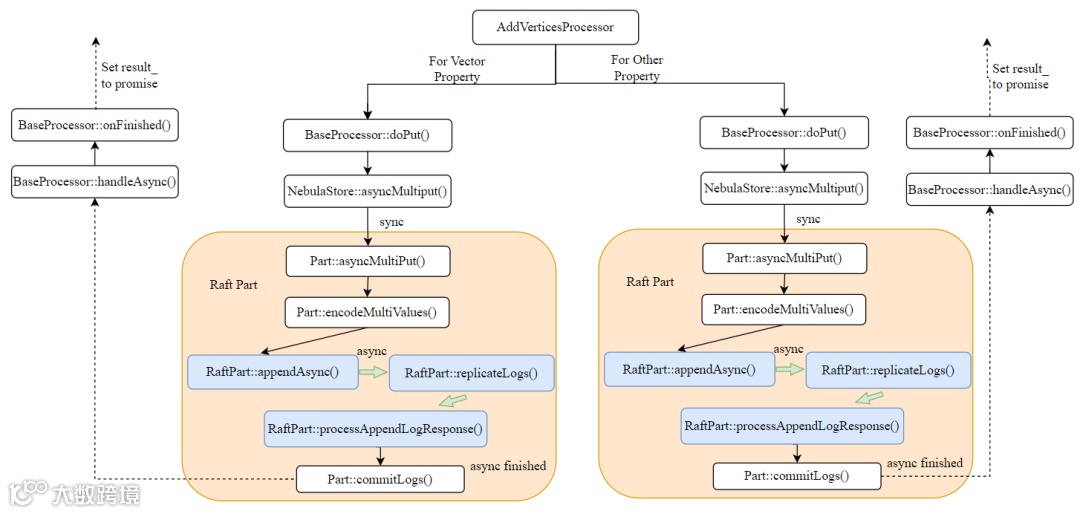
Storaged 接收到 graphd 发送的 executor 请求,启动对应的 Processor,执行process方法,实际上执行 doProcess 方法。
-
对于查询语句来说,实际上 doProcess方法也会生成 Storage 的执行计划,对 RocksDB 进行操作,这里对于 Insert 语句来说就是简单的执行doPut操作,通过 raft-wal 向 RockDB 中写入数据 -
在执行完逻辑后,将所有的更改写入集群,最后在回调中执行 handleAsync方法,实际上是执行onFinished方法,onFinished方法中设置 promise 的 value 为 RESP,RESP 中包含查询的结果,一层层返回直到返回给客户端。
template <typename RESP>void BaseProcessor<RESP>::doPut(GraphSpaceID spaceId,PartitionID partId,std::vector<kvstore::KV>&& data) {this->env_->kvstore_->asyncMultiPut(spaceId, partId, std::move(data), [spaceId, partId, this](nebula::cpp2::ErrorCode code) {handleAsync(spaceId, partId, code);});}template <typename RESP>void BaseProcessor<RESP>::handleAsync(GraphSpaceID spaceId,PartitionID partId,nebula::cpp2::ErrorCode code) {bool finished = false;{std::lock_guard<std::mutex> lg(this->lock_);handleErrorCode(code, spaceId, partId);this->callingNum_--;if (this->callingNum_ == 0) {finished = true;}}if (finished) {this->onFinished();}}virtual void onFinished() {memory::MemoryCheckOffGuard guard;this->result_.failed_parts_ref() = this->codes_;this->resp_.result_ref() = std::move(this->result_);this->promise_.setValue(std::move(this->resp_));delete this;}
DOPUT
-
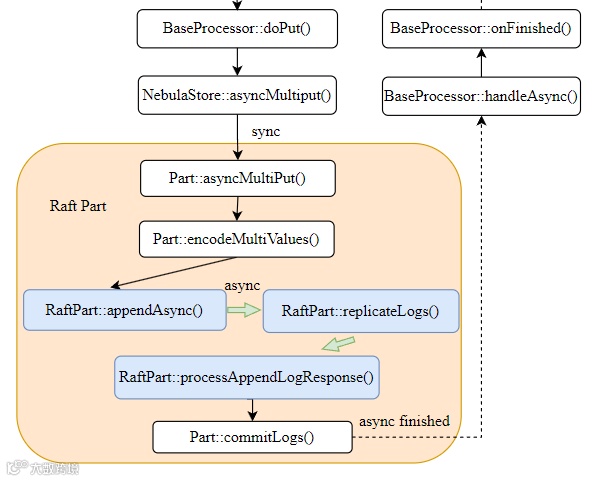
写入更改是 doPut 操作,该操作实际上是对 raft 提交日志,驱动 raft 状态机将该操作同步到集群中。
-
Raft 的日志复制过程大致分为三个步骤:
1. Leader:首先检查自身状态,然后先写入本地 WAL,然后将所有 log 复制到所有 follower
2. Follower:Followers 也会将新日志写入自己的 WAL,并向 Leader 回复 “成功”。 3. Leader:包括自己在内的大多数(Majority) 节点都已成功将该日志写入其 WAL,Leader 就会认为这条日志是 “已提交” (Committed) 的。Leader 就可以安全地将该日志(即 KV 操作)应用到其状态机(即真正执行 multiPut)
void RaftPart::appendLogsInternal(AppendLogsIterator iter, TermID termId) {do {// Process 1// Step 1: Write Local WAL{SCOPED_TIMER(if (!wal_->appendLogs(iter)) {break;}}} while (false);// Step 2: Replicate to followersauto* eb = ioThreadPool_->getEventBase();replicateLogs(eb, std::move(iter), currTerm, lastId, committed, prevLogTerm, prevLogId);return;}// process 2 & 3void RaftPart::replicateLogs(folly::EventBase* eb,AppendLogsIterator iter,TermID currTerm,LogID lastLogId,LogID committedId,TermID prevLogTerm,LogID prevLogId) {collectNSucceeded(gen::from(hosts) |gen::map([self = shared_from_this(),eb,currTerm,lastLogId,prevLogId,prevLogTerm,committedId](std::shared_ptr<Host> hostPtr) {return via(eb, [=]() -> Future<cpp2::AppendLogResponse> {// 向所有 follower 发送 AppendLogs 请求return hostPtr->appendLogs(eb, currTerm, lastLogId, committedId, prevLogTerm, prevLogId);});}) |gen::as<std::vector>(),quorum_,[hosts](size_t index, cpp2::AppendLogResponse& resp) {// Process 2: 收集到了半数节点通过return resp.get_error_code() == nebula::cpp2::ErrorCode::SUCCEEDED &&!hosts[index]->isLearner();}).via(executor_.get()).then([self = shared_from_this(),eb,it = std::move(iter),currTerm,lastLogId,committedId,prevLogId,prevLogTerm,pHosts = std::move(hosts),beforeAppendLogUs](folly::Try<AppendLogResponses>&& result) mutable {// Process 3: followers 真正开始进行写入self->processAppendLogResponses(*result,eb,std::move(it),currTerm,lastLogId,committedId,prevLogTerm,prevLogId,std::move(pHosts));return *result;});}
Metad
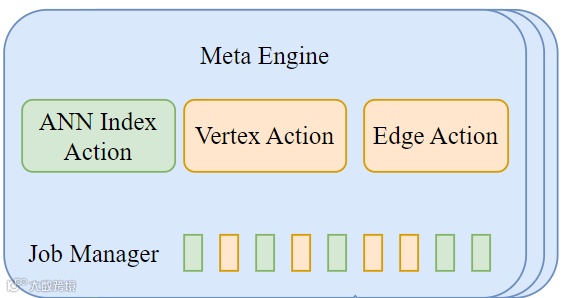
一般 Metad 主要参与 DDL 的语句执行流程,负责存储 Tag/Edge 的 Schema 以及一些索引的元数据信息。管理 ReBuild Index 等需要与 Storaged 同步的 Job.
Our Work
我们已经梳理了一条 Cypher 语句从输入到执行的完整流程,接下来我们就可以开始对 NebulaGraph 进行改动,支持向量类型以及向量存储。
NebulaGraph 的实际类型存储是以 KV 对的形式存储在 RocksDB 中的,Key 有自己特殊的结构,Value 则是属性值的二进制序列化结果。因此我们需要做两方面的工作:
-
设计向量类型 (Vector Data Type):实现向量数据类型和属性、序列化和反序列化 -
设计向量存储 (Vector Storage):修改存储引擎,支持向量属性的单独存储和读取,设计向量属性的 Key 和 Value 格式
为了方便后面的向量索引设计,我们将向量属性单独存储在一个 Column Family 中,其他属性存储在默认的 Column Family 中。
向量类型设计
NebulaGraph 中已经有了支持多 Value 的数据类型 List,但是我们仍然需要设计新的 Vector 类型。
原因是,向量与标准中已支持的数组在以下方面有所不同:
数组类型是一种集合类型。数组是值的集合。这些值在数组之外可能具有意义。例如,在一个电话号码数组中,每个电话号码在数组之外都有其意义。相比之下,向量的单个坐标本身在向量之外没有太多意义。
一个向量类型中的所有向量都具有相同的维度 n . 1 和 n 之间的每个坐标都是非空值。这与数组类型形成对比,数组类型通过声明的最大基数 n 来支持可变的基数,并且允许每个元素为空值。
-
向量类型除了 ==和!=,其他的算数操作均不应该支持。
Vector Value Type
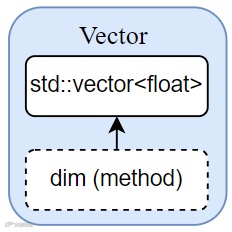
Vector 类型主要由一个 std::vector<float> 组成
Vector Property Type
// Vector typestruct Vector {1: list<double> values;} (cpp.type = "nebula::Vector")
template <class Protocol>uint32_t Cpp2Ops<nebula::Vector>::write(Protocol* proto, nebula::Vector const* obj;template <class Protocol>void Cpp2Ops<nebula::Vector>::read(Protocol* proto, nebula::Vector* obj);template <class Protocol>uint32_t Cpp2Ops<nebula::Vector>::serializedSize(Protocol const* proto, nebula::Vector const* obj);template <class Protocol>uint32_t Cpp2Ops<nebula::Vector>::serializedSizeZC(Protocol const* proto,nebula::Vector const* obj);
向量存储设计
我们已经梳理了一条 Cypher 语句从输入到执行的完整流程,接下来我们就可以开始对 NebulaGraph 进行改动,支持向量。
我们的目标是将向量属性存储在 NebulaGraph 的存储引擎中,NebulaGraph 默认的存储引擎是 RocksDB,同时需要支持一个 Tag/Edge 上同时存在多个向量属性。
我们的设计是将向量属性和其他属性分开存储,方便后续创建向量索引。
那么我们的工作就变成了:
-
修改存储引擎,支持向量属性的单独存储和读取(当前 Nebula Graph 只支持 RocksDB 的默认 Column Family) -
设计向量属性的 Key 和 Value 格式
Why?
在 NebulaGraph 默认设计中,所有属性(包括标量属性、文本属性、向量属性)都存放在 Default Column Family 里,即:
Key = {tag_id, vertex_id, property_name}
Value = {encoded property value}
但这对向量属性来说有几个问题:
数据膨胀:向量数据通常是高维(如 512D 或 1024D),单条记录体积大,容易造成 LSM-tree 写放大和 Compaction 压力;
访问模式不同:普通属性多为点查或条件过滤,而向量属性读取通常是批量读取或扫描式(构建索引时需要读所有向量);
Scan 效率低:向量索引构建时需要扫描所有向量数据,若与普通属性混存,读取时会带来大量无用数据的 IO 开销和解析开销
所以我们决定将向量属性单独存储在一个 Column Family 里,其他属性继续存储在 Default Column Family 里。
存储引擎修改
所有的属性都是存在 RocksDB 中的 KV 对中,一般属性的 Key 由 partId + tagId/edgeId + vertexId + propId 组成,Value 则是属性值的二进制序列化结果。
如下图所示,我们可以利用 RocksDB 的 Column Family 功能,将向量属性单独存储在一个 Column Family 中,其他属性存储在默认的 Column Family 中。
这里的 ID-VID Column Family 是后续创建向量索引时需要的,这里先不详细介绍。
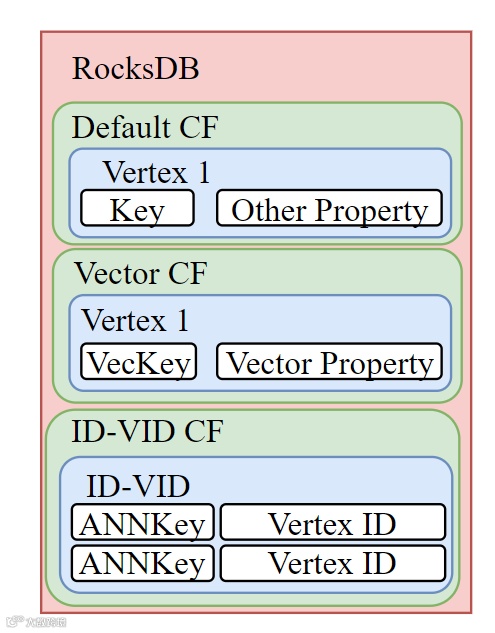
有趣的是,RockDB 支持多 Column Family 需要先使用默认列族打开 RocksDB,然后创建其他列族并获取这些列族的句柄(CF handles)。接着关闭数据库,再使用多个列族句柄重新打开该数据库。
// We need first open the db with default column family, then create the other column families.// Last we reopen the db with all column families.rocksdb::Options singleCFOptions(dbOptions, cfDescriptors[0].options);initRocksdbOptions(singleCFOptions, spaceId, vIdLen);status = rocksdb::DB::Open(singleCFOptions, path, &db);size_t cfCount = cfDescriptors.size();for (size_t i = 0; i < cfCount; ++i) {if (cfDescriptors[i].name == NebulaKeyUtils::kDefaultColumnFamilyName) {continue;}rocksdb::ColumnFamilyHandle* handle = nullptr;status = db->CreateColumnFamily(cfDescriptors[i].options, cfDescriptors[i].name, &handle);if (!status.ok()) {LOG(FATAL) << "Failed to create column family " << cfDescriptors[i].name << ": "<< status.ToString();}}delete db;db = nullptr;cfHandles_.clear();status = rocksdb::DB::Open(dbOptions, path, cfDescriptors, &cfHandles_, &db);
向量 Key 和 Value 格式
我们设计向量属性的 Key 格式为 type + partId + tagId + vertexId + propId,可以区分单个 Tag 中的向量属性。Value 则是 vector data type 的二进制序列化结果。
这样的设计可以支持一个 Tag 中有多个 vector 属性
不同的 tag 或属性可以用不同的 propId 区分,不会相互影响
VectorTagKey: () 里面是字节数type(1) + partId(3) + vertexId(*) + tagId(4) + propId(4)VectroEdgeKey:type(1) + partId(3) + srcId(*) + edgeType(4) + edgeRank(8) + dstId(*) + propId(4) +placeHolder(1)
下期预告:分享如何在 NebulaGraph 中支持向量属性的 DDL 和 DML 语句,欢迎大家持续关注~
🔗PR 链接
https://github.com/vesoft-inc/nebula/pull/6083
https://github.com/vesoft-inc/nebula/pull/6074
https://github.com/vesoft-inc/nebula/pull/6099
https://github.com/vesoft-inc/nebula/pull/6076
https://github.com/vesoft-inc/nebula/pull/6087
https://github.com/vesoft-inc/nebula/pull/6068
https://github.com/vesoft-inc/nebula/pull/6104
https://github.com/vesoft-inc/nebula/pull/6090
⚠️NebulaGraph 的向量相关功能,在 OSPP 2025 结束后,将统一收录于 nebula-contrib(收录了许多来自社区开发者贡献的生态工具)
https://github.com/nebula-contrib/nebula-vsearch/
💡本文首发于刘芷溢同学 Blog,点击「阅读原文」即可跳转。
🥳欢迎大家在评论区交流关于向量和 GraphRAG 的疑问/开发经验。
📧来论坛,GraphRAG 产品反馈一键直达 NebulaGraph 产品团队。
https://discuss.nebula-graph.com.cn/t/topic/17256
✦
如果你觉得 NebulaGraph 能帮到你,或者你只是单纯支持开源精神,可以在 GitHub 上为 NebulaGraph 点个 Star!
每一个 Star 都是对我们的支持和鼓励✨
GitHub:https://github.com/vesoft-inc/nebula
官网:https://www.nebula-graph.com.cn/
论坛:https://discuss.nebula-graph.com.cn/
✦
✦

扫码添加
可爱星云
技术交流
资料分享
NebulaGraph 用户案例
✦
Why Graph Database?⬇️
风控场景:普适智能|中证数智|BlockSec|携程|Airwallex|众安保险|中国移动|Akulaku|邦盛科技|360数科|BOSS直聘|金蝶征信|快手|青藤云安全
平台建设:博睿数据|携程|众安科技|微信|OPPO|vivo|美团|百度爱番番|携程金融|普适智能|BIGO
知识图谱:普适智能|中证数智|中医药大学|企查查|腾讯音乐|中科大脑|泰康在线|苏宁|微澜|同花顺|携程酒店
营销推荐:阿里妈妈
GraphRAG:中科数睿
✦
✦