


微信公众号:趣编程ACE
关注可了解更多的.NET日常实战开发技巧,如需源码 请公众号后台留言 源码;
[如果觉得本公众号对您有帮助,欢迎关注]
前文回顾
【微服务专题之】.Net6下集成消息队列上-RabbitMQRabbitMQ中直接路由模式
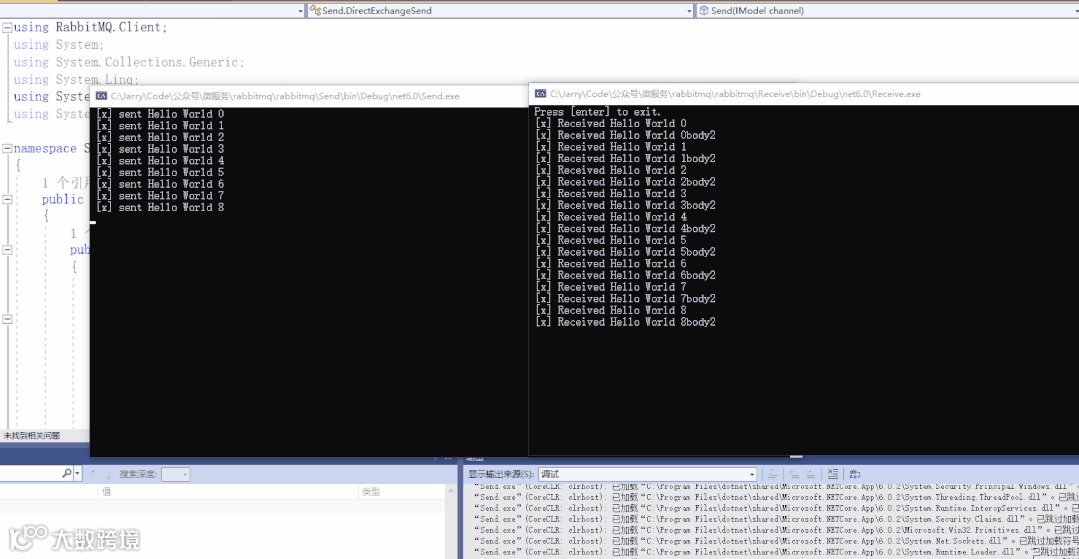
路由模式就是生产者与消费者之间基于交换机通信的时候,生产者指定路由发送数据,消费者绑定路由接收数据。这个与前文讲解的发布/订阅模式有一定的区分,发布订阅模式只要绑定了交换机的队列(queue)都会收到生产者通过交换机发送过来的数据,而路由模式增加了一个指定路由的设置,会声明发送到交换机下的哪个路由,而接受的消费者只有绑定了队列并且声明了该路由才会接受到数据。
代码演示
生产者代码:
 1public static void Send(IModel channel)
 2        {
 3            channel.ExchangeDeclare( "hello-direct-exchange",ExchangeType.Direct);
 4            var count = 0;
 5            while (true)
 6            {
 7                Thread.Sleep(1000);
 8                // 发送的消息
 9                string message = $"Hello World {count}";
10                var body = Encoding.UTF8.GetBytes(message);
11                var body2 = Encoding.UTF8.GetBytes(message+"body2");
12
13                // 基本发布 不指定交换
14                channel.BasicPublish(exchange: "hello-direct-exchange",
15                                     // 路由键   就是队列名称
16                                     routingKey: "route1",
17                                     // 基础属性
18                                     basicProperties: null,
19                                     // 传递的消息体
20                                     body: body);
21
22                channel.BasicPublish(exchange: "hello-direct-exchange",
23                                     // 路由键   就是队列名称
24                                     routingKey: "route2",
25                                     // 基础属性
26                                     basicProperties: null,
27                                     // 传递的消息体
28                                     body: body2);
29                count++;
30                Console.WriteLine(" [x] sent {0}", message);
31            }
32        }
消费者代码
 1public static void Receive(IModel channel)
 2        {
 3            channel.ExchangeDeclare("hello-direct-exchange", ExchangeType.Direct);
 4            channel.QueueDeclare(queue: "hello-direct-queue",
 5                        durable: true,
 6                        exclusive: false,
 7                        autoDelete: false,
 8                        arguments: null);
 9            channel.QueueBind("hello-direct-queue", "hello-direct-exchange", "route1");
10            channel.QueueBind("hello", "hello-direct-exchange", "route2");
11
12            // 创建一个消费者基本事件
13            var consumer = new EventingBasicConsumer(channel);
14            consumer.Received += (model, ea) =>
15            {
16                var body = ea.Body.ToArray();
17                var message = Encoding.UTF8.GetString(body);
18                Console.WriteLine(" [x] Received {0}", message);
19            };
20            channel.BasicConsume(queue: "hello-direct-queue",
21                                 // 自动确认
22                                 autoAck: true,
23                                 consumer: consumer);
24
25            channel.BasicConsume(queue: "hello",
26                                 // 自动确认
27                                 autoAck: true,
28                                 consumer: consumer);
29
30            Console.WriteLine(" Press [enter] to exit.");
31            Console.ReadLine();
32        }
效果展示
PS:代码详解见视频~