


依赖包如下
// config 实现包
Microsoft.Extensions.Configuration
// config 抽象包
Microsoft.Extensions.Configuration.Abstractions
配置框架核心接口
IConfiguration
IConfigurationRoot
IConfigurationSection
IConfigurationBuilder
一、基本演示:
 1static void Main(string[] args)
 2        {
 3            // 实现一个默认的ConfigurationBuilder
 4            IConfigurationBuilder configurationBuilder = new ConfigurationBuilder();
 5
 6            // 配置数据源 放置内存中【后续可以从文件中读取,此处代码生成】
 7            Dictionary<string, string> dict = new Dictionary<string, string>()
 8            {
 9                {"Key1","value1"},
10                {"Key2","value2" },
11                {"section1:key3","value3" }, // 一级节点
12                {"section1:section2:key4","value4" } // 二级节点
13            };
14            // 将内存配置提供程序添加到 configurationBuilder
15            configurationBuilder.AddInMemoryCollection(dict);
16
17            // 配置根 读取操作就是通过这个来实现
18            IConfigurationRoot configurationRoot = configurationBuilder.Build();
19
20            // 读取
21            Console.WriteLine($"读取配置1:{configurationRoot["Key1"]}");  // 读取配置1:value1
22            Console.WriteLine($"读取配置2:{configurationRoot["Key2"]}");  // 读取配置2:value2
23            /*Console.WriteLine($"读取节点配置1:{configurationRoot["section1"]}");*/ // 这样是获取不到value值的
24
25            // 读取节点配置 法一
26            IConfigurationSection section= configurationRoot.GetSection("section1");
27            Console.WriteLine($"读取节点配置1:{section["key3"]}");   // 读取节点配置1:value3
28            Console.WriteLine($"读取节点配置2:{section["key4"]}");  // section1 节点配置里并不存在Key4 所以也不会打印出
29
30            // 读取节点配置 法二
31            Console.WriteLine($"读取配置3:{configurationRoot["section1:key3"]}");
32
33            // 读取节点配置优化【封装了GetSectionStr】
34            var str= GetSectionStr(configurationRoot, "section1", "section2", "key4");
35            Console.WriteLine($"读取配置4:{str}"); //  读取配置4:value4
36        }
37
38
39        /// <summary>
40        /// 封装一个读取函数 只需提供各级节点的key,从而返回value值
41        /// </summary>
42        /// <param name="sections"></param>
43        /// <returns></returns>
44        public static string GetSectionStr(IConfiguration configuration, params string [] sections)
45        {
46            try
47            {
48                // 数组不为空
49                if(sections.Any())
50                {
51                    // 节点join
52                    var a = string.Join(":", sections);
53                    return configuration[a];
54                }
55            }
56            catch (Exception ex)
57            {
58                throw ex;
59            }
60            return "";
61        }
二、命令行配置程序
1核心包:
2// config 实现包
3Microsoft.Extensions.Configuration
4// config 抽象包
5Microsoft.Extensions.Configuration.Abstractions
6// 命令行包
7Microsoft.Extensions.Configuration.CommandLine
命令行支持的命令格式如下:
key=value
--key=value 或 --key value
/key=value 或 /key value
PS:等号格式与空格格式不能混用
命令行设置参数设置
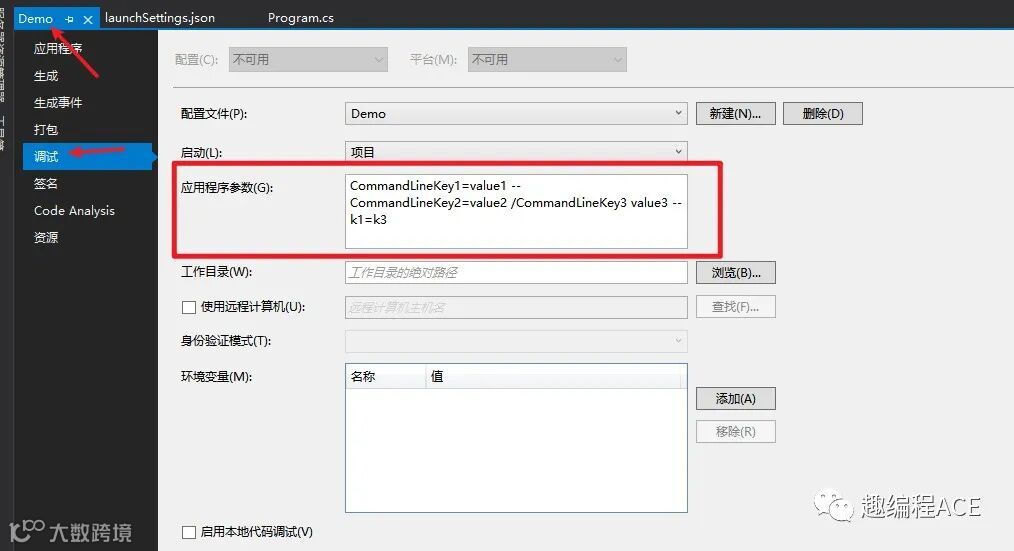
以上设置保存后会生成一个 launchSetting.json 文件 ;参数如上图设置 后续在这个文件修改属性也是同步生成的
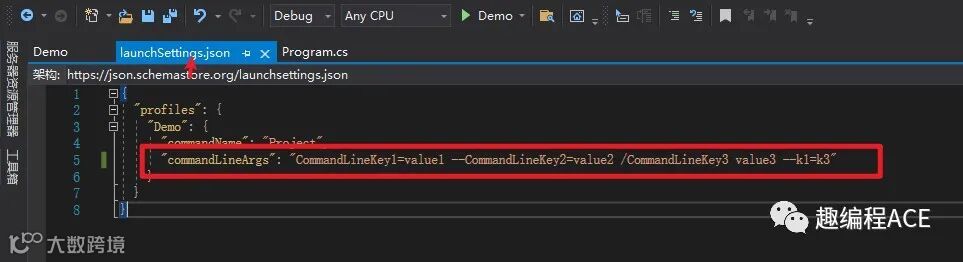
代码演示
 1static void Main(string[] args)
 2        {
 3            #region 命令行配置
 4
 5            var builder = new ConfigurationBuilder();
 6            // 命令行参数从main函数入参获取
 7            builder.AddCommandLine(args);
 8            var configurationRoot = builder.Build();
 9            Console.WriteLine($"CommandLineKey1:{configurationRoot["CommandLineKey1"]}");// CommandLineKey1:value1
10            Console.WriteLine($"CommandLineKey2:{configurationRoot["CommandLineKey2"]}");// CommandLineKey2:value2
11            Console.WriteLine($"CommandLineKey3:{configurationRoot["CommandLineKey3"]}");// CommandLineKey3:value3
12            #endregion
13
14        }
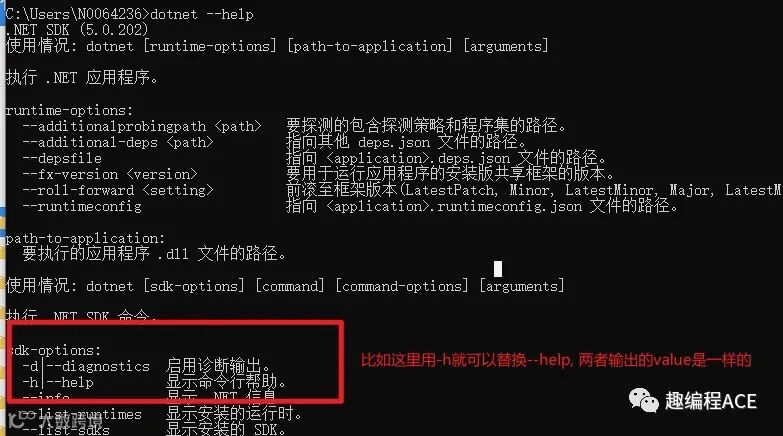
其中讲解下命令替换模式:
PS:
1.命令替换模式必须以 - 或者 -- 划线开头
2.映射字典不能包含重复的key
 1static void Main(string[] args)
 2        {
 3            var builder = new ConfigurationBuilder();
 4            //// 命令行参数从main函数入参获取
 5            //builder.AddCommandLine(args);
 6            #region 命令替换
 7            // 用--k1 替换  CommandLineKey1
 8            var mapper = new Dictionary<string, string> { { "--k1", "CommandLineKey1" } };
 9            builder.AddCommandLine(args, mapper);
10            #endregion
11            var configurationRoot = builder.Build();
12            Console.WriteLine($"CommandLineKey1:{configurationRoot["CommandLineKey1"]}"); // CommandLineKey1:k3 此时value就被替换成 --k1 对应的value
13            Console.WriteLine($"CommandLineKey2:{configurationRoot["CommandLineKey2"]}"); // CommandLineKey2:value2
14            Console.WriteLine($"CommandLineKey3:{configurationRoot["CommandLineKey3"]}"); // CommandLineKey3:value3
15            Console.ReadKey();
16        }
这个主要用途就是用来给参数提供别名:比如控制台输入 dotnet --help 查看各种命令
三、环境变量配置程序
应用场景:在容器化时代,我们用环境变量配置方式来代替命令行配置或者读取配置文件配置
PS:
1.对于多节点配置并且在程序部署在LInux系统中
我们需要用__ 代替 : 如: section1__section2__key1:value1 而不是 section1:section2:key1:value1
2.支持节点前缀配置加载筛选 详细看下面代码分析
1核心包:
2// config 实现包
3Microsoft.Extensions.Configuration
4// config 抽象包
5Microsoft.Extensions.Configuration.Abstractions
6// 环境变量包
7Microsoft.Extensions.Configuration.EnvironmentVariables
首先同命令行配置方式一样设置配置变量值
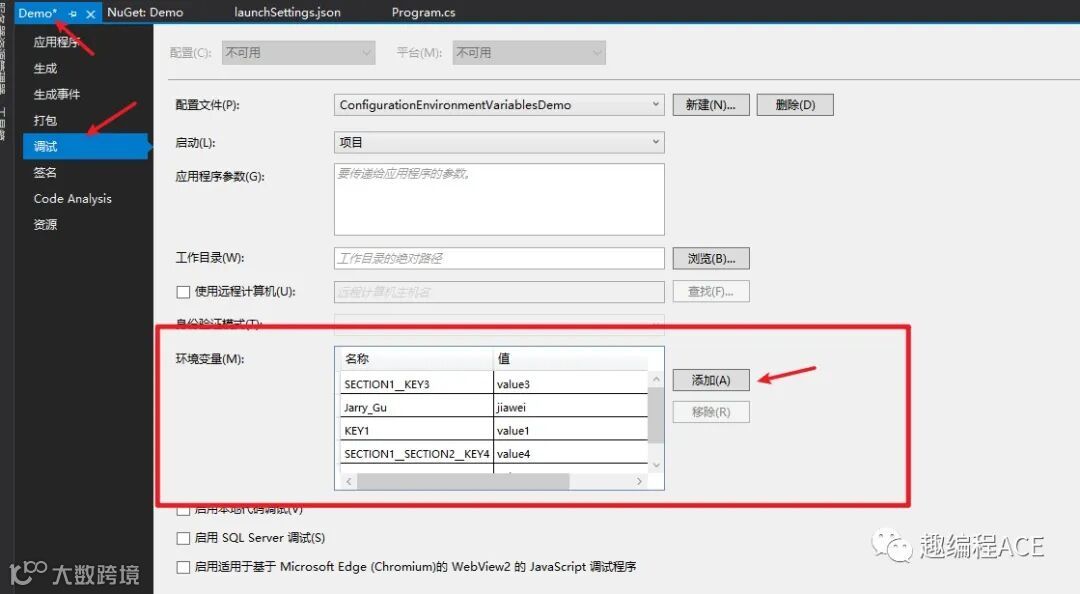
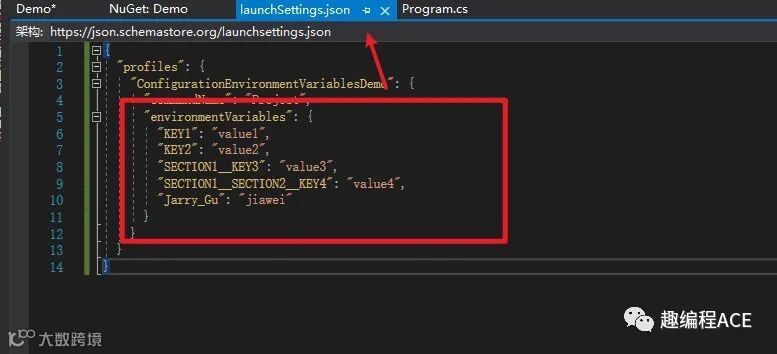
 1 static void Main(string[] args)
 2        {
 3            var builder = new ConfigurationBuilder();
 4            // 添加环境变量
 5            builder.AddEnvironmentVariables();
 6            var configurationRoot = builder.Build();
 7            Console.WriteLine($"key1:{configurationRoot["key1"]}"); //  key1:value1
 8
 9            // 多节点配置 获取方式一样
10            var section = configurationRoot.GetSection("SECTION1");
11            Console.WriteLine($"KEY3:{section["KEY3"]}");  // KEY3:value3
12        }
增加节点前缀筛选
 1static void Main(string[] args)
 2   {
 3            var builder = new ConfigurationBuilder();
 4            //// 添加环境变量
 5            //builder.AddEnvironmentVariables();
 6            //var configurationRoot = builder.Build();
 7            //Console.WriteLine($"key1:{configurationRoot["key1"]}"); //  key1:value1
 8
 9            //// 多节点配置 获取方式一样
10            //var section = configurationRoot.GetSection("SECTION1");
11            //Console.WriteLine($"KEY3:{section["KEY3"]}");  // KEY3:value3
12
13            // 只注入指定前缀的环境变量  Jarry_ 并去掉前缀
14            builder.AddEnvironmentVariables("Jarry_");
15            var configurationRoot = builder.Build();
16            Console.WriteLine($"KEY1:{configurationRoot["KEY1"]}"); // 没有值
17            Console.WriteLine($"KEY2:{configurationRoot["KEY2"]}"); // 没有值
18            Console.WriteLine($"KEY3:{configurationRoot["Gu"]}");   // jiawei
19
20    }