



01
—
开发背景
-
API没有统一的文档,使用不方便。 -
需要重复通过调用函数实现业务。 -
不便于管理,算法中有错误没法及时修改到每一个项目。(例如传统万年历与现代农历新年交替日存在分歧等)
02
—
1. 通过编写API文档方便用户使用或查阅,做好版本维护
2. 进一步封装部分实现,减少开发业务时的代码量
3. 通过更新库的版本,在项目中更新引用库版本来实现功能同步
let cal = new Calendar();// cal中应该包含了年月日、星期、农历年月日、当天节日等等信息let cal = new Calendar(2000, 1, 1);// Calendar应该支持传入参数生成指定日期实例
库的引用方式应该是:
import Calendar from "weli-calendar"; // 农历import Almanac from "weli-calendar/almanac"; // 黄历let alc = new Almanac();// Almanac 作为黄历类,它的实例应该包括宜忌、彭祖百忌等全部黄历数据
根据以上需求可以确定期望的打包结构为:
dist/calendar/index.jsdist/almanac/index.js
在package.json中配置项目入口
{"main": "/calendar/index.js",}
就可以实现我们期望的默认引入农历模块
项目结构
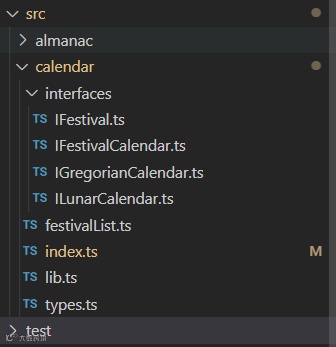
export default class Calendar implements IGregorianCalenar, ILunarCalenar, IFestivalCalendar{year: gregorianYear;month: gregorianMonth; // 月 1-12day: gregorianDay; // 日 1-31...lunarYear: lunarYear;lunarMonth: lunarMonth;lunarDay: lunarDay;...festival?: IFestival[]; // 节日solarTerm?: string; // 节气...}
export default interface IGregorianCalenar {year: gregorianYear,month: gregorianMonth, // 月 1-12day: gregorianDay, // 日 1-31formatMonth: string, // XX月formatDay: string, // XX日constellation: string, // 星座yearWeek: number, // 今年第几周week: number, // 星期 1-7weekCn: string, // "周X"weekCn2: string, // "星期X"isCurYear: boolean, // 是今年isCurMonth: boolean, // 是本月isCurDay: boolean, // 是今天diff: number // 距离今天日期差}
...static getMonthlyCalendar(beginWeekEn?: 'Mon' | 'Sun'): Calendar[]static getMonthlyCalendar(y?: gregorianYear | string, m?: gregorianMonth, beginWeekEn: 'Mon' | 'Sun' = 'Sun'): Calendar[] {...}...
export type gregorianYear = number; // 公历年export type gregorianMonth = number; // 公历月export type gregorianDay = number; // 公历日export type lunarYear = number; // 农历年export type lunarMonth = number; // 农历月export type lunarDay = number; // 农历日
getMonthlyCalendar(y?: gregorianYear | string, m?: gregorianMonth, beginWeekEn: 'Mon' | 'Sun' = 'Sun')03
—
单元测试配置
在jest.config.js中配置preset:
{preset: "ts-jest"}
jest为执行文件提供了describe等全局的方法,可以直接使用:
//test.tsdescribe("---lib 用例测试---", () => {// 固定测试几个值test("toXX", () => {expect(lib.toXX(1)).toBe("01");expect(lib.toXX(12)).toBe("12");expect(lib.toXX('1')).toBe("01");expect(lib.toXX('12')).toBe("12");});})// lib.toXX是一个把数字类型月日转为XX字符类型的方法
package.json中配置test相关命令:
"scripts": {..."test": "jest","test-c": "jest --coverage","test-s": "jest --watchAll"}
详细jest配置可参考官网 https://www.jestjs.cn/
04
—
单元测试技巧
多次循环提高测试准确性
// 随机取一天查询n天前test("getPrevDay", () => {for (let i = 0; i < 200; i++) {// 测试一天前let date = moment(Mock.mock('@date'));let year = +date.year();let month = +date.month() + 1;let day = +date.date();let nextD = date.add(-1, 'day')expect(lib.getPrevDay(year, month, day)).toEqual({year: nextD.year(),month: nextD.month() + 1,day: nextD.date(),});// 测试n天前let date2 = moment(Mock.mock('@date'));let year2 = +date2.year();let month2 = +date2.month() + 1;let day2 = +date2.date();let n = Mock.mock({ "number|1-100": 100 }).number // 随机n天前let futureD = date2.add(-n, 'day');expect(lib.getPrevDay(year2, month2, day2, n)).toEqual({year: futureD.year(),month: futureD.month() + 1,day: futureD.date(),});}})
北京时间
夏令时
1986年至1991年,中华人民共和国在全国范围实行了六年夏令时,每年从4月中旬的第一个星期日2时整(北京时间)到9月中旬第一个星期日的凌晨2时整(北京夏令时)。除1986年因是实行夏令时的第一年,从5月4日开始到9月14日结束外,其它年份均按规定的时段施行。夏令时实施期间,将时间向后调快一小时。1992年4月5日后不再实行。通过后端接口验证
// 公历转农历test("solar2Lunar", () => {for (let i = 0; i < 100; i++) {let date = moment(Mock.mock('@date'));let year = +date.year();let month = +date.month() + 1;let day = +date.date();let { lunarYear, lunarMonth, lunarDay, isLeap } = lib.solar2Lunar(year, month, day)expect(transferAPI(date.format('YYYYMMDD'), 0, 1)).resolves.toEqual({date_id: `${lunarYear}${lib.toXX(lunarMonth)}${lib.toXX(lunarDay)}`,leap_month: isLeap ? 1 : 0})}})// transferAPI是一个异步方法,调用接口返回数据// expect验证异步方法要用到resolves,使用详情参考例子与官网
05
—
打包发布
打包
// rollup.config.prod.jsexport default {input: {"calendar/index": "src/calendar/index.ts","almanac/index": "src/almanac/index.ts",},output: {dir: '.',format: 'cjs',sourcemap: false,chunkFileNames: "[name].js"...},plugins: [typescript({tsconfig: './tsconfig.json',verbosity: 3,}),...],};
配置打包命令
"scripts": {"build": "cross-env NODE_ENV=production rollup -c --config rollup.config.prod.js","build-dev": "cross-env NODE_ENV=development rollup -c --config rollup.config.prod.js","dev": "cross-env NODE_ENV=development rollup -c -w --config rollup.config.dev.js",...},
发布
配置上传文件与命令
{"files": ["/almanac","/calendar","festivalList.js","/src","LICENSE","package.json","CHANGELOG.md","README.md"],..."scripts": {..."push": "npm run build && yarn publish --registry=xxxxx",...},}
npm publish --registry=[私服地址]06
—
总结
作者 | 赵智祺 Web前端开发工程师