


Glances是一款免费(LGPL)的跨平台、基于curses函数库的监测工具,其目的在于在尽可能小的地方,提供尽可能多的信息,理想情况下 适合于典型的80x24终端或更大尺寸的终端,以便显示额外信息。Glances可以根据终端大小,动态调整所显示的信息。它还可以在客户机/服务器模式 下使用,用于远程监测。
该实用工具是用Python编写而成的,使用psutil库从你的服务器提取统计值。
安装
你可以使用pip这个命令行工具来安装Glances。你还会找到适用于Arch Linux、Fedora/CentOS/RHEL、Debian、Ubuntu (13.04+)、FreeBSD和OSX的程序包,那样就能使用自己青睐的程序包管理器来安装它了,具体如下所示:
将Glances安装到CentOS/Fedora/RHEL/Scientific Linux上
首先,在CentOS/RHEL/SL上开启Extra Packages for Enterprise Linux(即EPEL)程序包。键入下面yum这个命令:
# yum -y install glances
示例输出:
yum install glances
Loaded plugins: product-id, protectbase, rhnplugin
This system is receiving updates from RHN Classic or RHN Satellite.
rhel-x86_64-server-6 | 1.5 kB 00:00
rhel-x86_64-server-optional-6 | 1.5 kB 00:00
0 packages excluded due to repository protections
Setting up Install Process
Resolving Dependencies
--> Running transaction check
---> Package glances.noarch 0:1.7.1-1.el6 will be installed
--> Processing Dependency: python-psutil >= 0.4.1 for package: glances-1.7.1-1.el6.noarch
--> Processing Dependency: python-setuptools for package: glances-1.7.1-1.el6.noarch
--> Running transaction check
---> Package python-psutil.x86_64 0:0.6.1-1.el6 will be installed
---> Package python-setuptools.noarch 0:0.6.10-3.el6 will be installed
--> Finished Dependency Resolution
Dependencies Resolved
==================================================================
Package Arch Version Repository Size
==================================================================
Installing:
glances noarch 1.7.1-1.el6 epel 107 k
Installing for dependencies:
python-psutil x86_64 0.6.1-1.el6 epel 84 k
python-setuptools noarch 0.6.10-3.el6 rhel-x86_64-server-6 336 k
Transaction Summary
==================================================================
Install 3 Package(s)
Total download size: 527 k
Installed size: 843 k
Is this ok [y/N]: y
Downloading Packages:
(1/3): glances-1.7.1-1.el6.noarch.rpm | 107 kB 00:00
(2/3): python-psutil-0.6.1-1.el6.x86_64.rpm | 84 kB 00:00
(3/3): python-setuptools-0.6.10-3.el6.noarch.rpm | 336 kB 00:00
------------------------------------------------------------------
Total 1.8 MB/s | 527 kB 00:00
Running rpm_check_debug
Running Transaction Test
Transaction Test Succeeded
Running Transaction
Installing : python-psutil-0.6.1-1.el6.x86_64 1/3
Installing : python-setuptools-0.6.10-3.el6.noarch 2/3
Installing : glances-1.7.1-1.el6.noarch 3/3
Verifying : python-setuptools-0.6.10-3.el6.noarch 1/3
Verifying : python-psutil-0.6.1-1.el6.x86_64 2/3
Verifying : glances-1.7.1-1.el6.noarch 3/3
Installed:
glances.noarch 0:1.7.1-1.el6
Dependency Installed:
python-psutil.x86_64 0:0.6.1-1.el6
python-setuptools.noarch 0:0.6.10-3.el6
Complete!
将Glances安装到Debian/Ubuntu Linux(13.04+)
键入下面这个命令:
$ sudo apt-get install glances
我该如何使用glances?
基本的语法是:
# glances
# glances [options]
示例输出: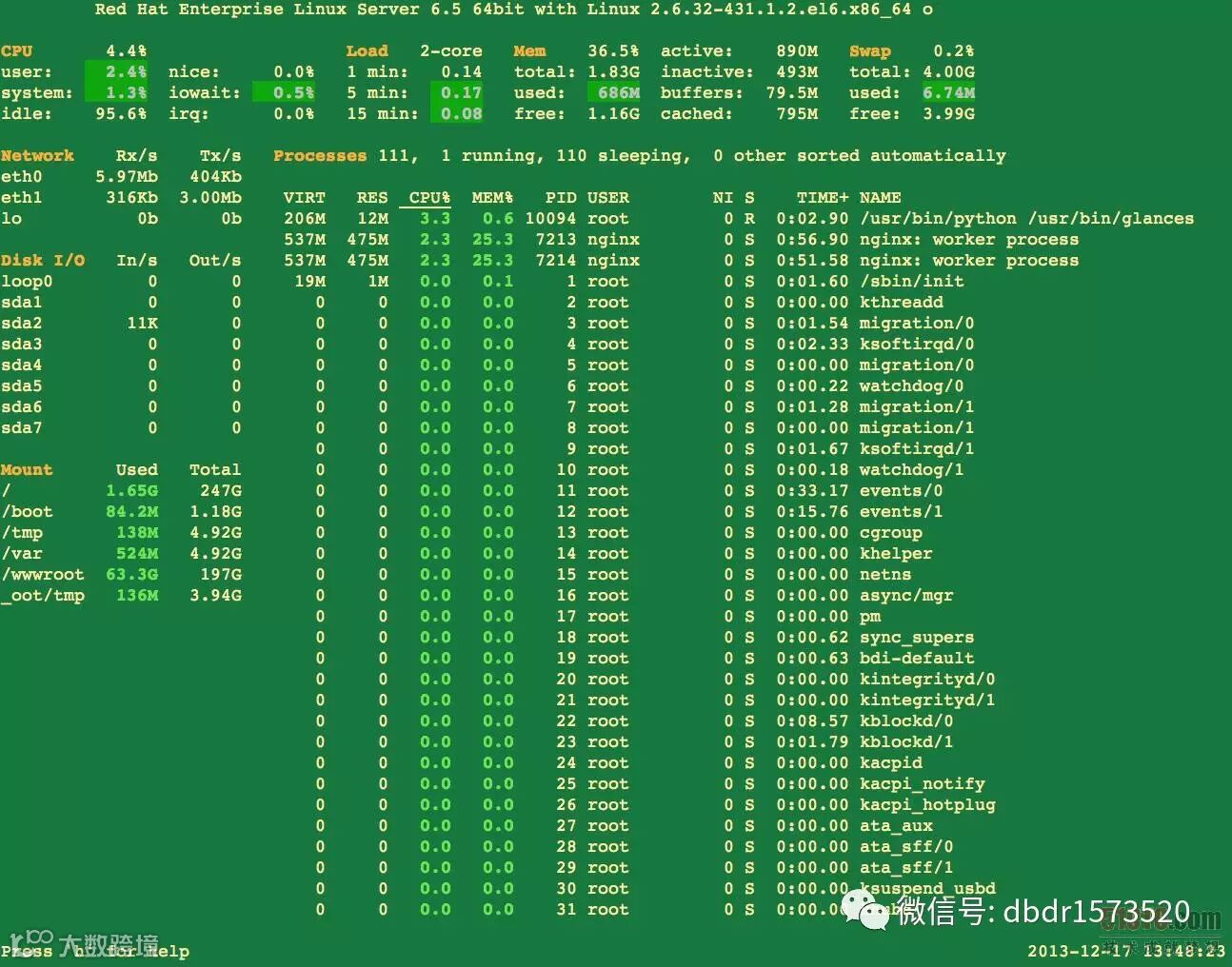
图1:Glances的实际输出结果
想退出,只要按q键(按Esc键和按Ctrl-C组合键也可以)。下面是来自基于Ubuntu的系统的另一个输出结果:
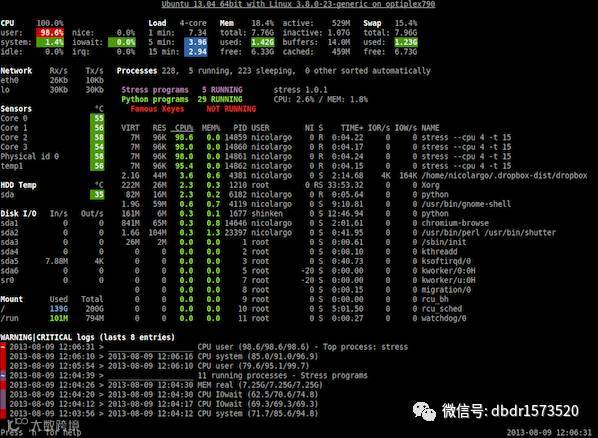
图2:Glances的实际输出结果
对输出进行微调(交互式命令)
使用下面这些热键,就可以对你的输出进行微调:
■a 自动对进程进行排序。
■c 按处理器使用百分比对进程进行排序。
■m 按内存使用百分比对进程进行排序。
■p 按名称对进程进行排序。
■i 按输入/输出速度对进程进行排序。
■d 显示/隐藏磁盘输入/输出的统计数字。
■f显示/隐藏文件系统的统计数字。
■n显示/隐藏网络的统计数字。
■s显示/隐藏传感器的统计数字。
■y显示/隐藏hddtemp的统计数字。
■l显示/隐藏日志。
■b 网络输入/输出的字节或比特。
■w 删除警告性日志。
■x 删除警告性日志和危急性日志。
■1全局处理器或单个处理器的统计数字。
■t 以合并方式查看网络输入/输出。
■u 查看累积的网络输入/输出。
我在客户机/服务器模式下如何使用Glances?
在服务器上,键入下面这个命令,就可以将服务器绑定到特定的IPv4/IPv6地址或主机名:
# glances -B @IP|host
# glances -B 75.126.153.206
# glances -B www.cyberciti.biz
从你的桌面客户机(比如基于OSX/FreeBSD/Linux的系统)上,键入下面这个命令,即可通过IPv4/IPv6地址或主机名,连接至Glances服务器:
# glances -c @IP|host
# glances -c 75.126.153.206
# glances -c www.cyberciti.biz
你可能需要传送-P password,以设置一个客户机/服务器密码。-s在服务器模式下运行Glances:
我如何每隔5秒刷新信息?
只要键入下面这个命令:# glances -t 5