轻量型指标采集器
用于从系统和服务收集指标。从 CPU 到内存,从 Redis 到 Nginx,Metricbeat 能够以一种轻量型的方式,输送各种系统和服务统计数据。
系统级监控,更简洁
将 Metricbeat 部署到您所有的 Linux、Windows 和 Mac 主机,并将它连接到 Elasticsearch 就大功告成啦:您可以获取系统级的 CPU 使用率、内存、文件系统、磁盘 IO 和网络 IO 统计数据,以及获得如同系统上 top 命令类似的各个进程的统计数据。探索[在线演示]
安装 Metricbeat
wget https://artifacts.elastic.co/downloads/beats/metricbeat/metricbeat-6.3.2-linux-x86_64.tar.gz
tar -zxvf metricbeat-6.3.2-linux-x86_64.tar.gz
mv metricbeat-6.3.2-linux-x86_64 metricbea
配置 Metricbeat
metricbeat.config.modules:
  path: ${path.config}/modules.d/*.yml
  reload.enabled: falsesetup.template.settings:
  index.number_of_shards: 1
  index.codec: best_compression
setup.kibana:
  host: "localhost:5602"output.elasticsearch:
  hosts: ["192.168.1.1:29200"]## 开启sytem监控$ cat modules.d/system.yml
- module: system
  period: 10s  metricsets:
    - cpu
    - load
    - memory
    - network
    - process
    - process_summary    #- core
    - diskio
    - socket  processes: ['.*']
  process.include_top_n:
    by_cpu: 5      # include top 5 processes by CPU
    by_memory: 5   # include top 5 processes by memory- module: system
  period: 1m  metricsets:
    - filesystem    #- fsstat
  processors:
  - drop_event.when.regexp:
      system.filesystem.mount_point: '^/(sys|cgroup|proc|dev|etc|host|lib)($|/)'- module: system
  period: 1m  metricsets:
    - uptime
启动kibana、es、metricbeat
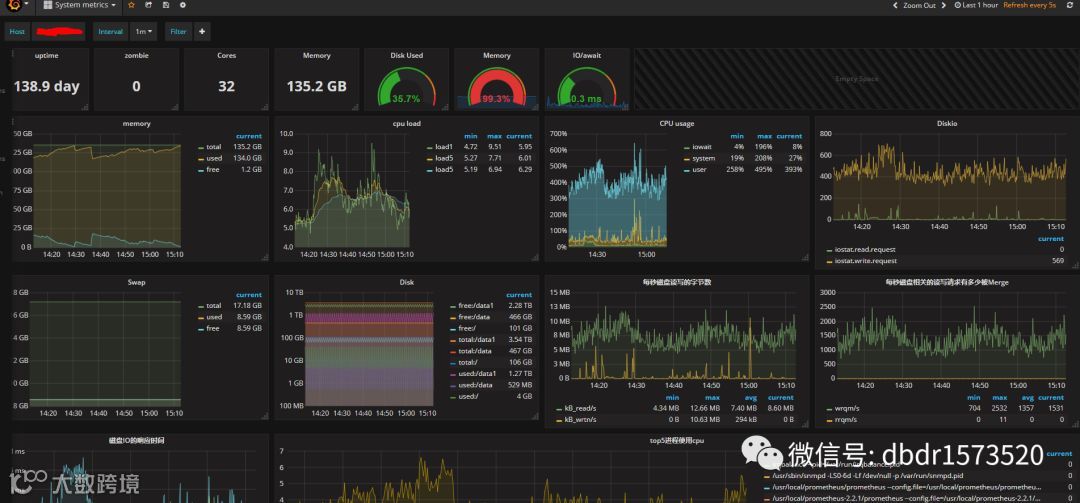
/usr/local/metricbeat/metricbeat -e -c /usr/local/metricbeat/metricbeat.yml效果如下图