



Oracle史上首次推出的第一个数据库rpm安装包。通过rpm包安装Oracle 18c更简单方便,省去通过vnc等图形化或静默方式安装的繁琐步骤。总之,oracle越来越方便,更加人性化;如下所安装过程。
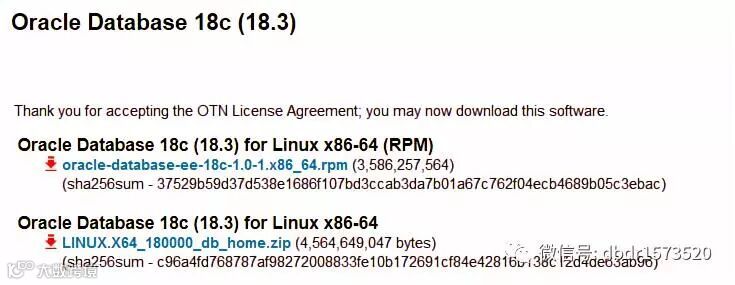
看oracle 18c安装包的信息
[root@localhost mnt]# ls -l oracle-database-ee-18c-1.0-1.x86_64.rpm
-rwxrwxrwx. 1 root root 3586257564 Oct 20 01:44 oracle-database-ee-18c-1.0-1.x86_64.rpm
[root@localhost mnt]#
[root@localhost mnt]# rpm -qpR oracle-database-ee-18c-1.0-1.x86_64.rpm
file
net-tools
oracle-database-preinstall-18c
/bin/sh
/bin/sh
/bin/sh
/bin/sh
rpmlib(FileDigests) <= 4.6.0-1
rpmlib(PayloadFilesHavePrefix) <= 4.0-1
rpmlib(CompressedFileNames) <= 3.0.4-1
rpmlib(PayloadIsXz) <= 5.2-1
[root@localhost mnt]# rpm -qlp oracle-database-ee-18c-1.0-1.x86_64.rpm|head -8
/etc/init.d/oracledb_ORCLCDB-18c
/etc/sysconfig/oracledb_ORCLCDB-18c.conf
/opt/oracle/product/18c
/opt/oracle/product/18c/dbhome_1
/opt/oracle/product/18c/dbhome_1/.opatchauto_storage
/opt/oracle/product/18c/dbhome_1/.opatchauto_storage/system_patches
/opt/oracle/product/18c/dbhome_1/.opatchauto_storage/system_patches/28096386
/opt/oracle/product/18c/dbhome_1/.opatchauto_storage/system_patches/28096386/bundle.xml
[root@localhost mnt]#
[root@localhost mnt]# rpm -ivh oracle-database-ee-18c-1.0-1.x86_64.rpm
error: Failed dependencies:
        oracle-database-preinstall-18c is needed by oracle-database-ee-18c-1.0-1.x86_64
[root@localhost mnt]#
[root@localhost mnt]# yum install oracle-database-preinstall-18c -y
....
[root@localhost mnt]#
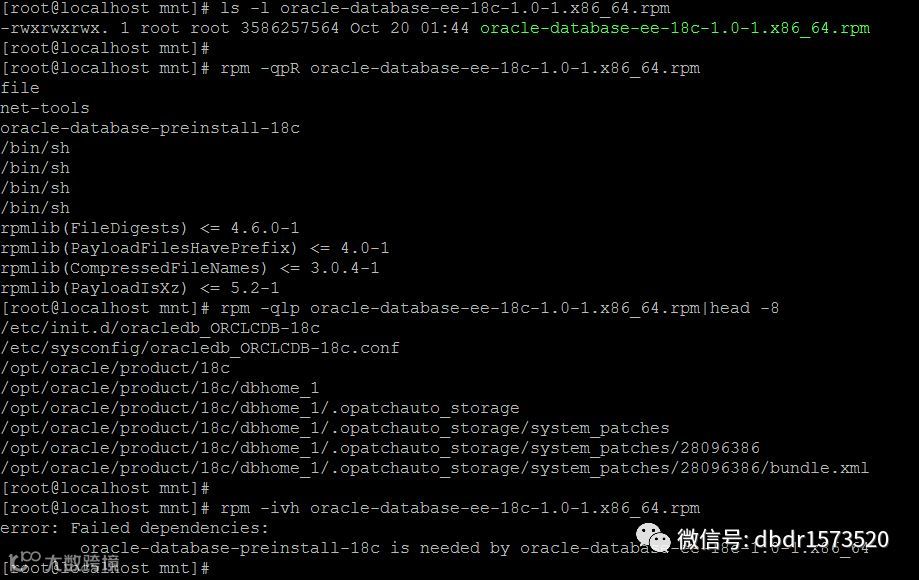
注意:如果要通过rpm包安装oracle 18c数据库,需要预安装oracle-database-preinstall-18c
安装18c rpm安装包
[root@localhost mnt]# id oracle
uid=54321(oracle) gid=54321(oinstall) groups=54321(oinstall),54322(dba),54324(oper),54325(backupdba),54326(dgdba),54327(kmdba),54330(racdba)
[root@localhost mnt]# rpm -ivh oracle-database-ee-18c-1.0-1.x86_64.rpm
Preparing...                ########################################### [100%]
   1:oracle-database-ee-18c ########################################### [100%]
[INFO] Executing post installation scripts...
[INFO] Oracle home installed successfully and ready to be configured.
To configure a sample Oracle Database you can execute the following service configuration script as root: /etc/init.d/oracledb_ORCLCDB-18c configure
[root@localhost mnt]#
查看18c sample配置文件内容
[root@localhost ~]# cat /etc/sysconfig/oracledb_ORCLCDB-18c.conf
#This is a configuration file to setup the Oracle Database.
#It is used when running '/etc/init.d/oracledb_ORCLCDB configure'.
#Please use this file to modify the default listener port and the
#Oracle data location.

# LISTENER_PORT: Database listener
LISTENER_PORT=1521

# ORACLE_DATA_LOCATION: Database oradata location
ORACLE_DATA_LOCATION=/opt/oracle/oradata

# EM_EXPRESS_PORT: Oracle EM Express listener
EM_EXPRESS_PORT=5500
[root@localhost ~]#
创建18c sample数据库ORCLCDB
[root@localhost ~]# /etc/init.d/oracledb_ORCLCDB-18c configure
Configuring Oracle Database ORCLCDB.
Prepare for db operation
8% complete
Copying database files
31% complete
Creating and starting Oracle instance
32% complete
36% complete
40% complete
43% complete
46% complete
Completing Database Creation
51% complete
54% complete
Creating Pluggable Databases
58% complete
77% complete
Executing Post Configuration Actions
100% complete
Database creation complete. For details check the logfiles at:
 /opt/oracle/cfgtoollogs/dbca/ORCLCDB.
Database Information:
Global Database Name:ORCLCDB
System Identifier(SID):ORCLCDB
Look at the log file "/opt/oracle/cfgtoollogs/dbca/ORCLCDB/ORCLCDB.log" for further details.
Database configuration completed successfully. The passwords were auto generated, you must change them by connecting to the database using 'sqlplus / as sysdba' as the oracle user.
[root@localhost ~]# ps -ef|grep pmon
oracle   11748     1  0 19:17 ?        00:00:00 ora_pmon_ORCLCDB
root     12134  3407  0 19:18 pts/0    00:00:00 grep pmon
[root@localhost ~]#
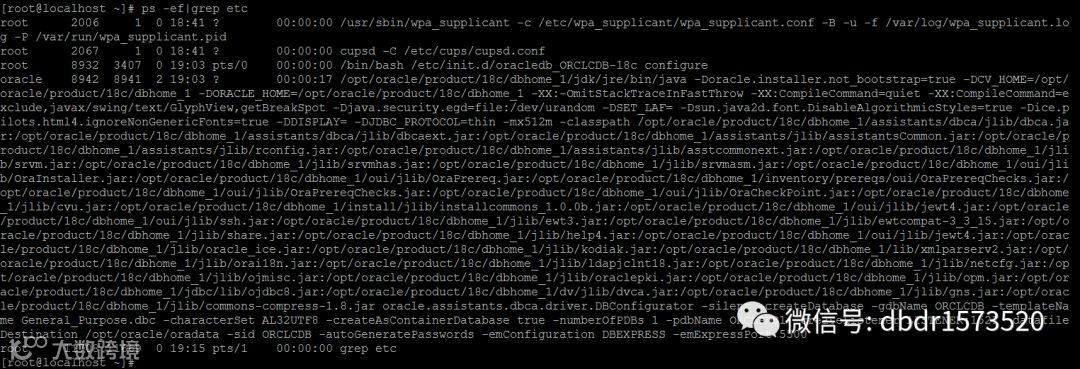
通过下面的图片我们能看到,后台实际上还是通过静默方式安装的。
-silent -createDatabase -gdbName ORCLCDB -templateName General_Purpose.dbc -characterSet AL32UTF8 -createAsContainerDatabase true -numberOfPDBs 1 -pdbName ORCLPDB1 -createListener LISTENER:1521 -datafileDestination /opt/oracle/oradata -sid ORCLCDB -autoGeneratePasswords -emConfiguration DBEXPRESS -emExpressPort 5500
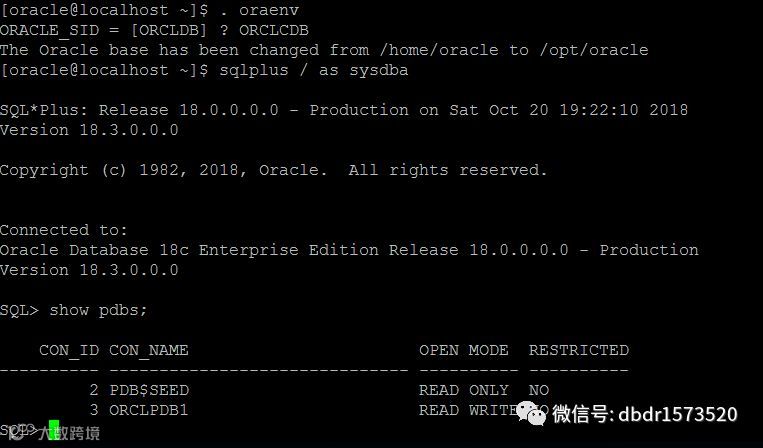
查看初始化脚本内容
[root@localhost ~]# cat /etc/init.d/oracledb_ORCLCDB-18c
#!/bin/bash
#
# chkconfig: 2345 80 05
# Description: This script is responsible for taking care of configuring the Oracle Database and its associated services.
#
# processname: oracledb_ORCLCDB-18c
# Red Hat or SuSE config: /etc/sysconfig/oracledb_ORCLCDB-18c
#
# Set path if path not set
case $PATH in
        "") PATH=/bin:/usr/bin:/sbin:/etc
                 export PATH ;;
esac
# Check if the root user is running this script
if [ $(id -u) != "0" ]
then
        echo "You must be root user to run the configurations script. Login as root user and try again."
        exit 1
fi
# Setting the required environment variables
export ORACLE_HOME=/opt/oracle/product/18c/dbhome_1
export ORACLE_VERSION=18c
export ORACLE_SID=ORCLCDB
export TEMPLATE_NAME=General_Purpose.dbc
export CHARSET=AL32UTF8
export PDB_NAME=ORCLPDB1
export LISTENER_NAME=LISTENER
export NUMBER_OF_PDBS=1
export CREATE_AS_CDB=true
# General exports and vars
export PATH=$ORACLE_HOME/bin:$PATH
LSNR=$ORACLE_HOME/bin/lsnrctl
SQLPLUS=$ORACLE_HOME/bin/sqlplus
DBCA=$ORACLE_HOME/bin/dbca
ORACLE_OWNER=oracle
RETVAL=0
CONFIG_NAME="oracledb_$ORACLE_SID-$ORACLE_VERSION.conf"
CONFIGURATION="/etc/sysconfig/$CONFIG_NAME"
# Commands
if [ -z "$SU" ];then SU=/bin/su; fi
if [ -z "$GREP" ]; then GREP=/usr/bin/grep; fi
if [ ! -f "$GREP" ]; then GREP=/bin/grep; fi
# To start the DB
start()
{
    check_for_configuration
    RETVAL=$?
    if [ $RETVAL -eq 1 ]
    then
        echo "The Oracle Database is not configured. You must run '/etc/init.d/oracledb_$ORACLE_SID-$ORACLE_VERSION configure' as the root user to configure the database."
        exit
    fi
    # Check if the DB is already started
    pmon=`ps -ef | egrep pmon_$ORACLE_SID'\>' | $GREP -v grep`
    if [ "$pmon" = "" ];
    then
        # Unset the proxy env vars before calling sqlplus
        unset_proxy_vars
        echo "Starting Oracle Net Listener."
        $SU -s /bin/bash $ORACLE_OWNER -c "$LSNR  start $LISTENER_NAME" > /dev/null 2>&1
        RETVAL=$?
        if [ $RETVAL -eq 0 ]
        then
            echo "Oracle Net Listener started."
        fi
        echo "Starting Oracle Database instance $ORACLE_SID."
        $SU -s /bin/bash  $ORACLE_OWNER -c "$SQLPLUS -s /nolog << EOF
        connect / as sysdba                                                   startup
                                         alter pluggable database all open
                                                                exit;
                                                                EOF" > /dev/null 2>&1
        RETVAL1=$?
        if [ $RETVAL1 -eq 0 ]
        then
            echo "Oracle Database instance $ORACLE_SID started."
        fi
    else
        echo "The Oracle Database instance $ORACLE_SID is already started."
        exit 0
    fi
    echo
    if [ $RETVAL -eq 0 ] && [ $RETVAL1 -eq 0 ]
    then
        return 0
     else
        echo "Failed to start Oracle Net Listener using $ORACLE_HOME/bin/tnslsnr and Oracle Database using $ORACLE_HOME/bin/sqlplus."
        exit 1
    fi
}
# To stop the DB
stop()
{
    check_for_configuration
    RETVAL=$?
    if [ $RETVAL -eq 1 ]
    then
        echo "The Oracle Database is not configured. You must run '/etc/init.d/oracledb_$ORACLE_SID-$ORACLE_VERSION configure' as the root user to configure the database."
        exit 1
    fi
    # Check if the DB is already stopped
    pmon=`ps -ef | egrep pmon_$ORACLE_SID'\>' | $GREP -v grep`
    if [ "$pmon" = "" ]
    then
        echo "Oracle Database instance $ORACLE_SID is already stopped."
        exit 1
    else
        # Unset the proxy env vars before calling sqlplus
        unset_proxy_vars
        echo "Shutting down Oracle Database instance $ORACLE_SID."
        $SU -s /bin/bash $ORACLE_OWNER -c "$SQLPLUS -s /nolog << EOF
                                                                connect / as sysdba
                                                                shutdown immediate
                                                                exit;
                                                                EOF" > /dev/null 2>&1
        RETVAL=$?
        if [ $RETVAL -eq 0 ]
        then
            echo "Oracle Database instance $ORACLE_SID shut down."
        fi
        echo "Stopping Oracle Net Listener."
        $SU -s /bin/bash  $ORACLE_OWNER -c "$LSNR stop $LISTENER_NAME" > /dev/null 2>&1
        RETVAL1=$?
        if [ $RETVAL1 -eq 0 ]
        then
            echo "Oracle Net Listener stopped."
        fi
    fi
    echo
    if [ $RETVAL -eq 0 ] && [ $RETVAL1 -eq 0 ]
    then
        return 0
    else
        echo "Failed to stop Oracle Net Listener using $ORACLE_HOME/bin/tnslsnr and Oracle Database using $ORACLE_HOME/bin/sqlplus."
        exit 1
    fi
}
# To call DBCA to configure the DB
configure_perform()
{
    # Unset the proxy env vars before calling dbca
    unset_proxy_vars
    echo "Configuring Oracle Database $ORACLE_SID."
    $SU -s /bin/bash  $ORACLE_OWNER -c "$DBCA -silent -createDatabase -gdbName $ORACLE_SID -templateName $TEMPLATE_NAME -characterSet $CHARSET -createAsContainerDatabase $CREATE_AS_CDB -numberOfPDBs $NUMBER_OF_PDBS -pdbName $PDB_NAME -createListener $LISTENER_NAME:$LISTENER_PORT -datafileDestination $ORACLE_DATA_LOCATION -sid $ORACLE_SID -autoGeneratePasswords -emConfiguration DBEXPRESS -emExpressPort $EM_EXPRESS_PORT"
    RETVAL=$?
    echo
    if [ $RETVAL -eq 0 ]
    then
        echo "Database configuration completed successfully. The passwords were auto generated, you must change them by connecting to the database using 'sqlplus / as sysdba' as the oracle user."
        return 0
    else
        echo "Database configuration failed."
        exit 1
    fi
}
# Enh 27965939 - Unsets the proxy env variables
unset_proxy_vars()
{
    if [ "$http_proxy" != "" ]
    then
        unset http_proxy
    fi

    if [ "$HTTP_PROXY" != "" ]
    then
        unset HTTP_PROXY
    fi
    if [ "$https_proxy" != "" ]
    then
        unset https_proxy
    fi
    if [ "$HTTPS_PROXY" != "" ]
    then
        unset HTTPS_PROXY
    fi
}
# Check if the DB is already configured
check_for_configuration()
{
    configfile=`$GREP --no-messages $ORACLE_SID:$ORACLE_HOME /etc/oratab` > /dev/null 2>&1
    if [ "$configfile" = "" ]
    then
        return 1
    fi
    return 0
}
read_config_file()
{
    if [ -f "$CONFIGURATION" ]
    then
        . "$CONFIGURATION"
    else
        echo "The Oracle Database is not configured. Unable to read the configuration file '$CONFIGURATION'"
        exit 1;
    fi
}
# Entry point to configure the DB
configure()
{
    check_for_configuration
    RETVAL=$?
    if [ $RETVAL -eq 0 ]
    then
        echo "Oracle Database instance $ORACLE_SID is already configured."
        exit 1
    fi
    read_config_file
    check_port_availability
    check_em_express_port_availability
    configure_perform
}
check_port_availability()
{
    port=`netstat -n --tcp --listen | $GREP :$LISTENER_PORT`
    if [ "$port" != "" ]
    then
        echo "Port $LISTENER_PORT appears to be in use by another application. Specify a different port in the configuration file '$CONFIGURATION'"
        exit 1;
    fi
}
# Validation method to check for port availability for Oracle EM Express
check_em_express_port_availability()
{
    port=`netstat -n --tcp --listen | $GREP :$EM_EXPRESS_PORT`
        if [ "$port" != "" ]
    then
         echo "Port $EM_EXPRESS_PORT appears to be in use by another application. Specify a different Oracle EM Express port in the configuration file '$CONFIGURATION'"
         exit 1;
    fi
}
restart()
{
    # Check if the DB is already stopped
    pmon=`ps -ef | egrep pmon_$ORACLE_SID'\>' | $GREP -v grep`
    if [ "$pmon" = "" ]
    then
        start
    else
        stop
        start
    fi
}
case "$1" in
    start)
        start
    ;;
    stop)
        stop
    ;;
    configure)
        configure
    ;;
    restart)
        restart
    ;;
    *)
        echo $"Usage: $0 {start|stop|restart|configure}"
        exit 1
    ;;
esac
exit 0
Reference
https://www.oracle.com/technetwork/database/enterprise-edition/downloads/oracle18c-linux-180000-5022980.html
https://docs.oracle.com/en/database/oracle/oracle-database/18/ladbi/installing-oracle-database-using-rpm-packages.html
https://www.oracle.com/technetwork/database/oracledatabase18c-wp-4392576.pdf
https://docs.oracle.com/en/database/oracle/oracle-database/18/index.html