


2020年 7月 Gartner 发布了两份最新报告:一直以来备受瞩目的《 2020 年度 Gartner 数据中心备份和恢复解决方案魔力象限》报告和《 2020 年度 Gartner 备份和恢复解决方案关键能力》的综合报告。您或有耳闻,我们在业界被称为魔力象限领导者,但您可能并不了解《 关键能力》报告。这份报告对各大供应商打分,跨越三大重要使用场景:公有云、虚拟环境和物理环境。
Critical data needs protection whether it is in the data center, the cloud, SaaS applications or at the edge, forcing I&O leaders to reevaluate their backup strategy and vendor selection. This research assesses nine backup and recovery vendors based on nine critical capabilities in three use cases.
Overview
Key Findings
Comprehensive protection from ransomware is a key driver for many clients considering replacing existing backup and recovery platforms.
Disk-to-disk-to-cloud is the backup architecture of choice as enterprises adopt public cloud for long-term retention or for storing a second copy of backup data.
Basic backup functionality offered by cloud vendors is being supplanted by enterprise backup solutions to improve data protection and make cloud data protection consistent with on-premises capabilities.
Backup of data stored in SaaS applications isn’t available except for the most common SaaS platforms, such as Office 365.
Recommendations
I&O leaders tasked with modernizing data center infrastructure for backup and recovery should:
Upgrade or replace existing backup architectures to support applications in the cloud and edge locations, as well as new workloads in the data center and SaaS applications.
Choose backup software that supports tiering and replication of backup data to public cloud providers, including low-cost archival storage such as Amazon Glacier.
Select backup software that provides consistent data protection regardless of whether the application is deployed in the data center, public cloud or SaaS vendor infrastructure.
Choose third-party backup software where necessary to supplement enterprise backup software and protect SaaS applications, such as Office 365 and Salesforce.
Make ransomware protection and support for regulatory compliance a key part of any backup platform selection and evaluation process by emphasizing these capabilities in their procurement criteria.
Strategic Planning Assumption
By 2022, 40% of organizations will completely replace or supplement their backup applications, compared with what they had deployed in 2018.
What You Need to Know
Protecting and recovering business applications regardless of the underlying infrastructure type and location is critical. This requirement becomes more challenging every year by the creation of new application and data types and the addition of new application deployment models such as SaaS. To help clients understand the suitability of different backup platforms, this Critical Capabilities research evaluates vendors based on three use cases — physical, virtual and public cloud environments. The ability of vendors to address these use cases is measured by evaluating each use case against nine critical capabilities — application support, platform support, performance and efficiency, security and compliance, user experience, manageability, reporting and analytics, ecosystem integration, and scalability.
Analysis
Critical Capabilities Use-Case Graphics
Figure 1. Vendors’ Product Scores for the Physical Server Environments Use Case
Source: Gartner (July 2020)
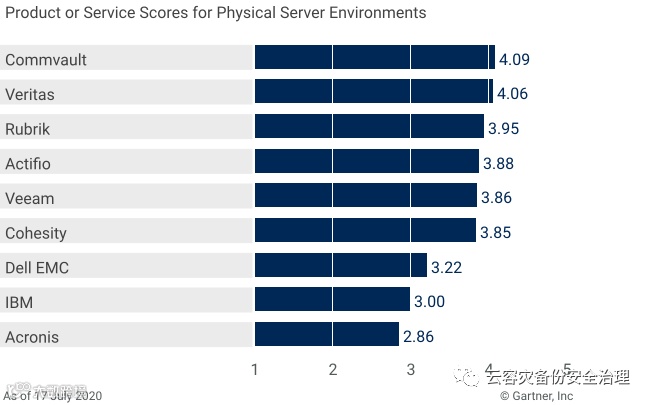
Figure 2. Vendors’ Product Scores for the Virtual Environments Use Case
Source: Gartner (July 2020)
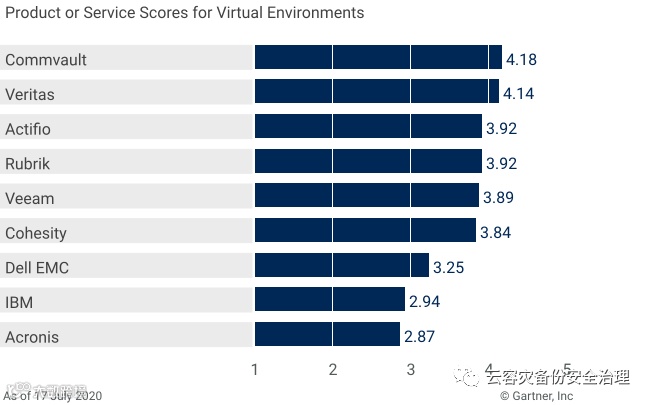
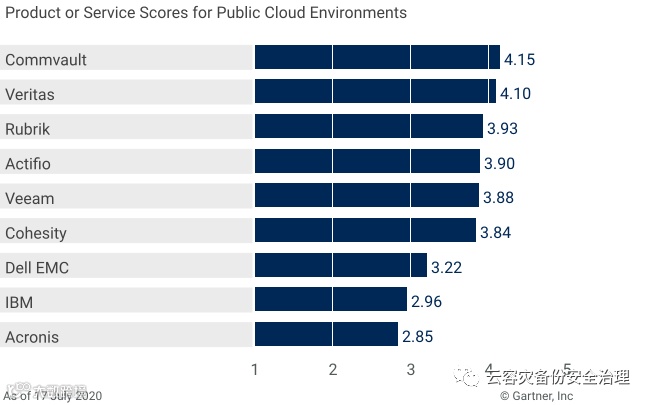
Figure 3. Vendors’ Product Scores for the Public Cloud Environments Use Case
Source: Gartner (July 2020)
Vendors
Acronis
Acronis Cyber Backup is aimed at data center and branch office locations, offering limited support for public cloud. Acronis uses a two-tier architecture. Agents installed on the physical host (either in the operating system or the hypervisor) send data to disk, tape-based backup or cloud targets; reporting information is sent to a central management server. The agent supplies a range of backup capabilities and services, including deduplication, encryption, replication and recovery. The central management server manages scheduling, stores a metadata catalog and provides reports on the status of backup operations.
Acronis’ innovation and differentiation lies in:
Backup verification — Acronis Cyber Backup uses blockchain technology to notarize and verify the data blocks, thus guaranteeing data authenticity of the backup copy.
Ransomware monitoring and recovery — Acronis Active Protection protects backup software, backup storage and production data against malware attacks and facilitates recovery after ransomware attacks by helping identify last-known usable backup copy.
Limitations:
Database support — Acronis Cyber Backup does not support granular-level backup and recovery of Microsoft SQL, Oracle RAC, SAP HANA and Db2 environments.
Hypervisor support — Acronis does not integrate with backup frameworks provided by Nutanix AHV, Oracle VM and Red Hat KVM and requires installation of backup agents in the guest VM for backing up the application data in the VM.
Public cloud backup — Acronis does not integrate with snapshot APIs provided by AWS, Microsoft Azure and Google Cloud Platform. Backing up on-premises data to these public clouds requires the Acronis Backup Gateway to be installed in the data center. Data is neither deduplicated nor compressed before sending to the cloud, therefore increasing data transfer costs.
Integration with hardware snapshots — Acronis does not integrate with snapshot capabilities provided by most primary storage array vendors. It currently only integrates with NetApp storage arrays.
It is due to the above product limitations, overall lack of focus in protecting enterprise applications and emerging use cases (such as containers and HCI) that Acronis scored the lowest among all vendors for all three use cases evaluated in this report.
Actifio
Actifio Sky’s architecture is based on its virtual data pipeline technology, which creates a “golden copy” of the production data in its native format. The golden copy is updated using incremental-forever updates, offering multiple recovery points and near-zero RTO. This enables use cases such as backup, disaster recovery, test/dev and analytics. The Actifio platform can be deployed in three form factors — Actifio Sky, a virtual machine appliance; Actifio CDX, a physical HA cluster appliance; and Actifio GO, a SaaS offering available in Google Cloud Platform, AWS and IBM Cloud to protect these cloud environments. All three deployment types can be managed using the Actifio Global Manager, a software platform that supports centralized management and orchestration.
Actifio’s innovation and differentiation lies in:
RDMS database support — Actifio supports granular backup and recovery for stand-alone and clustered instances of Oracle, Microsoft SQL and Db2 databases. The instant recovery function ensures that the production environment is back online quickly, thus reducing RTO.
In-memory databases — Actifio offers superior SAP HANA data protection capabilities compared to other vendors evaluated in the report. Actifio leverages SAP HANA SavePoint API to create a database-consistent snapshot. It also supports instant mount and recovery capabilities of SAP HANA databases either on-premises or in public clouds.
Low-cost cloud recovery — Backup copies stored in public cloud object storage can be retrieved in cloud or on-premises by directly mounting from object storage without the need for rehydrating the data or moving it to a high-cost storage tier in the cloud.
Limitations:
Ransomware detection and recovery — Actifio does not offer strong ransomware detection capabilities. The process of postransomware recovery is complex and mostly manual.
Support for public cloud PaaS environments — Actifio does not support popular public cloud DBaaS platforms such AWS RDS, Amazon Redshift or Azure SQL.
Hypervisor support — Actifio does not integrate with backup frameworks provided by Nutanix AHV, Oracle VM and Red Hat KVM. Protecting data within these VMs requires the installation of backup agents in the virtual machine.
Office 365 and Salesforce — Actifio relies on CloudAlly to provide data protection capabilities for Office 365 environments, thus increasing management complexity. It currently does not support Salesforce backup.
Overall, Actifio is well-suited for large database environments and public cloud environments with a focus on the reuse of backup data. Actifio Sky scores above average for all three use cases evaluated in this report.
Cohesity
Cohesity DataProtect is a backup and recovery platform built on Cohesity’s scale-out SpanFS file system. Cohesity DataProtect can be sourced as an appliance or as a software that can be deployed on certified hardware. It can also be deployed in AWS, Microsoft Azure and Google Cloud Platform as a virtual appliance. Cohesity also offers Helios, a SaaS-based management platform, used to centrally manage and monitor multiple Cohesity deployments.
Cohesity’s innovation and differentiation lies in:
Data reduction — Cohesity supports compression and variable length block-level deduplication. Deduplication is applied globally (that is, at the cluster level), thus reducing the backup footprint.
Search and recovery — Cohesity provides granular search and recovery of VMs, files and objects by indexing the metadata associated with the backup and allowing users to tag the backup for reference.
Rapid VM recovery — Cohesity stores all incremental backup copies in a hydrated format, thus enabling the live mounting of virtual machine backup copies from any point in time.
Limitations:
Primary storage array snapshot integration — Cohesity integrates with the snapshot APIs of a relatively small number of primary storage array vendors. It currently only integrates with HPE Nimble Storage and Pure Storage.
Microsoft SQL server support limitations — Cohesity does not support MS SQL log archive, thus preventing point-in-time restores from an archived snapshot. Cloning an SQL database that is backed up using SQL VDI frameworks is not supported.
Public cloud VM restore — On-premises VMs hosted on UEFI-based servers cannot be restored in the public cloud directly, as Cohesity does not support built-in UEFI to BIOS conversion.
SaaS application support — Cohesity needs to expand its support for common SaaS applications, such as Salesforce and Microsoft Dynamics 365, as well as improve its support for Office 365 by adding Teams support.
Overall, Cohesity DataProtect scores above average in all three use cases and is well-suited to support hybrid virtual environments that span the data center, public cloud and edge locations.
Commvault
Commvault Complete Backup & Recovery is a highly scalable enterprise data protection solution that uses the market-validated three-tier backup architecture consisting of backup agents, media servers and a management server. The solution is also packaged as an integrated appliance and sold under the Commvault Hyperscale brand. The Backup & Recovery platform is complemented by two additional components — Commvault Orchestrate, which provides DR orchestration, and Commvault Activate, which supports e-discovery, compliance search and analytics capabilities.
Commvault’s innovation and differentiation lies in:
Ransomware protection and recovery — Commvault uses a combination of machine learning algorithms, air gap and honeypot mechanisms to detect ransomware attacks. The backup data is secured by restricting any external I/O requests to only Commvault processes. The backup catalog can be backed up to Commvault-managed cloud and can be retrieved from multiple cloud locations in native format during the recovery process. Commvault also allows users to validate backup copies by performing isolated recoveries of data to a networkless VM environment for verification.
Ecosystem support — Commvault integrates with the highest number of primary storage array, cloud and application vendors evaluated in this report. It also supports several tape libraries and on-premises and public cloud object storage platforms.
DBaaS support — Commvault supports several DBaaS platforms, including AWS RDS, AWS Redshift, AWS DynamoDB, Azure SQL, Azure SQL-managed database, and Google Cloud PostgresSQL and MySQL. It also supports migration of on-premises database onto these cloud platforms.
Limitations:
Deployment complexity — Commvault Complete Backup & Recovery requires the installation of several components: client-interfacing agents, data movers, operations console, a central management and monitoring console, as well as additional tools for orchestration and search and compliance. This is more than what most vendors in this research require.
Live VM recovery — Commvault does not support live VM recovery of Hyper-V virtual machines.
Microsoft SQL server — The SQL Server Agent does not support VSS-enabled backups of SQL databases hosted on SMB shares.
Commvault excels in all three use cases because of its breadth and granularity of application support in physical, virtual and public cloud environments.
Dell EMC
Dell EMC Avamar is an enterprise data center backup and recovery product that addresses a broad range of use cases, including physical server, VMs, applications and NAS backup. Avamar is available as a stand-alone version packaged as a virtual appliance or as a component of Dell EMC Data Protection Suite, which also includes NetWorker and PowerProtect Data Manager.
Avamar innovation and differentiation lies in:
Data reduction — The variable-length segment client-side global deduplication function delivered by Avamar ensures a very high level of data reduction, thus reducing the backup window and improving storage efficiency. Avamar also integrates with PowerProtect DD and DD Boost to significantly reduce backup storage footprint.
VMware integration — Avamar provides agentless backup for both traditional and hyperconverged environments based on vSAN data stores. It also integrates with VMware vCloud Suite, thus supporting centralized management and automation of backup activities.
Public cloud support — Avamar Virtual Edition, together with PowerProtect DD Virtual Edition, can support up to 96TB of backup capacity in the public cloud, either on block or object storage, via a single virtual instance of the backup software.
Limitations:
Ecosystem integration — Avamar does not integrate with snapshot APIs offered by primary storage array vendors.
PowerProtect DD dependency — Avamar relies on its integration with PowerProtect DD for tiering data to the public cloud and for cloud-based disaster recovery. It requires PowerProtect DD Virtual Edition as a storage target for backup and recovery of public cloud IaaS workloads.
Database support — Avamar does not natively support backup of MySQL, SAP HANA and MongoDB and relies on PowerProtect App Direct, in combination with PowerProtect DD, to address these requirements.
Limited hypervisor support — Avamar does not support backup/recovery of virtual machines hosted on Nutanix AHV, Oracle VM and Red Hat KVM. Only guest-level protection is supported.
SaaS backup — Avamar does not support backup of Office 365 or Salesforce environments.
Overall, Dell EMC Avamar scored below average for all three use cases evaluated in this report. Enterprises with a diverse set of requirements will need to install a combination of different products offered as a part of the Data Protection Suite to address their data protection needs.
IBM
Spectrum Protect Plus (SPP) is IBM’s next-generation backup/recovery solution designed to address data protection and data reuse use cases for virtual and cloud environments. The product is positioned alongside the Spectrum Protect product line, which mainly focuses on physical and RDBMS environments. SPP can be deployed as a virtual appliance either on-premises or in the public cloud, and it uses multiple, independently scalable storage repositories called vSnap servers to store backup data.
Spectrum Protect Plus’ innovation and differentiation lies in:
Deployment simplicity — SPP requires a relatively fewer number of components to be installed, which makes it simpler to deploy and easy to manage.
Ransomware resilience — SPP stores the primary backup copy as immutable snapshots in the vSnap repository, making it resilient to ransomware attacks. This reduces the need for creating additional isolated copies of backup, reducing storage costs.
Container support — SPP integrates with the Container Storage Interface to create snapshot copies of persistent storage volumes that are associated with containers managed by Kubernetes.
Limitations:
Snapshot integration — SPP does not integrate with hardware snapshot APIs provided by storage array or hyperconverged systems vendors. This capability is delivered via Spectrum Protect Snapshot and Spectrum Copy Data Management. SPP does not integrate with virtual machine snapshot APIs provided by public cloud providers such as AWS and Microsoft Azure.
Public cloud recovery — SPP does not support recovering on-premises VMware or Hyper-V-based virtual machines in AWS or Microsoft Azure. It currently supports IBM Cloud and VMware on AWS as recovery destinations.
Database and DBaaS support — SPP does not support backup/recovery of SAP HANA, MySQL and PostgresSQL. Public cloud DBaaS products such as AWS RDS, Amazon Redshift and Azure SQL are not supported.
Limited SaaS backup capability — SPP does not support backup/recovery of Microsoft SharePoint Online, Microsoft Teams and Salesforce environments.
Installation considerations — Users need to account for additional hypervisor license costs as the server component of SPP can be deployed only as a virtual appliance in VMware or Hyper-V.
Overall, IBM Spectrum Protect Plus is below average for all three use cases evaluated in this report. Enterprises with a diverse set of requirements are expected to install a combination of different products, including IBM Spectrum Protect, to address their data protection needs.
Rubrik
Rubrik Cloud Data Management (CDM) is available as a hardware appliance, as software-only that can run on certified hardware, as a virtual appliance for remote and branch office environments (Rubrik Edge), and as a virtual appliance in AWS and Microsoft Azure. Complementing Rubrik CDM is Rubrik Polaris, a SaaS-based management platform that provides centralized policy management, ransomware detection and remediation, public cloud backup, and governance and compliance capabilities.
Rubrik CDM’s innovation and differentiation lies in:
Ransomware resilience and remediation — Rubrik CDM provides an immutable file system and is therefore less prone to ransomware attacks. Anti-ransomware capabilities are further enhanced by Polaris Radar, which provides centralized ransomware detection and remediation capabilities, covering applications hosted on-premises. The AI/ML models used to detect ransomware are constantly refined through a continuous learning process.
Public cloud VM backup — Rubrik can perform VM-level backup for AWS and Azure virtual instances by integrating with native snapshot APIs, without the need to install software or a virtual appliance in the cloud. Backup or recovery tasks can be performed through Polaris, the SaaS-based management platform.
Extensive database support — Rubrik CDM supports backup of stand-alone and clustered configurations of Oracle, Microsoft SQL, SAP HANA and Db2. It supports live mounting of Oracle and Microsoft SQL databases, which is particularly useful in recovering large databases quickly. It also provides extensive support for backup/recovery of NoSQL databases, such as Cassandra and MongoDB, through Rubrik Mosaic.
Limitations:
Ecosystem integration — Rubrik does not integrate with snapshot capabilities of most primary storage array vendors. It currently only integrates with Pure Storage and NetApp. There is no native support for tape drives and libraries, which requires products from Qstar, a third-party vendor.
Office 365 and Salesforce support — Rubrik CDM supports only Microsoft Exchange Online. Other components of Office 365 (SharePoint Online, Teams, OneDrive and Dynamics 365) are not supported. Rubrik CDM does not support backup/recovery of Salesforce environments.
Active Directory support — Rubrik CDM does not support granular recovery of Active Directory objects or backup/recovery of Azure Active Directory environments.
Limited hypervisor support — Rubrik CDM does not integrate with backup/recovery frameworks provided by Oracle VM and Red Hat KVM. Only guest-level protection is supported.
Overall, Rubrik scores above average across all three use cases evaluated in this report and is strongest with virtual and public cloud environments.
Veeam
Veeam Backup & Replication is sold primarily as a software solution that offers customers the flexibility to use their own hardware to address a broad range of data protection requirements. Veeam Backup & Replication is sold stand-alone or as part of the Veeam Availability Suite, which also includes Veeam ONE, a monitoring and analytics solution. Other products (Veeam Backup for Microsoft Office 365, Veeam Backup for AWS and Veeam Availability Orchestrator) are sold separately. In December 2019, Veeam and Nutanix announced Nutanix Mine with Veeam, a scale-out appliance using Nutanix HCI with Veaam Backup & Replication software.
Veeam’s innovation and differentiation lies in:
Efficient data transfer — Veeam supports multiple options to transport backup data from the production environment to the backup target. The direct SAN access mode moves backup traffic directly from the SAN to the backup repository via a dedicated backup proxy, reducing performance overhead on the client network.
Microsoft Office 365 support — Veeam provides comprehensive support for all major components of Office 365 (Exchange Online, SharePoint Online, OneDrive and Microsoft Teams). It supports backup/recovery of on-premises Microsoft Exchange, Microsoft SharePoint and Office 365 from a single pane of glass and has the ability to use the same target storage repository for all three use cases.
Ecosystem integration — Veeam integrates with the snapshot APIs of many primary storage array and hyperconverged systems vendors. It also natively supports numerous tape libraries, drives and object storage systems as archival targets.
Limitations:
Cloud backup — Veeam Backup for AWS and Veeam Backup for Azure do not support application-consistent backups. Application-consistent backup in these cloud environments can be achieved by deploying a solution that is identical to typical on-premises Veeam deployments that include backup servers, proxy servers, mount servers and backup agents. Popular DBaaS products (such as AWS RDS, Amazon Redshift and Azure SQL) are not supported.
Immutable backup storage — Veeam relies on security capabilities provided by the storage target or file system software to ensure the primary backup copy is immutable.
SaaS backup support — Veeam does not support backup of Salesforce or Microsoft Dynamics 365 environments.
Limited hypervisor support — Veeam does not integrate with backup/recovery frameworks provided by Oracle VM and Red Hat KVM. Only guest-level protection is supported for those.
Veeam Backup & Recovery excels in deployment flexibility and provides solid support across the physical, virtual and cloud use cases.
Veritas
Veritas NetBackup enterprise backup solution is available both as a stand-alone software solution as well as an appliance. Veritas NetBackup deployments typically consist of backup agents, media servers that interface between the agents and storage repository, and a master server that handles backup policy management, catalog management and reporting. Complementing Veritas NetBackup is NetBackup CloudPoint that provides application-consistent capabilities for public cloud instances hosted in AWS, Microsoft Azure and Google Cloud Platform. Backup monitoring, reporting and analytics capabilities are augmented by the 2019 acquisition of APTARE.
NetBackup’s key strengths and differentiators include:
Ecosystem integration — NetBackup integrates with a broad range of storage arrays and hyperconverged systems. It supports a large of number of tape libraries and object storage platforms as archival targets, making it suitable for large heterogeneous environments.
Scalability — Enterprise customers continue to deploy Veritas NetBackup for its scalability and modular architecture.
Public cloud and public cloud extensions — NetBackup CloudPoint integrates with snapshot capabilities provided by AWS, Microsoft Azure and Google Cloud Platform. It also provides specific plug-ins for Oracle and SQL databases to support application-consistent backups in the public cloud. Veritas NetBackup supports backup/recovery of AWS Outposts and Microsoft Azure Stack and integrates with cloud data transport appliances such as AWS Snowball and Azure Databox.
Limitations:
Ransomware detection and remediation — NetBackup’s primary backup copy, with the exception of tape, is not immutable, thus requiring additional backup copies based on immutable storage for additional resilience.
Cloud gateway requirement — Veritas NetBackup MSDP servers cannot write deduplicated data directly to the cloud but would require a dedicated CloudCatalyst appliance.
SaaS backup — Data protection requirements for Office 365, Salesforce and G Suite are delivered via a third-party SaaS backup vendor.
Azure Active Directory support — Veritas NetBackup does not support backup/recovery of Azure Active Directory environments.
Veritas NetBackup ranks second for all use cases and is well-suited to address data protection requirements in hybrid IT environments.
Context
Data center backup is a critical process with multiple challenges. Data volumes continue to grow, applications become more dynamic and threats like ransomware increase. As a result, slow backup performance has become a top issue for many organizations. Meanwhile, traditional backup and recovery methods are changing with an accelerating shift from tape to disk and cloud repositories. In addition to the on-premises challenges, applications hosted on IaaS platforms and applications outsourced to SaaS are demanding equal levels of protection. These diverse requirements are causing organizations to look for backup solutions that can protect everything (on-premises virtual and physical servers, applications in public IaaS clouds, and a growing list of SaaS applications), rather than adopting multiple point solutions. As a result, selecting a backup product that can meet the needs of the business during the next three to five years has become an important, strategic exercise.
Product/Service Class Definition
Gartner defines data center backup and recovery solutions as products designed to:
Capture a point-in-time copy (backup) of data across heterogeneous enterprise workloads regardless of where they are hosted.
Write the data out to an independent secondary location such as disk, tape, optical device or cloud service.
Provide the ability to find and restore specific datasets to the original or alternate system or location.
Critical Capabilities Definition
Scalability
The backup system must be able to demonstrate both scale-up and scale-out capabilities in order to accommodate growth in a number of applications and storage growth. Additional backup storage and compute nodes or servers must be added to an existing deployment with minimum operational overhead.
Performance and Efficiency
This refers to time and resources consumed for executing backup and recovery functions. Some of the factors influencing backup and recovery efficiency and performance are:
Media or appliance data ingestion speed
Backup method used (incremental, differential, full or any proprietary method)
Support for crash-consistent and application-consistent snapshots
Multiplexing
Multistreaming
Ability to live-mount the application or virtual machine images
Data compression and deduplication are some of the other parameters that are heavily weighted in this category.
Manageability
This refers to the ability to centralize management of various backup and recovery tasks. Other factors considered are the ability to carry out performance and capacity management of the backup infrastructure.
Integration with cloud orchestration tools via plug-ins and templates, as well as support for scripting tools such as PowerShell, will be considered as differentiating factors.
Ecosystem Integration
Ecosystem integration is the backup solution’s ability to integrate with primary storage arrays for optimized/efficient protection of applications running on primary storage. It also includes the ability to integrate with a broad range of backup target appliances and public cloud storage targets.
Platform Support
This capability examines support for such things as operating systems, hypervisors and cloud infrastructure as a service. The ability to support the following is weighted heavily:
Operating systems such as Microsoft Windows, Linux (Red Hat and others), IBM AIX, and Oracle Solaris.
Hypervisor platforms such as VMware ESXi, Microsoft HyperV, Nutanix AHV and Red hat KVM.
Public IaaS cloud such as Amazon AWS, Microsoft Azure and Google Compute.
Application Support
This capability assesses the ability of vendors to support and integrate with commonly deployed enterprise applications in physical or virtual servers or cloud environments.
Creating an application-consistent copy of data by integrating with services such as Microsoft VSS ensures the availability of a clean backup copy. Supporting a crash-consistent copy of these applications ensures a faster and higher number of backup copies at the cost of consistency. The following are some of the applications and databases that are considered. Although the list is not exhaustive, the vendor’s capabilities in supporting these applications is the focus for this evaluation:
Databases: Microsoft SQL, Oracle, Db2, MySQL, SAP HANA, MongoDB, Cassandra, PostgresSQL
Messaging: MS Exchange
Collaboration: NAS systems, MS SharePoint
Business applications: SAP, Oracle
Others: Microsoft Active Directory
Security and Compliance
The ability to support capabilities such as role-based access controls, industry-approved encryption mechanisms and read-only snapshots and to proactively detect and notify any attempt to change backup data will be evaluated.
The backup solution must be able to support advanced search functionality to ensure the backup data is searchable and certain data can be deleted to ensure compliance requirements are adhered to.
Reporting and Analytics
This refers to the ability of the solution to provide insights into backup infrastructure. Detecting and reporting failures and anomalies pertaining to backup infrastructure and tasks, and further recommending necessary actions via interactive dashboards, will be evaluated.
User Experience
User experience refers to the ability of the backup solution to provide an intuitive user interface, self-service functionality and perform routine tasks with a minimum number of actions. The ability to offer the backup software in multiple languages will be considered a differentiating factor.
Use Cases
Gartner has evaluated the products for three typical enterprise use cases. However, it’s important to note that in most enterprise environments, the products are likely to be used for all three use cases at the same time, so organizations should not view them in isolation.
Physical Server Environments
Although most data centers are virtualized, in some cases, mission-critical workloads or legacy environments continue to be deployed on physical servers for various reasons.
Physical servers are defined as dedicated single-tenant systems based on data-center-class processors such as Intel x86, AMD and IBM Power, running a Windows- or UNIX-based server OS directly on the hardware with no software-based virtualization such as a hypervisor. Servers deployed in this way are most frequently used to host mission-critical enterprise applications with the highest data protection requirements. The nature of these applications makes it imperative that the OS file system, application and application data are adequately protected.
To satisfy this use case, vendor solutions must be able to protect the entire platform (OS, application and data) and be capable of performing bare-metal recovery for the following operating systems as a minimum requirement:
Windows
Major distributions of Linux, including Red Hat and SUSE
HP-UX
Oracle Solaris
IBM AIX
For bare-metal recovery, the vendor’s solutions should also be able to provide recovery over the network and via a local media. In addition, the vendor’s solution should also provide multiple recovery options such as P2P and P2V.
Virtual Environments
Virtual environments as operating systems hosted on top of a software hypervisor or as a container within the OS are the dominant form of enterprise application deployment.
Applications span the entire range of business criticality from small-scale department applications to the most mission-critical enterprise applications, with a range of different data protection requirements.
Each vendor’s offerings will be evaluated on their ability to support commonly deployed virtualization platforms, including:
VMware ESXi
Microsoft Hyper-V
Nutanix Acropolis
Oracle Virtual Machine
Red Hat KVM
Docker Containers
To address this use case, the vendor’s offerings are evaluated on the ability to create a consistent backup copy of the virtual machine or container environment and protect the applications hosted inside the VM/container. Key points of evaluation include integration with the virtualization or container platform, recovery granularity, method and speed.
Public Cloud Environments
Enterprises are increasingly hosting entire applications and data in cloud IaaS environments that require similar levels of protection to on-premises data.
In addition, many enterprises are replacing on-premises applications with cloud-hosted SaaS platforms such as Office 365 and Salesforce. As the quantity and importance of these applications have grown, enterprise organizations have seen the need to protect the data stored in them using traditional backup and recovery tools. In addition to protecting applications hosted in the cloud, many organizations have reacted to the growing threat of ransomware by creating air-gapped copies of on-premises backups in the cloud.
To support these operations, this use case focuses on three activities:
Backup/recovery of on-premises environments to/from public cloud targets
Backup/recovery of applications hosted on public cloud IaaS platforms such as Amazon AWS, Microsoft Azure and Google Cloud Platform
Backup/recovery of widely used SaaS applications such as Microsoft Office 365, Microsoft Dynamics 365 and Salesforce
In all cases, vendor offerings will be evaluated on platform support, simplicity and scalability.
Vendors Added and Dropped
Added
None
Dropped
The following vendors were dropped from this year’s Critical Capabilities and Magic Quadrant after they declined to participate:
Unitrends
Arcserve
Inclusion Criteria
Refer to the inclusion criteria included in the “Magic Quadrant for Data Center Backup and Recovery Solutions.”
Table 1: Weighting for Critical Capabilities in Use Cases
Enlarge Table
Critical Capabilities |
Physical Server Environments |
Virtual Environments |
Public Cloud Environments |
|---|---|---|---|
Scalability |
7% |
7% |
8% |
Performance and Efficiency |
20% |
15% |
17% |
Manageability |
8% |
5% |
5% |
Ecosystem Integration |
8% |
6% |
9% |
Application Support |
15% |
20% |
21% |
Platform Support |
15% |
20% |
13% |
Security and Compliance |
15% |
15% |
15% |
Reporting and Analytics |
6% |
6% |
6% |
User Experience |
6% |
6% |
6% |
Total |
100% |
100% |
100% |
As of July 2020 |
|||
Source: Gartner (July 2020)
Critical Capabilities Rating
Each of the products/services has been evaluated on the critical capabilities on a scale of 1 to 5; a score of 1 = Poor (most or all defined requirements are not achieved), while 5 = Outstanding (significantly exceeds requirements).
Table 2: Product/Service Rating on Critical Capabilities
Enlarge Table
Critical Capabilities |
Acronis |
Actifio |
Cohesity |
Commvault |
Dell EMC |
IBM |
Rubrik |
Veeam |
Veritas |
|---|---|---|---|---|---|---|---|---|---|
Scalability |
3.2 |
3.9 |
3.7 |
4.2 |
3.4 |
3.0 |
3.8 |
3.7 |
4.2 |
Performance and Efficiency |
2.4 |
3.9 |
3.9 |
3.6 |
3.4 |
3.3 |
4.0 |
3.5 |
3.7 |
Manageability |
2.8 |
3.8 |
4.1 |
3.8 |
2.7 |
3.4 |
4.1 |
3.8 |
3.6 |
Ecosystem Integration |
2.6 |
3.9 |
3.7 |
4.5 |
2.2 |
2.4 |
3.8 |
4.3 |
4.4 |
Application Support |
2.5 |
4.3 |
3.8 |
4.8 |
3.2 |
2.5 |
3.8 |
4.0 |
4.5 |
Platform Support |
2.9 |
4.2 |
3.7 |
4.7 |
3.3 |
2.5 |
3.7 |
4.1 |
4.7 |
Security and Compliance |
3.3 |
3.3 |
3.9 |
3.6 |
3.7 |
3.6 |
4.2 |
3.9 |
3.9 |
Reporting and Analytics |
3.5 |
3.6 |
4.0 |
4.1 |
3.3 |
3.3 |
4.2 |
3.9 |
3.7 |
User Experience |
3.4 |
3.7 |
4.0 |
3.3 |
3.0 |
3.0 |
4.0 |
3.7 |
3.3 |
As of July 2020 |
|||||||||
Source: Gartner (July 2020)
Table 3 shows the product/service scores for each use case. The scores, which are generated by multiplying the use-case weightings by the product/service ratings, summarize how well the critical capabilities are met for each use case.
Table 3: Product Score in Use Cases
Enlarge Table
Use Cases |
Acronis |
Actifio |
Cohesity |
Commvault |
Dell EMC |
IBM |
Rubrik |
Veeam |
Veritas |
|---|---|---|---|---|---|---|---|---|---|
Physical Server Environments |
2.86 |
3.88 |
3.85 |
4.09 |
3.22 |
3.00 |
3.95 |
3.86 |
4.06 |
Virtual Environments |
2.87 |
3.92 |
3.84 |
4.18 |
3.25 |
2.94 |
3.92 |
3.89 |
4.14 |
Public Cloud Environments |
2.85 |
3.90 |
3.84 |
4.15 |
3.22 |
2.96 |
3.93 |
3.88 |
4.10 |
As of July 2020 |
|||||||||
Source: Gartner (July 2020)
To determine an overall score for each product/service in the use cases, multiply the ratings in Table 2 by the weightings shown in Table 1.
Critical Capabilities Methodology
This methodology requires analysts to identify the critical capabilities for a class of products or services. Each capability is then weighted in terms of its relative importance for specific product or service use cases. Next, products/services are rated in terms of how well they achieve each of the critical capabilities. A score that summarizes how well they meet the critical capabilities for each use case is then calculated for each product/service.
"Critical capabilities" are attributes that differentiate products/services in a class in terms of their quality and performance. Gartner recommends that users consider the set of critical capabilities as some of the most important criteria for acquisition decisions.
In defining the product/service category for evaluation, the analyst first identifies the leading uses for the products/services in this market. What needs are end-users looking to fulfill, when considering products/services in this market? Use cases should match common client deployment scenarios. These distinct client scenarios define the Use Cases.
The analyst then identifies the critical capabilities. These capabilities are generalized groups of features commonly required by this class of products/services. Each capability is assigned a level of importance in fulfilling that particular need; some sets of features are more important than others, depending on the use case being evaluated.
Each vendor’s product or service is evaluated in terms of how well it delivers each capability, on a five-point scale. These ratings are displayed side-by-side for all vendors, allowing easy comparisons between the different sets of features.
Ratings and summary scores range from 1.0 to 5.0:
1 = Poor or Absent: most or all defined requirements for a capability are not achieved
2 = Fair: some requirements are not achieved
3 = Good: meets requirements
4 = Excellent: meets or exceeds some requirements
5 = Outstanding: significantly exceeds requirements
To determine an overall score for each product in the use cases, the product ratings are multiplied by the weightings to come up with the product score in use cases.
The critical capabilities Gartner has selected do not represent all capabilities for any product; therefore, may not represent those most important for a specific use situation or business objective. Clients should use a critical capabilities analysis as one of several sources of input about a product before making a product/service decision.
转摘:
https://www.gartner.com/doc/reprints?id=1-1ZANYD8B&ct=200622&st=sb&kui=L_1eExwc0fru4Ltiq1WJvQ