


bacula是啥
bacula是一款开源的跨平台网络备份工具,它提供了基于企业级的客户端/服务器的备份恢复解决方案,通过它,系统管理人员可以对数据进行备份、恢复,以及完整性验证等操作,同时,它还提供了许多高级存储管理功能,使系统管理人员能够很容易发现并恢复丢失的或已经损坏的文件。bacula既有Windows版本的,也有Linux和UNIX版本的。

bacula适合用户
如果业务系统数据量巨大,每天都在迅速增长,还需要以tar打包方式进行低级备份,并且没有相应的异地容灾策略时,那么就应该考虑使用bacula。bacula拥有一个完美的增量备份功能,同时还支持远程容灾备份。通过bacula,可以将数据备份到任意一个远程主机上,用户只需要对bacula进行简单的设置即可自动完成数据备份。
 如果用户已经拥有一套存储设备,如磁盘阵列、磁带/带库,只是需要将业务数据从服务器自动备份到这些存储设备上,bacula无疑也是最佳选择,因为bacula具有介质管理功能,利用它可以轻松地实现将服务器数据保存到一个或者多个已经挂载的磁带或带库中。虽然商业的备份软件也能完成将数据自动备份到存储设备上,但代价昂贵。
对于正在使用一个商业的备份软件如legato和Veritas等的用户,更应该尝试一下bacula,因为bacula完全可以和这些商业软件相媲美,更重要的是,bacula是开源软件,如果某些关键功能无法通过实现,可以选择修改开源软件代码的方式来实现。通过对开源软件进行简单的修改来满足特殊需求,大大简化了用户的工作。
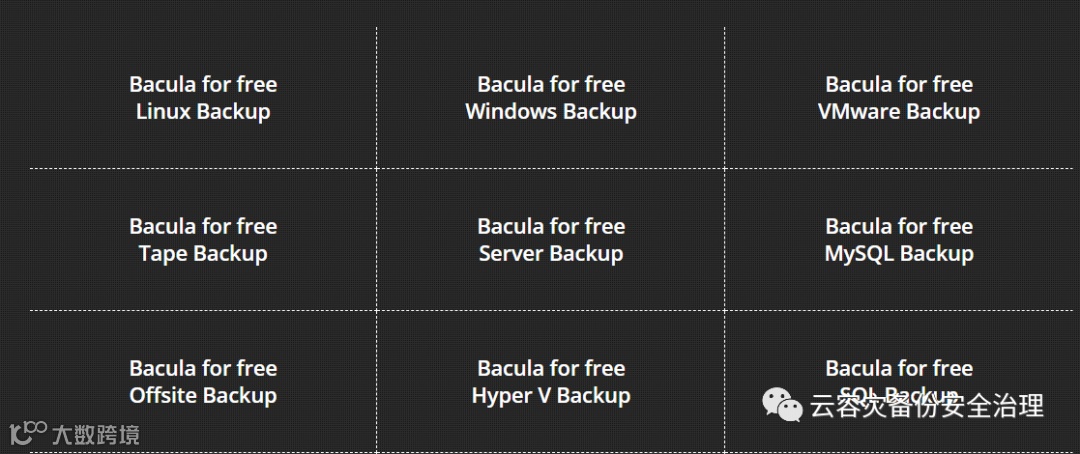
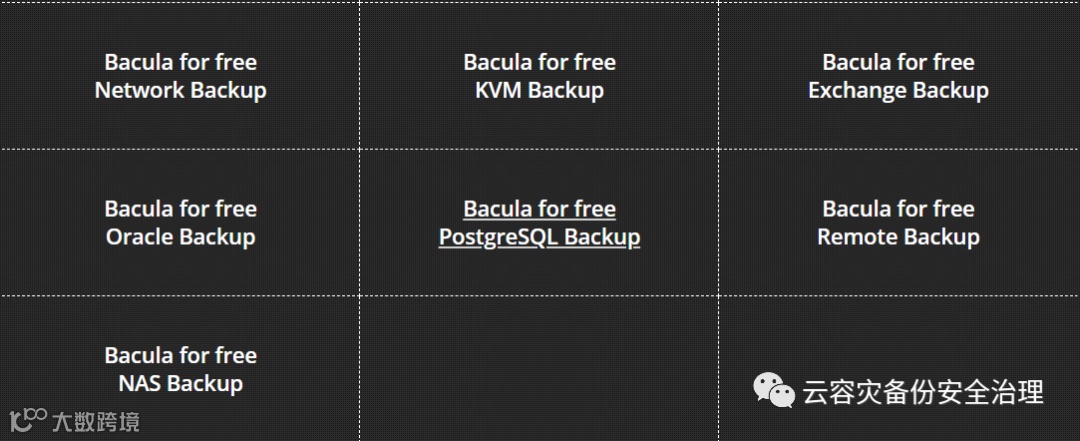
bacula备份内容:
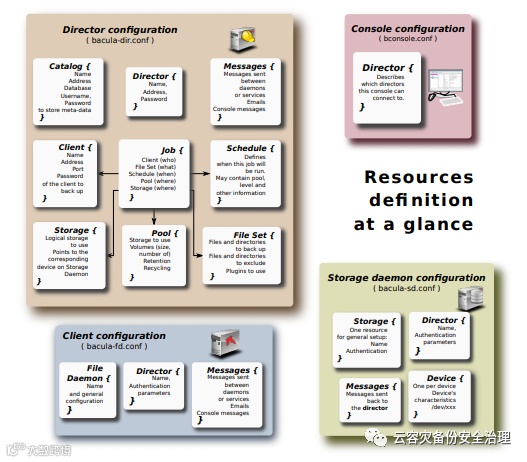
bacula架构
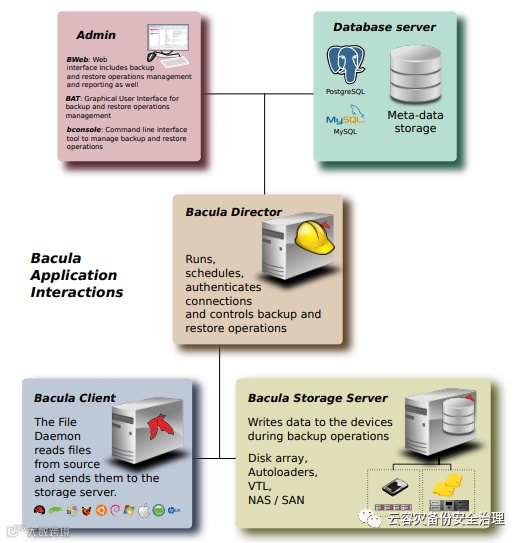
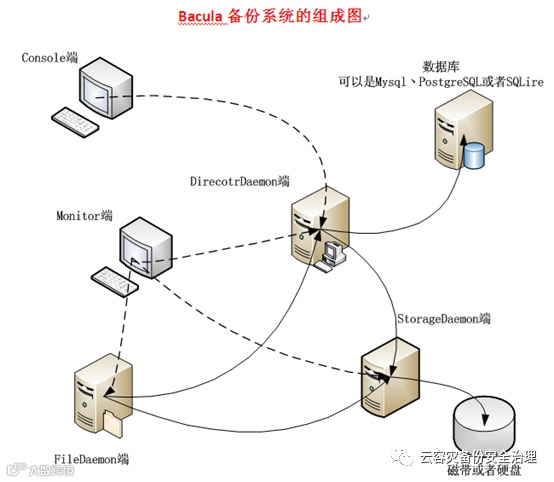
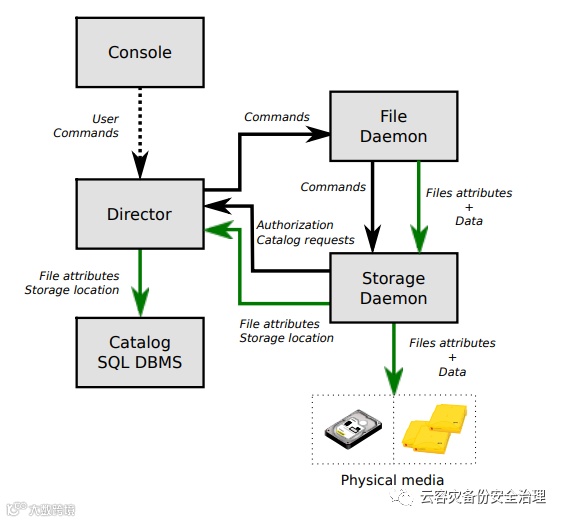
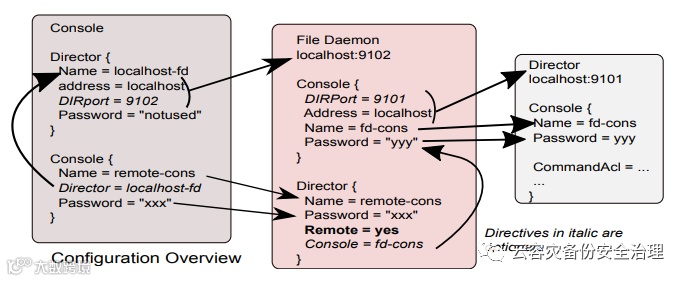
Interactions Between the Bacula Services
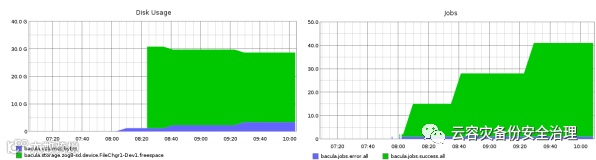
 Real-Time Statistics Monitoring
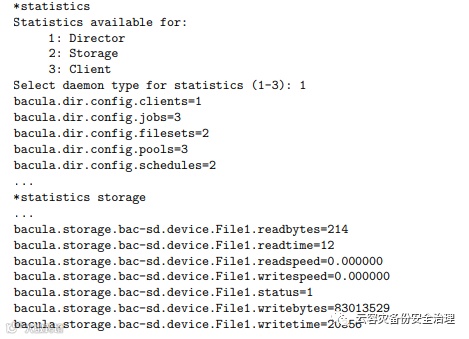
All Bacula daemons can now collect internal performance statistics periodically and provide mechanisms to store the values to a CSV file or to send the values to a Graphite daemon via the network.
Statistics { Name = "Graphite" Type = Graphite
# Graphite host information Host = "localhost" Port = 2003 }
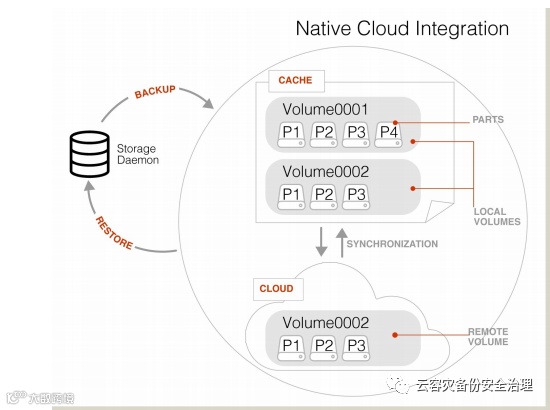
Cloud Backup-Cloud Volume Architecture
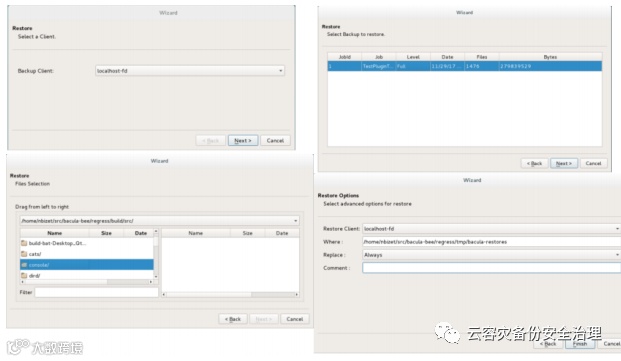
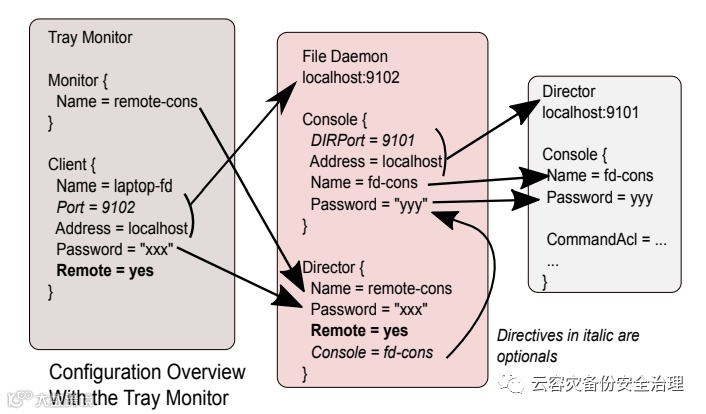
Tray Monitor Restore Screen
Progressive Virtual Full
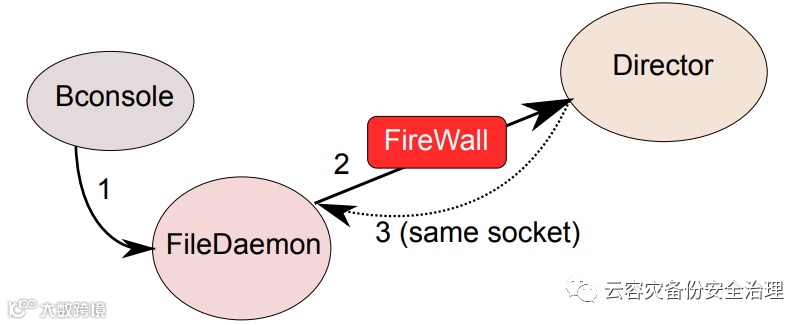
 Client Initiated Backup Network Flow
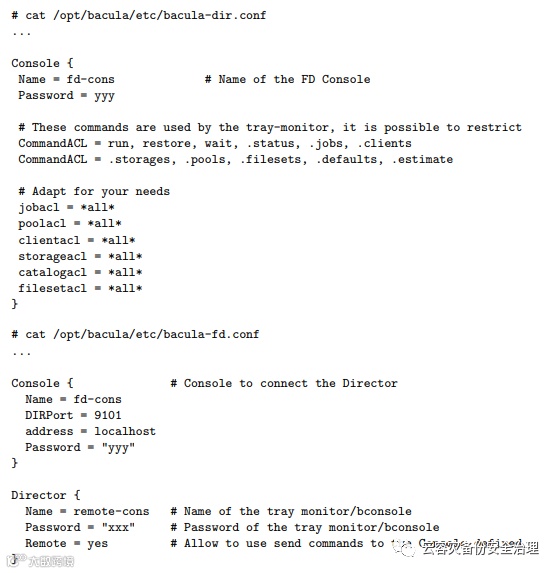
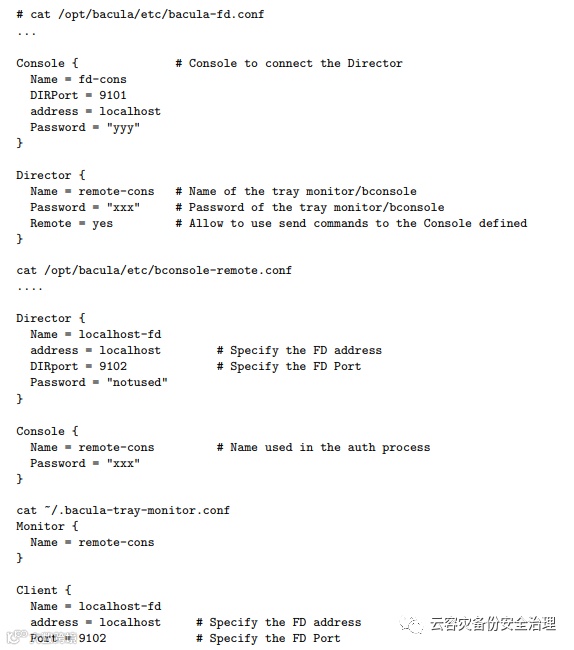
Configuring Client Initiated Backup
Bacula’s Free Oracle Backup Software
The purpose of any backup and recovery strategy is data safety, as well as the ability to restore (and quickly enough) if needed. The same goes for Oracle databases. Creating a backup and recovery system is necessary to protect the contents of Oracle databases.
There are a number of tasks that backup administration personnel are responsible for, including:
Backup schedule creation;
Backup troubleshooting;
Data loss recovery;
Different scenario testing;
Backup and recovery environment monitoring, and so on.
If we’re talking about creating a backup of an Oracle database using Bacula’s, the entire process can be summed up in three major steps:
Initial setup and file preparation
Bacula job configuration and initialization
Snapshot destruction
Initial setup and file preparation
Everything begins with running your Oracle database in Archive Log mode, it can be done in two steps:
Actually running the database in ARCHIVELOG mode;
Using a specific parameter to point to the location that would be storing Archival Logs in the first place, for example:
LOG_ARCHIVE_DEST_1 = 'LOCATION=/disk1/var/backup/oracle/arch'
The Archive Log mode in this case is needed to have all of the archived log files, these files are needed for the complete and successful restoration of backups we are about to create.
Next we’ll have to create a script that can put our Oracle database into the backup mode. It’ll be called start-backup-mode.sh and we are placing it in the following direction – /opt/oraappl/scripts. The contents of this script file are as follows:
#!/bin/bash
sqlplus /nolog <<EOF
conn sys/managger as sysdba
alter database begin backup;
exit
EOF
While it is possible to perform Oracle backup and recovery process without snapshots, it is recommended to use snapshots in order to decrease backup mode operation time. To use the snapshot technology in the backup process with the Oracle backup solution, we need the following lines in the previous file (start-backup-mode.sh):
/usr/sbin/lvcreate -L 20G -s -n oradata-snap oradata
/usr/sbin/lvcreate -L 20G -s -n oraappl-snap oraappl
mount /dev/VG_DATA/oradata-snap /mnt/snapshots/var/oradata/
mount /dev/VG_DATA/oraappl-snap /mnt/snapshots/opt/oraappl/
To order the script to exit the Oracle database backup mode after the backup process is done, we’ll be using the following command as the last part of the start-backup-mode.sh file:
sqlplus /nolog <<EOF
conn sys/managger as sysdba
alter database end backup;
exit
EOF
The final version of our backup script example should look like this:
#!/bin/bash
# Put DB in backup mode
sqlplus /nolog <<EOF
conn sys/managger as sysdba
alter database begin backup;
exit
EOF
# Create and mount Snapshots
/usr/sbin/lvcreate -L 20G -s -n oradata-snap oradata
/usr/sbin/lvcreate -L 20G -s -n oraappl-snap oraappl
mount /dev/VG_DATA/oradata-snap /mnt/snapshots/var/oradata/
mount /dev/VG_DATA/oraappl-snap /mnt/snapshots/opt/oraappl/
# Unset DB backup mode
sqlplus /nolog <<EOF
conn sys/managger as sysdba
alter database end backup;
exit
EOF
exit 0
Bacula job configuration and initialization
To be able to run scripts properly, Bacula as an Oracle backup solution needs the Oracle user’s permissions, and to have this we’ll be using the following lines in /etc/sudoers at Linux Server running our Oracle database:
Cmnd_Alias BACKUP_ORACLE = /bin/su - oracle -c /opt/oraappl/scripts/start-backup-mode.sh, /bin/su - oracle -c /opt/oraappl/scripts/start-backup-mode.sh
bacula LOCAL = NOPASSWD: BACKUP_ORACLE
There’s a number of commands that’ll be used to configure the Bacula backup jobs in this case:
FileSet {
Name = "Linux-Oracle-SNAPs"
Include {
Options { signature = SHA1; compression=GZIP6; strippath=2 }
File = /mnt/snap/var/oradata
File = /mnt/snap/opt/oraappl
File = /usr/local/bin/
File = /etc/oratab
}
}
FileSet {
Name = "Linux-Oracle-ARCs"
Include {
Options { signature = SHA1; compression=GZIP6 }
File = /var/backup/oracle/arch/
}
}
Schedule {
Name = "Oradata-Cycle"
Run = Full sun at 02:30
Run = Incremental mon-sat at 02:30
}
Schedule {
Name = "Oracle-AchiveLogs-Cycle"
Run = Full sun at 04:30
Run = Incremental mon-sat at 04:00
Run = Incremental mon-sat at 08:00
Run = Incremental mon-sat at 12:00
Run = Incremental mon-sat at 16:00
Run = Incremental mon-sat at 20:00
Run = Incremental mon-sat at 24:00
}
Job {
Name = "oracle-hotbackup"
Client = oracleserver-fd
JobDefs = "DefaultJob"
Schedule = "Oradata-Cycle"
RunBeforeJob = "sudo /bin/su - oracle -c /opt/oraappl/scripts/start-backup-mode.sh"
RunAfterJob = "sudo /bin/su - oracle -c /opt/oraappl/scripts/stop-backup-mode.sh"
FileSet = "Linux-Oracle-SNAPs"
Write Bootstrap = "/var/lib/bacula/oracle-hotbackup.bsr"
}
Job {
Name = "oracle-archivelog"
Client = oracleserver-fd
JobDefs = "DefaultJob"
Schedule = "Oracle-AchiveLogs-Cycle"
FileSet = "Linux-Oracle-ARCLOGS"
Write Bootstrap = "/var/lib/bacula/oracle-archivelog.bsr"
}
The example above specifies a number of things, including:
A command to backup all of the snapshot volumes once a day (mnt/snap/var/oradata and /mnt/snap/opt/oraappl);
A command to backup all of the archive logs 6 times a day (4 hour interval, the folder in question is /var/backup/oracle/arch/);
A command RunBeforeJob that activates Oracle database backup mode;
A command RunAfterJob that deactivates Oracle database backup mode.
Snapshot destruction
After the backup process is done, the original snapshot files are no longer needed, so it’s safe to remove them. You may have noticed in the previous step that there’s an additional file in the configuration called stop-backup-mode.sh. This is the file that completes the backup process and deletes the snapshot files automatically, according to the Oracle backup tool settings. This script should be created at /opt/oraappl/scripts/stop-backup-mode.sh with the following contents:
#!/bin/sh
# Umount and Destroy Snapshots
umount /mnt/snapshots/var/oradata/
umount /mnt/snapshots/opt/oraappl/
lvremove -f /dev/VG_DATA/oradata-snap
lvremove -f /dev/VG_DATA/oraappl-snap
exit 0
As previously stated, there are a variety of ways of making sure that your Oracle databases are secure by backing them up, including the use of third-party Oracle backup tools such as Bacula. Find out more about Bacula’s free Oracle backup software here.
If you’re also interested in Hyper V Backup, check out Bacula’s solution.